Welcome Guest ( Log In | Register )

Outline · [ Standard ] · Linear+

 Your mb/mbp battery health/problem

views
     
TSrx330
post Dec 24 2008, 03:02 PM, updated 12y ago

10k Club
********
All Stars
11,811 posts

Joined: Jun 2006
guys, im using my mbp for less than a moon, judging from iprostats, my battery health is only 96%

was readin from macenstein blog just now, the blogger has been using his mbp for quite a while, but his battery status as written by him is still 100%

problem with my batt?
ff8ong
post Dec 24 2008, 03:07 PM

Look at all my stars!!
*******
Senior Member
2,550 posts

Joined: Dec 2006
should be less than a month...not moon..lol
TSrx330
post Dec 24 2008, 03:11 PM

10k Club
********
All Stars
11,811 posts

Joined: Jun 2006
one moon cycle = one month
TechnoDude94
post Dec 24 2008, 03:27 PM

Happiness Advocate
*******
Senior Member
6,738 posts

Joined: Dec 2006
From: Kuala Lumpur, Malaysia | Eau Claire, Wisconsin


I changed my MacBook's (white, plastic) battery after using it for the first year. I've been using the new battery for about 2 years already and iStatPro and System Profiler shyows that my battery's health is "100%". Btw, I'm using the first launched MacBook (white, plastic) which is MacBook 1.1, if not mistaken.
wei
post Dec 24 2008, 03:28 PM

Get your Macs done right!
*******
Senior Member
6,496 posts

Joined: Jan 2003
From: Kota Damansara


Have you done a charge cycle and see the reading is correct?
ignis fatuus
post Dec 24 2008, 04:05 PM

Getting Started
**
Junior Member
169 posts

Joined: Jul 2008
QUOTE(wei @ Dec 24 2008, 03:28 PM)
Have you done a charge cycle and see the reading is correct?
*
Charge cycle? how la? Please throw in some light.
civic98
post Dec 24 2008, 04:09 PM

Regular
******
Senior Member
1,255 posts

Joined: Aug 2006
From: Langkawi


QUOTE(TechnoDude94 @ Dec 24 2008, 03:27 PM)
I changed my MacBook's (white, plastic) battery after using it for the first year. I've been using the new battery for about 2 years already and iStatPro and System Profiler shyows that my battery's health is "100%". Btw, I'm using the first launched MacBook (white, plastic) which is MacBook 1.1, if not mistaken.
*
Same as me, changed for a new one about a year, and till now it's showing perfect health. Actually above 100% at times. BUT it does hovers around 90%-100% some times. Readings are not totally accurate all the time. Better to test AFTER doing a calibration, that shoud be more accurate.

QUOTE(ignis fatuus @ Dec 24 2008, 04:05 PM)
Charge cycle? how la? Please throw in some light.
*
Go to System Profiler under Power, there are details of your battery there including charge cycle. Wei is right, battery health should be tied with charge cycle and not how many moons anyone had used it.

This post has been edited by civic98: Dec 24 2008, 04:10 PM
TSrx330
post Dec 24 2008, 04:53 PM

10k Club
********
All Stars
11,811 posts

Joined: Jun 2006
the so called calibration is the one where u let the battery goes flat then fully charged right? i did that twice or thrice

charge cycle is 14 now

btw, u guys mean changing battery as in? claim with apple?
from my previous exp with my fark up vaio, battery life condemn kenot claim sad.gif
wei
post Dec 24 2008, 05:21 PM

Get your Macs done right!
*******
Senior Member
6,496 posts

Joined: Jan 2003
From: Kota Damansara


Things about rechargeable battery is when you keep recharge it when it's never depleted, the memory somehow get "mixed-up" or forgotten how "deep" it can go (the full capacity). So, by doing a complete "charge cycle" (full charge then use it until your mac goes to sleep itself) will help to refresh the memory.

Since you're are pretty sure you've done full recharging I think the reading should be correct.

To my understanding, in order to able to get claim for battery it must be depleted to below certain % at certain period of time.

Anyway, if you still unhappy with the battery, you should call up AppleCare helpline instead of waiting for our reply in forum. All we can do is type & click, that won't help your battery.
neekun
post Dec 24 2008, 05:51 PM

I'm a Mac
*******
Senior Member
2,570 posts

Joined: Jun 2006


My MBP late 2008 charge cycle is 9 and battery health is good so far. Me always on AC power whenever possible.

I guess once a month i will do a calibration.
TechnoDude94
post Dec 24 2008, 05:52 PM

Happiness Advocate
*******
Senior Member
6,738 posts

Joined: Dec 2006
From: Kuala Lumpur, Malaysia | Eau Claire, Wisconsin


QUOTE(civic98 @ Dec 24 2008, 04:09 PM)
Same as me, changed for a new one about a year, and till now it's showing perfect health. Actually above 100% at times. BUT it does hovers around 90%-100% some times. Readings are not totally accurate all the time. Better to test AFTER doing a calibration, that shoud be more accurate.
Go to System Profiler under Power, there are details of your battery there including charge cycle. Wei is right, battery health should be tied with charge cycle and not how many moons anyone had used it.
*
How'd you get above 100%? blink.gif Btw, my "Cycle count" is "104". flex.gif I always calibrate my battery every 6 months by following the method shown in Apple's website.
hapa
post Dec 24 2008, 05:54 PM

i kill u!!
*****
Senior Member
828 posts

Joined: Nov 2007
mine 7 cycles, health 98%
LunaCry
post Dec 24 2008, 07:07 PM

Getting Started
**
Junior Member
281 posts

Joined: Apr 2007
mine 4 cycle with 100% health
civic98
post Dec 24 2008, 07:46 PM

Regular
******
Senior Member
1,255 posts

Joined: Aug 2006
From: Langkawi


QUOTE(TechnoDude94 @ Dec 24 2008, 05:52 PM)
How'd you get above 100%? blink.gif Btw, my "Cycle count" is "104". flex.gif I always calibrate my battery every 6 months by following the method shown in Apple's website.
*
Here's how, current capacity 5240 mAh compared to original 5200mAh. Charge cycle 90.


Attached image(s)
Attached Image
hairol83
post Dec 24 2008, 11:27 PM

Casual
***
Junior Member
344 posts

Joined: Jan 2003
From: Kuching


mine never get 100%
now is 95%..
TechnoDude94
post Dec 25 2008, 12:03 AM

Happiness Advocate
*******
Senior Member
6,738 posts

Joined: Dec 2006
From: Kuala Lumpur, Malaysia | Eau Claire, Wisconsin


QUOTE(civic98 @ Dec 24 2008, 07:46 PM)
Here's how, current capacity 5240 mAh compared to original 5200mAh. Charge cycle 90.
*
I see, but it's still not over 100%. Btw, Merry Christmas and a Happy New Year!
civic98
post Dec 25 2008, 12:36 AM

Regular
******
Senior Member
1,255 posts

Joined: Aug 2006
From: Langkawi


QUOTE(TechnoDude94 @ Dec 25 2008, 12:03 AM)
I see, but it's still not over 100%. Btw, Merry Christmas and a Happy New Year!
*
5240/5200 = 100.769% thumbup.gif

Merry Christmas Everyone...

This post has been edited by civic98: Dec 25 2008, 12:37 AM
TechnoDude94
post Dec 25 2008, 03:41 AM

Happiness Advocate
*******
Senior Member
6,738 posts

Joined: Dec 2006
From: Kuala Lumpur, Malaysia | Eau Claire, Wisconsin


QUOTE(civic98 @ Dec 25 2008, 12:36 AM)
5240/5200 = 100.769%  thumbup.gif

Merry Christmas Everyone...
*
100.769% = 101%? brows.gif
TSrx330
post Dec 26 2008, 09:53 AM

10k Club
********
All Stars
11,811 posts

Joined: Jun 2006
QUOTE(wei @ Dec 24 2008, 05:21 PM)
Things about rechargeable battery is when you keep recharge it when it's never depleted, the memory somehow get "mixed-up" or forgotten how "deep" it can go (the full capacity). So, by doing a complete "charge cycle" (full charge then use it until your mac goes to sleep itself) will help to refresh the memory.

Since you're are pretty sure you've done full recharging I think the reading should be correct.

To my understanding, in order to able to get claim for battery it must be depleted to below certain % at certain period of time.

Anyway, if you still unhappy with the battery, you should call up AppleCare helpline instead of waiting for our reply in forum. All we can do is type & click, that won't help your battery.
*
no lar, im just curios
so basically health range btween 90-100 is ok then its fine for me thumbup.gif


kenji82
post Dec 26 2008, 10:33 AM

Casual
***
Junior Member
431 posts

Joined: Jan 2003
From: Satay Town @ Edifier World


QUOTE(neekun @ Dec 24 2008, 05:51 PM)
My MBP late 2008 charge cycle is 9 and battery health is good so far. Me always on AC power whenever possible.

I guess once a month i will do a calibration.
*
Do you take out your battery when you are on AC Power?
nimrod323
post Dec 26 2008, 10:55 AM

Macster/Gunner\Autobot /Alphaman\
*******
Senior Member
2,664 posts

Joined: Apr 2008
From: Here and There


QUOTE(kenji82 @ Dec 26 2008, 10:33 AM)
Do you take out your battery when you are on AC Power?
*
i dont think theres a need to take out the battery,the macbook bypasses the battery when it uses AC.

kenji82
post Dec 26 2008, 11:43 AM

Casual
***
Junior Member
431 posts

Joined: Jan 2003
From: Satay Town @ Edifier World


QUOTE(nimrod323 @ Dec 26 2008, 10:55 AM)
i dont think theres a need to take out the battery,the macbook bypasses the battery when it uses AC.
*
are you sure? I noticed that whenever i'm on AC my battery is charging....can anyone confirm this pls. Thanks
hapa
post Dec 26 2008, 11:45 AM

i kill u!!
*****
Senior Member
828 posts

Joined: Nov 2007
bro, are u sure? check ur magsafe indicator light..
green - nop, no charging
red - yes, charging
nimrod323
post Dec 26 2008, 11:50 AM

Macster/Gunner\Autobot /Alphaman\
*******
Senior Member
2,664 posts

Joined: Apr 2008
From: Here and There


QUOTE(kenji82 @ Dec 26 2008, 11:43 AM)
are you sure? I noticed that whenever i'm on AC my battery is charging....can anyone confirm this pls. Thanks
*
you can see teh battery indicator on the top panel,if its a lightning symbol means its charging if its a power cord symbol its using AC
kenji82
post Dec 26 2008, 12:08 PM

Casual
***
Junior Member
431 posts

Joined: Jan 2003
From: Satay Town @ Edifier World


QUOTE(nimrod323 @ Dec 26 2008, 11:50 AM)
you can see teh battery indicator on the top panel,if its a lightning symbol means its charging if its a power cord symbol its using AC
*
if it is fully charge then its green....
ryley7
post Dec 26 2008, 12:11 PM

New Member
*
Newbie
3 posts

Joined: Oct 2007
it's always advisable & in good care to take out your battery if you're using your laptop while it's plugged-in to a power source for a long period of time. from my own experience, there'll be a deterioration of your battery's health, which i observed using CoconutBattery, back when i was being careless with my macbook pro. initially with a 100% charge, it'll last about 4 - 4.5 hours. now it's more like 3 hours.

so don't be lazy guys smile.gif do what's best for your mac.
TSrx330
post Dec 26 2008, 12:14 PM

10k Club
********
All Stars
11,811 posts

Joined: Jun 2006
my mbp only abt 3 hours .... not the promised 5 sad.gif
civic98
post Dec 26 2008, 01:21 PM

Regular
******
Senior Member
1,255 posts

Joined: Aug 2006
From: Langkawi


QUOTE(ryley7 @ Dec 26 2008, 12:11 PM)
it's always advisable & in good care to take out your battery if you're using your laptop while it's plugged-in to a power source for a long period of time. from my own experience, there'll be a deterioration of your battery's health, which i observed using CoconutBattery, back when i was being careless with my macbook pro. initially with a 100% charge, it'll last about 4 - 4.5 hours. now it's more like 3 hours.

so don't be lazy guys smile.gif do what's best for your mac.
*
Come on, how many times does anyone has to repeat this, DONT TAKE OUT THE BATTERY, it does no good to your battery, it does no good to your Mac. Period. Anyone wants to question this, search and learn. Just leave the battery in, your Mac does not use the battery when connected to AC, and it is safer this way also, just imagine losing power and not having battery in the middle of processing something, ESPECIALLY when scanning your drive etc.

Basic battery care:-

1. Use it till empty before charging, not use charge use charge as you like;
2. Charge it till full whenever charging;
3. Leave it in when on AC, just use it up once a while (once a month or so);
4. When storing away your battery (not in use for long time), leave it at 40% charge, not full, not empty.

Anyone still not convinced, look at my battery health posted in this thread, 1st page.

QUOTE(rx330 @ Dec 26 2008, 12:14 PM)
my mbp only abt 3 hours .... not the promised 5 sad.gif
*
Not promised, but it was rated, and depends very much on the use. Wifi, bluetooth etc.
TechnoDude94
post Dec 26 2008, 02:00 PM

Happiness Advocate
*******
Senior Member
6,738 posts

Joined: Dec 2006
From: Kuala Lumpur, Malaysia | Eau Claire, Wisconsin


QUOTE(kenji82 @ Dec 26 2008, 10:33 AM)
Do you take out your battery when you are on AC Power?
*
QUOTE(nimrod323 @ Dec 26 2008, 10:55 AM)
i dont think theres a need to take out the battery,the macbook bypasses the battery when it uses AC.
*
Shouldn't remove the battery pack from MacBook/MacBook Pro when your using it because the charger doesn't charge the battery pack once it's full (green, 100%). Also, removing the battery pack and using it directly from the charger will cause your MacBook/MacBook Pro to run in lower performance mode due to the lack of power. You see, the MacBook/MacBook Pro draws power that can't be supplied through the charger itself so it requires help from the battery pack. Hope I've helped.
TSrx330
post Dec 26 2008, 02:03 PM

10k Club
********
All Stars
11,811 posts

Joined: Jun 2006
im using wifi only, bluetooth is switch off
TechnoDude94
post Dec 26 2008, 02:49 PM

Happiness Advocate
*******
Senior Member
6,738 posts

Joined: Dec 2006
From: Kuala Lumpur, Malaysia | Eau Claire, Wisconsin


QUOTE(rx330 @ Dec 26 2008, 02:03 PM)
im using wifi only, bluetooth is switch off
*
I use @ lowest brightness, Wi-Fi on, Bluetooth off @ MacBook (plastic, white) can get 4 hours easily but on continuous surfing with no flash webpages/resource intensive webpages.
TSrx330
post Dec 26 2008, 02:56 PM

10k Club
********
All Stars
11,811 posts

Joined: Jun 2006
er... my brighness is at 2-3 petak only
TechnoDude94
post Dec 26 2008, 03:05 PM

Happiness Advocate
*******
Senior Member
6,738 posts

Joined: Dec 2006
From: Kuala Lumpur, Malaysia | Eau Claire, Wisconsin


QUOTE(rx330 @ Dec 26 2008, 02:56 PM)
er... my brighness is at 2-3 petak only
*
My brightness is only filled up by 1 box. tongue.gif
TSrx330
post Dec 26 2008, 03:06 PM

10k Club
********
All Stars
11,811 posts

Joined: Jun 2006
now i also fill up one box nia, test and see how
only advantage of my vaio is the 5 hour usage
TechnoDude94
post Dec 26 2008, 03:58 PM

Happiness Advocate
*******
Senior Member
6,738 posts

Joined: Dec 2006
From: Kuala Lumpur, Malaysia | Eau Claire, Wisconsin


QUOTE(rx330 @ Dec 26 2008, 03:06 PM)
now i also fill up one box nia, test and see how
only advantage of my vaio is the 5 hour usage
*
Some "netbooks" got more than 6 hours. shocking.gif brows.gif
TSrx330
post Dec 26 2008, 04:14 PM

10k Club
********
All Stars
11,811 posts

Joined: Jun 2006
yea, i heard my fren eeepc does tat, but for tat puny reso screen, n pariah processor, i dun think y not biggrin.gif
Shin1022
post Dec 27 2008, 05:01 PM

On my way
****
Senior Member
580 posts

Joined: Apr 2008
From: Mars


anyone knows what happen to my battery icon on the top right where u can't choose the battery selection from better performance to better battery life option??


Attached thumbnail(s)
Attached Image
d_lai_309
post Dec 27 2008, 05:02 PM

Casual
***
Junior Member
376 posts

Joined: Dec 2007
i do calibration once a week or sometimes once 2weeks depend on my usage.
my macbook black is 9months old and 23 cycles, battery life still in good condition.
also, dont take out the battery when u using it and on power cause it will reduce the performances.
sometimes my macbook show i got 8hrs if usage when i turn on but when u start using it...it gets to 4-5hrs.....
so pls do calibration once a while to let the battery "juice" flow...
Shin1022
post Dec 27 2008, 05:09 PM

On my way
****
Senior Member
580 posts

Joined: Apr 2008
From: Mars


further information about my battery


Attached thumbnail(s)
Attached Image
d_lai_309
post Dec 27 2008, 05:21 PM

Casual
***
Junior Member
376 posts

Joined: Dec 2007
same situation here..i think the new 10.5.6 update cause it...not sure
Shin1022
post Dec 27 2008, 05:40 PM

On my way
****
Senior Member
580 posts

Joined: Apr 2008
From: Mars


that's what i'm thinking too...after the update, it became like that..but othrwise it's ok...i'm just curious what happen actually.
Edoras
post Dec 27 2008, 07:49 PM

Regular
******
Senior Member
1,134 posts

Joined: Jan 2003
QUOTE(Shin1022 @ Dec 27 2008, 05:01 PM)
anyone knows what happen to my battery icon on the top right where u can't choose the battery selection from better performance to better battery life option??
*
Switch off the battery and you will see the battery icon..

civic98
post Dec 27 2008, 08:39 PM

Regular
******
Senior Member
1,255 posts

Joined: Aug 2006
From: Langkawi


QUOTE(Edoras @ Dec 27 2008, 07:49 PM)
Switch off the battery and you will see the battery icon..
*
LOL rclxub.gif How you "switch off" your battery?? doh.gif

What he meant is now you cant choose a battery setting directly from the battery icon laa...
Shin1022
post Dec 27 2008, 10:52 PM

On my way
****
Senior Member
580 posts

Joined: Apr 2008
From: Mars


yup....anyone knows how to revert it back to normal??i'm not sure whether to blame it on the update....
civic98
post Dec 27 2008, 11:40 PM

Regular
******
Senior Member
1,255 posts

Joined: Aug 2006
From: Langkawi


Not a life and death issue ler...

QUOTE
Display options missing Apple appears to have left some components out of the Mac OS X 10.5.6 release. So far, users have noticed the battery menu does not have any options to switch power modes, and users who connect to their TVs do not have any options for enabling "Overscan".

Some users have tried removing various preference files, creating new user accounts, and changing system settings, but those attempts have not worked. As with the battery menu, the lack of this option seems to be an oversight on Apple's part, and hopefully it will be added back with a future update.


http://www.macfixit.com/article.php?story=20081218235352708

Shin1022
post Dec 28 2008, 08:45 AM

On my way
****
Senior Member
580 posts

Joined: Apr 2008
From: Mars


Thanks for the info....

this is a minor problem...I hope they don't miss other more important not noticeable things in mac....
TechnoDude94
post Dec 28 2008, 11:58 AM

Happiness Advocate
*******
Senior Member
6,738 posts

Joined: Dec 2006
From: Kuala Lumpur, Malaysia | Eau Claire, Wisconsin


Edit: Post deleted.

This post has been edited by TechnoDude94: Dec 28 2008, 11:59 AM
TechnoDude94
post Dec 28 2008, 12:04 PM

Happiness Advocate
*******
Senior Member
6,738 posts

Joined: Dec 2006
From: Kuala Lumpur, Malaysia | Eau Claire, Wisconsin


This is the screenshot of my Apple MacBook 1.1 (Intel Core Duo, White, Plastic). Please click on the spoiler because I forgot to set ImageShack to resize my image. My battery has:
Cycle count: 104
Condition: Good
Full charge capacity (mAh): 5235.
» Click to show Spoiler - click again to hide... «


Shin1022
post Dec 28 2008, 12:37 PM

On my way
****
Senior Member
580 posts

Joined: Apr 2008
From: Mars


wow.....ur model was the core duo model....battery still in very good condition...mine was the penryn model, but the battery is starting to degenerate, guess i have used too much on outdoors (most of the time only use battery).
NFN
post Dec 28 2008, 10:28 PM

Getting Started
**
Junior Member
118 posts

Joined: Dec 2008
how to check?
how come some ppl use so long but count so less?
i will use it everyday and today is my 3rd dy to use mac but have already 3 cycle >..<"
Shin1022
post Dec 28 2008, 10:34 PM

On my way
****
Senior Member
580 posts

Joined: Apr 2008
From: Mars


QUOTE(NFN @ Dec 28 2008, 10:28 PM)
how to check?
how come some ppl use so long but count so less?
i will use it everyday and today is my 3rd dy to use mac but have already 3 cycle >..<"
*
when you use ur mac, try to plug in the power source ALWAYS.....

how to check just goto system profiler from application then choose utilities and find system profiler, look under power source.
rip_code
post Dec 29 2008, 12:05 AM

Regular
******
Senior Member
1,972 posts

Joined: Jan 2003


why my new alu macbook full capacity only 4199 mAH?
Shin1022
post Dec 29 2008, 12:55 AM

On my way
****
Senior Member
580 posts

Joined: Apr 2008
From: Mars


QUOTE(rip_code @ Dec 29 2008, 12:05 AM)
why my new alu macbook full capacity only 4199 mAH?
*
yup alu macbook capacity only has 4199 mAH if i'm not wrong...read from some forum...so, don't worry about it..
rip_code
post Dec 29 2008, 01:07 AM

Regular
******
Senior Member
1,972 posts

Joined: Jan 2003


ok thanks shin. cause mostly i saw 5K+. maybe cause it's mbp wink.gif
oh btw, to uninstall, just move the folder in application folder into trash rite?


Added on December 29, 2008, 1:20 amshould i update to 10.5.6?

This post has been edited by rip_code: Dec 29 2008, 01:20 AM
Shin1022
post Dec 29 2008, 02:00 AM

On my way
****
Senior Member
580 posts

Joined: Apr 2008
From: Mars


http://www.freemacsoft.net/AppCleaner/

you can use appcleaner for uninstall, which is a freeware..

you can still use drag and drop method, but i think by using appcleaner, it is better as it uninstall the program thoroughly..

about the update...it actually fixes some bugs,security and stability issue...i think it's ok to update it, the performance selection problem at the top right of desktop can be done manually through system preference and accoridng to civic 98, they will put it back for the next update. so just update it..
ensp!r@tion
post Dec 29 2008, 02:56 AM

New Member
*
Junior Member
33 posts

Joined: Nov 2008
i just checked my battery status.. it stated charged 99% and cycle count = 1.. is it normal? i just bought my alu macbook 2 weeks ago.. don't wish anything bad happened.. sad.gif
Edoras
post Dec 29 2008, 09:05 AM

Regular
******
Senior Member
1,134 posts

Joined: Jan 2003
QUOTE(rip_code @ Dec 29 2008, 12:05 AM)
why my new alu macbook full capacity only 4199 mAH?
*
Mine 7 cycles after more than a month and have 4676/4600 mAh.

Its normal to get 99% when fully charged.
However its better to calibrate each month.
TSrx330
post Dec 29 2008, 10:32 AM

10k Club
********
All Stars
11,811 posts

Joined: Jun 2006
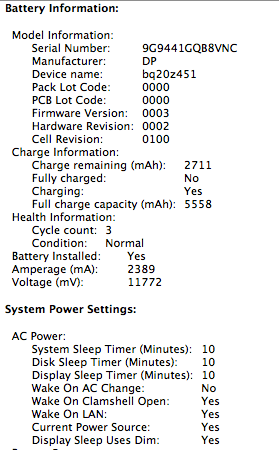
Charge Information:
Charge remaining (mAh): 2006
Fully charged: No
Charging: No
Full charge capacity (mAh): 4567
Health Information:
Cycle count: 16
Condition: Good
Battery Installed: Yes
Amperage (mA): -1643
Voltage (mV): 11196

my batttery stats
keep the power cord on, wont kill the batt right?
rip_code
post Dec 29 2008, 10:45 AM

Regular
******
Senior Member
1,972 posts

Joined: Jan 2003


thank shin. u help alot

@rx,
yours is mb or mbp?
TSrx330
post Dec 29 2008, 10:49 AM

10k Club
********
All Stars
11,811 posts

Joined: Jun 2006
@rip, mine is the new alu mbp, anjua?
rip_code
post Dec 29 2008, 10:54 AM

Regular
******
Senior Member
1,972 posts

Joined: Jan 2003


my current charge also above 100%?


Added on December 29, 2008, 10:55 amoh. seems ur full capacity also not more than 5k yea

This post has been edited by rip_code: Dec 29 2008, 10:55 AM


Attached File(s)
Attached File  cb.tiff ( 59.88k ) Number of downloads: 15
TSrx330
post Dec 29 2008, 11:00 AM

10k Club
********
All Stars
11,811 posts

Joined: Jun 2006
mine max is 4600
allvin
post Dec 29 2008, 12:21 PM

......
*******
Senior Member
4,506 posts

Joined: Aug 2005

QUOTE(rip_code @ Dec 29 2008, 10:54 AM)
my current charge also above 100%?


Added on December 29, 2008, 10:55 amoh. seems ur full capacity also not more than 5k yea
*
apple use lower battery in the new unibody. it has been mention before wink.gif *cut cost*

even my old macbook also above 5k

This post has been edited by allvin: Dec 29 2008, 12:21 PM
rip_code
post Dec 29 2008, 12:39 PM

Regular
******
Senior Member
1,972 posts

Joined: Jan 2003


QUOTE(allvin @ Dec 29 2008, 12:21 PM)
apple use lower battery in the new unibody. it has been mention before  wink.gif *cut cost*

even my old macbook also above 5k
*
thanks for the clarification, will try the so called 5 hours of usage later on =)
now the batt load cycle still 0 rclxms.gif
TSrx330
post Dec 29 2008, 12:41 PM

10k Club
********
All Stars
11,811 posts

Joined: Jun 2006
yea, my wife macbook also 5k + i think
sigh...
must do a so call callibration for her mac, never did once b4 since last june
rip_code
post Dec 29 2008, 12:46 PM

Regular
******
Senior Member
1,972 posts

Joined: Jan 2003


if i do the calibration, will the full capacity will increase?
TSrx330
post Dec 29 2008, 04:49 PM

10k Club
********
All Stars
11,811 posts

Joined: Jun 2006
try n u will know
TechnoDude94
post Dec 30 2008, 03:06 AM

Happiness Advocate
*******
Senior Member
6,738 posts

Joined: Dec 2006
From: Kuala Lumpur, Malaysia | Eau Claire, Wisconsin


QUOTE(rip_code @ Dec 29 2008, 12:46 PM)
if i do the calibration, will the full capacity will increase?
*
It increased for mine. Good luck on yours. thumbup.gif
Edoras
post Dec 30 2008, 09:01 AM

Regular
******
Senior Member
1,134 posts

Joined: Jan 2003
QUOTE(rip_code @ Dec 29 2008, 12:46 PM)
if i do the calibration, will the full capacity will increase?
*
It increased mine. rclxms.gif

rip_code - If your battery after calibration is still below 4230 mAh, it is not a good sign...

user posted image

This post has been edited by Edoras: Dec 30 2008, 09:14 AM
TSrx330
post Dec 30 2008, 09:17 AM

10k Club
********
All Stars
11,811 posts

Joined: Jun 2006
wow, more than original capacity thumbup.gif
nolie
post Dec 30 2008, 01:12 PM

New Member
*
Junior Member
37 posts

Joined: Jun 2007
From: zeitgeist movement


see, it's fluctuate,
i think it's normal


Attached thumbnail(s)
Attached Image
rip_code
post Dec 30 2008, 03:08 PM

Regular
******
Senior Member
1,972 posts

Joined: Jan 2003


QUOTE(Edoras @ Dec 30 2008, 09:01 AM)
It increased mine. rclxms.gif

rip_code - If your battery after calibration is still below 4230 mAh, it is not a good sign...

user posted image
*
thanks for your concern. i will calibrate my mac on new year eve
TSrx330
post Dec 31 2008, 10:34 AM

10k Club
********
All Stars
11,811 posts

Joined: Jun 2006
just cheking my wifes earlly 2008 macbook, bought on june 08, but coconut battery states the mac is 10 moon old liao, anjua?
civic98
post Dec 31 2008, 10:40 AM

Regular
******
Senior Member
1,255 posts

Joined: Aug 2006
From: Langkawi


QUOTE(rx330 @ Dec 31 2008, 10:34 AM)
just cheking my wifes earlly 2008 macbook, bought on june 08, but coconut battery states the mac is 10 moon old liao, anjua?
*
If I am not mistaken, Coconut Battery detects the age from the day the Mac was manufactured. Thus the older age compared to purchased date. You could otherwise match with Serial Number for the production week/code.
rip_code
post Dec 31 2008, 10:45 AM

Regular
******
Senior Member
1,972 posts

Joined: Jan 2003


QUOTE(civic98 @ Dec 31 2008, 10:40 AM)
If I am not mistaken, Coconut Battery detects the age from the day the Mac was manufactured. Thus the older age compared to purchased date. You could otherwise match with Serial Number for the production week/code.
*
My CoconutBattery states my macbook age is 8 weeks but the serial number said week 47. how?
ensp!r@tion
post Dec 31 2008, 12:38 PM

New Member
*
Junior Member
33 posts

Joined: Nov 2008
hmm... in conclusion should we remove the battery if we're using magsafe?
rip_code
post Dec 31 2008, 01:10 PM

Regular
******
Senior Member
1,972 posts

Joined: Jan 2003


QUOTE(ensp!r@tion @ Dec 31 2008, 12:38 PM)
hmm... in conclusion should we remove the battery if we're using magsafe?
*
shouldn't take out the battery whenever your're on AC power. it will not overcharge your battery.
Edoras
post Dec 31 2008, 01:17 PM

Regular
******
Senior Member
1,134 posts

Joined: Jan 2003
QUOTE(ensp!r@tion @ Dec 31 2008, 12:38 PM)
hmm... in conclusion should we remove the battery if we're using magsafe?
*
Removing the battery is actually a Myth...
In conclusion - do not remove the battery.
ensp!r@tion
post Dec 31 2008, 01:23 PM

New Member
*
Junior Member
33 posts

Joined: Nov 2008
alright... thanks for the info guys..
TSrx330
post Dec 31 2008, 01:57 PM

10k Club
********
All Stars
11,811 posts

Joined: Jun 2006
3 more hours n i can charge my wifes mb for the 1st ever calibration since june laugh.gif
civic98
post Dec 31 2008, 01:57 PM

Regular
******
Senior Member
1,255 posts

Joined: Aug 2006
From: Langkawi


QUOTE(rip_code @ Dec 31 2008, 10:45 AM)
My CoconutBattery states my macbook age is 8 weeks but the serial number said week 47. how?
*
I think week 47 is around mid November..
TSrx330
post Dec 31 2008, 01:58 PM

10k Club
********
All Stars
11,811 posts

Joined: Jun 2006
yea, abt 3rd - 4th week of november
Edoras
post Dec 31 2008, 02:41 PM

Regular
******
Senior Member
1,134 posts

Joined: Jan 2003
QUOTE(rip_code @ Dec 31 2008, 10:45 AM)
My CoconutBattery states my macbook age is 8 weeks but the serial number said week 47. how?
*
You can use utility called CoconutIdentityCard --> http://www.coconut-flavour.com/coconutiden...card/index.html

user posted image

TSrx330
post Dec 31 2008, 03:12 PM

10k Club
********
All Stars
11,811 posts

Joined: Jun 2006
macam macam ada laugh.gif
rip_code
post Dec 31 2008, 03:23 PM

Regular
******
Senior Member
1,972 posts

Joined: Jan 2003


wow. thanks edoras =)
jackyuen
post Jan 4 2009, 07:47 PM

New Member
*
Junior Member
7 posts

Joined: Mar 2007
I just bought a 2nd hand MBP (9 months old).

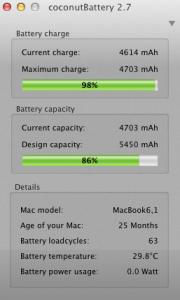
Using Coconut Battery, it says battery loadcycles = 42, maximum battery charge 4911mAh, maximum battery capacity 5500mAh. That's around 89% in terms of battery health. Is this normal?

If not, can I make a claim (replacement battery) from Apple Malaysia?

Thanks in advance.

Jack
Edoras
post Jan 4 2009, 08:45 PM

Regular
******
Senior Member
1,134 posts

Joined: Jan 2003
jacky - Try to install a better battery monitor called "MiniBatteryLogger"

--> http://www.versiontracker.com/dyn/moreinfo/macosx/30782


TSrx330
post Jan 5 2009, 09:12 AM

10k Club
********
All Stars
11,811 posts

Joined: Jun 2006
how many % left only claimable for warranty?
winmac
post Jan 5 2009, 10:33 AM

New Member
*
Junior Member
21 posts

Joined: Jan 2009
From: Kelana Jaya
Hi guys. I found out this forum and says that my battery cycle count is 181 and condition : check battery i am using macbook pro and it's charging while i'm viewing this. any advice?

UPDATE : I used CoconutBattery and this is what I got. Anyway I can undo this. Can the tech guys at Apple help me or simply I just need to buy a new battery? Sigh.

I am currently charging it. This is my battery.

user posted image


This post has been edited by winmac: Jan 5 2009, 12:33 PM
kiancher
post Jan 5 2009, 12:32 PM

New Member
*
Junior Member
43 posts

Joined: Jul 2007


QUOTE(ff8ong @ Dec 24 2008, 04:07 PM)
should be less than a month...not moon..lol
*
Hey, I just bought the new MacBook Aluminum. I used bout 4 hours online, listening to music but the battery used up to 24%. I ask some technician, it say the new MacBook can support up to 4 to 5 hours? is it truth? is it my battery got problem?
TSrx330
post Jan 5 2009, 12:48 PM

10k Club
********
All Stars
11,811 posts

Joined: Jun 2006
winmac, ur mbp is 2 years, dunno abt u la, for me, 2 years battery still can maintain 56% very good liao
are u on ACPP?

kiancher, u used 4 hours, till got 24%, u still not happy?
rip_code
post Jan 5 2009, 12:51 PM

Regular
******
Senior Member
1,972 posts

Joined: Jan 2003


QUOTE(kiancher @ Jan 5 2009, 12:32 PM)
Hey, I just bought the new MacBook Aluminum. I used bout 4 hours online, listening to music but the battery used up to 24%. I ask some technician, it say the new MacBook can support up to 4 to 5 hours? is it truth? is it my battery got problem?
*
Basically, it depends on your usage as well. 4 hours of listening to music is pretty good I must say.
Mine with brightness half, no music on, wireless on and bt off roughly get 3.5hrs
winmac
post Jan 5 2009, 01:51 PM

New Member
*
Junior Member
21 posts

Joined: Jan 2009
From: Kelana Jaya
Yes, I am on ACPP for 3 years. Is there anything I can do?

QUOTE(rx330 @ Jan 5 2009, 12:48 PM)
winmac, ur mbp is 2 years, dunno abt u la, for me, 2 years battery still can maintain 56% very good liao
are u on ACPP?

kiancher, u used 4 hours, till got 24%, u still not happy?
*
TSrx330
post Jan 5 2009, 01:59 PM

10k Club
********
All Stars
11,811 posts

Joined: Jun 2006
well, u can call up and ask, is there an problem with the batt
myxery
post Jan 5 2009, 02:27 PM

Oro?!
*****
Senior Member
904 posts

Joined: Aug 2005
From: Tanjong Golden Ville
QUOTE(kiancher @ Jan 5 2009, 12:32 PM)
Hey, I just bought the new MacBook Aluminum. I used bout 4 hours online, listening to music but the battery used up to 24%. I ask some technician, it say the new MacBook can support up to 4 to 5 hours? is it truth? is it my battery got problem?
*
yeah, it's depend on ur setting, brightness, bluetooth, wifi, fan speed, etc
winmac
post Jan 5 2009, 02:28 PM

New Member
*
Junior Member
21 posts

Joined: Jan 2009
From: Kelana Jaya
Yeah, just called Apple and they say that all parts of the Macbook Pro are protected under the ACPP except the battery as it is considered as consumables. I guess that's fair.

Just curious. I forgot to ask the tech support guy. When the battery is fully charged at 100%, and we still plug it in, will it affect the battery life?
Someone suggested me to remove the battery first before letting it run on power as it will affect the battery life. Any idea?

Thanks.

QUOTE(rx330 @ Jan 5 2009, 01:59 PM)
well, u can call up and ask, is there an problem with the batt
*
TSrx330
post Jan 5 2009, 02:42 PM

10k Club
********
All Stars
11,811 posts

Joined: Jun 2006
some of the guys here gotten their battery replace, but im not sure under wat circumstances

it won effect the battery life, my past eperience of notebook is to unplug once its full to let the battery tahan, but for apple lain
the best is keep it one power cord whenver possible, hence the lesser battery cycle consume
kiancher
post Jan 5 2009, 03:14 PM

New Member
*
Junior Member
43 posts

Joined: Jul 2007


QUOTE(winmac @ Jan 5 2009, 03:28 PM)
Yeah, just called Apple and they say that all parts of the Macbook Pro are protected under the ACPP except the battery as it is considered as consumables. I guess that's fair.

Just curious. I forgot to ask the tech support guy. When the battery is fully charged at 100%, and we still plug it in, will it affect the battery life?
Someone suggested me to remove the battery first before letting it run on power as it will affect the battery life. Any idea?

Thanks.
*
Those Apple technician suggest me take out the battery when u plug into socket. When charging at least 8 hour long.
TSrx330
post Jan 5 2009, 03:18 PM

10k Club
********
All Stars
11,811 posts

Joined: Jun 2006
apple technician???? store representative is it?
kiancher
post Jan 5 2009, 03:19 PM

New Member
*
Junior Member
43 posts

Joined: Jul 2007


QUOTE(rx330 @ Jan 5 2009, 04:18 PM)
apple technician???? store representative is it?
*
Machines service centre there got apple technician.
TSrx330
post Jan 5 2009, 03:21 PM

10k Club
********
All Stars
11,811 posts

Joined: Jun 2006
so many versions....
and wat they meant by wen charging, charge for 8 hours?
kiancher
post Jan 5 2009, 03:27 PM

New Member
*
Junior Member
43 posts

Joined: Jul 2007


QUOTE(rx330 @ Jan 5 2009, 04:21 PM)
so many versions....
and wat they meant by wen charging, charge for 8 hours?
*
if ur macbook battery is empty, then need to charge at least 8 hr long. If ur macbook battery is full, u can remove the battery out and plug into socket.

TSrx330
post Jan 5 2009, 03:30 PM

10k Club
********
All Stars
11,811 posts

Joined: Jun 2006
my battery empty also no need 8 hour ler
did it come across ur mind if u remove the battery, then suddenly no power, how?
kiancher
post Jan 5 2009, 03:32 PM

New Member
*
Junior Member
43 posts

Joined: Jul 2007


QUOTE(rx330 @ Jan 5 2009, 04:30 PM)
my battery empty also no need 8 hour ler
did it come across ur mind if u remove the battery, then suddenly no power, how?
*
Oh ya, usually I put together all in one into socket to charge.

myxery
post Jan 5 2009, 05:03 PM

Oro?!
*****
Senior Member
904 posts

Joined: Aug 2005
From: Tanjong Golden Ville
QUOTE(kiancher @ Jan 5 2009, 03:27 PM)
if ur macbook battery is empty, then need to charge at least 8 hr long. If ur macbook battery is full, u can remove the battery out and plug into socket.
*
remove the batt will reduce the performance isn't it? i tot i read sumwhere abt that.
Edoras
post Jan 5 2009, 06:21 PM

Regular
******
Senior Member
1,134 posts

Joined: Jan 2003
QUOTE(winmac @ Jan 5 2009, 02:28 PM)
Someone suggested me to remove the battery first before letting it run on power as it will affect the battery life. Any idea?
I read somewhere that Apple advised NOT to do this!
This is a MYTH.

tanjq87
post Jan 5 2009, 06:41 PM

Casual
***
Junior Member
483 posts

Joined: Oct 2006


there is higher possibility of hardware failures such as motherboard fries if u dun plug in the battery while using AC. It's because sudden variation of electricity (from the electric socket) may produce voltage peak which will damage ur hardware.
Don't you notice sometimes at home, the fluorescent light seems like blinking in short interval? probably 100ms? which u'll hardly notice.
So best is plug in battery all the time no matter what. It won't overcharge since apple battery will only recharge when the battery level drop to below 95%.
To those who think that they have zero or low cycle count after a few years of usage will make ur battery life longer. NO, the chemical inside the battery will deteriorate after a couple years, perhaps after 5 years u'll change another laptop already. So don't be stingy on using battery smile.gif
Shin1022
post Jan 5 2009, 08:08 PM

On my way
****
Senior Member
580 posts

Joined: Apr 2008
From: Mars


QUOTE(tanjq87 @ Jan 5 2009, 06:41 PM)
there is higher possibility of hardware failures such as motherboard fries if u dun plug in the battery while using AC. It's because sudden variation of electricity (from the electric socket) may produce voltage peak which will damage ur hardware.
Don't you notice sometimes at home, the fluorescent light seems like blinking in short interval? probably 100ms? which u'll hardly notice.
So best is plug in battery all the time no matter what. It won't overcharge since apple battery will only recharge when the battery level drop to below 95%.
To those who think that they have zero or low cycle count after a few years of usage will make ur battery life longer. NO, the chemical inside the battery will deteriorate after a couple years, perhaps after 5 years u'll change another laptop already. So don't be stingy on using battery smile.gif
*
cool info...any sources to back up? flex.gif
ghoul88
post Jan 5 2009, 08:56 PM

Getting Started
**
Junior Member
280 posts

Joined: Nov 2007
From: (^.^)


omg....

battery-loadcycles : 324
age of mac : 19 month

percentage health : 91%

what you guys opinion?
sweat.gif


Shin1022
post Jan 5 2009, 09:34 PM

On my way
****
Senior Member
580 posts

Joined: Apr 2008
From: Mars


consider OK i guess..mine 9 month old 167 cycle d....

try to use more A/C power instead of battery...
winmac
post Jan 5 2009, 10:11 PM

New Member
*
Junior Member
21 posts

Joined: Jan 2009
From: Kelana Jaya
@tanjq87 Thanks for the useful info.

@ghoul88 I think that is way too cool for 19 month old macbook battery. Just look at mine. 25 months and registering only 181 cycles but already left with only 53% battery life. But that's not too bad actually. I can still live with it ;-) In another 2 years, I could change to a new macbook.
tanjq87
post Jan 5 2009, 10:17 PM

Casual
***
Junior Member
483 posts

Joined: Oct 2006


QUOTE(Shin1022 @ Jan 5 2009, 08:08 PM)
cool info...any sources to back up? flex.gif
*
read this somewhere couple years back sweat.gif
Superman7
post Jan 5 2009, 10:25 PM

10k Club
********
All Stars
11,086 posts

Joined: Jan 2003
QUOTE(tanjq87 @ Jan 5 2009, 06:41 PM)
there is higher possibility of hardware failures such as motherboard fries if u dun plug in the battery while using AC. It's because sudden variation of electricity (from the electric socket) may produce voltage peak which will damage ur hardware.
Don't you notice sometimes at home, the fluorescent light seems like blinking in short interval? probably 100ms? which u'll hardly notice.
So best is plug in battery all the time no matter what. It won't overcharge since apple battery will only recharge when the battery level drop to below 95%.
To those who think that they have zero or low cycle count after a few years of usage will make ur battery life longer. NO, the chemical inside the battery will deteriorate after a couple years, perhaps after 5 years u'll change another laptop already. So don't be stingy on using battery smile.gif
*
Totally agree.. the battery will start to deteriorate right after it is being manufactured. This is no doubt the case in all battery lifespan. But with proper care of the battery, we will be able to prolong the lifetime.. smile.gif
myxery
post Jan 5 2009, 10:32 PM

Oro?!
*****
Senior Member
904 posts

Joined: Aug 2005
From: Tanjong Golden Ville
ah, i confused now, shud i left the batt inside or shouldn't?
nolie
post Jan 6 2009, 03:24 AM

New Member
*
Junior Member
37 posts

Joined: Jun 2007
From: zeitgeist movement


definitely must leave the battery where it belongs man..
http://www.engadget.com/2008/11/22/macbook...once-the-batt/3
Superman7
post Jan 6 2009, 09:17 AM

10k Club
********
All Stars
11,086 posts

Joined: Jan 2003
QUOTE(myxery @ Jan 5 2009, 10:32 PM)
ah, i confused now, shud i left the batt inside or shouldn't?
*
leave it in the MB... smile.gif
winmac
post Jan 6 2009, 09:21 AM

New Member
*
Junior Member
21 posts

Joined: Jan 2009
From: Kelana Jaya
Hehe. Even if you run the machine without plugin in the battery, you have that gut feeling that its wrong / something could go wrong. Previously I was under the assumption that Apple will cut the supply to the battery once its full and will run the macbook on direct power instead. That's how advance I believe Apple is and that's why I never took the battery out even sitting on the computer whole day while its plugged in. I could be wrong though. Haha.
myxery
post Jan 6 2009, 09:21 AM

Oro?!
*****
Senior Member
904 posts

Joined: Aug 2005
From: Tanjong Golden Ville
QUOTE(Superman7 @ Jan 6 2009, 09:17 AM)
leave it in the MB... smile.gif
*
using AC while battery in it wouldnt stress the batt right?
TSrx330
post Jan 6 2009, 09:32 AM

10k Club
********
All Stars
11,811 posts

Joined: Jun 2006
moral of the story, machines apple technician kenot pakai? laugh.gif
dvlzplayground
post Jan 6 2009, 03:47 PM

Web developer Nadzim.com
*******
Senior Member
7,916 posts

Joined: Jul 2005
From: Kuala Lumpur


my MBP's (bought June 2006) battery can go as low as 18% sometimes, then the notebook would have problems booting up a few times in succession (had to try like 10 times) but when it does boot up, the battery is at 38%.

after a few weeks, it'll slowly do gown to 18%, has the booting problem, then up to 38% again. any ideas? tongue.gif
civic98
post Jan 6 2009, 04:08 PM

Regular
******
Senior Member
1,255 posts

Joined: Aug 2006
From: Langkawi


WTH is wrong with people here? It has been discussed so many times, even on this very thread, why do people keep repeating the st*pid advice of removing the battery??
TSrx330
post Jan 6 2009, 04:20 PM

10k Club
********
All Stars
11,811 posts

Joined: Jun 2006
apple technician say one blush.gif
allvin
post Jan 6 2009, 04:37 PM

......
*******
Senior Member
4,506 posts

Joined: Aug 2005

QUOTE(rx330 @ Jan 6 2009, 04:20 PM)
apple technician say one blush.gif
*
then that technician must be PHAIL!!


Added on January 6, 2009, 4:38 pmi would say the best advice is 'google it'

This post has been edited by allvin: Jan 6 2009, 04:38 PM
xaw5126
post Jan 6 2009, 04:43 PM

Look at all my stars!!
*******
Senior Member
3,488 posts

Joined: Dec 2004
From: Petaling Jaya


that was for previous models, like the G4 iBook & PowerBook.
for current Intel-based MacBook & MacBook Pro, please leave the battery in smile.gif
TSrx330
post Jan 6 2009, 04:50 PM

10k Club
********
All Stars
11,811 posts

Joined: Jun 2006
guess the technician is reffering to older model?
foo0110
post Jan 24 2009, 01:44 AM

Getting Started
**
Junior Member
156 posts

Joined: Oct 2008


I leave my battery in my MB all the time, doesn't matter much...

I remember last time (4 monts ago) I watch anime with my MB when I travel from JB to KL, and that day caught in slow traffic, so took me about 5 hours to reach. And in that 5 hours, I was watching anime all the time, until I finish my anime...I still got battery for me to do other stuff like go online with my usb modem for about 1 hour maybe? I set my brightness to 1 bar, using earphone, bluetooth n wireless off.

From my experience, my MB is able to reach 4~5 hours when browsing on wifi and doing some typing. depends on what program u are running.
TSrx330
post Jan 24 2009, 09:54 AM

10k Club
********
All Stars
11,811 posts

Joined: Jun 2006
shit , y everybody elese battery more lasting than mine one ar?
SUSmojoza
post Jan 24 2009, 01:55 PM

Getting Started
**
Junior Member
85 posts

Joined: Mar 2008
From: Bangsar


my MBP 4-5.5hrs
TSrx330
post Jan 24 2009, 08:58 PM

10k Club
********
All Stars
11,811 posts

Joined: Jun 2006
mojoza, i think i previously ask u how, cos my mbp cant even reach 4 hours
lailaikatong
post Jan 24 2009, 09:02 PM

On my way
****
Senior Member
601 posts

Joined: Oct 2005
From: [Shah Alam]/Melbourne


QUOTE(rx330 @ Jan 24 2009, 09:54 AM)
shit , y everybody elese battery more lasting than mine one ar?
*
Surely can't beat mine. My battery now doesn't even last 5 minutes. It's officially dead but I don't have the moolah to get a new one right now. Haha
TSrx330
post Jan 24 2009, 09:06 PM

10k Club
********
All Stars
11,811 posts

Joined: Jun 2006
kekekekek, u the winner la
same thing happen to my vaio battery, lan lan go buy one, lucky less than rm 300
ed0gawa
post Jan 25 2009, 05:31 PM

coconut
*******
Senior Member
4,398 posts

Joined: Jan 2003


My battery life is kinda sad now.

Used to last like 4 hours on Mac OS
Around 2.5 hours on WinXP

Now it only last like 2hour plus plus on Mac OS and 1.5 hours on WinXP ...

terencetoo
post Jan 25 2009, 11:39 PM

Look at all my stars!!
*******
Senior Member
3,246 posts

Joined: Apr 2005


even MBP can last 4.5~5.5? sounds good biggrin.gif

usually how much does the new batery cost?

as i know PC based battery easily cost rm600 ~rm1k
Kernkraft400
post Jan 26 2009, 01:27 AM

Master Chief
*******
Senior Member
2,978 posts

Joined: Sep 2006
From: 3°10'21.80"N , 101°43'17.20"E


iPhone's battery so far is working wonders for me. Dont know about MAc though
terencetoo
post Jan 26 2009, 01:51 AM

Look at all my stars!!
*******
Senior Member
3,246 posts

Joined: Apr 2005


but iPhone do not show the charge cycle~
ed0gawa
post Jan 26 2009, 03:11 AM

coconut
*******
Senior Member
4,398 posts

Joined: Jan 2003


QUOTE
  Battery Installed: Yes
  First low level warning: No
  Full Charge Capacity (mAh): 2085
  Remaining Capacity (mAh): 402
  Amperage (mA): -2064
  Voltage (mV): 10329
  Cycle Count: 177
Can someone tell me that my battery is actually very healthy? :'(
nolie
post Jan 29 2009, 01:11 PM

New Member
*
Junior Member
37 posts

Joined: Jun 2007
From: zeitgeist movement


QUOTE(ed0gawa @ Jan 26 2009, 03:11 AM)
Can someone tell me that my battery is actually very healthy? :'(
*
what's your mac model? i think your battery healthy is quite low with that max capacity.
s88
post Jan 30 2009, 08:09 AM

Getting Started
**
Junior Member
151 posts

Joined: Jan 2009
From: Kelana Jaya


QUOTE(rx330 @ Jan 24 2009, 08:58 PM)
mojoza, i think i previously ask u how, cos my mbp cant even reach 4 hours
*
wah... my battery cant even last for 4 hours.. it says only 3 hours 30 mins.. and it's a new one sumore T_T
TSrx330
post Jan 30 2009, 09:56 AM

10k Club
********
All Stars
11,811 posts

Joined: Jun 2006
mine also new, abt 2 moons

did a calibration yesterday, not bad now biggrin.gif
4634 over 4600, battery health 100%
FrozenFrost
post Jan 30 2009, 10:26 AM

Getting Started
**
Junior Member
185 posts

Joined: Jan 2003
From: Kuching


I never use my mbp battery since the day I bought it. As one of the Apple technical guy, I always trying to avoid using battery. Believe it or not my battery charge cycle is still 0.
TSrx330
post Jan 30 2009, 10:28 AM

10k Club
********
All Stars
11,811 posts

Joined: Jun 2006
then wat did u use?
terencetoo
post Jan 30 2009, 10:38 AM

Look at all my stars!!
*******
Senior Member
3,246 posts

Joined: Apr 2005


i though is recommended to use the battery with AC wall plug?
wow then your battery is spanking new where u can sell it back to Apple Store biggrin.gif


FrozenFrost
post Jan 30 2009, 10:52 AM

Getting Started
**
Junior Member
185 posts

Joined: Jan 2003
From: Kuching


I use MagSafe adapter all the time. My boss also didn't recommend me to use battery when I'm at home or office. Even if I go to starbucks, I'll search for wall socket.
I'm thinking if one day I sell my mbp to get a new one, at least the battery can help to boost up the price. thumbup.gif
TSrx330
post Jan 30 2009, 10:55 AM

10k Club
********
All Stars
11,811 posts

Joined: Jun 2006
im using magsafe whenver i can now as well
terencetoo
post Jan 30 2009, 10:57 AM

Look at all my stars!!
*******
Senior Member
3,246 posts

Joined: Apr 2005


hmm~....what if starbucks out of wall plug? do u still bring your battery along?

last time i have the same idea as u~ try to minimize using the battery...guess what...1 yr later the batter cant charge....damx....
quote for new battery at it cost rm680 (PC Based)


FrozenFrost
post Jan 30 2009, 11:05 AM

Getting Started
**
Junior Member
185 posts

Joined: Jan 2003
From: Kuching


Good question. If starbucks run out of wall socket, I'll just sit there with a cup of ice blended mocha and wait till those wall socket to be available. I ever bring an extension socket to starbucks and shared with other people. No a big deal. As long as everyone is happy.
Battery won't charge after didn't use for 1 year? Guess what? You must be using it on and off right? If you already use your battery, it is good to use it once in a while. Unless you are like me, which I never use it or charge it since the day I got it.
s88
post Jan 30 2009, 07:42 PM

Getting Started
**
Junior Member
151 posts

Joined: Jan 2009
From: Kelana Jaya


whoa... i didnt know it's recommended to use the power supply at all time.. that means i've been doin the wrong thing till now...
FrozenFrost
post Jan 30 2009, 08:04 PM

Getting Started
**
Junior Member
185 posts

Joined: Jan 2003
From: Kuching


Not really. Like I said, if you have used your battery, continue using it. Until your battery is dead and when you get a new one, if you plan not to use battery at all, then just leave the battery out there. Don't even charge it when u first get it.
terencetoo
post Jan 30 2009, 11:47 PM

Look at all my stars!!
*******
Senior Member
3,246 posts

Joined: Apr 2005


haha FronzenFronst...think when i get my Mac the battery is power up already....so surely will touch on the battery itself~

nvm....by the time battery "kong" is time for new MB/MBP revision 3 ~ biggrin.gif


calibre
post Jan 31 2009, 12:13 AM

New Member
*
Junior Member
34 posts

Joined: Jul 2007


I thought the current advice is to leave the battery in while connected to a wall socket? it was discussed in the previous page. It was said that the battery helps to prevent fluctuations in voltage which could "fry" the mother board especially when there is a power surge.

I would think the safer option is to have the battery in while the Mac is in operation.
civic98
post Jan 31 2009, 12:17 AM

Regular
******
Senior Member
1,255 posts

Joined: Aug 2006
From: Langkawi


QUOTE(calibre @ Jan 31 2009, 12:13 AM)
I thought the current advice is to leave the battery in while connected to a wall socket? it was discussed in the previous page. It was said that the battery helps to prevent fluctuations in voltage which could "fry" the mother board especially when there is a power surge.

I would think the safer option is to have the battery in while the Mac is in operation.
*
Well it was repeated and repeated again and again, and some smart a** still come and give st*pid advice of taking out the battery. Just ignore them.
ed0gawa
post Jan 31 2009, 01:16 AM

coconut
*******
Senior Member
4,398 posts

Joined: Jan 2003


QUOTE(civic98 @ Jan 31 2009, 12:17 AM)
Well it was repeated and repeated again and again, and some smart a** still come and give st*pid advice of taking out the battery. Just ignore them.
*
*ahem* epal technician k ..... dun pray pray ...
Anyway..... to the one that asked for my MB model..

it is the older revision with 1.83GHz C2D ....
41% battery health... LOL ....... trying calibrate it now.. hope it becomes healthy after this
INFeRNO
post Jan 31 2009, 01:34 AM

Lord and Master
******
Senior Member
1,754 posts

Joined: Jan 2003
From: Balham, London


Well, my battery is currently at a lovely 65% capacity, with 443 load cycles (at least I think that's what it's called). Sucks, but to be honest I hardly every use it outside and when I do, it's only for about an hour max, so it's still good. Still, it isn't nice knowing that your battery isn't as 'juicy' as it used to be tongue.gif

I'll toss this one when snow leopard is released, hopefully with a MBP that doesn't have that awful black frame grumble.gif
BridgestoneRE711
post Jan 31 2009, 01:37 AM

♦ ♣ ♥ ♠
*******
Senior Member
3,429 posts

Joined: Nov 2004
From: alor star • selangor • skudai


well , u should know that the fact that the battery is going weaker even u have never use it. that is the characteristic of li-ion battery . from day 1 out from the shelf , it is deteriorating, the cell inside it has to be actively charged , that is why the recommended shelf keeping charge is 50% .
terencetoo
post Jan 31 2009, 09:57 AM

Look at all my stars!!
*******
Senior Member
3,246 posts

Joined: Apr 2005


A little review to share~

Li-ion batteries have a higher energy density, higher cell voltage, low self-discharge and very good cycle life, and are environmentally friendly as well as simple to charge and maintain.

Lithium is one of the lightest metals, is one of the most reactive and has the highest electrochemical potential, making it the ideal material for a battery. A Li-ion battery contains no lithium in a metallic state, but instead uses lithium ions that shuttle back and forth between the cathode and anode of the battery during charge and discharge, respectively
FrozenFrost
post Jan 31 2009, 11:50 AM

Getting Started
**
Junior Member
185 posts

Joined: Jan 2003
From: Kuching


QUOTE(civic98 @ Jan 31 2009, 12:17 AM)
Well it was repeated and repeated again and again, and some smart a** still come and give st*pid advice of taking out the battery. Just ignore them.
*
Well, different people different thinking and opinion. rclxms.gif
terencetoo
post Jan 31 2009, 03:06 PM

Look at all my stars!!
*******
Senior Member
3,246 posts

Joined: Apr 2005


haha ~ anyway just chuck the battery in the Mac and run it all way through~ no worries when the battery dies...get a new one biggrin.gif

just hope Apple come out with higher capacity batteries...like PC type 6 cell/8 cell~
civic98
post Jan 31 2009, 03:08 PM

Regular
******
Senior Member
1,255 posts

Joined: Aug 2006
From: Langkawi


Yea, different people different opinion, and some just like to run their notebook slower than it is supposed to. Paying for the battery and not using it, SMART.

Here are some searches that may interest some:-

http://www.google.com.my/search?hl=en&q=ma...le+Search&meta=

And this from Apple:-

http://support.apple.com/kb/HT2332

QUOTE
If the battery is removed from a MacBook or MacBook Pro, the computer will automatically reduce the processor speed. This prevents the computer from shutting down if it demands more power than the A/C adaptor alone can provide.

Additional Information
Important: It is strongly recommended that you do not use your MacBook or MacBook Pro while the battery is removed. Accidently bumping the A/C adaptor could disconnect power and shutdown the computer. Any information that was not saved on your computer would be lost.
This post has been edited by civic98: Jan 31 2009, 03:11 PM
FrozenFrost
post Jan 31 2009, 03:36 PM

Getting Started
**
Junior Member
185 posts

Joined: Jan 2003
From: Kuching


Hahaha that is true but I guess so far I'm lucky enough that no one bump into my a/c adapter. By the way, i do use power surge protector. so no big deal at the moment. Unless I go to starbucks, hmmm... should have gotten myself a portable power surge protector... hmm.. sweat.gif
chunkymunky
post Jan 31 2009, 04:40 PM

Getting Started
**
Junior Member
276 posts

Joined: Dec 2008
haha so u base on ur luck? dun do tat man dun do tat man....cummon u are usin a mac. protect it and take care of it. the article from apple tat civic98 gave u shud follow it as it is from apple themselves. they know their machines best =)
calibre
post Jan 31 2009, 05:10 PM

New Member
*
Junior Member
34 posts

Joined: Jul 2007


Case closed. End of the day, leave the battery where it is supposed to be and enjoy your Mac. The article from Apple is the most reliable fact/ evidence there is. Cheers!


FrozenFrost
post Jan 31 2009, 05:46 PM

Getting Started
**
Junior Member
185 posts

Joined: Jan 2003
From: Kuching


No sweat. Hahaha still different people different opinions.
dvlzplayground
post Feb 1 2009, 03:07 AM

Web developer Nadzim.com
*******
Senior Member
7,916 posts

Joined: Jul 2005
From: Kuala Lumpur


cmon people, think of the magsafe adapter. it's too easy to get accidentally yanked off. imagine that happening when u dun hv ur battery in haha.
FrozenFrost
post Feb 1 2009, 09:35 AM

Getting Started
**
Junior Member
185 posts

Joined: Jan 2003
From: Kuching


QUOTE(dvlzplayground @ Feb 1 2009, 03:07 AM)
cmon people, think of the magsafe adapter. it's too easy to get accidentally yanked off. imagine that happening when u dun hv ur battery in haha.
*
Hahaha dude, you've know me for such a long time and you've seen my mbp running completely without battery. Hahaha brows.gif
ikan_semilang
post Feb 1 2009, 09:54 AM

Look at all my stars!!
*******
Senior Member
4,504 posts

Joined: Jan 2003
From: Setapak


Mine health battery from 21 Jan 09 until now...

user posted image

If our battery is dead in priod warranty, can we get a new one?
FrozenFrost
post Feb 1 2009, 10:01 AM

Getting Started
**
Junior Member
185 posts

Joined: Jan 2003
From: Kuching


Yes! Apple will replace it with a new one in the warranty period.
calibre
post Feb 1 2009, 10:13 AM

New Member
*
Junior Member
34 posts

Joined: Jul 2007


Ikan semilang, where did you get that desktop picture? Nice...
ikan_semilang
post Feb 1 2009, 10:18 AM

Look at all my stars!!
*******
Senior Member
4,504 posts

Joined: Jan 2003
From: Setapak


QUOTE(calibre @ Feb 1 2009, 10:13 AM)
Ikan semilang, where did you get that desktop picture? Nice...
*
interfacelift... tongue.gif
civic98
post Feb 1 2009, 10:37 AM

Regular
******
Senior Member
1,255 posts

Joined: Aug 2006
From: Langkawi


Pity some who buys a MBP only to run the processor slower. Different people, funny opinions I say.
dvlzplayground
post Feb 1 2009, 12:40 PM

Web developer Nadzim.com
*******
Senior Member
7,916 posts

Joined: Jul 2005
From: Kuala Lumpur


QUOTE(FrozenFrost @ Feb 1 2009, 09:35 AM)
Hahaha dude, you've know me for such a long time and you've seen my mbp running completely without battery. Hahaha brows.gif
*
lol battery is too important 4 me. i tend to move arnd my mbp a lot i guess tongue.gif. dats y my old one so fast full of scratches haha

QUOTE(civic98 @ Feb 1 2009, 10:37 AM)
Pity some who buys a MBP only to run the processor slower. Different people, funny opinions I say.
*
who?
SUSmojoza
post Feb 1 2009, 12:45 PM

Getting Started
**
Junior Member
85 posts

Joined: Mar 2008
From: Bangsar


as long its above 4 hours should be alright
BridgestoneRE711
post Feb 1 2009, 03:07 PM

♦ ♣ ♥ ♠
*******
Senior Member
3,429 posts

Joined: Nov 2004
From: alor star • selangor • skudai


its up to you , but i dont hope people will follow the wrong procedure here .
anyway , i respect the purpose of a laptop , which is using the battery .hehehehe
TSrx330
post Feb 1 2009, 10:40 PM

10k Club
********
All Stars
11,811 posts

Joined: Jun 2006
er... ikan semilang, ur mac 10 years already?
ikan_semilang
post Feb 1 2009, 10:59 PM

Look at all my stars!!
*******
Senior Member
4,504 posts

Joined: Jan 2003
From: Setapak


QUOTE(rx330 @ Feb 1 2009, 10:40 PM)
er... ikan semilang, ur mac 10 years already?
*
No la...this thing just buy on 21 Jan 2009....that software don't know why it's said 122 months...if yes that time sure old school Mac... laugh.gif
TSrx330
post Feb 1 2009, 11:18 PM

10k Club
********
All Stars
11,811 posts

Joined: Jun 2006
ic, wat mac is that?
ur battery more juice than mine wor.....
ikan_semilang
post Feb 1 2009, 11:19 PM

Look at all my stars!!
*******
Senior Member
4,504 posts

Joined: Jan 2003
From: Setapak


QUOTE(rx330 @ Feb 1 2009, 11:18 PM)
ic, wat mac is that?
ur battery more juice than mine wor.....
*
Macbook late 2008...
TSrx330
post Feb 1 2009, 11:21 PM

10k Club
********
All Stars
11,811 posts

Joined: Jun 2006
mine mbp late 08, but y less juice than urs, only 4600
dvlzplayground
post Feb 2 2009, 02:59 PM

Web developer Nadzim.com
*******
Senior Member
7,916 posts

Joined: Jul 2005
From: Kuala Lumpur


mine 4583... bought 21 Jan 09 too, 9 cycles..
nimrod323
post Feb 2 2009, 03:51 PM

Macster/Gunner\Autobot /Alphaman\
*******
Senior Member
2,664 posts

Joined: Apr 2008
From: Here and There


QUOTE(FrozenFrost @ Feb 1 2009, 10:01 AM)
Yes! Apple will replace it with a new one in the warranty period.
*
only in the first year of the warranty period not after
ikan_semilang
post Feb 2 2009, 05:10 PM

Look at all my stars!!
*******
Senior Member
4,504 posts

Joined: Jan 2003
From: Setapak


QUOTE(dvlzplayground @ Feb 2 2009, 02:59 PM)
mine 4583... bought 21 Jan 09 too, 9 cycles..
*
Mine after 9 cycles....

user posted image
TSrx330
post Feb 2 2009, 08:58 PM

10k Club
********
All Stars
11,811 posts

Joined: Jun 2006
mbp less juice than mb?
hapa
post Feb 2 2009, 10:29 PM

i kill u!!
*****
Senior Member
828 posts

Joined: Nov 2007
QUOTE(ikan_semilang @ Feb 2 2009, 05:10 PM)
Mine after 9 cycles....

user posted image
*
er, why the age of your mac showing 122 months???
TSrx330
post Feb 2 2009, 11:30 PM

10k Club
********
All Stars
11,811 posts

Joined: Jun 2006
hapa. itu i sudah tanya la
keccik
post Feb 2 2009, 11:49 PM

Vaporist
****
Senior Member
583 posts

Joined: Jan 2003
From: Subang Jaya USJ


QUOTE(hapa @ Feb 2 2009, 10:29 PM)
er, why the age of your mac showing 122 months???
*
it means that u have left 122 months before your warranty expires i guess.

coz mine is 8months, realizing that i've not been using up till 8 months. So i check with my original warranty , left 8 months. i havent bought my ACPP yet.
TSrx330
post Feb 2 2009, 11:50 PM

10k Club
********
All Stars
11,811 posts

Joined: Jun 2006
keccik, dun guess biggrin.gif

hapa
post Feb 3 2009, 01:24 AM

i kill u!!
*****
Senior Member
828 posts

Joined: Nov 2007
er, so that a prob with coconut battery?? showing 122 months...

late 08 macbook?? white macbook??
keccik
post Feb 3 2009, 09:41 AM

Vaporist
****
Senior Member
583 posts

Joined: Jan 2003
From: Subang Jaya USJ


user posted image

user posted image

These are what im trying to say. I only assume..

Just sharing what's the logic in it. If im wrong, im sorry.. i dont know bout 122 months = 1yr 2months? hmm...
TSrx330
post Feb 3 2009, 09:48 AM

10k Club
********
All Stars
11,811 posts

Joined: Jun 2006
122 moons is 10 years n 2 moons

keccik urs is the early 08 model, hence the 8 moons, u bought it in august, but maybe the mac was assembled in may/june
Hongraphics
post Mar 12 2009, 11:59 AM

Getting Started
**
Junior Member
213 posts

Joined: Feb 2006
From: Subang Jaya
o.O my mbp's battery already 4 loadcycles and i just bought it last sunday..
TSrx330
post Mar 12 2009, 12:25 PM

10k Club
********
All Stars
11,811 posts

Joined: Jun 2006
u wan less, just make sure u keep it plug in
longfang
post Mar 12 2009, 02:16 PM

APO
****
Senior Member
532 posts

Joined: Jan 2003
From: Kuching, Sarawak
QUOTE(ryley7 @ Dec 26 2008, 12:11 PM)
it's always advisable & in good care to take out your battery if you're using your laptop while it's plugged-in to a power source for a long period of time. from my own experience, there'll be a deterioration of your battery's health, which i observed using CoconutBattery, back when i was being careless with my macbook pro. initially with a 100% charge, it'll last about 4 - 4.5 hours. now it's more like 3 hours.

so don't be lazy guys smile.gif do what's best for your mac.
*
dont give idiotic advice
kevin5017
post Mar 12 2009, 02:39 PM

New Member
*
Junior Member
22 posts

Joined: Feb 2009
hi~guys,i juz bought a macbook,can i know how to get tis coconut battery for check battery?
Hongraphics
post Mar 12 2009, 03:12 PM

Getting Started
**
Junior Member
213 posts

Joined: Feb 2006
From: Subang Jaya
Google only..anyway i get it from macupdate.com
foocy2001
post Mar 12 2009, 11:51 PM

New Member
*
Junior Member
8 posts

Joined: Jan 2009
From: Petaling Jaya, Selangor


QUOTE(kevin5017 @ Mar 12 2009, 02:39 PM)
hi~guys,i juz bought a macbook,can i know how to get tis coconut battery for check battery?
*
Use iStat Pro instead from iSlayer It's free and can monitor more than just battery health. Network I/O, Uptime, System load, temperatures etc...all in one little widget in the Dashboard. Looks good too.

This post has been edited by foocy2001: Mar 12 2009, 11:52 PM
chingwooi
post Mar 12 2009, 11:55 PM

~Doctor Wannabe~
*******
Senior Member
5,124 posts

Joined: May 2008
From: Mummy's tummy
QUOTE(foocy2001 @ Mar 12 2009, 11:51 PM)
Use iStat Pro instead from iSlayer It's free and can monitor more than just battery health. Network I/O, Uptime, System load, temperatures etc...all in one little widget in the Dashboard. Looks good too.
*
Oh, since it's in the Dashboard, will it be fine if I use this app together with the SMC fan control programme?
foocy2001
post Mar 12 2009, 11:59 PM

New Member
*
Junior Member
8 posts

Joined: Jan 2009
From: Petaling Jaya, Selangor


QUOTE(chingwooi @ Mar 12 2009, 11:55 PM)
Oh, since it's in the Dashboard, will it be fine if  I use this app together with the SMC fan control programme?
*
iStat does not control anything. It merely give you feedback/information on your internal workings. Yes, you can use the SMC fan control program with iStat.
chingwooi
post Mar 13 2009, 12:09 AM

~Doctor Wannabe~
*******
Senior Member
5,124 posts

Joined: May 2008
From: Mummy's tummy
QUOTE(foocy2001 @ Mar 12 2009, 11:59 PM)
iStat does not control anything. It merely give you feedback/information on your internal workings. Yes, you can use the SMC fan control program with iStat.
*
Haha, already had the iSTAT Menus installed while waiting for ur ans tongue.gif Nice man, thxs bunch. Which one is better ? the Menus, Pro or the Nano?
mr.ngiau
post Mar 13 2009, 04:15 PM

Getting Started
**
Junior Member
182 posts

Joined: Mar 2007
From: PJ, Malaysia
My MBP is Sony Cells..... not good either. This is my 3rd Battery in less than 1.5yrs. My full charge capacity was 5560mAh when I first got it (that was 2 months ago).

Battery Information:

Model Information:

Serial Number: Sony-ASMB012-3964-c3aa
Manufacturer: Sony
Device name: ASMB012
Pack Lot Code: 0001
PCB Lot Code: 0000
Firmware Version: 0110
Hardware Revision: 0500
Cell Revision: 0303
Charge Information:
Charge remaining (mAh): 3790
Fully charged: No
Charging: Yes
Full charge capacity (mAh): 5201
Health Information:
Cycle count: 57
Condition: Good
Battery Installed: Yes
Amperage (mA): 1567
Voltage (mV): 12349


But my MB battery is good. even after 612 cycle of charges, it's still storing a 5180mAh at full charge.

This post has been edited by mr.ngiau: Mar 13 2009, 04:15 PM
TSrx330
post Mar 13 2009, 04:36 PM

10k Club
********
All Stars
11,811 posts

Joined: Jun 2006
either ur mb is good, or the data corrupt liao tongue.gif hahahha
so powderful... my wife macbook also not so keng
nolie
post Mar 13 2009, 05:08 PM

New Member
*
Junior Member
37 posts

Joined: Jun 2007
From: zeitgeist movement


my batt health decreasing now down to 95%sad.gif
onejme
post Mar 13 2009, 06:57 PM

Getting Started
**
Junior Member
183 posts

Joined: Feb 2009


i bought my macbook on 28 January 2009
my battery cycle is 57 blink.gif
and my battery health is 94%..

damned teruk man !!!
3ric
post Mar 13 2009, 07:34 PM

Casual
***
Junior Member
349 posts

Joined: Jan 2003
From: Petaling Jaya/ Melbourne


Bought in march 2008
at 5133 mAh
charge cycles 41
health 93 %

Should I go replace the battery? I'm with ACCP

=/

This post has been edited by 3ric: Mar 13 2009, 07:48 PM
foocy2001
post Mar 14 2009, 03:00 AM

New Member
*
Junior Member
8 posts

Joined: Jan 2009
From: Petaling Jaya, Selangor


QUOTE(chingwooi @ Mar 13 2009, 12:09 AM)
Haha, already had the iSTAT Menus installed while waiting for ur ans tongue.gif Nice man, thxs bunch. Which one is better ? the Menus, Pro or the Nano?
*
Just go with the Pro...I like all the info. The Nano version is just cute and tiny...not for me. You can try it out and decide which one you want to keep.
TSrx330
post Mar 14 2009, 09:15 AM

10k Club
********
All Stars
11,811 posts

Joined: Jun 2006
those health are lower, just do the calibration thingy
and i dun think a drop of 7% would entitle u for a change
onejme
post Mar 17 2009, 02:12 PM

Getting Started
**
Junior Member
183 posts

Joined: Feb 2009


in what condition our battery should be if we want to entitled a replacement for a new battery??
Criollo
post Mar 17 2009, 04:29 PM

Pew Pew Pew
*****
Senior Member
845 posts

Joined: Dec 2007
Totally flat dead... then you are entitled for a replacement, within the warranty period la !
chingwooi
post Mar 17 2009, 06:33 PM

~Doctor Wannabe~
*******
Senior Member
5,124 posts

Joined: May 2008
From: Mummy's tummy
The battery thingy is really stupid. Yerterday i switched off my MacBook and the magsafe before i went to sleep. Then this morning when i turned on my lappy, i forgot to switch on the Magsafe 1st, guess what, for the split second when i went to turn it on, the battery is already down to 98% and charging lol. It drains out so freaking fast man xD
rip_code
post Mar 19 2009, 12:00 PM

Regular
******
Senior Member
1,972 posts

Joined: Jan 2003


i bought my unibody macbook in december 2008 with 13 batt cycle and 100% battery health thumbup.gif
kiancher
post Mar 19 2009, 07:42 PM

New Member
*
Junior Member
43 posts

Joined: Jul 2007


QUOTE(rx330 @ Dec 24 2008, 04:02 PM)
guys, im using my mbp for less than a moon, judging from iprostats, my battery health is only 96%

was readin from macenstein blog just now, the blogger has been using his mbp for quite a while, but his battery status as written by him is still 100%

problem with my batt?
*
What is iprostat? any link to download this software?
kiancher
post Mar 19 2009, 08:10 PM

New Member
*
Junior Member
43 posts

Joined: Jul 2007


How u guy see the battery health by %? I just download iStat Pro but did not mention bout battery health. Can guide me how to see, im new.

Pls look at my attachment


Attached thumbnail(s)
Attached Image
nVidiaFX
post Mar 19 2009, 09:20 PM

you can't handle the truth.
*******
Senior Member
4,880 posts

Joined: Jan 2003
From: KL/PJ


Ok so the conclusion, whenever i am at home or have the opportunity to a wall socket i should plug in the adapter and use it from the socket power? Regardless of my battery rate?
onejme
post Mar 21 2009, 02:15 AM

Getting Started
**
Junior Member
183 posts

Joined: Feb 2009


suddenly my batt health increase to 99%..
wow..
how did this happen?
im suprised,.
hehe.. rclxms.gif
ahblu3
post Mar 21 2009, 05:02 AM

Getting Started
**
Junior Member
157 posts

Joined: Feb 2008
From: PJ


Cycles: 14
Health: 100%

Run on battery power at least once per week, else on AC power. Perform Battery Calibration once per month. I do hope the Battery Health could stay good and achieve 80% health at 300 cycles like Apple claimed.


Added on March 21, 2009, 5:07 amhttp://www.apple.com/batteries/notebooks.html

to all Mac laptops users, if you still not aware about the importance of Battery Maintenance, do read the above article. (I suppose it does apply for all Laptops)

This post has been edited by ahblu3: Mar 21 2009, 05:07 AM
kiancher
post Mar 22 2009, 12:10 PM

New Member
*
Junior Member
43 posts

Joined: Jul 2007


QUOTE(ahblu3 @ Mar 21 2009, 06:02 AM)
Cycles: 14
Health: 100%

Run on battery power at least once per week, else on AC power. Perform Battery Calibration once per month. I do hope the Battery Health could stay good and achieve 80% health at 300 cycles like Apple claimed.


Added on March 21, 2009, 5:07 amhttp://www.apple.com/batteries/notebooks.html

to all Mac laptops users, if you still not aware about the importance of Battery Maintenance, do read the above article. (I suppose it does apply for all Laptops)
*
Hey, what mean by "Run on battery power at least once per week" and "Perform Battery Calibration once per month"?
XCool
post Mar 24 2009, 11:37 AM

Getting Started
**
Junior Member
92 posts

Joined: Apr 2005
I have the drain issue as well, pretty fast drain if you ask me. I'll usually let it drain till about 90% or less and then charge it. One weird thing is, charging from 90% to 100% takes quite long, like an hour or so...
ikan_semilang
post Mar 24 2009, 01:24 PM

Look at all my stars!!
*******
Senior Member
4,504 posts

Joined: Jan 2003
From: Setapak


QUOTE(ikan_semilang @ Feb 1 2009, 09:54 AM)
Mine health battery from 21 Jan 09 until now...

user posted image

If our battery is dead in priod warranty, can we get a new one?
*
Macbook Black late 2007 with spec 2.2Ghz, 1GB DDR2 and 160GB..battery never change...

user posted image

This post has been edited by ikan_semilang: Mar 24 2009, 01:27 PM
blizzzy
post Sep 13 2009, 11:03 PM

Getting Started
**
Junior Member
133 posts

Joined: Nov 2006
Standard Maintenance

For proper maintenance of a lithium-based battery, it’s important to keep the electrons in it moving occasionally. Apple does not recommend leaving your portable plugged in all the time. An ideal use would be a commuter who uses her MacBook Pro on the train, then plugs it in at the office to charge. This keeps the battery juices flowing. If on the other hand, you use a desktop computer at work, and save a notebook for infrequent travel, Apple recommends charging and discharging its battery at least once per month.

Got the info from here:-
http://www.apple.com/batteries/notebooks.html

Apple say Don't Plug in always. People say leave AC Plugged in. rclxub.gif

This post has been edited by blizzzy: Sep 13 2009, 11:04 PM
preducer
post Sep 13 2009, 11:18 PM

5555
*******
Senior Member
2,839 posts

Joined: Jan 2003
From: KL
QUOTE(blizzzy @ Sep 13 2009, 11:03 PM)
Standard Maintenance

For proper maintenance of a lithium-based battery, it’s important to keep the electrons in it moving occasionally. Apple does not recommend leaving your portable plugged in all the time. An ideal use would be a commuter who uses her MacBook Pro on the train, then plugs it in at the office to charge. This keeps the battery juices flowing. If on the other hand, you use a desktop computer at work, and save a notebook for infrequent travel, Apple recommends charging and discharging its battery at least once per month.

Got the info from here:-
http://www.apple.com/batteries/notebooks.html

Apple say Don't Plug in always. People say leave AC Plugged in.  rclxub.gif
*
twice a week i will use on batt to keep the juice flowing.
MetalZone
post Sep 14 2009, 02:08 AM

Look at all my stars!!
*******
Senior Member
2,515 posts

Joined: Jan 2003
From: Ipoh/KL


QUOTE(XCool @ Mar 24 2009, 11:37 AM)
I have the drain issue as well, pretty fast drain if you ask me. I'll usually let it drain till about 90% or less and then charge it. One weird thing is, charging from 90% to 100% takes quite long, like an hour or so...
*
This is normal. I'm guessing the mac's charger uses a constant voltage (CV) charging method towards the later(ending) charging stage. The charging current will logarithmically become less and less at the battery reaches the peak voltage. This is certified to be the safer way to top up a li-ion battery to it's maximum capacity without overcharging it.

The earlier stage of charging uses a constant current (CC) method to provide the maximum charging current at a fast constant rate which is why it charges much faster before it reaches the point where the charger switches to CV charging mode. That is I'm assuming that mac's does it this way as most modern chargers do.
Hongraphics
post Sep 14 2009, 09:54 AM

Getting Started
**
Junior Member
213 posts

Joined: Feb 2006
From: Subang Jaya
With proper calibration and use 2 - 3 times with battery a week, my 7 months old MBP's battery health still 100% with 42 cycles. smile.gif
55+
post Sep 14 2009, 10:42 AM

Getting Started
**
Junior Member
81 posts

Joined: Mar 2005
Just received my MBPro 13". Need advise whether to charge it to full first before on the set or can straight use the MBP? Question is to enable proper battery usage and longevity of the battery. Advise please.

jinaun
post Sep 14 2009, 10:53 AM

where are my stars???
Group Icon
Elite
6,139 posts

Joined: Jan 2003
QUOTE
Built right into each of the new MacBook Pro notebooks is a breakthrough battery that lasts dramatically longer and does so without increasing the size or weight of MacBook Pro. On a single charge, the battery in the new MacBook Pro lasts up to 7 hours (8 hours on the 17-inch MacBook Pro)1 and can be recharged up to 1000 times.2 That’s compared with only 200 to 300 times for typical notebooks. Advanced chemistry and Adaptive Charging allows the battery to maintain charging capabilities longer and determines the optimal way to charge the battery’s cells. Because the battery lasts up to five years, MacBook Pro uses just one battery in the same time a typical notebook uses three. That makes for less waste. And that, in turn, makes for one environmentally friendly battery.


the new MBP battery seems to be able to charge upto 1000 times compared to regular which is 300 times before it reaches 80%

sos : http://www.apple.com/macbookpro/battery/

This post has been edited by jinaun: Sep 14 2009, 10:55 AM
jasperng
post Sep 14 2009, 12:06 PM

- Eminent Leader -
******
Senior Member
1,264 posts

Joined: Feb 2006
From: KL, Malaysia


Should we use power supply while using mbp ? ... or only charge it to maximum and unplug the power supply? Since it is built in, we cant remove
TSrx330
post Sep 14 2009, 12:07 PM

10k Club
********
All Stars
11,811 posts

Joined: Jun 2006
sigh... here we go again..
leave the power supply on wenever u can, tats it
jasperng
post Sep 14 2009, 12:12 PM

- Eminent Leader -
******
Senior Member
1,264 posts

Joined: Feb 2006
From: KL, Malaysia


wouldnt the battery being charged all the time if Ac supply is on all the time ? Will this reduce the charge cycle dramatically then ?

what kind of calibration needed ? ... Full up the battery life and charge it full ?

TSrx330
post Sep 14 2009, 12:40 PM

10k Club
********
All Stars
11,811 posts

Joined: Jun 2006
jasper, sini only 12 page, just take a moment n go thru it, i will do u good
th3_glove20
post Sep 14 2009, 02:24 PM

Bla Blaa Blaaaa ~~
*****
Senior Member
702 posts

Joined: Oct 2004

do u guys leave ur MBP plug over nite although its power off whole nite??
aizad02
post Sep 14 2009, 02:59 PM

Look Further, Work Harder
*****
Senior Member
784 posts

Joined: Apr 2006
From: Gombak | Taiping @ Looking Through


QUOTE(jasperng @ Sep 14 2009, 12:12 PM)
wouldnt the battery being charged all the time if Ac supply is on all the time ? Will this reduce the charge cycle dramatically then ?

what kind of calibration needed ? ... Full up the battery life and charge it full ?
*
bro,the lappy will stop charging the batery once it reach its optimal charging..so, no worries..
th3_glove20
post Sep 14 2009, 04:48 PM

Bla Blaa Blaaaa ~~
*****
Senior Member
702 posts

Joined: Oct 2004

QUOTE(aizad02 @ Sep 14 2009, 02:59 PM)
bro,the lappy will stop charging the batery once it reach its optimal charging..so, no worries..
*
in other words means u can plug in ur AC 24/7???without turning it off??
diners
post Sep 14 2009, 05:02 PM

Young Dipertuan
******
Senior Member
1,484 posts

Joined: Jan 2007
this is mine.....
[attachmentid=1197182]
from iStat Pro


[attachmentid=1197184]
from Coconut Batt.


i wonder why that i bought my uMB @ march 09 but it stated its 8months old. its actually only 6months only what x.x?
and 20cycles saje but my batt gone 99% only. need to do soemthing with it already.
th3_glove20
post Sep 14 2009, 10:05 PM

Bla Blaa Blaaaa ~~
*****
Senior Member
702 posts

Joined: Oct 2004

great job..wat im trying to say here is will u leave ur AC on when ur laptop is off at nite..till the next day u come back prolly ard 6-7PM whereby the switch is still on...tis routine goes day by day 24/7... smile.gif
civic98
post Sep 14 2009, 10:37 PM

Regular
******
Senior Member
1,255 posts

Joined: Aug 2006
From: Langkawi


Mine is on and connected to power source 24/7 for at least 1 week.. For the past 2 years this has been going on and no problems..
jinaun
post Sep 14 2009, 10:38 PM

where are my stars???
Group Icon
Elite
6,139 posts

Joined: Jan 2003
QUOTE(th3_glove20 @ Sep 14 2009, 10:05 PM)
great job..wat im trying to say here is will u leave ur AC on when ur laptop is off at nite..till the next day u come back prolly ard 6-7PM whereby the switch is still on...tis routine goes day by day 24/7... smile.gif
*
this probably happens everyday at apple sales centre where demo units usually plugged in and operates the whole day

This post has been edited by jinaun: Sep 14 2009, 10:39 PM
fyire
post Sep 15 2009, 12:08 AM

Look at all my stars!!
Group Icon
VIP
9,270 posts

Joined: Jan 2003
From: Somewhere out there
QUOTE(diners @ Sep 14 2009, 05:02 PM)
this is mine.....
[attachmentid=1197182]
from iStat Pro
[attachmentid=1197184]
from Coconut Batt.
i wonder why that i bought my uMB @ march 09 but it stated its 8months old. its actually only 6months only what x.x?
and 20cycles saje but my batt gone 99% only. need to do soemthing with it already.
*
Well, it means that your Mac is not 0 months old when you first bought it. This is normal lar, the age here is dated from the date it was manufactured, not the date it was bought.

And a battery health of 99% for 20 cycles is pretty good actually.
preducer
post Sep 15 2009, 01:59 AM

5555
*******
Senior Member
2,839 posts

Joined: Jan 2003
From: KL
once u get around 40 cycles, the battery health will definately drop.
rheza02
post Sep 15 2009, 06:14 AM

Getting Started
**
Junior Member
279 posts

Joined: Oct 2005
QUOTE(preducer @ Sep 15 2009, 02:59 AM)
once u get around 40 cycles, the battery health will definately drop.
*
no, i have unibody mbp, 139 cycles, 8 months old, 100% health.
aizad02
post Sep 15 2009, 07:14 AM

Look Further, Work Harder
*****
Senior Member
784 posts

Joined: Apr 2006
From: Gombak | Taiping @ Looking Through


mine,24 cycles,still 100% mah...i think it's just the matter of luck...btw, i think if it's 99 or 98% still cn consider ok,laa..mine sometimes goes to 97% don't really understand why. Maybe it's just the software itself.
diners
post Sep 15 2009, 09:51 AM

Young Dipertuan
******
Senior Member
1,484 posts

Joined: Jan 2007
QUOTE(fyire @ Sep 15 2009, 12:08 AM)
Well, it means that your Mac is not 0 months old when you first bought it. This is normal lar, the age here is dated from the date it was manufactured, not the date it was bought.

And a battery health of 99% for 20 cycles is pretty good actually.
*
i 've not been doing battery calibration, maybe will be fine after calibrating =)
i heard my friend said that, when reach around 30 cycles, the battery will be more tahan lama.
nod.gif


Added on September 15, 2009, 9:51 am
QUOTE(aizad02 @ Sep 15 2009, 07:14 AM)
mine,24 cycles,still 100% mah...i think it's just the matter of luck...btw, i think if it's 99 or 98% still cn consider ok,laa..mine sometimes goes to 97% don't really understand why. Maybe it's just the software itself.
*
it doesn't matter. just bare in mind, apple is always better than others rclxms.gif

This post has been edited by diners: Sep 15 2009, 09:51 AM
th3_glove20
post Sep 15 2009, 01:01 PM

Bla Blaa Blaaaa ~~
*****
Senior Member
702 posts

Joined: Oct 2004

QUOTE(jinaun @ Sep 14 2009, 10:38 PM)
this probably happens everyday at apple sales centre where demo units usually plugged in and operates the whole day
*
but those r demo units..im js afraid tis might cut down my batt life..
btw may i know wat appz can i use to test on the batt life cycle plss... biggrin.gif
ginolo
post Sep 15 2009, 01:19 PM

Bugs Bunny running over that way!
******
Senior Member
1,359 posts

Joined: Mar 2008


coconut battery and istat.
jinaun
post Sep 15 2009, 01:20 PM

where are my stars???
Group Icon
Elite
6,139 posts

Joined: Jan 2003
QUOTE(th3_glove20 @ Sep 15 2009, 01:01 PM)
but those r demo units..im js afraid tis might cut down my batt life..
btw may i know wat appz can i use to test on the batt life cycle plss... biggrin.gif
*
the demo units are just as same as other units
th3_glove20
post Sep 15 2009, 06:58 PM

Bla Blaa Blaaaa ~~
*****
Senior Member
702 posts

Joined: Oct 2004

i mean the demo units doesnt belong to anybody,haha on top of tat the sales person don't care the batt life though...smile.gif
seancorr
post Sep 18 2009, 08:26 PM

Shut your trap!
****
Senior Member
582 posts

Joined: Nov 2005
From: Subang Jaya


QUOTE(th3_glove20 @ Sep 14 2009, 04:48 PM)
in other words means u can plug in ur AC 24/7???without turning it off??
*
Yeah I got mine plugged into AC 24/7 and I rarely turn my laptop off. Batt is still good so far and this laptop is over a year old.
jinaun
post Sep 18 2009, 10:12 PM

where are my stars???
Group Icon
Elite
6,139 posts

Joined: Jan 2003
QUOTE(seancorr @ Sep 18 2009, 08:26 PM)
Yeah I got mine plugged into AC 24/7 and I rarely turn my laptop off. Batt is still good so far and this laptop is over a year old.
*
weird.. other people would swear that the batt will die if plugged into the main 24/7..

i think its depends on how the battery/circuit are manufactured/formulated/designed ... good design=battery lasts longer vs poor design = battery last shorter

thats y i think many if not all would not want to warranty battery longer than necessary
MetalZone
post Sep 19 2009, 01:08 AM

Look at all my stars!!
*******
Senior Member
2,515 posts

Joined: Jan 2003
From: Ipoh/KL


Don't forget, the batteries don't get charged if the notebook is plugged in 24/7.
It's a myth that the battery will keep charging if plugged in. All consumer devices with lithium-ion batteries have proper protection and charging circuitry. Because any lithium-ion cobalt battery that is overcharged or overdischarged can turn into a bomb when it experiences thermal runaway.

The only enemy to the batteries are heat.
Euphonel
post Sep 20 2009, 11:11 PM

Getting Started
**
Junior Member
123 posts

Joined: Mar 2009


battery capacity going low and it can't be fixed?
just throw and buy a new one?
preducer
post Sep 21 2009, 09:58 PM

5555
*******
Senior Member
2,839 posts

Joined: Jan 2003
From: KL
QUOTE(Euphonel @ Sep 20 2009, 11:11 PM)
battery capacity going low and it can't be fixed?
just throw and buy a new one?
*
it works just like a rechargeable batt.. once the batt cant retained its power, it's time to change.
llsphinxll
post Sep 22 2009, 02:11 AM

debt that all men pay..
*******
Senior Member
2,197 posts

Joined: Nov 2008


yeah apparently the macbook battery doesnt exactly charge even thou its plugged into the ac 24/7.
urm read it somewhere, so i dont knw to what degree this statement is true. but the adapter is not connected directly to the battery. thats why when you flip the mac the other way around, the adapter is at one end and the battery is at the other. there is a chip that only lets the battery charge when its not full. when it is, the power go directly to where its needed and not to the battery first like any other device is designed to.

yeah but keep in mind that i read this of sumwhere and im not to sure of how true this is.hahha think the sifus over here will prove the statement after i post this up. nod.gif
TSrx330
post Sep 22 2009, 10:55 AM

10k Club
********
All Stars
11,811 posts

Joined: Jun 2006
dont worry, just keep the magsafe one tats it
Euphonel
post Sep 22 2009, 11:22 AM

Getting Started
**
Junior Member
123 posts

Joined: Mar 2009


My Battery Full charge capacity (mAh): 2064

is it gonna die? sad.gif
th3_glove20
post Sep 22 2009, 01:40 PM

Bla Blaa Blaaaa ~~
*****
Senior Member
702 posts

Joined: Oct 2004

so the conclusion is we can plug our AC 24/7 charge even the LED turn green and our laptop is power off???
correct me if im wrong..
TSrx330
post Sep 22 2009, 03:34 PM

10k Club
********
All Stars
11,811 posts

Joined: Jun 2006
but y wanna waste power?
jinaun
post Sep 22 2009, 03:51 PM

where are my stars???
Group Icon
Elite
6,139 posts

Joined: Jan 2003
QUOTE(rx330 @ Sep 22 2009, 03:34 PM)
but y wanna waste power?
*
how its going to waste power when no power is used to charge.. except for that green led dot?
llsphinxll
post Sep 22 2009, 07:39 PM

debt that all men pay..
*******
Senior Member
2,197 posts

Joined: Nov 2008


QUOTE(jinaun @ Sep 22 2009, 03:51 PM)
how its going to waste power when no power is used to charge.. except for that green led dot?
*
yeah no power is used. similar to charging your phone:
if the phone battery is empty and you charge it, you can feel that the charger becomes hot. but when its full and you leave it plugged and on, you will notice that after awhile the charger is not hot nemore.
same concept. nod.gif
polkiuj
post Sep 23 2009, 10:07 AM

Casual
***
Junior Member
337 posts

Joined: Mar 2007
From: Subang Jaya


Lemme shed more light on Li-ion/Li-polymer batteries.

BTW I'm new in this thread.

Our macbook's use Li-polymer, which is basically the same as Li-ion but is not round therefore you can have more capacity per volume(if cells are cubic in nature). Li-ion's are basically round cells and therefore have less capacity per volume.

Li-ion's have 3 enemies. Heat, time and (strangely) capacity.
Hotter = die faster
Longer = die faster
The more charge it has = die faster (to a point only)

Storing @ 30ºC for 1 year, your battery will lose it's capacity faster than @10ºC for 1 year if both are at equal charge.
Storing @ 100% charge for 1 year, your battery will lose it's capacity faster than @50% charge for 1 year if both are at equal temperature.
And of course, storing for 1 year, your battery will lose it's capacity faster than storing for 6 months if both are at equal temperature.

Li-ion seems happiest @ 40% charge, low temperatures.
Also, li-ion seems to not like cycling 0%>100%>0%

Oh well...

Someone correct me if I'm wrong anywhere.


Oh ya. Forgot my battery. Just ran a cycle a week ago I think.
Ori capacity: 5020 mAh
Current capacity: 94%(4731 mAh)
Loadcycles: 261
Age of Mac: 21 months
Pretty good I'd say.

This post has been edited by polkiuj: Sep 23 2009, 10:10 AM
TSrx330
post Sep 23 2009, 10:33 AM

10k Club
********
All Stars
11,811 posts

Joined: Jun 2006
samething like u keep ur tv power cord to the plug with the main switch on, even though ur tv is fully off
th3_glove20
post Sep 23 2009, 05:45 PM

Bla Blaa Blaaaa ~~
*****
Senior Member
702 posts

Joined: Oct 2004

how can i check my batt cycle??
tinkerbel
post Sep 23 2009, 06:04 PM

Fanaddict!
Group Icon
VIP
13,495 posts

Joined: Dec 2006
From: KL, Malaysia


@th3_glove20,
Download iStat pro. The information can be found there.
daydreaming
post Sep 23 2009, 08:04 PM

On my way
****
Senior Member
555 posts

Joined: Mar 2007


mm i jz got my mbp 2 days ago and the battery is not 100%. after plugged in so long, it is still at 98%. is there anything wrong with it ah? i cant seem to make it 100%
th3_glove20
post Sep 24 2009, 09:32 AM

Bla Blaa Blaaaa ~~
*****
Senior Member
702 posts

Joined: Oct 2004

QUOTE(tinkerbel @ Sep 23 2009, 06:04 PM)
@th3_glove20,
Download iStat pro.  The information can be found there.
*
great thanks tinkerbell rclxms.gif
so do u plug ur AC 24/7 eventhough the MBP is off??
tinkerbel
post Sep 24 2009, 01:28 PM

Fanaddict!
Group Icon
VIP
13,495 posts

Joined: Dec 2006
From: KL, Malaysia


@th3_glove20,
I keep the AC plugged in most of the time unless I'm on the go; but as to your question I might not be the right person to answer it cause my system's usually on tongue.gif
preducer
post Sep 24 2009, 02:11 PM

5555
*******
Senior Member
2,839 posts

Joined: Jan 2003
From: KL
QUOTE(th3_glove20 @ Sep 23 2009, 05:45 PM)
how can i check my batt cycle??
*
or coconutBattery..
th3_glove20
post Sep 24 2009, 05:28 PM

Bla Blaa Blaaaa ~~
*****
Senior Member
702 posts

Joined: Oct 2004

QUOTE(tinkerbel @ Sep 24 2009, 01:28 PM)
@th3_glove20,
I keep the AC plugged in most of the time unless I'm on the go; but as to your question I might not be the right person to answer it cause my system's usually on tongue.gif
*
yea usually it will b on after working hrs...till midnight b4 i sleep ill switch it on, so my question is should we leave it on?? hmm.gif
daydreaming
post Sep 24 2009, 06:33 PM

On my way
****
Senior Member
555 posts

Joined: Mar 2007


mmm seems like the battery will not b charged unless it is below a certain level. i unplugged in put it back at 95%...its not charging. jz like last time when it was 98%

instead, it will start to drop a bit by bit... :|

is this normal ?
xaw5126
post Sep 24 2009, 07:50 PM

Look at all my stars!!
*******
Senior Member
3,488 posts

Joined: Dec 2004
From: Petaling Jaya


yes its correct. Do get your info from www.apple.com/batteries

my experience is that it will re-charge only from 85% or thereabouts...

EDIT : typo

This post has been edited by xaw5126: Sep 24 2009, 07:51 PM
kalisair
post Sep 25 2009, 08:02 AM

Getting Started
**
Junior Member
51 posts

Joined: Oct 2008


Hi,

I'm a new mac convert... few weeks off windows...

This is my MBP 13" bought 3 weeks ago... Just to share biggrin.gif

Maximum capacity 5591mAh.. but it fluctuates everytime I reboot.. is it normal? It can go as high as 5643mAh ?

Thanks


Attached thumbnail(s)
Attached Image
ikan_semilang
post Oct 6 2009, 10:20 AM

Look at all my stars!!
*******
Senior Member
4,504 posts

Joined: Jan 2003
From: Setapak


Bought Macbook Alu 2nd hand...user using around 4 month...but found battery very quickly drain so fast...battery problem?


Attached thumbnail(s)
Attached Image
preducer
post Oct 6 2009, 01:33 PM

5555
*******
Senior Member
2,839 posts

Joined: Jan 2003
From: KL
QUOTE(ikan_semilang @ Oct 6 2009, 10:20 AM)
Bought Macbook Alu 2nd hand...user using around 4 month...but found battery very quickly drain so fast...battery problem?
*
when u say fast, how fast ? from the screenshot, everything looks alright.
Jing-leBelle
post Nov 19 2009, 03:20 PM

Very New Member
*******
Senior Member
2,003 posts

Joined: Sep 2008
From: Lowyat.NET


Erm, I don't really understand.
So is that ok to plug in AC charge whenever i switch on the macbook?

recently i used the MB under battery until 10% oni i plug in AC. >.<
is that the wrong method?
dvlzplayground
post Nov 19 2009, 09:58 PM

Web developer Nadzim.com
*******
Senior Member
7,916 posts

Joined: Jul 2005
From: Kuala Lumpur


QUOTE(Jing-leBelle @ Nov 19 2009, 03:20 PM)
Erm, I don't really understand.
So is that ok to plug in AC charge whenever i switch on the macbook?

recently i used the MB under battery until 10% oni i plug in AC. >.<
is that the wrong method?
*
it's okay

if everytime u wait until under 10% only charge, sure it wont damage the battery or anything, but u're using a lot of cycles there. the more cycles, the shorter the time the battery can power ur notebook. so u gonna have to replace the battery earlier than u should.

dont be too scared about the battery lah. if got power outlet, use it. also consider the fact that ur macbook is actually slightly slower when running on battery power....u paid for that fast processor so let it perform how it should smile.gif
Jing-leBelle
post Nov 20 2009, 03:21 PM

Very New Member
*******
Senior Member
2,003 posts

Joined: Sep 2008
From: Lowyat.NET


I just msg-ed wei and ask for his opinion.
He advised me to switch on my AC first then only turn on MB.
I will just follow his advise then. hehe.
jc79
post Nov 21 2009, 11:56 PM

Getting Started
**
Junior Member
90 posts

Joined: Aug 2006


hi, just bought my first macbook white 2 days ago. apple claims that the battery life can last for 7 hours, but in my experience, my battery only last for max 5 hours... is this normal? or i should bring my mb for checking?

thanks:)
SUSMinK
post Nov 25 2009, 06:38 AM

New Member
*
Junior Member
31 posts

Joined: May 2009
From: BANGKOOBER KANADUH


QUOTE(Jing-leBelle @ Nov 19 2009, 03:20 PM)
Erm, I don't really understand.
So is that ok to plug in AC charge whenever i switch on the macbook?

recently i used the MB under battery until 10% oni i plug in AC. >.<
is that the wrong method?
*
it is perfectly fine (in fact recommended) to connect ur laptop to the ac power the whole time. the more u discharge and charge it will increase the cycle count and this is what determines ur battery life. if im not mistaken by the 300th cycle ur battery should be able to retain about 80% of its initial capacity. for me id immediately change my power source to ac once the battery goes below 60% and when im at home ill connect it to ac power 24/7. i do the callibration every 1 month.
wei
post Nov 25 2009, 09:10 AM

Get your Macs done right!
*******
Senior Member
6,496 posts

Joined: Jan 2003
From: Kota Damansara


Actually not only charge cycle determine the battery life. Soon after the battery left the factory it's life is decreasing. So no battery will last forever (at the moment). It's just a matter when will it happen.

Having a good practice on usage will prolong the life. For all new MacBooks, the battery is internal and meaning it's connected whole time so discharge happen even you are not using the Mac.

I'm happy if the battery lasted 3 years. Else I got ACPP.
dvlzplayground
post Nov 25 2009, 11:04 AM

Web developer Nadzim.com
*******
Senior Member
7,916 posts

Joined: Jul 2005
From: Kuala Lumpur


QUOTE(jc79 @ Nov 21 2009, 11:56 PM)
hi, just bought my first macbook white 2 days ago. apple claims that the battery life can last for 7 hours, but in my experience, my battery only last for max 5 hours... is this normal? or i should bring my mb for checking?

thanks:)
*
off wifi, off bluetooth, put on lowest brightness n dont run anything tongue.gif.
jc79
post Nov 25 2009, 05:09 PM

Getting Started
**
Junior Member
90 posts

Joined: Aug 2006


QUOTE(dvlzplayground @ Nov 25 2009, 11:04 AM)
off wifi, off bluetooth, put on lowest brightness n dont run anything tongue.gif.
*
do u mean, shut down the mb? lol
dvlzplayground
post Nov 25 2009, 07:44 PM

Web developer Nadzim.com
*******
Senior Member
7,916 posts

Joined: Jul 2005
From: Kuala Lumpur


QUOTE(jc79 @ Nov 25 2009, 05:09 PM)
do u mean, shut down the mb? lol
*
if shut down, 1 year also battery can tahan. haha. i meant juz dont run any apps, n see how long is the estimated time until the battery dies
SUSMinK
post Nov 27 2009, 01:52 AM

New Member
*
Junior Member
31 posts

Joined: May 2009
From: BANGKOOBER KANADUH


40 cycles

user posted image

running on battery btw. is this shit accurate ? i mean coconut battery.
shdwkillr
post Dec 4 2009, 03:05 PM

Casual
***
Junior Member
324 posts

Joined: Nov 2008


user posted image

Does this mean that my macbook white's battery is dead? In fact when I turned around the macbook and try to press the battery light indicator, there is no sign of light coming of.

If it's dead, and if I don't have ACPP, what can I do? Can I call Apple and ask for servicing? If in this case, approximately how much will they charge for it?

Thanks in advance for any help.
dvlzplayground
post Dec 4 2009, 03:22 PM

Web developer Nadzim.com
*******
Senior Member
7,916 posts

Joined: Jul 2005
From: Kuala Lumpur


can u try to find some1 who has a macbook white as well? not the unibody model of course. borrow their battery n see if it works. also ask them to use ur battery too.

try to determine whether if ur battery is dead, or ur battery compartment got problem or not.
jc79
post Dec 9 2009, 12:31 AM

Getting Started
**
Junior Member
90 posts

Joined: Aug 2006


my mbp 13" is jz 3-day old... but i found the battery drain very fast!!!

when i check on the system, the result is:-

user posted image

the CONDITION is NORMAL ONLY!!! I saw other people's battery condition is GOOD...

does it means my battery got problem? shakehead.gif

Thanks

This post has been edited by jc79: Dec 9 2009, 12:38 AM
JasonKid
post Dec 9 2009, 12:49 AM

Getting Started
**
Junior Member
157 posts

Joined: Aug 2008
From: Petaling Jaya


QUOTE(jc79 @ Dec 9 2009, 12:31 AM)
my mbp 13" is jz 3-day old... but i found the battery drain very fast!!!

when i check on the system, the result is:-

user posted image

the CONDITION is NORMAL ONLY!!! I saw other people's battery condition is GOOD...

does it means my battery got problem? shakehead.gif

Thanks
*
Mine also show Normal only ~
Cycle count : 28 ~
dvlzplayground
post Dec 9 2009, 12:52 AM

Web developer Nadzim.com
*******
Senior Member
7,916 posts

Joined: Jul 2005
From: Kuala Lumpur


eh mine is GOOD... cycle count 154, charge remaining 4362 (out of 4385) tongue.gif bought january 2009
qwertypolle
post Dec 10 2009, 11:01 PM

New Member
*
Junior Member
14 posts

Joined: Dec 2009


hi everyone..i just bought a new macbook white
at first the battery health is 100% but after i calibrate the battery it became 97% blink.gif
i thot the health shud increase..not decrease
help? icon_question.gif
dvlzplayground
post Dec 10 2009, 11:20 PM

Web developer Nadzim.com
*******
Senior Member
7,916 posts

Joined: Jul 2005
From: Kuala Lumpur


QUOTE(qwertypolle @ Dec 10 2009, 11:01 PM)
hi everyone..i just bought a new macbook white
at first the battery health is 100% but after i calibrate the battery it became 97%  blink.gif
i thot the health shud increase..not decrease
help?  icon_question.gif
*
the health decrease lah..that's why it starts from 100% not 0%. battery loses charge over time.
qwertypolle
post Dec 10 2009, 11:27 PM

New Member
*
Junior Member
14 posts

Joined: Dec 2009


QUOTE(dvlzplayground @ Dec 10 2009, 11:20 PM)
the health decrease lah..that's why it starts from 100% not 0%. battery loses charge over time.
*
but just bought it 2 days ago
battery calibration shud maintain health right?
my previous macbook..6 months old, battery health 96% blink.gif hmm.gif

This post has been edited by qwertypolle: Dec 10 2009, 11:29 PM
chewlf
post Dec 10 2009, 11:30 PM

Regular
******
Senior Member
1,217 posts

Joined: Nov 2007
From: Penang
Did you follow the instruction from Apple to calibrate your battery for the first time use?

http://support.apple.com/kb/HT1490
qwertypolle
post Dec 10 2009, 11:33 PM

New Member
*
Junior Member
14 posts

Joined: Dec 2009


QUOTE(chewlf @ Dec 10 2009, 11:30 PM)
Did you follow the instruction from Apple to calibrate your battery for the first time use?

http://support.apple.com/kb/HT1490
*
yupp absolutely..didnt even miss one step..
the thing is..i used to hv a macbook which is 6 months old n the batt health is 97%
n my new macbook is only 2 days old n after i did the battery calibration the battery health dropped sad.gif
dvlzplayground
post Dec 10 2009, 11:41 PM

Web developer Nadzim.com
*******
Senior Member
7,916 posts

Joined: Jul 2005
From: Kuala Lumpur


QUOTE(qwertypolle @ Dec 10 2009, 11:27 PM)
but just bought it 2 days ago
battery calibration shud maintain health right?
my previous macbook..6 months old, battery health 96%  blink.gif  hmm.gif
*
yeah calibration is to maintain health... not make the health increase... if increase then its defying physics already ;p

sometimes this stuff not so accurate. how about u try check with other apps like Coconut.
qwertypolle
post Dec 11 2009, 12:07 AM

New Member
*
Junior Member
14 posts

Joined: Dec 2009


QUOTE(dvlzplayground @ Dec 10 2009, 11:41 PM)
yeah calibration is to maintain health... not make the health increase... if increase then its defying physics already ;p

sometimes this stuff not so accurate. how about u try check with other apps like Coconut.
*
haha..i have i stat pro n coconut battery..same percentage cry.gif
if every 2/3 days drop 3%..looks like i hv to buy a new laptop faster than i thot tongue.gif


Added on December 11, 2009, 12:12 am
QUOTE(dvlzplayground @ Dec 10 2009, 11:41 PM)
yeah calibration is to maintain health... not make the health increase... if increase then its defying physics already ;p

sometimes this stuff not so accurate. how about u try check with other apps like Coconut.
*
eh my macbook last time wen i calibrate the battery health increases..

This post has been edited by qwertypolle: Dec 11 2009, 12:12 AM
preducer
post Dec 11 2009, 03:15 AM

5555
*******
Senior Member
2,839 posts

Joined: Jan 2003
From: KL
dvlzplayground,

i think i get it when qwertypolle said the health increases coz after calibration it will show the correct percentage of battery life.

it can go up or down.. it has happened to me before.. sometimes after calibrating, it will go up from 95% to 99%, but this happened a while ago when i just got my macbook.
dvlzplayground
post Dec 11 2009, 10:57 AM

Web developer Nadzim.com
*******
Senior Member
7,916 posts

Joined: Jul 2005
From: Kuala Lumpur


QUOTE(preducer @ Dec 11 2009, 03:15 AM)
dvlzplayground,

i think i get it when qwertypolle said the health increases coz after calibration it will show the correct percentage of battery life.

it can go up or down.. it has happened to me before.. sometimes after calibrating, it will go up from 95% to 99%, but this happened a while ago when i just got my macbook.
*
oic, i thought he expected the health to increase above 100% tongue.gif my apologies

QUOTE(qwertypolle @ Dec 10 2009, 11:01 PM)
hi everyone..i just bought a new macbook white
at first the battery health is 100% but after i calibrate the battery it became 97%  blink.gif
i thot the health shud increase..not decrease
help?  icon_question.gif
*
shdwkillr
post Dec 11 2009, 01:38 PM

Casual
***
Junior Member
324 posts

Joined: Nov 2008


QUOTE(dvlzplayground @ Dec 4 2009, 03:22 PM)
can u try to find some1 who has a macbook white as well? not the unibody model of course. borrow their battery n see if it works. also ask them to use ur battery too.

try to determine whether if ur battery is dead, or ur battery compartment got problem or not.
*
I don't have a fren who has a white mb.. however, when I take my battery out and press the indicator light, there is no sign of life.. haha.. very sure it's dead.. anyway.. I searched for battery replacement on Apple site.. and OMG.. it costs like hell.. I think I have to stick with the adapter without portability dy..
prasys
post Dec 11 2009, 02:08 PM

Heros Never Die
Group Icon
VIP
12,925 posts

Joined: Mar 2005
From: Kuala Lumpur
Did you try to revive your battery by putting it in a fridge and reviving it. It may work , and try to run Coconut battery , it will tell you if its good to go or not. You can google or watch a video over at youtube on how to revive your dead battery. Generally it give you say 5-10 minutes of battery life

Take a look at its health and get the most accurate info from Coconut battery tongue.gif
Attached Image


If you want to save few $$$ , then refill the battery cells. There is a shop in lowyat which does this. They'll take your battery and "refill" her up. The thing is that the mac has an EC which may not like if the battery is refilled. You'll have to google up on this to check if its good to go. I truly understand that not many of us could afford the battery as its overpriced.

I'll ask around for you and let you know if there are other alternatives


shdwkillr
post Dec 11 2009, 02:51 PM

Casual
***
Junior Member
324 posts

Joined: Nov 2008


@prasys
Just tried with CoconutBattery.. it totally can't sense the presence of the battery.. @@.. seems like it's completely dead..

Anyway, if you have other alternatives pls do suggest.. thx in advanced..
JasonKid
post Dec 11 2009, 04:41 PM

Getting Started
**
Junior Member
157 posts

Joined: Aug 2008
From: Petaling Jaya


WAH ~
After I calibrate my macbook, 100% > 91% le....
Oh no ~
momochi zabuza
post Dec 14 2009, 12:00 PM

I never think about money, beautiful things make money
*****
Senior Member
719 posts

Joined: Jan 2003
From: cyberjaya, ampang, malaysia


Houston kita ada masalah!
Attached Image

sigh. On last June I already replaced the battery and need to send mbp to. So it took 1 month. And after 6 month, this new battery looks like want to screw me >_<
XCool
post Dec 14 2009, 04:45 PM

Getting Started
**
Junior Member
92 posts

Joined: Apr 2005
i have an article which i wrote about batteries, specifically for the iPhone/iPod touch, but it applies to macs as well. I use this on my mac and so far after about 8 months of use, my MBP's battery capacity is still around 97%...

http://www.onemoretap.com/2009/06/04/tips-...e-battery-life/
dvlzplayground
post Dec 14 2009, 07:04 PM

Web developer Nadzim.com
*******
Senior Member
7,916 posts

Joined: Jul 2005
From: Kuala Lumpur


QUOTE(XCool @ Dec 14 2009, 04:45 PM)
i have an article which i wrote about batteries, specifically for the iPhone/iPod touch, but it applies to macs as well. I use this on my mac and so far after about 8 months of use, my MBP's battery capacity is still around 97%...

http://www.onemoretap.com/2009/06/04/tips-...e-battery-life/
*
mine is 11 months old... 4422 mAH 96%. how come ur mAH lower but health higher?

*i dont know much about batteries*
kellykulala
post Dec 15 2009, 01:55 AM

New Member
*
Junior Member
6 posts

Joined: May 2009
From: Petaling Jaya
QUOTE(dvlzplayground @ Dec 11 2009, 10:57 AM)
oic, i thought he expected the health to increase above 100% tongue.gif my apologies
*
haha dvlzplayground..logically battery health cant b over 100% riiightt lol doh.gif
qwertypolle..just calibrate the battery every 2 months..
the battery health will maintain..or worst come to worst it wont drop drastically smile.gif
if u still feel worried, call applecare, they'll surely help u..no worries okay?
qwertypolle
post Dec 15 2009, 01:58 AM

New Member
*
Junior Member
14 posts

Joined: Dec 2009


thanks a lot preducer n kellykulala! oh n dvlzplayground too biggrin.gif
not tht worried anymore smile.gif
dvlzplayground
post Dec 15 2009, 12:13 PM

Web developer Nadzim.com
*******
Senior Member
7,916 posts

Joined: Jul 2005
From: Kuala Lumpur


QUOTE(kellykulala @ Dec 15 2009, 01:55 AM)
haha dvlzplayground..logically battery health cant b over 100% riiightt lol  doh.gif
qwertypolle..just calibrate the battery every 2 months..
the battery health will maintain..or worst come to worst it wont drop drastically smile.gif
if u still feel worried, call applecare, they'll surely help u..no worries okay?
*
that's why tongue.gif
polkiuj
post Dec 26 2009, 02:50 PM

Casual
***
Junior Member
337 posts

Joined: Mar 2007
From: Subang Jaya


QUOTE(MinK @ Nov 25 2009, 06:38 AM)
it is perfectly fine (in fact recommended) to connect ur laptop to the ac power the whole time. the more u discharge and charge it will increase the cycle count and this is what determines ur battery life. if im not mistaken by the 300th cycle ur battery should be able to retain about 80% of its initial capacity. for me id immediately change my power source to ac once the battery goes below 60% and when im at home ill connect it to ac power 24/7. i do the callibration every 1 month.
*
Keeping the battery @ 100% will kill it faster. See post #256. I've explained the behaviour of li-ion.polymer cells.


QUOTE(jc79 @ Dec 9 2009, 12:31 AM)
my mbp 13" is jz 3-day old... but i found the battery drain very fast!!!

when i check on the system, the result is:-

» Click to show Spoiler - click again to hide... «


the CONDITION is NORMAL ONLY!!! I saw other people's battery condition is GOOD...

does it means my battery got problem? shakehead.gif

Thanks
*
Unfortunately it should read good. Maybe apple changed, i dunno. Try downloading coconut battery to check it's capacity.
It should read something like
» Click to show Spoiler - click again to hide... «


QUOTE(qwertypolle @ Dec 10 2009, 11:01 PM)
hi everyone..i just bought a new macbook white
at first the battery health is 100% but after i calibrate the battery it became 97%  blink.gif
i thot the health shud increase..not decrease
help?  icon_question.gif
*
QUOTE(dvlzplayground @ Dec 10 2009, 11:41 PM)
yeah calibration is to maintain health... not make the health increase... if increase then its defying physics already ;p

sometimes this stuff not so accurate. how about u try check with other apps like Coconut.
*
QUOTE(kellykulala @ Dec 15 2009, 01:55 AM)
haha dvlzplayground..logically battery health cant b over 100% riiightt lol  doh.gif
qwertypolle..just calibrate the battery every 2 months..
the battery health will maintain..or worst come to worst it wont drop drastically smile.gif
if u still feel worried, call applecare, they'll surely help u..no worries okay?
*
To shed more light, calibrating WILL NOT increase the capacity or maintain it. (No matter what apple says)

The purpose of calibration is to reset your macbook's battery meter so that it is accurate. Hence the term "calibration"

In fact, calibration will usually decrease battery's capacity by a little bit as lithiums do not like to be over-discharged.


Here's my battery few days after calibration.
Hmm... can't upload.. oops.
Type out la.

Current cap. = 4668 mAh
Ori cap. = 5020 mAh
Capacity left = 92%

Load-cycle = 313
Age = 24 months

Hey not bad =P
digilife
post Jan 2 2010, 08:51 PM

The MNP guy, its me yeah.
*******
Senior Member
8,025 posts

Joined: Feb 2005
From: Planet Boleland


if this is my battery condition, can it be recondition back to better life as the battery loadcycle is kinda low

Attached Image

if yes, how can i do it

thanks

notworthy.gif

dvlzplayground
post Jan 2 2010, 09:04 PM

Web developer Nadzim.com
*******
Senior Member
7,916 posts

Joined: Jul 2005
From: Kuala Lumpur


QUOTE(digilife @ Jan 2 2010, 08:51 PM)
if this is my battery condition, can it be recondition back to better life as the battery loadcycle is kinda low

Attached Image

if yes, how can i do it

thanks

notworthy.gif
*
wow 3 years already. it's time....
digilife
post Jan 2 2010, 09:15 PM

The MNP guy, its me yeah.
*******
Senior Member
8,025 posts

Joined: Feb 2005
From: Planet Boleland


QUOTE(dvlzplayground @ Jan 2 2010, 09:04 PM)
wow 3 years already. it's time....
*
cost saving man

go green wif reuse biggrin.gif
hyumi
post Jan 3 2010, 11:49 PM

Getting Started
**
Junior Member
115 posts

Joined: Nov 2006


hi,
I am sorry, i am new to mac as well, I have MBP 15inch and i can't seem to find the charge cycle. my battery life always show 96% eventhough i am still charging it.. Is it okay to keep charging my MBP as i always leave it at home, hence the plug is on 24/7. I do off it sometimes to drain the battery..

Hope my actions are not ruining the battery life..
another thing is, the website says battery can last up to 7hours,
yet when i bring it out, it only last about 4-5hours max.
digilife
post Jan 4 2010, 12:08 AM

The MNP guy, its me yeah.
*******
Senior Member
8,025 posts

Joined: Feb 2005
From: Planet Boleland


QUOTE(hyumi @ Jan 3 2010, 11:49 PM)
hi,
I am sorry, i am new to mac as well, I have MBP 15inch and i can't seem to find the charge cycle. my battery life always show 96% eventhough i am still charging it.. Is it okay to keep charging my MBP as i always leave it at home, hence the plug is on 24/7. I do off it sometimes to drain the battery..

Hope my actions are not ruining the battery life..
another thing is, the website says battery can last up to 7hours,
yet when i bring it out, it only last about 4-5hours max.
*
If i were you,

i will charge the battery when i am not using the lappie, this way it wont put a strain on the adaptor and in the process it will last longer
i will turn off the mains to use the lappie, once its fully charge
i will discharge it once every 50 days or so
cRazYee
post Jan 4 2010, 12:49 AM

Look at all my stars!!
*******
Senior Member
2,642 posts

Joined: Jan 2005
From: Penang
QUOTE(digilife @ Jan 4 2010, 12:08 AM)
If i were you,

i will charge the battery when i am not using the lappie, this way it wont put a strain on the adaptor and in the process it will last longer
i will turn off the mains to use the lappie, once its fully charge
i will discharge it once every 50 days or so
*
well easily, your battery kaput
you're wasting your battery cycle

i wont recommend the way you use, i have a very good example
my dad macbook is nearly 3 years
the battery still very genki

use it as normal will plug in, even fully charge, just let it be, only be portable when you need portable, mean only use battery when away from desk. And do calibration every months, means fully drain the battery then charge back
dvlzplayground
post Jan 4 2010, 01:01 AM

Web developer Nadzim.com
*******
Senior Member
7,916 posts

Joined: Jul 2005
From: Kuala Lumpur


agree with crayzee. digilife u need to change ur habits ;p

QUOTE(hyumi @ Jan 3 2010, 11:49 PM)
hi,
I am sorry, i am new to mac as well, I have MBP 15inch and i can't seem to find the charge cycle. my battery life always show 96% eventhough i am still charging it.. Is it okay to keep charging my MBP as i always leave it at home, hence the plug is on 24/7. I do off it sometimes to drain the battery..

Hope my actions are not ruining the battery life..
another thing is, the website says battery can last up to 7hours,
yet when i bring it out, it only last about 4-5hours max.
*
go to About this Mac, More Info, n go to Power. that's where the charge cycle is ('cycle count' under health information). alternatively u can download iStat pro, iStat nano or coconut battery.

my MBP is plugged in all the time when i'm using it. only when i turn if off, i disconnect the magsafe

battery life heavily depends on what u're doing with the notebook (or any gadget). if u leave it idle, off wifi n bluetooth, no apps running, and off the screen, i think can go more than 7 hours ;p
digilife
post Jan 4 2010, 01:07 AM

The MNP guy, its me yeah.
*******
Senior Member
8,025 posts

Joined: Feb 2005
From: Planet Boleland


QUOTE(cRazYee @ Jan 4 2010, 12:49 AM)
well easily, your battery kaput
you're wasting your battery cycle

i wont recommend the way you use, i have a very good example
my dad macbook is nearly 3 years
the battery still very genki

use it as normal will plug in, even fully charge, just let it be, only be portable when you need portable, mean only use battery when away from desk. And do calibration every months, means fully drain the battery then charge back
*
wont tat "kill" the battery faster?
cause tat was wat happened to my acer battery last time

or acer battery system is different?? rclxub.gif
dvlzplayground
post Jan 4 2010, 01:21 AM

Web developer Nadzim.com
*******
Senior Member
7,916 posts

Joined: Jul 2005
From: Kuala Lumpur


QUOTE(digilife @ Jan 4 2010, 01:07 AM)
wont tat "kill" the battery faster?
cause tat was wat happened to my acer battery last time

or acer battery system is different?? rclxub.gif
*
yes it's different smile.gif on macs the charging connection will be cut off when the battery is full. i think sony laptops are like this too

This post has been edited by dvlzplayground: Jan 4 2010, 01:23 AM
cRazYee
post Jan 4 2010, 06:07 AM

Look at all my stars!!
*******
Senior Member
2,642 posts

Joined: Jan 2005
From: Penang
QUOTE(digilife @ Jan 4 2010, 01:07 AM)
wont tat "kill" the battery faster?
cause tat was wat happened to my acer battery last time

or acer battery system is different?? rclxub.gif
*
although they are both start will "A" company
but they are really different
i'm pre-acer user as well

since 3/4 years back, apple design circuit was so intelligent, it will automatic stop the charging and allow the computer will direct power in only

we did have debate whether is was software control or hardware control

my fren told me windows vista will perform the same operation as well, i not quite sure
Sony Computers do have the features as well
digilife
post Jan 4 2010, 06:25 AM

The MNP guy, its me yeah.
*******
Senior Member
8,025 posts

Joined: Feb 2005
From: Planet Boleland


QUOTE(cRazYee @ Jan 4 2010, 06:07 AM)
although they are both start will "A" company
but they are really different
i'm pre-acer user as well

since 3/4 years back, apple design circuit was so intelligent, it will automatic stop the charging and allow the computer will direct power in only

we did have debate whether is was software control or hardware control

my fren told me windows vista will perform the same operation as well, i not quite sure
Sony Computers do have the features as well
*
so meaning to say tat its better to plug-in to the mains and use the lappie while the switch is SWITCHED ON will actually prolong the battery life as the electric current will bypassed the battery and main power will be used?


cRazYee
post Jan 4 2010, 08:47 AM

Look at all my stars!!
*******
Senior Member
2,642 posts

Joined: Jan 2005
From: Penang
well, you wont wanted to always take out and put in your battery, dont you?
you dont want to waste your battery cycle, dont you?
so, just plug on the power, nothing to worry

when you see charged, mean battery fully charge, when your mac will use direct power from adapter.

better or not.... well i manage to have batter battery service period. My dad fren did the same as you, his battery kaput after year plus. They bought the mac almost the same time. So, how do you think?
dvlzplayground
post Jan 4 2010, 11:42 AM

Web developer Nadzim.com
*******
Senior Member
7,916 posts

Joined: Jul 2005
From: Kuala Lumpur


QUOTE(digilife @ Jan 4 2010, 06:25 AM)
so meaning to say tat its better to plug-in to the mains and use the lappie while the switch is SWITCHED ON will actually prolong the battery life as the electric current will bypassed the battery and main power will be used?
*
yes, better and easier. it doesn't 'prolong' the battery life (as in longer than it should), it's just how u're supposed to use it. if u keep taking out the battery, then u'll be charging it so many times n it'll die sooner than it should.
polkiuj
post Jan 4 2010, 11:45 AM

Casual
***
Junior Member
337 posts

Joined: Mar 2007
From: Subang Jaya


QUOTE(digilife @ Jan 2 2010, 08:51 PM)
if this is my battery condition, can it be recondition back to better life as the battery loadcycle is kinda low

Attached Image

if yes, how can i do it

thanks

notworthy.gif
*
Sorry, there is no way to regain lost capacity on Lithium batteries as the chemistry is like that. Only option is to get a new battery.

You should check if your battery is really at that capacity though as it is un-naturally low. It should be more than 50% still. Is this after a calibration? An uncalibrated reading might not be accurate as some charge can be lost during the charging/discharging process.


QUOTE(hyumi @ Jan 3 2010, 11:49 PM)
hi,
I am sorry, i am new to mac as well, I have MBP 15inch and i can't seem to find the charge cycle. my battery life always show 96% eventhough i am still charging it.. Is it okay to keep charging my MBP as i always leave it at home, hence the plug is on 24/7. I do off it sometimes to drain the battery..

Hope my actions are not ruining the battery life..
another thing is, the website says battery can last up to 7hours,
yet when i bring it out, it only last about 4-5hours max.
*
Yes it will ruin the batt if you keep it full all the time. This is just the way Lithium batteries work.
Battery life depends on what you do.

If you want to leave your MBP at home all the time, I suggest you get a desktop.

If you really want to maximize your battery life, there is one way.
Discharge it to 40%. Then store it in ur fridge. 40% seems to be the optimal capacity to store a Li-ion based battery and the lower the temp, the better. Not too low like freezer. Fridge should be fine.


QUOTE(digilife @ Jan 4 2010, 01:07 AM)
wont tat "kill" the battery faster?
cause tat was wat happened to my acer battery last time

or acer battery system is different?? rclxub.gif
*
Yes, keeping it full will kill it faster.

And please, Acer and all other companies battery work the same. Even the charging algorithm is the same as Lithium cobalt based batteries are very explosive prone and is not happy with weird charging algorithms. If charge is not cut by the time the batt reaches 100%, it will (soon) overheat and blow up. *BOOM*

Acer and all other companies do have a separate problem though. The battery is usually kept together with all other heat producing components. So the battery will naturally not last as long. Apple (being the genius they are) has kept the battery far away from all the "battery assassins". Therefora a mac battery usually lasts much longer. Hooray to Apple! =D


Here's my batt.
Hmm... it refuses to let me upload.. =(

Charge Information:
Charge remaining (mAh): 2409
Fully charged: No
Charging: No
Full charge capacity (mAh): 4636 (of 5020, 92%)
Health Information:
Cycle count: 318 (age: 24 months)
Condition: Good
Battery Installed: Yes
Amperage (mA): -1387
Voltage (mV): 11236

This post has been edited by polkiuj: Jan 4 2010, 12:14 PM

INFeRNO
post Jan 4 2010, 07:29 PM

Lord and Master
******
Senior Member
1,754 posts

Joined: Jan 2003
From: Balham, London


My battery is currently at 64% capacity after over 3 years of use. It shall be replaced with this:

http://store.fastmac.com/product_info.php?products_id=3

smile.gif
digilife
post Jan 4 2010, 08:37 PM

The MNP guy, its me yeah.
*******
Senior Member
8,025 posts

Joined: Feb 2005
From: Planet Boleland


QUOTE(INFeRNO @ Jan 4 2010, 07:29 PM)
My battery is currently at 64% capacity after over 3 years of use. It shall be replaced with this:

http://store.fastmac.com/product_info.php?products_id=3

smile.gif
*
any local reseller available which sells reliable or ori battery?

thx
Kernkraft400
post Jan 8 2010, 02:46 AM

Master Chief
*******
Senior Member
2,978 posts

Joined: Sep 2006
From: 3°10'21.80"N , 101°43'17.20"E


What is the implication if i turn on my MacBook Pro 13" for hours and hours with charger on? Maybe days, because i need to burn in my headphone if u guys know what i mean. Also, what happens if we don't have AppleCare and our battery doesn't work?Can retailers help us change the battery on the spot?
dvlzplayground
post Jan 8 2010, 04:00 AM

Web developer Nadzim.com
*******
Senior Member
7,916 posts

Joined: Jul 2005
From: Kuala Lumpur


QUOTE(Kernkraft400 @ Jan 8 2010, 02:46 AM)
What is the implication if i turn on my MacBook Pro 13" for hours and hours with charger on? Maybe days, because i need to burn in my headphone if u guys know what i mean. Also, what happens if we don't have AppleCare and our battery doesn't work?Can retailers help us change the battery on the spot?
*
i leave my MBP on for days when i have something to download. doesnt seem to have any bad effects to me, juz make sure it gets adequate cooling n dont put on soft stuff like mattresses and pillows.

what headphone have u got there? biggrin.gif
Kernkraft400
post Jan 8 2010, 04:03 AM

Master Chief
*******
Senior Member
2,978 posts

Joined: Sep 2006
From: 3°10'21.80"N , 101°43'17.20"E


I have just bought Grado Labs Alessandro's MS1i. I am burning-in the headphone using pink noise now on my MacBook Pro. I hope everything goes well smile.gif
kwekeugene
post Jan 8 2010, 04:13 AM

 
******
Senior Member
1,479 posts

Joined: Nov 2005
Those are nice headphones you've got there. I have the SR225 myself.

You could just plug it in to a radio or portable player if you don't want to keep your Mac on.
Kernkraft400
post Jan 8 2010, 04:24 AM

Master Chief
*******
Senior Member
2,978 posts

Joined: Sep 2006
From: 3°10'21.80"N , 101°43'17.20"E


The only portable player i have with me now is the iPhone. I wouldn't want to mess with the iPhone either, because i dont want it to have a shorter battery lifespan. You know how fragile the iPhone is sad.gif

I didn't know you're a fellow audiophile also tongue.gif
cRazYee
post Jan 9 2010, 03:30 AM

Look at all my stars!!
*******
Senior Member
2,642 posts

Joined: Jan 2005
From: Penang
QUOTE(Kernkraft400 @ Jan 8 2010, 04:03 AM)
I have just bought Grado Labs Alessandro's MS1i. I am burning-in the headphone using pink noise now on my MacBook Pro. I hope everything goes well smile.gif
*
how much it cost?
gerald7
post Jan 9 2010, 10:22 AM

r a n d o m l y
*******
Senior Member
2,452 posts

Joined: Nov 2007
From: Kuching, Sarawakland


Hi all . I have the 15MBP bought 2 months back. even at full charge I get about 6 hours of "projected" usable battery time. I only have finder, firefox and wifi running. the screen is down to the minimum and the keyboard lights were off. I tot it should average about 7-8 hrs of common use??

[g]
dvlzplayground
post Jan 9 2010, 11:10 AM

Web developer Nadzim.com
*******
Senior Member
7,916 posts

Joined: Jul 2005
From: Kuala Lumpur


QUOTE(gerald7 @ Jan 9 2010, 10:22 AM)
Hi all . I have the 15MBP bought 2 months back. even at full charge I get about 6 hours of "projected" usable battery time. I only have finder, firefox and wifi running. the screen is down to the minimum and the keyboard lights were off. I tot it should average about 7-8 hrs of common use??

[g]
*
firefox quite RAM hungry, moreover if u open a website that has flash stuff. this can lower battery life
gerald7
post Jan 9 2010, 12:07 PM

r a n d o m l y
*******
Senior Member
2,452 posts

Joined: Nov 2007
From: Kuching, Sarawakland


Hmm.. then its not possible to reach 8 hours of usage?

[g]
cRazYee
post Jan 9 2010, 10:26 PM

Look at all my stars!!
*******
Senior Member
2,642 posts

Joined: Jan 2005
From: Penang
yes, your web browsing must have no flash and java
gerald7
post Jan 10 2010, 11:33 AM

r a n d o m l y
*******
Senior Member
2,452 posts

Joined: Nov 2007
From: Kuching, Sarawakland


but most sites will have some amount of flash or some form of java. then again 6 hours is pretty good.. compared to my office laptop.. 1.5 hours LOL!
cRazYee
post Jan 10 2010, 10:45 PM

Look at all my stars!!
*******
Senior Member
2,642 posts

Joined: Jan 2005
From: Penang
factory battery life time is meant to cheat you
digilife
post Jan 11 2010, 12:49 AM

The MNP guy, its me yeah.
*******
Senior Member
8,025 posts

Joined: Feb 2005
From: Planet Boleland


there is a local reseller of MBP battery for rm300 (New)
do u guys think tat it is a GOOD BUY
thx
gerald7
post Jan 13 2010, 11:39 AM

r a n d o m l y
*******
Senior Member
2,452 posts

Joined: Nov 2007
From: Kuching, Sarawakland


QUOTE(cRazYee @ Jan 10 2010, 10:45 PM)
factory battery life time is meant to cheat you
*
HEHE hmm.gif i guess
cRazYee
post Jan 13 2010, 12:06 PM

Look at all my stars!!
*******
Senior Member
2,642 posts

Joined: Jan 2005
From: Penang
QUOTE(digilife @ Jan 11 2010, 12:49 AM)
there is a local reseller of MBP battery for rm300 (New)
do u guys think tat it is a GOOD BUY
thx
*
for what model of mac?
polkiuj
post Jan 13 2010, 03:40 PM

Casual
***
Junior Member
337 posts

Joined: Mar 2007
From: Subang Jaya


haih.. still won't let me post pic... =(

This post has been edited by polkiuj: Jan 13 2010, 03:41 PM
dinodog_Jr
post Nov 20 2011, 01:49 PM

I am not a dog
*******
Senior Member
3,813 posts

Joined: Jan 2003
hi guys,

Is it each calibration on the battery cycle, the mAh on the battery will drops?

Mine battery is 4800 mAh.
Current is 4646 mAh

Today is at 28 cycles.

is there a way to maintain or slower down the mAh ?
Jing-leBelle
post Nov 20 2011, 03:03 PM

Very New Member
*******
Senior Member
2,003 posts

Joined: Sep 2008
From: Lowyat.NET


QUOTE(dinodog_Jr @ Nov 20 2011, 01:49 PM)
hi guys,

Is it each calibration on the battery cycle, the mAh on the battery will drops?

Mine battery is 4800 mAh.
Current is 4646 mAh

Today is at 28 cycles.

is there a way to maintain or slower down the mAh ?
*
Mine drop after time being. It's normal from my point of view.
Battery performance dropping after usage..


Attached thumbnail(s)
Attached Image
piscesguy
post Nov 20 2011, 03:04 PM

私の名前はりゅうです
*******
Senior Member
3,965 posts

Joined: Nov 2006
Is this normal? hmm.gif
dinodog_Jr
post Nov 20 2011, 03:27 PM

I am not a dog
*******
Senior Member
3,813 posts

Joined: Jan 2003
jing-leBelle,

Roughly drops around 150mAh each 20 cycles...

Some guys in previous page managed to control the mAh closer to original capacity. Wonder what's the magic trick.

i am calibrating once within 1 or 2months.

edit : sorry typo : 20 cycles..haa

This post has been edited by dinodog_Jr: Nov 20 2011, 03:31 PM
Jing-leBelle
post Nov 20 2011, 03:30 PM

Very New Member
*******
Senior Member
2,003 posts

Joined: Sep 2008
From: Lowyat.NET


QUOTE(dinodog_Jr @ Nov 20 2011, 03:27 PM)
jing-leBelle,

Roughly drops around 150mAh each cycles...

Some guys in previous page managed to control the mAh closer to original capacity. Wonder what's the magic trick.

i am calibrating once within 1 or 2months.
*
If dropping 150mAH each cycle, then it's abnormal for me.
Sorry couldn't help. Wait for other forummers to enlighten smile.gif
wei
post Nov 20 2011, 03:32 PM

Get your Macs done right!
*******
Senior Member
6,496 posts

Joined: Jan 2003
From: Kota Damansara


For unibody model after 2009, you can keep the charger connected all the time when you use your Mac. My new battery was bought 4 months ago, still at 101% capacity. But I had a massive drop like +-200mAh once I disconnect the battery from the logicboard. No calibration done it. I'm planning to keep it this way just to experiment.

dinodog_Jr
post Nov 20 2011, 03:32 PM

I am not a dog
*******
Senior Member
3,813 posts

Joined: Jan 2003
sorry mistyped~! it's around 20 cycles from my case.


Added on November 20, 2011, 3:39 pmPerhaps my conception is wrong about calibration is to maintain the mAh as possible as it is.

I am using mbp late 2008.

I got new battery replacement somewhere around this mid year. Couldn't remember that well.

This post has been edited by dinodog_Jr: Nov 20 2011, 03:39 PM
wei
post Nov 20 2011, 04:35 PM

Get your Macs done right!
*******
Senior Member
6,496 posts

Joined: Jan 2003
From: Kota Damansara


Since new polymer battery don't suffer from "memory effects" I wonder calibration is still valid. But Apple recommend it. since I'm off with my experiment, I will report back in couple months.
dvlzplayground
post Nov 20 2011, 04:49 PM

Web developer Nadzim.com
*******
Senior Member
7,916 posts

Joined: Jul 2005
From: Kuala Lumpur


i dont think it has anything to do with the memory effect. my guess is the battery would have a sensor that reports how much charge is remaining, and the calibration is to calibrate the sensor, not the battery itself

well u're the pro lah tongue.gif that's just my impression
wei
post Nov 20 2011, 04:55 PM

Get your Macs done right!
*******
Senior Member
6,496 posts

Joined: Jan 2003
From: Kota Damansara


Heh, me no expert. But Apple batteries do have some extra components. You don't see normal batteries reporting health, model #, manufactured date and firmware update if needed.
kokonut
post Nov 21 2011, 07:54 PM

Getting Started
**
Junior Member
57 posts

Joined: Nov 2008
From: Kajang , Nilai , LCCT


Guys i need ur opinion.. is my batt okay?

user posted image

any tips for using or keeping my mbp ok?
dvlzplayground
post Nov 21 2011, 08:31 PM

Web developer Nadzim.com
*******
Senior Member
7,916 posts

Joined: Jul 2005
From: Kuala Lumpur


^ okay. nothing to worry about

read up: https://discussions.apple.com/thread/176422...hreadID=1764220
kokonut
post Nov 22 2011, 03:53 AM

Getting Started
**
Junior Member
57 posts

Joined: Nov 2008
From: Kajang , Nilai , LCCT


ic.. thanx for the word biggrin.gif lil worried reading the whole thread some say A some others say B.. wuuu..

running chrome mamp photoshop espresso etc etc sucking up my batt pretty fast..
Chuckiekey
post Nov 23 2011, 11:02 AM

Chuckie Cotton
******
Senior Member
1,502 posts

Joined: Sep 2010
The new Mac battery quite high tech, you can plug in and out whenever you want, once it's done charging, it will switch to cable mode, no longer battery
shockk
post Nov 23 2011, 11:43 AM

[ T A R G E T - L 0 C K E D ]
Group Icon
VIP
11,883 posts

Joined: Jan 2003
QUOTE(wei @ Nov 20 2011, 04:55 PM)
Heh, me no expert. But Apple batteries do have some extra components. You don't see normal batteries reporting health, model #, manufactured date and firmware update if needed.
*
yup, very impressive. even the number of temperature sensors are a lot more than a typical windows notebook.
the only drawback i can see is that only Apple certified chargers must be used, unlike a typical notebook which can use 3rd party non-certified chargers with no problem due to the simplicity of their batteries.
zXJaMeSXz
post Dec 16 2011, 01:53 AM

On my way
****
Senior Member
670 posts

Joined: Jan 2008
From: Petaling Jaya


Guys...
Recently, I've experience a suddenly decrease in my 13" Macbook Pro (2011)'s battery life...

I could only get about 3 hours of a full charge with about half the brightness....

Any idea what's the problem?

This post has been edited by zXJaMeSXz: Dec 16 2011, 01:54 AM
gallileo
post Feb 26 2012, 01:49 PM

New Member
*
Junior Member
27 posts

Joined: Jun 2011
From: Purple Tree
Hi need some advise, noticed 2 weeks ago my MBP 13' battery last like less than 5 hours on a full charged.

Is this normal.

Here is my coconutBattery reading.

Can advise if this is normal before I take it in, thanksAttached Image
sidewinderz
post Mar 1 2012, 06:46 PM

Long Live UV!!!
*******
Senior Member
3,966 posts

Joined: Jan 2003
From: Kuala Lumpur


your battery power seems to be quite good..mine is pretty bad. sad.gif


Is this even normal? sad.gif


Attached thumbnail(s)
Attached Image
Jackie-Cham
post Mar 7 2012, 10:09 AM

Getting Started
**
Junior Member
189 posts

Joined: Jan 2006


Did you try to do a recalibration?
Try charging till full, then keep running off AC power for 2 more hours (after fully charged).
Then use macbook as usual until battery is depleted and it goes to sleep.
After that switch off the macbook, leave it in that state for a couple of hours before fully charging it again.
My current full capacity is 5643 mAh, charge cycle 18.
duckie
post Apr 21 2012, 05:56 PM

New Member
*
Junior Member
11 posts

Joined: Oct 2007
Hello.
I just bought a macbook air 13" last monday and i installed coconut battery but the program said that my mac age is 7weeks. Why is that?
In this 6 days i've charged for 5 cycles already.

im not very sure what is all this cycle or keep it plugged in about, i've read the thread from apple forum about preserving the battery but there is no accurate info on whether i should keep it plugged in or use till 1% and charge till full 100%

if i continue to do as i usually do (drain to 1 then charge to 100) the cycle will increase drastically.

so which should i do guys? sorry if this question is repeated over and over again but i've read alot of topics but there is no specific answer.
BRY7
post Apr 21 2012, 06:14 PM

Siri: I'm your humble personal assistant
*******
Senior Member
7,924 posts

Joined: Jul 2009


QUOTE(duckie @ Apr 21 2012, 05:56 PM)
Hello.
I just bought a macbook air 13" last monday and i installed coconut battery but the program said that my mac age is 7weeks. Why is that?
In this 6 days i've charged for 5 cycles already.

im not very sure what is all this cycle or keep it plugged in about, i've read the thread from apple forum about preserving the battery but there is no accurate info on whether i should keep it plugged in or use till 1% and charge till full 100%

if i continue to do as i usually do (drain to 1 then charge to 100) the cycle will increase drastically.

so which should i do guys? sorry if this question is repeated over and over again but i've read alot of topics but there is no specific answer.
*
keep it plugged in if you have the chance.
but complete 1 cycle at least once a month
duckie
post Apr 21 2012, 06:21 PM

New Member
*
Junior Member
11 posts

Joined: Oct 2007
I will definitely have more than 1 cycle in a month cos i bring my mba to uni (of course with fully charged battery) but whenver im home it will be around 50% or so, so i'll try to use my mba and drain till 3% then charge full so i can bring to uni the next day.

am i doing it wrong? or i should instantly charge my mba when im home at 50% or so?
BRY7
post Apr 21 2012, 06:44 PM

Siri: I'm your humble personal assistant
*******
Senior Member
7,924 posts

Joined: Jul 2009


QUOTE(duckie @ Apr 21 2012, 06:21 PM)
I will definitely have more than 1 cycle in a month cos i bring my mba to uni (of course with fully charged battery) but whenver im home it will be around 50% or so, so i'll try to use my mba and drain till 3% then charge full so i can bring to uni the next day.

am i doing it wrong? or i should instantly charge my mba when im home at 50% or so?
*
as i stated earlier, just keep it plugged in when you have a chance.
at any percentage, you can charge it.
its not like normal PC laptops
duckie
post Apr 21 2012, 08:23 PM

New Member
*
Junior Member
11 posts

Joined: Oct 2007
regardless of any % including fully charged? will this kill the battery life? and how bout the cycle?

This post has been edited by duckie: Apr 21 2012, 08:35 PM
Hummingbird
post Apr 21 2012, 11:11 PM

Regular
******
Senior Member
1,007 posts

Joined: Nov 2006


QUOTE(duckie @ Apr 21 2012, 08:23 PM)
regardless of any % including fully charged? will this kill the battery life? and how bout  the cycle?
*
I do not care about it either. I just plug in whenever I find a chance. I don't appreciate the moment to desperately look for power source. tongue.gif

Anyway Applecare will cover if it goes wrong.
-Max91-
post Apr 22 2012, 12:39 AM

On my way
****
Senior Member
526 posts

Joined: Jun 2009


Guys, how bout mine? I remembered reading somewhere bout how to take good care of battery and currently, im practising :-
-Plug my MBP to the charger all the time but maintain 2 cycle of charges a week
- Every 2 months I recalibrate it once

user posted image
khairi.sc
post Jun 16 2013, 08:08 PM

New Member
*
Junior Member
7 posts

Joined: Apr 2012


hi. just want to ask. i am new to mac and am using macbook air mid 2012. so, i have checked with istatpro, and it states that battery health is 97% and cycles is 13. is it ok?
BRY7
post Jun 16 2013, 09:48 PM

Siri: I'm your humble personal assistant
*******
Senior Member
7,924 posts

Joined: Jul 2009


QUOTE(khairi.sc @ Jun 16 2013, 08:08 PM)
hi. just want to ask. i am new to mac and am using macbook air mid 2012. so, i have checked with istatpro, and it states that battery health is 97% and cycles is 13. is it ok?
*
thats normal
wiraone
post Jul 15 2013, 01:56 PM

Who cares about all the stars?
*******
Senior Member
3,892 posts

Joined: Jan 2003
From: Back on earth!
My daughter end-2009 MBW has "Service" showing on the battery, two options given by VRTech, replacing with stock = RM523, exchange = RM431 .. almost RM100 different .. but exchange means that the notebook need to be with them for a week. Worth it?
xproc
post Jul 16 2013, 10:04 AM

free for all
*******
Senior Member
4,470 posts

Joined: Sep 2007
From: Kuala Lumpur


QUOTE(wiraone @ Jul 15 2013, 01:56 PM)
My daughter end-2009 MBW has "Service" showing on the battery, two options given by VRTech, replacing with stock = RM523, exchange = RM431 .. almost RM100 different .. but exchange means that the notebook need to be with them for a week. Worth it?
*
buy new MBA... starting from 2999, battery life start from 9 hours... all spec is upgraded... got tax deduction also... and problems all solved... rclxms.gif rclxms.gif
invisiblelim
post Jul 25 2013, 10:01 AM

Regular
******
Senior Member
1,263 posts

Joined: Aug 2005


after reading thru the posts, this is my understanding on the battery usage.

whenever i was at office, i keep my MBA charged or with power plugged in.

when i was on the move, i will just use my MBA until i go home or office then charged it..

another enquiries, if example i had finished appointment and go back office, but i not plan to use the MBA, do i need to charge it? or only wait until the next use on plug in the power?


andrewtho
post Jul 25 2013, 11:54 AM

Hooded Knight
*******
Senior Member
5,936 posts

Joined: Dec 2009
From: City of Subang Jaya
QUOTE(invisiblelim @ Jul 25 2013, 10:01 AM)
after reading thru the posts, this is my understanding on the battery usage.

whenever i was at office, i keep my MBA charged or with power plugged in.

when i was on the move, i will just use my MBA until i go home or office then charged it..

another enquiries, if example i had finished appointment and go back office, but i not plan to use the MBA, do i need to charge it? or only wait until the next use on plug in the power?
*
Depends on the battery life. If it is above 95%, it won't charge even if you've plugged in.

Based on my observations, I will only charge the battery if it is below 40%, the less charge frequency the better. Not sure if others feel the same thou. But that will not consider as one charge cycle, if you charge it from > certain % of battery left.
allen84us
post Jul 27 2013, 04:44 PM

Getting Started
**
Junior Member
64 posts

Joined: Mar 2005
My current capacity even higher than design capacity !
Anything goes wrong ?
hairol83
post Jul 28 2013, 10:35 PM

Casual
***
Junior Member
344 posts

Joined: Jan 2003
From: Kuching


QUOTE(allen84us @ Jul 27 2013, 04:44 PM)
My current capacity even higher than design capacity !
Anything goes wrong ?
*
It is perfectly fine. It will deteriorate once your Mac is aging.

BRY7
post Jul 28 2013, 11:56 PM

Siri: I'm your humble personal assistant
*******
Senior Member
7,924 posts

Joined: Jul 2009


my battery condition after using for 1 year, its a 15" rMBP
Attached Image
teng_08
post Jul 29 2013, 10:16 PM

Enthusiast
*****
Senior Member
978 posts

Joined: Dec 2008


I'm using macbook aluminium 2008. Below is the btry info taken from System Profiler. Surprisingly it still lasts up to 1hr 10mins on a full charge.

Health Information:
Cycle count: 306
Condition: Poor
mhdsaifulaziz
post Jan 13 2014, 03:24 PM

On my way
****
Senior Member
563 posts

Joined: Sep 2013
QUOTE(rx330 @ Dec 24 2008, 03:02 PM)
guys, im using my mbp for less than a moon, judging from iprostats, my battery health is only 96%

was readin from macenstein blog just now, the blogger has been using his mbp for quite a while, but his battery status as written by him is still 100%

problem with my batt?
*
is usual, my battery max is 88% after one year caz i never switch off~
capacity stuff u need to calibrate~

Calibrate the battery once every 1-3 months
Finally, if your battery is showing signs of shorter run times, you may want to calibrate the battery (once every 1-3 months). To calibrate the battery, follow these instructions:

a) Fully charge your MacBook.
b) Once fully charged, leave it plugged in for at least another 2 hours.
c) Remove the MagSafe power adapter, and use your computer until it reaches around 5% remaining.
d) Plug in your MacBook and charge it to 100% battery life.
e) Once fully charged, your battery has been properly calibrated.
TSrx330
post Jan 15 2014, 10:02 AM

10k Club
********
All Stars
11,811 posts

Joined: Jun 2006
QUOTE(mhdsaifulaziz @ Jan 13 2014, 03:24 PM)
is usual, my battery max is 88% after one year caz i never switch off~
capacity stuff u need to calibrate~

Calibrate the battery once every 1-3 months
Finally, if your battery is showing signs of shorter run times, you may want to calibrate the battery (once every 1-3 months). To calibrate the battery, follow these instructions:

a) Fully charge your MacBook.
b) Once fully charged, leave it plugged in for at least another 2 hours.
c) Remove the MagSafe power adapter, and use your computer until it reaches around 5% remaining.
d) Plug in your MacBook and charge it to 100% battery life.
e) Once fully charged, your battery has been properly calibrated.
*
Thanks for the guidance, but that post was made since 2008
since then my mbp now is running on charger with no battery in it flex.gif
The battery went bloated few years back sweat.gif
iStand_store
post Jan 15 2014, 06:28 PM

Getting Started
**
Junior Member
50 posts

Joined: Jan 2014
From: Ipoh


QUOTE(-Max91- @ Apr 22 2012, 12:39 AM)
Guys, how bout mine? I remembered reading somewhere bout how to take good care of battery and currently, im practising :-
-Plug my MBP to the charger all the time but maintain 2 cycle of charges a week
- Every 2 months I recalibrate it once

user posted image
*
94% consider good result

btw,i dont think apple wants our macbook to be plugged all the time
use the battery often to keep the electrons in it moving occasionally,like mine ald 201 cycles still 94.8% (calibrate once within 1/2 months)

my bad experience :
keeping my macbook plugged all the time and then around 9-10 months my battery show 'service battery',below 80%,lucky its still under warranty,they replace a new battery for me rclxms.gif

my practice:charge till 100% and unplug it after 10 mins,use the battery,when doing heavy duty,must plug in
my result:
201 cycles
94.8%

mhdsaifulaziz
post Jan 20 2014, 10:05 AM

On my way
****
Senior Member
563 posts

Joined: Sep 2013
QUOTE(rx330 @ Jan 15 2014, 10:02 AM)
Thanks for the guidance, but that post was made since 2008
since then my mbp now is running on charger with no battery in it  flex.gif
The battery went bloated few years back  sweat.gif
*
haha~ sorry i didn't know that tips was be here since so long ago~ but just sharing for others newbie like me~ haha~ XD
kinni
post Jan 24 2014, 05:26 PM

Casual
***
Junior Member
320 posts

Joined: Nov 2009
From: Kajang/KL


Hello friends. I would like to ask is it normal for Macbook Air maximum only 4 hours and 30 minutes for 97 battery charged. I am currently using A1370 EMC 2471
Townshend
post Jan 24 2014, 05:45 PM

Regular
******
Senior Member
1,677 posts

Joined: Sep 2009
QUOTE(kinni @ Jan 24 2014, 05:26 PM)
Hello friends. I would like to ask is it normal for Macbook Air maximum only 4 hours and 30 minutes for 97 battery charged. I am currently using A1370 EMC 2471
*
Hi,

For a 2011, A1370 EMC 2471 (11-inch) MBA, that sounds pretty normal.

Plus, the 2011 model is almost three years.

The battery life for a 11" MBA (2011) :

Up to 5 hours wireless web
Up to 30 days standby time

http://support.apple.com/kb/sp631
kinni
post Jan 24 2014, 05:59 PM

Casual
***
Junior Member
320 posts

Joined: Nov 2009
From: Kajang/KL


QUOTE(Townshend @ Jan 24 2014, 05:45 PM)
Hi,

For a 2011, A1370 EMC 2471 (11-inch) MBA, that sounds pretty normal.

Plus, the 2011 model is almost three years.

The battery life for a 11" MBA (2011) :

Up to 5 hours wireless web
Up to 30 days standby time

http://support.apple.com/kb/sp631
*
I see, thanks for your information and afford. Because I thought Mac Air can last even longer and my battery life cycle 2++ sad.gif
In other words, even though i send to repair or replace my Air it won't able to last longer?
Townshend
post Jan 24 2014, 06:12 PM

Regular
******
Senior Member
1,677 posts

Joined: Sep 2009
QUOTE(kinni @ Jan 24 2014, 05:59 PM)
I see, thanks for your information and afford. Because I thought Mac Air can last even longer and my battery life cycle 2++ sad.gif
In other words, even though i send to repair or replace my Air it won't able to last longer?
*
2011 MBA (11-inch) is designed to last up to 5 hours.

You can replace your battery if it only lasts like 2-3 hours.

The newer 2013 MBA model has longer battery life though.

Up to 9 hours for 11-inch model and 12-hours for 13-inch model.

Even longer on Mavericks, which is almost 16 hours.
kinni
post Jan 24 2014, 06:34 PM

Casual
***
Junior Member
320 posts

Joined: Nov 2009
From: Kajang/KL


QUOTE(Townshend @ Jan 24 2014, 06:12 PM)
2011 MBA (11-inch) is designed to last up to 5 hours.

You can replace your battery if it only lasts like 2-3 hours.

The newer 2013 MBA model has longer battery life though.

Up to 9 hours for 11-inch model and 12-hours for 13-inch model.

Even longer on Mavericks,  which is almost 16 hours.
*
Oh my god, what a bad news could break my heart. Thanks for telling.
I am surviving for screen replacement. Since my Air's screen has cracked.
However, I've got some information about this. one of the Apple specialist quotes me 1190 and one that I found on internet only 900 but he said there might be minor uneven, dust or scratch after replace. Is this normal to screen replace?
Townshend
post Jan 24 2014, 08:00 PM

Regular
******
Senior Member
1,677 posts

Joined: Sep 2009
QUOTE(kinni @ Jan 24 2014, 06:34 PM)
However, I've got some information about this. one of the Apple specialist quotes me 1190 and one that I found on internet only 900 but he said there might be minor uneven, dust or scratch after replace. Is this normal to screen replace?
*
Based on what I read, 1K+ for MBA screen replacement seems normal to me.

kinni
post Jan 25 2014, 11:29 AM

Casual
***
Junior Member
320 posts

Joined: Nov 2009
From: Kajang/KL


QUOTE(Townshend @ Jan 24 2014, 08:00 PM)
Based on what I read, 1K+ for MBA screen replacement seems normal to me.
*
I see, thanks for answer rclxms.gif because yesterday I actually did call to machine and the staff told me the price will be about 1500-2000. It's really scared me. Lol
Townshend
post Jan 25 2014, 12:21 PM

Regular
******
Senior Member
1,677 posts

Joined: Sep 2009
QUOTE(kinni @ Jan 25 2014, 11:29 AM)
I see, thanks for answer  rclxms.gif because yesterday I actually did call to machine and the staff told me the price will be about 1500-2000. It's really scared me. Lol
*
IMO, if it is 2K, you better buy a new MBA, plus you will get a better battery life on it too.

Repairing Macs can be expensive and FYI, replacing battery on your current MBA will cost you around MYR 500+, IIRC.
kinni
post Jan 25 2014, 09:40 PM

Casual
***
Junior Member
320 posts

Joined: Nov 2009
From: Kajang/KL


QUOTE(Townshend @ Jan 25 2014, 12:21 PM)
IMO, if it is 2K, you better buy a new MBA, plus you will get a better battery life on it too.

Repairing Macs can be expensive and FYI, replacing battery on your current MBA will cost you around MYR 500+, IIRC.
*
Yup, you are right. Actually, why is the repair price is so over for Apple? cry.gif
May I know, what application are you using to protect your Mac? Beside this, due to the needs. I am thinking of install Microsoft Office on MacBook, but some of the people told me this might slow down the MacBook. Is this true? I tried to search on internet but answer supporting both side yes and no.
Townshend
post Jan 26 2014, 01:47 PM

Regular
******
Senior Member
1,677 posts

Joined: Sep 2009
QUOTE(kinni @ Jan 25 2014, 09:40 PM)
Yup, you are right. Actually, why is the repair price is so over for Apple? cry.gif
May I know, what application are you using to protect your Mac? Beside this, due to the needs. I am thinking of install Microsoft Office on MacBook, but some of the people told me this might slow down the MacBook. Is this true? I tried to search on internet but answer supporting both side yes and no.
*
Apple products are premium products after all, maybe that's why. Plus it's not a common laptop, so not many shops can find the parts and have the skills to do the repair for you.

For protection, right now, I only use avast! on my Mac, that's all.

As for Microsoft Office on OS X, I don't experience any slow down on my system (I have MS Office 2011 installed).
kinni
post Jan 27 2014, 02:12 AM

Casual
***
Junior Member
320 posts

Joined: Nov 2009
From: Kajang/KL


QUOTE(Townshend @ Jan 26 2014, 01:47 PM)
Apple products are premium products after all, maybe that's why. Plus it's not a common laptop, so not many shops can find the parts and have the skills to do the repair for you.

For protection, right now, I only use avast! on my Mac, that's all.

As for Microsoft Office on OS X, I don't experience any slow down on my system (I have MS Office 2011 installed).
*
Alright, I got really enough of information from you smile.gif Thanks for you sharing your knowledge.
nod.gif
eikozai
post Jan 27 2014, 02:26 AM

Newbie
******
Senior Member
1,120 posts

Joined: May 2011


QUOTE(kinni @ Jan 27 2014, 02:12 AM)
Alright, I got really enough of information from you smile.gif Thanks for you sharing your knowledge.
nod.gif
*
I got Microsoft Office 2011 for Mac installed too, not slowing at all.
Even running Windows 7 via Parallel Desktop 9 is smooth like butter.
Hummingbird
post Feb 8 2014, 03:12 PM

Regular
******
Senior Member
1,007 posts

Joined: Nov 2006


QUOTE(eikozai @ Jan 27 2014, 02:26 AM)
I got Microsoft Office 2011 for Mac installed too, not slowing at all.
Even running Windows 7 via Parallel Desktop 9 is smooth like butter.
*
but it does consume slightly more power than iWorks, based on my observation.
Townshend
post Feb 8 2014, 08:07 PM

Regular
******
Senior Member
1,677 posts

Joined: Sep 2009
QUOTE(Hummingbird @ Feb 8 2014, 03:12 PM)
but it does consume slightly more power than iWorks, based on my observation.
*
If it is just slightly, then maybe it is not noticeable to most users.
eikozai
post Feb 9 2014, 12:36 AM

Newbie
******
Senior Member
1,120 posts

Joined: May 2011


QUOTE(Hummingbird @ Feb 8 2014, 03:12 PM)
but it does consume slightly more power than iWorks, based on my observation.
*
I haven't really measure this before cause MBA have been providing me lot of juices that can keep me running all day out.
KoYuKii
post Feb 9 2014, 02:45 PM

Regular
******
Senior Member
1,979 posts

Joined: Jan 2003
From: Coconut Tree. That's what my mum said
do u guys ever get electric shock while ur macbook were charging ? how can i avoid this?
Miyabi
post Feb 9 2014, 03:52 PM

馬鹿じゃない
******
Senior Member
1,592 posts

Joined: Jul 2005
From: Poland
QUOTE(KoYuKii @ Feb 9 2014, 02:45 PM)
do u guys ever get electric shock while ur macbook were charging ? how can i avoid this?
*
check the grounding.. i mean your plug connecting to the power socket. you should not have the problem especially when using 3 pin plug power adapter. maybe try another 3 pin plug. If you are using 2 pin plug (US adapter), you will usually have this "shock".


Change to:
| Lo-Fi Version
0.1739sec    0.28    6 queries    GZIP Disabled
Time is now: 13th December 2025 - 11:38 PM