Welcome Guest ( Log In | Register )

Bump Topic Topic Closed RSS Feed
495 Pages « < 461 462 463 464 465 > » Bottom

Outline · [ Standard ] · Linear+

Unifi Official TM UniFi High Speed Broadband Thread V42, READ 1ST PAGE FOR RELEVANT WIFI INFO!

views
     
mesf
post Feb 13 2025, 01:43 PM

New Member
*
Junior Member
20 posts

Joined: Feb 2025
QUOTE(hsbb @ Feb 12 2025, 07:32 PM)
Disable DMZ. At port fwd page select Internet for wan connection & put games server ip at configure originating ip.

Also allow incoming/outgoing connection for your games in your pc firewall setting.
*
got rate limited but ive done that and port is still closed

i also contacted TM and they die die tell me that everyone needs to contact TM for port forwarding even with different routers, even though i have people telling me that they've never contacted TM for the matter
yenchenje
post Feb 13 2025, 02:16 PM

Enthusiast
*****
Junior Member
932 posts

Joined: Dec 2019
QUOTE(go626201 @ Feb 13 2025, 01:30 PM)
Does Anyone know how to set the GN630V as router mode?
I want to try to confirm the problem with bypass my mikrotik router.
*
Pretty sure its in internet tab, set from bridge to router
tng55
post Feb 13 2025, 02:21 PM

Regular
******
Senior Member
1,432 posts

Joined: Sep 2021


QUOTE(mesf @ Feb 13 2025, 01:43 PM)
got rate limited but ive done that and port is still closed

i also contacted TM and they die die tell me that everyone needs to contact TM for port forwarding even with different routers, even though i have people telling me that they've never contacted TM for the matter
*
you waste time to contact TM
tm wont do port forward open
i said port forward need router

zyxel e3200-t0 that provider TM Router wont work port forwarding

due limited control

get gaming router like asus can be port forward will always open not issue TM
you don't need ask tm

hope understand
mine asus router i also did port forwarded apply then i test got open never closed

i did FTP Server port forward and tested works fine

without contact TM

i know before i did use tm free router always wont work port forward still closed

go626201
post Feb 13 2025, 02:42 PM

Regular
******
Senior Member
1,882 posts

Joined: Sep 2017
QUOTE(yenchenje @ Feb 13 2025, 02:16 PM)
Pretty sure its in internet tab, set from bridge to router
*
Emm i not sure is that any high permission account for the GN630V.
There is a tab page can add the WAN thing,but it didn't works for me.
hsbb
post Feb 13 2025, 03:16 PM

Casual
***
Junior Member
447 posts

Joined: Aug 2009


QUOTE(go626201 @ Feb 13 2025, 02:42 PM)
Emm i not sure is that any high permission account for the GN630V.
There is a tab page can add the WAN thing,but it didn't works for me.
*
Can access control panel?
go626201
post Feb 13 2025, 03:29 PM

Regular
******
Senior Member
1,882 posts

Joined: Sep 2017
QUOTE(hsbb @ Feb 13 2025, 03:16 PM)
Can access control panel?
*
Yes.

But i just reset my mikrotik router and reconfigure again 1st.

Although i still seeing Ethernet error on the GN630V LAN page.

Update:
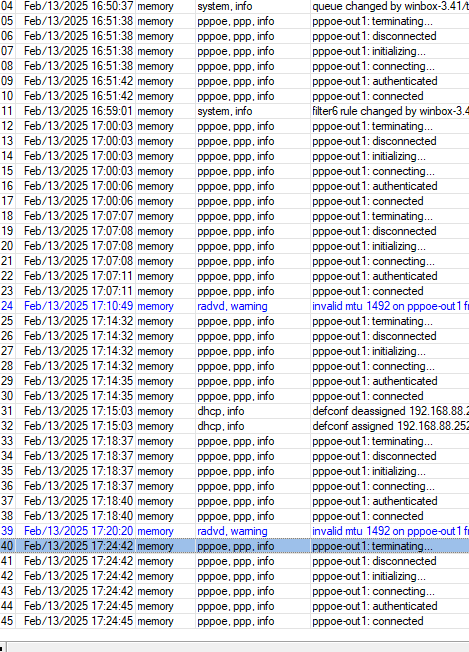
After reset my Mikrotik router,i still having the disconnect issue.
I think i am going to report for the device defects...

Update2:
Reported to TM.
Waiting for resolution. I really dont think my mikrotik rb5009 is broken...
As just now i reset router,i have almost 1 hour without disconnection,and suddenly keep dc every 5-10min until now.
And no port fault on mikrotik log.

user posted image

This post has been edited by go626201: Feb 13 2025, 05:25 PM
carvajal18
post Feb 13 2025, 04:07 PM

Getting Started
**
Junior Member
97 posts

Joined: Jan 2021
Unifi fibre contract just ended December last year, anyone have any idea of the latest SWU 5.0 offer? Thanks in advance

This post has been edited by carvajal18: Feb 13 2025, 04:07 PM
YoungMan
post Feb 13 2025, 04:26 PM

Look at all my stars!!
*******
Senior Member
6,793 posts

Joined: Oct 2008
From: Kuala Lumpur


QUOTE(carvajal18 @ Feb 13 2025, 04:07 PM)
Unifi fibre contract just ended December last year, anyone have any idea of the latest SWU 5.0 offer? Thanks in advance
*
SWU 5.0 plan here:
https://forum.lowyat.net/index.php?showtopi...ost&p=111177389
wiraone
post Feb 13 2025, 04:33 PM

Who cares about all the stars?
*******
Senior Member
3,892 posts

Joined: Jan 2003
From: Back on earth!
QUOTE(MarcoFromTropoja @ Feb 7 2025, 02:59 PM)
*** NO FREE SPEED UPGRADE LIKE SWU 4.0 500mbps (UPGRADE TO 1GBPS)
The above is not quite true, I believe they're kind of flexible since mine has the 1Gbps upgrade smile.gif So 500Mbps SWU 5.0 probably as flexible as you can push them smile.gif

hunt3r87
post Feb 13 2025, 04:46 PM

Getting Started
**
Junior Member
113 posts

Joined: Jul 2016


QUOTE(carvajal18 @ Feb 13 2025, 04:07 PM)
Unifi fibre contract just ended December last year, anyone have any idea of the latest SWU 5.0 offer? Thanks in advance
*
Not so gud offer SWU 5.0.. booooo. i oso need to wait some time lah if like this. last time got tm pipu call me said like this. 129rm encik dapat 100mbps, free wifi router, free 6 month bill and sim card perchumaaa. fak offfff. mine is better. 100mbps oni 79rm choiiiii. u should offer me 300mbps with 89rm then i take. brows.gif
aspire2oo6
post Feb 13 2025, 05:21 PM

Banned
*********
All Stars
35,468 posts

Joined: Oct 2006

QUOTE(hunt3r87 @ Feb 13 2025, 04:46 PM)
Not so gud offer SWU 5.0.. booooo. i oso need to wait some time lah if like this. last time got tm pipu call me said like this. 129rm encik dapat 100mbps,  free wifi router, free 6 month bill and sim card perchumaaa. fak offfff. mine is better. 100mbps oni 79rm choiiiii. u should offer me 300mbps with 89rm then i take.  brows.gif
*
I kena cheated by agent they call me said offer RM139 500mbps free router, free 6months bill but must subscribe postpaid 1 month RM59

When apply TM told me unifi home and postpaid are bundled
yenchenje
post Feb 13 2025, 06:13 PM

Enthusiast
*****
Junior Member
932 posts

Joined: Dec 2019
QUOTE(go626201 @ Feb 13 2025, 02:42 PM)
Emm i not sure is that any high permission account for the GN630V.
There is a tab page can add the WAN thing,but it didn't works for me.
*
tmadmin with Adm@XXXX? That’s what I did on mine to set between router/bridge
go626201
post Feb 13 2025, 06:49 PM

Regular
******
Senior Member
1,882 posts

Joined: Sep 2017
QUOTE(yenchenje @ Feb 13 2025, 06:13 PM)
tmadmin with Adm@XXXX? That’s what I did on mine to set between router/bridge
*
Do you mind to share the specific page screenshot without blacking the username id and password?


Guys after 3days,i think i find the real reason for my issue. blush.gif
I just take my old old old tplink router and put in and no dc for 1hour.
And now i had replace with a old mikrotik hEX and try to see dc or not.

So at the end, it might be the RB5009 Ethernet exchange chip broken...
Let me update the final update tonight. bangwall.gif bangwall.gif bangwall.gif

This post has been edited by go626201: Feb 13 2025, 08:04 PM
yenchenje
post Feb 13 2025, 08:19 PM

Enthusiast
*****
Junior Member
932 posts

Joined: Dec 2019
QUOTE(go626201 @ Feb 13 2025, 06:49 PM)
Do you mind to share the specific page screenshot without blacking the username id and password?
Guys after 3days,i think i find the real reason for my issue. blush.gif
I just take my old old old tplink router and put in and no dc for 1hour.
And now i had replace with a old mikrotik hEX and try to see dc or not.

So at the end, it might be the RB5009 Ethernet exchange chip broken...
Let me update the final update tonight.  bangwall.gif  bangwall.gif  bangwall.gif
*
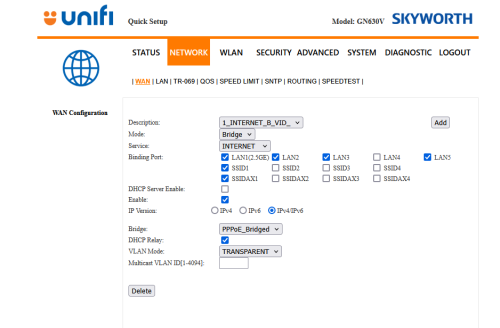
user posted image
user posted image

Sorry, network not WAN sweat.gif

Also side note, this thing runs hot without airflow, 66 deg right now in my rack on the GPON sweat.gif

Should move back to my GPON ONU stick but speed is nowhere close to SKYW bdg rclxub.gif
go626201
post Feb 13 2025, 08:22 PM

Regular
******
Senior Member
1,882 posts

Joined: Sep 2017
QUOTE(yenchenje @ Feb 13 2025, 08:19 PM)
user posted image
user posted image

Sorry, network not WAN  sweat.gif

Also side note, this thing runs hot without airflow, 66 deg right now in my rack on the GPON  sweat.gif

Should move back to my GPON ONU stick but speed is nowhere close to SKYW bdg  rclxub.gif
*
Emm mine cant add the INTERNET SELECTION. I only have 209 and 400.
I tried to add but also cant.

All of my network device have a usb fan to cooling. so mine only 44+ °C.
Only 2.5G switch dont have fan..haha.
Even CCTV NVR i also have laptop cooler to cool down.
yenchenje
post Feb 13 2025, 08:50 PM

Enthusiast
*****
Junior Member
932 posts

Joined: Dec 2019
QUOTE(go626201 @ Feb 13 2025, 08:22 PM)
Emm mine cant add the INTERNET SELECTION. I only have 209 and 400.
I tried to add but also cant.

All of my network device have a usb fan to cooling. so mine only 44+ °C.
Only 2.5G switch dont have fan..haha.
Even CCTV NVR i also have laptop cooler to cool down.
*
Maybe firmware issue? I have two units on hand to check if I got time hmm.gif
kwss
post Feb 13 2025, 08:52 PM

Regular
******
Senior Member
1,207 posts

Joined: Aug 2018
go626201
Mikrotik section:
On your HEX, can you run ping plotter and see if you still get packet lost on the router? If it didn't, your rb5009 is most definitely broken.

Mikrotik switch chip firmware do have bug, run supout and send it to Mikrotik.

But if your new ONU report error on Eth1 and Eth2 but absolutely zero error on other port, then it is mostly hardware failure as they are all connected to the same SoC, just using different lane and physical circuit on the PCB.

Do you still get ping spike with the HEX + new ONU?

Skyworth section:
Can screenshot me some of the Add option and relevant screen you tried?
But given the bugs that TM is having with their ONR, I think you better just reset the ONU and setup again, if you have the password and VOIP pin.

Example: The D-Link ONR cannot do port forwarding until firmware v2.0.6. It is crazy such simple function is broken for so long.


EDIT:
Just request for RMA. If they let you do it then you immediately rule out router problem.
From very early on I got a sus on it because you have that unusual packet loss in ping plotter which I cannot reproduce no matter how hard I try.

This post has been edited by kwss: Feb 13 2025, 08:58 PM
go626201
post Feb 13 2025, 09:41 PM

Regular
******
Senior Member
1,882 posts

Joined: Sep 2017
QUOTE(kwss @ Feb 13 2025, 08:52 PM)
go626201
Mikrotik section:
On your HEX, can you run ping plotter and see if you still get packet lost on the router? If it didn't, your rb5009 is most definitely broken.

Mikrotik switch chip firmware do have bug, run supout and send it to Mikrotik.

But if your new ONU report error on Eth1 and Eth2 but absolutely zero error on other port, then it is mostly hardware failure as they are all connected to the same SoC, just using different lane and physical circuit on the PCB.

Do you still get ping spike with the HEX + new ONU?

Skyworth section:
Can screenshot me some of the Add option and relevant screen you tried?
But given the bugs that TM is having with their ONR, I think you better just reset the ONU and setup again, if you have the password and VOIP pin.

Example: The D-Link ONR cannot do port forwarding until firmware v2.0.6. It is crazy such simple function is broken for so long.
EDIT:
Just request for RMA. If they let you do it then you immediately rule out router problem.
From very early on I got a sus on it because you have that unusual packet loss in ping plotter which I cannot reproduce no matter how hard I try.
*
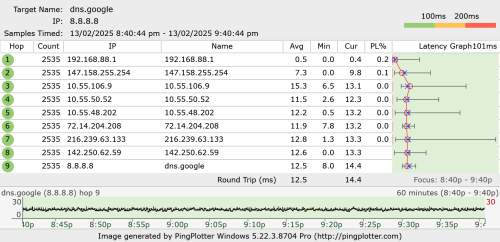
user posted image

My ipv6 with my pc have some issue with hEX,so now cant ping with ipv6 on my pc.

for RMA,i not sure Subtel got or not.
I bought it for 2-3years already. Not sure can repair or not...

kwss
post Feb 13 2025, 10:24 PM

Regular
******
Senior Member
1,207 posts

Joined: Aug 2018
QUOTE(go626201 @ Feb 13 2025, 09:41 PM)
user posted image

My ipv6 with my pc have some issue with hEX,so now cant ping with ipv6 on my pc.

for RMA,i not sure Subtel got or not.
I bought it for 2-3years already. Not sure can repair or not...
*
That's like the lowest so far but it still isn't 0. Try go to device manager and disable allow window to manage power for your NIC. Also go to advanced and disable energy efficient ethernet and anything that sounds like power saving.

Maybe upgrade to v7.18, then reset and reconfigure the HEX? Since it has been so long you might have some very experimental trial and error configuration inside there.

Did the new ONU register any Ethernet error with the HEX?
go626201
post Feb 13 2025, 10:34 PM

Regular
******
Senior Member
1,882 posts

Joined: Sep 2017
QUOTE(kwss @ Feb 13 2025, 10:24 PM)
That's like the lowest so far but it still isn't 0. Try go to device manager and disable allow window to manage power for your NIC. Also go to advanced and disable energy efficient ethernet and anything that sounds like power saving.

Maybe upgrade to v7.18, then reset and reconfigure the HEX? Since it has been so long you might have some very experimental trial and error configuration inside there.

Did the new ONU register any Ethernet error with the HEX?
*
I already updated to latest beta. Just not sure why windows will drop the ipv6 after few minutes having the address.

Not sure about it. but so far no disconnect after switch to hEX.
user posted image

495 Pages « < 461 462 463 464 465 > » Top
Topic ClosedOptions
 

Change to:
| Lo-Fi Version
0.0221sec    0.95    6 queries    GZIP Disabled
Time is now: 1st December 2025 - 09:24 PM