Welcome Guest ( Log In | Register )

Bump Topic Topic Closed RSS Feed
495 Pages « < 462 463 464 465 466 > » Bottom

Outline · [ Standard ] · Linear+

Unifi Official TM UniFi High Speed Broadband Thread V42, READ 1ST PAGE FOR RELEVANT WIFI INFO!

views
     
kwss
post Feb 13 2025, 10:40 PM

Regular
******
Senior Member
1,207 posts

Joined: Aug 2018
QUOTE(go626201 @ Feb 13 2025, 10:34 PM)
I already updated to latest beta. Just not sure why windows will drop the ipv6 after few minutes having the address.

Not sure about it. but so far no disconnect after switch to hEX.
user posted image
*
Did you restart the ONU after switching to HEX? These error should all be 0. Under no circumstances it should be more than that in all the network I ever run. It is a subtle way of screaming hardware problem.

All your device have IPv6 except your Windows?

This post has been edited by kwss: Feb 13 2025, 10:41 PM
go626201
post Feb 13 2025, 10:50 PM

Regular
******
Senior Member
1,882 posts

Joined: Sep 2017
QUOTE(kwss @ Feb 13 2025, 10:40 PM)
Did you restart the ONU after switching to HEX? These error should all be 0. Under no circumstances it should be more than that in all the network I ever run. It is a subtle way of screaming hardware problem.

All your device have IPv6 except your Windows?
*
I think i haven't reboot after switching. Although the error still adding more.
I usually use ipv6 on my pc and rpi.
I can see RPi ipv6 working well as smokeping didn't have any issue.
kwss
post Feb 13 2025, 10:53 PM

Regular
******
Senior Member
1,207 posts

Joined: Aug 2018
QUOTE(go626201 @ Feb 13 2025, 10:50 PM)
I think i haven't reboot after switching. Although the error still adding more.
I usually use ipv6 on my pc and rpi.
I can see RPi ipv6 working well as smokeping didn't have any issue.
*
Either your new ONU is a lemon or...
Did you run your network cable in parallel with power cable?

Did you try to disable all power saving for your NIC? I suspect it's chewing your packet
go626201
post Feb 13 2025, 11:04 PM

Regular
******
Senior Member
1,882 posts

Joined: Sep 2017
QUOTE(kwss @ Feb 13 2025, 10:53 PM)
Either your new ONU is a lemon or...
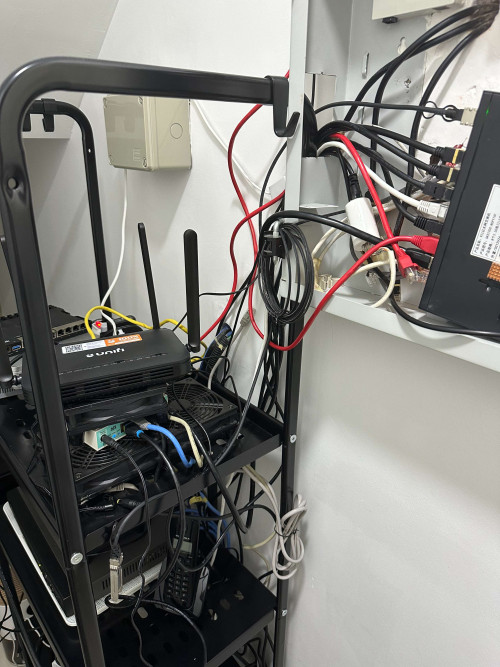
Did you run your network cable in parallel with power cable?

Did you try to disable all power saving for your NIC? I suspect it's chewing your packet
*
Like this not sure is parallel or not.
user posted image

I think power saving is disabled as i installing the non power saving driver.
kwss
post Feb 13 2025, 11:09 PM

Regular
******
Senior Member
1,207 posts

Joined: Aug 2018
QUOTE(go626201 @ Feb 13 2025, 11:04 PM)
Like this not sure is parallel or not.
user posted image

I think power saving is disabled as i installing the non power saving driver.
*
This one is okay. Did you use your rb5009 power brick for your HEX as well? Now I sus your power brick is broken
go626201
post Feb 13 2025, 11:14 PM

Regular
******
Senior Member
1,882 posts

Joined: Sep 2017
QUOTE(kwss @ Feb 13 2025, 11:09 PM)
This one is okay. Did you use your rb5009 power brick for your HEX as well? Now I sus your power brick is broken
*
No.i use my hEX adapter.
And i was not using rb5009 power adapter,as mine is the first batch release machine,that support 12-57v, so i just connected with my 12v ups. And use for few months already. (I mean i had use the rb5009 for few years)
Original adapter also got the problem. I had tested.

This post has been edited by go626201: Feb 13 2025, 11:15 PM
kwss
post Feb 13 2025, 11:18 PM

Regular
******
Senior Member
1,207 posts

Joined: Aug 2018
QUOTE(go626201 @ Feb 13 2025, 11:14 PM)
No.i use my hEX adapter.
And i was not using rb5009 power adapter,as mine is the first batch release machine,that support 12-57v, so i just connected with my 12v ups. And use for few months already. (I mean i had use the rb5009 for few years)
Original adapter also got the problem. I had tested.
*
Well, when the TM guy come, request for another brand of ONU.
Or if he has a few ONU, try them on the spot and see if they got any error counter.

Other than that, I have no idea what is wrong already. Obviously the error is on the internal network side.

Unless you also want to consider your UPS is broken. Try connecting to main power instead?
go626201
post Feb 13 2025, 11:25 PM

Regular
******
Senior Member
1,882 posts

Joined: Sep 2017
QUOTE(kwss @ Feb 13 2025, 11:18 PM)
Well, when the TM guy come, request for another brand of ONU.
Or if he has a few ONU, try them on the spot and see if they got any error counter.

Other than that, I have no idea what is wrong already. Obviously the error is on the internal network side.

Unless you also want to consider your UPS is broken. Try connecting to main power instead?
*
Actually i close up the report already..
Since i already confirm it is my device fault.
The TM guy came 1000% said no problem,and will charge rm53...
So i just close up. and going to buy a new mikrotik router to replace 1st.
kwss
post Feb 13 2025, 11:27 PM

Regular
******
Senior Member
1,207 posts

Joined: Aug 2018
QUOTE(go626201 @ Feb 13 2025, 11:25 PM)
Actually i close up the report already..
Since i already confirm it is my device fault.
The TM guy came 1000% said no problem,and will charge rm53...
So i just close up. and going to buy a new mikrotik router to replace 1st.
*
It can't be both Mikrotik also broken with frame error. They are totally different family, different SoC, different instruction set.
Try to remove the UPS from the rack and power everything directly?
go626201
post Feb 13 2025, 11:29 PM

Regular
******
Senior Member
1,882 posts

Joined: Sep 2017
QUOTE(kwss @ Feb 13 2025, 11:27 PM)
It can't be both Mikrotik also broken with frame error. They are totally different family, different SoC, different instruction set.
Try to remove the UPS from the rack and power everything directly?
*
Ya now GN630V and hEX is on their own power adapter.
Only 2.5G switch is on 12v ups.

This post has been edited by go626201: Feb 13 2025, 11:30 PM
kwss
post Feb 13 2025, 11:32 PM

Regular
******
Senior Member
1,207 posts

Joined: Aug 2018
QUOTE(go626201 @ Feb 13 2025, 11:29 PM)
Ya now GN630V and hEX is on their own power adapter.
Only 2.5G switch is on 12v ups.
*
Okay, did the error count still go up?
go626201
post Feb 13 2025, 11:34 PM

Regular
******
Senior Member
1,882 posts

Joined: Sep 2017
QUOTE(kwss @ Feb 13 2025, 11:32 PM)
Okay, did the error count still go up?
*
Ya.

user posted image
kwss
post Feb 13 2025, 11:47 PM

Regular
******
Senior Member
1,207 posts

Joined: Aug 2018
QUOTE(go626201 @ Feb 13 2025, 11:34 PM)
Ya.

user posted image
*
Since we have swapped everything already, the only thing left is the ONU + network cable combination.
Are you still using the Ugreen now?

EDIT:
Actually can you try another port on the ONU?

This post has been edited by kwss: Feb 13 2025, 11:48 PM
go626201
post Feb 13 2025, 11:52 PM

Regular
******
Senior Member
1,882 posts

Joined: Sep 2017
QUOTE(kwss @ Feb 13 2025, 11:47 PM)
Since we have swapped everything already, the only thing left is the ONU + network cable combination.
Are you still using the Ugreen now?

EDIT:
Actually can you try another port on the ONU?
*
No i change to vention cable.
No another port not supported for WAN.
kwss
post Feb 13 2025, 11:55 PM

Regular
******
Senior Member
1,207 posts

Joined: Aug 2018
QUOTE(go626201 @ Feb 13 2025, 11:52 PM)
No i change to vention cable.
No another port not supported for WAN.
*
Okay.
Can try change to Ugreen again and see if error still increases?
If yes then change to another cable and see if it still increases?

If still yes, I think I will ask for a different brand of ONU.
go626201
post Feb 14 2025, 12:02 AM

Regular
******
Senior Member
1,882 posts

Joined: Sep 2017
QUOTE(kwss @ Feb 13 2025, 11:55 PM)
Okay.
Can try change to Ugreen again and see if error still increases?
If yes then change to another cable and see if it still increases?

If still yes, I think I will ask for a different brand of ONU.
*
Now i didn't have internet problem,so hard to ask for ONU changes.
And the most problem is there is not better choice for the changes.
As anime4000 said before DLink have flaws,thats why i ask for Skyworth GN630V... rclxub.gif
kwss
post Feb 14 2025, 12:04 AM

Regular
******
Senior Member
1,207 posts

Joined: Aug 2018
QUOTE(go626201 @ Feb 14 2025, 12:02 AM)
Now i didn't have internet problem,so hard to ask for ONU changes.
And the most problem is there is not better choice for the changes.
As anime4000 said before DLink have flaws,thats why i ask for Skyworth GN630V...  rclxub.gif
*
So you tried different cable and it still have error?
Is there an option in the ONU to force port speed to 1gig full duplex?
go626201
post Feb 14 2025, 12:11 AM

Regular
******
Senior Member
1,882 posts

Joined: Sep 2017
QUOTE(kwss @ Feb 14 2025, 12:04 AM)
So you tried different cable and it still have error?
Is there an option in the ONU to force port speed to 1gig full duplex?
*
I didn't find the option.
I was also wonder is it 2.5G port can run as 1G port or not this evening.
kwss
post Feb 14 2025, 12:15 AM

Regular
******
Senior Member
1,207 posts

Joined: Aug 2018
QUOTE(go626201 @ Feb 14 2025, 12:11 AM)
I didn't find the option.
I was also wonder is it 2.5G port can run as 1G port or not this evening.
*
Well, that's a difficult situation now. Either live with it since I see your smokeping result are all OK.
Or you force your rb5009 to not advertise 2.5G and see if you still dc. But you said if you use other port on rb5009 you get absolutely 0 error right? Can you confirm my understanding of your statement?
go626201
post Feb 14 2025, 12:30 AM

Regular
******
Senior Member
1,882 posts

Joined: Sep 2017
QUOTE(kwss @ Feb 14 2025, 12:15 AM)
Well, that's a difficult situation now. Either live with it since I see your smokeping result are all OK.
Or you force your rb5009 to not advertise 2.5G and see if you still dc. But you said if you use other port on rb5009 you get absolutely 0 error right? Can you confirm my understanding of your statement?
*
Emm the evening i try to connect Ether 4 with GN630V,and also occurs disconnection within 10mins.
And before that i was testing with tplink router.
So i just make assumption that my RB5009 Ethernet is broken. Since the internet just randomly disconnected with Ether 1 2 4.
Before i wake up it didn't have disconnection issue,but the problem just occurs after 11am or 12pm.
And after 4pm it keeps dc me from unifi every 5-10mins. very random. And no ether down log at all.
Although i did see a few 2.5G ether down log from GN630V log.

So currently my final thought is RB5009 is broken in someway,but i could not said the accurate root cause.
I would try to connect RB5009 tomorrow as last try to see any chance that normal again.
But i dont think so,since 1 tplink plus 1 hEX can work without any issue,then it is very highly chance that issue is on RB5009.

Update:
At last afternoon,i was thinking any possibility that i damage the fiber optic. But after using the tplink and hEX, i can said no possibility on this anymore.

This post has been edited by go626201: Feb 14 2025, 12:32 AM

495 Pages « < 462 463 464 465 466 > » Top
Topic ClosedOptions
 

Change to:
| Lo-Fi Version
0.0207sec    0.26    6 queries    GZIP Disabled
Time is now: 1st December 2025 - 09:37 PM