Welcome Guest ( Log In | Register )

Bump Topic Topic Closed RSS Feed
495 Pages « < 460 461 462 463 464 > » Bottom

Outline · [ Standard ] · Linear+

Unifi Official TM UniFi High Speed Broadband Thread V42, READ 1ST PAGE FOR RELEVANT WIFI INFO!

views
     
go626201
post Feb 13 2025, 02:32 AM

Regular
******
Senior Member
1,882 posts

Joined: Sep 2017
QUOTE(kwss @ Feb 13 2025, 02:30 AM)
Can you check again your Mikrotik interface for any error count? If not then probably not related. Also check your log again for interface down message, since you are using Alcatel ONU now, which will cut the interface if status not O5.

Reporting really depends on luck. See who come to visit you.
*
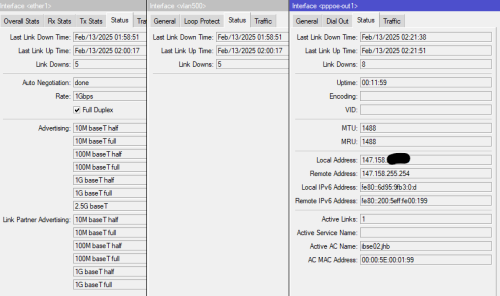
I already check log only have pppoe down.
and related interface only show the last down time that i clean the fiber optic with alcohol.

user posted image

This post has been edited by go626201: Feb 13 2025, 02:34 AM
hsbb
post Feb 13 2025, 02:34 AM

Casual
***
Junior Member
447 posts

Joined: Aug 2009


QUOTE(go626201 @ Feb 13 2025, 02:24 AM)
Ethernet port not down,also have the possibility for mikrotik broken?  :confused:

Let me observe until tomorrow afternoon.
Incase they really doing the maintenance.

Report is quite trouble...Later tm said not their fault and charge RM53...  bangwall.gif
*
U can use power meter to check if fiber drop have intermittent reading. More better if have OTDR.
go626201
post Feb 13 2025, 02:35 AM

Regular
******
Senior Member
1,882 posts

Joined: Sep 2017
QUOTE(hsbb @ Feb 13 2025, 02:34 AM)
U can use power meter to check if fiber drop have intermittent reading. More better if have OTDR.
*
I dont have those device. sad.gif
kwss
post Feb 13 2025, 02:42 AM

Regular
******
Senior Member
1,207 posts

Joined: Aug 2018
go626201
Agree to checking fiber using OTDR or even a GPON Analyzer.

Unless... You want to try configure your ONR into router mode and see if it works.
BTW, do you know what OLT are you using? Is it the same before the upgrade?
go626201
post Feb 13 2025, 02:45 AM

Regular
******
Senior Member
1,882 posts

Joined: Sep 2017
QUOTE(kwss @ Feb 13 2025, 02:42 AM)
go626201
Agree to checking fiber using OTDR or even a GPON Analyzer.

Unless... You want to try configure your ONR into router mode and see if it works.
BTW, do you know what OLT are you using? Is it the same before the upgrade?
*
Not sure how to configure with GN630V.
OLT also not sure,but i dont think they switch OLT,since they just came in 1st day and upgrade my speed and gone.
third day another person came and switch the modem to GN630V for me and gone. (I just told her to set as modem mode)

Anyone know how to check the OLT with GN630V?

This post has been edited by go626201: Feb 13 2025, 02:46 AM
hsbb
post Feb 13 2025, 02:45 AM

Casual
***
Junior Member
447 posts

Joined: Aug 2009


QUOTE(go626201 @ Feb 13 2025, 02:35 AM)
I dont have those device.  sad.gif
*
I remembered my friend told me about a contractor only bring lanjiou to attend fault. Haha
go626201
post Feb 13 2025, 02:48 AM

Regular
******
Senior Member
1,882 posts

Joined: Sep 2017
As long as no dc occurs anymore,then i might stick with old ONU for few days 1st...If the ONU is really the fault for the latency spikes then no choice,wait for a new ONU that TM will give,and at the time i will complain again to ask them to replace...
kwss
post Feb 13 2025, 02:56 AM

Regular
******
Senior Member
1,207 posts

Joined: Aug 2018
QUOTE(go626201 @ Feb 13 2025, 02:48 AM)
As long as no dc occurs anymore,then i might stick with old ONU for few days 1st...If the ONU is really the fault for the latency spikes then no choice,wait for a new ONU that TM will give,and at the time i will complain again to ask them to replace...
*
I want to suggest something stupid: Reboot the Mikrotik and ONU together. Check cable are connected tightly.

Then just let it be and see how many times it dc when you wake up tomorrow.
I don't think your old ONU suddenly malfunction after serving you for so long because your new ONU is doing the same too.

I also suggest to keep your ping plotter running. Need to know if the packet loss time align with your router log, or packet loss happen before it actually dc.

Reason: PPP session has it's own timeout value. If it timeout then the session get killed. However, if ping plotter is showing graph, it cannot possibly due to the timeout since there is data flowing.
go626201
post Feb 13 2025, 03:09 AM

Regular
******
Senior Member
1,882 posts

Joined: Sep 2017
QUOTE(kwss @ Feb 13 2025, 02:56 AM)
I want to suggest something stupid: Reboot the Mikrotik and ONU together. Check cable are connected tightly.

Then just let it be and see how many times it dc when you wake up tomorrow.
I don't think your old ONU suddenly malfunction after serving you for so long because your new ONU is doing the same too.

I also suggest to keep your ping plotter running. Need to know if the packet loss time align with your router log, or packet loss happen before it actually dc.

Reason: PPP session has it's own timeout value. If it timeout then the session get killed. However, if ping plotter is showing graph, it cannot possibly due to the timeout since there is data flowing.
*
Let me reboot both in seconds.
i need to turn off my pc..haha
My smokeping can be a monitoring to roughly see.

for the last PPP session. Actually i think mine didn't have timeout.
I used to get the unifi online for few weeks without disconnect,and keeping the same ipv4 address.
As long as my smokeping is consistent getting latency,which mean the internet never down as i didn't turn off the smokeping for any reason.
I usually stop the smokeping docker on my RPi when i need to restart my network device like router or ONU.
Today lazy to turn off, so many problem keep on and off waste my time.

Edited:
AHHHH crapp..
I just found out i accidentally use the wrong power adapter(RB5009 24V adapter) for the old ONU. (fortunately old ONU not broken still works,but the power dc port abit hot)
Now already switch back to my mini UPS 12v DC cable. cool2.gif
I had restart both of my router and old onu.

My ipv6 : 2001:e68:5432:d52a::

Setup a temporary smokeping to unifi ipv6 gateway: (every 15sec 3 ping)
https://smokeping.mywebping.com/smokeping/?...-Gateway-IPv6-1

This post has been edited by go626201: Feb 13 2025, 03:27 AM
kwss
post Feb 13 2025, 03:30 AM

Regular
******
Senior Member
1,207 posts

Joined: Aug 2018
QUOTE(go626201 @ Feb 13 2025, 03:09 AM)
Let me reboot both in seconds.
i need to turn off my pc..haha
My smokeping can be a monitoring to roughly see.

for the last PPP session. Actually i think mine didn't have timeout.
I used to get the unifi online for few weeks without disconnect,and keeping the same ipv4 address.
As long as my smokeping is consistent getting latency,which mean the internet never down as i didn't turn off the smokeping for any reason.
I usually stop the smokeping docker on my RPi when i need to restart my network device like router or ONU.
Today lazy to turn off, so many problem keep on and off waste my time.

Edited:
AHHHH crapp..
I just found out i accidentally use the wrong power adapter(RB5009 24V adapter) for the old ONU. (fortunately old ONU not broken still works,but the power dc port abit hot)
Now already switch back to my mini UPS 12v DC cable.  cool2.gif
I had restart both of my router and old onu.

My ipv6 : 2001:e68:5432:d52a::
*
Weih.... Night night want to do me meh? So you dc due to using wrong power adapter. Jeez.

CODE

--- 2001:e68:5432:d52a:: ping statistics ---
15069 packets transmitted, 15068 received, 0.00663614% packet loss, time 181017ms
rtt min/avg/max/mdev = 7.364/12.073/42.183/2.282 ms, pipe 4, ipg/ewma 12.013/12.250 ms

rclxm9.gif rclxm9.gif thumbup.gif thumbsup.gif
go626201
post Feb 13 2025, 03:32 AM

Regular
******
Senior Member
1,882 posts

Joined: Sep 2017
QUOTE(kwss @ Feb 13 2025, 03:30 AM)
Weih.... Night night want to do me meh? So you dc due to using wrong power adapter. Jeez.

CODE

--- 2001:e68:5432:d52a:: ping statistics ---
15069 packets transmitted, 15068 received, 0.00663614% packet loss, time 181017ms
rtt min/avg/max/mdev = 7.364/12.073/42.183/2.282 ms, pipe 4, ipg/ewma 12.013/12.250 ms

rclxm9.gif  rclxm9.gif  thumbup.gif  thumbsup.gif
*
Emm but the onu didn't power off,so it might only causing the laser error i think.

At current stage,i really think the fault is on the ONU. bruce.gif
Let see tomorrow afternoon.

This post has been edited by go626201: Feb 13 2025, 03:33 AM
kwss
post Feb 13 2025, 03:37 AM

Regular
******
Senior Member
1,207 posts

Joined: Aug 2018
QUOTE(go626201 @ Feb 13 2025, 03:32 AM)
Emm but the onu didn't power off,so it might only causing the laser error i think.

At current stage,i really think the fault is on the ONU.  bruce.gif
Let see tomorrow afternoon.
*
Using the wrong or broken power adapter can cause the clock to drift too much and go out of sync. PON is a synchronous network.

I think mostly okay already. Haha. Definitely had a lot of fun with this one.
go626201
post Feb 13 2025, 03:39 AM

Regular
******
Senior Member
1,882 posts

Joined: Sep 2017
QUOTE(kwss @ Feb 13 2025, 03:37 AM)
Using the wrong or broken power adapter can cause the clock to drift too much and go out of sync. PON is a synchronous network.

I think mostly okay already. Haha. Definitely had a lot of fun with this one.
*
If tomorrow okay,then switch back to new ONU tomorrow night. smile.gif
Maybe GN630V not compatible with my area OLT. rclxub.gif

Good night! Thanks for helping me. thumbup.gif

This post has been edited by go626201: Feb 13 2025, 03:40 AM
tng55
post Feb 13 2025, 07:56 AM

Regular
******
Senior Member
1,434 posts

Joined: Sep 2021


QUOTE(go626201 @ Feb 13 2025, 01:34 AM)
I actually got this tester one.  cool2.gif
But i dont think all cable is broken,as the branded 2 only use a few time only. Ugreen one just taken from TV and AP.
Vention one just use for sometime testing.
Fluke too expensive cant lah... brows.gif

And the quick update:
No seeing latency spikes so far with the old ONU.  doh.gif
Whether i spam full upload or not.
With GN630V,as i only upload to google drive will show the latency spikes but of course not like 2days ago 800ms,but like 40ms yes.

1050M with new ONU is quite attractive leh... hmm.gif
If stick with old onu really not acceptable... (900M)
*
seee always stable OLD ONU BTU
daam crap GN630V due weak low spec compare old onu btu spec seen batter
onr combo always problem unstable its not issue unifi
its issue combo onr

yah old onu hit 900mbps due limited

tm don't want old onu for new model 2.5G LAN port without combo onr
tm always cut cost to combo onr sigh
hsbb
post Feb 13 2025, 08:27 AM

Casual
***
Junior Member
447 posts

Joined: Aug 2009


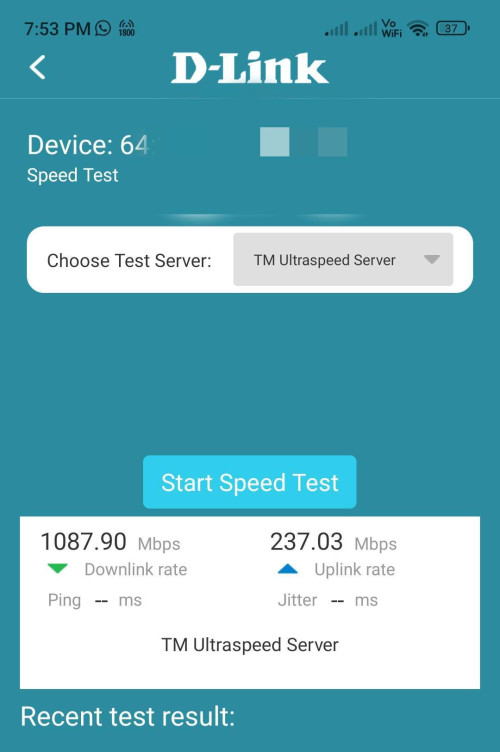
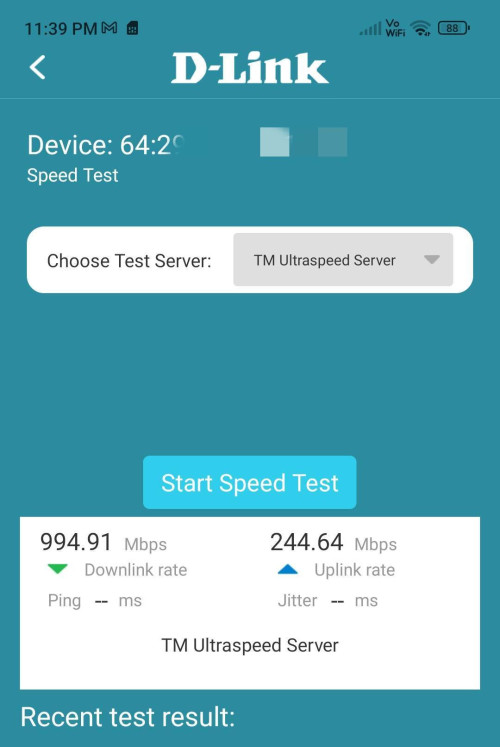
I don't understand why people said Dlink DPN-FX3060V limited to 940Mbps. This is my own-borrowed white DPN-FX3060V using 800Mbps unifi.

user posted image
user posted image
user posted image
yenchenje
post Feb 13 2025, 09:14 AM

Enthusiast
*****
Junior Member
932 posts

Joined: Dec 2019
QUOTE(hsbb @ Feb 13 2025, 08:27 AM)
I don't understand why people said Dlink DPN-FX3060V limited to 940Mbps. This is my own-borrowed white DPN-FX3060V using 800Mbps unifi.

user posted image
user posted image
user posted image
*
LAN ports out is only 1G, which is roughly 1000Mbps, 60Mbps reserved for TCP/IP packets

No one said that internally it’s not capable of higher speed, but what good is the speed internally if it can’t distribute it out at full capacity
Cavino
post Feb 13 2025, 09:26 AM

Enthusiast
*****
Senior Member
842 posts

Joined: May 2009


QUOTE(hsbb @ Feb 13 2025, 08:27 AM)
I don't understand why people said Dlink DPN-FX3060V limited to 940Mbps. This is my own-borrowed white DPN-FX3060V using 800Mbps unifi.

*
I tot the 940Mbps limit is when using the DLink as a bridge. If direct using as router, got no such problem especially when using WIFI.
MarcoFromTropoja
post Feb 13 2025, 10:12 AM

Getting Started
**
Junior Member
94 posts

Joined: Sep 2024
QUOTE(hsbb @ Feb 13 2025, 08:27 AM)
I don't understand why people said Dlink DPN-FX3060V limited to 940Mbps. This is my own-borrowed white DPN-FX3060V using 800Mbps unifi.

user posted image
user posted image
user posted image
*
In router speedtest yes its capable of delivering 1gbps+. But the problem is the lan port is only 1g. So device connected is limited to 940-950mbps
go626201
post Feb 13 2025, 10:42 AM

Regular
******
Senior Member
1,882 posts

Joined: Sep 2017
QUOTE(hsbb @ Feb 13 2025, 08:27 AM)
I don't understand why people said Dlink DPN-FX3060V limited to 940Mbps. This is my own-borrowed white DPN-FX3060V using 800Mbps unifi.

user posted image
user posted image
user posted image
*
The speedtest is directly go through by the Gpon port which is 2.4G/1.2G limitation.
And the speed that can hit more than 800mbps might due to TM own speedtest server,that TM intentionally set it to speedtest without qos limitation.
So the speedtest will not have the LAN port 1G limitation.


And update to my unfi status:
No disconnect happens in past 6 hours.
For latency issue,not sure for now because it does not occurs without low to mid utilize usage.

Update 2:
Crappp dc again in 10:58am...

Update 3:
I swap back to new ONU,to confirm the dc issue also occurs on new ONU or not.
As i not sure why this morning old onu can only hit 500mbps download. but upload also 500mbps okay. sad.gif
New ONU-GN630V can still hit 1000M DL.

Update 4:
using New ONU still dc from unifi... doh.gif

Update 5:
GN630V have a log system,i had enable,will try to figure out the log if later disconnect again.

Update 6:
I found a strange problem:
The GN630V log showing the 2.5 Lan port down.
But i didn't see the down error on the mikrotik router,and i tried to switch to another ether port on mikrotik showing the same problem. (And with new and old onu keep dc me from the internet)

Update 7:
How come only this Wan connected port (Ether1 and 2 both connected to Wan showing similar problem) keep port flipping ahhh.... other port on mikrotik didn't.

This post has been edited by go626201: Feb 13 2025, 01:44 PM

go626201
post Feb 13 2025, 01:30 PM

Regular
******
Senior Member
1,882 posts

Joined: Sep 2017
Does Anyone know how to set the GN630V as router mode?
I want to try to confirm the problem with bypass my mikrotik router.

495 Pages « < 460 461 462 463 464 > » Top
Topic ClosedOptions
 

Change to:
| Lo-Fi Version
0.0206sec    0.87    6 queries    GZIP Disabled
Time is now: 2nd December 2025 - 06:33 AM