Welcome Guest ( Log In | Register )

Bump Topic Topic Closed RSS Feed
495 Pages « < 459 460 461 462 463 > » Bottom

Outline · [ Standard ] · Linear+

Unifi Official TM UniFi High Speed Broadband Thread V42, READ 1ST PAGE FOR RELEVANT WIFI INFO!

views
     
go626201
post Feb 13 2025, 01:34 AM

Regular
******
Senior Member
1,882 posts

Joined: Sep 2017
QUOTE(hsbb @ Feb 13 2025, 01:30 AM)
You need this to play around with LAN cable. RJ45 header pin can can easily worn out if always plug & play.
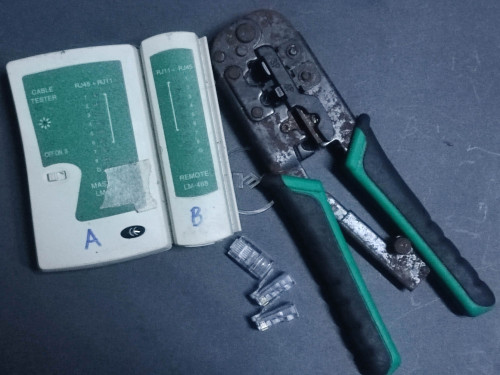
user posted image
*
I actually got this tester one. cool2.gif
But i dont think all cable is broken,as the branded 2 only use a few time only. Ugreen one just taken from TV and AP.
Vention one just use for sometime testing.

QUOTE(kwss @ Feb 13 2025, 01:31 AM)
I think he need a professional Fluke Network Cable Tester. The one that came with calibration certificate
bruce.gif
*
Fluke too expensive cant lah... brows.gif

And the quick update:
No seeing latency spikes so far with the old ONU. doh.gif
Whether i spam full upload or not.
With GN630V,as i only upload to google drive will show the latency spikes but of course not like 2days ago 800ms,but like 40ms yes.

1050M with new ONU is quite attractive leh... hmm.gif
If stick with old onu really not acceptable... (900M)

This post has been edited by go626201: Feb 13 2025, 01:38 AM
kwss
post Feb 13 2025, 01:38 AM

Regular
******
Senior Member
1,207 posts

Joined: Aug 2018
QUOTE(go626201 @ Feb 13 2025, 01:34 AM)
I actually got this tester one.  cool2.gif
But i dont think all cable is broken,as the branded 2 only use a few time only. Ugreen one just taken from TV and AP.
Vention one just use for sometime testing.
Fluke too expensive cant lah... brows.gif

And the quick update:
No seeing latency spikes so far with the old ONU.  doh.gif
Whether i spam full upload or not.
With GN630V,as i only upload to google drive will show the latency spikes but of course not like 2days ago 800ms,but like 40ms yes.
*
Arrrrr.... So it is the ONU. Or rather ONR issue. Just like the D-Link will speed drop when you turn on VPN.

You only lose 100M, is not too bad considering you got many hundreds meg. Or buy ONU from Anime

This post has been edited by kwss: Feb 13 2025, 01:39 AM
go626201
post Feb 13 2025, 01:40 AM

Regular
******
Senior Member
1,882 posts

Joined: Sep 2017
Is it the time to call Anime4000 step in? brows.gif
But the only reason i still cant use his custom-made ONU,is because my family still need the dect phone to work...

Let me observer for 1days 1st. in this case i can totally disable queue for use.

This post has been edited by go626201: Feb 13 2025, 01:42 AM
kwss
post Feb 13 2025, 01:42 AM

Regular
******
Senior Member
1,207 posts

Joined: Aug 2018
QUOTE(go626201 @ Feb 13 2025, 01:40 AM)
Is it the time to call Anime4000 step in?  brows.gif
But the only reason i still cant use his custom-made ONU,is because my family still need the dect phone to work...
*
I believe his ONU can force forward VLAN 400. Check with him.
Then use my method in his ONU stick thread to connect any Android phone.

EDIT:
Come IPv6 address. let's ping test agian

This post has been edited by kwss: Feb 13 2025, 01:43 AM
go626201
post Feb 13 2025, 01:45 AM

Regular
******
Senior Member
1,882 posts

Joined: Sep 2017
QUOTE(kwss @ Feb 13 2025, 01:42 AM)
I believe his ONU can force forward VLAN 400. Check with him.
Then use my method in his ONU stick thread to connect any Android phone.
*
Emm actually i dont mind to get a ATA adapter if this work with unifi and his ONU.
But i worry that upload latency spikes issue occurs again with his ONU,and in the end might wasting money...

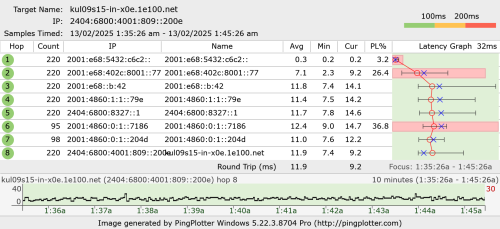
user posted image

Update:
What the hell,i dc again...
Let see how many time i will disconnect tonight to morning.
From 12/02/24 7PM to Now 13/02/24 2AM 6 time. (1 time is changing ONU)

This post has been edited by go626201: Feb 13 2025, 01:52 AM
PowerGadget
post Feb 13 2025, 01:45 AM

Enthusiast
*****
Junior Member
821 posts

Joined: Apr 2012
QUOTE(YoungMan @ Feb 11 2025, 07:37 PM)
Usually promo for port in is free 6 months or free TV. The process is seemless and no downtime at all.
Firstly, go to Tmpoint or any trusted unifi agent to register your plan. Tell them you want to port over from Celcom.
After registration, just wait for Celcom to approve your transfer request. Make sure you clear all outstanding bill. Once transfer is approved, just wait for TM to set installation date. Your Celcom fibre will continue to be usable until few days after Unifi installation.
On the day of installation, TM will just plug in Unifi router and configure your connection.
Remember that there will be a final prorated bill for your Celcom fibre.
*
Thanks YoungMan, you've been so helpful.

notworthy.gif notworthy.gif
hsbb
post Feb 13 2025, 01:48 AM

Casual
***
Junior Member
447 posts

Joined: Aug 2009


QUOTE(go626201 @ Feb 13 2025, 01:34 AM)
I actually got this tester one.  cool2.gif
But i dont think all cable is broken,as the branded 2 only use a few time only. Ugreen one just taken from TV and AP.
Vention one just use for sometime testing.
Fluke too expensive cant lah... brows.gif

And the quick update:
No seeing latency spikes so far with the old ONU.  doh.gif
Whether i spam full upload or not.
With GN630V,as i only upload to google drive will show the latency spikes but of course not like 2days ago 800ms,but like 40ms yes.

1050M with new ONU is quite attractive leh... hmm.gif
If stick with old onu really not acceptable... (900M)
*
No need fluke, use cheap multimeter to test cable connectivity or diy buzzer. Human handling basically can make everything can't use.
go626201
post Feb 13 2025, 01:50 AM

Regular
******
Senior Member
1,882 posts

Joined: Sep 2017
QUOTE(hsbb @ Feb 13 2025, 01:48 AM)
No need fluke, use cheap multimeter to test cable connectivity or diy buzzer. Human handling basically can make everything can't use.
*
Emm i believe those cable should made by machine.
Those are not clamp by myself,just buy and use only.
kwss
post Feb 13 2025, 01:51 AM

Regular
******
Senior Member
1,207 posts

Joined: Aug 2018
QUOTE(go626201 @ Feb 13 2025, 01:45 AM)
Emm actually i dont mind to get a ATA adapter if this work with unifi and his ONU.
But i worry that upload latency spikes issue occurs again with his ONU,and in the end might wasting money...

user posted image

Update:
What the hell,i dc again...
*
No wonder fail to ping.
You got alcohol swab pad? Go clean your fiber connector.
go626201
post Feb 13 2025, 01:52 AM

Regular
******
Senior Member
1,882 posts

Joined: Sep 2017
QUOTE(kwss @ Feb 13 2025, 01:51 AM)
No wonder fail to ping.
You got alcohol swab pad? Go clean your fiber connector.
*
Got 70+% alcohol.
I was trying to clean yesterday,but the ChatGPT told me alcohol not pure enough,not recommend me to do it...

This post has been edited by go626201: Feb 13 2025, 01:53 AM
kwss
post Feb 13 2025, 01:53 AM

Regular
******
Senior Member
1,207 posts

Joined: Aug 2018
QUOTE(go626201 @ Feb 13 2025, 01:52 AM)
Got 70+% alcohol.
*
Good enough. Take out the SC connector and clean it. Hope it works. Like I really no idea what else to try already.
No need to be perfectionist. A lot of people only use the 70% pad to clean before slicing. All works.

This post has been edited by kwss: Feb 13 2025, 01:57 AM
go626201
post Feb 13 2025, 02:02 AM

Regular
******
Senior Member
1,882 posts

Joined: Sep 2017
QUOTE(kwss @ Feb 13 2025, 01:53 AM)
Good enough. Take out the SC connector and clean it. Hope it works. Like I really no idea what else to try already.
No need to be perfectionist. A lot of people only use the 70% pad to clean before slicing. All works.
*
Cleaned.
New IP range:
2001:e68:5432:cbcb::

Last time i was working in the DC,the in charge person(supervisor) told us to spray on the mtp/mto fiber connector directly. brows.gif

This post has been edited by go626201: Feb 13 2025, 02:09 AM
kwss
post Feb 13 2025, 02:05 AM

Regular
******
Senior Member
1,207 posts

Joined: Aug 2018
QUOTE(go626201 @ Feb 13 2025, 02:02 AM)
Cleaned.
New IP range:
2001:e68:5432:cbcb::
*
It is quite an improvement!
CODE

--- 2001:e68:5432:cbcb:: ping statistics ---
11190 packets transmitted, 11189 received, 0.00893655% packet loss, time 146401ms
rtt min/avg/max/mdev = 8.236/13.084/24.203/2.432 ms, pipe 2, ipg/ewma 13.084/12.841 ms

go626201
post Feb 13 2025, 02:07 AM

Regular
******
Senior Member
1,882 posts

Joined: Sep 2017
QUOTE(kwss @ Feb 13 2025, 02:05 AM)
It is quite an improvement!
CODE

--- 2001:e68:5432:cbcb:: ping statistics ---
11190 packets transmitted, 11189 received, 0.00893655% packet loss, time 146401ms
rtt min/avg/max/mdev = 8.236/13.084/24.203/2.432 ms, pipe 2, ipg/ewma 13.084/12.841 ms

*
Emm i didn't see any improvement on my end.

Next time i will just buy the fiber optic cleaner easier.

This post has been edited by go626201: Feb 13 2025, 02:08 AM
hsbb
post Feb 13 2025, 02:11 AM

Casual
***
Junior Member
447 posts

Joined: Aug 2009


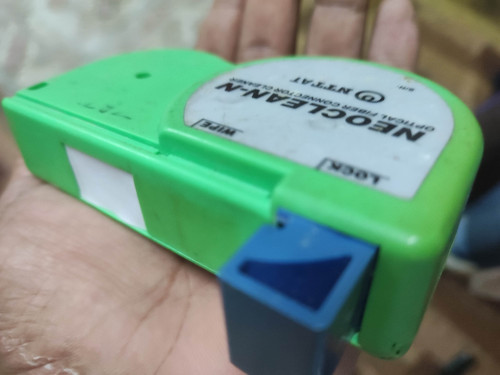
Swiss army tool for fiber optic.

user posted image
kwss
post Feb 13 2025, 02:13 AM

Regular
******
Senior Member
1,207 posts

Joined: Aug 2018
QUOTE(go626201 @ Feb 13 2025, 02:07 AM)
Emm i didn't see any improvement on my end.

Next time i will just buy the fiber optic cleaner easier.
*
Old:
rtt min/avg/max/mdev = 8.970/37.573/169.916/37.022 ms, ipg/ewma 200.632/27.331 ms
New:
rtt min/avg/max/mdev = 8.236/13.084/24.203/2.432 ms, pipe 2, ipg/ewma 13.084/12.841 ms

No improvement meh?
If you have a lot of connector to clean then it is better to use the clicker. But you buy to clean one connector then kind of waste? Of course you can clean inside the ONU port with the clicker.

If still dc... I think better you report to TM and see if they want to clean their fiber splitter or even willing to swap their line card.
go626201
post Feb 13 2025, 02:17 AM

Regular
******
Senior Member
1,882 posts

Joined: Sep 2017
QUOTE(hsbb @ Feb 13 2025, 02:11 AM)
Swiss army tool for fiber optic.

user posted image
*
QUOTE(kwss @ Feb 13 2025, 02:13 AM)
Old:
rtt min/avg/max/mdev = 8.970/37.573/169.916/37.022 ms, ipg/ewma 200.632/27.331 ms
New:
rtt min/avg/max/mdev = 8.236/13.084/24.203/2.432 ms, pipe 2, ipg/ewma 13.084/12.841 ms

No improvement meh?
If you have a lot of connector to clean then it is better to use the clicker. But you buy to clean one connector then kind of waste? Of course you can clean inside the ONU port with the clicker.

If still dc... I think better you report to TM and see if they want to clean their fiber splitter or even willing to swap their line card.
*
Cleaner price okay lah,and clean ONU port might be needed since i keep swap for few times already confirm got dust already.
You see in DC already clean,and they still got alot of port not working when early started..hahaha rolleyes.gif

Sorry for tagging you hsbb
Which mm should i buy for cleaning this unifi SC fiber optic.
1.25mm or 2.5mm?

Ah i know already sorry for tagging. 2.5mm is use for SC.


SSHHHITTTT DC again.
NEW IPv6: 2001:e68:5432:ce57::

This post has been edited by go626201: Feb 13 2025, 02:23 AM
kwss
post Feb 13 2025, 02:23 AM

Regular
******
Senior Member
1,207 posts

Joined: Aug 2018
QUOTE(go626201 @ Feb 13 2025, 02:17 AM)
Cleaner price okay lah,and clean ONU port might be needed since i keep swap for few times already confirm got dust already.
You see in DC already clean,and they still got alot of port not working when early started..hahaha  rolleyes.gif

Sorry for tagging you hsbb
Which mm should i buy for cleaning this unifi SC fiber optic.
1.25mm or 2.5mm?

Ah i know already sorry for tagging. 2.5mm is use for SC.
SSHHHITTTT DC again.
*
Yes it is 2.5.
Okay, time to file report already. Unless you remotely consider the possibility of needing to RMA your Mikrotik.
go626201
post Feb 13 2025, 02:24 AM

Regular
******
Senior Member
1,882 posts

Joined: Sep 2017
QUOTE(kwss @ Feb 13 2025, 02:23 AM)
Yes it is 2.5.
Okay, time to file report already. Unless you remotely consider the possibility of needing to RMA your Mikrotik.
*
Ethernet port not down,also have the possibility for mikrotik broken? confused.gif

Let me observe until tomorrow afternoon.
Incase they really doing the maintenance.

Report is quite trouble...Later tm said not their fault and charge RM53... bangwall.gif

This post has been edited by go626201: Feb 13 2025, 02:27 AM
kwss
post Feb 13 2025, 02:30 AM

Regular
******
Senior Member
1,207 posts

Joined: Aug 2018
QUOTE(go626201 @ Feb 13 2025, 02:24 AM)
Ethernet port not down,also have the possibility for mikrotik broken?  confused.gif

Let me observe until tomorrow afternoon.
Incase they really doing the maintenance.

Report is quite trouble...Later tm said not their fault and charge RM53...  bangwall.gif
*
Can you check again your Mikrotik interface for any error count? If not then probably not related. Also check your log again for interface down message, since you are using Alcatel ONU now, which will cut the interface if status not O5.

Reporting really depends on luck. See who come to visit you.

495 Pages « < 459 460 461 462 463 > » Top
Topic ClosedOptions
 

Change to:
| Lo-Fi Version
0.0196sec    0.32    6 queries    GZIP Disabled
Time is now: 3rd December 2025 - 06:34 AM