Outline ·
[ Standard ] ·
Linear+
Unifi Official TM UniFi High Speed Broadband Thread V42, READ 1ST PAGE FOR RELEVANT WIFI INFO!
|
blackbox14
|
 Sep 3 2024, 01:28 PM Sep 3 2024, 01:28 PM
|

|
QUOTE(Jeffreynsx @ Sep 3 2024, 01:19 PM) If you read the recent comments given by different users, some user can access without issue while some totally cannot access despite using own router. If you mentioned it apply for all, then why some people still can access using DOT and DOH?That's what I'm trying to make sense of. Maybe this is done through a setting in the ONU/modem that they remote accessed into and changed, assuming your idea of SWU users being affected. Or maybe it only affects certain TM IP ranges. One of the people you quoted also has some DNS providers blocked according to nmap, but can still access blocked sites. It is very unusual. |
|
|
|
|
|
Jeffreynsx
|
Sep 3 2024, 01:34 PM
|
|
|
QUOTE(blackbox14 @ Sep 3 2024, 01:28 PM) That's what I'm trying to make sense of. Maybe this is done through a setting in the ONU/modem that they remote accessed into and changed, assuming your idea of SWU users being affected. Or maybe it only affects certain TM IP ranges. One of the people you quoted also has some DNS providers blocked according to nmap, but can still access blocked sites. It is very unusual. I got different ONU and I noticed as long as my PPPOE being signed in to the Internet, the POS light will keep on blinking in red. I need to reboot my ONU and ONR 3 times before POS light went off. Subsequently the similar outcome received. Blocked by ISP for the DNS. |
|
|
|
|
|
Quantum Geist
|
Sep 3 2024, 01:43 PM
|
Getting Started

|
QUOTE(Jeffreynsx @ Sep 3 2024, 01:34 PM) I got different ONU and I noticed as long as my PPPOE being signed in to the Internet, the POS light will keep on blinking in red. I need to reboot my ONU and ONR 3 times before POS light went off. Subsequently the similar outcome received. Blocked by ISP for the DNS. Did you meant LOS (loss of service)? I'm not sure if related or not, but from my experience I used to get random LOS blinking because the splice between TM fiber optic cable and my home was misaligned after a while because exposed to outside heat. Ended up buying a fiber optic splice protector, it's a small box to make sure it was properly held together and the issue is gone. example: shopee link |
|
|
|
|
|
Jeffreynsx
|
Sep 3 2024, 01:45 PM
|
|
|
QUOTE(Quantum Geist @ Sep 3 2024, 01:43 PM) Did you meant LOS (loss of service)? I'm not sure if related or not, but from my experience I used to get random LOS blinking because the splice between TM fiber optic cable and my home was misaligned after a while because exposed to outside heat. Ended up buying a fiber optic splice protector, it's a small box to make sure it was properly held together and the issue is gone. example: shopee linkLast time before I signed the SWU package, the LOS light will not blink when I turn on the ONU. Nowadays before the PON light lighted up, the LOS light will blink 3 times first before the PON light turn on. |
|
|
|
|
|
1hoohoo1
|
Sep 3 2024, 01:53 PM
|
Getting Started
|
QUOTE(ChiaW3n @ Sep 3 2024, 01:36 AM) I think my contract with unifi already ended last month but why I didn’t receive call geh it is I have to pura pura terminate my account with tm first then only they will counter offer? Check ur email. They might offer 3 month free bill by recontract for 24 months. I didn't take this offer. Plan to get the SWU offer which should be better (6 month bill waiver). |
|
|
|
|
|
uk9089
|
Sep 3 2024, 01:59 PM
|
Getting Started
|
Someone from Unifi called offer to upgrade my Unifi from 800mbps to 1Gbps by replacing router + mesh for free and without increase my monthly subscription
After that she offered me 2 options add-on
1) Add on of RM1 for 24 months for 1 tablet Lenovo
or
1) Add on of RM28 for 24 months for 55/65 LG TV UR75
Is any of this promo/offer true? RM1 for 1 table ant RM28 for 55" TV LG?
This post has been edited by uk9089: Sep 3 2024, 02:03 PM
|
|
|
|
|
|
Quantum Geist
|
Sep 3 2024, 02:00 PM
|
Getting Started
|
QUOTE(Jeffreynsx @ Sep 3 2024, 01:45 PM) Last time before I signed the SWU package, the LOS light will not blink when I turn on the ONU. Nowadays before the PON light lighted up, the LOS light will blink 3 times first before the PON light turn on. From my basic knowledge on the ONU, LOS implies that the device is not even able to get a signal from the fiber optic cable for it to establish any sort of connection to TM. You might want to get it checked no? any sifus here want to chime in? This post has been edited by Quantum Geist: Sep 3 2024, 02:00 PM |
|
|
|
|
|
Jeffreynsx
|
Sep 3 2024, 02:07 PM
|
|
|
QUOTE(Quantum Geist @ Sep 3 2024, 02:00 PM) From my basic knowledge on the ONU, LOS implies that the device is not even able to get a signal from the fiber optic cable for it to establish any sort of connection to TM. You might want to get it checked no? any sifus here want to chime in? I'm able to access Internet after LOS light blink 3 times. This post has been edited by Jeffreynsx: Sep 3 2024, 02:07 PM |
|
|
|
|
|
SamD
|
Sep 3 2024, 02:09 PM
|
Getting Started
|
QUOTE(blacktubi @ Sep 2 2024, 07:37 PM) I am using a third party ONU and it's working flawlessly on TM Infra as well. But too bad they got no interest to sell it to the public. I just find it ridiculous that this isssue is still not solved by TM or D-Link after so long. The worst part is all the companies with this D-Link ONR are affected without a proper solution as well. On the bright side, my source told me that the Skyworth combo box with 2.5G port is coming soon and I heard it's going to be AX6000. Would you mind sharing the ONU you are using? thanks. |
|
|
|
|
|
jitbeng
|
Sep 3 2024, 02:19 PM
|
|
|
QUOTE(ChiaW3n @ Sep 3 2024, 01:36 AM) I think my contract with unifi already ended last month but why I didn’t receive call geh it is I have to pura pura terminate my account with tm first then only they will counter offer? My contract expired abt 6 mths ago. No call from TM to renew whatsoever. Then I remembered Gov last year announced free upgrade for all unifi users. . Mine is 800mbps pure internet & to be upgraded to 1000mbps but Nothing! Went end of last month to check at TM. Was told free upgrade will be given. If renew contract at existing 800, monthly pricing will reduce somewhat & free 3 months cause of Merdeka Celebration August month. But I want the free upgrade to 1000mbps as promised by Gov. Was then upgraded to 1000 with no change in monthly pricing. I renewed the contract & was given anorhrr extra 3 months for a total of 6 months free. 6 months free can save around RM1000. Btw I am a loyal subscriber since TM started their Internet services in 1995. Before that was with Jaring. This post has been edited by jitbeng: Sep 3 2024, 02:24 PM |
|
|
|
|
|
hazairi
|
Sep 3 2024, 02:43 PM
|
|
|
QUOTE(jitbeng @ Sep 3 2024, 02:19 PM) My contract expired abt 6 mths ago. No call from TM to renew whatsoever. Then I remembered Gov last year announced free upgrade for all unifi users. . Mine is 800mbps pure internet & to be upgraded to 1000mbps but Nothing! Went end of last month to check at TM. Was told free upgrade will be given. If renew contract at existing 800, monthly pricing will reduce somewhat & free 3 months cause of Merdeka Celebration August month. But I want the free upgrade to 1000mbps as promised by Gov. Was then upgraded to 1000 with no change in monthly pricing. I renewed the contract & was given anorhrr extra 3 months for a total of 6 months free. 6 months free can save around RM1000. Btw I am a loyal subscriber since TM started their Internet services in 1995. Before that was with Jaring. just create a ticket to MCMC. u'll get that free speed upgrade in no time |
|
|
|
|
|
jitbeng
|
Sep 3 2024, 02:52 PM
|
|
|
Upgraded from 800 to 1000mbps pure internet few days ago.TM installed the Dlink AX3000 Model DPN-FX3060V Modem/Router Combo. Cannot change DNS. Cannot port forward for my Xbox. And for wireless cannot change channels.
Using comupter Chrome or M Edge got abt 1000mbs dln & 500 upl. Got abt 1000-1300mbps dln & abt 500 upl using my Xbox Series X. Latency was abt 200ms. For online gaming in Malaysia using consoles I heard it is expected cause servers are located in Mainland USA.
Being a gov retiree since 2005 I now mainly kill my time in the house by playing this 2 online MMOs that is The Elder Scrolls Online & Fallout 76 Online using XboxSeries X & a 55" Sony TV. Paying a monthly subscription for these 2 online games & off course for the yearly subscription to Microsoft for their Xbox Online Gaming Live Server Platform. And watching YT, F1 & Netflix & occasionally to Genting for some fun Gaming 😅🤣😂.
Sorry guys for being long winded 😅😅😅🤣🤣🤣😂😂😂
This post has been edited by jitbeng: Sep 3 2024, 03:02 PM
|
|
|
|
|
|
soonwai
|
Sep 3 2024, 02:56 PM
|
|
|
QUOTE(jitbeng @ Sep 3 2024, 02:19 PM) My contract expired abt 6 mths ago. No call from TM to renew whatsoever. Then I remembered Gov last year announced free upgrade for all unifi users. . Mine is 800mbps pure internet & to be upgraded to 1000mbps but Nothing! Went end of last month to check at TM. Was told free upgrade will be given. If renew contract at existing 800, monthly pricing will reduce somewhat & free 3 months cause of Merdeka Celebration August month. But I want the free upgrade to 1000mbps as promised by Gov. Was then upgraded to 1000 with no change in monthly pricing. I renewed the contract & was given anorhrr extra 3 months for a total of 6 months free. 6 months free can save around RM1000. Btw I am a loyal subscriber since TM started their Internet services in 1995. Before that was with Jaring. Same here. Promised free upgrade from 800Mbps but no sound until July of this year when I live chat with TM and eventually got it on 31/7. 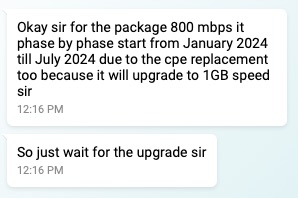 This is what CS said back in Jan. I waited until July. Also show them the screenshot where it said you'll get free upgrade. Let me see if I can find it. 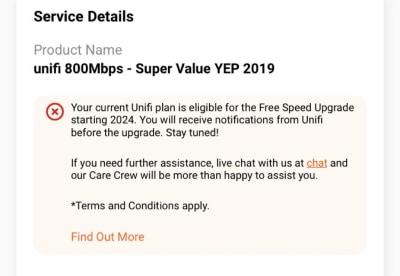 here ya go. This post has been edited by soonwai: Sep 3 2024, 03:01 PM |
|
|
|
|
|
danielyeap
|
Sep 3 2024, 03:03 PM
|
Getting Started
|
QUOTE(blacktubi @ Sep 2 2024, 07:37 PM) I am using a third party ONU and it's working flawlessly on TM Infra as well. But too bad they got no interest to sell it to the public. I just find it ridiculous that this isssue is still not solved by TM or D-Link after so long. The worst part is all the companies with this D-Link ONR are affected without a proper solution as well. On the bright side, my source told me that the Skyworth combo box with 2.5G port is coming soon and I heard it's going to be AX6000. Oh...which third party ONU are you using pls? Thanks. |
|
|
|
|
|
Omochao
|
Sep 3 2024, 03:04 PM
|
|
|
QUOTE(Jeffreynsx @ Sep 3 2024, 12:52 PM) It is a waste of time to enable secured DNS for both DOH and DOT as both of it is not working. For those who yet to take any SWU package, please hold on first as this Transparent Proxy thingy will apply to those who signed the new contract with TM. This is what I noticed so far among the users out there. I am kind of regret to take the SWU package that being treated just like that. Imagine you pay every month to your ISP and they put poison to your DNS without seeking your advise. It is against our personal rights already. Yes, I'm a user of SWU as well, funnily my posting in TM fb group got deleted when talking about external DNS getting block. Seems like they are sweeping it under the carpet, we all know TM dns is really bad at routing during peak usage period, and at times not consistent. Good luck to their customer service answering bombarding calls about browsing/downloading speed. QUOTE(BladeRider88 @ Sep 3 2024, 12:58 PM) Have you try to disable & re-enable back your NIC after you set the DoH in Windows? I've done disabling my wireless adapter, renable. Flush dns, restart even the laptop. still same result to TM dns . |
|
|
|
|
|
BladeRider88
|
Sep 3 2024, 03:07 PM
|
|
|
QUOTE(Omochao @ Sep 3 2024, 03:04 PM) Yes, I'm a user of SWU as well, funnily my posting in TM fb group got deleted when talking about external DNS getting block. Seems like they are sweeping it under the carpet, we all know TM dns is really bad at routing during peak usage period, and at times not consistent. Good luck to their customer service answering bombarding calls about browsing/downloading speed. I've done disabling my wireless adapter, renable. Flush dns, restart even the laptop. still same result to TM dns . Seriously????  They deleted your post regarding this  As for your DNS leaking issue, are you sure that you do it correctly? If you did enable IPv6, you need to set DoH on IPv6 as well |
|
|
|
|
|
go626201
|
Sep 3 2024, 03:08 PM
|
|
|
QUOTE(Jeffreynsx @ Sep 3 2024, 12:43 PM) I noticed if you did not connect to VPN, the DNS will redirect to TM DNS. If you connect to VPN, regardless of which DNS you configured, it will redirect to Google DNS. Not sure will our ISP collect our personal data information from Google? Or else why only Google DNS is being shown while not Cloudflare, OpenDNS and etc? The DNS while connected to VPN is depends of your VPN settings,some VPN providers have their own DNS server(some said SecureDNS). And you still can replace the DNS setting by changing the dns setting for the vpn network adapter. (On PC only) (for phone i dont think so with commercial vpn, but wireguard or your own vpn server is changeable) |
|
|
|
|
|
countingcrows
|
Sep 3 2024, 03:08 PM
|
Getting Started
|
QUOTE(Jjuggler @ Sep 3 2024, 11:21 AM) Also, please refer here for better clear explanation. But that was written 5 years ago? 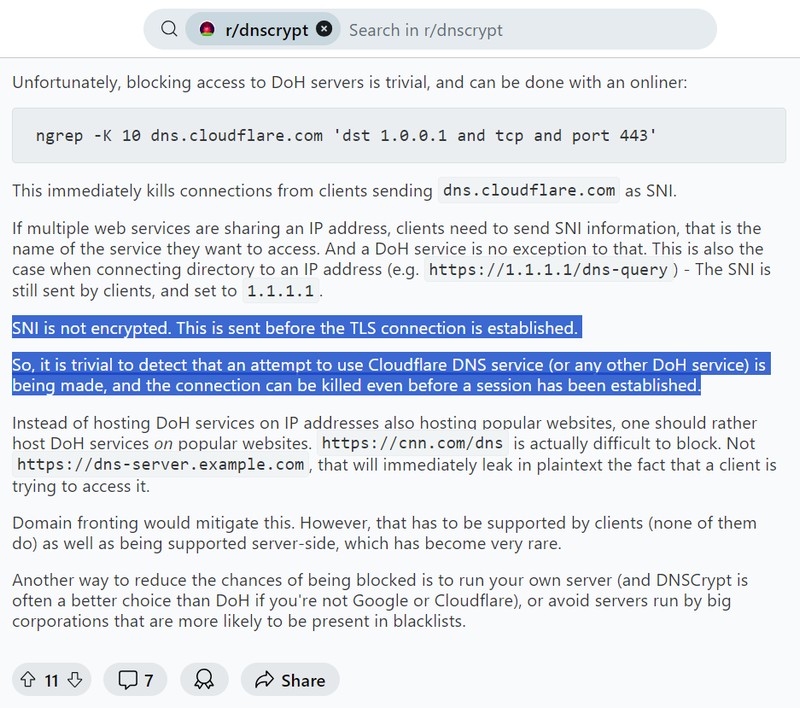 And SNI is encrypted now? So how? Test: https://www.cloudflare.com/ssl/encrypted-sni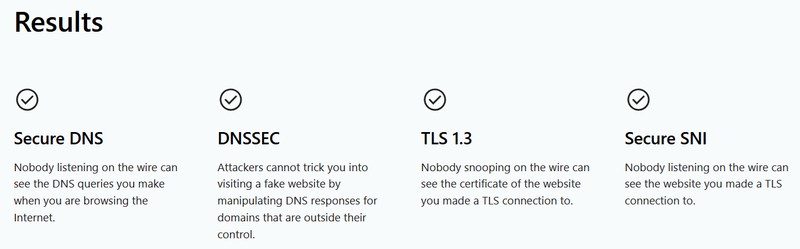 |
|
|
|
|
|
soonwai
|
Sep 3 2024, 03:16 PM
|
|
|
QUOTE(blackbox14 @ Sep 3 2024, 01:05 PM) The posters above answered that the only way to block DoH is by blocking the Domain and IP of the public DNS provider so no one can make queries. I understand if they blocked DoT by blocking the associated port, but how is it possible that they are blocking DoH AND DoT but only for specific users? Transparent Proxy should only apply if you are using neither DoT nor DoH, to my understanding. My house is using Adguard Home as the DNS. Upstream is DoH to quad9. No problems yet. I used to redirect UDP port 53 back to the local DNS to prevent devices from using their own DNS. That's all I know about this. Is this the equiv of transparent DNS proxy? This post has been edited by soonwai: Sep 3 2024, 03:19 PM |
|
|
|
|
|
zhihao4456
|
Sep 3 2024, 03:25 PM
|
|
|
QUOTE(blacktubi @ Sep 2 2024, 05:37 PM) Do you have any idea what they did? It's super hard to get the proper TM technician to come, usually they will send the contractors which are kinda bad I only saw another technician should be from their HQ remote to the on-site technician laptop, opened some command prompt to do execute some files and command and used their in-house program to make some changes which i don't understand. I made the report through the online chat, maybe whoever interested can do the same way i guess? This post has been edited by zhihao4456: Sep 3 2024, 03:33 PM |
|
|
|
|



 Quote
Quote








 0.0211sec
 0.35
0.35
 6 queries
 GZIP Disabled