Welcome Guest ( Log In | Register )

Bump Topic Topic Closed RSS Feed

Outline · [ Standard ] · Linear+

Unifi Official TM UniFi High Speed Broadband Thread V42, READ 1ST PAGE FOR RELEVANT WIFI INFO!

views
     
danielyeap
post Apr 30 2024, 08:05 AM

Getting Started
**
Junior Member
96 posts

Joined: Sep 2006


Hi Guys, I am also still waiting for my upgrade to 1Gbps.
I am currently using the Huawei HG8240H BTU and my own Mikrotik RB750Gr3 (LAN) + Asus XT8 (Wifi).
I am a networking noob and I wonder whether there's any need for Unifi to change the BTU to support 1Gbps?

Thanks.
danielyeap
post Apr 30 2024, 02:51 PM

Getting Started
**
Junior Member
96 posts

Joined: Sep 2006


QUOTE(kokomon @ Apr 30 2024, 02:40 PM)
TM came to upgrade 800Mbps to 1Gbps today. Opened MCMC ticket last week.

Cable
Download speed max ~950 and upload ~520 Mbps

WiFi
Download speed max ~750 and upload ~520 Mbps
Received Unifi ONR D-Link DPN-FX3060V.
TM Tech no idea about GPON bridge mode.

After they left, I followed instruction by eclectice for configuring GPON bridge and now back to using my own ASUS RT-AX86U.

VOIP is also working but need to enable back the proxy setting because it was disabled after changing to GPON bridge mode.

Haven't test the IPTV on my own ASUS router (LAN4).

Note: DHCP stopped working after changing to GPON bridge mode but luckily manage to login back to D-Link ONU router by connecting to LAN4 and manually set laptop IP to 192.168.0.x
*
bro, can share the steps by steps ah?
thank you thank you smile.gif
danielyeap
post Apr 30 2024, 03:16 PM

Getting Started
**
Junior Member
96 posts

Joined: Sep 2006


QUOTE(kokomon @ Apr 30 2024, 02:57 PM)
Hi bro, you can refer to guide to GPON bridge.

https://forum.lowyat.net/index.php?showtopi...ost&p=109336492
*
Thx dude smile.gif
danielyeap
post Apr 30 2024, 07:46 PM

Getting Started
**
Junior Member
96 posts

Joined: Sep 2006


QUOTE(kokomon @ Apr 30 2024, 02:57 PM)
Hi bro, you can refer to guide to GPON bridge.

https://forum.lowyat.net/index.php?showtopi...ost&p=109336492
*
Hi Bro,
If you don't mind, I have a few questions:
(1) My current Mikrotik router has IP 192.168.0.1. It seems to be the same as the ONR. Is that going to be a problem even if I set to GPON Bridge mode?
(2) Once in GPON Bridge mode, what is the method to access it again if needed?
(3) You mentioned:
"VOIP is also working but need to enable back the proxy setting because it was disabled after changing to GPON bridge mode."

I do not see that step on the shared instruction. Do you mind to elaborate please?

(4) You also mentioned:
"DHCP stopped working after changing to GPON bridge mode but luckily manage to login back to D-Link ONU router by connecting to LAN4 and manually set laptop IP to 192.168.0.x"

Which step is that in the shared instruction?

===================

Thanks in advance!
danielyeap
post May 2 2024, 08:41 AM

Getting Started
**
Junior Member
96 posts

Joined: Sep 2006


QUOTE(zeronehza @ May 2 2024, 07:57 AM)
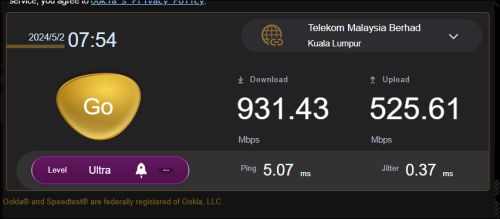
this is my upgrade from 800 -> 1Gbps
well upload not an issue with OLD ONU
super stable and maintain 5xx

the dload just 9xx..

user posted image

waiting to ask tm to change to the latest ONR too.. unlock 1Gbps barrier  rolleyes.gif
*
Hi,
Any idea why it's not hitting 1Gbps?
Thanks.
danielyeap
post May 2 2024, 03:49 PM

Getting Started
**
Junior Member
96 posts

Joined: Sep 2006


QUOTE(Anime4000 @ May 2 2024, 03:33 PM)
Yes, hopefully who on troublesome OLT get proper speed, LAN 1 can be very buggy
*
Hi,
Any idea when is this going to be available?
Thanks.
danielyeap
post May 7 2024, 12:08 PM

Getting Started
**
Junior Member
96 posts

Joined: Sep 2006


QUOTE(laihuhng @ May 7 2024, 11:57 AM)
Since February.

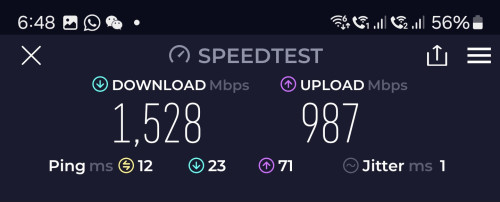
user posted image
*
Wow...is this the 2Gbps package? Any idea why it's not hitting 2Gbps (or anywhere near it?)
Thanks.
danielyeap
post May 12 2024, 07:53 AM

Getting Started
**
Junior Member
96 posts

Joined: Sep 2006


Hi Guys,
I am waiting for the 1Gbps upgrade and would like to learn more about the proper setup to achieve true 1Gbps speed (not to be limited by the hardware used).

Currently, I am using the Huawei BTU + Mikrotik RB750Gr3.

I prefer not to replace the Mikrotik, but would it be able to achieve 1Gbps speed with the new Unifi 2.5G ONU?

If not possible, any good router with 2.5G support to recommend (I still prefer Mikrotik, but it seems to have limited choice).

Thanks.
danielyeap
post Aug 19 2024, 04:16 PM

Getting Started
**
Junior Member
96 posts

Joined: Sep 2006


Hi Guys,
Just received a call from TM stating they will come over to upgrade my 800Mbps to 1Gbps.

Having read some of the comments here, I have a few questions which I hope you guys can help with:
(1) Is there stability issue (read intermittent speed reduce) with the new 1Gbps router?
(2) Can I re-use the existing Huawei BTU? I understand the speed might be down to about 940Mbps, but I am ok with that as long as it's more stable.
(3) I am currently using my own router (Mikrotik Hex and Asus XT8 for wifi). Should the TM provided ONU is stable at 1Gbps, which router is recommended to support 1Gbps throughout my home network?

Thanks.
danielyeap
post Aug 19 2024, 05:08 PM

Getting Started
**
Junior Member
96 posts

Joined: Sep 2006


QUOTE(petrofsky77 @ Aug 19 2024, 04:20 PM)
Their combo box, regardless of what brand, is problematic. It's like they never do proper research and testing and then just shove the device to us. If you don't really need the small 200MBps ish increase, just stay at 800MBps and ask for package price reduction instead.
*
Oh man...don't really care about the download speed actually, but fancy the upload...just accepted the offer, so too late now...
Let's see how this goes...thanks much!
danielyeap
post Aug 25 2024, 08:08 PM

Getting Started
**
Junior Member
96 posts

Joined: Sep 2006


Hi all, Unifi is down.
Strange thing is PON LED is on, but TEL1 is blinking.
Called TM, but cannot explain as usual.
The funny thing is they are supposed to come over to upgrade my package. Somehow, I believe it is related.
Any idea pls?
Thx.
danielyeap
post Aug 27 2024, 10:53 AM

Getting Started
**
Junior Member
96 posts

Joined: Sep 2006


Done the 1Gbps upgrade yesterday!
Received the Skyworth ComboBox (facepalm!).
Decided to switch back to my old and trusty Huawei (in bridge mode) and it works right away (the TM guys were very nice to stay back to verify with me lol).

No plan to upgrade my home LAN to 2.5/10G just yet, so happy to get the 100Mbps less than ideal speed smile.gif


danielyeap
post Aug 27 2024, 03:11 PM

Getting Started
**
Junior Member
96 posts

Joined: Sep 2006


Hi guys, any idea if there's any reliable 3rd party ONU/ONR that can work with this Unifi 1G (or beyond)?

Thanks.

This post has been edited by danielyeap: Aug 27 2024, 03:11 PM
danielyeap
post Aug 27 2024, 09:33 PM

Getting Started
**
Junior Member
96 posts

Joined: Sep 2006


QUOTE(Neptern @ Aug 27 2024, 09:23 PM)
During the upgrade, the installer gave me a set of numbers. What is it used for?
*
What? Mine didn't give me anything!! lol
danielyeap
post Aug 28 2024, 08:31 AM

Getting Started
**
Junior Member
96 posts

Joined: Sep 2006


QUOTE(Cavino @ Aug 28 2024, 08:16 AM)
Keep it. Don't let them take it away (my installer mentioned they don't take it anyway).

Yesterday tested the new black DLink ONR bridging, dropped again to 200-300Mbps permanently.
I hooked back the old Huawei modem to get back consistent 800-930Mbps speed. Will check again tonite see if it drop to 300Mbps even when using old Huawei modem.
If it drop, then its the ISP problem, if stable 800-900++, then have to abandon DLink ONR and hope for the best.

If my old Huawei ONU fail, will try to request for Huawei modem replacement. If they still insist on using the black ONR without correcting the situation for bridging, I may as well downgrade my package to 500Mbps, have even better speed than 1GB with 300Mbps bridging.
*
That's so sad to learn about that.
I abandoned the combobox they gave (did not even bother to really test it out lol) and hooked back the old but trusty Huawei rightaway tongue.gif
danielyeap
post Aug 29 2024, 05:05 PM

Getting Started
**
Junior Member
96 posts

Joined: Sep 2006


QUOTE(aa123aa @ Aug 29 2024, 05:04 PM)
possible to buy used onu/modem from shopee or carousell to replace the unstable black dlink combo onr? for 1gbps
*
Tried to search for the Huawei as spare, but could not find any decent ones lol
danielyeap
post Sep 3 2024, 03:03 PM

Getting Started
**
Junior Member
96 posts

Joined: Sep 2006


QUOTE(blacktubi @ Sep 2 2024, 07:37 PM)
I am using a third party ONU and it's working flawlessly on TM Infra as well. But too bad they got no interest to sell it to the public.

I just find it ridiculous that this isssue is still not solved by TM or D-Link after so long.

The worst part is all the companies with this D-Link ONR are affected without a proper solution as well.

On the bright side, my source told me that the Skyworth combo box with 2.5G port is coming soon and I heard it's going to be AX6000.
*
Oh...which third party ONU are you using pls?
Thanks.

Topic ClosedOptions
 

Change to:
| Lo-Fi Version
0.0417sec    0.90    7 queries    GZIP Disabled
Time is now: 18th December 2025 - 11:06 PM