Welcome Guest ( Log In | Register )

Bump Topic Topic Closed RSS Feed
495 Pages « < 248 249 250 251 252 > » Bottom

Outline · [ Standard ] · Linear+

Unifi Official TM UniFi High Speed Broadband Thread V42, READ 1ST PAGE FOR RELEVANT WIFI INFO!

views
     
Omochao
post Sep 2 2024, 08:37 PM

Enthusiast
*****
Junior Member
835 posts

Joined: Nov 2007
From: Land of Forgotten
QUOTE(dev/numb @ Sep 2 2024, 08:18 PM)
You don’t really need to have encrypted DNS capabilities on your router (although it’s good to have, no doubt) since any modern OS or browser can do it. In fact, most would recommend setting DoH/DoT on a per-device basis even if you have the feature on the router anyway, simply as an extra layer and also for when you’re outside your local network (eg: using mobile data).
*
most time it will only be me who's the one using it anyway. So would just require on the router should be enough for me to access some websites that are not so friendly.
Omochao
post Sep 2 2024, 08:38 PM

Enthusiast
*****
Junior Member
835 posts

Joined: Nov 2007
From: Land of Forgotten
QUOTE(The.Lucas.DaY @ Sep 2 2024, 08:37 PM)
I wonder what websites blocked by the isp dns, mind to share ?so i can test mine dns as well
*
anything that may deem to be not so safe for work.
dev/numb
post Sep 2 2024, 08:41 PM

On my way
****
Junior Member
691 posts

Joined: Nov 2021
QUOTE(The.Lucas.DaY @ Sep 2 2024, 08:37 PM)
I wonder what websites blocked by the isp dns, mind to share ?so i can test mine dns as well
*
Try gomen’s favorite blogger – https://murrayhunter.substack.com
The.Lucas.DaY
post Sep 2 2024, 08:46 PM

On my way
****
Junior Member
671 posts

Joined: May 2019

QUOTE(dev/numb @ Sep 2 2024, 08:41 PM)
Try gomen’s favorite blogger – https://murrayhunter.substack.com
*
Still can access to this as previously did, on chrome android, connected to CF without DoH
BladeRider88
post Sep 2 2024, 08:50 PM

On my way
****
Junior Member
554 posts

Joined: Nov 2006


QUOTE(Omochao @ Sep 2 2024, 08:07 PM)
I need to get a Pi right? They have been requesting for DoH and DoT to be included into decos, but i read somewhere it will take a toll on the CPU and RAM.

Only time will tell, as Tplink is a pain in the butt when it comes to new features.
*
Bro you are getting the hang of it hahaha 😆
Yeah a Pi will get you started 😜
Omochao
post Sep 2 2024, 08:53 PM

Enthusiast
*****
Junior Member
835 posts

Joined: Nov 2007
From: Land of Forgotten
QUOTE(BladeRider88 @ Sep 2 2024, 08:50 PM)
Bro you are getting the hang of it hahaha 😆
Yeah a Pi will get you started 😜
*
never although I know it can do a lot of blocking of ads even for non android TV.

dev/numb
post Sep 2 2024, 09:00 PM

On my way
****
Junior Member
691 posts

Joined: Nov 2021
QUOTE(The.Lucas.DaY @ Sep 2 2024, 08:46 PM)
Still can access to this as previously did, on chrome android, connected to CF without DoH
*
Means they haven’t implemented it for everyone or you already have secure/private DNS set in your Android (Connections/Network settings) or Chrome (Privacy & Security settings) setup. I think with some Android OEMs, the “Automatic” setting in the Private DNS section will default to Google DNS (using DoT) without any user interaction.
countingcrows
post Sep 2 2024, 09:02 PM

Getting Started
**
Junior Member
260 posts

Joined: Feb 2023
QUOTE(dev/numb @ Sep 2 2024, 08:41 PM)
Try gomen’s favorite blogger – https://murrayhunter.substack.com
*
Just tested. Digi does block this site but with DOH on my phone, the site loads.

So, Digi doesn't/hasn't employed any hardcore blocking that cannot be circumvented?

If Digi can load with DOH, I don't see why it will not be the same with Unifi using DOH.


Omochao
post Sep 2 2024, 09:03 PM

Enthusiast
*****
Junior Member
835 posts

Joined: Nov 2007
From: Land of Forgotten
QUOTE(dev/numb @ Sep 2 2024, 09:00 PM)
Means they haven’t implemented it for everyone or you already have secure/private DNS set in your Android (Connections/Network settings) or Chrome (Privacy & Security settings) setup. I think with some Android OEMs, the “Automatic” setting in the Private DNS section will default to Google DNS (using DoT) without any user interaction.
*
automatic will work, but private fails for now.
BladeRider88
post Sep 2 2024, 09:34 PM

On my way
****
Junior Member
554 posts

Joined: Nov 2006


QUOTE(Omochao @ Sep 2 2024, 08:53 PM)
never although I know it can do a lot of blocking of ads even for non android TV.
*
Adblocking + DoH both together in the Pi 😜
Epic_winner091
post Sep 2 2024, 09:40 PM

Casual
***
Junior Member
341 posts

Joined: Mar 2010
From: Shah Alam


I'm not observing on my end but if TM is blocking DoT. I'm guessing DoH is unaffected as they would have to block https as a whole?
dev/numb
post Sep 2 2024, 09:47 PM

On my way
****
Junior Member
691 posts

Joined: Nov 2021
QUOTE(countingcrows @ Sep 2 2024, 09:02 PM)
Just tested. Digi does block this site but with DOH on my phone, the site loads.

So, Digi doesn't/hasn't employed any hardcore blocking that cannot be circumvented?

If Digi can load with DOH, I don't see why it will not be the same with Unifi using DOH.
*
Not a networking expert, so I hope someone else with more knowledge can chime in here. From my limited understanding, you have hijacking of legacy/unencrypted/bareback DNS resolution happening either upstream (first or second hop outside your network) or locally (ISP provided router), which can be bypassed by using encrypted DNS. The other methods are firewall rules (or something similar) that blacklist sites which only a VPN can bypass (provided they aren’t blacklisting your VPN nodes as well). I know Maxis fiber does this for pr0n sites, maybe gambling sites too. I’m not sure which method (or combination of methods) all our different ISPs/telcos use here. Been on encrypted DNS (for KYC stuff) and VPNs (for non-KYC) for so long that I often can’t tell whenever ISPs are performing these perverted acts. Maybe one day when shit hits the fan and they start blocking TLS port 853 or ban VPN hostnames under the order of the cuntwaffles we voted for.


QUOTE(Omochao @ Sep 2 2024, 09:03 PM)
automatic will work, but private fails for now.
*
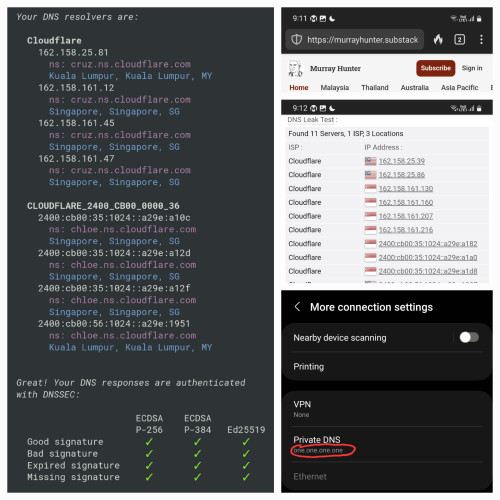
Seems to work for me. I don’t normally use Cloudflare (have a paid NextDNS account), but set it on my Android to test. Murray-chan still alive and kicking. Made a nice collage for you. Tested on both Unifi and Celcom.

user posted image

This post has been edited by dev/numb: Sep 3 2024, 01:08 AM
QuantumEdge
post Sep 2 2024, 10:04 PM

Regular
******
Senior Member
1,602 posts

Joined: Jan 2016


I'm on M and T ISPs with DoT+Adguard
So far no issue
Cant belive TM being the first to implement a full lockdown
PRSXFENG
post Sep 2 2024, 10:30 PM

Look at all my stars!!
*******
Senior Member
2,614 posts

Joined: Nov 2020


For anyone who host their own DNS Server on a raspberry pi or other Linux box, and has TM actively hijacking their DNS

May I request that you try out a specific niche protocol to see if they block it or not

Use, DNSCrypt-proxy, and connect to Quad9 over DNSCrypt
It's a lesser known and lesser heard of protocol
tng55
post Sep 2 2024, 10:46 PM

Regular
******
Senior Member
1,454 posts

Joined: Sep 2021


QUOTE(Omochao @ Sep 2 2024, 04:59 PM)
Did unifi just change their settings?

Using google dns or one dns, seems to be unable to access certain streaming websites be it adult or anime. are they outright banning some websites?
*
mine google dns asus router i can access website be it adult no problem for me
tng55
post Sep 2 2024, 10:56 PM

Regular
******
Senior Member
1,454 posts

Joined: Sep 2021


QUOTE(Jeffreynsx @ Sep 2 2024, 05:04 PM)
Yes. You may click on this link https://browserleaks.com/dns to find out whether Google, Cloudflare, OpenDNS or etc still running as per usual or all redirected to TM DNS?

For those that using own router, did you encounter similar redirected issue? Stock router already hard coded and unable to use alternate DNS.
*
look google dns works noting problem for me

Attached Image
ahlong
post Sep 2 2024, 11:01 PM

not a debt collector
****
Junior Member
612 posts

Joined: Apr 2005
From: http://127.0.0.1:80/announce


QUOTE(PRSXFENG @ Sep 2 2024, 10:30 PM)
For anyone who host their own DNS Server on a raspberry pi or other Linux box, and has TM actively hijacking their DNS

May I request that you try out a specific niche protocol to see if they block it or not

Use, DNSCrypt-proxy, and connect to Quad9 over DNSCrypt
It's a lesser known and lesser heard of protocol
*
using:
primary dns: adg + dnscrypt-proxy (cloudflare, google and nextdns) - raspi4b
secondary dns: pihole + dnscrypt-proxy (cloudflare, google and nextdns) - inside proxmox-vm ubuntu24.04

still can access but cf seems not "too" responsive. sometimes appear at dnscheck.tools sometimes not.

This post has been edited by ahlong: Sep 2 2024, 11:02 PM
kwss
post Sep 3 2024, 12:05 AM

Regular
******
Senior Member
1,208 posts

Joined: Aug 2018
QUOTE(issac99289928 @ Sep 2 2024, 07:05 AM)
a good sign . it means UNIFI needs to introduce higher speed plan in future to maintain ARPU . UNIFI has to install higher speed PON line cards.
*
Yea, some other member here mentioned they have upgraded Nokia OLT. It should be at least XG-PON. It is just that I hope it is something better than XG-PON.

QUOTE(raizer99 @ Sep 2 2024, 09:17 AM)
i facing similar issue currently, every night have high latency to everything (200++ ms) ,tell TM customer service many time only happen at night and tried different router,device , LAN and wifi still same issue then they say will report to relevant team, at the end are ask technician come to check.

At the day technician plan come to check,before he come he call me and say my area got people with same issue and he checked not device issue ,he asked me if is same issue (high latency at night) , i say yes and he say then he cannot do anything, so i asked him no need to come as i know is not device issue.

Currently the problem still exist
*
I had the same problem but I can confirmed the problem is gone after my 2Gbps Free Speed Upgrade.
Although I am still connected to the same OLT port and same BNG, latency has dropped significantly (from 100+ ms to only 4ms now).

I am using the exact same hardware, firmware and software. Didn't even unbox their ONR.

This post has been edited by kwss: Sep 3 2024, 12:10 AM

kwss
post Sep 3 2024, 12:15 AM

Regular
******
Senior Member
1,208 posts

Joined: Aug 2018
For people who has their DNS blocked, do you all mind to install nmap and run the following command?
CODE

nmap -sCV -Pn -p 53,443,853 <IP address of DNS server>

eg 1:
nmap -sCV -Pn -p 53,443,853 dns.google

eg 2:
nmap -sCV -Pn -p 53,443,853 9.9.9.9


Share your output here.
-Hzu-
post Sep 3 2024, 12:20 AM

Enthusiast
*****
Senior Member
944 posts

Joined: Oct 2010


2 September 2024 01:00 AM yesterday on the dot. My internet completely stopped working. I had a feeling it was DNS. I changed a lot of things. I didn't think that they would block DoT and DoH completely.

24 hours later, I finally figured it out after remembering the news about our ISPs hijacking and poisoning our DNS. I visited this thread and voila, it really was DoT on my router.

Firefox Max Proctection DoH doesn't work. No internet.
Router DoT doesn't work. No internet.
Changing router plain DNS basically gets hijacked with TM's DNS poison.

What the f? 20+ years never had a problem. Today we're getting full censorship?

495 Pages « < 248 249 250 251 252 > » Top
Topic ClosedOptions
 

Change to:
| Lo-Fi Version
0.0197sec    0.51    6 queries    GZIP Disabled
Time is now: 21st December 2025 - 06:34 AM