Outline ·
[ Standard ] ·
Linear+
Unifi Official TM UniFi High Speed Broadband Thread V42, READ 1ST PAGE FOR RELEVANT WIFI INFO!
|
Jeffreynsx
|
 Jul 19 2024, 04:36 PM Jul 19 2024, 04:36 PM
|

|
QUOTE(blacktubi @ Jul 18 2024, 10:28 PM) For those who got the Skyworth GN630V combo router, it's super easy to turn that thing into bridge mode and still use PPPOE at your own router. You should definitely do that as any decent third party router should have a much faster CPU than the GN630V. My settings below:  Note: VLAN tagging / IPTV Profile / VLAN profile not needed on your router with this configuration! Remember to switch off the WiFi function once that's done. Hi, currently I got Skyworth GN630V combo router, may I know why the buffer bloat for upload latency is higher than download? Isn't that the buffer bloat for Fibre Optics should be lower on both download and upload?  |
|
|
|
|
|
Jeffreynsx
|
Jul 20 2024, 04:53 PM
|
|
|
QUOTE(tng55 @ Jul 20 2024, 12:22 PM) because Skyworth GN630V combo router CPU AND RAM Unable handle that why I recommend to turn the GN630V to bridge mode then use your own router. try tp link ax73 enough handle or you want more powerful get ASUS Router I tried to setup as a bridge mode based on the screenshot provided earlier. However, I cannot connect it to my Asus Router. May I know any area need to setup to establish the connection? |
|
|
|
|
|
Jeffreynsx
|
Jul 21 2024, 08:43 AM
|
|
|
QUOTE(PRSXFENG @ Jul 20 2024, 08:54 PM) selected PPPoE in the asus and entered the username and password? Already done this part. In fact, previously I was using ZTE modem with Asus Router. No problem at all. QUOTE(tng55 @ Jul 20 2024, 09:28 PM) asus router can you need select PPPoE username and password Already done this part. In fact, previously I was using ZTE modem with Asus Router. No problem at all. |
|
|
|
|
|
Jeffreynsx
|
Jul 21 2024, 09:49 AM
|
|
|
QUOTE(yongtjunkit @ Jul 21 2024, 08:59 AM) Set ISP profile to None in Lan > IPTV If the ISP Profile set to None in LAN > IPTV from Asus Router. The VOIP will it work if I set the stock TM router to Bridge Mode? |
|
|
|
|
|
Jeffreynsx
|
Jul 25 2024, 07:12 PM
|
|
|
May I know how to set IPv6 based on Public DNS for Skyworth GN630V?
|
|
|
|
|
|
Jeffreynsx
|
Aug 10 2024, 09:46 AM
|
|
|
May I know the reason why I use stock Skyworth router, the upload latency only 1ms and if I change to Asus Router, the upload latency went up to 100ms++? The download latency is fine for both but upload latency is huge different. Any Asus router settings need to adjust to lower down the latency for upload?
This post has been edited by Jeffreynsx: Aug 10 2024, 09:48 AM
|
|
|
|
|
|
Jeffreynsx
|
Aug 10 2024, 09:47 AM
|
|
|
Duplicated.
This post has been edited by Jeffreynsx: Aug 10 2024, 09:47 AM
|
|
|
|
|
|
Jeffreynsx
|
Aug 10 2024, 10:33 AM
|
|
|
QUOTE(PRSXFENG @ Aug 10 2024, 10:24 AM) How are you configuring the Asus? PPPoE or Dynamic IP? PPPOE. QUOTE(blacktubi @ Aug 10 2024, 10:27 AM) If you are not using PPPOE mode on your ASUS router, that means you are still using the router mode on the Skyworth combo router. Ideally you should change that unit to bridge mode and setup PPPOE on your ASUS Router. If not, you are still bottlenecked by the slow CPU on the Skyworth combo router. PPPOE and Skyworth set to Bridge Mode. Even I use my ZTE modem + Asus Router. The upload latency also went up. This post has been edited by Jeffreynsx: Aug 10 2024, 10:35 AM |
|
|
|
|
|
Jeffreynsx
|
Aug 17 2024, 11:07 PM
|
|
|
QUOTE(TubeNRibbon @ Aug 17 2024, 09:18 PM) The internet slow down again! Yes. I found out a solution. Try to clear your browser history and cache. The surfing speed will restore back to normal. |
|
|
|
|
|
Jeffreynsx
|
Aug 17 2024, 11:13 PM
|
|
|
QUOTE(blacktubi @ Aug 10 2024, 10:45 AM) Try to enable AdaptiveQoS in your settings and set your upload speed and download speed properly. I tried earlier to set the QOS accordingly. However, the download speed will limit to 50% speed. Without QOS will back to normal download speed but upload latency went up. But Jitter (ms) is fine. Last time before I signed up the new SWU package, this issue never happened. After switched to SWU 4.0 package, this problem happen. Despite I swapped between ZTE and Skyworth router (set as bridge mode), both configuration getting similar outcome. If I use back Skyworth router as main router, both the download and upload latency is fine. It seems like our ISP need us to use the stock router in order to fully utilized the speed. |
|
|
|
|
|
Jeffreynsx
|
Sep 2 2024, 06:50 AM
|
|
|
QUOTE(ntw @ Sep 2 2024, 02:40 AM) Just noticed that my Unbound + Adguard stopped working all of a sudden, unable to nslookup google.com until I turned off DNS over TLS in Unbound. Seems like TM started blocking port 853 Indeed TM started blocking port 853. Now the only thing can unblock is using VPN. |
|
|
|
|
|
Jeffreynsx
|
Sep 2 2024, 01:07 PM
|
|
|
Anyone can guide me how to configure QOS for Asus Router. If let's say I got 500mbps package, how to set the download and upload MB if select under Adaptive QOS with Manual Settings? I tried to set download and upload with 8% to 10% more than the bandwidth range, still cannot achieve the best result. If set exactly the same download and upload MB, the download speed will reduce by half. If no QOS, the upload latency will goes up.
This post has been edited by Jeffreynsx: Sep 2 2024, 01:10 PM
|
|
|
|
|
|
Jeffreynsx
|
Sep 2 2024, 02:15 PM
|
|
|
QUOTE(tng55 @ Sep 2 2024, 01:40 PM) mine asus router i don't use QOS its bad due cpu usage higher for router mine 500mbps i disable QOS long time already i never set QOS ago untouched its disable When I ping for 500mbps, the latency for upload similar like the screenshot here. Ignored the download speed as I taken it from some other user result. Somemore I'm on LAN cable. By right the latency should be at minimum level if QOS is disable. This post has been edited by Jeffreynsx: Sep 2 2024, 02:21 PM Attached thumbnail(s)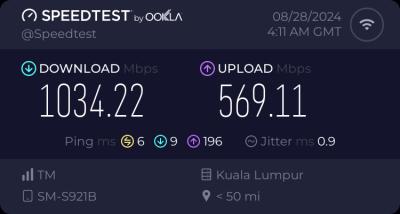
|
|
|
|
|
|
Jeffreynsx
|
Sep 2 2024, 02:27 PM
|
|
|
QUOTE(hasmidzul_jojo @ Sep 2 2024, 02:20 PM) Maybe your asus router cpu cannot handle your internet speed.Try to lower to 250Mbps on the download and 100Mbps on the upload.Test again. BTW, this was my test against sydney server.QOS is disable. 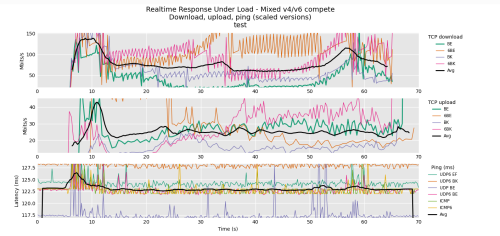 I'm currently using Asus RT-AX3000 router. Will the Asus router unable to cope with 500mbps speed? This post has been edited by Jeffreynsx: Sep 2 2024, 02:30 PM |
|
|
|
|
|
Jeffreynsx
|
Sep 2 2024, 05:04 PM
|
|
|
QUOTE(Omochao @ Sep 2 2024, 04:59 PM) Did unifi just change their settings? Using google dns or one dns, seems to be unable to access certain streaming websites be it adult or anime. are they outright banning some websites? Yes. You may click on this link https://browserleaks.com/dns to find out whether Google, Cloudflare, OpenDNS or etc still running as per usual or all redirected to TM DNS? For those that using own router, did you encounter similar redirected issue? Stock router already hard coded and unable to use alternate DNS. This post has been edited by Jeffreynsx: Sep 2 2024, 05:09 PM |
|
|
|
|
|
Jeffreynsx
|
Sep 2 2024, 05:09 PM
|
|
|
QUOTE(Omochao @ Sep 2 2024, 05:08 PM) Yup, running the test and with your link keep showing TM dns server results. Guess this it ? Malaysian internet censorship at its full force? My router doesn't supports DoH or other method, just plain old dns address, anyway to bypass this besides using VPN? Are you using your own router or stock router? Even DOH and DOT both is not working. I already tested. This post has been edited by Jeffreynsx: Sep 2 2024, 05:10 PM |
|
|
|
|
|
Jeffreynsx
|
Sep 2 2024, 05:12 PM
|
|
|
QUOTE(Omochao @ Sep 2 2024, 05:11 PM) own router, Deco X50. Ahh, then is game over for all of us who wants to go further in the web? I think for the time being only can use VPN. They hard coded it. |
|
|
|
|
|
Jeffreynsx
|
Sep 2 2024, 05:17 PM
|
|
|
QUOTE(go626201 @ Sep 2 2024, 05:16 PM) Looks like currently still not all area are under DNS hijacking/poisoning. My end still looks goods with those dns servers. They will implement it in batch by batch. |
|
|
|
|
|
Jeffreynsx
|
Sep 2 2024, 05:19 PM
|
|
|
QUOTE(Omochao @ Sep 2 2024, 05:13 PM) lmao, not even google dns is allowed? can DNS screw up their servers? Time to use Starlink once the speed get boosted. |
|
|
|
|
|
Jeffreynsx
|
Sep 2 2024, 05:20 PM
|
|
|
QUOTE(countingcrows @ Sep 2 2024, 05:18 PM) Go into Chrome Settings and turn on Secure DNS 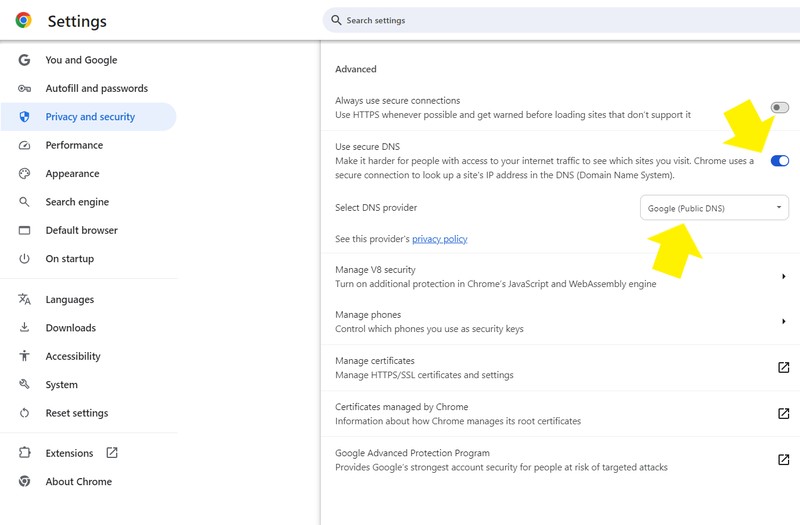 I tried it earlier. If you close the browser and open back, you no longer able to access the webpage. |
|
|
|
|



 Quote
Quote
 0.0371sec
 0.78
0.78
 7 queries
 GZIP Disabled