Welcome Guest ( Log In | Register )

Bump Topic Topic Closed RSS Feed
5 Pages  1 2 3 > » Bottom

Outline · [ Standard ] · Linear+

Unifi Official TM UniFi High Speed Broadband Thread V42, READ 1ST PAGE FOR RELEVANT WIFI INFO!

views
     
blackbox14
post Aug 8 2024, 02:32 AM

Casual
***
Junior Member
349 posts

Joined: Jul 2012
QUOTE(kwss @ Aug 8 2024, 12:10 AM)
DNS wall climbing for beginner
This quick guide will teach you how to use CDN to front DoH server using Amazon CloudFront.
The benefit this provides over other method is the difficulty of the censor to block this kind of setup without blocking the whole CDN provider.

Requirements:
AWS Account
Browser / OS / resolver supporting DoH
*
Just want to ask. Isn't this illegal or against the ToS of these cloud service providers? I've heard of domain fronting before and I thought it was mostly restricted. Or is that a different thing altogether?
blackbox14
post Aug 8 2024, 03:35 AM

Casual
***
Junior Member
349 posts

Joined: Jul 2012
QUOTE(junsheng @ Aug 8 2024, 03:18 AM)
if it's discovered / reported you just get a ban
then proceed to created another new account for the same thing
*
I still think the risk that you can get banned for domain fronting should be highlighted in the guide since you need to input credit card info, real name/address, etc. to register for AWS.
blackbox14
post Aug 8 2024, 04:02 AM

Casual
***
Junior Member
349 posts

Joined: Jul 2012
QUOTE(kwss @ Aug 8 2024, 03:41 AM)
This is not domain fronting as i do not spoof SNI anywhere. The SNI and Host header are the same throughout the connection.

All CDN already blocked domain fronting.
*
Thanks for clarifying. Wanted to be sure since it sounded very similar to that, but I didn't know the technical differences.
blackbox14
post Sep 3 2024, 10:26 AM

Casual
***
Junior Member
349 posts

Joined: Jul 2012
QUOTE(-Hzu- @ Sep 3 2024, 12:20 AM)
2 September 2024 01:00 AM yesterday on the dot. My internet completely stopped working. I had a feeling it was DNS. I changed a lot of things. I didn't think that they would block DoT and DoH completely.

24 hours later, I finally figured it out after remembering the news about our ISPs hijacking and poisoning our DNS. I visited this thread and voila, it really was DoT on my router.

Firefox Max Proctection DoH doesn't work. No internet.
Router DoT doesn't work. No internet.
Changing router plain DNS basically gets hijacked with TM's DNS poison.

What the f? 20+ years never had a problem. Today we're getting full censorship?
*
For those more knowledgeable about these things: is there a way they can block DoH without just IP blocking the DNS provider (Google, Cloudflare, quad9, etc.)?

I understand DoT can be blocked by blocking port 853.
blackbox14
post Sep 3 2024, 01:05 PM

Casual
***
Junior Member
349 posts

Joined: Jul 2012
QUOTE(Jeffreynsx @ Sep 3 2024, 12:52 PM)
It is a waste of time to enable secured DNS for both DOH and DOT as both of it is not working. For those who yet to take any SWU package, please hold on first as this Transparent Proxy thingy will apply to those who signed the new contract with TM. This is what I noticed so far among the users out there. I am kind of regret to take the SWU package that being treated just like that. Imagine you pay every month to your ISP and they put poison to your DNS without seeking your advise. It is against our personal rights already.
*
The posters above answered that the only way to block DoH is by blocking the Domain and IP of the public DNS provider so no one can make queries. I understand if they blocked DoT by blocking the associated port, but how is it possible that they are blocking DoH AND DoT but only for specific users?

Transparent Proxy should only apply if you are using neither DoT nor DoH, to my understanding.
blackbox14
post Sep 3 2024, 01:28 PM

Casual
***
Junior Member
349 posts

Joined: Jul 2012
QUOTE(Jeffreynsx @ Sep 3 2024, 01:19 PM)
If you read the recent comments given by different users, some user can access without issue while some totally cannot access despite using own router. If you mentioned it apply for all, then why some people still can access using DOT and DOH?
*
That's what I'm trying to make sense of. Maybe this is done through a setting in the ONU/modem that they remote accessed into and changed, assuming your idea of SWU users being affected. Or maybe it only affects certain TM IP ranges.

One of the people you quoted also has some DNS providers blocked according to nmap, but can still access blocked sites. It is very unusual.
blackbox14
post Sep 3 2024, 06:50 PM

Casual
***
Junior Member
349 posts

Joined: Jul 2012
QUOTE(dev/numb @ Sep 3 2024, 06:37 PM)
This is probably a good thing. Means they cannot MiTM an encrypted connection and redirect you. Can only block the hostname/IP outright. The question now becomes why you are experiencing this and I am not. Are they doing this in stages or is it perhaps being done locally by the newer ONU (mine’s the old white Huawei) boxes?
*
Yeah the ONU given to new SWU contractees is definitely suspect as some have said. Other factors could be the region (which state) and the IP address range.

Hopefully more people experiencing this come forward and we can start seeing what they have in common.

This post has been edited by blackbox14: Sep 3 2024, 06:51 PM
blackbox14
post Sep 3 2024, 07:21 PM

Casual
***
Junior Member
349 posts

Joined: Jul 2012
QUOTE(wai57 @ Sep 3 2024, 07:15 PM)
Anyone's internet not able to go into iherb, torrent, XX stuffs despite using 8888 or 1111 dns anymore?
*
Are you also under Stay With Unifi and got upgraded recently? Did you recently get a new ONU/modem and router with the upgrade?

Several users here have reported this but trying to confirm what there is in common.
blackbox14
post Sep 3 2024, 07:32 PM

Casual
***
Junior Member
349 posts

Joined: Jul 2012
QUOTE(wai57 @ Sep 3 2024, 07:27 PM)

I am under SWU upgraded to 500mbps, but modem same old. Guess I'll have to rely on VPN from now on?
*
Interesting. So far some of those affected have been SWU upgraded also but you don't have any new equipment. So that rules out the ONU as how they implement the block.

If your DNS is set on router level and if the rest of the internet is working besides the blocked sites, try setting DoH on your browser and see if that works.

This post has been edited by blackbox14: Sep 3 2024, 07:34 PM
blackbox14
post Sep 3 2024, 07:49 PM

Casual
***
Junior Member
349 posts

Joined: Jul 2012
QUOTE(wai57 @ Sep 3 2024, 07:39 PM)
"ONU" "Doh" , I'll have to do some researching on that. I'll give it a try!

Yeah,, I did however changed the router though to tplink AX12
*
DoH or DNS over HTTPS setting on browser depends on which browser you use. For example on Firefox it's under Settings -> Privacy and Security -> scroll all the way down. Set it to Max Protection and use Cloudflare or nextDNS.

If your internet is still working besides those sites you tried to visit then the block that they applied to you is a bit different. The others here couldn't use their internet connections at all unless they set the DNS setting on router back to the default.

QUOTE(soonwai @ Sep 3 2024, 07:42 PM)
I'm still using the old Huawei ONT so it's probably not that. Likely region based before TM rolls it out fully. So far I've seen dns.google, dns.opendns.com and dns.cloudflare.com being "hijacked" and ports for DoH & DoT blocked.

I'm in Kajang using ibse01.bgi.
*
I may be wrong but they can't block the port for DoH, so they must be blocking the IP/domain/hostname or whatever you call it. DoT has a dedicated port so yeah, that can be blocked.

Are you seeing posts about this on socmed or are you now affected as well?
blackbox14
post Sep 3 2024, 09:24 PM

Casual
***
Junior Member
349 posts

Joined: Jul 2012
QUOTE(soonwai @ Sep 3 2024, 09:05 PM)
Yup, just checked with "8.8.8.8", the eleet to rrent site is going to 175.139.142.25 which is TM's DNS purgatory somewhere in Brickfields.
*
The way the block is implemented doesnt seem to be consistent either. The others from earlier said DoH quad9 doesnt work for them, and wai57 above said some of the sites you can go to just fine are blocked for him.
blackbox14
post Sep 3 2024, 09:43 PM

Casual
***
Junior Member
349 posts

Joined: Jul 2012
QUOTE(tng55 @ Sep 3 2024, 09:35 PM)
mine SWU 3.0 500MBPS RM119 old BTU and my own old router asus but still without problem for me
*
Probably rolling out these blocks in stages as soonwai said. Keep an eye on it if you suddenly lose access.
blackbox14
post Sep 4 2024, 12:18 AM

Casual
***
Junior Member
349 posts

Joined: Jul 2012
So given what they are doing blocks even DoH, will that Amazon AWS wall climbing method still work even when using cloudflare-dns.com or dns.google as the origin?
blackbox14
post Sep 4 2024, 12:55 AM

Casual
***
Junior Member
349 posts

Joined: Jul 2012
QUOTE(kwss @ Sep 4 2024, 12:48 AM)
The day this method stop working is when AWS pack up and leave Malaysia. It cannot be blocked.

Or, they learn from AWS China where you must show Amazon your ICP license before you can use CloudFront. Not gonna happen here. If it does happen, just move your account elsewhere. My AWS account is not under Malaysia so won't affect me either way.
*
So that method works with any public DNS provider including quad9, right? Are there any limitations besides the 1TB data transfer and 10mil requests that I should know about?

I'm guessing I shouldn't be using it on OS level since I watch a lot of streams and Steam games need to patch sometimes.
blackbox14
post Sep 4 2024, 01:06 AM

Casual
***
Junior Member
349 posts

Joined: Jul 2012
QUOTE(kwss @ Sep 4 2024, 01:00 AM)
There is no limitation. AWS is not like Cloudflare where there is different tier. Every account is full featured account.

I use it for the whole house (in Mikrotik) and my mobile phone with the Intra app.
I also use it on my laptop in browser and with dnscrypt-proxy system wide.

Still USD $0.01 per month.

You don't have to worry about stream and patching. They just query DNS once and load data. Your OS also has its own DNS cache.

10 million request per month is a lot!

Yes it works with any DoH provider
*
What would be the best way to verify that it is working properly after I've set it up? Other than trying to load blocked sites, of course.
blackbox14
post Sep 4 2024, 01:15 AM

Casual
***
Junior Member
349 posts

Joined: Jul 2012
QUOTE(kwss @ Sep 4 2024, 01:09 AM)
You can view your telemetry in the CloudFront dashboard. It should show your URL and how many requests are made.
You can also use DNS checker to see if your configured DoH provider is used.
*
Thanks for answering. It's very helpful. I'll consider trying it out if they start targeting other DNS providers as well.
blackbox14
post Sep 4 2024, 12:19 PM

Casual
***
Junior Member
349 posts

Joined: Jul 2012
QUOTE(BladeRider88 @ Sep 4 2024, 09:58 AM)
It will be implemented on all ISP in Malaysia eventually.
Maxis, TM Unifi & Time already started action (according to my circle of friends)
*
Yeah for Unifi it is looking more and more like they are testing in stages before rolling out to everyone. Last time they did short tests late at night and right now they are doing random regions as samples.

Because they didn't just target the naked DNS like Maxis and TIME, but also want to block DoT and DoH, there is slightly more upkeep for them. So they are probably checking to see how effective it is and maybe expose how people choose to bypass it.
blackbox14
post Sep 4 2024, 03:46 PM

Casual
***
Junior Member
349 posts

Joined: Jul 2012
QUOTE(isr25 @ Sep 4 2024, 03:25 PM)
Or use NextDNS. Cheaper at RM80/year - or 300k lookups free monthly
*
I would actually avoid using any subscription-based, paid DNS solution as an alternative for the time being.

Since this isn't the final version of the DNS block wall that will be rolled out to everyone, they may decide to block those paid DNS services as well. TM may be checking based on how many connections to haram websites are blocked by their poisoning, how many are bypassed and the methods used to bypass. My guess is that they must have some kind of number that they have to meet for the new restrictions to be deemed 'sufficient' by MCMC/Fahmi/whoever is in charge, otherwise this would have been released nationwide already.

IMO better to wait and see just how many DNS services will be blocked when everyone gets blocked, then start to find alternatives. For all you know, by then only VPNs will work.
blackbox14
post Sep 4 2024, 09:17 PM

Casual
***
Junior Member
349 posts

Joined: Jul 2012
QUOTE(soonwai @ Sep 4 2024, 08:53 PM)
Maybe coincidence but yesterday somebody mentioned Quad9, today TM already took control.
*
To be fair Quad9 was being intercepted for some people even before that, and it is one of the more popular DNS available.

But yes, this is no longer 2008 or 2010s. They might be checking places like this so they can get as many blocks as possible. I think it might be best to limit discussion of workarounds to DMs or private forums.
blackbox14
post Sep 4 2024, 10:02 PM

Casual
***
Junior Member
349 posts

Joined: Jul 2012
QUOTE(QuantumEdge @ Sep 4 2024, 09:48 PM)
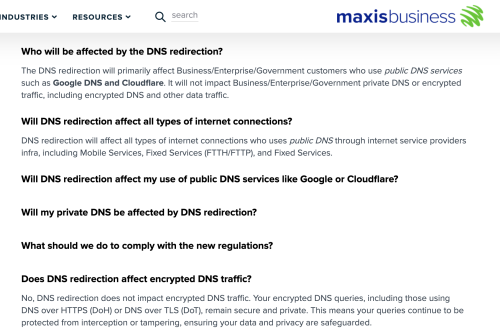
user posted image
https://www.business.maxis.com.my/en/faq/da...ns-redirection/

Congrats TM
According to this, Maxis is not going to touch DoT DoH
They even push users to use encrypted DNS, Lmao
*
That's for business customers right? Not Maxis home users.

5 Pages  1 2 3 > » Top
Topic ClosedOptions
 

Change to:
| Lo-Fi Version
0.0396sec    0.63    7 queries    GZIP Disabled
Time is now: 18th December 2025 - 01:10 PM