

QUOTE(Omochao @ Sep 2 2024, 05:13 PM)
lmao, not even google dns is allowed? can DNS screw up their servers?

Time to use Starlink once the speed get boosted.Unifi Official TM UniFi High Speed Broadband Thread V42, READ 1ST PAGE FOR RELEVANT WIFI INFO!
|
|
 Sep 2 2024, 05:19 PM Sep 2 2024, 05:19 PM
|
 
Senior Member
774 posts Joined: Jun 2014 
|
QUOTE(Omochao @ Sep 2 2024, 05:13 PM) lmao, not even google dns is allowed? can DNS screw up their servers? Time to use Starlink once the speed get boosted. |
|
|
|
|
|
Sep 2 2024, 05:20 PM
Show posts by this member only | IPv6 | Post
#4962
|

Junior Member
835 posts Joined: Nov 2007 From: Land of Forgotten
|
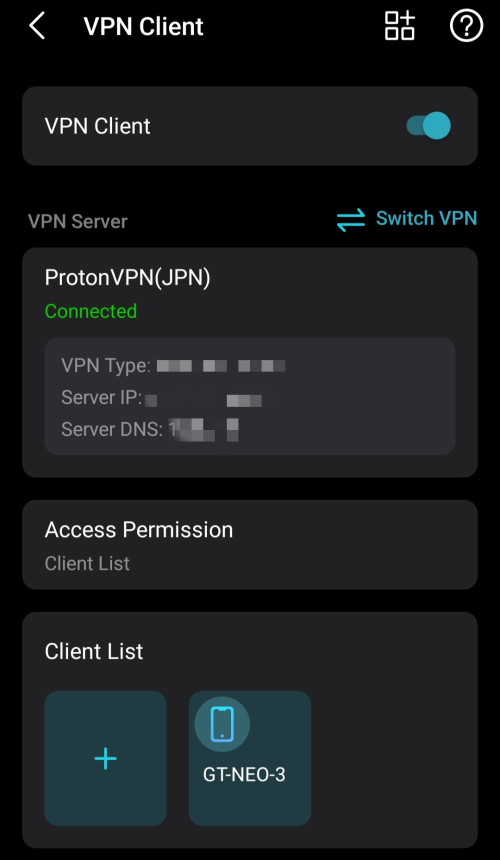
Yes, gotta use VPN for the moment. Seems like they patch out all DNS to fail, no wonder my I had notifications that it couldnt be connected last night about my Private DNS settings on mobile devices which has set to ad guard dns profile.
|
|
|
Sep 2 2024, 05:20 PM
Show posts by this member only | IPv6 | Post
#4963
|

Senior Member
1,882 posts Joined: Sep 2017
|
QUOTE(Jeffreynsx @ Sep 2 2024, 05:17 PM) They will implement it in batch by batch. Nevermind,i already implement DoH and DoT on my personal dns server(smartdns+adguard).  BladeRider88 liked this post
|
|
|
Sep 2 2024, 05:20 PM
|
|
Senior Member
774 posts Joined: Jun 2014
|
QUOTE(countingcrows @ Sep 2 2024, 05:18 PM) Go into Chrome Settings and turn on Secure DNS I tried it earlier. If you close the browser and open back, you no longer able to access the webpage.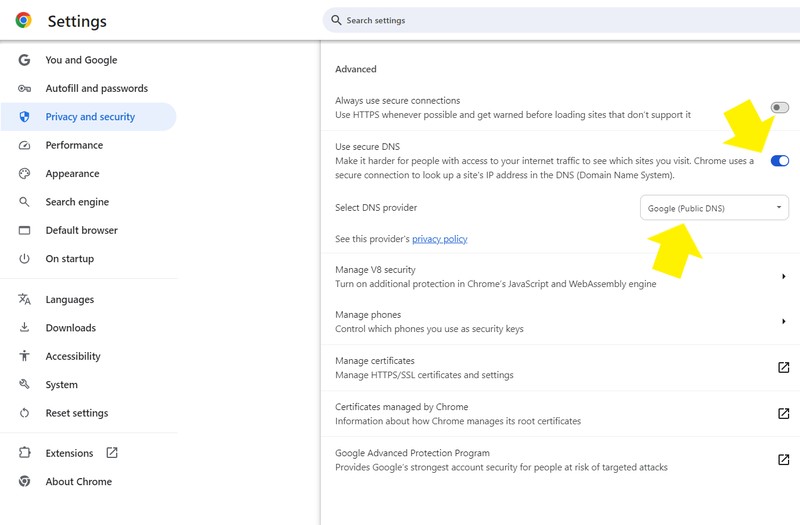 |
|
|
Sep 2 2024, 05:24 PM
Show posts by this member only | IPv6 | Post
#4965
|
|
Junior Member
835 posts Joined: Nov 2007 From: Land of Forgotten
|
QUOTE(countingcrows @ Sep 2 2024, 05:18 PM) Go into Chrome Settings and turn on Secure DNS can't even load at all when set to OPENdns.... |
|
|
Sep 2 2024, 05:27 PM
Show posts by this member only | IPv6 | Post
#4966
|

Junior Member
260 posts Joined: Feb 2023
|
QUOTE(Jeffreynsx @ Sep 2 2024, 05:20 PM) I tried it earlier. If you close the browser and open back, you no longer able to access the webpage. QUOTE(Omochao @ Sep 2 2024, 05:24 PM) can't even load at all when set to OPENdns.... What if you select Add Custom DNS Service Provider ?https://dns.quad9.net/dns-query |
|
|
|
|
|
Sep 2 2024, 05:27 PM
Show posts by this member only | IPv6 | Post
#4967
|
|
Junior Member
835 posts Joined: Nov 2007 From: Land of Forgotten
|
The only way for the moment, hopefully VPN don't block this method.
 |
|
|
Sep 2 2024, 05:37 PM
Show posts by this member only | IPv6 | Post
#4968
|
 
Elite
8,421 posts Joined: Jul 2008 
|
QUOTE(zhihao4456 @ Sep 2 2024, 04:24 PM) Latest Update: Do you have any idea what they did?* For those who is facing drop of internet speed using bridge mode TM technician has came to my premise to do some configuration to the BLACK BOX. Technician laptop was connected to it then ANYDESK was used for their other technician to access to do some command patching and programming stuff and uses some problem tool. Now my 2Gbps does not have drop speed issue for a week. I reported my case through the online chat from their website mentioning my problem and requiring their highest professional team to settle the issue. Hope this helps everyone out there. It's super hard to get the proper TM technician to come, usually they will send the contractors which are kinda bad |
|
|
Sep 2 2024, 06:07 PM
Show posts by this member only | IPv6 | Post
#4969
|

Senior Member
2,400 posts Joined: Jul 2009 From: /dev/null 
|
QUOTE(blacktubi @ Sep 2 2024, 05:37 PM) Do you have any idea what they did? many facing same issue even highest technicion come to configure, not all is same place, lastly using my PON Stick solve the issue,It's super hard to get the proper TM technician to come, usually they will send the contractors which are kinda bad I suspect speed drop due to T-CONT not match and/or dead T-CONT |
|
|
Sep 2 2024, 06:23 PM
Show posts by this member only | IPv6 | Post
#4970
|

Junior Member
554 posts Joined: Nov 2006
|
QUOTE(Omochao @ Sep 2 2024, 05:08 PM) Yup, running the test and with your link keep showing TM dns server results. Guess this it ? Malaysian internet censorship at its full force? BroMy router doesn't supports DoH or other method, just plain old dns address, anyway to bypass this besides using VPN? If you willing to learn a bit of Linux, i can suggest you setup your own DNS server which can support DoH out of the box. Sorry to say many TP Link WiFi 6 product does not support DoH/DoT out of the box, so external device are recommended. You can even host a VM if your PC is on 24/7. |
|
|
Sep 2 2024, 06:28 PM
Show posts by this member only | IPv6 | Post
#4971
|
|
Senior Member
2,400 posts Joined: Jul 2009 From: /dev/null
|
QUOTE(BladeRider88 @ Sep 2 2024, 06:23 PM) Bro Using BIND9 ?If you willing to learn a bit of Linux, i can suggest you setup your own DNS server which can support DoH out of the box. Sorry to say many TP Link WiFi 6 product does not support DoH/DoT out of the box, so external device are recommended. You can even host a VM if your PC is on 24/7. |
|
|
Sep 2 2024, 06:31 PM
|
|
Junior Member
36 posts Joined: Apr 2019
|
QUOTE(BladeRider88 @ Sep 2 2024, 06:23 PM) Bro TP-Link Archer AX55If you willing to learn a bit of Linux, i can suggest you setup your own DNS server which can support DoH out of the box. Sorry to say many TP Link WiFi 6 product does not support DoH/DoT out of the box, so external device are recommended. You can even host a VM if your PC is on 24/7. 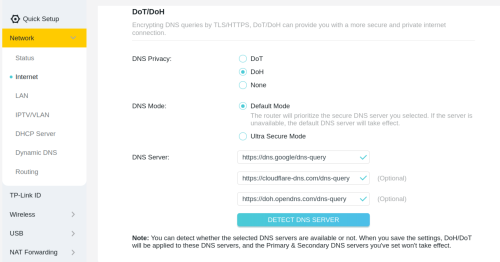 |
|
|
Sep 2 2024, 06:32 PM
Show posts by this member only | IPv6 | Post
#4973
|
|
Junior Member
554 posts Joined: Nov 2006
|
QUOTE(Anime4000 @ Sep 2 2024, 06:28 PM) Using BIND9 ? Hi sifuNot Bind9, too advanced for me to guide people if shits arise 🤣 I recommend ppl use Dietpi + AGH ( sorry for the short form, scared of ISP spy) |
|
|
|
|
|
Sep 2 2024, 06:33 PM
Show posts by this member only | IPv6 | Post
#4974
|

Junior Member
584 posts Joined: May 2013
|
QUOTE(tng55 @ Sep 2 2024, 02:02 PM) you mean 500Mbps without TV Package RM119 NOT RM109 Right Total: RM109.00mine paying RM119 500Mbps |
|
|
Sep 2 2024, 06:33 PM
Show posts by this member only | IPv6 | Post
#4975
|
|
Junior Member
554 posts Joined: Nov 2006
|
QUOTE(iotbot000 @ Sep 2 2024, 06:31 PM) TP-Link Archer AX55 Bro..i said many , not entirely, got difference k? I also know AX55 does support, but our bro here not using AX55 so beat it 😂 You can read it over here, TP link finally update their info on Wifi 7 routers https://community.tp-link.com/en/home/forum/topic/617138 This post has been edited by BladeRider88: Sep 2 2024, 06:35 PM |
|
|
Sep 2 2024, 06:41 PM
|
|
Junior Member
36 posts Joined: Apr 2019
|
QUOTE(BladeRider88 @ Sep 2 2024, 06:33 PM) Bro..i said many , not entirely, got difference k? I thought AX55 is kind of on the lower end of the TP-Link WiFi 6 product range, so the higher end ones would probably have support of DoH/DoT. Not the case ? Guess I got lucky to have AX55.I also know AX55 does support, but our bro here not using AX55 so beat it 😂 You can read it over here, TP link finally update their info on Wifi 7 routers https://community.tp-link.com/en/home/forum/topic/617138 BladeRider88 liked this post
|
|
|
Sep 2 2024, 07:37 PM
Show posts by this member only | IPv6 | Post
#4977
|
|
Elite
8,421 posts Joined: Jul 2008
|
QUOTE(Anime4000 @ Sep 2 2024, 06:07 PM) many facing same issue even highest technicion come to configure, not all is same place, lastly using my PON Stick solve the issue, I am using a third party ONU and it's working flawlessly on TM Infra as well. But too bad they got no interest to sell it to the public.I suspect speed drop due to T-CONT not match and/or dead T-CONT I just find it ridiculous that this isssue is still not solved by TM or D-Link after so long. The worst part is all the companies with this D-Link ONR are affected without a proper solution as well. On the bright side, my source told me that the Skyworth combo box with 2.5G port is coming soon and I heard it's going to be AX6000. |
|
|
Sep 2 2024, 08:07 PM
Show posts by this member only | IPv6 | Post
#4978
|
|
Junior Member
835 posts Joined: Nov 2007 From: Land of Forgotten
|
QUOTE(BladeRider88 @ Sep 2 2024, 06:23 PM) Bro I need to get a Pi right? They have been requesting for DoH and DoT to be included into decos, but i read somewhere it will take a toll on the CPU and RAM.If you willing to learn a bit of Linux, i can suggest you setup your own DNS server which can support DoH out of the box. Sorry to say many TP Link WiFi 6 product does not support DoH/DoT out of the box, so external device are recommended. You can even host a VM if your PC is on 24/7. Only time will tell, as Tplink is a pain in the butt when it comes to new features. |
|
|
Sep 2 2024, 08:18 PM
|

Junior Member
691 posts Joined: Nov 2021
|
QUOTE(Omochao @ Sep 2 2024, 08:07 PM) I need to get a Pi right? They have been requesting for DoH and DoT to be included into decos, but i read somewhere it will take a toll on the CPU and RAM. You don’t really need to have encrypted DNS capabilities on your router (although it’s good to have, no doubt) since any modern OS or browser can do it. In fact, most would recommend setting DoH/DoT on a per-device basis even if you have the feature on the router anyway, simply as an extra layer and also for when you’re outside your local network (eg: using mobile data).Only time will tell, as Tplink is a pain in the butt when it comes to new features. |
|
|
Sep 2 2024, 08:37 PM
Show posts by this member only | IPv6 | Post
#4980
|

Junior Member
671 posts Joined: May 2019 
|
QUOTE(Omochao @ Sep 2 2024, 05:24 PM) can't even load at all when set to OPENdns.... I wonder what websites blocked by the isp dns, mind to share ?so i can test mine dns as well |
|
Topic ClosedOptions
|
| Change to: |  0.0207sec 0.0207sec
 0.60 0.60
 6 queries 6 queries
 GZIP Disabled GZIP Disabled
Time is now: 21st December 2025 - 12:48 AM |
 Quote
Quote