

QUOTE(cyberic @ Aug 9 2024, 03:36 PM)
Switched to SWU 3.0 300 package before the free upgrade to 500? Or it was standard 300 package?

It was standard 300 before free upgrade last yearUnifi Official TM UniFi High Speed Broadband Thread V42, READ 1ST PAGE FOR RELEVANT WIFI INFO!
|
|
 Aug 9 2024, 04:23 PM Aug 9 2024, 04:23 PM
|
 
Junior Member
671 posts Joined: May 2019  
|
QUOTE(cyberic @ Aug 9 2024, 03:36 PM) Switched to SWU 3.0 300 package before the free upgrade to 500? Or it was standard 300 package? It was standard 300 before free upgrade last year |
|
|
|
|
|
Aug 9 2024, 05:01 PM
|

All Stars
14,909 posts Joined: Jul 2005 
|
QUOTE(hizadzahid @ Aug 9 2024, 04:05 PM) On the 12 August. God willing will get my free upgrade from 800Mbps to 2Gbps 800Mb/s would only get 1Gb/s no? |
|
|
Aug 9 2024, 05:02 PM
|

Senior Member
1,196 posts Joined: Sep 2018 
|
QUOTE(hizadzahid @ Aug 9 2024, 04:05 PM) On the 12 August. God willing will get my free upgrade from 800Mbps to 2Gbps 2Gbps 😳😳 it's supposed to be 1Gbps right? |
|
|
Aug 9 2024, 07:14 PM
Show posts by this member only | IPv6 | Post
#4344
|

Senior Member
3,307 posts Joined: Dec 2012
|
QUOTE(hizadzahid @ Aug 9 2024, 04:05 PM) On the 12 August. God willing will get my free upgrade from 800Mbps to 2Gbps Thanks God if you boost from 800mbps to 2Gbps. |
|
|
Aug 9 2024, 07:19 PM
Show posts by this member only | IPv6 | Post
#4345
|

Senior Member
1,058 posts Joined: Nov 2009
|
QUOTE(soonwai @ Jul 31 2024, 10:20 PM) ...which is RM159 (+Ultimate Pack+STD20). May I know how is your bill listing after the upgrade to 1TB? Thanks. |
|
|
Aug 9 2024, 07:24 PM
|

Senior Member
6,831 posts Joined: Oct 2008 From: Kuala Lumpur 
|
QUOTE(A183RT0 @ Aug 9 2024, 09:48 AM) i already change my router and still the same.. Need to get technician to check the DB outside your house. BTW, i change from TM DIR-X3060Z to my old Asus RT-AC85U  port issue?? they already tried the reset port while i turned off the router, still the same. or maybe i didn't understand at all QUOTE(tng55 @ Aug 9 2024, 11:16 AM) ohh RT-AC85U still speed bad Give him your inside contact, maybe can also help him to troubleshoot unifi connection.what BTU you use ??? |
|
|
|
|
|
Aug 9 2024, 07:31 PM
Show posts by this member only | IPv6 | Post
#4347
|

All Stars
11,459 posts Joined: Oct 2007 From: KL
|
QUOTE(eugenecctan @ Aug 9 2024, 07:19 PM) May I know how is your bill listing after the upgrade to 1TB? Thanks. Haven't got the bill yet but plan has changed to "Unifi Home 1Gbps - Pro Upgrade" |
|
|
Aug 9 2024, 11:59 PM
|
|
Senior Member
1,452 posts Joined: Sep 2021
|
QUOTE(The.Lucas.DaY @ Aug 9 2024, 04:23 PM) It was standard 300 before free upgrade last year how much was paying ???RM119 ??? 500mbps to 800mbps |
|
|
Aug 10 2024, 01:12 AM
Show posts by this member only | IPv6 | Post
#4349
|
|
Junior Member
10 posts Joined: Dec 2009
|
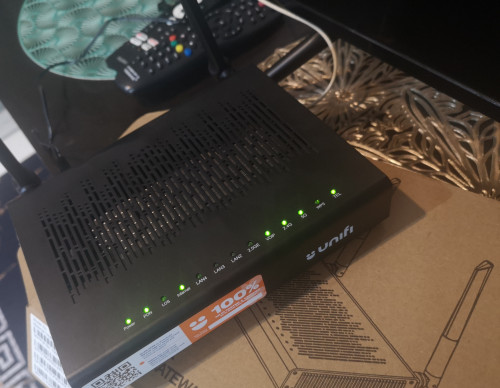
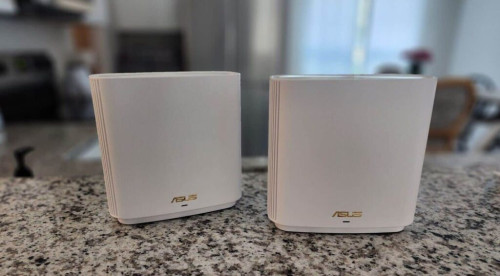
Hai..just got my free upgrade 800 to 1gbps..and they give me D-link DPN-FX3060V Combo Box ..can i use with ASUS ZenWiFi AX (XT8) .. can help me .thanks
  |
|
|
Aug 10 2024, 03:14 AM
|
|
Senior Member
1,208 posts Joined: Aug 2018
|
Sorry people I misunderstand the documentation. The following statements is not true. I'm Lulu.
:excl: :excl: TM deployed kill switch for Firefox DoH and Apple Private Relay :excl: :excl: Mozilla and Apple has a DNS controlled kill switch that allows organization to prevent their usage. This is so that whatever DPI or DLP system will function properly. Mozilla kill switch: use-application-dns.net Apple Private Relay kill switch: mask.icloud.com mask-h2.icloud.com Firefox DoH kill switch is enabled: CODE dig use-application-dns.net @1.9.1.9 ; <<>> DiG 9.18.28 <<>> use-application-dns.net @1.9.1.9 ;; global options: +cmd ;; Got answer: ;; ->>HEADER<<- opcode: QUERY, status: NOERROR, id: 21955 ;; flags: qr rd ra; QUERY: 1, ANSWER: 1, AUTHORITY: 0, ADDITIONAL: 1 ;; OPT PSEUDOSECTION: ; EDNS: version: 0, flags:; udp: 512 ;; QUESTION SECTION: ;use-application-dns.net. IN A ;; ANSWER SECTION: use-application-dns.net. 70 IN A 35.190.14.201 ;; Query time: 15 msec ;; SERVER: 1.9.1.9#53(1.9.1.9) (UDP) ;; WHEN: Sat Aug 10 03:04:46 +08 2024 ;; MSG SIZE rcvd: 68 Both Apple Private Relay kill switches are enabled: CODE dig mask.icloud.com @1.9.1.9 ; <<>> DiG 9.18.28 <<>> mask.icloud.com @1.9.1.9 ;; global options: +cmd ;; Got answer: ;; ->>HEADER<<- opcode: QUERY, status: NOERROR, id: 32464 ;; flags: qr rd ra; QUERY: 1, ANSWER: 7, AUTHORITY: 0, ADDITIONAL: 1 ;; OPT PSEUDOSECTION: ; EDNS: version: 0, flags:; udp: 512 ;; QUESTION SECTION: ;mask.icloud.com. IN A ;; ANSWER SECTION: mask.icloud.com. 42078 IN CNAME mask.apple-dns.net. mask.apple-dns.net. 33 IN A 104.30.128.79 mask.apple-dns.net. 33 IN A 104.30.128.76 mask.apple-dns.net. 33 IN A 104.30.128.78 mask.apple-dns.net. 33 IN A 104.30.128.77 mask.apple-dns.net. 33 IN A 104.30.128.74 mask.apple-dns.net. 33 IN A 104.30.128.75 ;; Query time: 15 msec ;; SERVER: 1.9.1.9#53(1.9.1.9) (UDP) ;; WHEN: Sat Aug 10 03:05:24 +08 2024 ;; MSG SIZE rcvd: 172 CODE dig mask-h2.icloud.com @1.9.1.9 ; <<>> DiG 9.18.28 <<>> mask-h2.icloud.com @1.9.1.9 ;; global options: +cmd ;; Got answer: ;; ->>HEADER<<- opcode: QUERY, status: NOERROR, id: 59548 ;; flags: qr rd ra; QUERY: 1, ANSWER: 7, AUTHORITY: 0, ADDITIONAL: 1 ;; OPT PSEUDOSECTION: ; EDNS: version: 0, flags:; udp: 512 ;; QUESTION SECTION: ;mask-h2.icloud.com. IN A ;; ANSWER SECTION: mask-h2.icloud.com. 734 IN CNAME mask.apple-dns.net. mask.apple-dns.net. 34 IN A 104.30.128.75 mask.apple-dns.net. 34 IN A 104.30.128.77 mask.apple-dns.net. 34 IN A 104.30.128.79 mask.apple-dns.net. 34 IN A 104.30.128.78 mask.apple-dns.net. 34 IN A 104.30.128.76 mask.apple-dns.net. 34 IN A 104.30.128.74 ;; Query time: 19 msec ;; SERVER: 1.9.1.9#53(1.9.1.9) (UDP) ;; WHEN: Sat Aug 10 03:05:38 +08 2024 ;; MSG SIZE rcvd: 175 This post has been edited by kwss: Aug 10 2024, 07:07 AM |
|
|
Aug 10 2024, 08:11 AM
Show posts by this member only | IPv6 | Post
#4351
|
|
Junior Member
288 posts Joined: Sep 2020
|
QUOTE(lan4280 @ Aug 10 2024, 01:12 AM) Hai..just got my free upgrade 800 to 1gbps..and they give me D-link DPN-FX3060V Combo Box ..can i use with ASUS ZenWiFi AX (XT8) .. can help me .thanks ASUS ZenWiFi AX need to be reset become connect using dynamic ip or set the dlink combo box to bridge mode, make sure u get the all needed username & password from the installer |
|
|
Aug 10 2024, 08:49 AM
Show posts by this member only | IPv6 | Post
#4352
|
|
Senior Member
2,614 posts Joined: Nov 2020
|
QUOTE(kcl2006ch @ Aug 10 2024, 08:11 AM) ASUS ZenWiFi AX need to be reset become connect using dynamic ip or set the dlink combo box to bridge mode, make sure u get the all needed username & password from the installer not recommended to dynamic ip it, it will cause double NATbridge mode is the way to go |
|
|
Aug 10 2024, 08:52 AM
Show posts by this member only | IPv6 | Post
#4353
|
|
Senior Member
2,614 posts Joined: Nov 2020
|
QUOTE(kwss @ Aug 10 2024, 03:14 AM) Sorry people I misunderstand the documentation. The following statements is not true. I'm Lulu. the mozilla killswitch only prevents automatic doh for happening (eg, default doh is on auto from fresh install of the browser) TM deployed kill switch for Firefox DoH and Apple Private Relay TM deployed kill switch for Firefox DoH and Apple Private Relay Mozilla and Apple has a DNS controlled kill switch that allows organization to prevent their usage. This is so that whatever DPI or DLP system will function properly. Mozilla kill switch: use-application-dns.net Apple Private Relay kill switch: mask.icloud.com mask-h2.icloud.com Firefox DoH kill switch is enabled: CODE dig use-application-dns.net @1.9.1.9 ; <<>> DiG 9.18.28 <<>> use-application-dns.net @1.9.1.9 ;; global options: +cmd ;; Got answer: ;; ->>HEADER<<- opcode: QUERY, status: NOERROR, id: 21955 ;; flags: qr rd ra; QUERY: 1, ANSWER: 1, AUTHORITY: 0, ADDITIONAL: 1 ;; OPT PSEUDOSECTION: ; EDNS: version: 0, flags:; udp: 512 ;; QUESTION SECTION: ;use-application-dns.net. IN A ;; ANSWER SECTION: use-application-dns.net. 70 IN A 35.190.14.201 ;; Query time: 15 msec ;; SERVER: 1.9.1.9#53(1.9.1.9) (UDP) ;; WHEN: Sat Aug 10 03:04:46 +08 2024 ;; MSG SIZE rcvd: 68 Both Apple Private Relay kill switches are enabled: CODE dig mask.icloud.com @1.9.1.9 ; <<>> DiG 9.18.28 <<>> mask.icloud.com @1.9.1.9 ;; global options: +cmd ;; Got answer: ;; ->>HEADER<<- opcode: QUERY, status: NOERROR, id: 32464 ;; flags: qr rd ra; QUERY: 1, ANSWER: 7, AUTHORITY: 0, ADDITIONAL: 1 ;; OPT PSEUDOSECTION: ; EDNS: version: 0, flags:; udp: 512 ;; QUESTION SECTION: ;mask.icloud.com. IN A ;; ANSWER SECTION: mask.icloud.com. 42078 IN CNAME mask.apple-dns.net. mask.apple-dns.net. 33 IN A 104.30.128.79 mask.apple-dns.net. 33 IN A 104.30.128.76 mask.apple-dns.net. 33 IN A 104.30.128.78 mask.apple-dns.net. 33 IN A 104.30.128.77 mask.apple-dns.net. 33 IN A 104.30.128.74 mask.apple-dns.net. 33 IN A 104.30.128.75 ;; Query time: 15 msec ;; SERVER: 1.9.1.9#53(1.9.1.9) (UDP) ;; WHEN: Sat Aug 10 03:05:24 +08 2024 ;; MSG SIZE rcvd: 172 CODE dig mask-h2.icloud.com @1.9.1.9 ; <<>> DiG 9.18.28 <<>> mask-h2.icloud.com @1.9.1.9 ;; global options: +cmd ;; Got answer: ;; ->>HEADER<<- opcode: QUERY, status: NOERROR, id: 59548 ;; flags: qr rd ra; QUERY: 1, ANSWER: 7, AUTHORITY: 0, ADDITIONAL: 1 ;; OPT PSEUDOSECTION: ; EDNS: version: 0, flags:; udp: 512 ;; QUESTION SECTION: ;mask-h2.icloud.com. IN A ;; ANSWER SECTION: mask-h2.icloud.com. 734 IN CNAME mask.apple-dns.net. mask.apple-dns.net. 34 IN A 104.30.128.75 mask.apple-dns.net. 34 IN A 104.30.128.77 mask.apple-dns.net. 34 IN A 104.30.128.79 mask.apple-dns.net. 34 IN A 104.30.128.78 mask.apple-dns.net. 34 IN A 104.30.128.76 mask.apple-dns.net. 34 IN A 104.30.128.74 ;; Query time: 19 msec ;; SERVER: 1.9.1.9#53(1.9.1.9) (UDP) ;; WHEN: Sat Aug 10 03:05:38 +08 2024 ;; MSG SIZE rcvd: 175 if you manually configure doh in settings, firefox will ignore that dns request's results as for apple icloud, it seems like it will warn the user... based on https://developer.apple.com/icloud/prepare-...-private-relay/ Also, as you realized, those respond with something, so, no, it's not actually blocked, if NXDOMAIN, yes then it's blocked This post has been edited by PRSXFENG: Aug 10 2024, 08:53 AM kwss liked this post
|
|
|
|
|
|
Aug 10 2024, 09:46 AM
Show posts by this member only | IPv6 | Post
#4354
|

Senior Member
774 posts Joined: Jun 2014
|
May I know the reason why I use stock Skyworth router, the upload latency only 1ms and if I change to Asus Router, the upload latency went up to 100ms++? The download latency is fine for both but upload latency is huge different. Any Asus router settings need to adjust to lower down the latency for upload?
This post has been edited by Jeffreynsx: Aug 10 2024, 09:48 AM |
|
|
Aug 10 2024, 09:47 AM
Show posts by this member only | IPv6 | Post
#4355
|
|
Senior Member
774 posts Joined: Jun 2014
|
Duplicated.
This post has been edited by Jeffreynsx: Aug 10 2024, 09:47 AM |
|
|
Aug 10 2024, 10:24 AM
Show posts by this member only | IPv6 | Post
#4356
|
|
Senior Member
2,614 posts Joined: Nov 2020
|
QUOTE(Jeffreynsx @ Aug 10 2024, 09:46 AM) May I know the reason why I use stock Skyworth router, the upload latency only 1ms and if I change to Asus Router, the upload latency went up to 100ms++? The download latency is fine for both but upload latency is huge different. Any Asus router settings need to adjust to lower down the latency for upload? How are you configuring the Asus? PPPoE or Dynamic IP? |
|
|
Aug 10 2024, 10:27 AM
Show posts by this member only | IPv6 | Post
#4357
|
 
Elite
8,421 posts Joined: Jul 2008
|
QUOTE(Jeffreynsx @ Aug 10 2024, 09:46 AM) May I know the reason why I use stock Skyworth router, the upload latency only 1ms and if I change to Asus Router, the upload latency went up to 100ms++? The download latency is fine for both but upload latency is huge different. Any Asus router settings need to adjust to lower down the latency for upload? If you are not using PPPOE mode on your ASUS router, that means you are still using the router mode on the Skyworth combo router.Ideally you should change that unit to bridge mode and setup PPPOE on your ASUS Router. If not, you are still bottlenecked by the slow CPU on the Skyworth combo router. |
|
|
Aug 10 2024, 10:33 AM
Show posts by this member only | IPv6 | Post
#4358
|
|
Senior Member
774 posts Joined: Jun 2014
|
QUOTE(PRSXFENG @ Aug 10 2024, 10:24 AM) How are you configuring the Asus? PPPoE or Dynamic IP? PPPOE.QUOTE(blacktubi @ Aug 10 2024, 10:27 AM) If you are not using PPPOE mode on your ASUS router, that means you are still using the router mode on the Skyworth combo router. PPPOE and Skyworth set to Bridge Mode.Ideally you should change that unit to bridge mode and setup PPPOE on your ASUS Router. If not, you are still bottlenecked by the slow CPU on the Skyworth combo router. Even I use my ZTE modem + Asus Router. The upload latency also went up. This post has been edited by Jeffreynsx: Aug 10 2024, 10:35 AM |
|
|
Aug 10 2024, 10:45 AM
Show posts by this member only | IPv6 | Post
#4359
|
|
Elite
8,421 posts Joined: Jul 2008
|
QUOTE(Jeffreynsx @ Aug 10 2024, 10:33 AM) PPPOE. Try to enable AdaptiveQoS in your settings and set your upload speed and download speed properly.PPPOE and Skyworth set to Bridge Mode. Even I use my ZTE modem + Asus Router. The upload latency also went up. |
|
|
Aug 10 2024, 07:58 PM
|
|
Senior Member
1,208 posts Joined: Aug 2018
|
QUOTE(PRSXFENG @ Aug 10 2024, 08:52 AM) the mozilla killswitch only prevents automatic doh for happening (eg, default doh is on auto from fresh install of the browser) Yep, what you said is correct... Haha. I realized my mistake when it makes no sense that anything with NOERROR will start disabling stuff.if you manually configure doh in settings, firefox will ignore that dns request's results as for apple icloud, it seems like it will warn the user... based on https://developer.apple.com/icloud/prepare-...-private-relay/ Also, as you realized, those respond with something, so, no, it's not actually blocked, if NXDOMAIN, yes then it's blocked But knowing there is a DNS controlled kill switch, this should be monitored more closely. It is a very easy method for censor to disable privacy and security feature. |
|
Topic ClosedOptions
|
| Change to: |  0.0233sec 0.0233sec
 0.71 0.71
 6 queries 6 queries
 GZIP Disabled GZIP Disabled
Time is now: 20th December 2025 - 07:10 PM |
 Quote
Quote