Welcome Guest ( Log In | Register )

Bump Topic Topic Closed RSS Feed
495 Pages « < 214 215 216 217 218 > » Bottom

Outline · [ Standard ] · Linear+

Unifi Official TM UniFi High Speed Broadband Thread V42, READ 1ST PAGE FOR RELEVANT WIFI INFO!

views
     
NagaK
post Aug 8 2024, 09:33 PM

Regular
******
Senior Member
1,194 posts

Joined: Sep 2018


Anyone facing issue with Astro connected to Unifi? I'm using Astro plug n play box past 1 week they connection to Astro was so sluggish hardly reach 10mbps. Don't know either issue with Astro or TM
tng55
post Aug 8 2024, 09:58 PM

Regular
******
Senior Member
1,443 posts

Joined: Sep 2021


QUOTE(A183RT0 @ Aug 8 2024, 07:33 PM)
Is something wrong with TM this week??
This problem happens on last Friday, so i contact TM from Facebook (Since 3 of the customer service number is useless and no one is picking up)
their representative gives me the EasyFix Guide and i told them already tried(turn off router, they reset the port and etc) still the same
so they make a report number and the technician came to my home on this Monday, checked the cables and make speed test with their temporary account but end up also the same.
my plan is 500Mbps and yet i keep getting below 100Mbps

so now, what i am trying to say is, WHAT THE HECK IS GOING ON??

here is today's speed test result
user posted image

i can't even watch streams using the UnifiTV app
*
maybe router issue buy you own router settle
tng55
post Aug 8 2024, 09:59 PM

Regular
******
Senior Member
1,443 posts

Joined: Sep 2021


QUOTE(NagaK @ Aug 8 2024, 09:33 PM)
Anyone facing issue with Astro connected to Unifi? I'm using Astro plug n play box past 1 week they connection to Astro was so sluggish hardly reach 10mbps. Don't know either issue with Astro or TM
*
mine no issue unifi for astro ulti box connected wifi no buffering
The.Lucas.DaY
post Aug 8 2024, 10:55 PM

On my way
****
Junior Member
671 posts

Joined: May 2019

QUOTE(NagaK @ Aug 8 2024, 09:33 PM)
Anyone facing issue with Astro connected to Unifi? I'm using Astro plug n play box past 1 week they connection to Astro was so sluggish hardly reach 10mbps. Don't know either issue with Astro or TM
*
Perhaps you better ask in Astro forum

QUOTE(denver1347 @ Aug 8 2024, 08:09 PM)
Yes, after login with TMadmin account.
I only see my unifi id password in "dot dot dot".

How to know the real password.  notworthy.gif  notworthy.gif
*
You mean the PPPoE password?
PJng
post Aug 8 2024, 11:16 PM

10k Club
********
All Stars
12,047 posts

Joined: Oct 2017


hahah, anyone post slow speed problem, standard answer buy own router tm give carp router
jiaen0509
post Aug 8 2024, 11:26 PM

Look at all my stars!!
*******
Senior Member
3,305 posts

Joined: Dec 2012
QUOTE(A183RT0 @ Aug 8 2024, 07:33 PM)
Is something wrong with TM this week??
This problem happens on last Friday, so i contact TM from Facebook (Since 3 of the customer service number is useless and no one is picking up)
their representative gives me the EasyFix Guide and i told them already tried(turn off router, they reset the port and etc) still the same
so they make a report number and the technician came to my home on this Monday, checked the cables and make speed test with their temporary account but end up also the same.
my plan is 500Mbps and yet i keep getting below 100Mbps

so now, what i am trying to say is, WHAT THE HECK IS GOING ON??

here is today's speed test result
user posted image

i can't even watch streams using the UnifiTV app
*
I guess the router rosak. Try connecting to a different band like 5GHz/2.4GHz and test the speed. Or connect via LAN cable and see if that works. I don’t think it’s a fibwr cable issue—if it was, you wouldn’t be able to connect langsung liao.
tng55
post Aug 9 2024, 01:48 AM

Regular
******
Senior Member
1,443 posts

Joined: Sep 2021


QUOTE(jiaen0509 @ Aug 8 2024, 11:26 PM)
I guess the router rosak. Try connecting to a different band like 5GHz/2.4GHz and test the speed. Or connect via LAN cable and see if that works. I don’t think it’s a fibwr cable issue—if it was, you wouldn’t be able to connect langsung liao.
*
yah you correct router issue i am sure not problem fibre cable
cklove96
post Aug 9 2024, 02:36 AM

hehe
*****
Junior Member
706 posts

Joined: Feb 2017

QUOTE(denver1347 @ Aug 8 2024, 09:09 PM)
Yes, after login with TMadmin account.
I only see my unifi id password in "dot dot dot".

How to know the real password.  notworthy.gif  notworthy.gif
*
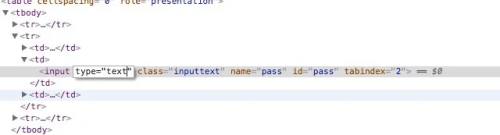
highlight your password>right click>inspect element> replace type="password" to type="text" the password will reveal


user posted image


afif92
post Aug 9 2024, 05:13 AM

Casual
***
Junior Member
374 posts

Joined: Mar 2010
QUOTE(A183RT0 @ Aug 8 2024, 07:33 PM)
Is something wrong with TM this week??
This problem happens on last Friday, so i contact TM from Facebook (Since 3 of the customer service number is useless and no one is picking up)
their representative gives me the EasyFix Guide and i told them already tried(turn off router, they reset the port and etc) still the same
so they make a report number and the technician came to my home on this Monday, checked the cables and make speed test with their temporary account but end up also the same.
my plan is 500Mbps and yet i keep getting below 100Mbps

so now, what i am trying to say is, WHAT THE HECK IS GOING ON??

here is today's speed test result
user posted image

i can't even watch streams using the UnifiTV app
*
look like your fiber cable or port have issue
A183RT0
post Aug 9 2024, 09:48 AM

Getting Started
**
Junior Member
108 posts

Joined: Nov 2008
From: Labuan


QUOTE(tng55 @ Aug 8 2024, 09:58 PM)
maybe router issue buy you own router settle
*
QUOTE(PJng @ Aug 8 2024, 11:16 PM)
hahah, anyone post slow speed problem, standard answer buy own router tm give carp router
*
QUOTE(jiaen0509 @ Aug 8 2024, 11:26 PM)
I guess the router rosak. Try connecting to a different band like 5GHz/2.4GHz and test the speed. Or connect via LAN cable and see if that works. I don’t think it’s a fibwr cable issue—if it was, you wouldn’t be able to connect langsung liao.
*
QUOTE(tng55 @ Aug 9 2024, 01:48 AM)
yah you correct router issue i am sure not problem fibre cable
*
i already change my router and still the same..
BTW, i change from TM DIR-X3060Z to my old Asus RT-AC85U
user posted image


QUOTE(afif92 @ Aug 9 2024, 05:13 AM)
look like your fiber cable or port have issue
*
port issue?? they already tried the reset port while i turned off the router, still the same.
or maybe i didn't understand at all

This post has been edited by A183RT0: Aug 9 2024, 09:56 AM

syahpian
post Aug 9 2024, 10:00 AM

Enthusiast
*****
Junior Member
813 posts

Joined: Jul 2008
From: Kota Kinabalu <-> Kuala Lumpur


QUOTE(A183RT0 @ Aug 9 2024, 09:48 AM)
i already change my router and still the same..
BTW, i change from TM DIR-X3060Z to my old Asus RT-AC85U
user posted image
port issue?? they already tried the reset port while i turned off the router, still the same.
or maybe i didn't understand at all
*
i have simillar issue before,

the issue with mine is the fibre connection on blackbox is loose/broken. they change the port on the box and it fix biggrin.gif
ChenKaiWen
post Aug 9 2024, 10:06 AM

Casual
***
Junior Member
382 posts

Joined: May 2019


QUOTE(syahpian @ Aug 9 2024, 10:00 AM)
i have simillar issue before,

the issue with mine is the fibre connection on blackbox is loose/broken. they change the port on the box and it fix  biggrin.gif
*
Same but on TIME. Installer accidentally melt the fibre with hot glue gun. During hot weather, the fibre reading would degrade so bad. Download speed drops and packet loss is high but upload is fine at full speed. No problem after installer came and fix it.
TongCN
post Aug 9 2024, 10:51 AM

Look ma, I have lots stars :D
*******
Senior Member
6,681 posts

Joined: Aug 2008
From: Malaysia


QUOTE(ChenKaiWen @ Aug 9 2024, 10:06 AM)
Same but on TIME. Installer accidentally melt the fibre with hot glue gun. During hot weather, the fibre reading would degrade so bad. Download speed drops and packet loss is high but upload is fine at full speed. No problem after installer came and fix it.
*
So weird that upload doesnt get affected hmm.gif
zeronehza
post Aug 9 2024, 11:12 AM

Malaysian Real Madrid Supporter Club
******
Senior Member
1,704 posts

Joined: Jan 2003
From: Hogoh Pahang Hogoh

QUOTE(NagaK @ Aug 8 2024, 06:11 PM)
Guys help for this price is actually worth?
I'm planning to upgrade from TP Link AX73

Normal price is about RM1000.00
I guess
*
being using it for 9 months, from tuf ax3000 to ax6000

the worst part of tuf ax6000 is using mtk cpu, which is not support by merlin fw doh.gif

the widest coverage is good.. 6 antenna can cover my 2 storey house smile.gif
and its super stable.. im on 1Gbps plan + zte Onu
average traffic usage 20-25TB monthly


from ur case.. ax73 already powerful enuff,.. no need to upgrade to tuf ax6000
unless u aim for 2Gbps plan, look for wifi 7 for future proof
tng55
post Aug 9 2024, 11:16 AM

Regular
******
Senior Member
1,443 posts

Joined: Sep 2021


QUOTE(A183RT0 @ Aug 9 2024, 09:48 AM)
i already change my router and still the same..
BTW, i change from TM DIR-X3060Z to my old Asus RT-AC85U
user posted image
port issue?? they already tried the reset port while i turned off the router, still the same.
or maybe i didn't understand at all
*
ohh RT-AC85U still speed bad
what BTU you use ???
The.Lucas.DaY
post Aug 9 2024, 11:22 AM

On my way
****
Junior Member
671 posts

Joined: May 2019

My bro has got his speed upgrade from 300 to 500mbps last year, todei he received another free upgrade to 800mbps... really?? I just got 1 time upgrade tho

This post has been edited by The.Lucas.DaY: Aug 9 2024, 03:19 PM
NagaK
post Aug 9 2024, 11:44 AM

Regular
******
Senior Member
1,194 posts

Joined: Sep 2018


QUOTE(zeronehza @ Aug 9 2024, 11:12 AM)
being using it for 9 months, from tuf ax3000 to ax6000

the worst part of tuf ax6000 is using mtk cpu, which is not support by merlin fw  doh.gif

the widest coverage is good.. 6 antenna can cover my 2 storey house  smile.gif
and its super stable.. im on 1Gbps plan + zte Onu
average traffic usage 20-25TB monthly
from ur case.. ax73 already powerful enuff,.. no need to upgrade to tuf ax6000
unless u aim for 2Gbps plan, look for wifi 7 for future proof
*
It's powerful but my old TP LINK AX20 doesn't support easymesh . So I'm using wifi extender and AP mode on Ax20.
Planning to change whole system to Asus as it's support Aimesh. I already had Asus RT AX57 in my office so I plan to replace with my TP Link.
Set AX6000 is main router and AX57 below with AiMesh.

A183RT0
post Aug 9 2024, 11:54 AM

Getting Started
**
Junior Member
108 posts

Joined: Nov 2008
From: Labuan


QUOTE(tng55 @ Aug 9 2024, 11:16 AM)
ohh RT-AC85U still speed bad
what BTU you use ???
*
the TM provide Huawei Echolife HG8240H

but can we change to our own bought BTU or do not touch them at all??
DeepMemory
post Aug 9 2024, 11:57 AM

Regular
******
Senior Member
1,805 posts

Joined: Oct 2010
Anyone on 800mbps still haven't receive free upgrade to 1gbps? I complained to MCMC but still no change.
PRSXFENG
post Aug 9 2024, 12:06 PM

Look at all my stars!!
*******
Senior Member
2,608 posts

Joined: Nov 2020


QUOTE(A183RT0 @ Aug 9 2024, 11:54 AM)
the TM provide Huawei Echolife HG8240H

but can we change to our own bought BTU or do not touch them at all??
*
not supposed to, if it breaks you just ask tm to replace it, lifetime warranty

for advanced users, you could if you know what you're doing

495 Pages « < 214 215 216 217 218 > » Top
Topic ClosedOptions
 

Change to:
| Lo-Fi Version
0.0217sec    0.54    6 queries    GZIP Disabled
Time is now: 14th December 2025 - 05:05 AM