Outline ·
[ Standard ] ·
Linear+
Unifi Official TM UniFi High Speed Broadband Thread V42, READ 1ST PAGE FOR RELEVANT WIFI INFO!
|
NagaK
|
 Feb 5 2024, 10:42 AM Feb 5 2024, 10:42 AM
|

|
QUOTE(vl319 @ Feb 5 2024, 10:14 AM) Hi.....Would like to hear from you all whether Unifi or maxis fibre is better in term of stability, browsing experience. Want to install for my new house. My area has both maxis and unifi. 100 or 300mbps will do coz we dont play games, mainly for TV box, youtube, netflix, some browsing, social media. Thank you.. I had unifi at home and Maxis in both office and restaurant both are reliable. But technical support wise unifi far better they guarantee 24 hours fix if I report last night about my internet down next day they showed up but Maxis took sweet about 2-4days to come fix |
|
|
|
|
|
NagaK
|
Feb 21 2024, 01:23 PM
|
|
|
QUOTE(syncomp @ Feb 21 2024, 01:05 PM) Its already second month of 2024, still no news for 800 Mbps? The in app message of free upgrade for this plan is no longer there. TM just keep quiet? Looks like TM keep quiet as they need upgrade ONR for free |
|
|
|
|
|
NagaK
|
Feb 21 2024, 09:05 PM
|
|
|
QUOTE(yenchenje @ Feb 21 2024, 05:08 PM) We're here begging for free upgrade for the price we've already paid Look at our neighbour https://www.channelnewsasia.com/singapore/b...ps-imda-4138006Also side note, has anyone encountered their MyUnifi account showing "Whoopsie! Looks like you have not updated your ID number to enable us to get your account details" Account is under my mom's name, already added IC number, just haven't added passport/organization number. Which both is not needed if it was never in the database to begin with right? Our menteri like that. Last time when PKR won 2018 we finally gets speed upgrade upto 800mbps them PN BN doesn't care that much about then again PH won 2022 given us free upgrade and reduce pricing. End of the day only PH care about landed network |
|
|
|
|
|
NagaK
|
Mar 7 2024, 09:55 PM
|
|
|
QUOTE(ken120 @ Mar 7 2024, 04:56 PM) Nice hope you update us after they upgrade. As per mine they said all subjected to unifi infra upgrade |
|
|
|
|
|
NagaK
|
Mar 12 2024, 08:31 PM
|
|
|
QUOTE(ken120 @ Mar 12 2024, 11:49 AM) Finally my 800mbps get FSU to 1gbps  Package name also changed from 800mbps to 1gbps - pro upgrade ONR changed?;does they provide mesh router?? Can get pic |
|
|
|
|
|
NagaK
|
Mar 14 2024, 01:09 PM
|
|
|
QUOTE(eclectice @ Mar 14 2024, 08:24 AM) Bridging mode is easy to set up on the Unifi ONR D-Link DPN-FX3060V. Connect the LAN cable from the laptop/PC to any unused LAN port on the ONR to access the ONR Web UI at the default http: // 192.168.0.1. Select the "GPON-Bridge", connect the LAN cable from the LAN1 port on ONR to our third-party router's WAN port, and wait a few seconds for the ONR to reset after applying changes. Then, connect the LAN cable from the laptop/PC to any LAN port of the third-party router to configure everything (but no change is required if it works like before). 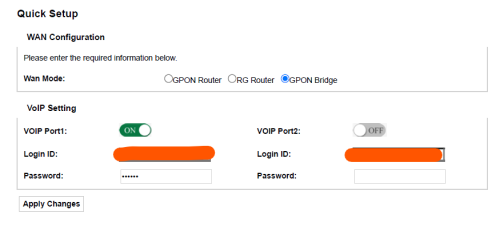 Note that VOIP port 1 is made available for a VOIP phone by connecting the cable from TEL1 of the ONR to the phone. Before performing the bridging, make sure the interfaces are correctly set up, especially the INTERNET service: 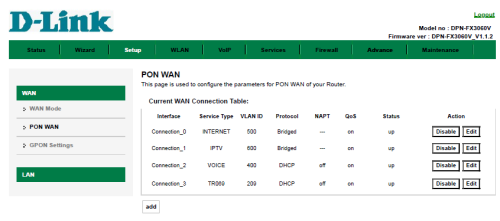  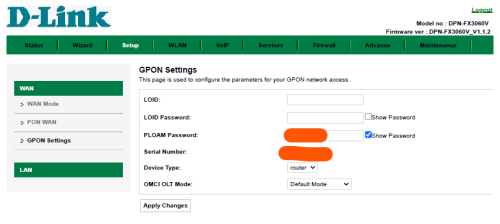 The speed test result for the Free Speed Upgrade from the 800 Mbps plan to the 1 Gbps plan; as expected after bridging. The download speed result is probably due to a non-Nokia OLT source. The WAN port of the third-party router is 2.5 Gbps capable but it detects a 1 Gbps connection from the ONR when probed (Asus ZenWiFi XT12 Pro 2-pack). 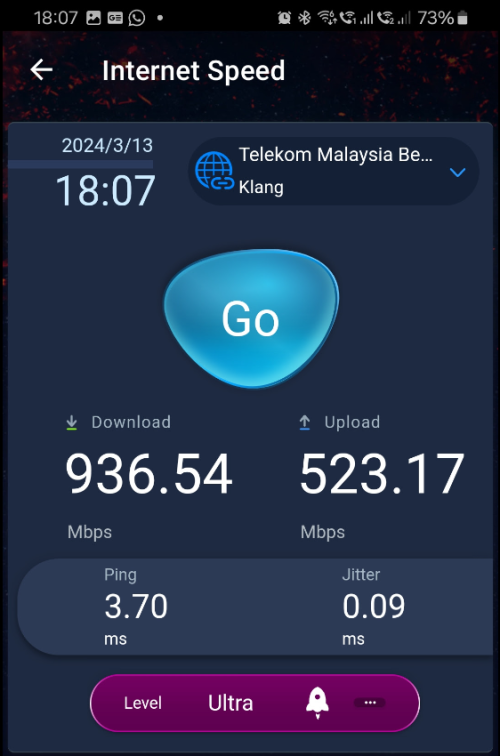 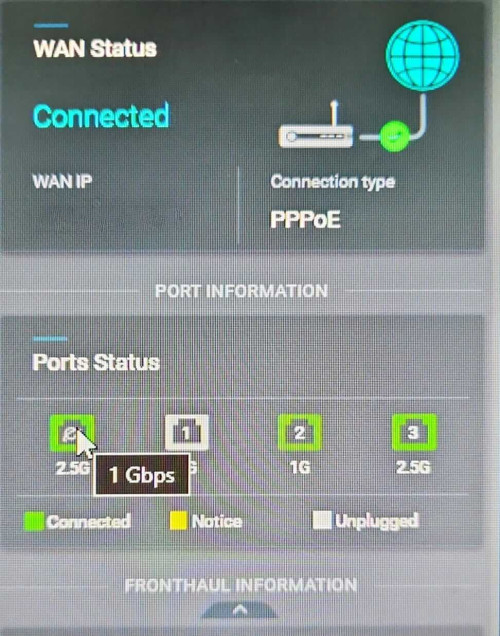 Thanks for info will be helpful to me after they upgrade |
|
|
|
|
|
NagaK
|
Mar 30 2024, 11:25 AM
|
|
|
QUOTE(neekun @ Mar 29 2024, 09:04 PM) Got a call from TM telling me my upgrade from 800mbps to 1gbps is ready. Was informed they will give me a new dlink router. When I asked it’s a router or modem plus router combo, she said it’s a router. My current modem maintained as it supports 1gbps. Btw my modem is the white Huawei tm modem. If this is the case I can just reuse my current Asus ax110000 router. However, if they give me a Dlink router and modem combo, what setting should I set on the Dlink so I can use its modem function only but not the wifi router function? Thanks. Which location bro? |
|
|
|
|
|
NagaK
|
Apr 26 2024, 01:19 PM
|
|
|
QUOTE(sHawTY @ Apr 23 2024, 10:16 AM) First response from TM in MCMC portal regarding my 800Mb/s to 1Gb/s speed upgrade. Will follow up if there are further updates. 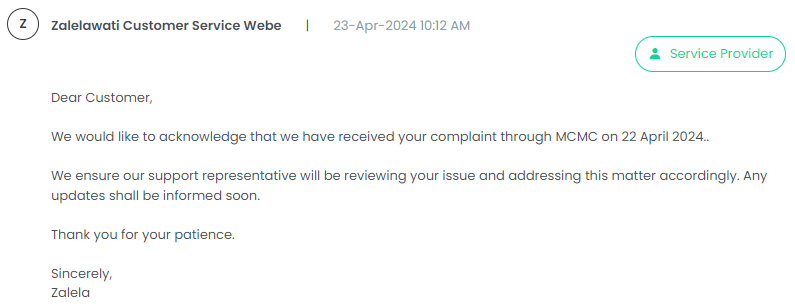 I'm also gotten this response from TM yesterday but surprise today morning got call from TM that I'm getting free upgrade to 1Gbps and enquire about appointment and need change equipment ONR But haven't got date yet... This post has been edited by NagaK: Apr 26 2024, 01:19 PM |
|
|
|
|
|
NagaK
|
Apr 26 2024, 05:28 PM
|
|
|
QUOTE(sil3ntHunt3r @ Apr 26 2024, 05:26 PM) Logged complained to MCMC regarding the 800Mbps upgrade. Today received call from TM for installation appointment. Asked the lady why they only started taking action after user logged a complaint to MCMC. She said there's quite a lot of 800Mbps users hence they are prioritizing those who's bill is above RM200/month for the upgrade then only look into those below 200 bill  I'm paying about RM240 per month they just contact after I report MCMC |
|
|
|
|
|
NagaK
|
May 6 2024, 05:33 PM
|
|
|
QUOTE(sHawTY @ May 4 2024, 01:55 PM) Yep. Just finished the upgrade 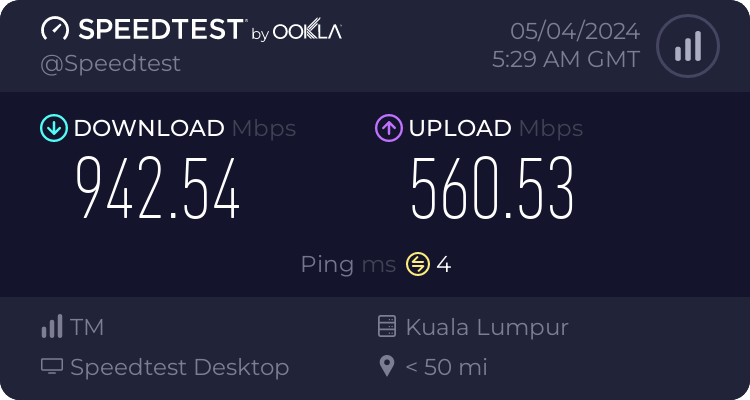 So to anyone else waiting for their speed upgrade, raise a ticket to MCMC immediately Not getting full 1gbps?? Does they install new ONR or newer one? This post has been edited by NagaK: May 6 2024, 05:36 PM |
|
|
|
|
|
NagaK
|
May 6 2024, 11:22 PM
|
|
|
QUOTE(sHawTY @ May 6 2024, 05:48 PM) TM is still using the D-Link DPN-FX3060V with 1Gb/s LAN ports as the replacement ONR. New ONR with 2.5Gb/s LAN ports is not released yet as stated in my previous post. Then let's wait for TM release |
|
|
|
|
|
NagaK
|
May 8 2024, 10:54 AM
|
|
|
Just got SMS from Unifi this week Friday got appointment for 1Gbps upgrade (Klang Area) Is their current ONR router is good? If not I would postpone my appointment for better equipment. Also I had own TP LINK AX5400 router
Any users do share 😊
This post has been edited by NagaK: May 8 2024, 10:55 AM
|
|
|
|
|
|
NagaK
|
May 8 2024, 11:43 AM
|
|
|
QUOTE(sHawTY @ May 8 2024, 11:06 AM) Yes, the new ONR works perfectly fine for 1Gb/s users. However, if your current ONR's LAN ports already support 1Gb/s, switching to the new ONR won't change your speed. You'll still see speeds limited to around 920-950Mb/s. Personally, I've gone back to using the old one and kept the new one as a spare in case the old ONR breaks down. Just a reminder, when the contractor calls to confirm the appointment time, don't forget to inquire if they know how to set up bridge mode on the new ONR. If they're unsure, feel free to contact me, and I'll provide you with the contact information of the contractor who has visited my location before. Your contractor can then reach out to them for assistance with this issue. Sure bro. Will keep update you |
|
|
|
|
|
NagaK
|
May 9 2024, 05:47 PM
|
|
|
QUOTE(sHawTY @ May 8 2024, 11:06 AM) Yes, the new ONR works perfectly fine for 1Gb/s users. However, if your current ONR's LAN ports already support 1Gb/s, switching to the new ONR won't change your speed. You'll still see speeds limited to around 920-950Mb/s. Personally, I've gone back to using the old one and kept the new one as a spare in case the old ONR breaks down. Just a reminder, when the contractor calls to confirm the appointment time, don't forget to inquire if they know how to set up bridge mode on the new ONR. If they're unsure, feel free to contact me, and I'll provide you with the contact information of the contractor who has visited my location before. Your contractor can then reach out to them for assistance with this issue. Bro can you mind to share contractor number who was help you just incase if my technician doesn't know I will direct to contact them PM me |
|
|
|
|
|
NagaK
|
May 10 2024, 12:15 PM
|
|
|
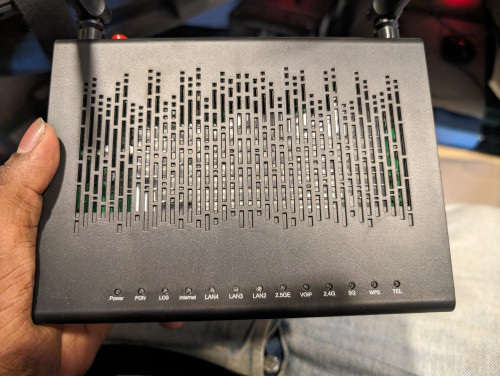
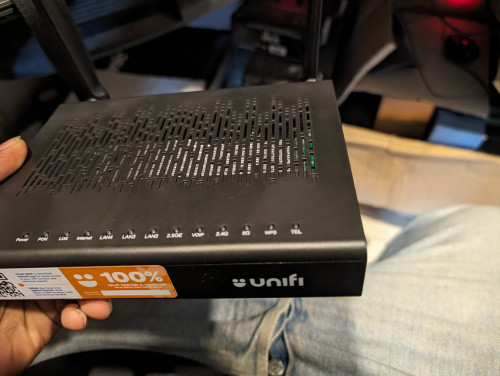
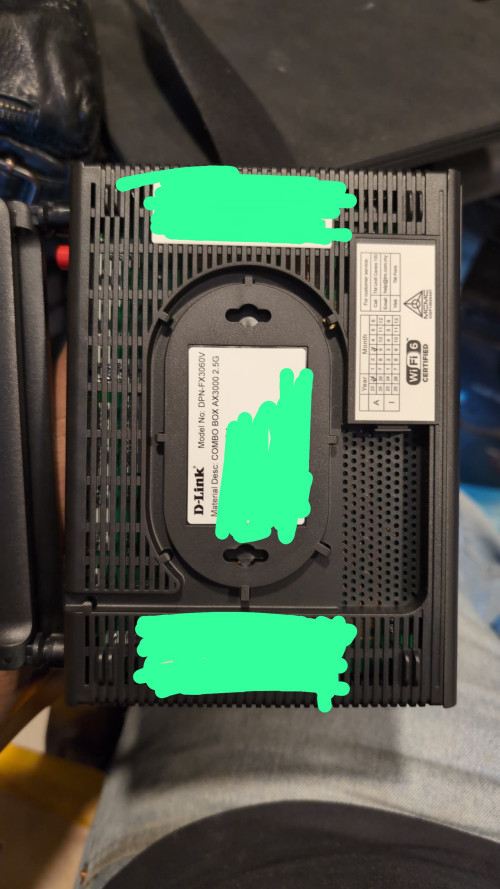
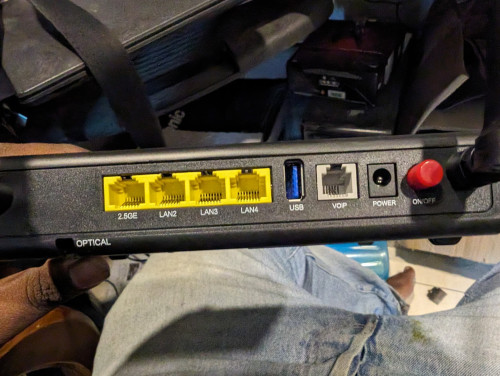
Just done upgraded 1gbps from 800mbps. TM give me new black router with 2.5G Lan port. Also new router technician doesn't confident to set up with bridge mode as very new so they offer to stick with Fiberhome + Router setup as my ONU still 3 months new. How long speed can reflect on router as still I getting 800mbps down and 200mbps up after multiple test. Up limit 170mbps after restart modem router can go 500mbps up after 2 mins go down
Update : my bad I was limited QOS on my router
This post has been edited by NagaK: May 10 2024, 12:59 PM
|
|
|
|
|
|
NagaK
|
May 10 2024, 03:50 PM
|
|
|
|
|
|
|
|
|
NagaK
|
May 10 2024, 03:59 PM
|
|
|
QUOTE(jiaen0509 @ May 10 2024, 03:52 PM) Nice to know👍 Just get a 2.5G router then you can bridge then. Yes as my router just 7 months old I don't want to replace it for now will keep in future |
|
|
|
|
|
NagaK
|
May 11 2024, 10:33 PM
|
|
|
QUOTE(zeronehza @ May 11 2024, 09:16 PM) so.. achieve break 1Gbps+ barrier ? Max 940mbps with my existing Fiberhome ONU with TP LINK AX73 router I'm not installed the TM provided router yet as I doesn't have any 2.5G support devices This post has been edited by NagaK: May 11 2024, 10:34 PM |
|
|
|
|
|
NagaK
|
May 13 2024, 08:19 PM
|
|
|
QUOTE(Mazda9 @ May 13 2024, 05:27 PM) 800MBPS user here + ultimate pack + free 600 minutes Voice call for RM159 schedule to be upgraded to Unifi Home 1GBPS - Pro Upgrade tomorrow at 2pm. Finally the day came after waiting for months. I’m planning to use my own router Asus RT-AC5300. Anyone have done the bridging using this router? I keep TM new router and use back fiberhome modem and TP link AX73 still reach 950mbps down 560mbps up with LAN |
|
|
|
|



 Quote
Quote

 0.0673sec
 0.44
0.44
 7 queries
 GZIP Disabled