

QUOTE(yenchenje @ Jul 30 2024, 10:25 PM)
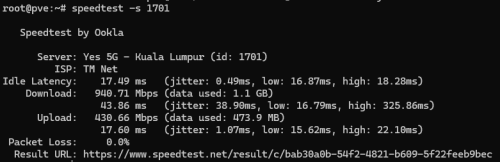
Testing via WiFi not exactly indicative


Unifi Official TM UniFi High Speed Broadband Thread V42, READ 1ST PAGE FOR RELEVANT WIFI INFO!
|
|
 Jul 30 2024, 10:36 PM Jul 30 2024, 10:36 PM
Show posts by this member only | IPv6 | Post
#4080
|
 
Senior Member
1,196 posts Joined: Sep 2018  
|
QUOTE(yenchenje @ Jul 30 2024, 10:25 PM) Testing via WiFi not exactly indicative |
|
|
|
|
|
Jul 30 2024, 11:04 PM
|

Junior Member
980 posts Joined: Dec 2011
|
QUOTE(NagaK @ Jul 30 2024, 10:36 PM) How to test like this ah teach me? If this CMD right? Just do the same speedtest while connected to your router through a cable, or if you router has a speedtest on that, try that i guess. |
|
|
Jul 30 2024, 11:07 PM
Show posts by this member only | IPv6 | Post
#4082
|

Senior Member
2,613 posts Joined: Nov 2020
|
QUOTE(NagaK @ Jul 30 2024, 10:36 PM) How to test like this ah teach me? If this CMD right? That's speedtest clihttps://www.speedtest.net/apps/cli |
|
|
Jul 30 2024, 11:13 PM
|
|
Senior Member
1,447 posts Joined: Sep 2021
|
QUOTE(YoungMan @ Jul 30 2024, 02:05 PM) Not everyone rich to pay for 500mbps. i know but private ip if he complaint we can't solve |
|
|
Jul 30 2024, 11:16 PM
Show posts by this member only | IPv6 | Post
#4084
|

All Stars
12,052 posts Joined: Oct 2017
|
QUOTE(PRSXFENG @ Jul 30 2024, 11:07 PM) just open that exe? i just try, speed test half way, it auto close |
|
|
Jul 31 2024, 02:35 AM
Show posts by this member only | IPv6 | Post
#4085
|
|
Senior Member
1,208 posts Joined: Aug 2018
|
QUOTE(Anime4000 @ Jul 30 2024, 02:34 PM) This very comprehensive report. From a strict technical perspective TM didn't block NPTv6 "directly". What they are doing is not assigning IPv6 address to endpoint and they are just doing prefix delegation with /64.I have asked my friend about Route issue, and I have verify with my another friend who use TIME and indeed route is correct. I also send this report to MCMC along with IPv6 /60 NPTv6/NAT66 issue hell, just now MCMC called me, my report sub category going to change to "Service Delivery". So proper team will investigate that TM did not fulfill RFC 6177 and blocking NPTv6/NAT66 Update kwss Do you think there is hope to have proper IPv6? MCMC just updated and I mention about ISP can get free IPv6 subnet 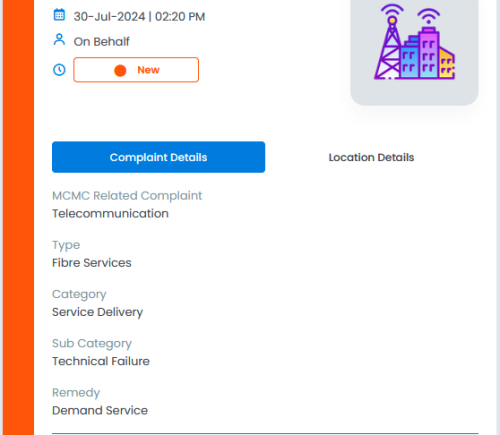 I believe your focus should be RIPE-690 but since you already mentioned RFC 6177 then just add RIPE-690 to the list. Once correctly implemented, you don't need NPTv6 anymore. One thing with network operator is nobody likes RFC. Best Current Operational Practice for Operators do a better job to help network operator understand stuff. If it is up to me to implement RIPE-690, here is how I am going to do it: First I will submit a plan to APNIC to request another /32 block of IPv6 prefix. I will keep all the existing setup intact. This is so that people who don't need more address don't need to do anything but still have working IPv6. All the existing router don't need to change. I will then allow all account holders to request for a static /56 or /48 from the Unifi portal. The BNG will then route those prefix accordingly. There are many advantage to this setup: 1. Dynamic IPv6 prefix is useless. You cannot configure it to your Kubernetes cluster, libvirt network, etc when they keep changing. 2. Everyone will have a working IPv6 network by default without complicated setup, as it is now. 3. TM don't need to redo their address planning QUOTE(Moogle Stiltzkin @ Jul 30 2024, 07:59 PM) Putin? It is very easy for a censor with active probe to spot commercial VPN service and it is implemented in Great Firewall of China. https://www.forbes.com/sites/zakdoffman/202...e-and-election/ Wouldn't using a VPN solve this? If before people weren't sure, now is more sure that is what you have to do going onwards  This is how they do it: 1. DPI categorize the connection as VPN. 2. Signal the probe to do active scanning (just like nmap) 3. If the result comes back as positive then put the IP address into the VPN blocklist. You can easily do this yourself using nmap. All commercial VPN provider has multiple open port to accept different VPN protocol, along with certificate that positively identify themselves. Another way for censor to identify VPN is they have inside access to social network. If they don't like your post, they will "subpoena" your information and just add the IP address and the active probe signature to VPN blocklist. This will effectively cut off your VPN access because your IP is blocked outright. Borrowing the principle from Tor, many China citizen workaround this by connecting to CDN which act as a guard node, which then connects to their compute instance acting as exit node. ACL will be deployed in exit node to block attempt of active probe. AWS has made doing this very easy with their managed prefix list: https://aws.amazon.com/blogs/networking-and...zon-cloudfront/ By using EC2 Instance Endpoint Connect you do not need to expose your SSH port too. So your exit node will have absolutely zero open port for the censor's probe to scan: https://docs.aws.amazon.com/AWSEC2/latest/U...using-eice.html By doing this, even if the censor blacklist your exit node IP address, your VPN still works because you are not connecting directly to it. I have a working anti-censorship VPN and have done extensive threat modelling and pen testing on it. I even tested it in China. Of course the active probe can also detect if your CDN is acting as a front door to bypass censorship and there are various ways to bypass it. This is a more advanced topic for the censor and I should disclose nothing to educate them. Let's see if the Malaysia censor is as competent as China. Kadaj, hasmidzul_jojo, and 1 other liked this post
|
|
|
|
|
|
Jul 31 2024, 09:03 AM
|
|
Junior Member
382 posts Joined: May 2019
|
Personally, I’ve used Tailscale with exit node in china. Worked perfectly fine when I was on China Unicom. It was only bad on China telecom since TIME has bad upload to it.
|
|
|
Jul 31 2024, 11:48 AM
Show posts by this member only | IPv6 | Post
#4087
|

Senior Member
2,400 posts Joined: Jul 2009 From: /dev/null
|
QUOTE(kwss @ Jul 31 2024, 02:35 AM) From a strict technical perspective TM didn't block NPTv6 "directly". What they are doing is not assigning IPv6 address to endpoint and they are just doing prefix delegation with /64. Today Update (Status: Closed):I believe your focus should be RIPE-690 but since you already mentioned RFC 6177 then just add RIPE-690 to the list. Once correctly implemented, you don't need NPTv6 anymore. One thing with network operator is nobody likes RFC. Best Current Operational Practice for Operators do a better job to help network operator understand stuff. If it is up to me to implement RIPE-690, here is how I am going to do it: First I will submit a plan to APNIC to request another /32 block of IPv6 prefix. I will keep all the existing setup intact. This is so that people who don't need more address don't need to do anything but still have working IPv6. All the existing router don't need to change. I will then allow all account holders to request for a static /56 or /48 from the Unifi portal. The BNG will then route those prefix accordingly. There are many advantage to this setup: 1. Dynamic IPv6 prefix is useless. You cannot configure it to your Kubernetes cluster, libvirt network, etc when they keep changing. 2. Everyone will have a working IPv6 network by default without complicated setup, as it is now. 3. TM don't need to redo their address planning 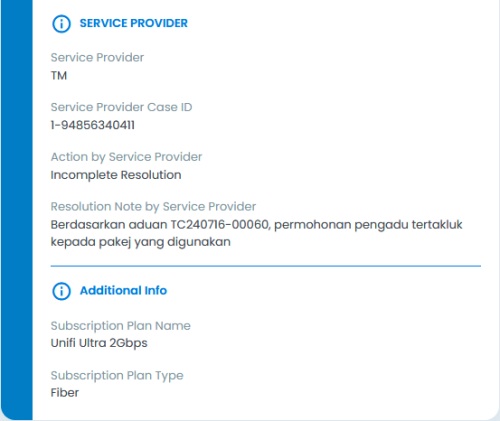 Their Reply: QUOTE Farahanim Customer Service Telekom Malaysia | 31-Jul-2024 07:15 AM I guess can't comment any further, the case has been locked, I can't add comment about RIPE-690 😭Reason: Duplicate Complaint Note: Kepada <name>, Mohon refer tagging : MCMC TC240716-00060 - <name> Aduan melalui tagging tersebut sedang di jalankan dan masih menunggu maklumbalas stakeholders. Terima kasih. I think only way is try use my influence with Pendakwah Teknologi YouTuber, he can bashing ISP,  Note: I don't care anymore, here my case number, if anyone want make a report of IPv6, go ahead... |
|
|
Jul 31 2024, 01:13 PM
|
|
Junior Member
453 posts Joined: Feb 2014
|
I notice it's been a while now that everyday after around 9pm, something funny is going on with Unifi.
I am having hard time accessing my office server (Office on Maxis fiber) at full speed after around 9pm from home (Unifi plan), even I turn on Tailscale also maximum can only achieve below 100kbps. But, I can achieve full speed when I use my mobile data. Anyone got any insider news on what actually is going on with Unifi? Is it just temporary or it's going to be there permanently? I'm contemplating to switch out from Unifi, paying full price but not getting the full service. |
|
|
Jul 31 2024, 01:17 PM
|

Senior Member
1,635 posts Joined: May 2005
|
TM installer came to replace the fiberhome with D-Link Black ONR. He changed it to GPON Bridge as per my request, and the PPPoE up for few minutes, then down with the message
CODE 2024-07-31 11:38:17 Port1.500: PPPoE Link UP 2024-07-31 11:42:24 Port1.500: PPPoE Link DOWN 2024-07-31 11:43:24 Port1.500 : PADO Packet timeout no response from server.Please verify service name & ISP link status on modem. Restarting session. He switched it back to GPON Router mode but failed to establish PPPoE connection. And he brought back the D-Link ONR, said got issue with it.  Could it be related to this? QUOTE(Anime4000 @ May 17 2024, 10:37 AM) I think might not a bug on Bridge Mode, Since the D-Link do not have the option to set VLAN ID in GPON Bridge, I need to set the VLAN ID 500 in my own router?if read ME 171, for example on Alcatel Lucent/Nokia (ALCL) OLT, the ME 171 explicitly tell: Disable Bridge Port VLAN 500,209 on LAN 1 & PPP Disable LAN 2 Disable LAN 3 Disable LAN 4 VLAN 209,400 on VEIP & POTS this cause permanent settings on newer D-Link, cannot change back to Router Mode unless factory reset. Enforced ME 171 can prevent bridge and Disabled Ports This post has been edited by loonsave: Jul 31 2024, 03:30 PM |
|
|
Jul 31 2024, 01:21 PM
Show posts by this member only | IPv6 | Post
#4090
|

All Stars
11,459 posts Joined: Oct 2007 From: KL
|
QUOTE(soonwai @ Jan 8 2024, 12:21 PM) 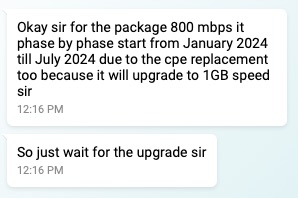 Good news for 800Mbps. 7 more months or less to go for upgrade. Looking forward to the 268% increase in speed. Finally got my FSU +100Mbps free download speed upgrade.  DPN-FX3060V 2.5Gbps still in box. Use back old Huawei for now. Update: Just noticed package name updated to "Unifi Home 1Gbps - Pro Upgrade" This post has been edited by soonwai: Jul 31 2024, 10:20 PM cHiLdHo0drEaMz and jonathanwhm liked this post
|
|
|
Jul 31 2024, 02:14 PM
|

Senior Member
5,827 posts Joined: Jan 2003 From: Selayang, Selangor
|
QUOTE(kwss @ Jul 26 2024, 10:35 PM) I do not think I will make a custom firmware out of it. This thing is held together using a spaghetti of ebtables, iptables and smuxctl voodoo. People like me might be stuck since it looks like the OLT I'm connected to is bound to the ONU/ONR. If I change to another ONU I can't connect. They further complicate things by compiling it into a startup binary. I suspect they do this to hide the TM kill switch or whatever backdoor they are having. To everyone using this thing, just throw it away. 1 Gbps user can buy a used Huawei ONU or PON stick. 2 Gbps user's only option is a PON stick.  Unless the PON stick can spoof MAC or whatever else hardware IDs they're using to bind the account. All this is very concerning. However much I try to secure my network and privacy the giant hole there is unpatchable because its the way the ISP operates. Heck they can just cut all internet access any time if they want. Imagine a malicious actor getting into their network and causing mayhem... |
|
|
Jul 31 2024, 02:29 PM
|
|
Senior Member
5,827 posts Joined: Jan 2003 From: Selayang, Selangor
|
QUOTE(ssslayerrr @ Jul 22 2024, 07:13 AM) Yes another user (RViN) here has the same problem with the black onu. I have the problem with my white ONU. I was regretting not getting a Mikrotik router but now I feel a bit better if that setting didn't solve the issue I changed a setting in my mikrotik router, enabled multi-queue-ethernet-default on the hardware interface. I thought the problem was solved, it lasted 4 days, but I checked just now, the speed is down to 300/100 again. LIke yourself, restarting the ONU restores the speed That site is using the Unifi Biz 1gbps plan QUOTE(NagaK @ Jul 22 2024, 12:09 AM) I'm the one affected with that.When I plug my old modem not worked TM technician came and changed to Skyworth combo box . But I keep and resetup and re use Fiberhome modem and live with 940mbps. So far no issues speed also consistent Wait, so originally switching to your old ONU it couldnt connect (meaning your account was hardware-binded), but after technician came over now you can switch to whichever ONU it can work?When I told the technicians to remove the hardware bind they told me cannot, so I sort of speculated (together with some other members here) that it could be that the OLT I'm unfortunately connected to requires some kind of hardware bind.  |
|
|
|
|
|
Jul 31 2024, 02:34 PM
|
|
Senior Member
1,196 posts Joined: Sep 2018
|
QUOTE(RViN @ Jul 31 2024, 02:29 PM) When I told the technicians to remove the hardware bind they told me cannot, so I sort of speculated (together with some other members here) that it could be that the OLT I'm unfortunately connected to requires some kind of hardware bind. |
|
|
Jul 31 2024, 03:15 PM
|

Senior Member
5,075 posts Joined: Oct 2008
|
QUOTE(soonwai @ Jul 31 2024, 01:21 PM) Can't say much about efficiency but they're certainly punctual. Right on the last day of July. I still have not received any contact about the upgrade. Last contacted TM livechat in June and they asked me to keep waiting.Finally got my FSU +100Mbps free download speed upgrade. DPN-FX3060V 2.5Gbps still in box. Use back old Huawei for now. |
|
|
Jul 31 2024, 05:35 PM
|
|
Senior Member
848 posts Joined: Feb 2005 From: everywhere, yet nowhere. 
|
QUOTE(PJng @ Jul 30 2024, 11:16 PM) just open that exe? i just try, speed test half way, it auto close run cmd/powershell/terminal first then run that exe from thereotherwise it will just terminate and close when it completes |
|
|
Jul 31 2024, 06:14 PM
|

Senior Member
1,031 posts Joined: Jun 2011 From: #KajangTop
|
QUOTE(soonwai @ Jul 31 2024, 01:21 PM) Can't say much about efficiency but they're certainly punctual. Right on the last day of July. Like finally. Did any recontract occured ?Finally got my FSU +100Mbps free download speed upgrade. DPN-FX3060V 2.5Gbps still in box. Use back old Huawei for now. |
|
|
Jul 31 2024, 07:40 PM
Show posts by this member only | IPv6 | Post
#4097
|
|
All Stars
11,459 posts Joined: Oct 2007 From: KL
|
QUOTE(zellleonhart @ Jul 31 2024, 03:15 PM) I still have not received any contact about the upgrade. Last contacted TM livechat in June and they asked me to keep waiting. Try chat again. I chose Order Enquiry. Then show them the ss which says upgrade from Jan until July. If dun have, just use mine. I didn't have to but ask them to escalate if they don't and get a report number. After that waaaiit some more.Even after all that, mine took awhile. 20240707 Chat and report number 20240711 Call from Unifi CS 03-79647000 to agree to FSU TNC 20240727 Modify Package order created 20240731 Installation zellleonhart, yamin07, and 1 other liked this post
|
|
|
Jul 31 2024, 07:45 PM
Show posts by this member only | IPv6 | Post
#4098
|
|
All Stars
11,459 posts Joined: Oct 2007 From: KL
|
QUOTE(cHiLdHo0drEaMz @ Jul 31 2024, 06:14 PM) Like finally. Did any recontract occured ? Yeah, finally! I suppose can be faster if chase them a bit or use MCMC but nvm lah. No recontract according to phone call received earlier where the FSU TNC was read out and agreed to.Not sure if the service acceptance form got state anything about contract or otherwise. Next want to see if I can change my Ultimate to Ruby pack. RM60 -> RM30 This post has been edited by soonwai: Jul 31 2024, 07:49 PM cHiLdHo0drEaMz liked this post
|
|
|
Jul 31 2024, 08:14 PM
|
|
Senior Member
1,882 posts Joined: Sep 2017
|
QUOTE(soonwai @ Jul 31 2024, 01:21 PM) Can't say much about efficiency but they're certainly punctual. Right on the last day of July. Finally got my FSU +100Mbps free download speed upgrade. DPN-FX3060V 2.5Gbps still in box. Use back old Huawei for now. Update: Just noticed package name updated to "Unifi Home 1Gbps - Pro Upgrade" QUOTE(soonwai @ Jul 31 2024, 07:53 PM) This is why TM is the bestest ISP in town. Always keep promise. Improved customer service,but service quality worst... Chat on Jan 8. OK I wait. Today, last day of July, got the free speed upgrade. LOL Haven't get the free 1G speed upgrade yet... Will ask TM again after 2weeks when i complete resign from my current job.  |
|
Topic ClosedOptions
|
| Change to: |  0.0296sec 0.0296sec
 0.27 0.27
 6 queries 6 queries
 GZIP Disabled GZIP Disabled
Time is now: 17th December 2025 - 11:41 PM |
 Quote
Quote