Welcome Guest ( Log In | Register )

Bump Topic Topic Closed RSS Feed
495 Pages « < 201 202 203 204 205 > » Bottom

Outline · [ Standard ] · Linear+

Unifi Official TM UniFi High Speed Broadband Thread V42, READ 1ST PAGE FOR RELEVANT WIFI INFO!

views
     
kerolzarmyfanboy
post Jul 29 2024, 12:55 PM

On my way
****
Junior Member
575 posts

Joined: Feb 2013
TM technician came this morning & just replaced my old ONU with the Fibrehome HG6145F3, might as well, since still under warranty anyway. guy was puzzled as well as to why so many disconnections when he read the logs haha.
but could confirm fibre is fine, so problem could just be between my router and the old ONU, could be just the LAN cable between the two devices even. he just ended up replace the whole thing with HG6145F3 and just disconnect my old router as well. let's see if that might've solved the intermittent disconnect issue, will monitor. gonna use my old router as repeater for 2nd floor.
and now I have another new minor problem since the new Fibrehome installed; for some reason, even after changing DNS to Google DNS & flush computer's DNS, some websites still blocked for me. especially the torrent ones rclxub.gif have changed dns on the router too. weird. rclxub.gif
budi1413
post Jul 29 2024, 01:33 PM

Regular
******
Senior Member
1,607 posts

Joined: Aug 2013


QUOTE(kerolzarmyfanboy @ Jul 29 2024, 12:55 PM)
TM technician came this morning & just replaced my old ONU with the Fibrehome HG6145F3, might as well, since still under warranty anyway. guy was puzzled as well as to why so many disconnections when he read the logs haha.
but could confirm fibre is fine, so problem could just be between my router and the old ONU, could be just the LAN cable between the two devices even. he just ended up replace the whole thing with HG6145F3 and just disconnect my old router as well. let's see if that might've solved the intermittent disconnect issue, will monitor. gonna use my old router as repeater for 2nd floor.
and now I have another new minor problem since the new Fibrehome installed; for some reason, even after changing DNS to Google DNS & flush computer's DNS, some websites still blocked for me. especially the torrent ones rclxub.gif have changed dns on the router too. weird.  rclxub.gif
*
QUOTE(kwss @ Jul 19 2024, 02:14 AM)
TM is poisoning DNS again. Last time they just outright block port 443, preventing DoH. This time they redirect you to their own server using their own certificate.

CODE

$ nmap -sCV -Pn -p 443 1.1.1.1
Starting Nmap 7.93 ( https://nmap.org ) at 2024-07-19 02:09 +08
Nmap scan report for 1.1.1.1
Host is up (0.0093s latency).

PORT    STATE SERVICE  VERSION
443/tcp open  ssl/http EMC Navisphere CIM Object Manager httpd
|_http-title: Site doesn't have a title.
| ssl-cert: Subject: commonName=dns.tm.net.my/organizationName=Telekom Malaysia Berhad/stateOrProvinceName=Kuala Lumpur/countryName=MY
| Subject Alternative Name: DNS:dns.tm.net.my
| Not valid before: 2024-07-09T01:22:02
|_Not valid after:  2025-04-06T04:36:03
|_ssl-date: TLS randomness does not represent time

Service detection performed. Please report any incorrect results at https://nmap.org/submit/ .
Nmap done: 1 IP address (1 host up) scanned in 33.86 seconds

*
Anime4000
post Jul 29 2024, 02:16 PM

Look at all my stars!!
*******
Senior Member
2,399 posts

Joined: Jul 2009
From: /dev/null


QUOTE(kwss @ Jul 19 2024, 02:14 AM)
TM is poisoning DNS again. Last time they just outright block port 443, preventing DoH. This time they redirect you to their own server using their own certificate.

CODE

$ nmap -sCV -Pn -p 443 1.1.1.1
Starting Nmap 7.93 ( https://nmap.org ) at 2024-07-19 02:09 +08
Nmap scan report for 1.1.1.1
Host is up (0.0093s latency).

PORT    STATE SERVICE  VERSION
443/tcp open  ssl/http EMC Navisphere CIM Object Manager httpd
|_http-title: Site doesn't have a title.
| ssl-cert: Subject: commonName=dns.tm.net.my/organizationName=Telekom Malaysia Berhad/stateOrProvinceName=Kuala Lumpur/countryName=MY
| Subject Alternative Name: DNS:dns.tm.net.my
| Not valid before: 2024-07-09T01:22:02
|_Not valid after:  2025-04-06T04:36:03
|_ssl-date: TLS randomness does not represent time

Service detection performed. Please report any incorrect results at https://nmap.org/submit/ .
Nmap done: 1 IP address (1 host up) scanned in 33.86 seconds

*
I check mine,

» Click to show Spoiler - click again to hide... «


My current IPv4 is 124.13.42.16,

TM now have selected subnet for DNS/DoH poisoning ?
kerolzarmyfanboy
post Jul 29 2024, 02:31 PM

On my way
****
Junior Member
575 posts

Joined: Feb 2013
I don't seem to see similar 'poisoning' result as well. my IP 100.111.127.254
CODE

Starting Nmap 7.95 ( https://nmap.org ) at 2024-07-29 14:25 Malay Peninsula Standard Time
Nmap scan report for one.one.one.one (1.1.1.1)
Host is up (0.010s latency).

PORT    STATE SERVICE  VERSION
443/tcp open  ssl/http Cloudflare http proxy
| ssl-cert: Subject: commonName=cloudflare-dns.com/organizationName=Cloudflare, Inc./stateOrProvinceName=California/countryName=US
| Subject Alternative Name: DNS:cloudflare-dns.com, DNS:*.cloudflare-dns.com, DNS:one.one.one.one, IP Address:1.0.0.1, IP Address:1.1.1.1, IP Address:162.159.36.1, IP Address:162.159.46.1, IP Address:2606:4700:4700:0:0:0:0:1001, IP Address:2606:4700:4700:0:0:0:0:1111, IP Address:2606:4700:4700:0:0:0:0:64, IP Address:2606:4700:4700:0:0:0:0:6400
| Not valid before: 2023-12-30T00:00:00
|_Not valid after:  2025-01-21T23:59:59
|_http-server-header: cloudflare
|_ssl-date: TLS randomness does not represent time
|_http-generator: 1.1.1.1
|_http-title: 1.1.1.1 \xE2\x80\x94 The free app that makes your Internet faster.

Service detection performed. Please report any incorrect results at https://nmap.org/submit/ .
Nmap done: 1 IP address (1 host up) scanned in 18.90 seconds

kwss
post Jul 29 2024, 02:59 PM

Regular
******
Senior Member
1,207 posts

Joined: Aug 2018
QUOTE(zellleonhart @ Jul 29 2024, 11:35 AM)
Hmm sorry I am not technical enough to understand - so there's no issue actually? Just tried again and still can't access/ping on IPv4... Can't afford to get a new public IP now since I am outside, but will see if a new IP range works.

Tried your command and it's loading forever:

CODE

curl -v -4 http://tailscale.com
*   Trying 76.76.21.21:80...

*
Can you post your traceroute to tailscale.com?
What if you use https in curl? Does it work?
If you have IPv6, try -6 instead of -4 to see if it works.


QUOTE(Anime4000 @ Jul 29 2024, 12:43 PM)
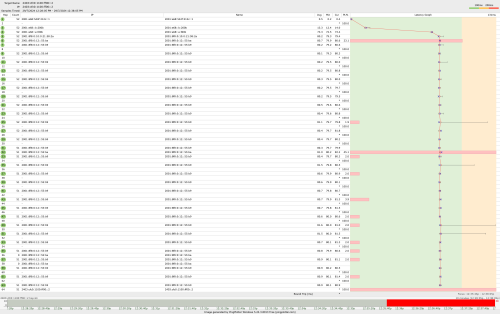
kwss seem Unifi IPv6 has broken IX or potential MITM attack?

My Mikrotik cannot join my friend BGP bangwall.gif
user posted image

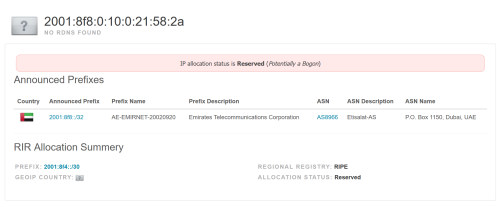
Bogon IX?
user posted image
https://bgpview.io/ip/2001:8f8:0:10:0:21:58:2a
*
This one is definitely TM at fault. I take a look and Etisalat do not even have IPv6 peering anywhere except Etisalat Dubai EmIX.
They do have a looking glass here:
http://lg.emix.net.ae/lg/

So I check their BGP:
CODE

Command: show bgp ipv6 2403:cfc0:1100:ff00::2


BGP routing table entry for 2403:cfc0:1100::/48
Paths: (1 available, best #1, table Default-IP-Routing-Table)
 Not advertised to any peer
 132337 133210 135134
   2001:8f8::58 (metric 1) from 2001:8f8::36 (195.229.0.58)
     Origin IGP, localpref 120, valid, internal, best
     Community: 8966:41 8966:8888
     Originator: 195.229.0.58, Cluster list: 195.229.0.36
     Last update: Wed Jul 24 04:49:07 2024

AS132337 Axclusive > AS133210 EN Technologies Pte Ltd > AS135134 Soon Keat Neo.
Based on this alone it is impossible for Etisalat to take in traffic destinated for AS135134. They are not even adjacent AS. It also clearly stated "Not advertised to any peer"

Trying to figure out where they peer, seems to be Equinix SG:
CODE

traceroute to 2404:160:815c:6f5a:8bb3:d730:f8da:dd5a (2404:160:815c:6f5a:8bb3:d730:f8da:dd5a), 30 hops max, 80 byte packets
1  2001:8f8:0:10:0:22:209:1 (2001:8f8:0:10:0:22:209:1)  3.670 ms  3.797 ms  3.926 ms
2  * * *
3  * * *
4  * 10030.sgw.equinix.com (2001:de8:4::1:30:1)  87.628 ms *
5  * * *


They indeed has direct peering to TM, presumably over a route server
CODE

Command: show bgp ipv6 2001:e68:5427:3c12:164:5ba5:d348:18dd


BGP routing table entry for 2001:e68::/32
Paths: (1 available, best #1, table Default-IP-Routing-Table)
 Not advertised to any peer
 4788
   2001:8f8::21 (metric 1) from 2001:8f8::36 (195.229.0.21)
     Origin IGP, localpref 100, valid, internal, best
     Community: 4788:6200 4788:6210
     Originator: 195.229.0.21, Cluster list: 195.229.0.36
     Last update: Sat Jun  1 10:09:34 2024


However, none of this explains why TM will dump traffic to Etisalat when they don't have direct route to your friend. They don't even advertise the prefix.
This Etisalat also sucks at IPv6 so I am not surprised they have a routing loop (your traceroute is an example of routing loop).
This is further evident by how they configure their DNS AAAA record:
CODE

dig +short www.etisalat.ae aaaa
www.global.etisalat.ae.
::213.42.167.153
::213.42.214.53

I really wanna laugh. What kind of sorcery is "::213.42.167.153"

Since TM don't have a Looking Glass, I cannot tell for sure what is wrong.
In this specific case, bogon IP is basically prefix that is not publicly routable because they are used internally in IXP. It is done using BGP filtering.
Sorry man, I don't have an exact answer for this question. If you have a working traceroute from last time maybe we can infer something from there.
Alternatively, since your friend has control on his end, maybe ask him to run a traceroute to you?

I do have a theory: TM is leeching other people's pipe by configuring a static route and dump traffic onto other AS.
In a lot of peering policy, this is illegal. Maybe Etisalat do not have this written in their policy and TM is abusing it.

QUOTE(kerolzarmyfanboy @ Jul 29 2024, 12:55 PM)
TM technician came this morning & just replaced my old ONU with the Fibrehome HG6145F3, might as well, since still under warranty anyway. guy was puzzled as well as to why so many disconnections when he read the logs haha.
but could confirm fibre is fine, so problem could just be between my router and the old ONU, could be just the LAN cable between the two devices even. he just ended up replace the whole thing with HG6145F3 and just disconnect my old router as well. let's see if that might've solved the intermittent disconnect issue, will monitor. gonna use my old router as repeater for 2nd floor.
and now I have another new minor problem since the new Fibrehome installed; for some reason, even after changing DNS to Google DNS & flush computer's DNS, some websites still blocked for me. especially the torrent ones rclxub.gif have changed dns on the router too. weird.  rclxub.gif
*
Assuming you are using Windows, did "ipconfig /all" shows you are actually using Google DNS? Sorry I don't run Windows so anyone out there feel free to chime in for the correct command.
You can verify with Android phone too by going to your WiFi and tap the gear icon beside your SSID. Tap advanced and scroll down to DNS.
If you don't mind, maybe you can post the problematic domain and I look it up for you.

Also for the DNS poisoning, it don't happen all the time. I think they are still kind of field testing it. I just caught them doing it.

This post has been edited by kwss: Jul 29 2024, 03:17 PM

kerolzarmyfanboy
post Jul 29 2024, 03:56 PM

On my way
****
Junior Member
575 posts

Joined: Feb 2013
QUOTE(kwss @ Jul 29 2024, 02:59 PM)
Assuming you are using Windows, did "ipconfig /all" shows you are actually using Google DNS? Sorry I don't run Windows so anyone out there feel free to chime in for the correct command.
You can verify with Android phone too by going to your WiFi and tap the gear icon beside your SSID. Tap advanced and scroll down to DNS.
If you don't mind, maybe you can post the problematic domain and I look it up for you.

Also for the DNS poisoning, it don't happen all the time. I think they are still kind of field testing it. I just caught them doing it.
*
no worries, i'm good now. DNS back to 'normal' after several router reboot, can access all those sites now. Thanks for all the help tongue.gif
SUSnonamer
post Jul 29 2024, 05:52 PM

Getting Started
**
Junior Member
224 posts

Joined: Apr 2019
connection to europe having problem today? i access european site only for compiling code everyday, today failed twice already, same symptom as when during the recent submarine cable issue
zellleonhart
post Jul 29 2024, 09:51 PM

Stars stars stars
*******
Senior Member
5,075 posts

Joined: Oct 2008


QUOTE(kwss @ Jul 29 2024, 02:59 PM)
Can you post your traceroute to tailscale.com?
What if you use https in curl? Does it work?
If you have IPv6, try -6 instead of -4 to see if it works.
*
I didn't manage to check with traceroute but I tried https in curl, same result.

But now I refreshed my ip to 219.xxx.xxx.xxx and I can access tailscale.com now. My previous IP was in the 60.50.xxx.xxx range.
ckthang10
post Jul 29 2024, 09:57 PM

New Member
*
Junior Member
40 posts

Joined: Nov 2011
Currently im using Dlink AX3060 Unifi router in living room. I have linked with Dlink AX3000 as mesh in master bedroom. However, the signal is very weak in bedroom 3, located in between the two devices.
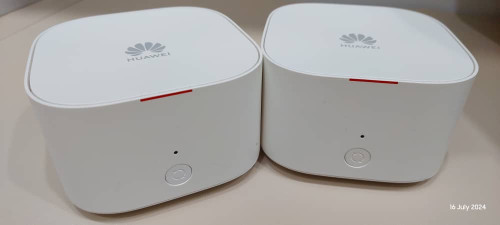
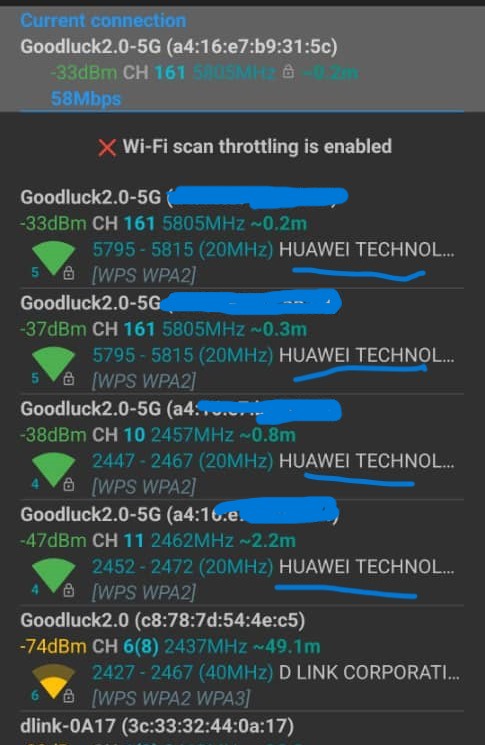
I do have 2 units Huawei Echolife WA8021V5 mesh from TIME.com, I did the setup as mesh, both signals appears in the WifiAnalyser app (refer to the attached photo) but it does not connected. The mesh indicator shows as RED.
Kindly assist, what went wrong as im new in set up mesh. TQ

user posted image

user posted image

This post has been edited by ckthang10: Jul 29 2024, 09:58 PM
PRSXFENG
post Jul 29 2024, 11:03 PM

Look at all my stars!!
*******
Senior Member
2,608 posts

Joined: Nov 2020


QUOTE(ckthang10 @ Jul 29 2024, 09:57 PM)
Currently im using Dlink AX3060 Unifi router in living room. I have linked with Dlink AX3000 as mesh in master bedroom. However, the signal is very weak in bedroom 3, located in between the two devices.
I do have 2 units Huawei Echolife WA8021V5 mesh from TIME.com, I did the setup as mesh, both signals appears in the WifiAnalyser app (refer to the attached photo) but it does not connected. The mesh indicator shows as RED.
Kindly assist, what went wrong as im new in set up mesh. TQ

user posted image

user posted image
*
Incompatible, it's not possible to mesh different brand mesh together

(unless they support WiFi Alliance EasyMesh, which they dont)

you will need to get more of those dlink routers
aniq8676
post Jul 29 2024, 11:09 PM

Regular
******
Senior Member
1,524 posts

Joined: Dec 2020
From: Perak


QUOTE(ckthang10 @ Jul 29 2024, 09:57 PM)
Currently im using Dlink AX3060 Unifi router in living room. I have linked with Dlink AX3000 as mesh in master bedroom. However, the signal is very weak in bedroom 3, located in between the two devices.
I do have 2 units Huawei Echolife WA8021V5 mesh from TIME.com, I did the setup as mesh, both signals appears in the WifiAnalyser app (refer to the attached photo) but it does not connected. The mesh indicator shows as RED.
Kindly assist, what went wrong as im new in set up mesh. TQ

user posted image

user posted image
*
No, router/mesh from TIME FIBRE only supports OmniMesh, while Unifi router supports EASYMESH.
tng55
post Jul 29 2024, 11:46 PM

Regular
******
Senior Member
1,440 posts

Joined: Sep 2021


QUOTE(zellleonhart @ Jul 29 2024, 01:42 AM)
Can anyone check if you can access this website https://tailscale.com? I can't access it on unifi, even with my own DNS, but all good with Digi or under VPN. Pinging it 76.76.21.21 returns 100% packet loss.

I happen to want to read a blogpost there but turns out I can't access. This is not the first time I randomly encounter a common/popular site that is not accessible via unifi.
*
mine working my ip range 175.xxx.xxx

ping -t 76.76.21.21

Pinging 76.76.21.21 with 32 bytes of data:
Reply from 76.76.21.21: bytes=32 time=8ms TTL=250
Reply from 76.76.21.21: bytes=32 time=7ms TTL=250
Reply from 76.76.21.21: bytes=32 time=8ms TTL=250
Reply from 76.76.21.21: bytes=32 time=9ms TTL=250

Ping statistics for 76.76.21.21:
Packets: Sent = 6, Received = 6, Lost = 0 (0% loss),
Approximate round trip times in milli-seconds:
Minimum = 7ms, Maximum = 9ms, Average = 8ms
Control-C
kwss
post Jul 30 2024, 03:53 AM

Regular
******
Senior Member
1,207 posts

Joined: Aug 2018
QUOTE(zellleonhart @ Jul 29 2024, 09:51 PM)
I didn't manage to check with traceroute but I tried https in curl, same result.

But now I refreshed my ip to 219.xxx.xxx.xxx and I can access tailscale.com now. My previous IP was in the 60.50.xxx.xxx range.
*
Alright then, great that it is solved. Would be nice to have a before and after traceroute to see if it is different.

Anime4000, I continue to look into your problem.
Knowing they peer at Equinix SG, I use Equinix Looking Glass:
https://lg.equinixmetal.com/

As you can see it go straight to AS133210 EN Technologies Pte Ltd > AS135134 Soon Keat Neo
CODE

BGP routing table entry for 2403:cfc0:1100::/48
Paths: (6 available, best #6, table default)
 Not advertised to any peer
 8966 132337 133210 135134
   2604:1380:4590:ffff::7 from 2604:1380:4590:ffff::7 (86.109.14.7)
     Origin IGP, metric 100, localpref 200, valid, internal
     Community: 8966:41 8966:8888
     Large Community: 54825:5007:6000 54825:5007:6002
     AddPath ID: RX 6, TX-All 0 TX-Best-Per-AS 0
     Last update: Sat Jul 27 22:18:38 2024
 132337 133210 135134
   2604:1380:4590:ffff::7 from 2604:1380:4590:ffff::7 (86.109.14.7)
     Origin IGP, metric 100, localpref 200, valid, internal
     Large Community: 54825:5007:6000 54825:5007:6002
     AddPath ID: RX 5, TX-All 0 TX-Best-Per-AS 0
     Last update: Sat Jul 27 22:18:38 2024
 132337 133210 135134
   2604:1380:4590:ffff::7 from 2604:1380:4590:ffff::7 (86.109.14.7)
     Origin IGP, metric 100, localpref 200, valid, internal
     Large Community: 54825:5007:6000 54825:5007:6002
     AddPath ID: RX 3, TX-All 0 TX-Best-Per-AS 0
     Last update: Sat Jul 27 22:18:38 2024
 4637 8966 132337 133210 135134
   2604:1380:4590:ffff::7 from 2604:1380:4590:ffff::7 (86.109.14.7)
     Origin IGP, metric 100, localpref 150, valid, internal
     Community: 4637:32023 4637:32304 4637:32501 4637:60952
     Large Community: 54825:5007:4000 54825:5007:4009
     AddPath ID: RX 4, TX-All 0 TX-Best-Per-AS 0
     Last update: Wed Jul 24 02:03:11 2024
 133210 135134
   2604:1380:4590:ffff::7 from 2604:1380:4590:ffff::7 (86.109.14.8)
     Origin IGP, metric 100, localpref 200, valid, internal
     Community: 24115:65023
     Large Community: 24115:1000:2 24115:1001:1 24115:1002:1 24115:1003:1 24115:1004:133210 54825:5007:6000 54825:5007:6002
     Originator: 86.109.14.8, Cluster list: 86.109.14.7
     AddPath ID: RX 1, TX-All 0 TX-Best-Per-AS 0
     Last update: Sat Jul 27 22:19:22 2024
 133210 135134
   2604:1380:4590:ffff::7 from 2604:1380:4590:ffff::7 (86.109.14.7)
     Origin IGP, metric 100, localpref 200, valid, internal, best (Router ID)
     Community: 24115:65023
     Large Community: 24115:1000:2 24115:1001:1 24115:1002:2 24115:1003:1 24115:1004:133210 54825:5007:6000 54825:5007:6002
     AddPath ID: RX 2, TX-All 0 TX-Best-Per-AS 0
     Last update: Sat Jul 27 22:18:38 2024


A traceroute from the Looking Glass confirms it:
CODE

traceroute to 2403:cfc0:1100:ff00::2 (2403:cfc0:1100:ff00::2), 15 hops max, 80 byte packets
1  fe80:31::1%bond0 (fe80:31::1%bond0) [*]  0.165 ms
2  fc00:da:0:d::2b (fc00:da:0:d::2b) [*]  0.157 ms
3  fc00:da:0:d::f (fc00:da:0:d::f) [*]  0.543 ms
4  133210-sg1-ix.equinix.com (2001:de8:4::13:3210:1) [*]  1.057 ms <--- egress interface AS133210 EN Technologies Pte Ltd
5  2403:cfc0:1100:ff00::2 (2403:cfc0:1100:ff00::2) [AS135134]  1.047 ms


Now that we have confirmed nothing is wrong with Etisalat (they are never meant to carry the traffic) and Equinix, plus the fact that it works on Celcom, it must be TM.

EDIT:
I have narrowed down the problem to the peering between AS4788 TM and AS132337 Axclusive. All IPv6 traffic meant for AS132337 Axclusive will end up getting dumped into Etisalat. IPv4 works fine.

I am also not sure why TM never send traffic directly to AS133210 EN Technologies when all of them peer with Equinix route server.

Even when IPv4 route fine, it go an extra hop to Axclusive instead of directly to EN Technologies.

I think your next step is limited.
Your friend might have more option since he has an IP Transit relationship with his upstream. Maybe get him to file a complaint?
His upstream (AS133210 EN Technologies) will then file another complain to upstream (AS132337 Axclusive)

None of these people has a Looking Glass so I think for now there is nothing more to investigate.

EDIT 2:
I have high confidence 2001:e68::e:fd0b is physically located in Etisalat SmartHub Fujairah. So this is the root cause of all the problem. TM egress the traffic physically in UAE and not Singapore.

EDIT 3:
I root cause Etisalat IPv6 routing loop problem. It's a configuration error where the next hop address is the same as the loopback address. That guy must be half asleep and mix up the ssh session of different router.
CODE


BGP neighbor is 2001:8f8::36, remote AS 8966, local AS 8966, internal link
 BGP version 4, remote router ID 195.229.0.36
 BGP state = Established, up for 51w0d13h
 Last read 00:00:00, hold time is 180, keepalive interval is 60 seconds
 Neighbor capabilities:
   4 Byte AS: advertised and received
   Route refresh: advertised and received(old & new)
   Address family IPv4 Unicast: advertised
   Address family IPv6 Unicast: advertised and received
 Message statistics:
   Inq depth is 0
   Outq depth is 0
                        Sent       Rcvd
   Opens:                  1          1
   Notifications:          0          0
   Updates:                0  205308908
   Keepalives:        511403          7
   Route Refresh:          0          1
   Capability:             0          0
   Total:             511404  205308917
 Minimum time between advertisement runs is 5 seconds

For address family: IPv4 Unicast
 Community attribute sent to this neighbor(both)
 Outbound path policy configured
 Route map for outgoing advertisements is *deny-out
 0 accepted prefixes

For address family: IPv6 Unicast
 Community attribute sent to this neighbor(both)
 209412 accepted prefixes

 Connections established 1; dropped 0
 Last reset never
Local host: 2001:8f8:0:10:0:22:209:2, Local port: ???
Foreign host: 2001:8f8::36, Foreign port: ???
Nexthop: 195.229.3.210
Nexthop global: 2001:8f8:0:10:0:22:209:2
Nexthop local: ::
BGP connection: non shared network
Read thread: on  Write thread: off


Your problem will be fixed if either:
1. TM don't egress in UAE
2. Etisalat put the correct IPv6 address in their next hop

This post has been edited by kwss: Jul 30 2024, 07:42 AM
kwss
post Jul 30 2024, 03:56 AM

Regular
******
Senior Member
1,207 posts

Joined: Aug 2018
QUOTE(PRSXFENG @ Jul 29 2024, 11:03 PM)
Incompatible, it's not possible to mesh different brand mesh together

(unless they support WiFi Alliance EasyMesh, which they dont)

you will need to get more of those dlink routers
*
From my recent reverse engineering of the D-Link firmware, they setup their mesh via a hardcoded SSID along with a hardcoded PSK key.
I suspect other vendor do the same thing. Maybe you can "mesh" with your neighbor's D-Link just by knowing the key and SSID but it is untested.
ckthang10
post Jul 30 2024, 08:08 AM

New Member
*
Junior Member
40 posts

Joined: Nov 2011
QUOTE(PRSXFENG @ Jul 29 2024, 11:03 PM)
Incompatible, it's not possible to mesh different brand mesh together

(unless they support WiFi Alliance EasyMesh, which they dont)

you will need to get more of those dlink routers
*
OK Tq sifu.
ckthang10
post Jul 30 2024, 08:09 AM

New Member
*
Junior Member
40 posts

Joined: Nov 2011
QUOTE(aniq8676 @ Jul 29 2024, 11:09 PM)
No, router/mesh from TIME FIBRE only supports OmniMesh, while Unifi router supports EASYMESH.
*
Tq Sifu for your clarification.
ckthang10
post Jul 30 2024, 08:17 AM

New Member
*
Junior Member
40 posts

Joined: Nov 2011
QUOTE(PRSXFENG @ Jul 29 2024, 11:03 PM)
Incompatible, it's not possible to mesh different brand mesh together

(unless they support WiFi Alliance EasyMesh, which they dont)

you will need to get more of those dlink routers
*
Would DLink M15 Eagle Pro AX1500 compatible as mesh with Unifi router?
trix
post Jul 30 2024, 10:09 AM

Enthusiast
*****
Senior Member
848 posts

Joined: Feb 2005
From: everywhere, yet nowhere.


QUOTE(Anime4000 @ Jul 29 2024, 02:16 PM)
I check mine,

My current IPv4 is 124.13.42.16,

TM now have selected subnet for DNS/DoH poisoning ?
*
QUOTE(kerolzarmyfanboy @ Jul 29 2024, 02:31 PM)
I don't seem to see similar 'poisoning' result as well. my IP 100.111.127.254
*
from my log, the test start and stop on the day itself

first occurrence:
Jul 19 01:39:48 unbound 75835 [75835:0] error: ssl handshake failed crypto error:0A000086:SSL routines::certificate verify failed

last occurrence:
Jul 19 10:53:25 unbound 47093 [47093:1] error: ssl handshake failed crypto error:0A000086:SSL routines::certificate verify failed
soonwai
post Jul 30 2024, 10:32 AM


********
All Stars
11,456 posts

Joined: Oct 2007
From: KL


QUOTE(soonwai @ Jul 11 2024, 11:09 AM)
chong83
Decided to prod TM a bit. Livechat with them on 7/7. Today got the call for the 1Gbps upgrade. CS just read out the terms of the upgrade - 800-1000/500, new modem/router (1-yr warranty), no charge for technician visit, no re-contract, price, UnifiTV & call package remains the same. Now wait for technician to set appointment.

The only thing I find strange is that, even though I was given a report number after the live chat, there's no sign of the ticket in either My Activities or My Orders.
*
Want to get FSU also so susah. Anyway today got update. Randomly checked My Orders and saw something appeared dated 3 days ago.

20240108: Live chat back in Jan
20240707: Live chat for FSU
20240711: TM call to accept TnC.
20240719: 2 missed calls from TM
20240727: Modify Package order created. Current status "Order is in progress"

OK, back to waiting. Still July.

Update:
20240731: Installer called in the morning and installation done afternoon. Package name updated to "Unifi Home 1Gbps - Pro Upgrade"

This post has been edited by soonwai: Oct 21 2024, 02:34 PM
soonwai
post Jul 30 2024, 10:42 AM


********
All Stars
11,456 posts

Joined: Oct 2007
From: KL


QUOTE(jiaen0509 @ Jul 24 2024, 03:01 PM)
TM just called me to offer a 3-month fee waiver in exchange for a 24-month contract. I need your opinion. If you decide to keep the services and not switch ISPs, would you take the offer considering it’s only for 3 months?

Not sure how para lowyat guru will advise.
*
Back in 2019, TM offered this YEP 2019. Also same, 3 mths free with 24-mth contract renewal.
https://www.lowyat.net/2019/195336/unifi-pa...thing-end-year/

Then we also had a debate about 3 mths free vs 24 mth contract renewal but that time no SWU. In the end, I went for the free 3-mths.

This post has been edited by soonwai: Jul 30 2024, 10:45 AM

495 Pages « < 201 202 203 204 205 > » Top
Topic ClosedOptions
 

Change to:
| Lo-Fi Version
0.0454sec    0.25    6 queries    GZIP Disabled
Time is now: 4th December 2025 - 03:06 AM