Welcome Guest ( Log In | Register )

Bump Topic Topic Closed RSS Feed
495 Pages « < 175 176 177 178 179 > » Bottom

Outline · [ Standard ] · Linear+

Unifi Official TM UniFi High Speed Broadband Thread V42, READ 1ST PAGE FOR RELEVANT WIFI INFO!

views
     
Maxieos
post Jun 29 2024, 11:29 PM

Look at all my stars!!
*******
Senior Member
3,757 posts

Joined: May 2008
QUOTE(budi1413 @ Jun 29 2024, 10:54 PM)
my setup:

mi 4a gigabit with openwrt firmware + wireguard
+
ovh vps starter sg location
+
https://github.com/Nyr/wireguard-install

tested a lot of sg vps provider, ovh sg network is the bestest even at night time.
*
Private or Public IP ?
TM stock dlink router , not possible to flash as I only have 1 router working and household all need to use it , except I have an extra router.
That is why I need to find a cheap 2nd router for backup or for vpn flashing.
yenchenje
post Jun 30 2024, 12:02 AM

Enthusiast
*****
Junior Member
932 posts

Joined: Dec 2019
1Gbps here and so far I don't think I've encountered any slowdowns even after like 2-3 IP changes for the past few days

Feels like all the slowdowns I've seen here is local Unifi GW going to overseas CDN before routing back to Shopee?

CODE
 1    <1 ms    <1 ms    <1 ms  unifi.udsmse.x.x [10.20.10.1]
 2     9 ms     5 ms     3 ms  Public IP
 3     9 ms     8 ms     8 ms  10.55.106.15
 4     8 ms     8 ms     8 ms  10.55.100.82
 5     *       10 ms     9 ms  203.116.89-53.unknown.starhub.net.sg [203.116.89.53]
 6    22 ms    10 ms    13 ms  203.116.3-74.unknown.starhub.net.sg [203.116.3.74]
 7    11 ms    10 ms    10 ms  203.116.31.78
 8    10 ms    10 ms    10 ms  143.92.108.198
 9     *        *        *     Request timed out.
10     *        *        *     Request timed out.
11    11 ms    11 ms    10 ms  10.254.241.179
12    11 ms    11 ms    11 ms  10.254.2.217
13    10 ms    10 ms    10 ms  202.181.90.194


60.x, no third party DNS, all just default TM DNS hmm.gif
SwarmTroll
post Jun 30 2024, 02:13 AM

Regular
******
Senior Member
1,401 posts

Joined: Apr 2012
Hi guys, is there any side effects if I disable IPv6? Is it okay if I just use IPv4 for now? Will be setting in router configuration.
heLL_bOy
post Jun 30 2024, 09:49 AM

Regular
******
Senior Member
1,350 posts

Joined: Nov 2004
From: HEAVEN & HELL


QUOTE(SwarmTroll @ Jun 30 2024, 02:13 AM)
Hi guys, is there any side effects if I disable IPv6? Is it okay if I just use IPv4 for now? Will be setting in router configuration.
*
No side effect, most of the sites or servers not fully implement IPv6 yet.

You may turn ipv6 off at your router configuration.
Epic_winner091
post Jun 30 2024, 11:04 AM

Casual
***
Junior Member
333 posts

Joined: Mar 2010
From: Shah Alam


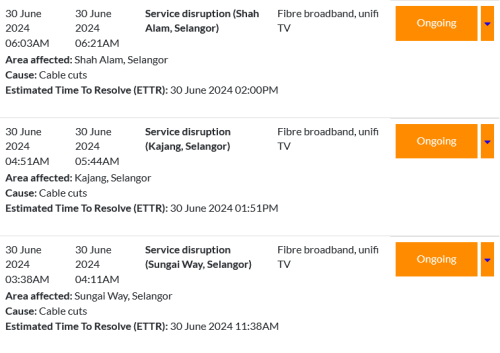
Is there an outage in the Shah Alam area?
MyProLife
post Jun 30 2024, 01:26 PM

I bully wumao & MPKL
*******
Senior Member
2,074 posts

Joined: Sep 2021
From: nowhere

Suddenly cannot surf lowyat, Reddit or GitHub

Also shah Alan area.

FB seems okay
aniq8676
post Jun 30 2024, 04:23 PM

Regular
******
Senior Member
1,524 posts

Joined: Dec 2020
From: Perak


QUOTE(Epic_winner091 @ Jun 30 2024, 11:04 AM)
Is there an outage in the Shah Alam area?
*
user posted image
Cable cuts
Edlois
post Jul 1 2024, 01:47 AM

New Member
*
Newbie
28 posts

Joined: Jan 2016
From: Kuala Lumpur


user posted image


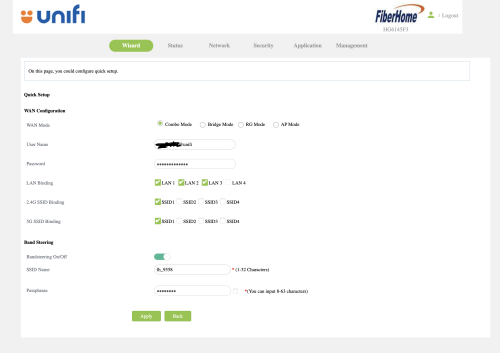
Tm unifi just upgraded my plan to 800mbps. and gave me this Fiberhome HG6145F3.

I had an existing DECO M5 mesh wifi.

But the problem comes when. I change the combo mode -> Bridge mode. I reset my DECO mesh and authenticate the PPPOE service credentials with proper VLAN profile. it's not working.
Okay nvm then I change back the ONU/combo box to combo mode again.

suddenly. the internet led start blinking. meaning I can't access to the internet.
I had the correct PPPOE service credentials
then I didn't touch anything, other than toggling between "Combo Mode" and "Bridge Mode"

I can't find any other people who got this "HG6145F3" on the forum. so.... help...... bangwall.gif bye.gif bye.gif
PRSXFENG
post Jul 1 2024, 07:17 AM

Look at all my stars!!
*******
Senior Member
2,608 posts

Joined: Nov 2020


QUOTE(Edlois @ Jul 1 2024, 01:47 AM)
user posted image
Tm unifi just upgraded my plan to 800mbps. and gave me this Fiberhome HG6145F3.

I had an existing DECO M5 mesh wifi.

But the problem comes when. I change the combo mode -> Bridge mode. I reset my DECO mesh and authenticate the PPPOE service credentials with proper VLAN profile. it's not working.
Okay nvm then I change back the ONU/combo box to combo mode again.

suddenly. the internet led start blinking. meaning I can't access to the internet.
I had the correct PPPOE service credentials
then I didn't touch anything, other than toggling between "Combo Mode" and "Bridge Mode"

I can't find any other people who got this "HG6145F3" on the forum. so.... help...... bangwall.gif  bye.gif  bye.gif
*
try setting up with NO VLAN on the deco
hk99mobile
post Jul 1 2024, 11:49 AM

New Member
*
Newbie
9 posts

Joined: Sep 2014
Hi Sifu, I have the black Dlink ONR combo and does it have a phone cloud apps? TIA huh.gif

raizer99
post Jul 1 2024, 02:10 PM

New Member
*
Newbie
39 posts

Joined: Jun 2015
QUOTE(raizer99 @ Jun 25 2024, 08:31 AM)
My unifi speed is 500mbps (SWU3.0 300mbps with free upgrade), but recently it left only around 100mbps download when downloading/run speedtest, while the upload speed is normal which is 100mbps(for 500mbps package). Restarting router does not fix it and QOS is not enabled on router. Last time is able to reach 500mbps just recently drop to 100mbps.Any idea how to solve this issue?
*
Now i try the speed will get back 500mbps after restart router,but after a while (few hour) it will become around 100mbps again,once restart will be 500mbps ,then back 100mbps again (looping)
wcnew
post Jul 1 2024, 02:21 PM

Getting Started
**
Junior Member
275 posts

Joined: Oct 2009
QUOTE(raizer99 @ Jul 1 2024, 02:10 PM)
Now i try the speed will get back 500mbps after restart router,but after a while (few hour) it will become around 100mbps again,once restart will be 500mbps ,then back 100mbps again (looping)
*
user posted image
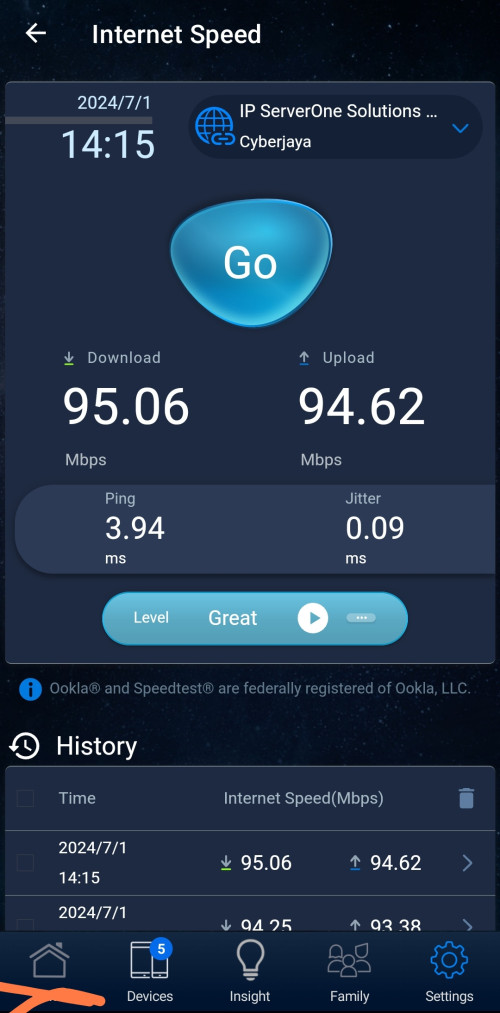
My 800mbps package become 90mbps after yesterday suddenly disconnection..what happen to tmnut? I check 100 they said shah alam got internet cable cut is it related??
raizer99
post Jul 1 2024, 03:03 PM

New Member
*
Newbie
39 posts

Joined: Jun 2015
QUOTE(wcnew @ Jul 1 2024, 02:21 PM)
user posted image
My 800mbps package become 90mbps after yesterday suddenly disconnection..what happen to tmnut? I check 100 they said shah alam got internet cable cut is it related??
*
Mine was having similar speed after a while restarted the router just like the situation i mentioned,this have been quite a while (few week) and i live in kuching sarawak
SwarmTroll
post Jul 1 2024, 04:11 PM

Regular
******
Senior Member
1,401 posts

Joined: Apr 2012
Hey guys, I disabled IPv6 and I got an IP address of 1.32.xx.xxx

I've never seen before an IP range starting with 1. Is this a public IP?
sHawTY
post Jul 1 2024, 04:18 PM

Frequent Reporter
********
All Stars
14,908 posts

Joined: Jul 2005

QUOTE(SwarmTroll @ Jul 1 2024, 04:11 PM)
I've never seen before an IP range starting with 1.
My office has been utilizing a fixed IP address that begins with "1" for nearly three years. We currently have five additional fixed IP addresses, all of which also start with "1."

We are subscribed to a 1 Gb/s internet package, having recently upgraded from an 800 Mb/s package.
SwarmTroll
post Jul 1 2024, 04:49 PM

Regular
******
Senior Member
1,401 posts

Joined: Apr 2012
QUOTE(sHawTY @ Jul 1 2024, 04:18 PM)
My office has been utilizing a fixed IP address that begins with "1" for nearly three years. We currently have five additional fixed IP addresses, all of which also start with "1."

We are subscribed to a 1 Gb/s internet package, having recently upgraded from an 800 Mb/s package.
*
Ah I see, I'm guessing there is no issues? Also it's a Public IP right?
darachan
post Jul 1 2024, 05:15 PM

Getting Started
**
Junior Member
87 posts

Joined: Jul 2022
Can anyone confirm that CGNAT IP becomes the problem that when registering for new Google accounts a phone verification is needed (previously not so)? How to bypass this?
coolguy_0925
post Jul 1 2024, 05:38 PM

Look at all my stars!!
*******
Senior Member
4,538 posts

Joined: Jan 2003
QUOTE(darachan @ Jul 1 2024, 05:15 PM)
Can anyone confirm that CGNAT IP becomes the problem that when registering for new Google accounts a phone verification is needed (previously not so)? How to bypass this?
*
I am on public ip but still have to verify otp

Probably want to prevent same person creating too many account
Quanta
post Jul 1 2024, 05:40 PM

Idiot member
******
Senior Member
1,425 posts

Joined: Jan 2003
From: Pearl 14000 + Kayangan 01000


QUOTE(wcnew @ Jul 1 2024, 02:21 PM)
user posted image
My 800mbps package become 90mbps after yesterday suddenly disconnection..what happen to tmnut? I check 100 they said shah alam got internet cable cut is it related??
*
like ur ethernet cable down negotiate to 100Mbps
sHawTY
post Jul 1 2024, 05:45 PM

Frequent Reporter
********
All Stars
14,908 posts

Joined: Jul 2005

QUOTE(SwarmTroll @ Jul 1 2024, 04:49 PM)
Ah I see, I'm guessing there is no issues? Also it's a Public IP right?
Since my office is using a business package, we automatically get a permanent public IP address.
I'm not sure about the situation for end users, though.

495 Pages « < 175 176 177 178 179 > » Top
Topic ClosedOptions
 

Change to:
| Lo-Fi Version
0.0193sec    0.25    6 queries    GZIP Disabled
Time is now: 3rd December 2025 - 08:45 PM