Welcome Guest ( Log In | Register )

Bump Topic Topic Closed RSS Feed

Outline · [ Standard ] · Linear+

Unifi Official TM UniFi High Speed Broadband Thread V42, READ 1ST PAGE FOR RELEVANT WIFI INFO!

views
     
raizer99
post Feb 16 2024, 08:34 AM

New Member
*
Newbie
39 posts

Joined: Jun 2015
mine line also become slow especially after 10pm. I playing league of legend at around 8pm can get 20++ms while it alway start to become 200++ms after 10pm for few day
raizer99
post Jun 25 2024, 08:31 AM

New Member
*
Newbie
39 posts

Joined: Jun 2015
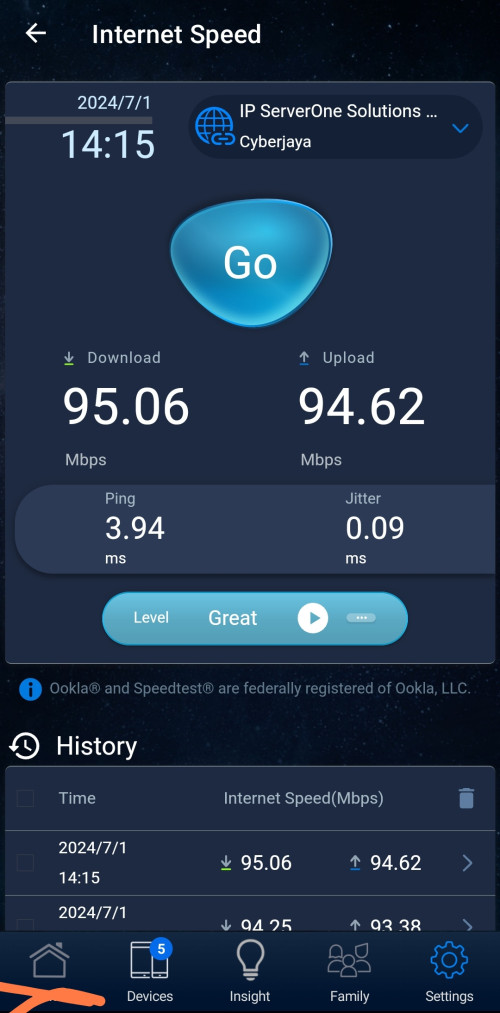
My unifi speed is 500mbps (SWU3.0 300mbps with free upgrade), but recently it left only around 100mbps download when downloading/run speedtest, while the upload speed is normal which is 100mbps(for 500mbps package). Restarting router does not fix it and QOS is not enabled on router. Last time is able to reach 500mbps just recently drop to 100mbps.Any idea how to solve this issue?
raizer99
post Jun 25 2024, 02:03 PM

New Member
*
Newbie
39 posts

Joined: Jun 2015
QUOTE(PRSXFENG @ Jun 25 2024, 12:49 PM)
94Mbps or beyond? like 100 to 110mbps
if its 94Mbps then you are limited by 10/100 ethernet, check cables, disconnect and reconnect em

if beyond 94Mbps, then maybe they accidentally capped you, contact them and complain
*
i using wifi and the wifi is quite stable (can reach 500mbps last time,few month no issue) but recently only left around 90-110mbps
raizer99
post Jul 1 2024, 02:10 PM

New Member
*
Newbie
39 posts

Joined: Jun 2015
QUOTE(raizer99 @ Jun 25 2024, 08:31 AM)
My unifi speed is 500mbps (SWU3.0 300mbps with free upgrade), but recently it left only around 100mbps download when downloading/run speedtest, while the upload speed is normal which is 100mbps(for 500mbps package). Restarting router does not fix it and QOS is not enabled on router. Last time is able to reach 500mbps just recently drop to 100mbps.Any idea how to solve this issue?
*
Now i try the speed will get back 500mbps after restart router,but after a while (few hour) it will become around 100mbps again,once restart will be 500mbps ,then back 100mbps again (looping)
raizer99
post Jul 1 2024, 03:03 PM

New Member
*
Newbie
39 posts

Joined: Jun 2015
QUOTE(wcnew @ Jul 1 2024, 02:21 PM)
user posted image
My 800mbps package become 90mbps after yesterday suddenly disconnection..what happen to tmnut? I check 100 they said shah alam got internet cable cut is it related??
*
Mine was having similar speed after a while restarted the router just like the situation i mentioned,this have been quite a while (few week) and i live in kuching sarawak
raizer99
post Aug 20 2024, 07:32 PM

New Member
*
Newbie
39 posts

Joined: Jun 2015
Anyone in kuching experiencing lagging/high latency at night around 7-10pm these few day? Mine alway got 200-300 ms in online game during these time and get back normal (40--ms) afterward, and already few day have this situation. Mine package is 500mbps (300mbps swu 3.0 with free upgrade) and below is the speedtest during the time i mentioned


Attached thumbnail(s)
Attached Image
raizer99
post Aug 21 2024, 09:46 PM

New Member
*
Newbie
39 posts

Joined: Jun 2015
QUOTE(tng55 @ Aug 20 2024, 10:15 PM)
maybe router issue i doubt
mine speed always full 500mbps 7pm to 10pm speed always full
*
i dont think is router issue as it happen at only around that time everyday and my ping to my router was 1ms normally
raizer99
post Sep 2 2024, 09:17 AM

New Member
*
Newbie
39 posts

Joined: Jun 2015
QUOTE(heLL_bOy @ Aug 31 2024, 11:03 PM)
in the past i try to complaint from various channel, like TM customer service and MCMC.

most of the time they not understand the issue even i sent them the MTR or traceroute report and they simply sent technician to check my fiber line which is totally not what i asking to check and close my case. doh.gif
*
i facing similar issue currently, every night have high latency to everything (200++ ms) ,tell TM customer service many time only happen at night and tried different router,device , LAN and wifi still same issue then they say will report to relevant team, at the end are ask technician come to check.

At the day technician plan come to check,before he come he call me and say my area got people with same issue and he checked not device issue ,he asked me if is same issue (high latency at night) , i say yes and he say then he cannot do anything, so i asked him no need to come as i know is not device issue.

Currently the problem still exist
raizer99
post Sep 3 2024, 09:15 AM

New Member
*
Newbie
39 posts

Joined: Jun 2015
QUOTE(kwss @ Sep 3 2024, 12:15 AM)
For people who has their DNS blocked, do you all mind to install nmap and run the following command?
CODE

nmap -sCV -Pn -p 53,443,853 <IP address of DNS server>

eg 1:
nmap -sCV -Pn -p 53,443,853 dns.google

eg 2:
nmap -sCV -Pn -p 53,443,853 9.9.9.9


Share your output here.
*
i not sure if i blocked

C:\Program Files (x86)\Nmap>nmap -sCV -Pn -p 53,443,853 dns.google
Starting Nmap 7.95 ( https://nmap.org ) at 2024-09-03 09:10 Malay Peninsula Standard Time
Nmap scan report for dns.google (8.8.4.4)
Host is up (0.022s latency).
Other addresses for dns.google (not scanned): 2001:4860:4860::8888 2001:4860:4860::8844 8.8.8.8

PORT STATE SERVICE VERSION
53/tcp open tcpwrapped
| dns-nsid:
|_ bind.version: unbound 1.13.2
443/tcp open tcpwrapped
| http-server-header:
| HTTP server (unknown)
|_ scaffolding on HTTPServer2
| ssl-cert: Subject: commonName=dns.google
| Subject Alternative Name: DNS:dns.google, DNS:dns.google.com, DNS:*.dns.google.com, DNS:8888.google, DNS:dns64.dns.google, IP Address:8.8.8.8, IP Address:8.8.4.4, IP Address:2001:4860:4860:0:0:0:0:8888, IP Address:2001:4860:4860:0:0:0:0:8844, IP Address:2001:4860:4860:0:0:0:0:6464, IP Address:2001:4860:4860:0:0:0:0:64
| Not valid before: 2024-08-05T07:20:13
|_Not valid after: 2024-10-28T07:20:12
|_ssl-date: TLS randomness does not represent time
853/tcp open tcpwrapped
|_ssl-date: TLS randomness does not represent time
| ssl-cert: Subject: commonName=dns.google
| Subject Alternative Name: DNS:dns.google, DNS:dns.google.com, DNS:*.dns.google.com, DNS:8888.google, DNS:dns64.dns.google, IP Address:8.8.8.8, IP Address:8.8.4.4, IP Address:2001:4860:4860:0:0:0:0:8888, IP Address:2001:4860:4860:0:0:0:0:8844, IP Address:2001:4860:4860:0:0:0:0:6464, IP Address:2001:4860:4860:0:0:0:0:64
| Not valid before: 2024-08-05T07:20:13
|_Not valid after: 2024-10-28T07:20:12

Service detection performed. Please report any incorrect results at https://nmap.org/submit/ .
Nmap done: 1 IP address (1 host up) scanned in 27.10 seconds

C:\Program Files (x86)\Nmap>nmap -sCV -Pn -p 53,443,853 9.9.9.9
Starting Nmap 7.95 ( https://nmap.org ) at 2024-09-03 09:12 Malay Peninsula Standard Time
Nmap scan report for dns9.quad9.net (9.9.9.9)
Host is up (0.049s latency).

PORT STATE SERVICE VERSION
53/tcp open domain Unbound 1.13.2
| dns-nsid:
|_ bind.version: unbound 1.13.2
443/tcp open ssl/https
|_ssl-date: TLS randomness does not represent time
| ssl-cert: Subject: commonName=dns.quad9.net/organizationName=Quad9/stateOrProvinceName=Zurich/countryName=CH
| Subject Alternative Name: DNS:dns.quad9.net, DNS:dns-nosec.quad9.net, DNS:doh-brave.quad9.net, DNS:dns.resolver.quad9.net, DNS:alpha-dns.quad9.net, DNS:beta-dns.quad9.net, DNS:dns9.quad9.net, DNS:dns10.quad9.net, DNS:dns11.quad9.net, DNS:dns12.quad9.net, DNS:dns13.quad9.net, DNS:dns14.quad9.net, DNS:dns15.quad9.net, DNS:dns254.quad9.net, DNS:mozilla.quad9.net, IP Address:9.9.9.9, IP Address:9.9.9.10, IP Address:9.9.9.11, IP Address:9.9.9.12, IP Address:9.9.9.13, IP Address:9.9.9.14, IP Address:9.9.9.15, IP Address:149.112.112.9, IP Address:149.112.112.10, IP Address:149.112.112.11, IP Address:149.112.112.12, IP Address:149.112.112.13, IP Address:149.112.112.14, IP Address:149.112.112.15, IP Address:149.112.112.112, IP Address:2620:FE:0:0:0:0:0:FE, IP Address:2620:FE:0:0:0:0:0:9, IP Address:2620:FE:0:0:0:0:0:10, IP Address:2620:FE:0:0:0:0:0:11, IP Address:2620:FE:0:0:0:0:0:12, IP Address:2620:FE:0:0:0:0:0:13, IP Address:2620:FE:0:0:0:0:0:14, IP Address:2620:FE:0:0:0:0:0:15, IP Address:2620:FE:0:0:0:0:FE:9, IP Address:2620:FE:0:0:0:0:FE:10, IP Address:2620:FE:0:0:0:0:FE:11, IP Address:2620:FE:0:0:0:0:FE:12, IP Address:2620:FE:0:0:0:0:FE:13, IP Address:2620:FE:0:0:0:0:FE:14, IP Address:2620:FE:0:0:0:0:FE:15
| Not valid before: 2024-07-17T00:00:00
|_Not valid after: 2025-07-16T23:59:59
|_http-server-header: h2o/dnsdist
|_http-title: Site doesn't have a title (text/plain; charset=utf-8).
853/tcp open ssl/domain (unknown banner: Q9-P-7.5)
| fingerprint-strings:
| DNSVersionBindReqTCP:
| version
| bind
|_ Q9-P-7.5
|_ssl-date: TLS randomness does not represent time
| ssl-cert: Subject: commonName=dns.quad9.net/organizationName=Quad9/stateOrProvinceName=Zurich/countryName=CH
| Subject Alternative Name: DNS:dns.quad9.net, DNS:dns-nosec.quad9.net, DNS:doh-brave.quad9.net, DNS:dns.resolver.quad9.net, DNS:alpha-dns.quad9.net, DNS:beta-dns.quad9.net, DNS:dns9.quad9.net, DNS:dns10.quad9.net, DNS:dns11.quad9.net, DNS:dns12.quad9.net, DNS:dns13.quad9.net, DNS:dns14.quad9.net, DNS:dns15.quad9.net, DNS:dns254.quad9.net, DNS:mozilla.quad9.net, IP Address:9.9.9.9, IP Address:9.9.9.10, IP Address:9.9.9.11, IP Address:9.9.9.12, IP Address:9.9.9.13, IP Address:9.9.9.14, IP Address:9.9.9.15, IP Address:149.112.112.9, IP Address:149.112.112.10, IP Address:149.112.112.11, IP Address:149.112.112.12, IP Address:149.112.112.13, IP Address:149.112.112.14, IP Address:149.112.112.15, IP Address:149.112.112.112, IP Address:2620:FE:0:0:0:0:0:FE, IP Address:2620:FE:0:0:0:0:0:9, IP Address:2620:FE:0:0:0:0:0:10, IP Address:2620:FE:0:0:0:0:0:11, IP Address:2620:FE:0:0:0:0:0:12, IP Address:2620:FE:0:0:0:0:0:13, IP Address:2620:FE:0:0:0:0:0:14, IP Address:2620:FE:0:0:0:0:0:15, IP Address:2620:FE:0:0:0:0:FE:9, IP Address:2620:FE:0:0:0:0:FE:10, IP Address:2620:FE:0:0:0:0:FE:11, IP Address:2620:FE:0:0:0:0:FE:12, IP Address:2620:FE:0:0:0:0:FE:13, IP Address:2620:FE:0:0:0:0:FE:14, IP Address:2620:FE:0:0:0:0:FE:15
| Not valid before: 2024-07-17T00:00:00
|_Not valid after: 2025-07-16T23:59:59
1 service unrecognized despite returning data. If you know the service/version, please submit the following fingerprint at https://nmap.org/cgi-bin/submit.cgi?new-service :
SF-Port853-TCP:V=7.95%T=SSL%I=7%D=9/3%Time=66D6627B%P=i686-pc-windows-wind
SF:ows%r(DNSVersionBindReqTCP,35,"\x003\0\x06\x81\x80\0\x01\0\x01\0\0\0\0\
SF:x07version\x04bind\0\0\x10\0\x03\xc0\x0c\0\x10\0\x03\0\0}q\0\t\x08Q9-P-
SF:7\.5");

Service detection performed. Please report any incorrect results at https://nmap.org/submit/ .
Nmap done: 1 IP address (1 host up) scanned in 29.69 seconds

This post has been edited by raizer99: Sep 3 2024, 09:18 AM

raizer99
post Sep 6 2024, 08:48 AM

New Member
*
Newbie
39 posts

Joined: Jun 2015
user posted image

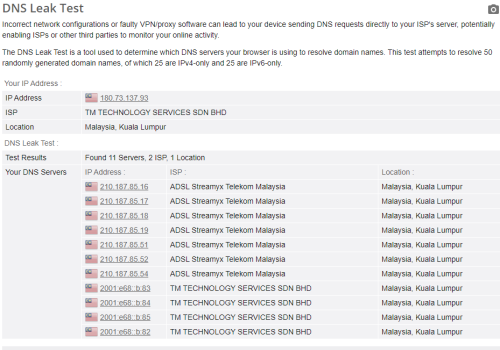
Mine DNS already not working (Both DoT/DoH/direct)

I am in Kuching,Sarawak and using SWU 3.0 300mbps (500mbps speed)

My work place also same (Unifi business with static IP)
raizer99
post Sep 6 2024, 09:02 AM

New Member
*
Newbie
39 posts

Joined: Jun 2015
QUOTE(YoungMan @ Sep 6 2024, 08:57 AM)
Walao even Unifi Business users are not spared from this DNS blocking. At least for now Maxis Business not affected.
*
I using home wifi cannot access those blocked website while using office wifi (unifi business) can access some blocked website but not all (dns.google , one.one.one.one still blocked)
raizer99
post Oct 8 2024, 12:23 PM

New Member
*
Newbie
39 posts

Joined: Jun 2015
QUOTE(shinjite @ Oct 8 2024, 12:11 PM)
Mine too until now still showing 300mbps - StayWithUnifi 3.0 (MESH6) in my Myunifi app.
*
Mine also showing 300mbps - StayWithUnifi 3.0 (MESH6), was sign on November 2023 and direct got 500mbps till now. Next month will be 1 year not sure if will become back 300mbps
raizer99
post Oct 21 2024, 08:34 AM

New Member
*
Newbie
39 posts

Joined: Jun 2015
QUOTE(StuartLee2015 @ Oct 20 2024, 10:19 PM)
I see, the AX55 have one that's not PRO, which i think is one less LAN port if am not wrong... for now, i think use the SR1041F router for the time being.

I used TP-link AX20 before this, the Tether app have a very user friendly interface. The SR1041F, not so much.
*
i owning a AX55 not PRO, i think the only diff is the WAN port, PRO was one 2.5gbps and one 1gbps that can be use as LAN or WAN, three 1gbps LAN port, and not PRO is 1gbps WAN and 4 1gbps LAN, other stuff i think is same ,not PRO have USB 3.0 port also

This post has been edited by raizer99: Oct 21 2024, 08:37 AM
raizer99
post Nov 12 2024, 05:01 PM

New Member
*
Newbie
39 posts

Joined: Jun 2015
My friend want to apply unifi home as new user as previous account not under his name. I here help him to ask is currently any offer or good deal for new unifi home user?

Topic ClosedOptions
 

Change to:
| Lo-Fi Version
0.0417sec    0.85    7 queries    GZIP Disabled
Time is now: 19th December 2025 - 05:20 AM