Outline ·
[ Standard ] ·
Linear+
Unifi Official TM UniFi High Speed Broadband Thread V42, READ 1ST PAGE FOR RELEVANT WIFI INFO!
|
laihuhng
|
 Jun 13 2024, 05:40 PM Jun 13 2024, 05:40 PM
|

|
QUOTE(bugipunch @ Jun 13 2024, 05:30 PM) yes. This 1 is only for the 2gbps plan. U can try ask sometimes they will give u the new version. Members here got it by asking the contractor. Apply for those with free upgrades from 1Gbps? My plan is 1Gbps but free upgraded to 2Gbps already. |
|
|
|
|
|
TubeNRibbon
|
Jun 13 2024, 05:55 PM
|
Getting Started

|
QUOTE(eternity4av @ Jun 13 2024, 05:30 PM) seems like its not a good thing? at least my current 800mbps is stable all along. minus the wifi that couldn't be maxed out in upper floors. indeed the old modem seem pretty stable. I can revert back to the old modem but wait for the issue happen again. |
|
|
|
|
|
Ashren
|
Jun 13 2024, 06:05 PM
|
Getting Started
|
QUOTE(hizadzahid @ Jun 13 2024, 04:09 PM) If I did not call 100, i will be waiting forever for my 1Gbps upgrades. Is it true i need to pay for the modem if i do not wish to extent the contract> As far as i know all 800mbps should get free upgrade to 1gbps at no extra charge or contract. But some here got a different offer. Free 3 months, speed upgrade to 1gbps and 24 months contract. You have to double check with TM. They're emotionally unstable always flip flop offers lol. This post has been edited by Ashren: Jun 13 2024, 06:29 PM |
|
|
|
|
|
Ashren
|
Jun 13 2024, 06:06 PM
|
Getting Started
|
QUOTE(laihuhng @ Jun 13 2024, 05:40 PM) Apply for those with free upgrades from 1Gbps? My plan is 1Gbps but free upgraded to 2Gbps already. Yes. |
|
|
|
|
|
Ashren
|
Jun 13 2024, 06:18 PM
|
Getting Started
|
QUOTE(eternity4av @ Jun 13 2024, 12:55 PM) hi fellow seniors, i do observed some members here gotten their 800mbps upgraded to 1gbps, so im abit unstable now paying rm210.95, so not sure whether should i go for swu or wait for 1gbps, The upgrade is without contract you can walk away anytime without penalty since you're financialy not stable right now. SWU comes with a 2yr contract. Let say if you cant afford even the cheapest plan in the future you still have the penalty imposed on you. It's your choice. |
|
|
|
|
|
Ashren
|
Jun 13 2024, 06:21 PM
|
Getting Started
|
QUOTE(captainwifi @ Jun 13 2024, 01:04 PM) What router do unifi give for new 300 mbps 24 months contracts? They wouldnt tell me what router it is? I'm considering both maxis and unifi at the moment. Either Skyworth wifi6 or Fiberhome wifi6. Both ONR (with built in modem). Skyworth 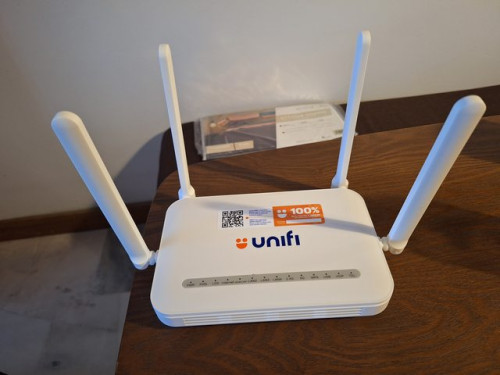 Fiberhome 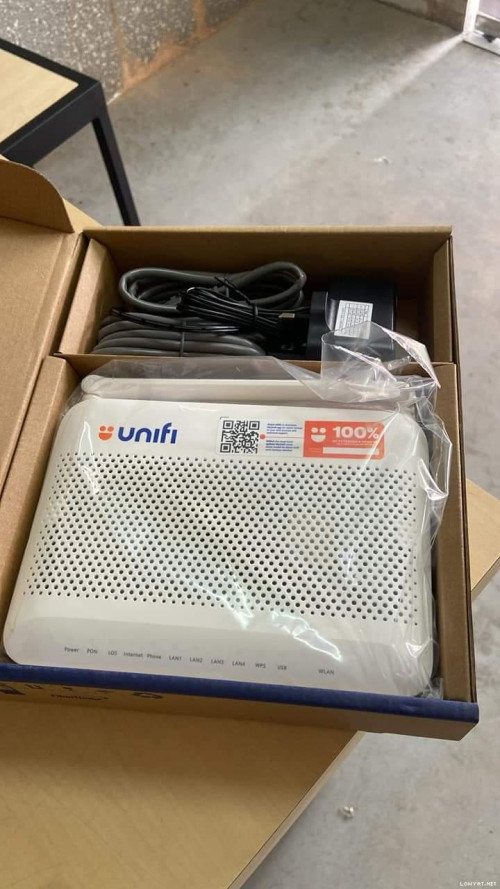 This post has been edited by Ashren: Jun 13 2024, 06:23 PM This post has been edited by Ashren: Jun 13 2024, 06:23 PM |
|
|
|
|
|
YoungMan
|
Jun 13 2024, 08:11 PM
|
|
|
QUOTE(eternity4av @ Jun 13 2024, 12:55 PM) hi fellow seniors, i do observed some members here gotten their 800mbps upgraded to 1gbps, so im abit unstable now paying rm210.95, so not sure whether should i go for swu or wait for 1gbps, Try request for SWU 4.0, 100mbps rm79, 300mbps rm119 free 6 months. If you feel paying for fix broadband is not so stable, maybe time to terminate and get a broadband sim without contract. |
|
|
|
|
|
LinebeckSA
|
Jun 13 2024, 10:01 PM
|
New Member
|
Seems UniFi is having big problems atm. Internet speed is extremely slow and been seeing a lot of people around the country reporting similar issues now.
|
|
|
|
|
|
bahjan_2000
|
Jun 13 2024, 10:04 PM
|
|
|
QUOTE(LinebeckSA @ Jun 13 2024, 10:01 PM) Seems UniFi is having big problems atm. Internet speed is extremely slow and been seeing a lot of people around the country reporting similar issues now. Ah. I thought it was my router thats dying while downloading a big game patch lol. Not seeing much discussions anywhere. Should I log a ticket to Unifi? |
|
|
|
|
|
LinebeckSA
|
Jun 13 2024, 10:06 PM
|
New Member
|
QUOTE(bahjan_2000 @ Jun 13 2024, 10:04 PM) Ah. I thought it was my router thats dying while downloading a big game patch lol. Not seeing much discussions anywhere. Should I log a ticket to Unifi? I'm trying to log a ticket with them now but the queue is really long. |
|
|
|
|
|
luqman98x
|
Jun 13 2024, 10:24 PM
|
|
|
Yep, unifi having problem connecting to most sites, local is okay I believe
Switching to my phone hotspot (using Yes) and it's sailing smooth again
|
|
|
|
|
|
yenchenje
|
Jun 13 2024, 10:27 PM
|
|
|
Local and overseas with local CDN is fine for me, overseas all fucked, but what's new
|
|
|
|
|
|
bahjan_2000
|
Jun 13 2024, 10:50 PM
|
|
|
Darn. With the weekend and long holiday coming I hope this is resolved fast..
|
|
|
|
|
|
KcX35
|
Jun 13 2024, 10:55 PM
|
|
|
why the fk is my internet so slow every night? especially video site, even my carousel is loading
|
|
|
|
|
|
luqman98x
|
Jun 13 2024, 10:55 PM
|
|
|
Seems like resolved already for me...
This post has been edited by luqman98x: Jun 13 2024, 10:58 PM
|
|
|
|
|
|
LinebeckSA
|
Jun 13 2024, 10:58 PM
|
New Member
|
QUOTE(luqman98x @ Jun 13 2024, 10:55 PM) Seems like resolved already for me, although pings are still high Yeah so far my download speed is back to normal, but my upload speed is still very slow. Haven't been able to get in contact with anyone at Unifi, seems their helplines are very busy atm. |
|
|
|
|
|
tng55
|
Jun 14 2024, 12:28 AM
|
|
|
QUOTE(pokemon @ Jun 12 2024, 01:01 PM) I just tried to disconnect and reconnect the connections. I still can get different range of ip like 175.xx, 115.xx, 60.51.xx that you are lucky but mine unlucky i already 10times always stuck 42.189.xxx.xxx |
|
|
|
|
|
pokemon
|
Jun 14 2024, 12:41 AM
|
|
|
QUOTE(tng55 @ Jun 14 2024, 12:28 AM) that you are lucky but mine unlucky i already 10times always stuck 42.189.xxx.xxx You can ask TM why you are struck with ip 42.189.xxx |
|
|
|
|
|
neekun
|
Jun 14 2024, 04:41 AM
|
|
|
QUOTE(eternity4av @ Jun 13 2024, 05:30 PM) seems like its not a good thing? at least my current 800mbps is stable all along. minus the wifi that couldn't be maxed out in upper floors. After a week of upgrade to 1gbps, the connection had been stable, no disconnection or speed drop. In fact prior to upgrade my connection also stable with no issue, it can remain connected for weeks until I manually reboot Asus router one a while just to refresh the connection. |
|
|
|
|
|
hussain
|
Jun 14 2024, 11:11 AM
|
|
|
I have been updated to 1 gbps last weekend.. Today I experienced some slowdown on wifi..mine installed bridge mode.. So I test with lan cable.. Also I get 800 instead of 1gbps...already restart devices.. Same.. Any settings I can adjust to get higher stable connection?
|
|
|
|
|



 Quote
Quote


 0.0417sec
 0.62
0.62
 6 queries
 GZIP Disabled