Welcome Guest ( Log In | Register )

Bump Topic Topic Closed RSS Feed

Outline · [ Standard ] · Linear+

Unifi Official TM UniFi High Speed Broadband Thread V42, READ 1ST PAGE FOR RELEVANT WIFI INFO!

views
     
hussain
post May 30 2024, 11:44 AM

Look at all my stars!!
*******
Senior Member
2,012 posts

Joined: Dec 2007
From: Malaysia


HI Guys.. Need some help.. I just got a call from unifi that finally i will get free upgrade from 800mbps to 1gbps. but they said have to installl their own router. Cant i continue to use my own router coz mine is new and is wifi 6 TP link Archer AX 73. My house is kinda large so previously using mesh did not help but after using this router speeds everywhere in the house is quite good even without mesh.. will their upgraded router be any better ?..appreciate some sifu advice.. thanks

Also will unifi be better or moving altogether to celcom fibre 1gbps?

This post has been edited by hussain: May 30 2024, 11:47 AM
hussain
post May 30 2024, 04:10 PM

Look at all my stars!!
*******
Senior Member
2,012 posts

Joined: Dec 2007
From: Malaysia


QUOTE(bugipunch @ May 30 2024, 03:14 PM)
ask technician to install bridge mode and all done.
*
Meaning? Sorry not very tech savvy
hussain
post May 31 2024, 09:23 AM

Look at all my stars!!
*******
Senior Member
2,012 posts

Joined: Dec 2007
From: Malaysia


QUOTE(Ashren @ May 30 2024, 09:20 PM)
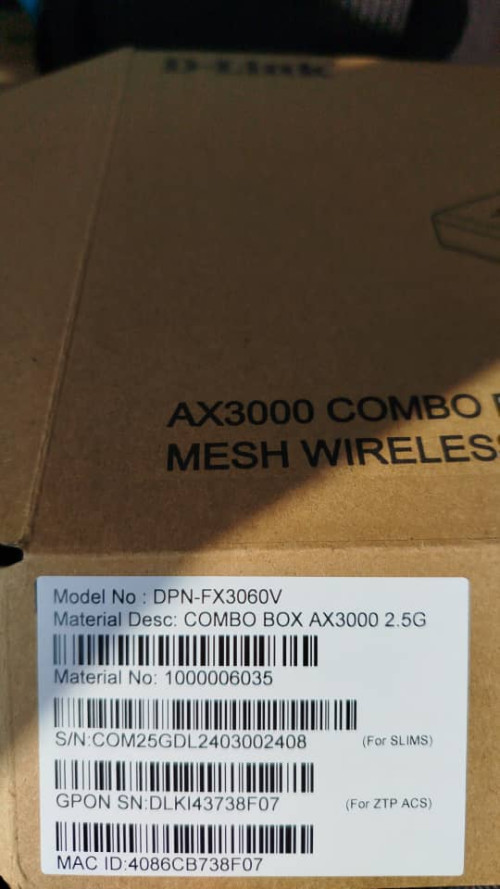
They give you the DLink modem with built in router combo box (ONR). So in order for you to use back your TPLink router just tell the installer to set the combo box to bridge mode. It'll act as a modem only and you can plug your TPLink router to it. Or you can use back your present setup without the combo modem. Speed is limited to 940mbps if use present setup. With the combo box set to bridge mode using own router can reach 1050-1100mbps if use with a 2.5gbps LAN port.

I suggest you do some simple search on the forum because lots of people already explain things like this including me. I got mine upgraded to 1gbps last week. I got the combo box set to bridge mode and I use back my Asus router and continue using my mesh setup as usual. When they come to install it for you make sure to ask for the black DLink combo box. If you get the white one tell them nicely you want the black one. If they refuse, go ham on them. Lol j/k

P/S: The black one better than the white one don't ask why I got tired explaning 😂
*
Thanks so much bro.. appreciate your help.. cheers
hussain
post Jun 8 2024, 09:22 AM

Look at all my stars!!
*******
Senior Member
2,012 posts

Joined: Dec 2007
From: Malaysia


Hi can anyone share picture what the black tm router looks like?

user posted image

My technician say he gonna bring this type but he says it's white in color unit... How?

This post has been edited by hussain: Jun 8 2024, 09:32 AM
hussain
post Jun 8 2024, 09:45 AM

Look at all my stars!!
*******
Senior Member
2,012 posts

Joined: Dec 2007
From: Malaysia


So it's my router that's gonna be setup as bridge mode right?
hussain
post Jun 8 2024, 10:02 AM

Look at all my stars!!
*******
Senior Member
2,012 posts

Joined: Dec 2007
From: Malaysia


QUOTE(NagaK @ Jun 8 2024, 10:00 AM)

*
thanks bro
hussain
post Jun 8 2024, 02:13 PM

Look at all my stars!!
*******
Senior Member
2,012 posts

Joined: Dec 2007
From: Malaysia


QUOTE(neekun @ Jun 8 2024, 10:34 AM)
Done settled. Got the black onr with 2.5gbps port.

[attachmentid=11496822]
*
all sorted. Black onr + bridge mode with my router.. Sorted

thanks all for advice and help.. cheers
hussain
post Jun 9 2024, 04:18 PM

Look at all my stars!!
*******
Senior Member
2,012 posts

Joined: Dec 2007
From: Malaysia


QUOTE(zeronehza @ Jun 9 2024, 03:45 PM)
dload speed got over 1Gbps ?
*
On Lan cable yes.. Wifi 700 to 800 mbps
hussain
post Jun 9 2024, 05:28 PM

Look at all my stars!!
*******
Senior Member
2,012 posts

Joined: Dec 2007
From: Malaysia


QUOTE(jiaen0509 @ Jun 9 2024, 04:46 PM)
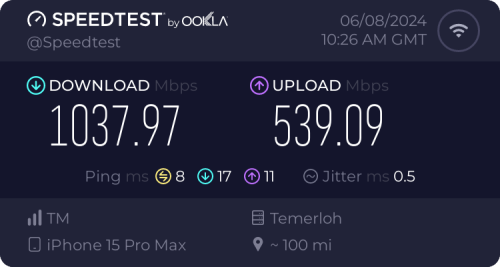
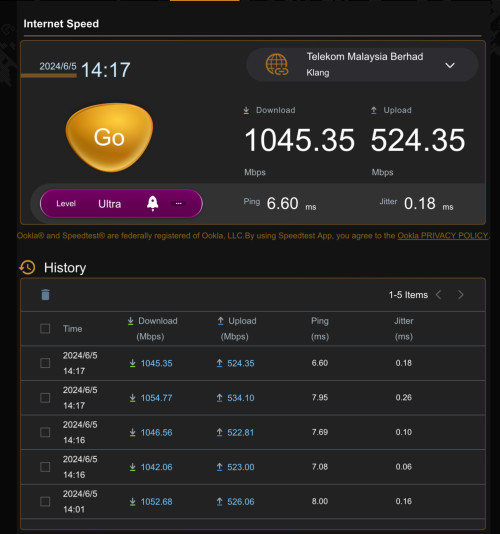
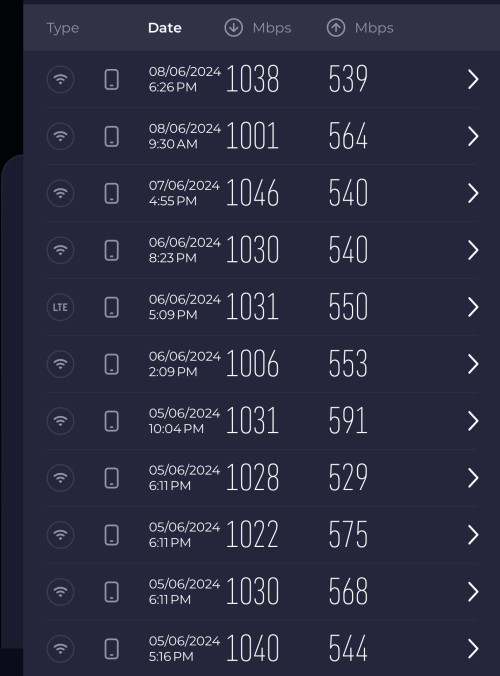
I consistently achieve download speeds of 1000 Mbps and upload speeds of 500 Mbps on both 5GHz Wi-Fi with iPhone 15 Pro Max device used and LAN when using the Black ONR in Bridge Mode and dialing PPPoE on the Asus Router.

user posted image

user posted image

user posted image
*
Is there something that my setup is doing wrong? Did u set it up differently from how tm service guys set it... Plesse share.. Thanks.. BTW I'm using s23 ultra
hussain
post Jun 9 2024, 06:37 PM

Look at all my stars!!
*******
Senior Member
2,012 posts

Joined: Dec 2007
From: Malaysia


QUOTE(jiaen0509 @ Jun 9 2024, 05:51 PM)
1. Let TM fully configure and set up the Combo Box. Ensure the;
• Internet is up
• VoIP is working
2. Thank the technician, belanja a air tin/kotak, and goodbye.
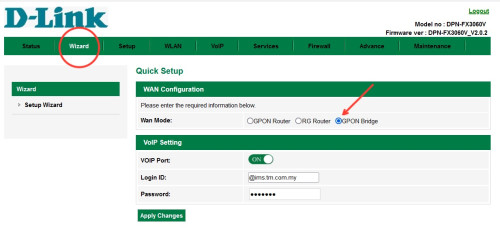
3. Connect a LAN cable from the LAN 1 port on the D-Link Combo Box to the WAN port on my Asus Router.
4. Access the D-Link WebUI via 192.168.0.1.
5. Go to the “Wizard” and change the [WAN Mode] to “GPON Mode,” then apply the changes. See reference below;
user posted image
6. Wait a few seconds, and the internet on my Asus Router will be up.
Note: My PPPoE information was already configured on my Asus Router before the Combo Box was installed, so the above steps do not involve setting up or configuring PPPoE. Once “Bridge Mode” on Combo Box is set. It will take some time to up the internet.

I am aware of a previously reported issue where the internet speed drops after a certain number of hours, requiring a restart of the Combo Box to resolve. For my case, after more than five days of monitoring, I haven’t encountered any speed drop issues.
*
I have lost my internet connection after doing this? And I can't connect to 192.168.0.1 to go in and change it back.. What did I do?
hussain
post Jun 9 2024, 06:38 PM

Look at all my stars!!
*******
Senior Member
2,012 posts

Joined: Dec 2007
From: Malaysia


I try connect modem to my laptop but can't get ethernet to work
hussain
post Jun 9 2024, 06:45 PM

Look at all my stars!!
*******
Senior Member
2,012 posts

Joined: Dec 2007
From: Malaysia


Please help
hussain
post Jun 9 2024, 06:53 PM

Look at all my stars!!
*******
Senior Member
2,012 posts

Joined: Dec 2007
From: Malaysia


I did that.. I got the wifi to select but no internet. The tm guy did set mine to bridge mode before he left.. How now?
hussain
post Jun 9 2024, 08:53 PM

Look at all my stars!!
*******
Senior Member
2,012 posts

Joined: Dec 2007
From: Malaysia


QUOTE(jiaen0509 @ Jun 9 2024, 06:57 PM)
Did you ever change your PPPoE password by requesting a new one from TM before? The installer only has access to the default (first) password in their system. In my case, the installer reset my PPPoE password without informing me, until I ask him only he told me he did reset the PPPoE password.

But since your bridge mode is working. Why change the settings 😂
*
Totally messed up.. No internet 😭😭😭
hussain
post Jun 9 2024, 09:54 PM

Look at all my stars!!
*******
Senior Member
2,012 posts

Joined: Dec 2007
From: Malaysia


QUOTE(jiaen0509 @ Jun 9 2024, 09:31 PM)
Oh man. Not sure is it due to your PPPoE password…. I should put a disclaimer on my sharing.
*
It's OK bro.. Sorted.. Sorry for the trouble
hussain
post Jun 9 2024, 10:21 PM

Look at all my stars!!
*******
Senior Member
2,012 posts

Joined: Dec 2007
From: Malaysia


QUOTE(cHiLdHo0drEaMz @ Jun 9 2024, 09:59 PM)
What and where did it get wrong? Kindly share if possible so others might be aware of it
*
Not sure.. When. I switched back to Gpon router it worked.. Gpon bridge messed it up for me.. My tm guy did set my router in bridge mode already... I misunderstood your post in that by setting it to gpon bridge it could improve my speed but it was a wrong move for me.. Anyways.. All. Is well now.. Cheers
hussain
post Jun 12 2024, 03:20 PM

Look at all my stars!!
*******
Senior Member
2,012 posts

Joined: Dec 2007
From: Malaysia


QUOTE(yakumo @ Jun 12 2024, 03:07 PM)
hi, i am going to get my free upgrade from 800 to 1gbps,

i heard that the modem is a combo and  i may not be able to use my own router to control my network, or am i wrong?
*
ask technician to install your router as bridge mode.. kaw tim
hussain
post Jun 14 2024, 11:11 AM

Look at all my stars!!
*******
Senior Member
2,012 posts

Joined: Dec 2007
From: Malaysia


I have been updated to 1 gbps last weekend.. Today I experienced some slowdown on wifi..mine installed bridge mode.. So I test with lan cable.. Also I get 800 instead of 1gbps...already restart devices.. Same.. Any settings I can adjust to get higher stable connection?
hussain
post Jun 14 2024, 11:21 AM

Look at all my stars!!
*******
Senior Member
2,012 posts

Joined: Dec 2007
From: Malaysia


QUOTE(bugipunch @ Jun 14 2024, 11:17 AM)
lan can get full speed? If lan can get full speed maybe u can change your wifi channel. Download wifi analyzer and look for a channel that is not congested.
*
OK will try that.. Thanks
hussain
post Jul 2 2024, 05:14 PM

Look at all my stars!!
*******
Senior Member
2,012 posts

Joined: Dec 2007
From: Malaysia


QUOTE(xjoshualaw29 @ Jul 2 2024, 02:30 PM)
Hi,

Just went to TMpoint to terminate my Unifi and they said new Stay with Unifi promo started yesterday.

1Gbps for RM159/mth 6 month free bill.

With the bad routing, every night... Imma come back to Unifi once it is better. Now on Maxis fiber for 2 years and will see any improvement by then
*
which Tmpoint you went to bro?


2 Pages  1 2 >Top
Topic ClosedOptions
 

Change to:
| Lo-Fi Version
0.0358sec    0.66    7 queries    GZIP Disabled
Time is now: 18th December 2025 - 06:31 PM