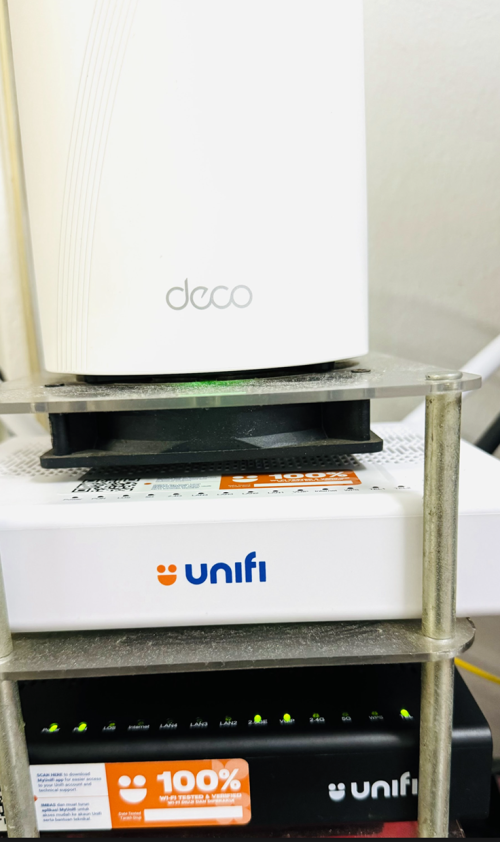
QUOTE(yenchenje @ Jun 15 2024, 01:05 PM)
Never open your router to the general internet unless absolutely necessary. If you REALLY need access, setup a local VPN to do this

Thank you 
Unifi Official TM UniFi High Speed Broadband Thread V42, READ 1ST PAGE FOR RELEVANT WIFI INFO!
|
|
 Jun 15 2024, 09:30 PM Jun 15 2024, 09:30 PM
|
 
Newbie
9 posts Joined: Sep 2014 
|
QUOTE(yenchenje @ Jun 15 2024, 01:05 PM) Never open your router to the general internet unless absolutely necessary. If you REALLY need access, setup a local VPN to do this Thank you |
|
|
|
|
|
Jun 15 2024, 09:32 PM
Show posts by this member only | IPv6 | Post
#3162
|

Junior Member
172 posts Joined: Oct 2008
|
QUOTE(tng55 @ Jun 12 2024, 11:38 AM) same here my area penang sad fixed 42.xxx.xxx bad IP Does your office pay more to get better IP? Why do they give some region bad IPs?but my office ip is 175 very nice same area penang my home to go office shop can walk near take 1min only or 30sec sad i can't get that ip 175.xxx for my home  |
|
|
Jun 15 2024, 09:35 PM
|
|
Senior Member
1,442 posts Joined: Sep 2021 
|
QUOTE(pokemon @ Jun 14 2024, 12:41 AM) You can ask TM why you are struck with ip 42.189.xxx i am sure tm wont help waste time they just do reset port noting effect ip address change sigh |
|
|
Jun 15 2024, 09:56 PM
|
|
Senior Member
1,208 posts Joined: Aug 2018
|
QUOTE(tng55 @ Jun 15 2024, 09:35 PM) i am sure tm wont help waste time they just do reset port noting effect ip address change sigh Would you like a diagnostic? Please specify clearly what problem are you facing and the steps to reproduce them.I find it hard to believe some numbers will cause problem. As far as computer is concerned it is just a number. |
|
|
Jun 15 2024, 10:14 PM
|
|
Junior Member
172 posts Joined: Oct 2008
|
Unpredictable and sudden bad routing to western servers. You get very bad ping via pingplotter to certain western servers, some international sites load very slowly or not at all, especially if servers are located soley in the west. You don't know when it will hit, whether it is because of undersea cable fault or repair. No word or information from TM at all. Just lot of users complained before:
https://forum.lowyat.net/topic/5149798 https://forum.lowyat.net/topic/5453176 I think it has been some years with intermittent cable issues. Some IP ranges seem to fare better strangely, hence users trying to 'roll' other 'good' IP ranges instead but are stuck with the bad 42.x range. Some time ago you usually can avoid the bad range by reset your router but now most people are stuck in the bad range and unable to change it. For 42.x range, in the am hours the ping is usually back to normal like <250ms, but the bad ping time can happen any time, so you get 1000+ms and packet loss. Local sites or most popular sites like Youtube/Facebook with multiple server locations are usually still okay and not affected hence the majority of users are unaware of issue. |
|
|
Jun 15 2024, 10:23 PM
|
|
Senior Member
1,208 posts Joined: Aug 2018
|
QUOTE(bluemind @ Jun 15 2024, 10:14 PM) Unpredictable and sudden bad routing to western servers. You get very bad ping via pingplotter to certain western servers, some international sites load very slowly or not at all, especially if servers are located soley in the west. You don't know when it will hit, whether it is because of undersea cable fault or repair. No word or information from TM at all. Just lot of users complained before: The links you posted affect all TM customer, not specific IP range. Please provide actionable items like specific IP address so I can look it or even better a packet capture that highlight the problem.https://forum.lowyat.net/topic/5149798 https://forum.lowyat.net/topic/5453176 I think it has been some years with intermittent cable issues. Some IP ranges seem to fare better strangely, hence users trying to 'roll' other 'good' IP ranges instead but are stuck with the bad 42.x range. Some time ago you usually can avoid the bad range by reset your router but now most people are stuck in the bad range and unable to change it. For 42.x range, in the am hours the ping is usually back to normal like <250ms, but the bad ping time can happen any time, so you get 1000+ms and packet loss. Local sites or most popular sites like Youtube/Facebook with multiple server locations are usually still okay and not affected hence the majority of users are unaware of issue. Like I said, there is no feng shui in network. Don't focus on IP address and ignore the other possibility. Referring to: https://bgpview.io/asn/4788#prefixes-v4 It seems the whole block of 42.188.0.0/14 is hard assigned to a few BNG. It might very well be those BNG are congested. It could also be possible TM has many suppliers for their BNG and those are the few that has issues, just like their ZTE core network upgrade. Since it is hard assigned, you can never get another prefix, ever... Unless you move out This post has been edited by kwss: Jun 15 2024, 10:25 PM |
|
|
|
|
|
Jun 15 2024, 10:41 PM
|
|
Junior Member
156 posts Joined: Dec 2010
|
QUOTE(kwss @ Jun 15 2024, 09:56 PM) Would you like a diagnostic? Please specify clearly what problem are you facing and the steps to reproduce them. Different ip range connect to different gateway. Some have better routing than others and its also area dependent. Its better to have the option to choose which one perform well for you. As for me 175.xxx and 124.xxx is good. I had 42.xxx for about a year and a half and it's very unreliable since I play online games alot. Once there's maintenance in my area and suddenly I'm not tied to that 42.xxx ip range anymore. Thank god I'd never want to go back to that ip range ever again.I find it hard to believe some numbers will cause problem. As far as computer is concerned it is just a number. |
|
|
Jun 15 2024, 10:42 PM
|
|
Senior Member
3,758 posts Joined: May 2008
|
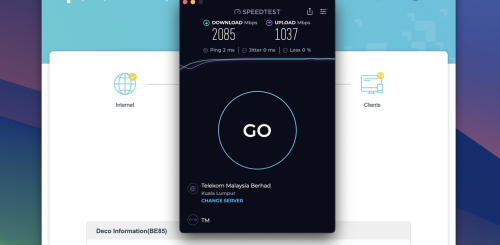
QUOTE(jonathanwhm @ Jun 11 2024, 08:05 PM) I just got the ONU replaced by TM this evening, from model A1 to B1. I'm running on Bridge Mode and using my Deco BE85 as a router. I managed to get around 2085Mbps DL and 1037Mbps UL. Do you really need 2GB internet connection ? what did you use it for ? » Click to show Spoiler - click again to hide... « Even mine after upgrade also facing issue with slow internet to oversea , now even apps can't load , website slow and etc. Now , almost all website ping over 100-1k ms. |
|
|
Jun 15 2024, 10:54 PM
|
|
Senior Member
1,208 posts Joined: Aug 2018
|
QUOTE(Ashren @ Jun 15 2024, 10:41 PM) Different ip range connect to different gateway. Some have better routing than others and its also area dependent. Its better to have the option to choose which one perform well for you. As for me 175.xxx and 124.xxx is good. I had 42.xxx for about a year and a half and it's very unreliable since I play online games alot. Once there's maintenance in my area and suddenly I'm not tied to that 42.xxx ip range anymore. Thank god I'd never want to go back to that ip range ever again. No they don't. This is a myth that has been circulating like forever. All of them use the same international gateway. You can easily prove this with BGP Looking Glass.The only factor I can think of is the BNG. All BNGs will connect to a ring network, which then connect internationally. If the ring network or the international gateway is broken it should affect everyone. |
|
|
Jun 15 2024, 10:58 PM
|

All Stars
14,909 posts Joined: Jul 2005 
|
Has anyone else noticed that add-ons for MESH/Smart Home devices are missing from the UniFi app and website, or is it just me?
|
|
|
Jun 15 2024, 11:05 PM
Show posts by this member only | IPv6 | Post
#3171
|
|
Senior Member
2,717 posts Joined: Oct 2004
|
QUOTE(Maxieos @ Jun 15 2024, 10:42 PM) Do you really need 2GB internet connection ? what did you use it for ? Which overseas sites are having issues?Even mine after upgrade also facing issue with slow internet to oversea , now even apps can't load , website slow and etc. Now , almost all website ping over 100-1k ms. |
|
|
Jun 15 2024, 11:07 PM
|
|
Senior Member
1,442 posts Joined: Sep 2021
|
QUOTE(bluemind @ Jun 15 2024, 09:32 PM) Does your office pay more to get better IP? Why do they give some region bad IPs? office pay RM1xx That BIZ lucky my office ip range is best stable sad |
|
|
Jun 15 2024, 11:08 PM
|
|
Senior Member
1,442 posts Joined: Sep 2021
|
QUOTE(kwss @ Jun 15 2024, 09:56 PM) Would you like a diagnostic? Please specify clearly what problem are you facing and the steps to reproduce them. many site slow and shopee slow and lag etcI find it hard to believe some numbers will cause problem. As far as computer is concerned it is just a number. if 175.xxx.xxx ip seeem batter to me |
|
|
|
|
|
Jun 15 2024, 11:11 PM
|
|
Senior Member
1,208 posts Joined: Aug 2018
|
QUOTE(tng55 @ Jun 15 2024, 11:08 PM) many site slow and shopee slow and lag etc Can you list the exact URL?if 175.xxx.xxx ip seeem batter to me Also can you check if your home and office is connected to the same BNG? If you are using Mikrotik then it is listed as "Active AC Name". If your router don't show this field then you gotta packet capture the PPPoE handshake. |
|
|
Jun 15 2024, 11:12 PM
Show posts by this member only | IPv6 | Post
#3175
|
|
Junior Member
172 posts Joined: Oct 2008
|
QUOTE(kwss @ Jun 15 2024, 10:23 PM) The links you posted affect all TM customer, not specific IP range. Please provide actionable items like specific IP address so I can look it or even better a packet capture that highlight the problem. There are plenty to choose from if you want to spend time investigate. Like for example AWS servers in US N. Virginia (us-east-1) displays average ping of 300-350ms (https://awsspeedtest.com/latency) which seems fine on paper but in actual connection like a game connection which relies on steady packets you will get frequent packet loss, disconnections or high pings upwards to 4000ms (https://en-forum.guildwars2.com/topic/130645-locationip-of-us-servers-please/).Like I said, there is no feng shui in network. Don't focus on IP address and ignore the other possibility. Referring to: https://bgpview.io/asn/4788#prefixes-v4 It seems the whole block of 42.188.0.0/14 is hard assigned to a few BNG. It might very well be those BNG are congested. It could also be possible TM has many suppliers for their BNG and those are the few that has issues, just like their ZTE core network upgrade. Since it is hard assigned, you can never get another prefix, ever... Unless you move out And it is not all day either which is strange, during am hours things are back to <250ms, and the packet loss happens at random times. Could be congestion issue for the steady in am hours but some IP ranges are not affected no matter the time of day. If someone have other Unifi IP range maybe they can try see if they get better routing for these? anyways customers who get stuck with this range can't do anything. https://i.imgur.com/T8lojDT.jpg 18.204.102.208 54.205.4.11 52.73.147.16 |
|
|
Jun 15 2024, 11:16 PM
|
|
Senior Member
1,442 posts Joined: Sep 2021
|
QUOTE(Ashren @ Jun 15 2024, 10:41 PM) Different ip range connect to different gateway. Some have better routing than others and its also area dependent. Its better to have the option to choose which one perform well for you. As for me 175.xxx and 124.xxx is good. I had 42.xxx for about a year and a half and it's very unreliable since I play online games alot. Once there's maintenance in my area and suddenly I'm not tied to that 42.xxx ip range anymore. Thank god I'd never want to go back to that ip range ever again. same like me you got lucky 175.xxx and 124.xxx i have remember long time ago used 175.xxx very good also and 118.xxx good daam |
|
|
Jun 15 2024, 11:16 PM
|
|
Senior Member
1,208 posts Joined: Aug 2018
|
QUOTE(bluemind @ Jun 15 2024, 11:12 PM) There are plenty to choose from if you want to spend time investigate. Like for example AWS servers in US N. Virginia (us-east-1) displays average ping of 300-350ms (https://awsspeedtest.com/latency) which seems fine on paper but in actual connection like a game connection which relies on steady packets you will get frequent packet loss, disconnections or high pings upwards to 4000ms (https://en-forum.guildwars2.com/topic/130645-locationip-of-us-servers-please/). This is not an IP range problem I am trying to diagnose. This affects everyone including me.And it is not all day either which is strange, during am hours things are back to <250ms, and the packet loss happens at random times. Could be congestion issue for the steady in am hours but some IP ranges are not affected no matter the time of day. If someone have other Unifi IP range maybe they can try see if they get better routing for these? anyways customers who get stuck with this range can't do anything. https://i.imgur.com/T8lojDT.jpg 18.204.102.208 54.205.4.11 52.73.147.16 I am not protecting TM or anyone. If it is a problem, it is a problem. |
|
|
Jun 15 2024, 11:19 PM
|
|
Senior Member
1,442 posts Joined: Sep 2021
|
QUOTE(kwss @ Jun 15 2024, 11:11 PM) Can you list the exact URL? my home asus router and office also asus routerAlso can you check if your home and office is connected to the same BNG? If you are using Mikrotik then it is listed as "Active AC Name". If your router don't show this field then you gotta packet capture the PPPoE handshake. we don't have mikrotik |
|
|
Jun 15 2024, 11:21 PM
|
|
Senior Member
3,758 posts Joined: May 2008
|
QUOTE(tng55 @ Jun 15 2024, 11:08 PM) many site slow and shopee slow and lag etc same cannot load apps at all. even laz also the same.if 175.xxx.xxx ip seeem batter to me |
|
|
Jun 15 2024, 11:24 PM
Show posts by this member only | IPv6 | Post
#3180
|
|
Junior Member
172 posts Joined: Oct 2008
|
QUOTE(kwss @ Jun 15 2024, 11:16 PM) This is not an IP range problem I am trying to diagnose. This affects everyone including me. I am unable to connect to other IP range atm so I can't show you that certain other IP range are not affected usually, that was my experience like a year or more ago unless something has changed now and everyone is now affected. If you are currently connected via other IP range you can test it yourself easily, hence why I posted the IPs you requested earlier.I am not protecting TM or anyone. If it is a problem, it is a problem. |
|
Topic ClosedOptions
|
| Change to: |  0.0161sec 0.0161sec
 0.70 0.70
 6 queries 6 queries
 GZIP Disabled GZIP Disabled
Time is now: 11th December 2025 - 08:52 AM |
 Quote
Quote