Welcome Guest ( Log In | Register )

Bump Topic Topic Closed RSS Feed

Outline · [ Standard ] · Linear+

Unifi Official TM UniFi High Speed Broadband Thread V42, READ 1ST PAGE FOR RELEVANT WIFI INFO!

views
     
yenchenje
post May 22 2024, 10:47 AM

Enthusiast
*****
Junior Member
932 posts

Joined: Dec 2019
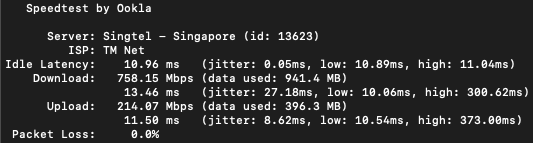
If someone here is on the 115.135.x range for IP, can help verify if speedtest to singapore servers are fucked?

GBe plan but only getting max 200mbps, need to know if it's a router issue or peering issue
countingcrows
post May 22 2024, 10:53 AM

Getting Started
**
Junior Member
260 posts

Joined: Feb 2023
QUOTE(yenchenje @ May 22 2024, 10:47 AM)
If someone here is on the 115.135.x range for IP, can help verify if speedtest to singapore servers are fucked?

GBe plan but only getting max 200mbps, need to know if it's a router issue or peering issue
*
115.134

user posted image
jusbella
post May 22 2024, 11:38 AM

Look at all my stars!!
*******
Senior Member
3,038 posts

Joined: Dec 2011


QUOTE(yenchenje @ May 22 2024, 10:47 AM)
If someone here is on the 115.135.x range for IP, can help verify if speedtest to singapore servers are fucked?

GBe plan but only getting max 200mbps, need to know if it's a router issue or peering issue
*
user posted image
dev/numb
post May 22 2024, 11:41 AM

On my way
****
Junior Member
691 posts

Joined: Nov 2021
QUOTE(yenchenje @ May 22 2024, 10:47 AM)
If someone here is on the 115.135.x range for IP, can help verify if speedtest to singapore servers are fucked?

GBe plan but only getting max 200mbps, need to know if it's a router issue or peering issue
*
It’s variable, and changes almost daily. One day your peering to a certain Singapore server is fine and the next day you will get triple the latency and >10% packet loss. For example, last night between 9pm-1am, out of the 5 servers my VPN provider offers in SG, only 1 was useable. It’s not just SG either. Even HK, Thai and Indo servers can be affected. It’s a TM problem and has been going on since just before MCO, not related to the submarine cable faults currently affecting our EU connectivity for the past month. So basically, we Unifi users are battling a combination of 2 issues nowadays – TM peering issues plus EU connectivity issues. Every night for the past month I try find one nearby SG server and use that as the first hop to negate TM’s usual peering issues, and then connect to Japan for the second hop to avoid the slow connectivity to EU domains caused by the undersea cable breakage.
Anime4000
post May 22 2024, 11:45 AM

Look at all my stars!!
*******
Senior Member
2,400 posts

Joined: Jul 2009
From: /dev/null


QUOTE(Oltromen Ripot @ May 22 2024, 08:35 AM)
please. and thank you for your effort.

keep updating the 1st primary posts of it of future revisions so that we don't get lost looking for new revision if you instead posted in post #947.

but warn the visitors of that thread to only feedback towards improving the firmware's future versions. please delete any "thank you", "good job" kind of posts. last thing we need is a 10,000 postings in a thread in which we cannot find the 100 that mattered.
*
Alright, I making one post for modding D-Link

EDIT: posted here https://forum.lowyat.net/topic/5458877

This post has been edited by Anime4000: May 22 2024, 01:04 PM
Zaryl
post May 22 2024, 09:27 PM

Hardcore Casual Gamer
******
Senior Member
1,711 posts

Joined: Jan 2003
From: Kedah Khap Khoun Khap (4K)


anyone experiencing intermittent signal on their UniFi, specifically in Klang area?

tried restart the router, sometimes can surf normal. then few hours like that, no internet.
called CS, they restarted the port on their side, good for few hours then got problem.

i'm using the 100Mbps package (previously on 30Mbps then free auto upgrade).

if this still happens, i might switch to Maxis Fiber.

but, Maxis fiber IS using TM's infra right? doh.gif


yenchenje
post May 22 2024, 10:26 PM

Enthusiast
*****
Junior Member
932 posts

Joined: Dec 2019
QUOTE(countingcrows @ May 22 2024, 10:53 AM)
115.134

user posted image
*
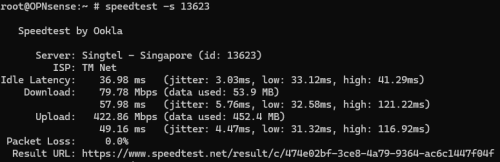
Okay, it was at around 340Mbps, now testing at 1030PM its down to 80Mbps DL.. ranting.gif
QUOTE(jusbella @ May 22 2024, 11:38 AM)
user posted image
*
Okay this is weird, private network and local speedtest servers is *fine* ish but SG is just not working
user posted image
QUOTE(dev/numb @ May 22 2024, 11:41 AM)
It’s variable, and changes almost daily. One day your peering to a certain Singapore server is fine and the next day you will get triple the latency and >10% packet loss. For example, last night between 9pm-1am, out of the 5 servers my VPN provider offers in SG, only 1 was useable. It’s not just SG either. Even HK, Thai and Indo servers can be affected. It’s a TM problem and has been going on since just before MCO, not related to the submarine cable faults currently affecting our EU connectivity for the past month. So basically, we Unifi users are battling a combination of 2 issues nowadays – TM peering issues plus EU connectivity issues. Every night for the past month I try find one nearby SG server and use that as the first hop to negate TM’s usual peering issues, and then connect to Japan for the second hop to avoid the slow connectivity to EU domains caused by the undersea cable breakage.
*
EU for me not much of an issue as I don't have much stuff that is needed from EU, but to around SEA it's gotten worst in the last 2-3 months from my exp, never this bad during the first time that my internet upgraded to 1Gbps rclxub.gif

This post has been edited by yenchenje: May 22 2024, 10:27 PM
jusbella
post May 22 2024, 10:30 PM

Look at all my stars!!
*******
Senior Member
3,038 posts

Joined: Dec 2011


QUOTE(yenchenje @ May 22 2024, 10:26 PM)
Okay, it was at around 340Mbps, now testing at 1030PM its down to 80Mbps DL..  ranting.gif

Okay this is weird, private network and local speedtest servers is *fine* ish but SG is just not working
user posted image

EU for me not much of an issue as I don't have much stuff that is needed from EU, but to around SEA it's gotten worst in the last 2-3 months from my exp, never this bad during the first time that my internet upgraded to 1Gbps  rclxub.gif
*
Guess you can compile all those screenshot and write report send to tm to check.
RViN
post May 22 2024, 10:37 PM

There Is Only One United
*******
Senior Member
5,827 posts

Joined: Jan 2003
From: Selayang, Selangor


QUOTE(zeronehza @ May 21 2024, 08:42 PM)
what about real time speed download ? try to queue as many same file same size from good dedicated server like nvidia driver etc  tongue.gif
*
Why though? Speed test can reach 1GB. When it's behaving properly can get 700-800mbps on steam downloads. I noticed the last time it happened (which was only after a gap of a few hours) it was because I was wondering why my steam downloads were only moving at 30mbps and thought it might have been a peering issue to the vpn but then checking the speed test to tm server it was maxed at 50+ mbps, so then I manually restarted ONR and voila straight after the usual 700+mbps.

QUOTE(blacktubi @ May 21 2024, 09:10 PM)
What’s your fiber reading?
*
Fiber reading? Sounds like something I would check on the ONR? Didn't see an option in the GUI the last time I was looking through it.

QUOTE(Ashren @ May 21 2024, 09:18 PM)
Since you're using Asus router, check the port status and link nego when the speed drop happen. Network map > system status > click the status tab. At first i thought mem leak, but your ram is fine at 39% so it has to be other issue. If cable, you did get 1g before it drop. Maybe fiber reading like blacktubi suggest. But damn you break the 1g barrier so to me fiber reading also cannot be it. I feel like theres some qos or traffic shaping going on.
*
I'll wait till the problem reoccurs and check, but the last time it happened I remember seeing the ports were all green so it should be 2.5g.

Epic_winner091
post May 22 2024, 11:01 PM

Casual
***
Junior Member
340 posts

Joined: Mar 2010
From: Shah Alam


Downloads from anything Microsoft-related (like Windows Updates, Xbox downloads) seem to slow down at night.

*sigh*

I guess the internet in unusable without a VPN at night.
bugipunch
post May 23 2024, 05:35 AM

Getting Started
**
Junior Member
173 posts

Joined: Jul 2021
QUOTE(Zaryl @ May 22 2024, 09:27 PM)
anyone experiencing intermittent signal on their UniFi, specifically in Klang area?

tried restart the router, sometimes can surf normal. then few hours like that, no internet.
called CS, they restarted the port on their side, good for few hours then got problem.

i'm using the 100Mbps package (previously on 30Mbps then free auto upgrade).

if this still happens, i might switch to Maxis Fiber.

but, Maxis fiber IS using TM's infra right?  doh.gif
*
this 1 your fiber kena makan already. Technician need to come and replace the cable. U go maxis even worse since maxis will need to call tm to replace the cable.
Ashren
post May 23 2024, 01:03 PM

Getting Started
**
Junior Member
156 posts

Joined: Dec 2010
My installer took the long and hard way today he came with the white Skyworth AX3000 I told him that's for 100-800mbps, he told me it's a new model they just got it this week I told him I know but I want the black D-Link not this. So he called his boss and they confirm Ultra plan D-Link, Pro plan Skyworth. He said sorry and went back to office to get the stock and he's on the way again. Very nice fella 😂 Let's hope I can bridge that little brat to my Asus.

Edit: I can bridge to my Asus no problem at all and I can use my previous Huawei EG8240H5 also, both authenticate normally so no binding. They gave me the PLOAM pass too just in case for safe keeping. Kudos to the installer I gave them 10/10 feedback when they send me the sms link. Going back and forth to get the D-Link and very fast too 😂

This post has been edited by Ashren: May 23 2024, 02:36 PM
NagaK
post May 23 2024, 03:12 PM

Regular
******
Senior Member
1,196 posts

Joined: Sep 2018


QUOTE(Ashren @ May 23 2024, 01:03 PM)
My installer took the long and hard way today he came with the white Skyworth AX3000 I told him that's for 100-800mbps, he told me it's a new model they just got it this week I told him I know but I want the black D-Link not this. So he called his boss and they confirm Ultra plan D-Link, Pro plan Skyworth. He said sorry and went back to office to get the stock and he's on the way again. Very nice fella 😂 Let's hope I can bridge that little brat to my Asus.

Edit: I can bridge to my Asus no problem at all and I can use my previous Huawei EG8240H5 also, both authenticate normally so no binding. They gave me the PLOAM pass too just in case for safe keeping. Kudos to the installer I gave them 10/10 feedback when they send me the sms link. Going back and forth to get the D-Link and very fast too 😂
*
What is PLOAM pass? I didn't get it. Did you bridge your router just your own or installer did it?
I will try to install D Link ONR to just how stable fiber connection was
jiaen0509
post May 23 2024, 03:17 PM

Look at all my stars!!
*******
Senior Member
3,307 posts

Joined: Dec 2012
QUOTE(Ashren @ May 23 2024, 01:03 PM)
My installer took the long and hard way today he came with the white Skyworth AX3000 I told him that's for 100-800mbps, he told me it's a new model they just got it this week I told him I know but I want the black D-Link not this. So he called his boss and they confirm Ultra plan D-Link, Pro plan Skyworth. He said sorry and went back to office to get the stock and he's on the way again. Very nice fella 😂 Let's hope I can bridge that little brat to my Asus.

Edit: I can bridge to my Asus no problem at all and I can use my previous Huawei EG8240H5 also, both authenticate normally so no binding. They gave me the PLOAM pass too just in case for safe keeping. Kudos to the installer I gave them 10/10 feedback when they send me the sms link. Going back and forth to get the D-Link and very fast too 😂
*
🙌🏻Great! Let’s monitor the speed issue raised by RViN before where the speed will drop to ~300mbps after certain periods of times (within 24 hours) on Black D-Link ONR and bridge mode. Looking forward to your feedback.
Ashren
post May 23 2024, 03:29 PM

Getting Started
**
Junior Member
156 posts

Joined: Dec 2010
QUOTE(NagaK @ May 23 2024, 03:12 PM)
What is PLOAM pass? I didn't get it. Did you bridge your router just your own or installer did it?
I will try to install D Link ONR to just how stable fiber connection was
*
I bridged the D-Link myself but I told the installer beforehand and he said no problem he even show me how to do the bridge mode setup. It's exactly how other fellow members here taught us.

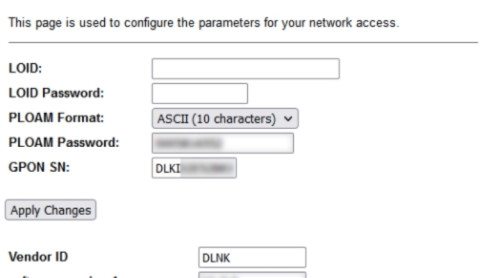
The PLOAM pass is the pass the ONR/ONU use to authenticate itself to the OLT before we can dial to the service. Usually the pass are generated with the serial num of the device. If the pass and serial doesnt match the profile on the OLT, the ONR/ONU cannot be used to dial PPPoE or even access the line. If they bind a particular ONU/ONR to the OLT you can only use that device to connect. If no bind, can use any ONR/ONU provided each device has its own PLOAM pass generated to match it's serial in the settings. Some called this ONU pass, even my installer refer to it as ONU pass. So if you hard reset your D-Link you need to enter PLOAM pass again in settings just like your PPPoE pass.

Example from Anime post ⬇️

user posted image

This post has been edited by Ashren: May 23 2024, 03:39 PM
Ashren
post May 23 2024, 03:31 PM

Getting Started
**
Junior Member
156 posts

Joined: Dec 2010
QUOTE(jiaen0509 @ May 23 2024, 03:17 PM)
🙌🏻Great! Let’s monitor the speed issue raised by RViN before where the speed will drop to ~300mbps after certain periods of times (within 24 hours) on Black D-Link ONR and bridge mode. Looking forward to your feedback.
*
I'll monitor and will update in due time.
andrekua2
post May 23 2024, 03:31 PM

10k Club
********
All Stars
13,484 posts

Joined: Jan 2012


QUOTE(Zaryl @ May 22 2024, 09:27 PM)
anyone experiencing intermittent signal on their UniFi, specifically in Klang area?

tried restart the router, sometimes can surf normal. then few hours like that, no internet.
called CS, they restarted the port on their side, good for few hours then got problem.

i'm using the 100Mbps package (previously on 30Mbps then free auto upgrade).

if this still happens, i might switch to Maxis Fiber.

but, Maxis fiber IS using TM's infra right?  doh.gif
*
Did they sent u an sms? I noticed that whenever Unifi sent SMS about network fault/down, I still find that the internet works when I reached home. However it will be just like you said, the internet is on and off a couple of times every hour. So annoying when gaming.
Zaryl
post May 23 2024, 03:52 PM

Hardcore Casual Gamer
******
Senior Member
1,711 posts

Joined: Jan 2003
From: Kedah Khap Khoun Khap (4K)


QUOTE(bugipunch @ May 23 2024, 05:35 AM)
this 1 your fiber kena makan already. Technician need to come and replace the cable. U go maxis even worse since maxis will need to call tm to replace the cable.
*
QUOTE(andrekua2 @ May 23 2024, 03:31 PM)
Did they sent u an sms? I noticed that whenever Unifi sent SMS about network fault/down, I still find that the internet works when I reached home. However it will be just like you said, the internet is on and off a couple of times every hour. So annoying when gaming.
*
one TM technician came today to troubleshoot.
at first, he replaced with a new white Dlink router he bought along which I am currently using (Dlink DVG F2452 used for 2 years already).
problem still persists. then he tried reset the router via a pin on my old router. no go.

then he used a new Dlink AX3000 Wifi6 router. Voila, no more issue.

he also feels strange why the my old and the new DVG F2452 routers got the problem where certain websites can't access even unifi.com.my, banking websites, etc.

issue resolved.

that AX3000 is supposed to be used with 300Mbps package but i got it for RM53 instead (technician visit fee).

Touchwood hopefully this new Wifi6 would last for years. icon_rolleyes.gif


NagaK
post May 23 2024, 04:45 PM

Regular
******
Senior Member
1,196 posts

Joined: Sep 2018


QUOTE(Ashren @ May 23 2024, 03:29 PM)
I bridged the D-Link myself but I told the installer beforehand and he said no problem he even show me how to do the bridge mode setup. It's exactly how other fellow members here taught us.

The PLOAM pass is the pass the ONR/ONU use to authenticate itself to the OLT before we can dial to the service. Usually the pass are generated with the serial num of the device. If the pass and serial doesnt match the profile on the OLT, the ONR/ONU cannot be used to dial PPPoE or even access the line. If they bind a particular ONU/ONR to the OLT you can only use that device to connect. If no bind, can use any ONR/ONU provided each device has its own PLOAM pass generated to match it's serial in the settings. Some called this ONU pass, even my installer refer to it as ONU pass. So if you hard reset your D-Link you need to enter PLOAM pass again in settings just like your PPPoE pass.

Example from Anime post ⬇️

user posted image
*
So If I contact to Unifi can I get PLOAM pass again? Installer said that if want to install new ONR call Unifi or contact him personally he said will assist
Ashren
post May 23 2024, 05:09 PM

Getting Started
**
Junior Member
156 posts

Joined: Dec 2010
QUOTE(NagaK @ May 23 2024, 04:45 PM)
So If I contact to Unifi can I get PLOAM pass again? Installer said that if want to install new ONR call Unifi or contact him personally he said will assist
*
Yes just contact him personally and ask for the PLOAM pass he should have it (customer service they don't know they still gonna ask the installer) or ask him to assist you walkthrough in setting up the ONR. Once you get the ONR authenticated the rest is easy to setup.

Topic ClosedOptions
 

Change to:
| Lo-Fi Version
0.0198sec    0.58    6 queries    GZIP Disabled
Time is now: 20th December 2025 - 09:52 AM