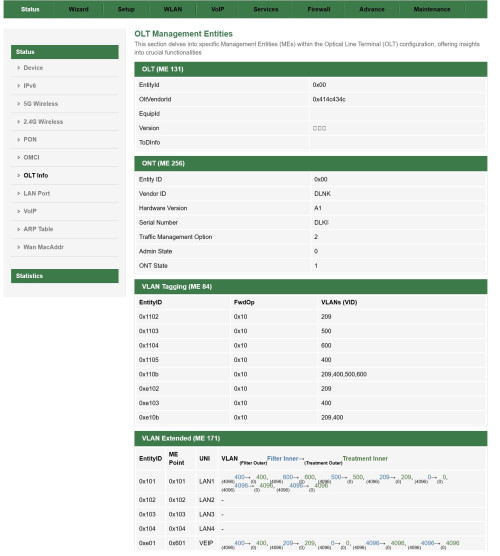
UpdateI have manage to port OLT page from my PON Stick project into D-Link ONR on both hardware (A1 & B1)
OLT InfoAlcatel-Lucent/Nokia (ALCL/414c434c)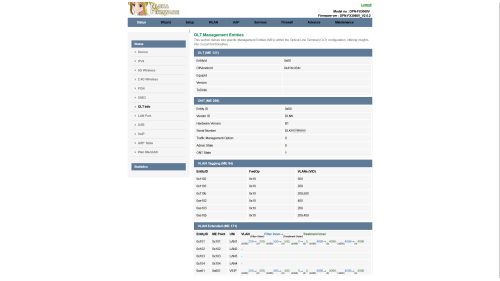 ZTE (ZTEG/5a544547)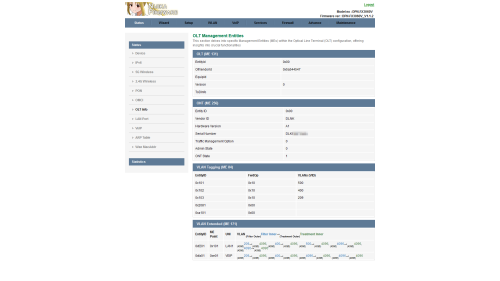
As you can see, every OLT give different VLAN Bridging,
EVEN on same OLT!
OLT VLANOn my experience during PON Stick deployment, there are many ME 171 to map. Rank from top (most troublesome)
1. Fiberhome (FHTT)QUOTE
A. FHTT doesn't show it's OLT Vendor Id when in Universal Mode, it cause to display as 0x00.
B. Also FHTT push ME 171 varies from customer to customer, mostly are able to bridge until ME 171 become Router Mode which is need a special IGD hack to fool OLT and quietly bridge VLAN 500 to SFP Interface
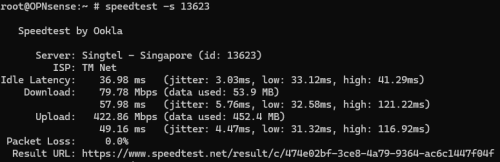
C. Speed issue are very common on FHTT, It's has lack proper QoS and doesn't have DSCP, wrong ME 277 (Priority Queue) cause speed drop or even worst: 2000Mbps Download, 67Mbps Upload

2. Alcatel-Lucent/Nokia (ALCL)QUOTE
A. ALCL has very deep ME 171, even it can kill WebGUI, disable LAN Ports even crash the ONT by sending same VLAN on PPTP and VEIP!
B. Bridging VoIP from VEIP to LAN/SFP side can very tricky, but possible to override!
C. First time activation, only one ME 171 profile for you for all ONT you have!
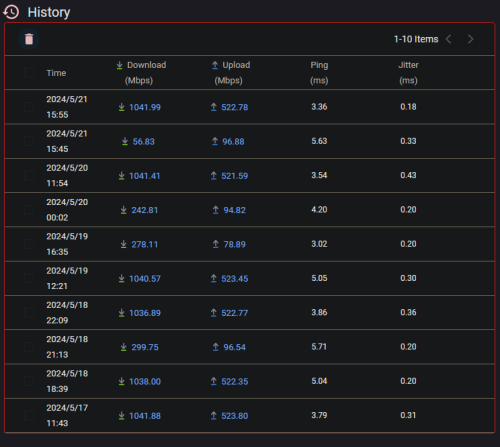
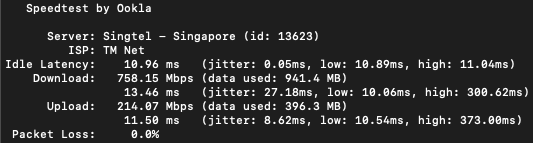
D. ALCL has proper QoS and DSCP, this give user more speed especially upload speed can be max as 1100Mbps!

3. Huawei (HWTC)QUOTE
A. HWTC have different Forwarding Operation (FwdOp) depend on legal TM ONT, mostly HWTC would use 0x04 or 0x10 for other ONT
B. Bridging VoIP from VEIP to LAN/SFP side can very tricky, but possible to override!
C. Plugging different ONT cause HWTC set different ME 171 profile to match that ONT, as simple fix!
4. ZTE (ZTEG)QUOTE
A. ZTEG in Universal is very easy to handle, ME 171 also simple
B. ZTEG has very highest speed performance! Download speed can be max as 2129Mbps! overtake ALCL for Download performance!
C. ZTEG also has proper QoS despite lack DSCP feature!
If you ask me, FHTT is crap to work with! I hate FHTT Priority Queue so much!
Nijika Firmware A PON Stick Project D-Link DPN-FX3060V, Hardware A1 (White):DPN-FX3060V-A1_V1.1.2_20240521_NIJIKA.binD-Link DPN-FX3060V, Hardware B1 (Black):DPN-FX3060V-B1_V2.0.2_20240521_NIJIKA.binWhat Changed:
CODE
Revision 20240521
1. Add OLT Status page at Status Menu
2. Add fix WebGUI being killed, at least it works on me (ALCL)
Share OLT Status PagePlease update the firmware to correct Hardware A1 or B1, and share your OLT Info just like screenshot above,
This way we here can know which OLT are you on, either troublesome FHTT or awesome ZTEG
Here some Known TM OLT Vendor Id:
| ASCII | HEX |
| ALCL | 414c434c |
| FHTT | 46485454 |
| FHTT | 0x00* |
| HWTC | 48575443 |
| UBNT | 55424e54 |
| ZTEG | 5a544547 |
| - | 0x00** |
*
FHTT send 0x00 to ONT as allowing other ONT work on FHTT OLT**
Sometime TM use off-brand OLT on Kampung/under-develop areaAt least we know how ME 171 used on your place
One thing, force refresh after update the firmware to take effect new Theme!
Should I make new post for Dedicated to D-Link DPN-FX3060V ?
 Possible Bridge Fix
If you have access to UART, try this:
Look your ME 84 in Router Mode, then set to bridge mode
CODE
omcicli mib set 84 <EntityID> FwdOp 0x02
FwdOp 0x02 mean:
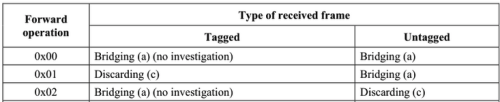
Bridge as is without investigate or modify
This works on me, ALCL disallow to enter WebGUI/Telnet/SSH, only access is via UART
This post has been edited by Anime4000: May 21 2024, 10:16 PM 

 May 21 2024, 09:10 PM




 Quote
Quote









 0.0231sec
 0.98
0.98
 6 queries
 GZIP Disabled