Welcome Guest ( Log In | Register )

Bump Topic Topic Closed RSS Feed

Outline · [ Standard ] · Linear+

Unifi Official TM UniFi High Speed Broadband Thread V42, READ 1ST PAGE FOR RELEVANT WIFI INFO!

views
     
Jjuggler
post May 21 2024, 01:45 PM

Narcissistic Genius
******
Senior Member
1,343 posts

Joined: Dec 2016
QUOTE(TongCN @ May 21 2024, 01:00 PM)
I used shopee or other platform, haha

Unifi app basically for me to download statement only
*
I feel you man. I am quite surprised to see such company having bad design in the system for such simple app. Looking at the review at Google Play shows the competency of their developers.
RViN
post May 21 2024, 01:52 PM

There Is Only One United
*******
Senior Member
5,827 posts

Joined: Jan 2003
From: Selayang, Selangor


QUOTE(Jjuggler @ May 21 2024, 01:45 PM)
I feel you man. I am quite surprised to see such company having bad design in the system for such simple app. Looking at the review at Google Play shows the competency of their developers.
*
I mean if you see all the discussions here about the problems with their network, their devices, firmware of the devices and network infra etc etc, those they cant figure out and its supposed to be their core competency ... shouldn't be a surprise they are incompetent and the business support layer laugh.gif
Jjuggler
post May 21 2024, 02:04 PM

Narcissistic Genius
******
Senior Member
1,343 posts

Joined: Dec 2016
QUOTE(RViN @ May 21 2024, 01:52 PM)
I mean if you see all the discussions here about the problems with their network, their devices, firmware of the devices and network infra etc etc, those they cant figure out and its supposed to be their core competency ... shouldn't be a surprise they are incompetent and the business support layer  laugh.gif
*
You are right mate. I couldn't agree more. We have beautiful talents in Malaysia, yet they are underutilized. When I saw Unifi has their own community site before taken down. Basically it's a ping-to-pong game. If you encounter problem, you will be asked to meet / complain at point A, B and etc. In the end, you ended up as a stressed person w/ the problem remain unsolved.
soonwai
post May 21 2024, 02:20 PM


********
All Stars
11,459 posts

Joined: Oct 2007
From: KL


QUOTE(Jjuggler @ May 21 2024, 02:04 PM)
You are right mate. I couldn't agree more. We have beautiful talents in Malaysia, yet they are underutilized. When I saw Unifi has their own community site before taken down. Basically it's a ping-to-pong game. If you encounter problem, you will be asked to meet / complain at point A, B and etc. In the end, you ended up as a stressed person w/ the problem remain unsolved.
*
The latest myUnifi app is terrible. Everything is so small and fonts are so thin.
enduser
post May 21 2024, 02:21 PM

Regular
******
Senior Member
1,282 posts

Joined: Jan 2003
QUOTE(Jjuggler @ May 21 2024, 02:04 PM)
You are right mate. I couldn't agree more. We have beautiful talents in Malaysia, yet they are underutilized. When I saw Unifi has their own community site before taken down. Basically it's a ping-to-pong game. If you encounter problem, you will be asked to meet / complain at point A, B and etc. In the end, you ended up as a stressed person w/ the problem remain unsolved.
*
Now 2024 & basic apps also cannot improved

Really failed la this tm nut
Anime4000
post May 21 2024, 02:34 PM

Look at all my stars!!
*******
Senior Member
2,400 posts

Joined: Jul 2009
From: /dev/null


I also test on D-Link white (V1.1.2), porting is success!

user posted image

Soon I try plugging fiber and see what the output between different OLT
Jjuggler
post May 21 2024, 02:38 PM

Narcissistic Genius
******
Senior Member
1,343 posts

Joined: Dec 2016
QUOTE(soonwai @ May 21 2024, 02:20 PM)
The latest myUnifi app is terrible. Everything is so small and fonts are so thin.
*
Not a big fan of their current logo and fonts they using.

QUOTE(enduser @ May 21 2024, 02:21 PM)
Now 2024 & basic apps also cannot improved

Really failed la this tm nut
*
Nowadays I only make payments through e-wallet. Save the headache. No need to see the app. Once six month just download the statements. Sometimes, I don't even get my bill statement through app.

QUOTE(Anime4000 @ May 21 2024, 02:34 PM)
I also test on D-Link white (V1.1.2), porting is success!

user posted image

Soon I try plugging fiber and see what the output between different OLT
*
Waiting to see the progress mate.
beverlykho
post May 21 2024, 04:00 PM

On my way
****
Junior Member
501 posts

Joined: Dec 2007


QUOTE(Jjuggler @ May 21 2024, 01:45 PM)
I feel you man. I am quite surprised to see such company having bad design in the system for such simple app. Looking at the review at Google Play shows the competency of their developers.
*
Designed by the lowest bidder.
mivec024
post May 21 2024, 06:21 PM

New Member
*
Newbie
11 posts

Joined: May 2017


Hi, i receive sms saying they will upgrade my speed form 800mbps to 1gbps.

Just wondering, will they provide new router or just maintain the existing router.

I'm currently using DIR-X1860Z router provide by TM.

And if they replace the router, is it possible for me to use the existing router to become mesh wifi
RViN
post May 21 2024, 07:27 PM

There Is Only One United
*******
Senior Member
5,827 posts

Joined: Jan 2003
From: Selayang, Selangor


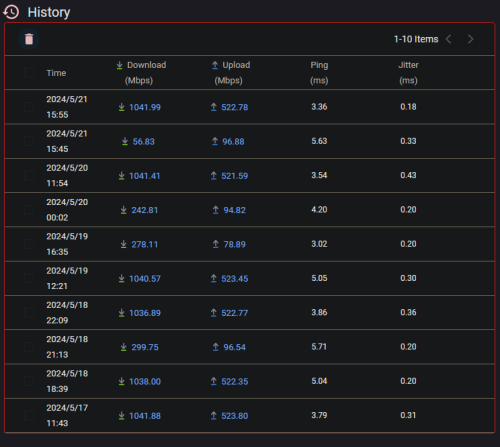
This is the behaviour I'm seeing with the black ONR. I left it for longer today and the speed dropped further, not only was it below 300mbps it was now below 100mbps. After restarting the modem back to gigabit.

user posted image

I wasn't diligent about running the speed tests immediately before and after most of the time that's why you see the timing is not consistent. But its basically consistent.

I've setup a timer on the power socket powering the modem to turn it on and off every 4am, then I'll monitor and see if this still happens biggrin.gif

Not sure if I should complain/feedback to TM about this, might end up in a worse position lol
zeronehza
post May 21 2024, 08:42 PM

Malaysian Real Madrid Supporter Club
******
Senior Member
1,704 posts

Joined: Jan 2003
From: Hogoh Pahang Hogoh

QUOTE(RViN @ May 21 2024, 07:27 PM)
This is the behaviour I'm seeing with the black ONR. I left it for longer today and the speed dropped further, not only was it below 300mbps it was now below 100mbps. After restarting the modem back to gigabit.

user posted image

I wasn't diligent about running the speed tests immediately before and after most of the time that's why you see the timing is not consistent. But its basically consistent.

I've setup a timer on the power socket powering the modem to turn it on and off every 4am, then I'll monitor and see if this still happens biggrin.gif

Not sure if I should complain/feedback to TM about this, might end up in a worse position lol
*
what about real time speed download ? try to queue as many same file same size from good dedicated server like nvidia driver etc tongue.gif

This post has been edited by zeronehza: May 21 2024, 08:43 PM
blacktubi
post May 21 2024, 09:10 PM

-
Group Icon
Elite
8,421 posts

Joined: Jul 2008

QUOTE(RViN @ May 21 2024, 07:27 PM)
This is the behaviour I'm seeing with the black ONR. I left it for longer today and the speed dropped further, not only was it below 300mbps it was now below 100mbps. After restarting the modem back to gigabit.

user posted image

I wasn't diligent about running the speed tests immediately before and after most of the time that's why you see the timing is not consistent. But its basically consistent.

I've setup a timer on the power socket powering the modem to turn it on and off every 4am, then I'll monitor and see if this still happens biggrin.gif

Not sure if I should complain/feedback to TM about this, might end up in a worse position lol
*
What’s your fiber reading?
Ashren
post May 21 2024, 09:18 PM

Getting Started
**
Junior Member
156 posts

Joined: Dec 2010
QUOTE(RViN @ May 21 2024, 07:27 PM)
This is the behaviour I'm seeing with the black ONR. I left it for longer today and the speed dropped further, not only was it below 300mbps it was now below 100mbps. After restarting the modem back to gigabit.

user posted image

I wasn't diligent about running the speed tests immediately before and after most of the time that's why you see the timing is not consistent. But its basically consistent.

I've setup a timer on the power socket powering the modem to turn it on and off every 4am, then I'll monitor and see if this still happens biggrin.gif

Not sure if I should complain/feedback to TM about this, might end up in a worse position lol
*
Since you're using Asus router, check the port status and link nego when the speed drop happen. Network map > system status > click the status tab. At first i thought mem leak, but your ram is fine at 39% so it has to be other issue. If cable, you did get 1g before it drop. Maybe fiber reading like blacktubi suggest. But damn you break the 1g barrier so to me fiber reading also cannot be it. I feel like theres some qos or traffic shaping going on.
Anime4000
post May 21 2024, 10:04 PM

Look at all my stars!!
*******
Senior Member
2,400 posts

Joined: Jul 2009
From: /dev/null


Update
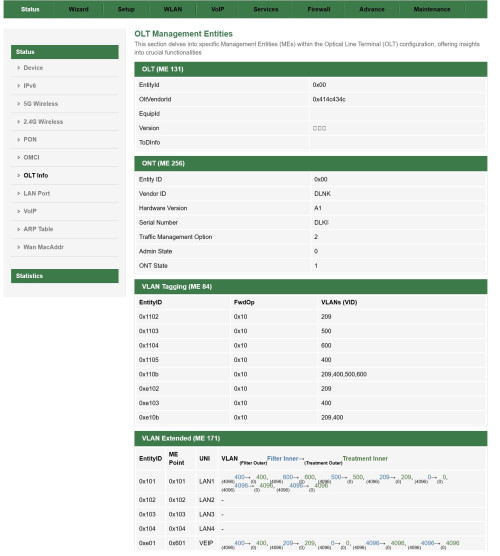
I have manage to port OLT page from my PON Stick project into D-Link ONR on both hardware (A1 & B1)

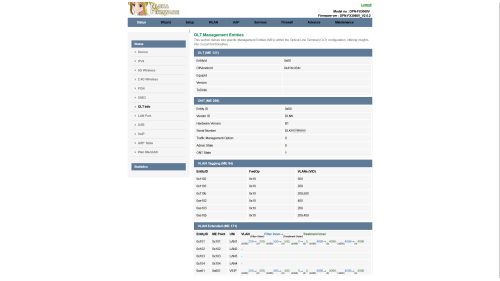
OLT Info
Alcatel-Lucent/Nokia (ALCL/414c434c)
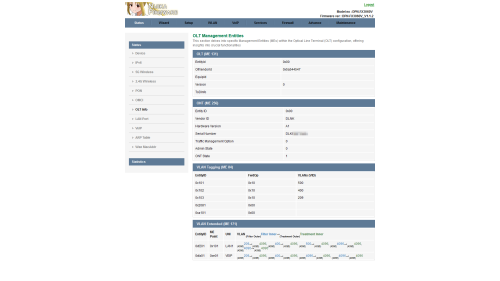
user posted image

ZTE (ZTEG/5a544547)
user posted image

As you can see, every OLT give different VLAN Bridging, EVEN on same OLT!

OLT VLAN
On my experience during PON Stick deployment, there are many ME 171 to map. Rank from top (most troublesome)
1. Fiberhome (FHTT)
QUOTE
A. FHTT doesn't show it's OLT Vendor Id when in Universal Mode, it cause to display as 0x00.
B. Also FHTT push ME 171 varies from customer to customer, mostly are able to bridge until ME 171 become Router Mode which is need a special IGD hack to fool OLT and quietly bridge VLAN 500 to SFP Interface
C. Speed issue are very common on FHTT, It's has lack proper QoS and doesn't have DSCP, wrong ME 277 (Priority Queue) cause speed drop or even worst: 2000Mbps Download, 67Mbps Upload ranting.gif
2. Alcatel-Lucent/Nokia (ALCL)
QUOTE
A. ALCL has very deep ME 171, even it can kill WebGUI, disable LAN Ports even crash the ONT by sending same VLAN on PPTP and VEIP!
B. Bridging VoIP from VEIP to LAN/SFP side can very tricky, but possible to override!
C. First time activation, only one ME 171 profile for you for all ONT you have!
D. ALCL has proper QoS and DSCP, this give user more speed especially upload speed can be max as 1100Mbps! rclxm9.gif
3. Huawei (HWTC)
QUOTE
A. HWTC have different Forwarding Operation (FwdOp) depend on legal TM ONT, mostly HWTC would use 0x04 or 0x10 for other ONT
B. Bridging VoIP from VEIP to LAN/SFP side can very tricky, but possible to override!
C. Plugging different ONT cause HWTC set different ME 171 profile to match that ONT, as simple fix!
4. ZTE (ZTEG)
QUOTE
A. ZTEG in Universal is very easy to handle, ME 171 also simple
B. ZTEG has very highest speed performance! Download speed can be max as 2129Mbps! overtake ALCL for Download performance!
C. ZTEG also has proper QoS despite lack DSCP feature!
If you ask me, FHTT is crap to work with! I hate FHTT Priority Queue so much!

Nijika Firmware A PON Stick Project

user posted image
D-Link DPN-FX3060V, Hardware A1 (White):
DPN-FX3060V-A1_V1.1.2_20240521_NIJIKA.bin

D-Link DPN-FX3060V, Hardware B1 (Black):
DPN-FX3060V-B1_V2.0.2_20240521_NIJIKA.bin

What Changed:
CODE

Revision 20240521
1. Add OLT Status page at Status Menu
2. Add fix WebGUI being killed, at least it works on me (ALCL)


Share OLT Status Page
Please update the firmware to correct Hardware A1 or B1, and share your OLT Info just like screenshot above,
This way we here can know which OLT are you on, either troublesome FHTT or awesome ZTEG

Here some Known TM OLT Vendor Id:
ASCII HEX
ALCL 414c434c
FHTT 46485454
FHTT 0x00*
HWTC 48575443
UBNT 55424e54
ZTEG 5a544547
- 0x00**
* FHTT send 0x00 to ONT as allowing other ONT work on FHTT OLT
** Sometime TM use off-brand OLT on Kampung/under-develop area

At least we know how ME 171 used on your place

One thing, force refresh after update the firmware to take effect new Theme!

Should I make new post for Dedicated to D-Link DPN-FX3060V ? hmm.gif

Possible Bridge Fix
If you have access to UART, try this:

Look your ME 84 in Router Mode, then set to bridge mode

CODE

omcicli mib set 84 <EntityID> FwdOp 0x02

FwdOp 0x02 mean:
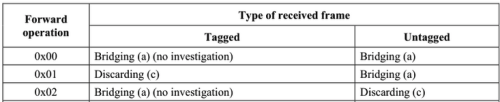
user posted image
Bridge as is without investigate or modify

This works on me, ALCL disallow to enter WebGUI/Telnet/SSH, only access is via UART

This post has been edited by Anime4000: May 21 2024, 10:16 PM

Maxieos
post May 21 2024, 10:17 PM

Look at all my stars!!
*******
Senior Member
3,767 posts

Joined: May 2008
Anyone can suggest a good vpn for SG , whole 1-2 month sure connection issue with TM.
How many of you all getting slow internet browsing with high ping and some website unable to load ?


This post has been edited by Maxieos: May 21 2024, 10:18 PM
Icehart
post May 22 2024, 12:39 AM

72.55.191.6
********
All Stars
14,902 posts

Joined: Apr 2005
From: Kuala Lumpur & Selangor


QUOTE(Maxieos @ May 21 2024, 10:17 PM)
Anyone can suggest a good vpn for SG , whole 1-2 month sure connection issue with TM.
How many of you all getting slow internet browsing with high ping and some website unable to load ?
*
I using Akamai Linode.
But you have to setup yourself. Cost $5/month.
jonathanwhm
post May 22 2024, 01:33 AM

Getting Started
**
Junior Member
87 posts

Joined: Jun 2011
QUOTE(Anime4000 @ May 21 2024, 11:04 PM)
Update
I have manage to port OLT page from my PON Stick project into D-Link ONR on both hardware (A1 & B1)

OLT Info
Alcatel-Lucent/Nokia (ALCL/414c434c)
user posted image

ZTE (ZTEG/5a544547)
user posted image

As you can see, every OLT give different VLAN Bridging, EVEN on same OLT!

OLT VLAN
On my experience during PON Stick deployment, there are many ME 171 to map. Rank from top (most troublesome)
1. Fiberhome (FHTT)
2. Alcatel-Lucent/Nokia (ALCL)
3. Huawei (HWTC)
4. ZTE (ZTEG)
If you ask me, FHTT is crap to work with! I hate FHTT Priority Queue so much!

Nijika Firmware A PON Stick Project
user posted image
D-Link DPN-FX3060V, Hardware A1 (White):
DPN-FX3060V-A1_V1.1.2_20240521_NIJIKA.bin

D-Link DPN-FX3060V, Hardware B1 (Black):
DPN-FX3060V-B1_V2.0.2_20240521_NIJIKA.bin

What Changed:
CODE

Revision 20240521
1. Add OLT Status page at Status Menu
2. Add fix WebGUI being killed, at least it works on me (ALCL)


Share OLT Status Page
Please update the firmware to correct Hardware A1 or B1, and share your OLT Info just like screenshot above,
This way we here can know which OLT are you on, either troublesome FHTT or awesome ZTEG

Here some Known TM OLT Vendor Id:
ASCII HEX
ALCL  414c434c
FHTT  46485454
FHTT  0x00*   
HWTC  48575443
UBNT  55424e54
ZTEG  5a544547
-    0x00** 
* FHTT send 0x00 to ONT as allowing other ONT work on FHTT OLT
** Sometime TM use off-brand OLT on Kampung/under-develop area

At least we know how ME 171 used on your place

One thing, force refresh after update the firmware to take effect new Theme!

Should I make new post for Dedicated to D-Link DPN-FX3060V ? hmm.gif

Possible Bridge Fix
If you have access to UART, try this:

Look your ME 84 in Router Mode, then set to bridge mode

CODE

omcicli mib set 84 <EntityID> FwdOp 0x02

FwdOp 0x02 mean:
user posted image
Bridge as is without investigate or modify

This works on me, ALCL disallow to enter WebGUI/Telnet/SSH, only access is via UART
*
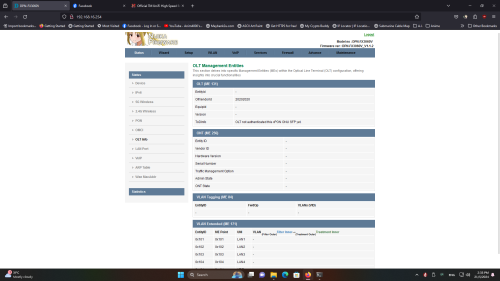
Thank you for the fantastic work! Here is my OLT info.

user posted image
Anime4000
post May 22 2024, 01:45 AM

Look at all my stars!!
*******
Senior Member
2,400 posts

Joined: Jul 2009
From: /dev/null


QUOTE(jonathanwhm @ May 22 2024, 01:33 AM)
Thank you for the fantastic work! Here is my OLT info.

user posted image
*
Nice! You on Alcatel Lucent/Nokia OLT just like me!

Even same OLT, you have VoIP (VLAN400) on the LAN1 but not me
jonathanwhm
post May 22 2024, 01:55 AM

Getting Started
**
Junior Member
87 posts

Joined: Jun 2011
QUOTE(Anime4000 @ May 22 2024, 02:45 AM)
Nice! You on Alcatel Lucent/Nokia OLT just like me!

Even same OLT, you have VoIP (VLAN400) on the LAN1 but not me
*
Interesting! I'm eagerly anticipating the arrival of the 2.5Gbe ONU. Meanwhile, one of my neighbors is already using the Maxis 2Gbps, Skyworth model. sad.gif sad.gif sad.gif
Oltromen Ripot
post May 22 2024, 08:35 AM

👍 999999 person Likes this member
*******
Senior Member
4,034 posts

Joined: Dec 2019
QUOTE(Anime4000 @ May 21 2024, 10:04 PM)
Should I make new post for Dedicated to D-Link DPN-FX3060V ? hmm.gif
*
please. and thank you for your effort.

keep updating the 1st primary posts of it of future revisions so that we don't get lost looking for new revision if you instead posted in post #947.

but warn the visitors of that thread to only feedback towards improving the firmware's future versions. please delete any "thank you", "good job" kind of posts. last thing we need is a 10,000 postings in a thread in which we cannot find the 100 that mattered.

Topic ClosedOptions
 

Change to:
| Lo-Fi Version
0.0230sec    0.74    6 queries    GZIP Disabled
Time is now: 20th December 2025 - 03:45 PM