QUOTE(Ashren @ May 23 2024, 01:03 PM)
My installer took the long and hard way today he came with the white Skyworth AX3000 I told him that's for 100-800mbps, he told me it's a new model they just got it this week I told him I know but I want the black D-Link not this. So he called his boss and they confirm Ultra plan D-Link, Pro plan Skyworth. He said sorry and went back to office to get the stock and he's on the way again. Very nice fella 😂 Let's hope I can bridge that little brat to my Asus.
Edit: I can bridge to my Asus no problem at all and I can use my previous Huawei EG8240H5 also, both authenticate normally so no binding. They gave me the PLOAM pass too just in case for safe keeping. Kudos to the installer I gave them 10/10 feedback when they send me the sms link. Going back and forth to get the D-Link and very fast too 😂
Yeah some technicians are really good, the one who was handed my original upgrade job while maybe not being the most knowledgable did do a lot of running around for me.
QUOTE(Ashren @ May 23 2024, 03:29 PM)
I bridged the D-Link myself but I told the installer beforehand and he said no problem he even show me how to do the bridge mode setup. It's exactly how other fellow members here taught us.
The PLOAM pass is the pass the ONR/ONU use to authenticate itself to the OLT before we can dial to the service. Usually the pass are generated with the serial num of the device. If the pass and serial doesnt match the profile on the OLT, the ONR/ONU cannot be used to dial PPPoE or even access the line. If they bind a particular ONU/ONR to the OLT you can only use that device to connect. If no bind, can use any ONR/ONU provided each device has its own PLOAM pass generated to match it's serial in the settings. Some called this ONU pass, even my installer refer to it as ONU pass. So if you hard reset your D-Link you need to enter PLOAM pass again in settings just like your PPPoE pass.
Example from Anime post ⬇️
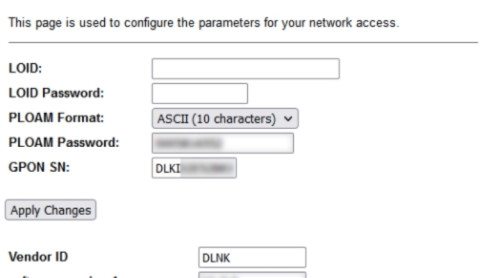
Funny thing is in my case even though its binded, the PLOAM is the same, never changed.
I'm wondering if my case is special because I've been on the same account since around 2013 (set this up when the pilot 30mbps package was set up and only available in select areas). I wonder if because its some "old" account there's some different SOP they follow where they have to bind. I asked the technician but he didn't know about this, and they wouldn't let me talk to the backend people lol.
QUOTE(jiaen0509 @ May 23 2024, 03:17 PM)
🙌🏻Great! Let’s monitor the speed issue raised by
RViN before where the speed will drop to ~300mbps after certain periods of times (within 24 hours) on Black D-Link ONR and bridge mode. Looking forward to your feedback.
Ashren your router also has a 2.5GbE port? Will be interesting to see if you face the same behaviour as mine. If not then I think I'll flash Anime's firmware and see if we have the same OLT. Wonder if there's a chance my ONR itself could have some fault.
Also as an update from my end, seems like it doesn't take anywhere near 24 hours to occur. Reboot was at 4am, and when I decided to check at 4pm it was already slowing down to the 300mbps level. Couldn't restart the modem since I was working from home, did so at 6.30pm and it was fine right after.

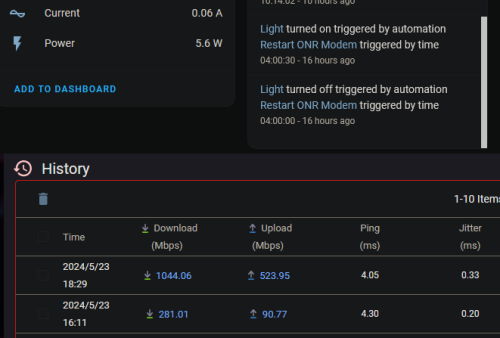
And because of the stupid binding issue, I cant test with the previous ONU and this router also to see if similar things happen. Not sure if I can bind one of the 1G ports on the ONR to be the WAN port and see if the same problem occurs over time or not, just to rule out that its the ONR that has some issue not specific to the 2.5g port.


 May 23 2024, 01:03 PM


 Quote
Quote










 0.0211sec
 0.70
0.70
 6 queries
 GZIP Disabled