Welcome Guest ( Log In | Register )

120 Pages « < 39 40 41 42 43 > » Bottom

Outline · [ Standard ] · Linear+

 U Home 5G

views
     
spaceman
post Jan 23 2024, 02:58 PM

On my way
****
Junior Member
606 posts

Joined: Jan 2003


QUOTE(netken @ Jan 23 2024, 08:43 AM)
any reason why Zyxel is chosen to be sold? i have both as well actually but have not unboxed the x50 5g yet ...
*
Because I can use Deco app to reboot my x50 remotely. But personally I like Zyxel's simplicity, the web UI is easy to understand / configure.

This post has been edited by spaceman: Jan 23 2024, 02:58 PM
rd0038
post Jan 25 2024, 10:50 AM

New Member
*
Junior Member
25 posts

Joined: Sep 2009
QUOTE(ericsow @ Jan 22 2024, 10:24 PM)
Tested U Home 5G for two months without 5G modem. Turn on youtube on TV and play it non stop.

Using B618 (Unifi first batch modem) connect 4G speed below 10mbps and always experience line disconnected. ( On modem status no service signal bar empty, need to restart modem)

Connect B28 with other 4G CA, speed improved a bit around 20mbps. Also encounter line disconnected.

If only connect B28, speed average at 30-50mbps. Line disconnected remain happen.

Within two months, line disconnected average 2-4 times per week and most of the time happen at 6am-8am.

I don't know how the line disconnected. But there are two outcome. one i can use HWmanager/WebUI connect it saw signal bar empty with no service. Another one was I can't access my modem with HWmanager/WebUI. Required hard restart modem will back to normal. So I am suspecting some kind of DoS attacked happen on my modem.

Now i had terminated my U Home 5G account after two months and testing with Telco M. So far 30days had passed and no internet interruption happen on same device.

This modem never happen in past with Unifi bebas and Digi unlimited. Something should go wrong with umobile.
*
you should lock band 28,i'm also using B618, locked to band 28, i can get between 60-80 Mbps

ericsow
post Jan 25 2024, 08:56 PM

Casual
***
Junior Member
363 posts

Joined: Jan 2009
QUOTE(rd0038 @ Jan 25 2024, 10:50 AM)
you should lock band 28,i'm also using B618, locked to band 28, i can get between 60-80 Mbps
*
QUOTE(ericsow @ Jan 22 2024, 10:24 PM)
Tested U Home 5G for two months without 5G modem. Turn on youtube on TV and play it non stop.

Using B618 (Unifi first batch modem) connect 4G speed below 10mbps and always experience line disconnected. ( On modem status no service signal bar empty, need to restart modem)

Connect B28 with other 4G CA, speed improved a bit around 20mbps. Also encounter line disconnected.

If only connect B28, speed average at 30-50mbps. Line disconnected remain happen.

Within two months, line disconnected average 2-4 times per week and most of the time happen at 6am-8am.

I don't know how the line disconnected. But there are two outcome. one i can use HWmanager/WebUI connect it saw signal bar empty with no service. Another one was I can't access my modem with HWmanager/WebUI. Required hard restart modem will back to normal. So I am suspecting some kind of DoS attacked happen on my modem.

Now i had terminated my U Home 5G account after two months and testing with Telco M. So far 30days had passed and no internet interruption happen on same device.

This modem never happen in past with Unifi bebas and Digi unlimited. Something should go wrong with umobile.
*
Indeed, locked B28 speed average at 30-50mbps is environment factor for me. Because 4G+ can't reached that speed as well, this is main reason I still hesitate purchasing 5G modem. sad.gif
toyperson
post Jan 26 2024, 10:53 AM

New Member
*
Junior Member
49 posts

Joined: Oct 2008
QUOTE(dannytzh @ Jan 17 2024, 02:47 PM)
Have been using U98 main with a few U38 family share lines for a few months, with the U38 sims as modem-exclusive hotspot only usage.
Everything was working until today, where the modem shows network service is available but the devices connecting to the modem/router can't access internet.

Changing the U38 sims to mobile phones shows no issue connecting to internet.

Called customer service, was advised that family share internet quota is only for mobile phone.
Following the advise, I went to get a Broadband 68 plan. Put the sim back into modem, Still no internet.

So frus. Any idea what went wrong?

(modem restarted, checked APN, no maintenance in area, no firmware update, all the standard things have been done so please skip those kind inputs tq).
*
hows changing to the Umobile broadband rm68 step went? did it finally manage to work?
because i have the same problem using the P38 on my nr5103e.....holding back from getting the broadband 68 after reading your post.


LaiN87
post Jan 27 2024, 02:38 PM

Nom nom nom...
******
Senior Member
1,320 posts

Joined: Jan 2003
From: メラカ /b/PowerLvl:Over9000!


QUOTE(toyperson @ Jan 26 2024, 10:53 AM)
hows changing to the Umobile broadband rm68 step went? did it finally manage to work?
because i have the same problem using the P38 on my nr5103e.....holding back from getting the broadband 68 after reading your post.
*
It worked for me. You have few choices now:

1. Maintain P38 but find a different 5G router that can bypass this.
2. Maintain P38 but use phone hotspot to continuously 5G.
3. Change to UHome 5G RM68 (< I did this and confirmed work)
4. Change to Yes Flexi RM58

This post has been edited by LaiN87: Jan 27 2024, 02:39 PM
SUSpetpenyubobo
post Jan 27 2024, 03:04 PM

Regular
******
Senior Member
1,030 posts

Joined: Jan 2022

QUOTE(LaiN87 @ Jan 27 2024, 02:38 PM)
It worked for me. You have few choices now:

1. Maintain P38 but find a different 5G router that can bypass this.
2. Maintain P38 but use phone hotspot to continuously 5G.
3. Change to UHome 5G RM68 (< I did this and confirmed work)
4. Change to Yes Flexi RM58
*
Let me just tell you this.

The ISPs can also whitelist only a handful of allowed devices which they permit and ban all rogue devices which is not in their whitelist from connecting to their network.

In the case of their broadband plans, they'd only whitelist popular known modems IMEI in the market which are widely used to only gain access to their network and other rogue devices blocked to prevent usage of their home broadband 5G plans to be used in regular phones.

About Yes, they're actually the pioneer in implementing this restriction in Malaysia. 2 years ago they already did this with their RM35 Kasi Up 4G 100GB Postpaid plan meant only for phones.

I was once their victim suddenly my 4G modem speed became so slow that you could get 500kbps when all the while obtaining 10-15Mbps.
Called them up and they straight told me my device wasn't in their green list.

It was actually an illegal move because nothing was said in their contract that the quota restricted plan was supposed to be for phones only.
The move was controversial and arguable that since it's quota based(100GB) why did you restrict your users in placing it into any device they wanted as long as they do not bypass the volume quota?

JimbeamofNRT
post Jan 28 2024, 10:48 AM

the Original Lanji@_ Chicken Rice Shop Since 2002
******
Senior Member
1,902 posts

Joined: Sep 2012

QUOTE(petpenyubobo @ Jan 27 2024, 03:04 PM)
Let me just tell you this.

The ISPs can also whitelist only a handful of allowed devices which they permit and ban all rogue devices which is not in their whitelist from connecting to their network.

In the case of their broadband plans, they'd only whitelist popular known modems IMEI in the market which are widely used to only gain access to their network and other rogue devices blocked to prevent usage of their home broadband 5G plans to be used in regular phones.

About Yes, they're actually the pioneer in implementing this restriction in Malaysia. 2 years ago they already did this with their RM35 Kasi Up 4G 100GB Postpaid plan meant only for phones.

I was once their victim suddenly my 4G modem speed became so slow that you could get 500kbps when all the while obtaining 10-15Mbps.
Called them up and they straight told me my device wasn't in their green list.

It was actually an illegal move because nothing was said in their contract that the quota restricted plan was supposed to be for phones only.
The move was controversial and arguable that since it's quota based(100GB) why did you restrict your users in placing it into any device they wanted as long as they do not bypass the volume quota?
*
One of the reason why I stay away from that telco. marketing dem hype, but in reality? whistling.gif whistling.gif whistling.gif
contestchris
post Jan 30 2024, 12:25 AM

Look at all my stars!!
*******
Senior Member
5,547 posts

Joined: Aug 2011

How is this compared to Fiber Broadband? I'm on Time 100mbps and thinking if I should jump over.

In my home, Maxis 5G signal on my phone seems to be consistently at >300mbps whenever I run a speedtest.
thankyou
post Jan 30 2024, 12:03 PM

Regular
******
Senior Member
1,941 posts

Joined: Jan 2003
I'm considering swapping the mainline and supp line:

U98 - move it to MiFi
U38 Although it's supp line, it should be okay to use it as main line

Any advice on whether this will work?
OlgaC4
post Jan 30 2024, 12:34 PM

Look at all my stars!!
*******
Senior Member
5,292 posts

Joined: Nov 2006
QUOTE(contestchris @ Jan 30 2024, 12:25 AM)
How is this compared to Fiber Broadband? I'm on Time 100mbps and thinking if I should jump over.

In my home, Maxis 5G signal on my phone seems to be consistently at >300mbps whenever I run a speedtest.
*
Then use 5g modem but put extra fan on the modem.
rd0038
post Jan 31 2024, 10:20 PM

New Member
*
Junior Member
25 posts

Joined: Sep 2009
QUOTE(thankyou @ Jan 30 2024, 12:03 PM)
I'm considering swapping the mainline and supp line:

U98 - move it to MiFi
U38 Although it's supp line, it should be okay to use it as main line

Any advice on whether this will work?
*
https://forum.lowyat.net/topic/5434244/all

check this, u mobile is blocking U98 used in modem
4WD_er
post Feb 1 2024, 09:06 AM

On my way
****
Junior Member
571 posts

Joined: Aug 2018


QUOTE(rd0038 @ Jan 31 2024, 10:20 PM)
https://forum.lowyat.net/topic/5434244/all

check this, u mobile is blocking U98 used in modem
*
Need a modded 5G modem like Yeacomm.
thankyou
post Feb 1 2024, 03:29 PM

Regular
******
Senior Member
1,941 posts

Joined: Jan 2003
QUOTE(rd0038 @ Jan 31 2024, 10:20 PM)
https://forum.lowyat.net/topic/5434244/all

check this, u mobile is blocking U98 used in modem
*
QUOTE(4WD_er @ Feb 1 2024, 09:06 AM)
Need a modded 5G modem like Yeacomm.
*
Thank you. I should have bought a 5G phone and a Wifi hotspot... now I'm stuck with Home 5G with/ the ZTE MIFI.
jkfoong
post Feb 2 2024, 03:40 PM

Long time member
****
Junior Member
518 posts

Joined: May 2008
Can anyone advise on this?
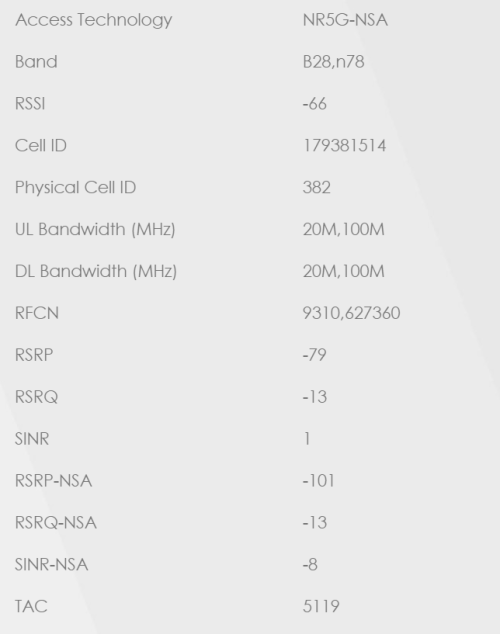
Using UHome 5G with NR5103e (three version), band locked to B28 N78.
Only getting 50Mbps average, previously can get 300Mbps.
Sometimes getting network disconnection randomly, already put the router to the side of window.

user posted image

This post has been edited by jkfoong: Feb 2 2024, 03:44 PM
jkfoong
post Feb 2 2024, 04:02 PM

Long time member
****
Junior Member
518 posts

Joined: May 2008
QUOTE(jkfoong @ Feb 2 2024, 03:40 PM)
Can anyone advise on this?
Using UHome 5G with NR5103e (three version), band locked to B28 N78.
Only getting 50Mbps average, previously can get 300Mbps.
Sometimes getting network disconnection randomly, already put the router to the side of window.

user posted image
*
Somehow found out that i need to put exactly sticking to the window to get best reception.
However i think sunlight exposure will cause overheat issue and bad to the modem health.
Anyone has the same issue on this? Or buy external antenna for this issue?
Mashed Potato
post Feb 2 2024, 04:50 PM

New Member
*
Junior Member
19 posts

Joined: Aug 2021
Hi, currently staying in Rivercity Condo in Sentul area.

My rental does not provide Wifi so I plan to take this U Home 5G but still skeptical about it because i dont have a 5G router that can use SIM card.

1. Is U Home 5G good in Sentul area?

2. Any cheap 5G compatible Routers (that work with U Home 5G), preferably below RM200 (hard cap RM300) to recommend?


Need for casual gaming, Youtubing as well as partially working from home.
PRSXFENG
post Feb 2 2024, 11:05 PM

Look at all my stars!!
*******
Senior Member
2,608 posts

Joined: Nov 2020


QUOTE(Mashed Potato @ Feb 2 2024, 04:50 PM)
Hi, currently staying in Rivercity Condo in Sentul area.

My rental does not provide Wifi so I plan to take this U Home 5G but still skeptical about it because i dont have a 5G router that can use SIM card.

1. Is U Home 5G good in Sentul area?

2. Any cheap 5G compatible Routers (that work with U Home 5G), preferably below RM200 (hard cap RM300) to recommend?
Need for casual gaming, Youtubing as well as partially working from home.
*
1. ultimately you will have to test yourself since it is highly location dependant, where your tower is, what obstacles are in the way
can buy prepaid sim to try
or since u home 5g has no contract can terminate easily

2. not possible to get 5g routers at that price, you can get 4g routers and they will work
but expect slower speeds, around 30Mbps or better depending on modem
Mashed Potato
post Feb 3 2024, 12:20 AM

New Member
*
Junior Member
19 posts

Joined: Aug 2021
QUOTE(PRSXFENG @ Feb 2 2024, 11:05 PM)
1. ultimately you will have to test yourself since it is highly location dependant, where your tower is, what obstacles are in the way
can buy prepaid sim to try
or since u home 5g has no contract can terminate easily

2. not possible to get 5g routers at that price, you can get 4g routers and they will work
but expect slower speeds, around 30Mbps or better depending on modem
*
1. I see, then I'll will do that.

2. That's unfortunate. Which 5G Router would you recommend I get that wouldn't break the bank. I could technically fork out up to RM1k if I were to think of this as future proofing my internet needs for at least 2 years in the future. Would just need to cut back on other expenses as a form of installment towards this router.
JLA
post Feb 3 2024, 09:34 AM

Look at all my stars!!
*******
Senior Member
2,777 posts

Joined: May 2008
QUOTE(Mashed Potato @ Feb 3 2024, 12:20 AM)


2. That's unfortunate. Which 5G Router would you recommend I get that wouldn't break the bank. I could technically fork out up to RM1k if I were to think of this as future proofing my internet needs for at least 2 years in the future. Would just need to cut back on other expenses as a form of installment towards this router.
*
below RM800 budget
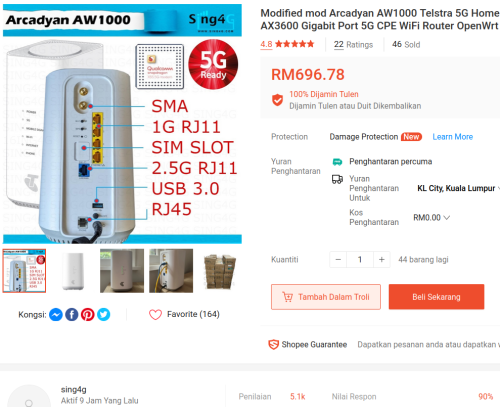
Telstra Arcadyan AW1000
GTENIQ iQ02X55

keyword : support external antenna, imei, lock band, active support

side note : ZTE F50 not support 5G, missing b28

4G network getting congested, 5G modem cpe getting cheaper over time

If u dont mind speed around 50mbps, just get band 28 modem like b315-607

» Click to show Spoiler - click again to hide... «

5G modem price war
gnome
post Feb 3 2024, 02:47 PM

- We game, do you? -
*******
Senior Member
4,925 posts

Joined: Jan 2003
QUOTE(Mashed Potato @ Feb 3 2024, 12:20 AM)
1. I see, then I'll will do that.

2. That's unfortunate. Which 5G Router would you recommend I get that wouldn't break the bank. I could technically fork out up to RM1k if I were to think of this as future proofing my internet needs for at least 2 years in the future. Would just need to cut back on other expenses as a form of installment towards this router.
*
This nokia fastmile seems okay

https://shopee.com.my/Nokia-FastMile-5G-Mod...35-e1ad63607ae6

Price also ok la for 5g router

120 Pages « < 39 40 41 42 43 > » Top
 

Change to:
| Lo-Fi Version
0.0208sec    0.36    6 queries    GZIP Disabled
Time is now: 7th December 2025 - 07:00 AM