Welcome Guest ( Log In | Register )

Outline · [ Standard ] · Linear+

 U Home 5G

views
     
ericsow
post Jan 22 2024, 10:24 PM

Casual
***
Junior Member
363 posts

Joined: Jan 2009
Tested U Home 5G for two months without 5G modem. Turn on youtube on TV and play it non stop.

Using B618 (Unifi first batch modem) connect 4G speed below 10mbps and always experience line disconnected. ( On modem status no service signal bar empty, need to restart modem)

Connect B28 with other 4G CA, speed improved a bit around 20mbps. Also encounter line disconnected.

If only connect B28, speed average at 30-50mbps. Line disconnected remain happen.

Within two months, line disconnected average 2-4 times per week and most of the time happen at 6am-8am.

I don't know how the line disconnected. But there are two outcome. one i can use HWmanager/WebUI connect it saw signal bar empty with no service. Another one was I can't access my modem with HWmanager/WebUI. Required hard restart modem will back to normal. So I am suspecting some kind of DoS attacked happen on my modem.

Now i had terminated my U Home 5G account after two months and testing with Telco M. So far 30days had passed and no internet interruption happen on same device.

This modem never happen in past with Unifi bebas and Digi unlimited. Something should go wrong with umobile.

This post has been edited by ericsow: Jan 22 2024, 10:49 PM
ericsow
post Jan 25 2024, 08:56 PM

Casual
***
Junior Member
363 posts

Joined: Jan 2009
QUOTE(rd0038 @ Jan 25 2024, 10:50 AM)
you should lock band 28,i'm also using B618, locked to band 28, i can get between 60-80 Mbps
*
QUOTE(ericsow @ Jan 22 2024, 10:24 PM)
Tested U Home 5G for two months without 5G modem. Turn on youtube on TV and play it non stop.

Using B618 (Unifi first batch modem) connect 4G speed below 10mbps and always experience line disconnected. ( On modem status no service signal bar empty, need to restart modem)

Connect B28 with other 4G CA, speed improved a bit around 20mbps. Also encounter line disconnected.

If only connect B28, speed average at 30-50mbps. Line disconnected remain happen.

Within two months, line disconnected average 2-4 times per week and most of the time happen at 6am-8am.

I don't know how the line disconnected. But there are two outcome. one i can use HWmanager/WebUI connect it saw signal bar empty with no service. Another one was I can't access my modem with HWmanager/WebUI. Required hard restart modem will back to normal. So I am suspecting some kind of DoS attacked happen on my modem.

Now i had terminated my U Home 5G account after two months and testing with Telco M. So far 30days had passed and no internet interruption happen on same device.

This modem never happen in past with Unifi bebas and Digi unlimited. Something should go wrong with umobile.
*
Indeed, locked B28 speed average at 30-50mbps is environment factor for me. Because 4G+ can't reached that speed as well, this is main reason I still hesitate purchasing 5G modem. sad.gif
ericsow
post May 25 2024, 04:46 PM

Casual
***
Junior Member
363 posts

Joined: Jan 2009
On Kaon for three weeks,


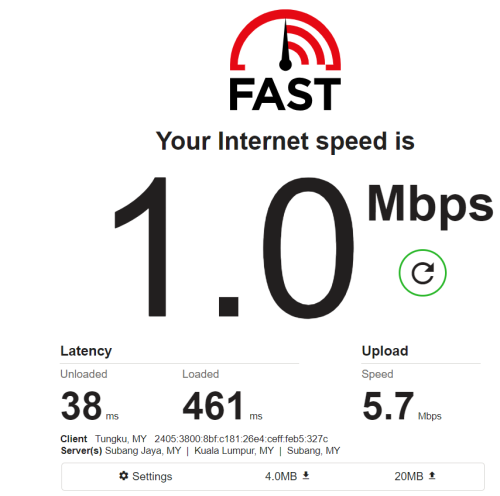
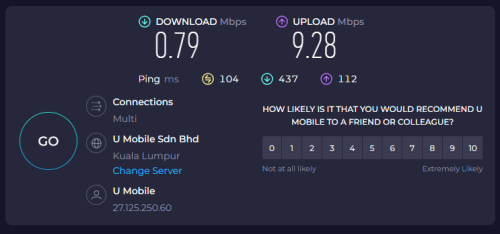
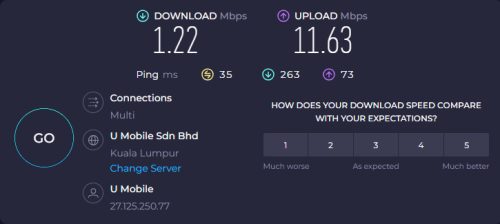
From begin I can get 50-120mbps but this few days slower and slower till below 3mbps.

The upload speed is higher than download speed. It is congestion or I has to log service call to umobile?

If using phone (poco x5), I can get 300-400mbps connection and same location side by side.


user posted image

user posted image

This post has been edited by ericsow: May 25 2024, 04:49 PM
ericsow
post May 25 2024, 05:13 PM

Casual
***
Junior Member
363 posts

Joined: Jan 2009
QUOTE(andrekua2 @ May 25 2024, 04:57 PM)
Maybe you can check if the network downgrade to 4G.
*
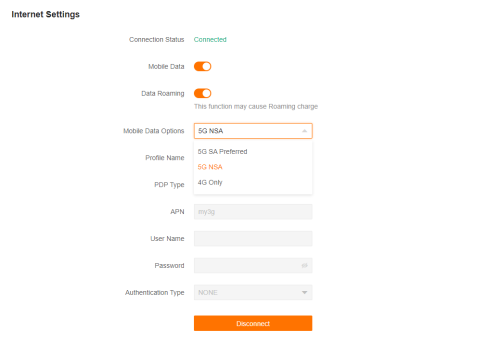
Kaon able to lock 5G NSA or SA mode. Definitely no fall back to 4G


user posted image
ericsow
post May 26 2024, 12:19 PM

Casual
***
Junior Member
363 posts

Joined: Jan 2009
QUOTE(xswatch @ May 25 2024, 05:48 PM)
damn. lock to 5g but speed 1mbps. looks like router issue since u cna get >300mbps using phone.
*
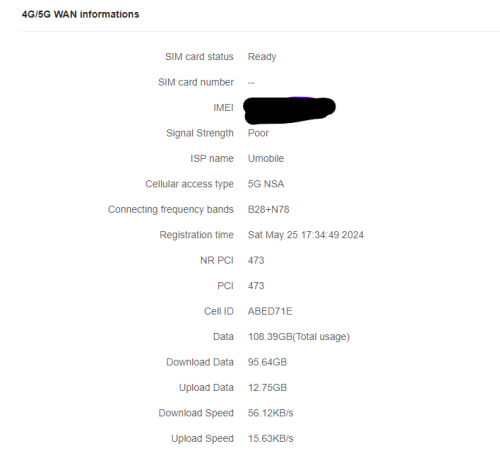
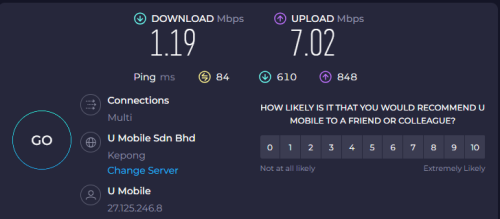
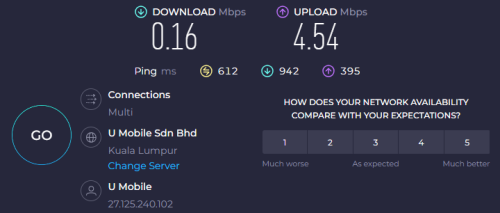
The best part is the upload speed is ten time than download speed.
user posted image

QUOTE(andrekua2 @ May 25 2024, 06:13 PM)
Wait... why data roaming?
*
QUOTE(cloudwan @ May 25 2024, 06:14 PM)
Ya lor why need data roaming eh?  sweat.gif  sweat.gif
*
Ah... no ideal, it came default. Turn it off also no improve performance.

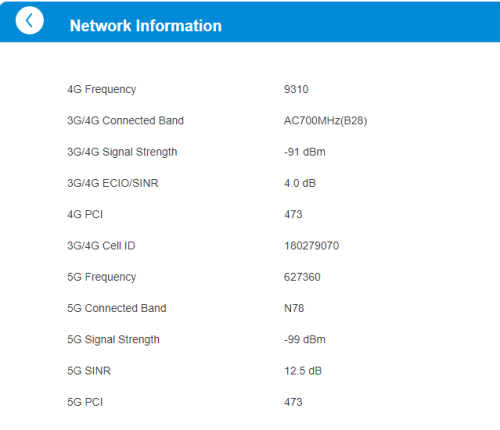
QUOTE(ameyhazuan @ May 26 2024, 02:40 AM)
any page showing network strength and band used?

like this one on zte :

user posted image
*
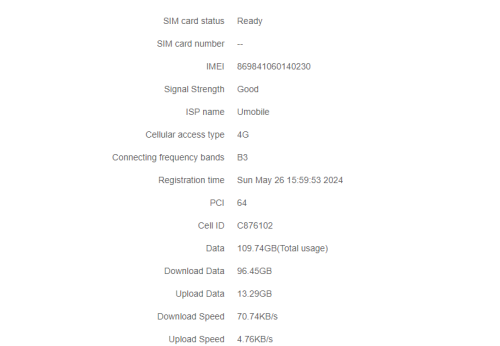
user posted image
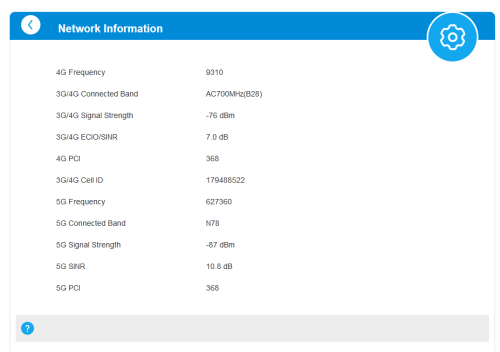
Here is it.

By the way, Kaon cannot disable WIFI.

This post has been edited by ericsow: May 26 2024, 12:24 PM
ericsow
post May 26 2024, 01:29 PM

Casual
***
Junior Member
363 posts

Joined: Jan 2009
QUOTE(ameyhazuan @ May 26 2024, 12:53 PM)
You have a poor connection and probably a terrible SNIR. Hence unacceptable speed.
*
Yes about the poor signal but before yesterday, it working alright with 50mpbs to 120mbps at same location. Been using it at past three weeks.


Just this two days the performance goes weird. Anyway I just logged complaint to customer services.

user posted image


ericsow
post May 26 2024, 03:38 PM

Casual
***
Junior Member
363 posts

Joined: Jan 2009
QUOTE(ccgoay @ May 26 2024, 03:04 PM)
Web page say 5G signal strenght is POOR, mean in 1-2bar, you need redirection you modem, to get better signal quality! in order to get better download speed!
If on MC801A or NR5103E, Upload speed can achieve ~20Mbps, download speed also can get >100Mbps  

In phone how many bar o 5G signal? the phone can be help on locate best spot for Modem Location, but after that you still need turn the modem direction for best reception signal!
*
Current location is the best place for router, tested couple of weeks with router and 5G phone.
Even I had tested with B618 locked band 28 with 30-40mbps and 5G Phone with 4bar can reached 400mbps.

Past two weeks average can get 50-120mbps. (Best performance is 220mbps)

Unfortunately this two days the download speed drop so much. I just wondering how come the upload speed always better than download speed?
In another word, the upload speed look normal to me as past test, but the download speed just very weird slow.


This just happen at this two days, Is it because school holiday?

user posted image

This post has been edited by ericsow: May 26 2024, 03:49 PM
ericsow
post May 26 2024, 04:10 PM

Casual
***
Junior Member
363 posts

Joined: Jan 2009
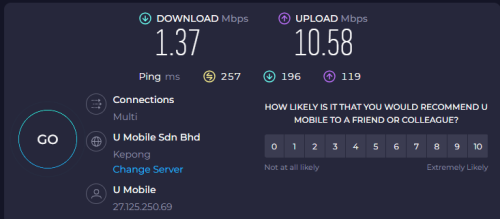
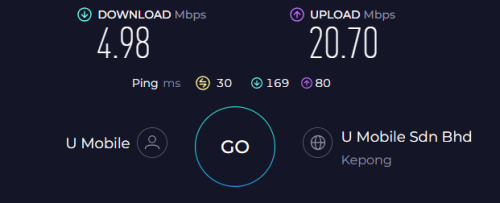
Switched to 4G. Still upload speed better than download.


user posted image

user posted image

This post has been edited by ericsow: May 26 2024, 04:14 PM
ericsow
post May 26 2024, 06:59 PM

Casual
***
Junior Member
363 posts

Joined: Jan 2009
QUOTE(andrekua2 @ May 26 2024, 05:13 PM)
Did you exceed the 1000GB quota btw?
*
No, only one user not heavy download.
At new router recorded 109GB data usage.
ericsow
post Jun 7 2024, 02:03 AM

Casual
***
Junior Member
363 posts

Joined: Jan 2009
QUOTE(ameyhazuan @ Jun 6 2024, 02:56 PM)
Finally they sent me Kaon. Too bad i have lost interest on any of the modems.

Before i send back, is there any positive feedback using this modem?

user posted image
*
Pro:
No over heat.
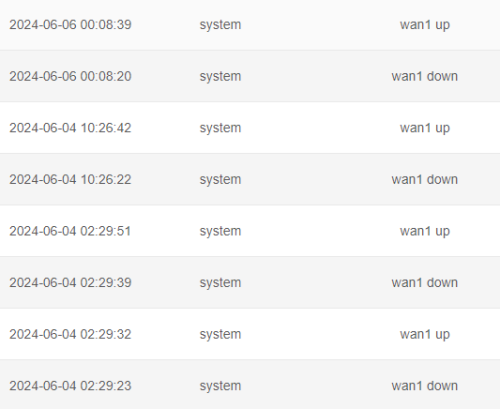
No auto restart or hang status required reboot router but connection may drop in few seconds.
user posted image
Haven't connect to external WIFI AP, it WIFI so far so good for 15 devices connection.


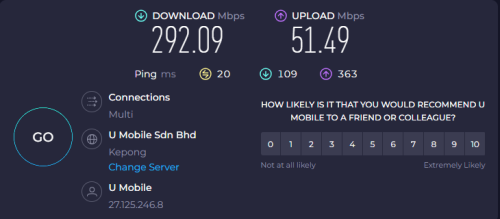
Same position I did reported couple day ago with poor connection but when good time, below is how it performance.

user posted image

user posted image

This post has been edited by ericsow: Jun 7 2024, 02:04 AM
ericsow
post Jun 8 2024, 11:45 AM

Casual
***
Junior Member
363 posts

Joined: Jan 2009
QUOTE(Zaryl @ Jun 7 2024, 06:16 PM)
got internal fan inside?
btw, my ZTE is  up and running again on 5G.

turns out the router was too hot after it ran for approximately 2 weeks without any fan cooling.

I turned off ZTE and let it cool down for 10-15 minutes then run again, can get back 5G with ~250Mbps DL ~50Mbps UL.
now running a small JisuLife fan use at Speed 3 setting to keep it cool.

will monitor again should it drop back to 4G+ only due to excessive heat.
*
No fan at inside, it just consume low power likely 1A12V.

Yesterday add external WIFI AP. The WIFI respond time getting better and 20% speed increase. Meaning the KAON internal WIFI is bad type.
ericsow
post Aug 12 2024, 02:02 PM

Casual
***
Junior Member
363 posts

Joined: Jan 2009
user posted image

Yeah bangwall.gif , I get third router from UM after logged to MCMC but with above signal. The result remain same at my location.

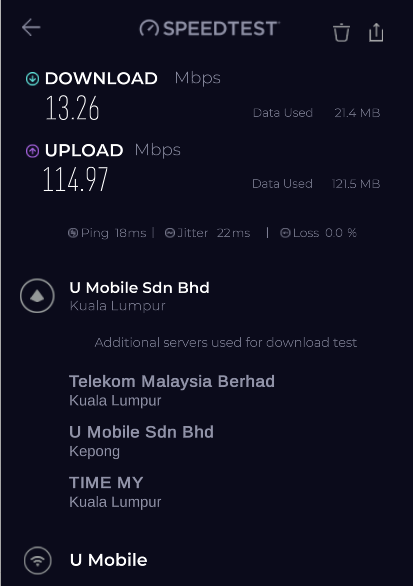
Here is the speed test result confused.gif

user posted image

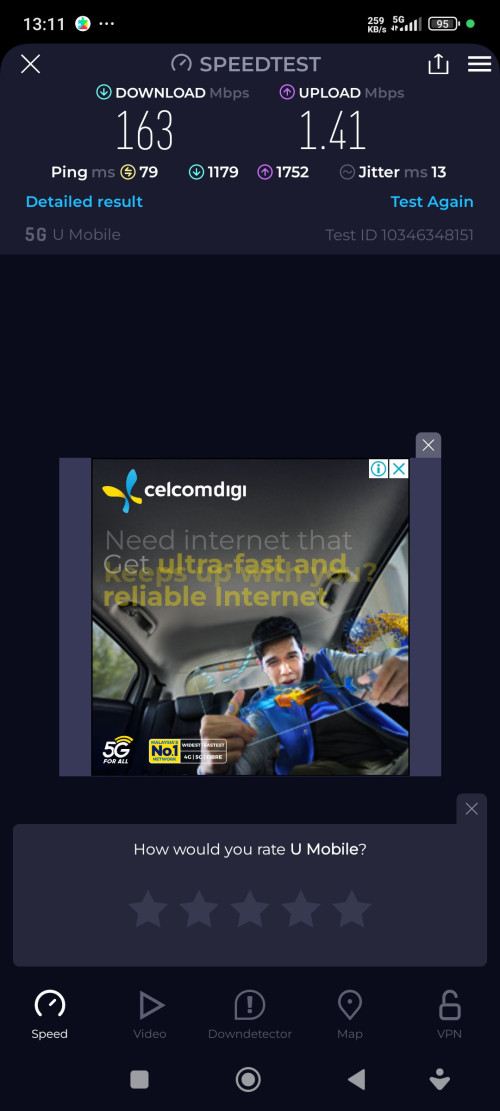
From my phone the result completely different with UM provided router.


user posted image
icon_idea.gif
ericsow
post Aug 21 2024, 04:02 PM

Casual
***
Junior Member
363 posts

Joined: Jan 2009
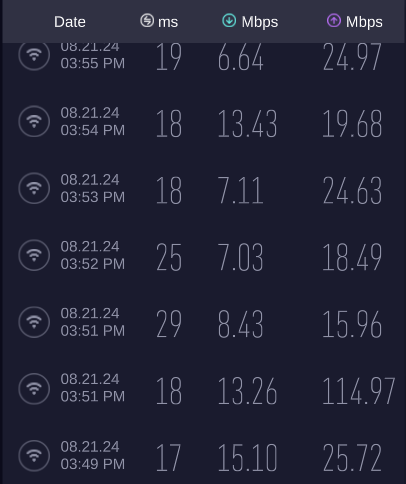
Waiting for my fourth router replacement. And today the connection still same as weird.

4g download speed with 5g upload speed. blush.gif

user posted image
ericsow
post Aug 22 2024, 02:20 PM

Casual
***
Junior Member
363 posts

Joined: Jan 2009
QUOTE(MR_alien @ Aug 22 2024, 09:26 AM)
have you tried taking the modem and sim elsewhere to try?
*
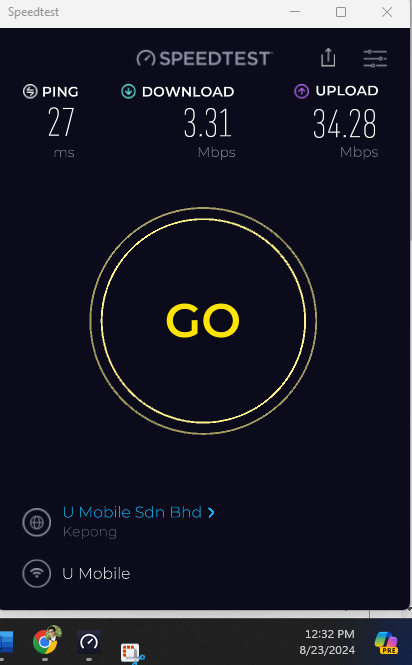
I think is not necessary, I had test run before signed bundle modem at my phone and B618 and result is acceptable. The key is the bundle modem is.... not so....well.

After sign up with bundle modem. Each time I had captured bundle modem, phone and B618 speedtest results to UM customer service and they will said no problem on tower/my area. Then UM CS will dispatch new router to me. (Of cause MUST logged with MCMC).

The strong point is my entry level 5G phone able get average 200mbps all time at most of spot of my home. For the bundle modem I did used 10feet ladder trying every indoor location, moving modem inch to inch, step by step, up and down and turn a round to get best B28 and N78 signal strength and SINR. Once moment it able get >100mbps, next moment the signal strength unchanged but performance will drop below 10mbps.
Even at B618 locked B28 only the performance better than UM's modem.

Meantime, I also tested 5G WIFI only and linked external WIFI AP 5G only(Include different LAN cable). The result remain same.

Sometime I always question "mana wire pasang salah". Exchange the upload speed with download speed, at least I can run some thing.
user posted image
ericsow
post Aug 23 2024, 12:38 PM

Casual
***
Junior Member
363 posts

Joined: Jan 2009
QUOTE(iz1011 @ Aug 23 2024, 12:08 PM)
May I know what modem you’re using? MC888S?
*
First is Kaon, then the following two replacement are ZTE MC888S.

user posted image
ericsow
post Aug 23 2024, 03:05 PM

Casual
***
Junior Member
363 posts

Joined: Jan 2009
QUOTE(vkashin @ Aug 23 2024, 02:24 PM)
Hi everyone, would like to ask if it is normal to have the billing cycle to be less than 30 days?

I signed up for U Home 5G Sim only plan on 17 Aug 2024, with RM68 paid on the same day
However when I checked in app today, it shows that it is only valid for another 14 days, which means i only got 21 days with the first RM68 paid? Next billing date in app is on 6 Sept 2024

Should I contact customer service or will it be adjusted later on?
Thanks
*
Don't worry, UM will prorated you first month charge and adjust your billing cycle to begin of the month. The first month payment you make at center, just a deposit not monthly payment.

Example your first month prorated amount is RM38. You still has extra balance RM30 at next begin of the month.

The sale person should told you about this during signup.

ericsow
post Aug 23 2024, 11:39 PM

Casual
***
Junior Member
363 posts

Joined: Jan 2009
QUOTE(andrekua2 @ Aug 23 2024, 08:29 PM)
Where do you live btw?
*
Melaka City center. 520m away from 5G tower.
ericsow
post Sep 1 2024, 02:12 PM

Casual
***
Junior Member
363 posts

Joined: Jan 2009
QUOTE(Zaryl @ Aug 31 2024, 02:05 PM)
I just purchased Gteniq IQ02X55 ver2 5G router at Shopee (price after discount about RM805).
Been running for few days and I am so satisfied with it.

Now NO MORE frequent auto reboot compared to my old ZTE MC888s free router by umobile.

been getting consistent ~450Mbps DL ~50Mbps UL with 17ms ping.
5G tower is just ~1km from my home in Jitra Kedah.
Can lock bands too.
This is just using the internal antennas (2x WiFi, 4x 5G). Gteniq can use outdoor parabolic antennas as well, but with the good signal strength I'm getting (-85 dBm LTE, -90 dBm 5G), I think no need for outdoor antennas.

As i understand, this Gteniq 5G router is using Qualcomm Snapdragon X55 chipset, which is the same as my wife's ZTE MU5120 portable 5G MiFi router.
Very stable, cpu & wifi temperature under its WebUI shows below 50 deg C during operation.

But I do have UniFi fiber line as main internet.

the 5G serve as backup and to offload 50% IoT devices riding on my main ASUS AX82U router.
*
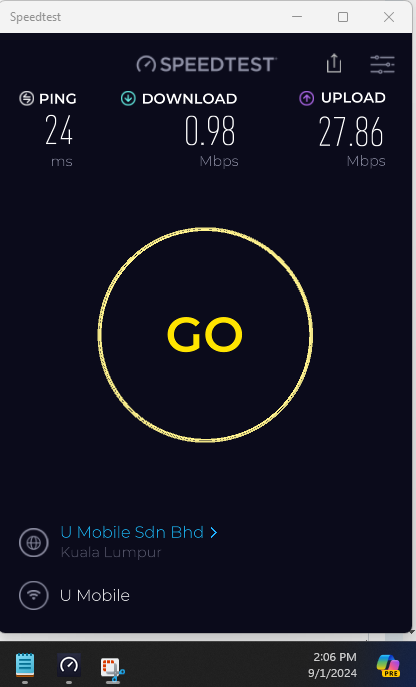
Do you mind to share how is the ZTE MC888S signal strength at your location?

My location is -80dBm LTE and -97 dBm 5G with below performance.
cry.gif

user posted image

With this kind of speed, I can't do my online study, lab, exam and video conference.
ericsow
post Sep 1 2024, 05:07 PM

Casual
***
Junior Member
363 posts

Joined: Jan 2009
QUOTE(andrekua2 @ Sep 1 2024, 03:54 PM)
Took out the sim and test on your smartphone instead. I think one should at least tried this to determine whether it's the router or poor network problem.
*
I did and send report to UM and MCMC.

user posted image
ericsow
post Aug 7 2025, 02:53 PM

Casual
***
Junior Member
363 posts

Joined: Jan 2009
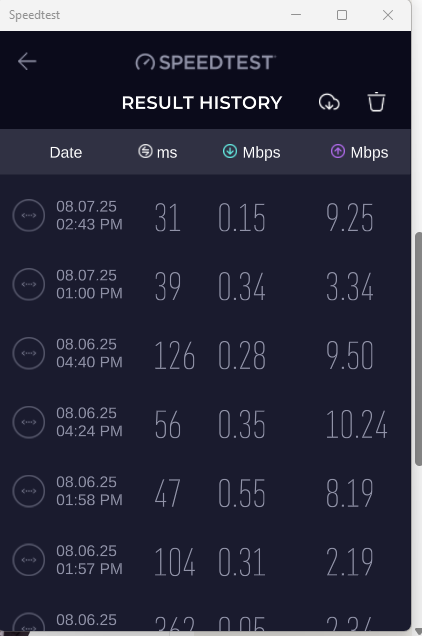
user posted image

After ten months, the slow internet come back again since end of July. bangwall.gif

Had reported to UM and MCMC, the solution is waiting for fifth time router replacement. CR said will be Huawei model, hopefully the logistic won't mess up old model to me. bruce.gif

2 Pages  1 2 >Top
 

Change to:
| Lo-Fi Version
0.0279sec    0.30    7 queries    GZIP Disabled
Time is now: 22nd December 2025 - 04:22 AM