Welcome Guest ( Log In | Register )

95 Pages « < 25 26 27 28 29 > » Bottom

Outline · [ Standard ] · Linear+

 Windows 11, To be announce on 24 June 2021

views
     
SUSlife5tyle
post Oct 13 2021, 02:49 PM

Getting Started
**
Junior Member
277 posts

Joined: Oct 2016
As expected, new software on official release, sure will still have a lot of bugs. There is where update coming in.

The Windows Explorer memory draining bug was still there. If you open up multiple Windows Explorer (10+), it seem that it release out about 50% that totally taken by explorer.exe. If you open 2~3 Windows Explorer, it does free up all the memory taken when you close them but when you open over 10 Windows Explorer then you will notice that it didn't free all.
xxboxx
post Oct 13 2021, 06:42 PM

The mind is for having ideas, not holding them
*******
Senior Member
5,261 posts

Joined: Oct 2004
From: J@Y B33


Dual bios mobo will have issue with TPM. Or even if update bios?
Changed some unstable timing that caused the PC to crash, PC boot into secondary bios and Windows detect something different I guess, it say existing Windows Hello pin can't be used anymore and ask to re-login account and set new pin.
peterscm
post Oct 14 2021, 02:14 AM

Casual
***
Junior Member
388 posts

Joined: Jun 2006
Look like I am not the only one have the random Shutdown Windows box pop-up issue.

https://techcommunity.microsoft.com/t5/repo.../highlight/true
angeluslee
post Oct 14 2021, 09:16 AM

New Member
*
Junior Member
27 posts

Joined: Jan 2009
From: Sarawak


Anyone running Window 11 latest on older PC especially Ivy Bridge?
Andrewtst
post Oct 14 2021, 11:09 AM

Forgiveness is Happiness
*********
All Stars
29,773 posts

Joined: Jan 2009
From: Johor, Malaysia.


QUOTE(angeluslee @ Oct 14 2021, 09:16 AM)
Anyone running Window 11 latest on older PC especially Ivy Bridge?
*
That is 9 years ago CPU, it is highly Not Recommended.

The performance will not be good, Windows 11 is much power hunger than Windows 10 in general.
angeluslee
post Oct 14 2021, 02:34 PM

New Member
*
Junior Member
27 posts

Joined: Jan 2009
From: Sarawak


QUOTE(Andrewtst @ Oct 14 2021, 11:09 AM)
That is 9 years ago CPU, it is highly Not Recommended.

The performance will not be good, Windows 11 is much power hunger than Windows 10 in general.
*
Actually running it not long ago, will report back if I encounter serious issue. So far for me performance better then when I'm on Window 10 tho. and I'm running it without GPU some more and it's buttery smooth. My old pc is 3770 third gen sweat.gif so all requirement for Window 11 confirm won't pass....

This post has been edited by angeluslee: Oct 14 2021, 02:36 PM
Peter_APIIT
post Oct 14 2021, 02:50 PM

Casual
***
Junior Member
364 posts

Joined: Mar 2008


Don't upgrade first because it is buggy.
Andrewtst
post Oct 14 2021, 03:23 PM

Forgiveness is Happiness
*********
All Stars
29,773 posts

Joined: Jan 2009
From: Johor, Malaysia.


QUOTE(angeluslee @ Oct 14 2021, 02:34 PM)
Actually running it not long ago, will report back if I encounter serious issue.  So far for me performance better then when I'm on Window 10 tho. and I'm running it without GPU some more and it's buttery smooth.  My old pc is 3770 third gen  sweat.gif so all requirement for Window 11 confirm won't pass....
*
You no need report to Feedback Hub, Microsoft already said they won't support for PC not in supported list.

I got also install at my old laptop that is not in support list which running Intel® Core™ i7-6700HQ CPU @ 2.60GHz and GPU Intel® HD Graphics 530 + Nvidia GeForce 970M with 16 GB RAM + SSD. It is smooth but I still can feel it is not what Windows 11 suppose buttery smooth as it should when I compare with my New PC running AMD Ryzen 9 5900X 12-Core Processor 3.70GHz and GPU Nvidia GeForce RTX 3080 with 32 GB RAM + NVMe SSD.

Once you see how Windows 11 perform in New PC spec, then you will know actually it is not buttery smooth in older spec especially those not meet the requirement spec.

- In my new PC, everything include new design apps like Photo, Clock all open instant, no waiting. The File Explorer in dark mode is instant appear and not showing the clip of white.
- In my old laptop, everything need 2 to 3 seconds to open. Those new design apps like Photo, Clock need 3 to 4 seconds to open. The File Explorer showing a clip of white and icon load up later in 1 to 2 seconds.

This post has been edited by Andrewtst: Oct 14 2021, 03:43 PM

XeactorZ
post Oct 14 2021, 05:06 PM

♥ PandaDog ♥
*********
All Stars
31,608 posts

Joined: Aug 2010
QUOTE(Andrewtst @ Oct 14 2021, 03:23 PM)
You no need report to Feedback Hub, Microsoft already said they won't support for PC not in supported list.

I got also install at my old laptop that is not in support list which running Intel® Core™ i7-6700HQ CPU @ 2.60GHz and GPU Intel® HD Graphics 530 + Nvidia GeForce 970M with 16 GB RAM + SSD. It is smooth but I still can feel it is not what Windows 11 suppose buttery smooth as it should when I compare with my New PC running AMD Ryzen 9 5900X 12-Core Processor 3.70GHz and GPU Nvidia GeForce RTX 3080 with 32 GB RAM + NVMe SSD.

Once you see how Windows 11 perform in New PC spec, then you will know actually it is not buttery smooth in older spec especially those not meet the requirement spec.

- In my new PC, everything include new design apps like Photo, Clock all open instant, no waiting. The File Explorer in dark mode is instant appear and not showing the clip of white.
- In my old laptop, everything need 2 to 3 seconds to open. Those new design apps like Photo, Clock need 3 to 4 seconds to open.  The File Explorer showing a clip of white and icon load up later in 1 to 2 seconds.
*
You comparing nvme ssd vs sata ssd off course lose biggrin.gif

But then seems like Microsoft releasing Windows Update on non supported CPU hmm.gif
Andrewtst
post Oct 14 2021, 05:25 PM

Forgiveness is Happiness
*********
All Stars
29,773 posts

Joined: Jan 2009
From: Johor, Malaysia.


QUOTE(XeactorZ @ Oct 14 2021, 05:06 PM)
You comparing nvme ssd vs sata ssd off course lose biggrin.gif

But then seems like Microsoft releasing Windows Update on non supported CPU hmm.gif
*
tongue.gif

Yup non supported CPU still get update. biggrin.gif
PJng
post Oct 14 2021, 11:03 PM

10k Club
********
All Stars
12,044 posts

Joined: Oct 2017


5 Ways Windows 11’s Taskbar Is Worse Than Windows 10’s

https://www.howtogeek.com/761064/5-ways-the...an-windows-10s/

On win 7 and 10, i choose to expand all running program name, not combined into 1 icon
And will use drag and drop file on taskbar icon

Yes if i need win 11 i need new pc, don want try on my i5 2300
1kokies
post Oct 14 2021, 11:07 PM

On my way
****
Senior Member
532 posts

Joined: Aug 2011


QUOTE(Andrewtst @ Oct 14 2021, 03:23 PM)
You no need report to Feedback Hub, Microsoft already said they won't support for PC not in supported list.

I got also install at my old laptop that is not in support list which running Intel® Core™ i7-6700HQ CPU @ 2.60GHz and GPU Intel® HD Graphics 530 + Nvidia GeForce 970M with 16 GB RAM + SSD. It is smooth but I still can feel it is not what Windows 11 suppose buttery smooth as it should when I compare with my New PC running AMD Ryzen 9 5900X 12-Core Processor 3.70GHz and GPU Nvidia GeForce RTX 3080 with 32 GB RAM + NVMe SSD.

Once you see how Windows 11 perform in New PC spec, then you will know actually it is not buttery smooth in older spec especially those not meet the requirement spec.

- In my new PC, everything include new design apps like Photo, Clock all open instant, no waiting. The File Explorer in dark mode is instant appear and not showing the clip of white.
- In my old laptop, everything need 2 to 3 seconds to open. Those new design apps like Photo, Clock need 3 to 4 seconds to open.  The File Explorer showing a clip of white and icon load up later in 1 to 2 seconds.
*
Thanks for the update, i have laptops of similiar CPU
1kokies
post Oct 14 2021, 11:09 PM

On my way
****
Senior Member
532 posts

Joined: Aug 2011


QUOTE(XeactorZ @ Oct 14 2021, 05:06 PM)
You comparing nvme ssd vs sata ssd off course lose biggrin.gif

But then seems like Microsoft releasing Windows Update on non supported CPU hmm.gif
*
that's great, does it mean there will be auto updates after all, just that OS is not smooth on older hardware
Andrewtst
post Oct 15 2021, 01:47 AM

Forgiveness is Happiness
*********
All Stars
29,773 posts

Joined: Jan 2009
From: Johor, Malaysia.


QUOTE(1kokies @ Oct 14 2021, 11:09 PM)
that's great, does it mean there will be auto updates after all, just that OS is not smooth on older hardware
*
Now update is pushing out, forever or not nobodies know.

Microsoft changing terms now is faster than you changing clothes. notworthy.gif

The performance still smooth, but buttery smooth is not.
Andrewtst
post Oct 15 2021, 03:40 AM

Forgiveness is Happiness
*********
All Stars
29,773 posts

Joined: Jan 2009
From: Johor, Malaysia.


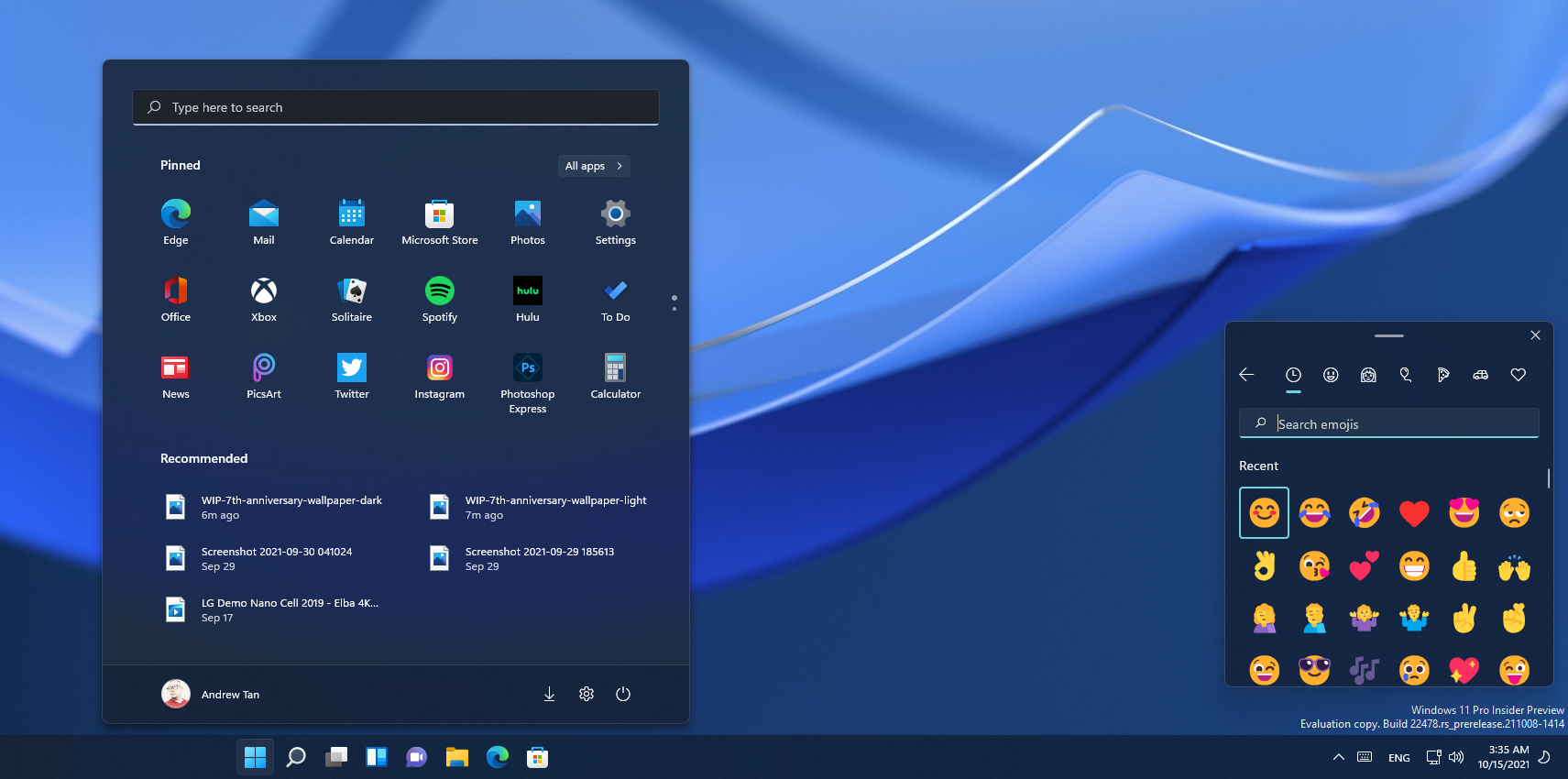
The New Emoji & Wallpaper for Windows 11 Dev Channel Build 22478 Looks Awesome!

https://blogs.windows.com/windows-insider/2...ew-build-22478/

user posted image
SUSlife5tyle
post Oct 15 2021, 08:29 AM

Getting Started
**
Junior Member
277 posts

Joined: Oct 2016
I currently installed on my old Dell Latitude 3340 and also a VM in AMD Ryzen 5 3600 (8GB RAM allocated to the virtual machine). Well on startup, my Dell Latitude 3340 run much smoother than my VM. But once my VM is running loaded all the Windows, it seem my VM is much smoother. But it seem that I might want to revert back to Windows 7 on my Dell Latitude 3340. I can restore the image I backup on my external HDD.
SUSlife5tyle
post Oct 15 2021, 08:30 AM

Getting Started
**
Junior Member
277 posts

Joined: Oct 2016
QUOTE(Andrewtst @ Oct 15 2021, 03:40 AM)
The New Emoji & Wallpaper for Windows 11 Dev Channel Build 22478 Looks Awesome!

https://blogs.windows.com/windows-insider/2...ew-build-22478/

user posted image
*
You haven't install the official release version?
Andrewtst
post Oct 15 2021, 08:58 AM

Forgiveness is Happiness
*********
All Stars
29,773 posts

Joined: Jan 2009
From: Johor, Malaysia.


QUOTE(life5tyle @ Oct 15 2021, 08:30 AM)
You haven't install the official release version?
*
This is running under VM.

My main PC is running official release. biggrin.gif
SUSlife5tyle
post Oct 15 2021, 09:11 AM

Getting Started
**
Junior Member
277 posts

Joined: Oct 2016
QUOTE(Andrewtst @ Oct 15 2021, 08:58 AM)
This is running under VM.

My main PC is running official release.  biggrin.gif
*
my VM also running on official release already. LOL!
Andrewtst
post Oct 15 2021, 09:26 AM

Forgiveness is Happiness
*********
All Stars
29,773 posts

Joined: Jan 2009
From: Johor, Malaysia.


QUOTE(life5tyle @ Oct 15 2021, 09:11 AM)
my VM also running on official release already. LOL!
*
VM I set it purpose to see what is new on future Windows 11. So it is running Dev channel. biggrin.gif

This post has been edited by Andrewtst: Oct 15 2021, 09:36 AM

95 Pages « < 25 26 27 28 29 > » Top
 

Change to:
| Lo-Fi Version
0.0281sec    0.82    6 queries    GZIP Disabled
Time is now: 12th December 2025 - 08:46 PM