

Your existing antivirus programs (Symantec / McaFee) works after the upgrade from win10 to win11 ?
Also I read about windows explorer not releasing memory back to the system.
Windows 11, To be announce on 24 June 2021
Windows 11, To be announce on 24 June 2021
|
|
 Oct 15 2021, 03:18 PM Oct 15 2021, 03:18 PM
|
Junior Member
572 posts Joined: Aug 2018  
|
Your existing antivirus programs (Symantec / McaFee) works after the upgrade from win10 to win11 ?
Also I read about windows explorer not releasing memory back to the system. |
|
|
|
|
|
Oct 15 2021, 03:57 PM
|

All Stars
29,773 posts Joined: Jan 2009 From: Johor, Malaysia.
|
QUOTE(4WD_er @ Oct 15 2021, 03:18 PM) Your existing antivirus programs (Symantec / McaFee) works after the upgrade from win10 to win11 ? No idea, I never use 3rd party Anti-virus since Windows 10. Haha!Also I read about windows explorer not releasing memory back to the system.  |
|
|
Oct 15 2021, 06:56 PM
Show posts by this member only | IPv6 | Post
#543
|

Senior Member
6,660 posts Joined: Jan 2003 From: Palace of sexology 
|
Win 11 will repeat winME history of ultimate blue screen king
|
|
|
Oct 15 2021, 07:05 PM
|

Senior Member
5,261 posts Joined: Oct 2004 From: J@Y B33
|
QUOTE(vexus @ Oct 15 2021, 06:56 PM) Win 11 will repeat winME history of ultimate blue screen king Why it will always blue screen?Not mistaken Win 11 blue screen now is black screen. |
|
|
Oct 15 2021, 07:06 PM
|
|
All Stars
29,773 posts Joined: Jan 2009 From: Johor, Malaysia.
|
QUOTE(vexus @ Oct 15 2021, 06:56 PM) Win 11 will repeat winME history of ultimate blue screen king Windows 11 is freaking stable.It is even stable than Windows 10 to me. My not sure what issue idle hang no longer appear since I use Windows 11. |
|
|
Oct 15 2021, 07:13 PM
|
|
Senior Member
5,261 posts Joined: Oct 2004 From: J@Y B33
|
QUOTE(4WD_er @ Oct 15 2021, 03:18 PM) Your existing antivirus programs (Symantec / McaFee) works after the upgrade from win10 to win11 ? Opened 33 windowsAlso I read about windows explorer not releasing memory back to the system.  After close all windows it still retain about 350MB. My system haven't install this week patch Tuesday yet. (KB5006674) I restart windows explorer at Task Manager, it's size drop to 55MB |
|
|
|
|
|
Oct 15 2021, 09:08 PM
Show posts by this member only | IPv6 | Post
#547
|

Junior Member
277 posts Joined: Oct 2016
|
QUOTE(xxboxx @ Oct 15 2021, 07:13 PM) Opened 33 windows This Windows Explorer bug still not yet patch under the latest update. Might need to wait for a while for the patch.After close all windows it still retain about 350MB. My system haven't install this week patch Tuesday yet. (KB5006674) I restart windows explorer at Task Manager, it's size drop to 55MB |
|
|
Oct 15 2021, 10:42 PM
Show posts by this member only | IPv6 | Post
#548
|

Junior Member
27 posts Joined: Jan 2009 From: Sarawak
|
QUOTE(xxboxx @ Oct 15 2021, 07:13 PM) Opened 33 windows There is a report of memory leak on Window 11 that the reason.After close all windows it still retain about 350MB. My system haven't install this week patch Tuesday yet. (KB5006674) I restart windows explorer at Task Manager, it's size drop to 55MB This post has been edited by angeluslee: Oct 15 2021, 10:42 PM |
|
|
Oct 16 2021, 12:31 AM
|
|
Senior Member
5,261 posts Joined: Oct 2004 From: J@Y B33
|
QUOTE(angeluslee @ Oct 15 2021, 10:42 PM) There is a report of memory leak on Window 11 that the reason. Ya, confirming to the other guy it still happening. Just installed this week patch but it still not fixed.Those that need every MB to be free, can restart Windows Explorer in Task Manager for temporary fix. In my case it became 55MB but grew to 72MB after few minutes. |
|
|
Oct 16 2021, 02:43 AM
|
|
All Stars
29,773 posts Joined: Jan 2009 From: Johor, Malaysia.
|
Beta Channel & Release Preview Channel of 22000.282
Many fixed but major is AMD Ryzen L3 Cache. https://blogs.windows.com/windows-insider/2...eview-channels/  |
|
|
Oct 16 2021, 02:05 PM
Show posts by this member only | IPv6 | Post
#551
|

Senior Member
1,779 posts Joined: Jan 2019
|
QUOTE(Andrewtst @ Oct 14 2021, 03:23 PM) I got also install at my old laptop that is not in support list which running Intel® Core™ i7-6700HQ CPU @ 2.60GHz and GPU Intel® HD Graphics 530 + Nvidia GeForce 970M with 16 GB RAM + SSD. It is smooth but I still can feel it is not what Windows 11 suppose buttery smooth as it should when I compare with my New PC running AMD Ryzen 9 5900X 12-Core Processor 3.70GHz and GPU Nvidia GeForce RTX 3080 with 32 GB RAM + NVMe SSD. i5-8265u 16GB ram UHD620 graphics 500GB 970 Evo Or maybe I should wait till they fix their bugs before upgrading. |
|
|
Oct 16 2021, 02:57 PM
|
|
Junior Member
295 posts Joined: Oct 2020
|
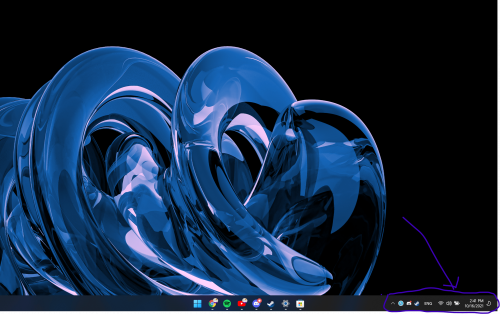 anyone have the issue that the whole part at i circled at the taskbar glitches/flickers randomly? |
|
|
Oct 16 2021, 05:18 PM
|
|
All Stars
29,773 posts Joined: Jan 2009 From: Johor, Malaysia.
|
QUOTE(KopiChia @ Oct 16 2021, 02:05 PM) So I will expect a performance hit too if my laptop cpu is weaker ones in supported list? I am thinking of upgrade Windows on Your PC is very ok update to Windows 11. They is no serious fix for Intel CPU. i5-8265u 16GB ram UHD620 graphics 500GB 970 Evo Or maybe I should wait till they fix their bugs before upgrading. The L3 Cache issue only happen to AMD CPU and fixed already out for Beta Channel and Release Preview Channel. Final should be out by next week. |
|
|
|
|
|
Oct 16 2021, 05:20 PM
|
|
All Stars
29,773 posts Joined: Jan 2009 From: Johor, Malaysia.
|
QUOTE(miyeonevermioff @ Oct 16 2021, 02:57 PM) anyone have the issue that the whole part at i circled at the taskbar glitches/flickers randomly? Are you using HDR monitor, try switch to SDR and later switch to HDR or v.s This post has been edited by Andrewtst: Oct 16 2021, 05:21 PM |
|
|
Oct 16 2021, 05:21 PM
Show posts by this member only | IPv6 | Post
#555
|
|
Senior Member
1,779 posts Joined: Jan 2019
|
QUOTE(Andrewtst @ Oct 16 2021, 05:18 PM) Your PC is very ok update to Windows 11. They is no serious fix for Intel CPU. Thanks for info man.The L3 Cache issue only happen to AMD CPU and fixed already out for Beta Channel and Release Preview Channel. Final should be out by next week. Andrewtst liked this post
|
|
|
Oct 16 2021, 07:12 PM
|
|
Junior Member
295 posts Joined: Oct 2020
|
QUOTE(Andrewtst @ Oct 16 2021, 05:20 PM) It happened to me on earlier 1st release build but no more. just using a normal laptop soooo any other ideas?Are you using HDR monitor, try switch to SDR and later switch to HDR or v.s |
|
|
Oct 16 2021, 07:23 PM
|
|
All Stars
29,773 posts Joined: Jan 2009 From: Johor, Malaysia.
|
QUOTE(miyeonevermioff @ Oct 16 2021, 07:12 PM) just using a normal laptop soooo any other ideas? Try updating your GPU driver. |
|
|
Oct 16 2021, 08:23 PM
Show posts by this member only | IPv6 | Post
#558
|

Senior Member
4,490 posts Joined: Oct 2014
|
New adopter of Windows 11 here. I'm using a laptop with Ryzen 5 4600H and so far it's stable enough for me to run RStudio and Jupyter Notebook on this as I had spent quite some time on doing things on these.
|
|
|
Oct 17 2021, 12:01 AM
|
|
Senior Member
5,261 posts Joined: Oct 2004 From: J@Y B33
|
QUOTE(miyeonevermioff @ Oct 16 2021, 02:57 PM) anyone have the issue that the whole part at i circled at the taskbar glitches/flickers randomly? After update this week patch, didn't notice the glitch still happening. But didn't use the laptop these few days so can't really confirm. |
|
|
Oct 17 2021, 12:24 AM
|
|
All Stars
29,773 posts Joined: Jan 2009 From: Johor, Malaysia.
|
Finally decide join back Windows Insider Program but this time I choose only Release Preview Channel.
Latest Beta / Release Preview Channel 22000.282 confirmed Fixed the AMD Ryzen CPU L3 Cache Latency Issue.  |
| Change to: |  0.0318sec 0.0318sec
 0.74 0.74
 6 queries 6 queries
 GZIP Disabled GZIP Disabled
Time is now: 13th December 2025 - 08:59 AM |
 Quote
Quote