Welcome Guest ( Log In | Register )

Bump Topic Topic Closed RSS Feed
3 Pages  1 2 3 >Bottom

Outline · [ Standard ] · Linear+

 Official TM UniFi High Speed Broadband Thread V39, READ 1ST PAGE FOR RELEVANT WIFI INFO

views
     
jacktiew
post Feb 20 2021, 03:08 AM

Getting Started
**
Junior Member
289 posts

Joined: Sep 2012
QUOTE(crecar @ Feb 19 2021, 03:25 PM)
I have several questions

1) Does Unifi has contract like 1 year/2 year
Or can I cancel anytime? Use 1 month then cancel also can?

2) How much bandwidth should I need for 720p and 1080p and 4k youtube/netflix
There is choice of 30mbps, 100mbps, 300mbps

3) The advertisement say premium entertainment if I pay more. What is the premium entertainment, is it netflix, astro or other?

4) What is wifi mesh and wifi booster? Are they useful?
*
I'm 100Mbps subscriber. Based on my observation, for youtube 4k, it would use around 100Mbps to run for a 2-3 seconds when the video starts to load. Then it will drops to 40-70Mbps for normal buffering.
jacktiew
post Feb 26 2021, 02:50 PM

Getting Started
**
Junior Member
289 posts

Joined: Sep 2012
RM159 - 300Mbps without unifiplaytv


Just got this offer above today. I rejected it because I'm satisfied with my 100Mbps already.

May I know 50Mbps still available through some special channel? Btw, I'm out of contract already. Might consider to downgrade since I'm not using much and want to reduce monthly payment.
jacktiew
post Feb 26 2021, 03:12 PM

Getting Started
**
Junior Member
289 posts

Joined: Sep 2012
QUOTE(aniq8676 @ Feb 26 2021, 03:00 PM)
yes, if you stay in selected high-rise where it still uses copper
*

It's not for me then. I have FTTH haha.

Thanks anyway. smile.gif
jacktiew
post Feb 26 2021, 03:13 PM

Getting Started
**
Junior Member
289 posts

Joined: Sep 2012
QUOTE(kemin @ Feb 26 2021, 03:06 PM)
Can someone check if you are able to access iherb website.  Been trying to access without success the past day, is it me or everyone?

https://my.iherb.com/
*
No problem here. Chrome also. Area: Selangor
jacktiew
post Mar 12 2021, 11:58 AM

Getting Started
**
Junior Member
289 posts

Joined: Sep 2012
QUOTE(jerry123939 @ Mar 12 2021, 10:14 AM)
Hi all sifu, I installed fiber This Tuesday, is it safe to power off the ONU now or I need to let it run for few more days? TQ
*
It's safe to power off. But everytime when you turn it again, it takes few minutes to connect.
jacktiew
post Mar 19 2021, 01:37 PM

Getting Started
**
Junior Member
289 posts

Joined: Sep 2012
QUOTE(Sam Leong @ Mar 19 2021, 12:01 PM)
TM reply me ady for the problem

» Click to show Spoiler - click again to hide... «

they got attach file for me
but the picture quality smile.gif)))))
user posted image
*
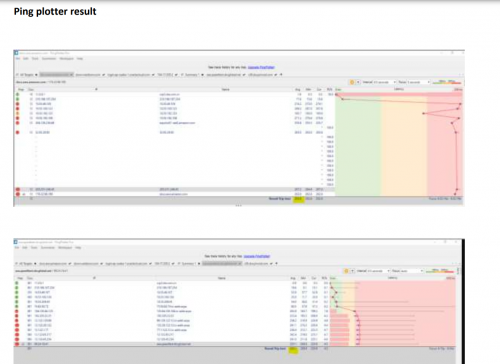
They actually listened to customer complain about their routing. Interesting.

Are you a biz line subscriber?
jacktiew
post Apr 7 2021, 10:55 PM

Getting Started
**
Junior Member
289 posts

Joined: Sep 2012
QUOTE(dino89 @ Apr 7 2021, 09:22 PM)
Thanks! Manaaged to off the IPTV port and now my android tv box can be plugged in via cable instead of Wifi
I still have some "legacy" devices in my house that need to run on 2.4ghz, if not I will just off the 2.4ghz band. I guess for now have to leave both bands on and hope that my devices will be "smart" abit to use the 5ghz band lol
*
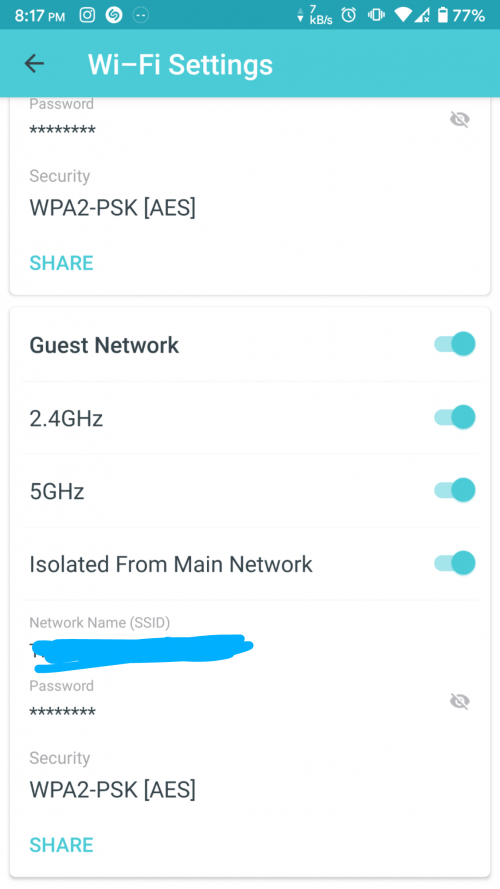
Turn on the guest wifi, set only for 2.4Ghz, turn off isolated from main network on the guest wifi and set 5Ghz only on main network. Problem solved.
jacktiew
post Apr 7 2021, 11:13 PM

Getting Started
**
Junior Member
289 posts

Joined: Sep 2012
QUOTE(dino89 @ Apr 7 2021, 11:11 PM)
Thanks! Will consider doing this

BTW is this correct for ipv6 setup?
[attachmentid=10835087]
*
I'm using it in AP mode so I'm not sure. But it seems correct to me.

You can use this website to test whether you get the IPv6 address or not.

http://ip6.me
jacktiew
post Apr 8 2021, 01:08 PM

Getting Started
**
Junior Member
289 posts

Joined: Sep 2012
QUOTE(dino89 @ Apr 8 2021, 11:25 AM)
Unfortunately my wifi printer running on guest network cant print if my devices are connected on the main network sweat.gif I guess i have to enable 2.4ghz on the main network for the printing works to go on
*
Once you turn off' 'isolated from main network', you should be able to ping your printer.
jacktiew
post Apr 8 2021, 08:21 PM

Getting Started
**
Junior Member
289 posts

Joined: Sep 2012
QUOTE(dino89 @ Apr 8 2021, 03:51 PM)
On the deco app, i cant find this setting to turn off  icon_question.gif
*
Maybe is you because you're using router mode. Maybe you can change the vlan under the guest wifi to 1 to see whether it works. Otherwise you have to stick with what you have now.

This is mine which is using AP mode.

user posted image
jacktiew
post Apr 8 2021, 09:45 PM

Getting Started
**
Junior Member
289 posts

Joined: Sep 2012
QUOTE(dino89 @ Apr 8 2021, 09:29 PM)
Mayb like what u said, i using as router mode
Mine like this d
[attachmentid=10836435]
*
Mine is Deco M4.

Since x20 is still new, maybe coming soon in your upcoming firmware update.
jacktiew
post Apr 10 2021, 08:31 PM

Getting Started
**
Junior Member
289 posts

Joined: Sep 2012
QUOTE(HariszKilz @ Apr 10 2021, 03:33 PM)
Thanks for the replies guys. I think that it was TM fault's too because my friend in the same taman also facing the same problem like me but he didn't even use internet that much. I just hoarded around 1.2TB usage this month. That's why I think that the CS might be right because of the usage. Strange that TM didn't mentioned a thing about their rerouting. Anyway, do you guys think investing for a Wifi-6 router is good ? I'm currently aiming for Asus AX55. My house is a single storey house and only 4 people currently using the wifi. Only me is hoarding the wifi at maximum usage. Others just use Youtube and Netflix only.
*
I used average 2TB per month. No issue at all. wink.gif

If you're using stock router than just replace it, otherwise you won't see much difference unless you have devices that support wifi 6.
jacktiew
post May 9 2021, 03:26 PM

Getting Started
**
Junior Member
289 posts

Joined: Sep 2012
QUOTE(go626201 @ May 9 2021, 02:53 PM)
Deco got AP mode?
I saw my cousin house using deco set,but the speed very bad...(main node connected to asus ac router)
*
I'm used use it in wireless backhaul, I got 70Mbps (I subscribed to 100Mbps) on my second floor. (But this depending on how far you place on each other.)

Now I'm using wired backhaul, full speed as always.
jacktiew
post May 16 2021, 11:20 AM

Getting Started
**
Junior Member
289 posts

Joined: Sep 2012
QUOTE(heLL_bOy @ May 16 2021, 02:53 AM)
hopefully... next monday everything back to normal.

contabo SG still new they only have two IP Transit provider which is Hurriance and Telia. i saw a few reviews that their connection speed n latency across asia still not stable due to current upstream. hopefully they add few more upstream and peering like equinix or sgix will be better.
*
Wondering if maxis have the same issue on the IPv6 and the routing issue.
jacktiew
post May 24 2021, 08:02 PM

Getting Started
**
Junior Member
289 posts

Joined: Sep 2012
Can you guys access https://www.maxis.com.my with IPv6 enable. It's been a while since I cannot access without turning off IPv6.
jacktiew
post Sep 2 2021, 10:35 PM

Getting Started
**
Junior Member
289 posts

Joined: Sep 2012
QUOTE(Steponlego @ Sep 2 2021, 10:13 PM)
Is it normal to get like 500mbps on speedtest even when using cat6 cable? I subscribed to 800mbps package. Upload speed is consistent at 200mbps.

I can see that the my internet speed in network properties is fluctuating, sometimes it lists 866.7mbps, some times 600mbps, most of the time 500mbps.

Before this I use the default unifi black AZ-tech router and the M9 Deco Plus on dynamic IP mode, can get 800mbps. Today I changed to use PPPoE mode with the M9 Deco to reduce cable clutter, I can only get 500mbps.

My house is the only one connected to the TM fibre black box outside.
*
You need AX triband router to get more than 500Mbps.
jacktiew
post Oct 4 2021, 11:50 PM

Getting Started
**
Junior Member
289 posts

Joined: Sep 2012
QUOTE(cT.!Kee! @ Oct 4 2021, 11:49 PM)
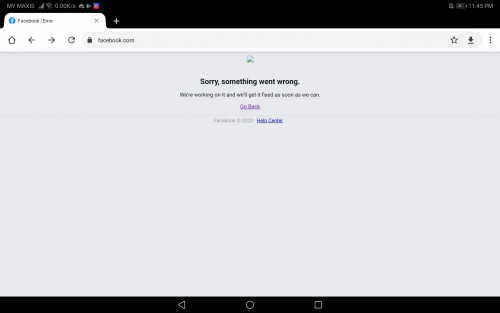
Facebook is down?

user posted image
*
Yes, same goes to Instagram and WhatsApp I guess.
jacktiew
post Nov 24 2021, 05:47 PM

Getting Started
**
Junior Member
289 posts

Joined: Sep 2012
deleted

This post has been edited by jacktiew: Nov 24 2021, 05:51 PM
jacktiew
post Dec 9 2021, 06:08 PM

Getting Started
**
Junior Member
289 posts

Joined: Sep 2012
QUOTE(mazannor81 @ Dec 9 2021, 09:52 AM)
Hi guy, sorry if have been asked before. I have
1. Netis DL440v : subsribed to Unifi 10Mpbs VDSL
2. YES ZOOM+ : better speed

I just want 1 SSID for my house.
Can I connect both; YES Zoom to Netis wan port and Off wifi for yes Zoom
*
Get a load balancing router to combine two internet into one and an access point for the wifi

jacktiew
post Dec 14 2021, 09:55 AM

Getting Started
**
Junior Member
289 posts

Joined: Sep 2012
I plan to go to TMPoint Cyberjaya to get that 300Mbps RM129 package. Do they open during lunch hour? Do I need to prepare anything beforehand to ensure smooth process before I go there, or just tell him I want the package?

Fyi, my contract is over.

Thanks.

3 Pages  1 2 3 >Top
Topic ClosedOptions
 

Change to:
| Lo-Fi Version
0.1863sec    0.86    7 queries    GZIP Disabled
Time is now: 15th December 2025 - 11:18 AM