Welcome Guest ( Log In | Register )

Bump Topic Topic Closed RSS Feed
413 Pages « < 59 60 61 62 63 > » Bottom

Outline · [ Standard ] · Linear+

 Official TM UniFi High Speed Broadband Thread V39, READ 1ST PAGE FOR RELEVANT WIFI INFO

views
     
TongCN
post Mar 1 2021, 08:31 AM

Look ma, I have lots stars :D
*******
Senior Member
6,666 posts

Joined: Aug 2008
From: Malaysia


So i received call from Unifi and they only offer me RM159 (M4 1 pair) 300mbps package.

Cant get the RM139 for 300mbps.
But still i just get RM159 and probably pass that router to my parents' home
LostAndFound
post Mar 1 2021, 08:42 AM

Look at all my stars!!
*******
Senior Member
6,265 posts

Joined: Jul 2005
From: UEP Subang Jaya


QUOTE(cskean @ Feb 28 2021, 11:04 PM)
Yup, it is fax capable. All the while the printer is connected with a telephone line. It was meant for my wife usage, but since she quit her job, I just keep it like that all the while.

I remember with the same setup(where the telephone line is connected to the printer), I didn't encounter such issue before all the while. Only few days ago when I was unable to wirelessly print my son's homework from my laptop, I thought the printer needed a restart(I hardly restart it unless loss connection), then only I found out such situation.

Maybe will try again tomorrow and feedback here the outcome...
*
Is your printer the sort which connect to network via LAN. Hope it's not running it's own DHCP server pointing to itself....
TongCN
post Mar 1 2021, 08:50 AM

Look ma, I have lots stars :D
*******
Senior Member
6,666 posts

Joined: Aug 2008
From: Malaysia


QUOTE(TongCN @ Mar 1 2021, 08:31 AM)
So i received call from Unifi and they only offer me RM159 (M4 1 pair) 300mbps package.

Cant get the RM139 for 300mbps.
But still i just get RM159 and probably pass that router to my parents' home
*
Accepted on Friday evening roughly 6pm +

Weekend =/= working day

This morning 8:30am checked and become unifi 300Mbps - Loyalty Super Value (Broadband + MESH WiFi M4)

That's fast

EDIT: Test using 3 platform

1) Speed test - 70mbps down +-
2) Fast.com - 67~70mbps down
3) TP-Link Deco app - 306mbps

What?

This post has been edited by TongCN: Mar 1 2021, 08:54 AM
LostAndFound
post Mar 1 2021, 09:00 AM

Look at all my stars!!
*******
Senior Member
6,265 posts

Joined: Jul 2005
From: UEP Subang Jaya


QUOTE(TongCN @ Mar 1 2021, 08:50 AM)
EDIT: Test using 3 platform

1) Speed test - 70mbps down +-
2) Fast.com - 67~70mbps down
3) TP-Link Deco app - 306mbps

What?
*
Deco app is correct because it is directly from router to modem to server.

Your speedtest/fast.com is from your machine (PC/laptop/phone) which is connected via wifi. Those speeds means you are connecting via 2.4GHz probably. Connect by LAN/5G and you will see close to 300.
TongCN
post Mar 1 2021, 09:25 AM

Look ma, I have lots stars :D
*******
Senior Member
6,666 posts

Joined: Aug 2008
From: Malaysia


QUOTE(LostAndFound @ Mar 1 2021, 09:00 AM)
Deco app is correct because it is directly from router to modem to server.

Your speedtest/fast.com is from your machine (PC/laptop/phone) which is connected via wifi. Those speeds means you are connecting via 2.4GHz probably. Connect by LAN/5G and you will see close to 300.
*
Oh ya, now u mentioned.

My office laptop connected to the Guest Wifi which is 2.4ghz only XD

Thanks for the clarification.


EDIT:

I tested my xbox which using LAN cable using the the console own speed test and get this result:

Attached Image

I also use my android phone connected my main WiFi which is 5Ghz also getting 100mbps max
Using iphone 11 also same, weird.

But Deco App still shows 300+ mbps

Router using was TP-Link X20 right now

This post has been edited by TongCN: Mar 1 2021, 09:36 AM
y500
post Mar 1 2021, 09:55 AM

Casual
***
Junior Member
336 posts

Joined: May 2013

QUOTE(TongCN @ Mar 1 2021, 09:25 AM)
Oh ya, now u mentioned.

My office laptop connected to the Guest Wifi which is 2.4ghz only XD

Thanks for the clarification.
EDIT:

I tested my xbox which using LAN cable using the the console own speed test and get this result:

Attached Image

I also use my android phone connected my main WiFi which is 5Ghz also getting 100mbps max
Using iphone 11 also same, weird.

But Deco App still shows 300+ mbps

Router using was TP-Link X20 right now
*
Try restart your modem and router.
Sam Leong
post Mar 1 2021, 11:15 AM

On my way
****
Junior Member
678 posts

Joined: Mar 2016


QUOTE(heLL_bOy @ Feb 28 2021, 11:23 PM)
Now connection to JP also getting worst doh.gif  30% packet loss for 100 round trip at peak hours
SMW-5 cable to EU will be fixed by 10th March info from TM side. hope everything back to normal.
*
Seems like only certain route got problem
Oracle Osaka through TataCom from unifi to Oracle Osaka
CODE
Pinging login.ap-osaka-1.oraclecloud.com [140.204.30.132] with 32 bytes of data:
Reply from 140.204.30.132: bytes=32 time=95ms TTL=54
Reply from 140.204.30.132: bytes=32 time=92ms TTL=54
Reply from 140.204.30.132: bytes=32 time=94ms TTL=54
Reply from 140.204.30.132: bytes=32 time=98ms TTL=54

Ping statistics for 140.204.30.132:
   Packets: Sent = 4, Received = 4, Lost = 0 (0% loss),
Approximate round trip times in milli-seconds:
   Minimum = 92ms, Maximum = 98ms, Average = 94ms

Will test at night see how again
cskean
post Mar 1 2021, 11:53 AM

Look at all my stars!!
*******
Senior Member
2,551 posts

Joined: Jan 2003
From: Cheras / Ampang


QUOTE(LostAndFound @ Mar 1 2021, 08:42 AM)
Is your printer the sort which connect to network via LAN. Hope it's not running it's own DHCP server pointing to itself....
*
I'm connecting my printer via wifi only as my printer is sitting on the 1st floor while my router is located at the living hall on the ground floor...

I'm not up to the level where I can setup such advance setting to the printer yet... rclxm9.gif rclxm9.gif rclxm9.gif
Hobbez
post Mar 1 2021, 01:08 PM

Regular
******
Senior Member
1,232 posts

Joined: Dec 2009
QUOTE(heLL_bOy @ Feb 28 2021, 11:23 PM)
Now connection to JP also getting worst doh.gif  30% packet loss for 100 round trip at peak hours
SMW-5 cable to EU will be fixed by 10th March info from TM side. hope everything back to normal.
*
How do you get those TM sources? I ask all those TM "engineers" all the time about this problem with TM connection and ALL of them are so coy.

They either really don't know or they don't want to say anything. Or maybe instructed not to say anything.

But I am glad to see I am not the only one experiencing this TM issue, and it's been going on for some time now.

So only March 10, the issue will be fixed for EU connection?

What about the others?
TongCN
post Mar 1 2021, 02:10 PM

Look ma, I have lots stars :D
*******
Senior Member
6,666 posts

Joined: Aug 2008
From: Malaysia


QUOTE(y500 @ Mar 1 2021, 09:55 AM)
Try restart your modem and router.
*
Just now did nothing and the speed right now increase already , lolz.. tonight test again see

At least now my xbox test speed get 280mbps
AV_2018
post Mar 1 2021, 03:34 PM

Casual
***
Junior Member
451 posts

Joined: Apr 2018
Comparison of TM DNS, Google DNS and Cloudflare DNS from East Malaysia for Akamai CDN (used by streaming sites such as VIU) as at today.

TM DNS
» Click to show Spoiler - click again to hide... «


Google DNS
» Click to show Spoiler - click again to hide... «


Cloudflare DNS
» Click to show Spoiler - click again to hide... «


Not only is Cloudflare no longer the fastest responding DNS, but it also returns non-optimal IPs (which at the moment is unusable due to International routing issues) for Akamai CDN as can be seen in the ping test below:

IP returned by TM and Google DNS
CODE
Pinging 203.106.94.179 with 32 bytes of data:
Reply from 203.106.94.179: bytes=32 time=20ms TTL=61
Reply from 203.106.94.179: bytes=32 time=21ms TTL=61
Reply from 203.106.94.179: bytes=32 time=20ms TTL=61
Reply from 203.106.94.179: bytes=32 time=19ms TTL=61

Ping statistics for 203.106.94.179:
   Packets: Sent = 4, Received = 4, Lost = 0 (0% loss),
Approximate round trip times in milli-seconds:
   Minimum = 19ms, Maximum = 21ms, Average = 20ms


IP returned by Cloudflare DNS
CODE
Pinging 23.50.232.183 with 32 bytes of data:
Reply from 23.50.232.183: bytes=32 time=333ms TTL=56
Request timed out.
Reply from 23.50.232.183: bytes=32 time=332ms TTL=56
Reply from 23.50.232.183: bytes=32 time=336ms TTL=56

Ping statistics for 23.50.232.183:
   Packets: Sent = 4, Received = 3, Lost = 1 (25% loss),
Approximate round trip times in milli-seconds:
   Minimum = 332ms, Maximum = 336ms, Average = 333ms


Therefore I have switched back to using Google DNS and the streaming services are working smoothly with max resolution now.

heLL_bOy
post Mar 1 2021, 03:36 PM

Regular
******
Senior Member
1,350 posts

Joined: Nov 2004
From: HEAVEN & HELL


QUOTE(Sam Leong @ Mar 1 2021, 11:15 AM)
Seems like only certain route got problem
Oracle Osaka through TataCom from unifi to Oracle Osaka
CODE
Pinging login.ap-osaka-1.oraclecloud.com [140.204.30.132] with 32 bytes of data:
Reply from 140.204.30.132: bytes=32 time=95ms TTL=54
Reply from 140.204.30.132: bytes=32 time=92ms TTL=54
Reply from 140.204.30.132: bytes=32 time=94ms TTL=54
Reply from 140.204.30.132: bytes=32 time=98ms TTL=54

Ping statistics for 140.204.30.132:
   Packets: Sent = 4, Received = 4, Lost = 0 (0% loss),
Approximate round trip times in milli-seconds:
   Minimum = 92ms, Maximum = 98ms, Average = 94ms

Will test at night see how again
*
mine everyday same no need test unless you connected specific ip range.
heLL_bOy
post Mar 1 2021, 03:39 PM

Regular
******
Senior Member
1,350 posts

Joined: Nov 2004
From: HEAVEN & HELL


QUOTE(Hobbez @ Mar 1 2021, 01:08 PM)
How do you get those TM sources? I ask all those TM "engineers" all the time about this problem with TM connection and ALL of them are so coy.

They either really don't know or they don't want to say anything. Or maybe instructed not to say anything.

But I am glad to see I am not the only one experiencing this TM issue, and it's been going on for some time now.

So only March 10, the issue will be fixed for EU connection?

What about the others?
*
exact time should be 14th march. but tm say 10th march so just wait and see.
Sam Leong
post Mar 1 2021, 03:59 PM

On my way
****
Junior Member
678 posts

Joined: Mar 2016


QUOTE(AV_2018 @ Mar 1 2021, 03:34 PM)
Comparison of TM DNS, Google DNS and Cloudflare DNS from East Malaysia for Akamai CDN (used by streaming sites such as VIU) as at today.

IP returned by Cloudflare DNS
CODE
Pinging 23.50.232.183 with 32 bytes of data:
Reply from 23.50.232.183: bytes=32 time=333ms TTL=56
Request timed out.
Reply from 23.50.232.183: bytes=32 time=332ms TTL=56
Reply from 23.50.232.183: bytes=32 time=336ms TTL=56

Ping statistics for 23.50.232.183:
   Packets: Sent = 4, Received = 3, Lost = 1 (25% loss),
Approximate round trip times in milli-seconds:
   Minimum = 332ms, Maximum = 336ms, Average = 333ms


Therefore I have switched back to using Google DNS and the streaming services are working smoothly with max resolution now.
*
For me also unifi but no problem with 23.50.232.183
CODE
Pinging 23.50.232.183 with 32 bytes of data:
Reply from 23.50.232.183: bytes=32 time=58ms TTL=56
Reply from 23.50.232.183: bytes=32 time=59ms TTL=56
Reply from 23.50.232.183: bytes=32 time=57ms TTL=56
Reply from 23.50.232.183: bytes=32 time=59ms TTL=56

Ping statistics for 23.50.232.183:
   Packets: Sent = 4, Received = 4, Lost = 0 (0% loss),
Approximate round trip times in milli-seconds:
   Minimum = 57ms, Maximum = 59ms, Average = 58ms

and traceroute shows it go to HK first only back to SG
with Telia
user posted image
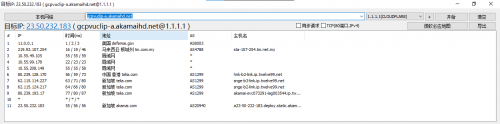
This is what Cloudflare 1.1.1.1 return me for gcpvuclip-a.akamaihd.net
user posted image
go626201
post Mar 1 2021, 04:13 PM

Regular
******
Senior Member
1,882 posts

Joined: Sep 2017
QUOTE(Sam Leong @ Mar 1 2021, 03:59 PM)
For me also unifi but no problem with 23.50.232.183
CODE
Pinging 23.50.232.183 with 32 bytes of data:
Reply from 23.50.232.183: bytes=32 time=58ms TTL=56
Reply from 23.50.232.183: bytes=32 time=59ms TTL=56
Reply from 23.50.232.183: bytes=32 time=57ms TTL=56
Reply from 23.50.232.183: bytes=32 time=59ms TTL=56

Ping statistics for 23.50.232.183:
   Packets: Sent = 4, Received = 4, Lost = 0 (0% loss),
Approximate round trip times in milli-seconds:
   Minimum = 57ms, Maximum = 59ms, Average = 58ms

and traceroute shows it go to HK first only back to SG
with Telia
user posted image
This is what Cloudflare 1.1.1.1 return me for gcpvuclip-a.akamaihd.net
user posted image
*
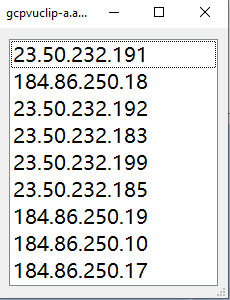
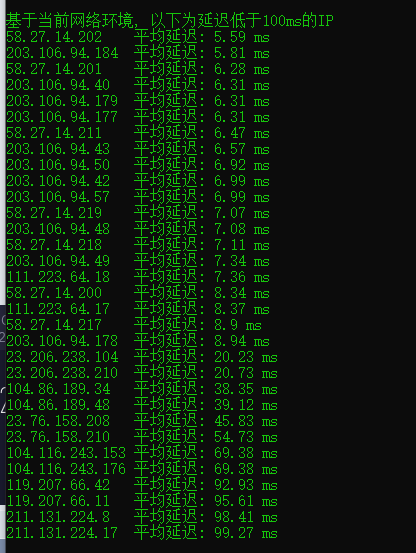
Maybe u can try to use modify "hosts" with this following ips for getting better speed. (For gcpvuclip-a.akamaihd.net)
user posted image
RallyNight
post Mar 1 2021, 04:16 PM

Regular
******
Senior Member
1,129 posts

Joined: Nov 2015
QUOTE(AV_2018 @ Mar 1 2021, 04:34 PM)
Comparison of TM DNS, Google DNS and Cloudflare DNS from East Malaysia for Akamai CDN (used by streaming sites such as VIU) as at today.

TM DNS
» Click to show Spoiler - click again to hide... «


Google DNS
» Click to show Spoiler - click again to hide... «


Cloudflare DNS
» Click to show Spoiler - click again to hide... «


Not only is Cloudflare no longer the fastest responding DNS, but it also returns non-optimal IPs (which at the moment is unusable due to International routing issues) for Akamai CDN as can be seen in the ping test below:

IP returned by TM and Google DNS
CODE
Pinging 203.106.94.179 with 32 bytes of data:
Reply from 203.106.94.179: bytes=32 time=20ms TTL=61
Reply from 203.106.94.179: bytes=32 time=21ms TTL=61
Reply from 203.106.94.179: bytes=32 time=20ms TTL=61
Reply from 203.106.94.179: bytes=32 time=19ms TTL=61

Ping statistics for 203.106.94.179:
   Packets: Sent = 4, Received = 4, Lost = 0 (0% loss),
Approximate round trip times in milli-seconds:
   Minimum = 19ms, Maximum = 21ms, Average = 20ms


IP returned by Cloudflare DNS
CODE
Pinging 23.50.232.183 with 32 bytes of data:
Reply from 23.50.232.183: bytes=32 time=333ms TTL=56
Request timed out.
Reply from 23.50.232.183: bytes=32 time=332ms TTL=56
Reply from 23.50.232.183: bytes=32 time=336ms TTL=56

Ping statistics for 23.50.232.183:
   Packets: Sent = 4, Received = 3, Lost = 1 (25% loss),
Approximate round trip times in milli-seconds:
   Minimum = 332ms, Maximum = 336ms, Average = 333ms


Therefore I have switched back to using Google DNS and the streaming services are working smoothly with max resolution now.
*
Ty for the test.

Tested on wow, eso, ff14 in game ping:
Tm, cloud, google

Wow
400
460
230

Eso
366 to 999999999 drop all lost packet from akamai to server.
299 to 999999999 drop
266 to 999999999 drop

Ff14
210
110
111

Seems like akamai is the problem.


go626201
post Mar 1 2021, 04:23 PM

Regular
******
Senior Member
1,882 posts

Joined: Sep 2017
QUOTE(RallyNight @ Mar 1 2021, 04:16 PM)
Ty for the test.

Tested on wow, eso, ff14 in game ping:
Tm, cloud, google

Wow
400
460
230

Eso
366 to 999999999 drop all lost packet from akamai to server.
299 to 999999999 drop
266 to 999999999 drop

Ff14
210
110
111

Seems like akamai is the problem.
*
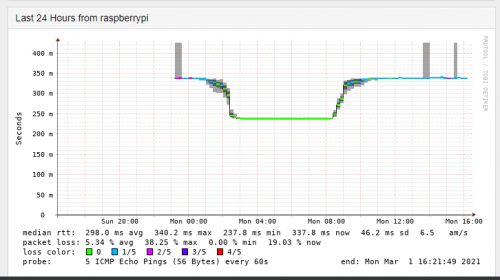
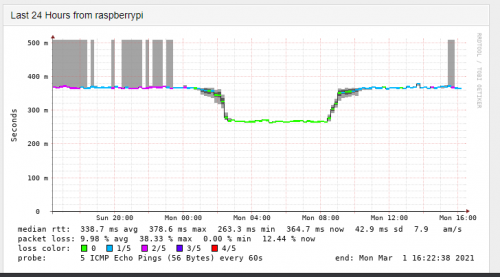
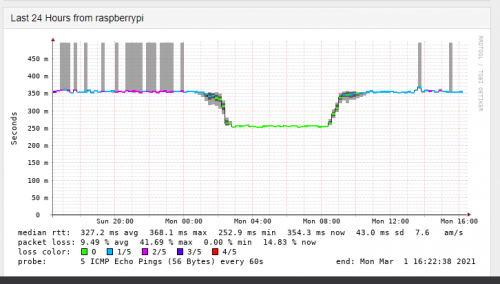
TM to ESO US server and AWS EAST seems like using the same pipe.
ESO US
user posted image

AWS EAST
user posted image
user posted image

Edit:
I think i accidently put the wrong ip for the wrong region name for ESO...Just reset the monitor for ESO.

This post has been edited by go626201: Mar 1 2021, 04:43 PM
RallyNight
post Mar 1 2021, 04:33 PM

Regular
******
Senior Member
1,129 posts

Joined: Nov 2015
QUOTE(go626201 @ Mar 1 2021, 05:23 PM)
TM to ESO US server and AWS EAST seems like using the same pipe.
ESO EU
user posted image

AWS EAST
user posted image
user posted image
*
This explain. Tyvm.
Now eso barely can even pass thru login screen.
Cause friend ask me test for them.
taqu
post Mar 1 2021, 04:35 PM

Enthusiast
*****
Junior Member
864 posts

Joined: May 2005
My Adguard Home DNS server uses both Cloudflare DOT & Google DOH server, parallel requests so I always get fastest response from either one. I'm still getting faster response from Cloudflare, is it only their DNS servers problematic but their DOT servers still OK?
go626201
post Mar 1 2021, 04:45 PM

Regular
******
Senior Member
1,882 posts

Joined: Sep 2017
QUOTE(RallyNight @ Mar 1 2021, 04:33 PM)
This explain. Tyvm.
Now eso barely can even pass thru login screen.
Cause friend ask me test for them.
*
I think i accidentally put the wrong name for the ESO monitor.
The previous replies picture should be NA server monitor result.

413 Pages « < 59 60 61 62 63 > » Top
Topic ClosedOptions
 

Change to:
| Lo-Fi Version
0.0191sec    0.68    6 queries    GZIP Disabled
Time is now: 10th December 2025 - 05:52 PM