
Welcome Guest ( Log In | Register )

Bump Topic Topic Closed RSS Feed

Outline · [ Standard ] · Linear+

 Official TM UniFi High Speed Broadband Thread V39, READ 1ST PAGE FOR RELEVANT WIFI INFO

views
     
AV_2018
post Feb 28 2021, 10:48 PM

Casual
***
Junior Member
451 posts

Joined: Apr 2018
QUOTE(go626201 @ Feb 28 2021, 10:10 PM)
Actually from my experience this should not be tm problem,because cloudflare site dc route is not done by tm, CloudFlare distribute it.
Normally peak time will always route to further dc.

But for Fastly,that 70% is TM problem,i reported to Fastly before about 1 years ago.
But Fastly team can contact TM to temporary fix it.(for weeks)

Edit:
If someone who has problem with Fastly CDN, please enter this site http://www.fastly-debug.com/
and after completed debug,the top of the site will show a long code just sent it to Fastly team,they will fix it.
*
Over here in East Malaysia using Cloudflare DNS (connected to JHB PoP) on Unifi Home, legal streaming sites using Akamai CDN is totally unusable at night. Infinite buffering/loading until it errors out. Pinging the domains serving the videos results in packet loss. IPv6 is enabled but Akamai CDN for the videos seem to only use IPv4.

CODE
Pinging a1416.w39.akamai.net [184.28.229.8] with 32 bytes of data:
Reply from 184.28.229.8: bytes=32 time=321ms TTL=55
Request timed out.
Reply from 184.28.229.8: bytes=32 time=319ms TTL=55
Reply from 184.28.229.8: bytes=32 time=320ms TTL=55
Request timed out.
Request timed out.
Request timed out.
Reply from 184.28.229.8: bytes=32 time=319ms TTL=55

Ping statistics for 184.28.229.8:
   Packets: Sent = 10, Received = 6, Lost = 4 (40% loss),
Approximate round trip times in milli-seconds:
   Minimum = 319ms, Maximum = 321ms, Average = 319ms


CODE
Pinging a922.w10.akamai.net [23.46.16.143] with 32 bytes of data:
Reply from 23.46.16.143: bytes=32 time=326ms TTL=55
Reply from 23.46.16.143: bytes=32 time=323ms TTL=55
Reply from 23.46.16.143: bytes=32 time=325ms TTL=55
Request timed out.
Reply from 23.46.16.143: bytes=32 time=324ms TTL=55
Reply from 23.46.16.143: bytes=32 time=327ms TTL=55
Reply from 23.46.16.143: bytes=32 time=325ms TTL=55
Request timed out.
Reply from 23.46.16.143: bytes=32 time=323ms TTL=55

Ping statistics for 23.46.16.143:
   Packets: Sent = 10, Received = 8, Lost = 2 (20% loss),
Approximate round trip times in milli-seconds:
   Minimum = 323ms, Maximum = 327ms, Average = 324ms


Addon: Looking up the IPs involved points to Singapore. So even connection to Singapore is 300ms+ with packet loss!

This post has been edited by AV_2018: Feb 28 2021, 10:50 PM
AV_2018
post Feb 28 2021, 11:01 PM

Casual
***
Junior Member
451 posts

Joined: Apr 2018
QUOTE(Sam Leong @ Feb 28 2021, 10:51 PM)
Weird , mine also unifi home but i nvr encountered this problem
1.1.1.1 DNS

seems like yours being divert to US akamai cdn and for now unifi to US route is extremely unstable situation. Can be describe as totally unuseable. doh.gif
paying for premium price , getting shit service - unifi
*
QUOTE(RallyNight @ Feb 28 2021, 10:53 PM)
Tested anything pass thru akamai got no connect at all.
Game like eso are using akamai are consider dead.
Akamai is complete down everyday on peak time. Today is the worst.
*
I looked up the IPs that I ping... they are both located in Singapore doh.gif

CODE
IP Address 184.28.229.8
Decimal Representation 3088901384
ASN AS35994
City Singapore
Country Singapore
Country Code SG
ISP Akamai Technologies


CODE
IP Address 23.46.16.143
Decimal Representation 388894863
ASN AS3491
City Singapore
Country Singapore
Country Code SG
ISP Akamai Technologies, Inc.

AV_2018
post Feb 28 2021, 11:06 PM

Casual
***
Junior Member
451 posts

Joined: Apr 2018
QUOTE(michaelkkl @ Feb 28 2021, 10:57 PM)
Akamai mainly relies on EDNS client subnet for optimized node.
Cloudflare DNS didn't support this feature thus Akamai IP may resolved to Singapore instead of local Akamai node.
*
hmm.gif looking up the Akamai domains with TM and Google DNS does give totally different IPs compared to Cloudflare. I'm aware Cloudflare doesn't support EDNS but thought it usually doesn't matter much since Cloudflare DNS is in Malaysia so other CDNs DNS that are queried by Cloudflare will know that the query is from Malaysia.
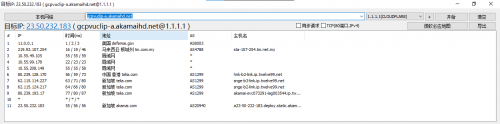
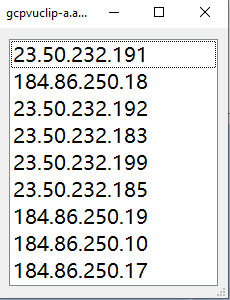
Update: I switched to Google DNS and it fixed the streaming issue. The reason I picked Cloudflare over Google is because I use the malware blocking feature though.

This post has been edited by AV_2018: Feb 28 2021, 11:09 PM
AV_2018
post Mar 1 2021, 12:09 AM

Casual
***
Junior Member
451 posts

Joined: Apr 2018
QUOTE(afif92 @ Mar 1 2021, 12:03 AM)
I tried traceroute to given Akamai (a922.w10.akamai.net and a922.w10.akamai.net) which all shows high ping when using Google and Cloudflare but after I disable DNS over TLS, the traceroute shows lower ping which is 10ms (using Google DNS).

The cloudflare dns still shows high ping even disable DoT.
*
Make sure did not tell Google to disable EDNS Client Subnet (ECS). Some DNS-over-TLS clients default to disabling ECS. Without ECS, Google DNS returns almost the same IP as Cloudflare DNS.
AV_2018
post Mar 1 2021, 03:34 PM

Casual
***
Junior Member
451 posts

Joined: Apr 2018
Comparison of TM DNS, Google DNS and Cloudflare DNS from East Malaysia for Akamai CDN (used by streaming sites such as VIU) as at today.

TM DNS
» Click to show Spoiler - click again to hide... «


Google DNS
» Click to show Spoiler - click again to hide... «


Cloudflare DNS
» Click to show Spoiler - click again to hide... «


Not only is Cloudflare no longer the fastest responding DNS, but it also returns non-optimal IPs (which at the moment is unusable due to International routing issues) for Akamai CDN as can be seen in the ping test below:

IP returned by TM and Google DNS
CODE
Pinging 203.106.94.179 with 32 bytes of data:
Reply from 203.106.94.179: bytes=32 time=20ms TTL=61
Reply from 203.106.94.179: bytes=32 time=21ms TTL=61
Reply from 203.106.94.179: bytes=32 time=20ms TTL=61
Reply from 203.106.94.179: bytes=32 time=19ms TTL=61

Ping statistics for 203.106.94.179:
   Packets: Sent = 4, Received = 4, Lost = 0 (0% loss),
Approximate round trip times in milli-seconds:
   Minimum = 19ms, Maximum = 21ms, Average = 20ms


IP returned by Cloudflare DNS
CODE
Pinging 23.50.232.183 with 32 bytes of data:
Reply from 23.50.232.183: bytes=32 time=333ms TTL=56
Request timed out.
Reply from 23.50.232.183: bytes=32 time=332ms TTL=56
Reply from 23.50.232.183: bytes=32 time=336ms TTL=56

Ping statistics for 23.50.232.183:
   Packets: Sent = 4, Received = 3, Lost = 1 (25% loss),
Approximate round trip times in milli-seconds:
   Minimum = 332ms, Maximum = 336ms, Average = 333ms


Therefore I have switched back to using Google DNS and the streaming services are working smoothly with max resolution now.
AV_2018
post Mar 1 2021, 05:04 PM

Casual
***
Junior Member
451 posts

Joined: Apr 2018
QUOTE(taqu @ Mar 1 2021, 04:35 PM)
My Adguard Home DNS server uses both Cloudflare DOT & Google DOH server, parallel requests so I always get fastest response from either one. I'm still getting faster response from Cloudflare, is it only their DNS servers problematic but their DOT servers still OK?
*
Both DoT and normal is the same for me. Only difference is DoT higher initial connection latency due to TLS connection setup to DNS server. From my tests, averagely, Cloudflare DNS is now 2x slower than Google DNS in returning a reply. Cloudflare also returns Singapore IP for some CDNs instead of KL IP because it doesn't support ECS, causing video streaming to buffer alot because right now there is an issue connecting from Unifi to Singapore CDN server which goes all the way to HK and back according to traceroute by previous poster.
AV_2018
post Mar 1 2021, 05:11 PM

Casual
***
Junior Member
451 posts

Joined: Apr 2018
QUOTE(Sam Leong @ Mar 1 2021, 03:59 PM)
For me also unifi but no problem with 23.50.232.183
CODE
Pinging 23.50.232.183 with 32 bytes of data:
Reply from 23.50.232.183: bytes=32 time=58ms TTL=56
Reply from 23.50.232.183: bytes=32 time=59ms TTL=56
Reply from 23.50.232.183: bytes=32 time=57ms TTL=56
Reply from 23.50.232.183: bytes=32 time=59ms TTL=56

Ping statistics for 23.50.232.183:
   Packets: Sent = 4, Received = 4, Lost = 0 (0% loss),
Approximate round trip times in milli-seconds:
   Minimum = 57ms, Maximum = 59ms, Average = 58ms

and traceroute shows it go to HK first only back to SG
with Telia
user posted image
This is what Cloudflare 1.1.1.1 return me for gcpvuclip-a.akamaihd.net
user posted image
*
Comparison of trace to Akamai CDN IP returned by Cloudflare DNS vs Google DNS

Cloudflare DNS:
CODE
Tracing route to a23-50-232-183.deploy.static.akamaitechnologies.com [23.50.232.183]
over a maximum of 30 hops:

 1    <1 ms    <1 ms    <1 ms  *****.home.arpa [192.168.1.1]
 2     1 ms     3 ms     2 ms  124.82.***.***
 3    54 ms    54 ms    61 ms  10.55.***.***
 4    58 ms    60 ms    59 ms  10.55.39.162
 5    25 ms    24 ms    25 ms  10.55.100.124
 6    58 ms    58 ms    59 ms  10.55.208.151
 7    68 ms    66 ms    65 ms  80.239.161.229
 8    58 ms    62 ms    57 ms  hnk-b1-link.ip.twelve99.net [62.115.115.137]
 9    99 ms   100 ms   101 ms  snge-b2-link.ip.twelve99.net [62.115.116.146]
10   334 ms     *      336 ms  akamai-svc073291-lag003544.ip.twelve99-cust.net [80.239.193.17]
11   352 ms   375 ms   370 ms  ae6.nttcom-sin.netarch.akamai.com [23.56.139.195]
12   334 ms   334 ms   334 ms  a23-50-232-183.deploy.static.akamaitechnologies.com [23.50.232.183]

Trace complete.


Google DNS:
CODE
Tracing route to 203.106.94.179 over a maximum of 30 hops

 1    <1 ms    <1 ms    <1 ms *****.home.arpa [192.168.1.1]
 2     3 ms     2 ms     3 ms  124.82.***.***
 3    20 ms    21 ms    21 ms  10.55.***.***
 4    21 ms    22 ms    22 ms  10.55.39.162
 5    27 ms    29 ms    29 ms  10.55.48.90
 6    20 ms    19 ms    19 ms  203.106.94.179

Trace complete.


This post has been edited by AV_2018: Mar 1 2021, 05:12 PM
AV_2018
post Mar 2 2021, 02:38 PM

Casual
***
Junior Member
451 posts

Joined: Apr 2018
QUOTE(mecheng @ Mar 1 2021, 05:25 PM)
user posted image
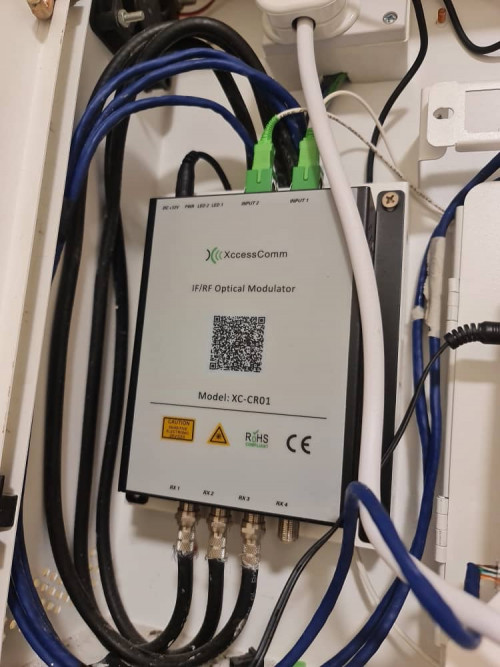
From what I see, this seems to be for astro/DVB-T2 and nothing to do with Unifi. Both the white fibres are connected to input port and the fibres are not connected to Huawei modem which is yellow colour fibre right?

QUOTE(mecheng @ Mar 1 2021, 05:25 PM)
Hi All, i have managed to connect to internet after doing the VLAN settings. Thanks alot!

But i still facing 1 issue- If i connect my new router directly with the modem, i can connect to internet - I live in condo, the modem is installed at my front door, ethernet cable is connected to the building's cable to a ethernet outlet in the living room. So when I try to connect the new router via the ethernet cable, no internet again.

Can i conclude that:
1. If i can connect to internet means my PPPoE password and other settings are correct
2. Connecting my old router to the ethernet cable in living room works okay - means the building's cable is okay too.
3. I tried clone MAC address, couldnt work too.

For this, do i need to do some settings to the Modem at my door?

Thanks all
*
So if I understand correctly, you have successfully configured your new router and it works when connected directly to the Huawei modem via a short Ethernet cable. However, when connected via the long Ethernet cable in the wall, it does not work but the old router used to work. In this case, there is no configuration problem with the modem or new router. If you are very sure both ends of the in-wall cable are connected correctly then I believe the in-wall Ethernet cable may be faulty. If connected exactly the same as the old router but the old router works, it might be because the cable so happen is good enough just for the old router to establish a connection. Faulty cable might also cause speed to drop below 100Mbps or lower. From your modem photos, it looks like the Ethernet cables are not terminated in the best way. Usually a Ethernet cable capable of 1Gbps is terminated so that there are no internal colourful wires exposed outside the plug.
AV_2018
post Mar 2 2021, 08:22 PM

Casual
***
Junior Member
451 posts

Joined: Apr 2018
QUOTE(mecheng @ Mar 2 2021, 07:59 PM)
Hello. Yes. Fiber connected to the huawei modem is yellow in color.

I see. Yes you got it right.

Yea with the old router, everything is working fine. Unfortunately i do not have a device that i can test with a Lan cable from the LAN outlet. It might be like what you say, the in building cable is just enough to provide connection to old router, but not the new one. If this is the case then headache. Need to involve management sommore. Or who should i engage to solve this issue? haha

Im thinking, to actually set the old router as a bridge, and connect my new router to it to provide wifi. Would this be a solution?
*
Suggest that you find a way to test the concealed Ethernet cable. For my case, I'm not in condo, all the Ethernet cable from modem to router and router to PC etc. is all done by myself using Cat6 cable mounted to wall surface. My modem and router is not in the same location and I'm using my own router as well. No issues and can support 800Mbps+ speed all throughout.
AV_2018
post Dec 17 2021, 02:17 PM

Casual
***
Junior Member
451 posts

Joined: Apr 2018
QUOTE(Rhetoric @ Dec 17 2021, 01:32 PM)
Is twitter okay guys?. website load but feed is loading slow

*try on my phone pics and video loading

*
Okay here on browser when browsing profiles without signing in. Videos can load and play without delay. Using Google DNS with IPv6 enabled. The video is loaded from IP belonging to Edgecast CDN via IPv6.

This post has been edited by AV_2018: Dec 17 2021, 02:20 PM
AV_2018
post Dec 17 2021, 03:07 PM

Casual
***
Junior Member
451 posts

Joined: Apr 2018
QUOTE(BenYeeHua @ Dec 17 2021, 02:33 PM)
So it is area depended?
Melaka, loading take like 1 mins with heavy packet drop, others thing are the same. hmm.gif
*
Sarawak here.

Topic ClosedOptions
 

Change to:
| Lo-Fi Version
0.0275sec    0.46    7 queries    GZIP Disabled
Time is now: 11th December 2025 - 08:03 AM