Welcome Guest ( Log In | Register )

Bump Topic Topic Closed RSS Feed
413 Pages « < 61 62 63 64 65 > » Bottom

Outline · [ Standard ] · Linear+

 Official TM UniFi High Speed Broadband Thread V39, READ 1ST PAGE FOR RELEVANT WIFI INFO

views
     
heLL_bOy
post Mar 1 2021, 10:59 PM

Regular
******
Senior Member
1,350 posts

Joined: Nov 2004
From: HEAVEN & HELL


QUOTE(Hobbez @ Mar 1 2021, 09:05 PM)
So they expect us to wait for.....20+ days?

Why don't they come out with official statement?

I already made so many case reports about my bad internet connection to them....and they act like they don't know what is wrong/
*
since 17th Feb the submarine cable already down but they manage reroute some of routing back to normal. But on 19th or 20th Feb they route all the international traffic to HKG become worst till to date.

if you saying connection latency to SG actually before CNY latency to SG already worst the ping latency after 7pm always up to 25ms to 35ms. even Cloudflare CDN or any others CDN or any server in SG are the same.

they won't announce if no mainstream say about this matter.

only their upper level know the issue. customer service normally dont know about the matter, i even reported so many times still same copy and paste reply and closed case. end of the day we just little pipit dont they care much about it.


This post has been edited by heLL_bOy: Mar 1 2021, 11:01 PM
QuantumEdge
post Mar 1 2021, 11:04 PM

Regular
******
Senior Member
1,597 posts

Joined: Jan 2016


user posted image

user posted image
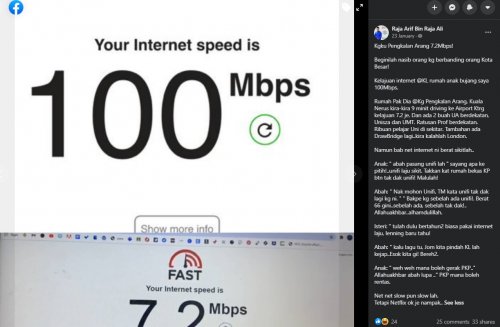
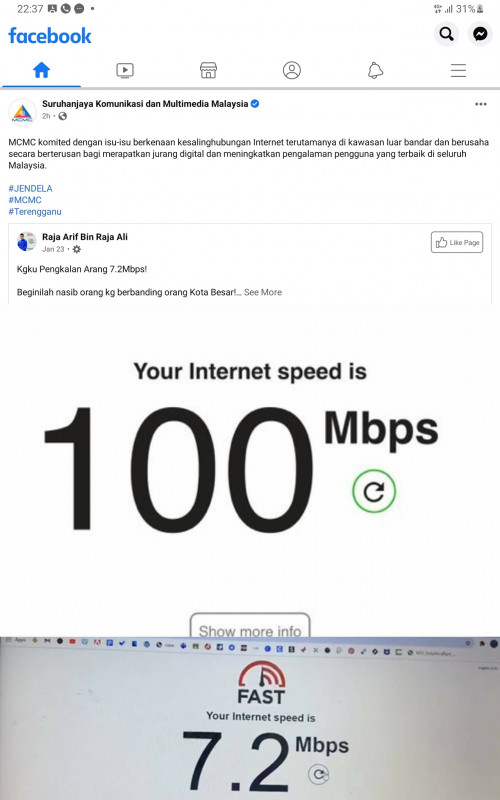
Guess what, MCMC deleted their post 2 hours later
TheStig123
post Mar 1 2021, 11:21 PM

New Member
*
Junior Member
49 posts

Joined: Dec 2014
Just curious, anyone reached the FUP limit for unifi?

Redownloading all my games *ahem Warzone *ahem GTAV and I'm afraid to finish up my limit for the month.
heLL_bOy
post Mar 1 2021, 11:21 PM

Regular
******
Senior Member
1,350 posts

Joined: Nov 2004
From: HEAVEN & HELL


QUOTE(QuantumEdge @ Mar 1 2021, 11:04 PM)
user posted image

user posted image
Guess what, MCMC deleted their post 2 hours later
*
because we are little pipit they don't bother much.

plus nowsday that agency protecting TM unlike before this.
heLL_bOy
post Mar 1 2021, 11:22 PM

Regular
******
Senior Member
1,350 posts

Joined: Nov 2004
From: HEAVEN & HELL


QUOTE(TheStig123 @ Mar 1 2021, 11:21 PM)
Just curious, anyone reached the FUP limit for unifi?

Redownloading all my games *ahem Warzone *ahem GTAV and I'm afraid to finish up my limit for the month.
*
there is no FUP limit for unlimited package, unless your are using 30Mbps which got FUP limit.
SUSCandy12
post Mar 2 2021, 12:09 AM

Regular
******
Senior Member
1,878 posts

Joined: Apr 2019
QUOTE(mecheng @ Mar 1 2021, 09:16 PM)
I got your point, but thinking back, my old router is working just fine, with the current setup. When the contractor installed the modem, they have mapped to the correct cable I believe, that is why it is still working. Or I do need to trial an error now to switch the cables abit haha..
*
Brief us a bit on your old router setup. Did you have a Huawei ONT box back then? The one you shown in the picture looks new. Did you have an older ONT box installed previously?

From my experience the kind of setup in your condo has a pair of fibre strands (2 incoming fibres with green APC connectors which hooks you up to a switch in the MDF riser room).

This pair of duplex fibre is basically a P2P connection which combines data/RF video/cable TV signals in different wavelengths which terminates at a switch in the MDF riser room. It reduces the need to pull multiple types of cables such as coax, copper phone wiring, CAT5E/6 LAN cables to each unit, all combined into just 1 pair of fibre cables point to point between your unit to the MDF riser room.

So you don't even need a separate ONT at your condo unit. Just plug in a router will do for authentication.But older modulators only allow upto 100M ports.

When you first purchase the condo unit, the developer will usually bundle a few years of free internet for the tenant. You sure you were using Unifi previously? Why did the newer setup came with an ONT instead, how about the old router setup?

I'm also uncertain if your modulator box has unmanaged switch capabilities with its ethernet ports.
SUSCandy12
post Mar 2 2021, 12:12 AM

Regular
******
Senior Member
1,878 posts

Joined: Apr 2019
QUOTE(heLL_bOy @ Mar 1 2021, 11:22 PM)
there is no FUP limit for unlimited package, unless your are using 30Mbps which got FUP limit.
*
They might say no or not admit it but secretly managed your speed if your usage is excessive. I think it's clearly written in the T&C to protect their interests.

We'll never know what is the FUP limit because the telco can change the limit from season to season during busy months.


go626201
post Mar 2 2021, 12:36 AM

Regular
******
Senior Member
1,882 posts

Joined: Sep 2017
QUOTE(Candy12 @ Mar 2 2021, 12:12 AM)
They might say no or not admit it but secretly managed your speed if your usage is excessive. I think it's clearly written in the T&C to protect their interests.

We'll never know what is the FUP limit because the telco can change the limit from season to season during busy months.
*
I dont think tm got hard limit for unifi,bcs dont really see anyone said his or her unifi totally speed limited before,
but of course sometimes tm doing maintenances and speed drop then that is true.
SUSCandy12
post Mar 2 2021, 12:42 AM

Regular
******
Senior Member
1,878 posts

Joined: Apr 2019
QUOTE(go626201 @ Mar 2 2021, 12:36 AM)
I dont think tm got hard limit for unifi,bcs dont really see anyone said his or her unifi totally speed limited before,
but of course sometimes tm doing maintenances and speed drop then that is true.
*
The local Malaysian are not obligated to tell. They've clearly stated in their T&Cs that they've all the right to managed and throttle users if they discover the subscriber has excessive usage habits from their billing system.

By doing so they're immune to any charges against them by law. When approach they'd just say didn't you agree when you signed on the dotted line?
mecheng
post Mar 2 2021, 12:46 AM

New Member
*
Newbie
49 posts

Joined: Feb 2009
QUOTE(Candy12 @ Mar 2 2021, 12:09 AM)
Brief us a bit on your old router setup. Did you have a Huawei ONT box back then? The one you shown in the picture looks new. Did you have an older ONT box installed previously?

From my experience the kind of setup in your condo has a pair of fibre strands (2 incoming fibres with green APC connectors which hooks you up to a switch in the MDF riser room).

This pair of duplex fibre is basically a P2P connection which combines data/RF video/cable TV signals in different wavelengths which terminates at a switch in the MDF riser room. It reduces the need to pull multiple types of cables such as coax, copper phone wiring, CAT5E/6 LAN cables to each unit, all combined into just 1 pair of fibre cables point to point between your unit to the MDF riser room.

So you don't even need a separate ONT at your condo unit. Just plug in a router will do for authentication.But older modulators only allow upto 100M ports.

When you first purchase the condo unit, the developer will usually bundle a few years of free internet for the tenant. You sure you were using Unifi previously? Why did the newer setup came with an ONT instead, how about the old router setup?

I'm also uncertain if your modulator box has unmanaged switch capabilities with its ethernet ports.
*
I see. That's why the Unifi installer went into the room to do some settings. I guess is to turn on the port for my unit.

So basically the whole setup with the old router was what you see in the pic. Nothing is new. Plug in old router- works fine. New router, unable to connect to Internet- via ethernet outlet In living room.

I'm on 300mpbs plan, and was advised to change my router to WiFi 6 to get most of what I paid haha. If not I'm just getting less than 30mbps consistently via WiFi.

Contacted Unifi to have a look on the issue. But waiting time is crazy. Headache headache. Really don't know what's the problem sad.gif
SUSCandy12
post Mar 2 2021, 12:49 AM

Regular
******
Senior Member
1,878 posts

Joined: Apr 2019
QUOTE(mecheng @ Mar 2 2021, 12:46 AM)
I see. That's why the Unifi installer went into the room to do some settings. I guess is to turn on the port for my unit.

So basically the whole setup with the old router was what you see in the pic. Nothing is new. Plug in old router- works fine. New router, unable to connect to Internet- via ethernet outlet In living room.

I'm on 300mpbs plan, and was advised to change my router to WiFi 6 to get most of what I paid haha. If not I'm just getting less than 30mbps consistently via WiFi.

Contacted Unifi to have a look on the issue. But waiting time is crazy. Headache headache. Really don't know what's the problem sad.gif
*
If you want to subscribe to higher speed plan above 100M, probably you need a dedicated ONT(fibre modem).
ziniowong
post Mar 2 2021, 09:26 AM

Casual
***
Junior Member
471 posts

Joined: Nov 2015
QUOTE(John42 @ Feb 25 2021, 09:09 PM)
The current latest router model for the installation on this month is D-Link DIR825m. Back in December 2020 they did provide TP Link AC1200 4 antenna model. Other than these two, the crappy router was Fiberhome sr-120a, AZ-Tech, Netis, Dlink dir842 and TP link AC1200 VR400
*
thanks for the update!
mecheng
post Mar 2 2021, 10:46 AM

New Member
*
Newbie
49 posts

Joined: Feb 2009
QUOTE(Candy12 @ Mar 2 2021, 12:49 AM)
If you want to subscribe to higher speed plan above 100M, probably you need a dedicated ONT(fibre modem).
*
The speed im getting - wirelessly from new router is 300mbps. Should be ok right?

Im thinking of an alternative, whether can i use the old router as a bridge, and connect my new router to the lan port for internet for WIfi. Anyone has done this before? hahaha
heLL_bOy
post Mar 2 2021, 01:58 PM

Regular
******
Senior Member
1,350 posts

Joined: Nov 2004
From: HEAVEN & HELL


QUOTE(Candy12 @ Mar 2 2021, 12:12 AM)
They might say no or not admit it but secretly managed your speed if your usage is excessive. I think it's clearly written in the T&C to protect their interests.

We'll never know what is the FUP limit because the telco can change the limit from season to season during busy months.
*
if there are FUP limit policy alot user will be effected. unless you bursting your speed 24/7 365day maybe they will throttle you.
AV_2018
post Mar 2 2021, 02:38 PM

Casual
***
Junior Member
451 posts

Joined: Apr 2018
QUOTE(mecheng @ Mar 1 2021, 05:25 PM)
user posted image
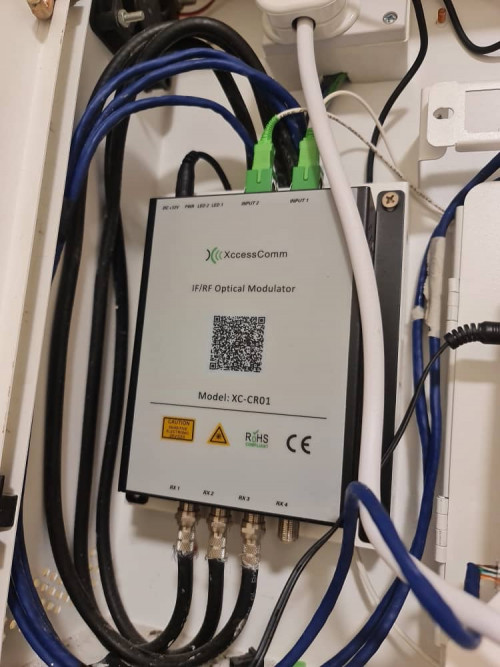
From what I see, this seems to be for astro/DVB-T2 and nothing to do with Unifi. Both the white fibres are connected to input port and the fibres are not connected to Huawei modem which is yellow colour fibre right?

QUOTE(mecheng @ Mar 1 2021, 05:25 PM)
Hi All, i have managed to connect to internet after doing the VLAN settings. Thanks alot!

But i still facing 1 issue- If i connect my new router directly with the modem, i can connect to internet - I live in condo, the modem is installed at my front door, ethernet cable is connected to the building's cable to a ethernet outlet in the living room. So when I try to connect the new router via the ethernet cable, no internet again.

Can i conclude that:
1. If i can connect to internet means my PPPoE password and other settings are correct
2. Connecting my old router to the ethernet cable in living room works okay - means the building's cable is okay too.
3. I tried clone MAC address, couldnt work too.

For this, do i need to do some settings to the Modem at my door?

Thanks all
*
So if I understand correctly, you have successfully configured your new router and it works when connected directly to the Huawei modem via a short Ethernet cable. However, when connected via the long Ethernet cable in the wall, it does not work but the old router used to work. In this case, there is no configuration problem with the modem or new router. If you are very sure both ends of the in-wall cable are connected correctly then I believe the in-wall Ethernet cable may be faulty. If connected exactly the same as the old router but the old router works, it might be because the cable so happen is good enough just for the old router to establish a connection. Faulty cable might also cause speed to drop below 100Mbps or lower. From your modem photos, it looks like the Ethernet cables are not terminated in the best way. Usually a Ethernet cable capable of 1Gbps is terminated so that there are no internal colourful wires exposed outside the plug.
heLL_bOy
post Mar 2 2021, 04:35 PM

Regular
******
Senior Member
1,350 posts

Joined: Nov 2004
From: HEAVEN & HELL


4pm... connection to SG cloudflare and sg server also start congestion 20% loss packet.
connection to US west coast server also congestion 35% loss packet doh.gif doh.gif doh.gif

from 175.141 ip range

This post has been edited by heLL_bOy: Mar 2 2021, 04:36 PM
tomsulliven
post Mar 2 2021, 04:55 PM

Getting Started
**
Junior Member
85 posts

Joined: Dec 2008


Hi all sifu, I like to change my unifi orange netis router, is located in master bedroom on 2nd floor, can’t get stable contention at 1st floor dining room, do I go for ASUS RT-AX55 twin pack? Or TPlink AX73 with RE300 ?
QuantumEdge
post Mar 2 2021, 05:30 PM

Regular
******
Senior Member
1,597 posts

Joined: Jan 2016


QUOTE(heLL_bOy @ Mar 2 2021, 04:35 PM)
4pm... connection to SG cloudflare and sg server also start congestion 20% loss packet.
connection to US west coast server also congestion 35% loss packet doh.gif  doh.gif  doh.gif

from 175.141 ip range
*
US-East (Virginia) ping nearly 800ms....
others are normal for me, IP range 115.135
heLL_bOy
post Mar 2 2021, 05:42 PM

Regular
******
Senior Member
1,350 posts

Joined: Nov 2004
From: HEAVEN & HELL


QUOTE(QuantumEdge @ Mar 2 2021, 05:30 PM)
US-East (Virginia) ping nearly 800ms....
others are normal for me, IP range 115.135
*
very frustrating to have this kind of nonsense still have to wait 10 march and also not sure the problem will be fixed or still continue the same
go626201
post Mar 2 2021, 05:49 PM

Regular
******
Senior Member
1,882 posts

Joined: Sep 2017
QUOTE(heLL_bOy @ Mar 2 2021, 05:42 PM)
very frustrating to have this kind of nonsense still have to wait 10 march and also not sure the problem will be fixed or still continue the same
*
I dont think SMW-5 fixed will fix the connection to US region...

413 Pages « < 61 62 63 64 65 > » Top
Topic ClosedOptions
 

Change to:
| Lo-Fi Version
0.0196sec    0.61    6 queries    GZIP Disabled
Time is now: 12th December 2025 - 10:01 AM