Welcome Guest ( Log In | Register )

Bump Topic Topic Closed RSS Feed
413 Pages « < 58 59 60 61 62 > » Bottom

Outline · [ Standard ] · Linear+

 Official TM UniFi High Speed Broadband Thread V39, READ 1ST PAGE FOR RELEVANT WIFI INFO

views
     
Sam Leong
post Feb 28 2021, 10:02 PM

On my way
****
Junior Member
679 posts

Joined: Mar 2016


QUOTE(go626201 @ Feb 28 2021, 09:49 PM)
Try this site for seeing how many site that routed you to the specific cloudflare dc.
https://cloudflare-test.judge.sh/
*
yes , even enterprise one will divert to HKG not KUL / JHB
my current solution is use cloudflare partner and cname the dns to business plan / pro plan IP
then i can get local PoP
go626201
post Feb 28 2021, 10:10 PM

Regular
******
Senior Member
1,882 posts

Joined: Sep 2017
QUOTE(Sam Leong @ Feb 28 2021, 10:02 PM)
yes , even enterprise one will divert to HKG not KUL / JHB
my current solution is use cloudflare partner and cname the dns to business plan / pro plan IP
then i can get local PoP
*
Actually from my experience this should not be tm problem,because cloudflare site dc route is not done by tm, CloudFlare distribute it.
Normally peak time will always route to further dc.

But for Fastly,that 70% is TM problem,i reported to Fastly before about 1 years ago.
But Fastly team can contact TM to temporary fix it.(for weeks)

Edit:
If someone who has problem with Fastly CDN, please enter this site http://www.fastly-debug.com/
and after completed debug,the top of the site will show a long code just sent it to Fastly team,they will fix it.

This post has been edited by go626201: Feb 28 2021, 10:14 PM
blacktubi
post Feb 28 2021, 10:24 PM

-
Group Icon
Elite
8,415 posts

Joined: Jul 2008

QUOTE(cskean @ Feb 28 2021, 09:42 PM)
Ok, just manage to test out the scenario you mentioned. Tried to restart the router after switching off the printer, internet connection manage to back online(printer still in off status). Then I try to turn on and switch off the printer again, but this time I didn't restart the router, it seems like after some time, the router will back online again. But the time needed to get back online seems slightly longer than the 1st scenario...
wire line as in telephone cable or the wall socket power supply part?

DB box is it referring to ELCB there?
Could it be possible that I mess up the setting inside my router and gave permission to my printer accidentally that it sync the power on/off with both the printer & router confused.gif
*
I notice your machine is fax capable. Do you hook it up to the modem?

Perhaps it is triggering something or voltage spike affecting the modem.
AV_2018
post Feb 28 2021, 10:48 PM

Casual
***
Junior Member
451 posts

Joined: Apr 2018
QUOTE(go626201 @ Feb 28 2021, 10:10 PM)
Actually from my experience this should not be tm problem,because cloudflare site dc route is not done by tm, CloudFlare distribute it.
Normally peak time will always route to further dc.

But for Fastly,that 70% is TM problem,i reported to Fastly before about 1 years ago.
But Fastly team can contact TM to temporary fix it.(for weeks)

Edit:
If someone who has problem with Fastly CDN, please enter this site http://www.fastly-debug.com/
and after completed debug,the top of the site will show a long code just sent it to Fastly team,they will fix it.
*
Over here in East Malaysia using Cloudflare DNS (connected to JHB PoP) on Unifi Home, legal streaming sites using Akamai CDN is totally unusable at night. Infinite buffering/loading until it errors out. Pinging the domains serving the videos results in packet loss. IPv6 is enabled but Akamai CDN for the videos seem to only use IPv4.

CODE
Pinging a1416.w39.akamai.net [184.28.229.8] with 32 bytes of data:
Reply from 184.28.229.8: bytes=32 time=321ms TTL=55
Request timed out.
Reply from 184.28.229.8: bytes=32 time=319ms TTL=55
Reply from 184.28.229.8: bytes=32 time=320ms TTL=55
Request timed out.
Request timed out.
Request timed out.
Reply from 184.28.229.8: bytes=32 time=319ms TTL=55

Ping statistics for 184.28.229.8:
   Packets: Sent = 10, Received = 6, Lost = 4 (40% loss),
Approximate round trip times in milli-seconds:
   Minimum = 319ms, Maximum = 321ms, Average = 319ms


CODE
Pinging a922.w10.akamai.net [23.46.16.143] with 32 bytes of data:
Reply from 23.46.16.143: bytes=32 time=326ms TTL=55
Reply from 23.46.16.143: bytes=32 time=323ms TTL=55
Reply from 23.46.16.143: bytes=32 time=325ms TTL=55
Request timed out.
Reply from 23.46.16.143: bytes=32 time=324ms TTL=55
Reply from 23.46.16.143: bytes=32 time=327ms TTL=55
Reply from 23.46.16.143: bytes=32 time=325ms TTL=55
Request timed out.
Reply from 23.46.16.143: bytes=32 time=323ms TTL=55

Ping statistics for 23.46.16.143:
   Packets: Sent = 10, Received = 8, Lost = 2 (20% loss),
Approximate round trip times in milli-seconds:
   Minimum = 323ms, Maximum = 327ms, Average = 324ms


Addon: Looking up the IPs involved points to Singapore. So even connection to Singapore is 300ms+ with packet loss!

This post has been edited by AV_2018: Feb 28 2021, 10:50 PM
Sam Leong
post Feb 28 2021, 10:48 PM

On my way
****
Junior Member
679 posts

Joined: Mar 2016


QUOTE(go626201 @ Feb 28 2021, 10:10 PM)
Actually from my experience this should not be tm problem,because cloudflare site dc route is not done by tm, CloudFlare distribute it.
Normally peak time will always route to further dc.

But for Fastly,that 70% is TM problem,i reported to Fastly before about 1 years ago.
But Fastly team can contact TM to temporary fix it.(for weeks)

Edit:
If someone who has problem with Fastly CDN, please enter this site http://www.fastly-debug.com/
and after completed debug,the top of the site will show a long code just sent it to Fastly team,they will fix it.
*
i dont think is peak time problem , i get route to KIX / HKG for i think almost 2-3 month , contacted Cloudflare they mention we have to find ISP this was not their issue
https://community.cloudflare.com/t/wrong-cl...tacenter/192122
QUOTE
Cloudflare is an anycast network, so where you are routed is determined by peering with ISPs.

RallyNight
post Feb 28 2021, 10:51 PM

Regular
******
Senior Member
1,131 posts

Joined: Nov 2015
QUOTE(QuantumEdge @ Feb 28 2021, 10:28 PM)
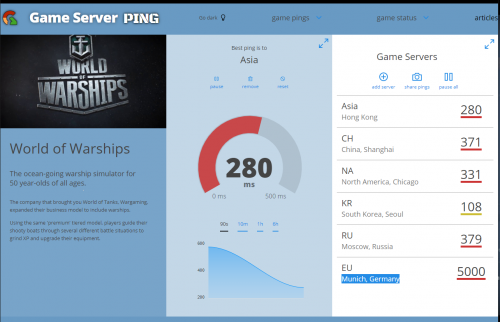
Should be their shitty international routing at work again, as I'm not the only one affected according to few posts earlier...
If I take those numbers from gameserverping seriously, according to my calculation:
The moon is at an average distance of 240,000 miles from Earth.
Light, travelling at 186,000 miles per second would make a single trip from Earth to the moon in 1.29 seconds.
Ping to the moon and back to earth would be twice 1.29 times 1000, or 2580 ms,
That's the best-case scenario assuming there's nothing slowing the message down.

Bravo boys, means a Moon Rover gets better ping than my computer on earth from Malaysia to Germany on the other side of the globe!  drool.gif
What an ISP! Wow!

user posted image
*
QUOTE(Sam Leong @ Feb 28 2021, 10:32 PM)
You are right. TM international routing is shit as hell. Why? even when u using cloudflare CDN , some website cloudflare IP will be point to KIX (Japan) PoPs and not KUL / JHB / SIN PoPs (Yes Malaysia have two Cloudflare PoPs) , only TM will route you to Japan PoP for some reason but tested Maxis Fibre , Digi 4G , Yes 4G , Celcom 4G , Maxis 4G won't happen.
user posted image
*
Tested wow 1120ping at unplayable stage.
Eso gone case 120000ping basically just no connection.

Sam Leong
post Feb 28 2021, 10:51 PM

On my way
****
Junior Member
679 posts

Joined: Mar 2016


QUOTE(AV_2018 @ Feb 28 2021, 10:48 PM)
Over here in East Malaysia using Cloudflare DNS (connected to JHB PoP) on Unifi Home, legal streaming sites using Akamai CDN is totally unusable at night. Infinite buffering/loading until it errors out. Pinging the domains serving the videos results in packet loss. IPv6 is enabled but Akamai CDN for the videos seem to only use IPv4.

CODE
Pinging a1416.w39.akamai.net [184.28.229.8] with 32 bytes of data:
Reply from 184.28.229.8: bytes=32 time=321ms TTL=55
Request timed out.
Reply from 184.28.229.8: bytes=32 time=319ms TTL=55
Reply from 184.28.229.8: bytes=32 time=320ms TTL=55
Request timed out.
Request timed out.
Request timed out.
Reply from 184.28.229.8: bytes=32 time=319ms TTL=55

Ping statistics for 184.28.229.8:
   Packets: Sent = 10, Received = 6, Lost = 4 (40% loss),
Approximate round trip times in milli-seconds:
   Minimum = 319ms, Maximum = 321ms, Average = 319ms


CODE
Pinging a922.w10.akamai.net [23.46.16.143] with 32 bytes of data:
Reply from 23.46.16.143: bytes=32 time=326ms TTL=55
Reply from 23.46.16.143: bytes=32 time=323ms TTL=55
Reply from 23.46.16.143: bytes=32 time=325ms TTL=55
Request timed out.
Reply from 23.46.16.143: bytes=32 time=324ms TTL=55
Reply from 23.46.16.143: bytes=32 time=327ms TTL=55
Reply from 23.46.16.143: bytes=32 time=325ms TTL=55
Request timed out.
Reply from 23.46.16.143: bytes=32 time=323ms TTL=55

Ping statistics for 23.46.16.143:
   Packets: Sent = 10, Received = 8, Lost = 2 (20% loss),
Approximate round trip times in milli-seconds:
   Minimum = 323ms, Maximum = 327ms, Average = 324ms

*
Weird , mine also unifi home but i nvr encountered this problem
1.1.1.1 DNS
CODE
Pinging a922.w10.akamai.net [203.106.94.50] with 32 bytes of data:
Reply from 203.106.94.50: bytes=32 time=18ms TTL=61
Reply from 203.106.94.50: bytes=32 time=19ms TTL=61
Reply from 203.106.94.50: bytes=32 time=20ms TTL=61
Reply from 203.106.94.50: bytes=32 time=19ms TTL=61
Reply from 203.106.94.50: bytes=32 time=20ms TTL=61
Reply from 203.106.94.50: bytes=32 time=21ms TTL=61

Ping statistics for 203.106.94.50:
   Packets: Sent = 6, Received = 6, Lost = 0 (0% loss),
Approximate round trip times in milli-seconds:
   Minimum = 18ms, Maximum = 21ms, Average = 19ms

CODE
Pinging a1416.w39.akamai.net [203.106.94.26] with 32 bytes of data:
Reply from 203.106.94.26: bytes=32 time=18ms TTL=61
Reply from 203.106.94.26: bytes=32 time=19ms TTL=61
Reply from 203.106.94.26: bytes=32 time=18ms TTL=61
Reply from 203.106.94.26: bytes=32 time=21ms TTL=61
Reply from 203.106.94.26: bytes=32 time=18ms TTL=61
Reply from 203.106.94.26: bytes=32 time=21ms TTL=61
Reply from 203.106.94.26: bytes=32 time=19ms TTL=61

Ping statistics for 203.106.94.26:
   Packets: Sent = 9, Received = 9, Lost = 0 (0% loss),
Approximate round trip times in milli-seconds:
   Minimum = 18ms, Maximum = 21ms, Average = 19ms

seems like yours being divert to US akamai cdn and for now unifi to US route is extremely unstable situation. Can be describe as totally unuseable. doh.gif
paying for premium price , getting shit service - unifi

RallyNight
post Feb 28 2021, 10:53 PM

Regular
******
Senior Member
1,131 posts

Joined: Nov 2015
QUOTE(AV_2018 @ Feb 28 2021, 11:48 PM)
Over here in East Malaysia using Cloudflare DNS (connected to JHB PoP) on Unifi Home, legal streaming sites using Akamai CDN is totally unusable at night. Infinite buffering/loading until it errors out. Pinging the domains serving the videos results in packet loss. IPv6 is enabled but Akamai CDN for the videos seem to only use IPv4.

CODE
Pinging a1416.w39.akamai.net [184.28.229.8] with 32 bytes of data:
Reply from 184.28.229.8: bytes=32 time=321ms TTL=55
Request timed out.
Reply from 184.28.229.8: bytes=32 time=319ms TTL=55
Reply from 184.28.229.8: bytes=32 time=320ms TTL=55
Request timed out.
Request timed out.
Request timed out.
Reply from 184.28.229.8: bytes=32 time=319ms TTL=55

Ping statistics for 184.28.229.8:
   Packets: Sent = 10, Received = 6, Lost = 4 (40% loss),
Approximate round trip times in milli-seconds:
   Minimum = 319ms, Maximum = 321ms, Average = 319ms


CODE
Pinging a922.w10.akamai.net [23.46.16.143] with 32 bytes of data:
Reply from 23.46.16.143: bytes=32 time=326ms TTL=55
Reply from 23.46.16.143: bytes=32 time=323ms TTL=55
Reply from 23.46.16.143: bytes=32 time=325ms TTL=55
Request timed out.
Reply from 23.46.16.143: bytes=32 time=324ms TTL=55
Reply from 23.46.16.143: bytes=32 time=327ms TTL=55
Reply from 23.46.16.143: bytes=32 time=325ms TTL=55
Request timed out.
Reply from 23.46.16.143: bytes=32 time=323ms TTL=55

Ping statistics for 23.46.16.143:
   Packets: Sent = 10, Received = 8, Lost = 2 (20% loss),
Approximate round trip times in milli-seconds:
   Minimum = 323ms, Maximum = 327ms, Average = 324ms


Addon: Looking up the IPs involved points to Singapore. So even connection to Singapore is 300ms+ with packet loss!
*
Tested anything pass thru akamai got no connect at all.
Game like eso are using akamai are consider dead.
Akamai is complete laggy everyday on peak time. Today is the worst.

This post has been edited by RallyNight: Feb 28 2021, 10:57 PM
michaelkkl
post Feb 28 2021, 10:57 PM

Casual
***
Junior Member
362 posts

Joined: Jan 2011
QUOTE(AV_2018 @ Feb 28 2021, 10:48 PM)
Over here in East Malaysia using Cloudflare DNS (connected to JHB PoP) on Unifi Home, legal streaming sites using Akamai CDN is totally unusable at night. Infinite buffering/loading until it errors out. Pinging the domains serving the videos results in packet loss. IPv6 is enabled but Akamai CDN for the videos seem to only use IPv4.

CODE
Pinging a1416.w39.akamai.net [184.28.229.8] with 32 bytes of data:
Reply from 184.28.229.8: bytes=32 time=321ms TTL=55
Request timed out.
Reply from 184.28.229.8: bytes=32 time=319ms TTL=55
Reply from 184.28.229.8: bytes=32 time=320ms TTL=55
Request timed out.
Request timed out.
Request timed out.
Reply from 184.28.229.8: bytes=32 time=319ms TTL=55

Ping statistics for 184.28.229.8:
   Packets: Sent = 10, Received = 6, Lost = 4 (40% loss),
Approximate round trip times in milli-seconds:
   Minimum = 319ms, Maximum = 321ms, Average = 319ms


CODE
Pinging a922.w10.akamai.net [23.46.16.143] with 32 bytes of data:
Reply from 23.46.16.143: bytes=32 time=326ms TTL=55
Reply from 23.46.16.143: bytes=32 time=323ms TTL=55
Reply from 23.46.16.143: bytes=32 time=325ms TTL=55
Request timed out.
Reply from 23.46.16.143: bytes=32 time=324ms TTL=55
Reply from 23.46.16.143: bytes=32 time=327ms TTL=55
Reply from 23.46.16.143: bytes=32 time=325ms TTL=55
Request timed out.
Reply from 23.46.16.143: bytes=32 time=323ms TTL=55

Ping statistics for 23.46.16.143:
   Packets: Sent = 10, Received = 8, Lost = 2 (20% loss),
Approximate round trip times in milli-seconds:
   Minimum = 323ms, Maximum = 327ms, Average = 324ms


Addon: Looking up the IPs involved points to Singapore. So even connection to Singapore is 300ms+ with packet loss!
*
Akamai mainly relies on EDNS client subnet for optimized node.
Cloudflare DNS didn't support this feature thus Akamai IP may resolved to Singapore instead of local Akamai node.


AV_2018
post Feb 28 2021, 11:01 PM

Casual
***
Junior Member
451 posts

Joined: Apr 2018
QUOTE(Sam Leong @ Feb 28 2021, 10:51 PM)
Weird , mine also unifi home but i nvr encountered this problem
1.1.1.1 DNS

seems like yours being divert to US akamai cdn and for now unifi to US route is extremely unstable situation. Can be describe as totally unuseable. doh.gif
paying for premium price , getting shit service - unifi
*
QUOTE(RallyNight @ Feb 28 2021, 10:53 PM)
Tested anything pass thru akamai got no connect at all.
Game like eso are using akamai are consider dead.
Akamai is complete down everyday on peak time. Today is the worst.
*
I looked up the IPs that I ping... they are both located in Singapore doh.gif

CODE
IP Address 184.28.229.8
Decimal Representation 3088901384
ASN AS35994
City Singapore
Country Singapore
Country Code SG
ISP Akamai Technologies


CODE
IP Address 23.46.16.143
Decimal Representation 388894863
ASN AS3491
City Singapore
Country Singapore
Country Code SG
ISP Akamai Technologies, Inc.

cskean
post Feb 28 2021, 11:04 PM

Look at all my stars!!
*******
Senior Member
2,551 posts

Joined: Jan 2003
From: Cheras / Ampang


QUOTE(blacktubi @ Feb 28 2021, 10:24 PM)
I notice your machine is fax capable. Do you hook it up to the modem?

Perhaps it is triggering something or voltage spike affecting the modem.
*
Yup, it is fax capable. All the while the printer is connected with a telephone line. It was meant for my wife usage, but since she quit her job, I just keep it like that all the while.

I remember with the same setup(where the telephone line is connected to the printer), I didn't encounter such issue before all the while. Only few days ago when I was unable to wirelessly print my son's homework from my laptop, I thought the printer needed a restart(I hardly restart it unless loss connection), then only I found out such situation.

Maybe will try again tomorrow and feedback here the outcome...

AV_2018
post Feb 28 2021, 11:06 PM

Casual
***
Junior Member
451 posts

Joined: Apr 2018
QUOTE(michaelkkl @ Feb 28 2021, 10:57 PM)
Akamai mainly relies on EDNS client subnet for optimized node.
Cloudflare DNS didn't support this feature thus Akamai IP may resolved to Singapore instead of local Akamai node.
*
hmm.gif looking up the Akamai domains with TM and Google DNS does give totally different IPs compared to Cloudflare. I'm aware Cloudflare doesn't support EDNS but thought it usually doesn't matter much since Cloudflare DNS is in Malaysia so other CDNs DNS that are queried by Cloudflare will know that the query is from Malaysia.

Update: I switched to Google DNS and it fixed the streaming issue. The reason I picked Cloudflare over Google is because I use the malware blocking feature though.

This post has been edited by AV_2018: Feb 28 2021, 11:09 PM
RallyNight
post Feb 28 2021, 11:21 PM

Regular
******
Senior Member
1,131 posts

Joined: Nov 2015
QUOTE(AV_2018 @ Mar 1 2021, 12:06 AM)
hmm.gif looking up the Akamai domains with TM and Google DNS does give totally different IPs compared to Cloudflare. I'm aware Cloudflare doesn't support EDNS but thought it usually doesn't matter much since Cloudflare DNS is in Malaysia so other CDNs DNS that are queried by Cloudflare will know that the query is from Malaysia.

Update: I switched to Google DNS and it fixed the streaming issue. The reason I picked Cloudflare over Google is because I use the malware blocking feature though.
*
I tried either cloud or google all same.
heLL_bOy
post Feb 28 2021, 11:23 PM

Regular
******
Senior Member
1,350 posts

Joined: Nov 2004
From: HEAVEN & HELL


Now connection to JP also getting worst doh.gif 30% packet loss for 100 round trip at peak hours


SMW-5 cable to EU will be fixed by 10th March info from TM side. hope everything back to normal.
go626201
post Feb 28 2021, 11:25 PM

Regular
******
Senior Member
1,882 posts

Joined: Sep 2017
QUOTE(heLL_bOy @ Feb 28 2021, 11:23 PM)
Now connection to JP also getting worst doh.gif  30% packet loss for 100 round trip at peak hours
SMW-5 cable to EU will be fixed by 10th March info from TM side. hope everything back to normal.
*
What server u are connecting?
heLL_bOy
post Feb 28 2021, 11:32 PM

Regular
******
Senior Member
1,350 posts

Joined: Nov 2004
From: HEAVEN & HELL


QUOTE(go626201 @ Feb 28 2021, 11:25 PM)
What server u are connecting?
*
cdn77 server in tokyo

from my traceroute TM> HK PCCW> PCCW JP> CDN77

from server traceroute CDN77> Equinix JP> He.net HKG> He.net SG> TM
asellus
post Feb 28 2021, 11:55 PM

#gompusas
Group Icon
Elite
4,541 posts

Joined: Jan 2003
From: BSRPPG51 Access Concentrator


QUOTE(RallyNight @ Feb 28 2021, 11:21 PM)
I tried either cloud or google all same.
*
Go try using https://101.101.101.101/index_en.html for DNS servers.
afif92
post Mar 1 2021, 12:03 AM

Casual
***
Junior Member
374 posts

Joined: Mar 2010
I tried traceroute to given Akamai (a922.w10.akamai.net and a922.w10.akamai.net) which all shows high ping when using Google and Cloudflare but after I disable DNS over TLS, the traceroute shows lower ping which is 10ms (using Google DNS).

The cloudflare dns still shows high ping even disable DoT.
AV_2018
post Mar 1 2021, 12:09 AM

Casual
***
Junior Member
451 posts

Joined: Apr 2018
QUOTE(afif92 @ Mar 1 2021, 12:03 AM)
I tried traceroute to given Akamai (a922.w10.akamai.net and a922.w10.akamai.net) which all shows high ping when using Google and Cloudflare but after I disable DNS over TLS, the traceroute shows lower ping which is 10ms (using Google DNS).

The cloudflare dns still shows high ping even disable DoT.
*
Make sure did not tell Google to disable EDNS Client Subnet (ECS). Some DNS-over-TLS clients default to disabling ECS. Without ECS, Google DNS returns almost the same IP as Cloudflare DNS.
RallyNight
post Mar 1 2021, 12:41 AM

Regular
******
Senior Member
1,131 posts

Joined: Nov 2015
QUOTE(asellus @ Mar 1 2021, 12:55 AM)
Go try using https://101.101.101.101/index_en.html for DNS servers.
*
Ty i tested lagger than cf.

I flushed and reapply google. Now ping back to stable.

Nvm, back to normal lag again.

This post has been edited by RallyNight: Mar 1 2021, 12:44 AM

413 Pages « < 58 59 60 61 62 > » Top
Topic ClosedOptions
 

Change to:
| Lo-Fi Version
0.0185sec    0.60    6 queries    GZIP Disabled
Time is now: 12th December 2025 - 01:01 PM