Welcome Guest ( Log In | Register )

Bump Topic Topic Closed RSS Feed
413 Pages « < 56 57 58 59 60 > » Bottom

Outline · [ Standard ] · Linear+

 Official TM UniFi High Speed Broadband Thread V39, READ 1ST PAGE FOR RELEVANT WIFI INFO

views
     
kopitiam
post Feb 27 2021, 06:45 PM

cookie monster
*******
Senior Member
4,480 posts

Joined: Jan 2003
From: The capital of Soviet Sarawak - Pusak City


QUOTE(enduser @ Feb 27 2021, 05:08 PM)
Could be ur pc/laptop limitation? Network cable?
*
Using cat6 cables with gigabit switch & lan port

QUOTE(aniq8676 @ Feb 27 2021, 06:01 PM)
There may be an issue with your fiber reading, you need to call TM Expert to come to your house
*
Report using online chat?

This post has been edited by kopitiam: Feb 27 2021, 06:46 PM
do117
post Feb 27 2021, 06:57 PM

Getting Started
**
Junior Member
130 posts

Joined: Sep 2007


guys, just want to ask, anyone of you facing random slow network or constant disconnect recently? like started 2-3 weeks ago i think? :S
go626201
post Feb 27 2021, 07:29 PM

Regular
******
Senior Member
1,882 posts

Joined: Sep 2017
QUOTE(do117 @ Feb 27 2021, 06:57 PM)
guys, just want to ask, anyone of you facing random slow network or constant disconnect recently? like started 2-3 weeks ago i think?  :S
*
Slow network is confirm for all of us.
But i didn't have disconnect problem.
aniq8676
post Feb 27 2021, 07:32 PM

Regular
******
Senior Member
1,524 posts

Joined: Dec 2020
From: Perak


QUOTE(Azusa_San @ Feb 27 2021, 06:40 PM)
I see. Did you get any tracking no from tm? hmm.gif
*
not yet, the tracking number will be sent from third party via email
eternity4av
post Feb 27 2021, 09:08 PM

♥ ♥ ♥ taeyeon
*******
Senior Member
2,269 posts

Joined: Nov 2004
Anyone tried tp link ax5400 rm399 router on 800mbps before ? How’s the wifi speed ? Would want to replace my mesh m9 with this if it’s better
afif92
post Feb 27 2021, 09:40 PM

Casual
***
Junior Member
374 posts

Joined: Mar 2010
QUOTE(eternity4av @ Feb 27 2021, 09:08 PM)
Anyone tried tp link ax5400 rm399 router on 800mbps before ? How’s the wifi speed ? Would want to replace my mesh m9 with this if it’s better
*
Of course you can easily reach 800Mbps if you use Wifi 6 device. Even the cheaper one AX20 also can reach that speed. But in term of coverage, AX73 would be better.
Sam Leong
post Feb 27 2021, 09:44 PM

On my way
****
Junior Member
673 posts

Joined: Mar 2016


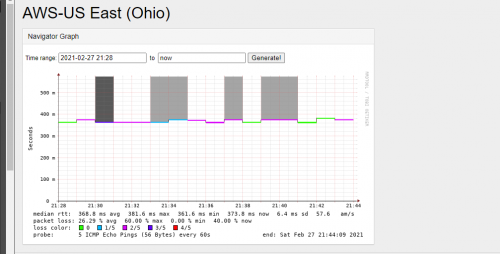
The packet loss and high ping appear again
same to AWS US route
what the hell they doing
Source : http://617bd6efe2dd.ap.ngrok.io/smokeping/...arget=AWS.AWS-1

user posted image

soulknight
post Feb 27 2021, 10:12 PM

On my way
****
Junior Member
549 posts

Joined: Mar 2007


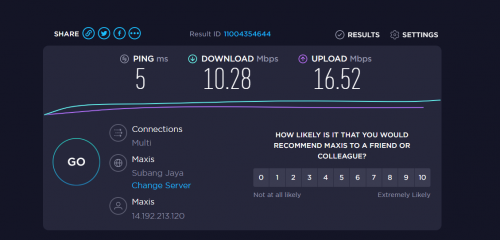
I'm using Maxis Fiber Broadband which also using TM fiber infra. This affected my connection speed. From 100 mbps drop to less than 10mbps. Quite frustrating.

user posted image

This post has been edited by soulknight: Feb 27 2021, 10:12 PM
Sam Leong
post Feb 27 2021, 10:17 PM

On my way
****
Junior Member
673 posts

Joined: Mar 2016


QUOTE(soulknight @ Feb 27 2021, 10:12 PM)
I'm using Maxis Fiber Broadband which also using TM fiber infra. This affected my connection speed. From 100 mbps drop to less than 10mbps. Quite frustrating.
user posted image
*
I think so , im having Google Meet with my friend which use Maxis home fibre and he just got disconnected for few minutes omo

Made a speedtest to AT&T server in US
My plan is unifi 50mbps
Guess what speed i get?
0.69Mbps OMO
Speedtest TM UNIFI 50MBPS -> AT&T US
Made a traceroute to AT&T speedtest server:

user posted image
I guess he.net to US way boom already

I got 32% packet loss from unifi KUL to AWS US Server
CODE
Ping statistics for 176.32.98.189:
   Packets: Sent = 83, Received = 56, Lost = 27 (32% loss),
Approximate round trip times in milli-seconds:
   Minimum = 363ms, Maximum = 367ms, Average = 363ms


from GCP SG to AWS US :
CODE
--- 176.32.98.189 ping statistics ---
75 packets transmitted, 75 received, 0% packet loss, time 74028ms
rtt min/avg/max/mdev = 216.192/217.709/247.332/4.189 ms

confirmed unifi issue

This post has been edited by Sam Leong: Feb 27 2021, 10:21 PM

hottemper
post Feb 27 2021, 10:36 PM

Getting Started
**
Junior Member
248 posts

Joined: Feb 2006
From: KL


Sifus here, i been using unifi for more than 3 years, with this D-Link DIR-850L. All this while, everything work perfectly for me. But These few months, i notice that my connection in my upstairs room become unstable, as im playing my game, my ping can jump from 19 to 60 to 200 to 600 to 19 and repeat again. This usually happen after 8pm which is ok for the past few years.

I wonder is this my router problem or unifi problem, or any solution/ suggestion to solve this problem?

P/s: Didnt change any setting at all, router remain the same place all the time, no renovation, no relocation done at all. 2.4ghz full bar all the time.
soonwai
post Feb 27 2021, 10:40 PM


********
All Stars
11,456 posts

Joined: Oct 2007
From: KL


QUOTE(kopitiam @ Feb 27 2021, 04:59 PM)
my new unifi installation 800mbps only can reach 3xx mbps on tplink ac1200 using gigabit lan. shall i downgrade to 500mbps since can't reach 800mbps?  hmm.gif
*
Yeah, may as well and save some money.
heLL_bOy
post Feb 27 2021, 11:37 PM

Regular
******
Senior Member
1,350 posts

Joined: Nov 2004
From: HEAVEN & HELL


QUOTE(soulknight @ Feb 27 2021, 10:12 PM)
I'm using Maxis Fiber Broadband which also using TM fiber infra. This affected my connection speed. From 100 mbps drop to less than 10mbps. Quite frustrating.
user posted image
*
your range look like 95% under NTT transit.. no wonder you are so lag and slow
soonwai
post Feb 28 2021, 01:57 AM


********
All Stars
11,456 posts

Joined: Oct 2007
From: KL


QUOTE(Azusa_San @ Feb 27 2021, 06:10 PM)
...
Can I know it took how long for you to receive the mesh device? As TM informed me it may need up to 7 days to process and deliver it.
*
Same here, TM also told me 7 days for processing.

Deco M4 Order:
Mar 12: Ordered through 100. "Complaint" ticket created and closed.
Mar 16: Modify Order created and completed.
Mar 17: Order processed & shipped email with J&T tracking number received from Lapasar SB.
Mar 25: Picked up: J&T Alam Damai
Mar 28: Delivered
https://forum.lowyat.net/index.php?showtopi...post&p=95867900

This is right at the start of the OG MCO. Unsure if things should be faster or slower now.
cskean
post Feb 28 2021, 02:03 AM

Look at all my stars!!
*******
Senior Member
2,551 posts

Joined: Jan 2003
From: Cheras / Ampang


Guys, need some help here...

I'm using a HP Officejet Pro 8730 printer in my home(linked with my home wifi for wireless printing) and recently I just notice that whenever I turn off my printer, my Unifi will be disconnected as well...

At 1st I thought that was Unifi issue but after few times tested with my printer, I can confirm the printer is causing Unifi disconnection.

But I couldn't figure out how can a printer can cause the internet to be disconnected...

Hopefully some network experts here can enlighten me...
LostAndFound
post Feb 28 2021, 06:04 AM

Look at all my stars!!
*******
Senior Member
6,262 posts

Joined: Jul 2005
From: UEP Subang Jaya


QUOTE(cskean @ Feb 28 2021, 02:03 AM)
Guys, need some help here...

I'm using a HP Officejet Pro 8730 printer in my home(linked with my home wifi for wireless printing) and recently I just notice that whenever I turn off my printer, my Unifi will be disconnected as well...

At 1st I thought that was Unifi issue but after few times tested with my printer, I can confirm the printer is causing Unifi disconnection.

But I couldn't figure out how can a printer can cause the internet to be disconnected...

Hopefully some network experts here can enlighten me...
*
Are you turning of the wrong switch? Or maybe the extension cable which power the printer is same as the one which power your modem/router, and when you physically off the switch you are accidentally turning off the supply for modem/router?
blacktubi
post Feb 28 2021, 11:24 AM

-
Group Icon
Elite
8,406 posts

Joined: Jul 2008

QUOTE(cskean @ Feb 28 2021, 02:03 AM)
Guys, need some help here...

I'm using a HP Officejet Pro 8730 printer in my home(linked with my home wifi for wireless printing) and recently I just notice that whenever I turn off my printer, my Unifi will be disconnected as well...

At 1st I thought that was Unifi issue but after few times tested with my printer, I can confirm the printer is causing Unifi disconnection.

But I couldn't figure out how can a printer can cause the internet to be disconnected...

Hopefully some network experts here can enlighten me...
*
This is strange.

Try to restart your router when the printer is switched off and see if the network is restored.
al_madd
post Feb 28 2021, 12:21 PM

Regular
******
Senior Member
1,382 posts

Joined: Jan 2011
From: Lahad datu


Hai...i want to ask..
Is upgrade from 30mbps to 100mbps can do via livechat?
YoungMan
post Feb 28 2021, 12:28 PM

Look at all my stars!!
*******
Senior Member
6,798 posts

Joined: Oct 2008
From: Kuala Lumpur


QUOTE(al_madd @ Feb 28 2021, 01:21 PM)
Hai...i want to ask..
Is upgrade  from 30mbps to 100mbps can do via livechat?
*
Can. But you can also do it yourself using MyUnifi app.
kemin
post Feb 28 2021, 12:31 PM

Getting Started
**
Junior Member
74 posts

Joined: Jan 2010
QUOTE(Sam Leong @ Feb 27 2021, 10:17 PM)
I think so , im having Google Meet with my friend which use Maxis home fibre and he just got disconnected for few minutes omo

Made a speedtest to AT&T server in US
My plan is unifi 50mbps
Guess what speed i get?
0.69Mbps OMO
Speedtest TM UNIFI 50MBPS -> AT&T US
Made a traceroute to AT&T speedtest server:

user posted image
I guess he.net to US way boom already

I got 32% packet loss from unifi KUL to AWS US Server
CODE
Ping statistics for 176.32.98.189:
   Packets: Sent = 83, Received = 56, Lost = 27 (32% loss),
Approximate round trip times in milli-seconds:
   Minimum = 363ms, Maximum = 367ms, Average = 363ms


from GCP SG to AWS US :
CODE
--- 176.32.98.189 ping statistics ---
75 packets transmitted, 75 received, 0% packet loss, time 74028ms
rtt min/avg/max/mdev = 216.192/217.709/247.332/4.189 ms

confirmed unifi issue
*
I'm trying to download a 9MB file from AWS server for an online class but it failed to complete download last night after trying for 3 hours. Frustratingly, this morning I tried again and only managed to complete the file after 1 hour of waiting. This is causing me to delay my class work, is there any way around this? Will a VPN solve this slow download issue?
al_madd
post Feb 28 2021, 12:43 PM

Regular
******
Senior Member
1,382 posts

Joined: Jan 2011
From: Lahad datu


QUOTE(YoungMan @ Feb 28 2021, 12:28 PM)
Can. But you can also do it yourself using MyUnifi app.
*
Thanks..

I hope can get promo deal...cheaper price...which is unlikely

413 Pages « < 56 57 58 59 60 > » Top
Topic ClosedOptions
 

Change to:
| Lo-Fi Version
0.0357sec    0.50    6 queries    GZIP Disabled
Time is now: 5th December 2025 - 09:00 AM