Welcome Guest ( Log In | Register )

Bump Topic Topic Closed RSS Feed
413 Pages « < 55 56 57 58 59 > » Bottom

Outline · [ Standard ] · Linear+

 Official TM UniFi High Speed Broadband Thread V39, READ 1ST PAGE FOR RELEVANT WIFI INFO

views
     
heLL_bOy
post Feb 27 2021, 01:22 PM

Regular
******
Senior Member
1,346 posts

Joined: Nov 2004
From: HEAVEN & HELL


QUOTE(YoungMan @ Feb 27 2021, 10:48 AM)
But they are getting bigger and bigger each day. The upcoming 5G will be between gov and TM.
*
of cos they growing bigger because TM represent National Telco provider. but their internet gateway capacity never getting bigger is still the same old day how to cope with the demand which the supply not enough.
philip42
post Feb 27 2021, 01:26 PM

Regular
******
Senior Member
1,396 posts

Joined: Mar 2009


QUOTE(aniq8676 @ Feb 27 2021, 01:13 PM)
included
*
Oh my package doesn’t have that, just called 100 and double confirmed, the guy told me it will carry forward the voice call plan from the previous plan.
Mazda9
post Feb 27 2021, 02:06 PM

On my way
****
Junior Member
535 posts

Joined: Mar 2009
Guys,

Need recommendation. I’m using Asus rt-ac 5300 upstairs my house and my unifi tv box is downstairs. Was using powerline adaptor previously and it became dead after 4 years.

Kindly advise what would you suggest for my current scenario?

This post has been edited by Mazda9: Feb 27 2021, 02:19 PM
mecheng
post Feb 27 2021, 02:19 PM

New Member
*
Newbie
49 posts

Joined: Feb 2009
Hi Sifus. Need help troubleshooting my new TP Link AX73.

Replaced it with my old router, and got a new PPPoE password from Unifi already. But still can't connect to the Internet. Teied reconfigure a few times still failed.

But when I connect my old router back, everything works fine (I haven't even updare the new PPPoE password with my old router)

Called TM, and TM say will send people to troubleshoot. WTF.

Can anyone help or guide me with some tips? Would it be this router does not suit my condo's network/infra?

Thanks alot!
YoungMan
post Feb 27 2021, 02:31 PM

Look at all my stars!!
*******
Senior Member
6,793 posts

Joined: Oct 2008
From: Kuala Lumpur


QUOTE(heLL_bOy @ Feb 27 2021, 02:22 PM)
of cos they growing bigger because TM represent National Telco provider. but their internet gateway capacity never getting bigger is still the same old day how to cope with the demand which the supply not enough.
*
Too complacent of them not to upgrade their network capacity.

QUOTE(mecheng @ Feb 27 2021, 03:19 PM)
Hi Sifus. Need help troubleshooting my new TP Link AX73.

Replaced it with my old router, and got a new PPPoE password from Unifi already. But still can't connect to the Internet. Teied reconfigure a few times still failed.

But when I connect my old router back, everything works fine (I haven't even updare the new PPPoE password with my old router)

Called TM, and TM say will send people to troubleshoot. WTF.

Can anyone help or guide me with some tips? Would it be this router does not suit my condo's network/infra?

Thanks alot!
*
Why not take the old password from the router and try it? Because by right the old password should not work anymore once they reset.
aniq8676
post Feb 27 2021, 02:59 PM

Regular
******
Senior Member
1,524 posts

Joined: Dec 2020
From: Perak


QUOTE(mecheng @ Feb 27 2021, 02:19 PM)
Hi Sifus. Need help troubleshooting my new TP Link AX73.

Replaced it with my old router, and got a new PPPoE password from Unifi already. But still can't connect to the Internet. Teied reconfigure a few times still failed.

But when I connect my old router back, everything works fine (I haven't even updare the new PPPoE password with my old router)

Called TM, and TM say will send people to troubleshoot. WTF.

Can anyone help or guide me with some tips? Would it be this router does not suit my condo's network/infra?

Thanks alot!
*
make sure you put the correct id and password, make sure the VLAN tag is enable
heLL_bOy
post Feb 27 2021, 03:04 PM

Regular
******
Senior Member
1,346 posts

Joined: Nov 2004
From: HEAVEN & HELL


QUOTE(YoungMan @ Feb 27 2021, 02:31 PM)
Too complacent of them not to upgrade their network capacity.
*
when time up say bye bye to them. Very frustrating with their internet quality been tolerant this kind of nonsense since last year march till now.
go626201
post Feb 27 2021, 03:26 PM

Regular
******
Senior Member
1,882 posts

Joined: Sep 2017
QUOTE(heLL_bOy @ Feb 27 2021, 03:04 PM)
when time up say bye bye to them. Very frustrating with their internet quality been tolerant this kind of nonsense since last year march till now.
*
I think i still need to stick with TM unifi,as my family needs the free fixed call...
Actually i think if mco totally end then bandwidth should be lower and more smooth at that time.

VPN is a must for using any malaysian ISP internet.
There is no best network provider in the world, so whatever ISP u are using there will be some small issue will be face.
So I really suggest everyone should get a VPN service if you are really want to have a very stable network all of the time.

You get what you pay for.
But of course last few days TM is really screw up on their network.
Hopefully TM technician will solve this problem as soon as possible...
doomed151
post Feb 27 2021, 03:56 PM

New Member
*
Newbie
11 posts

Joined: Feb 2017
QUOTE(mecheng @ Feb 27 2021, 02:19 PM)
Hi Sifus. Need help troubleshooting my new TP Link AX73.

Replaced it with my old router, and got a new PPPoE password from Unifi already. But still can't connect to the Internet. Teied reconfigure a few times still failed.

But when I connect my old router back, everything works fine (I haven't even updare the new PPPoE password with my old router)

Called TM, and TM say will send people to troubleshoot. WTF.

Can anyone help or guide me with some tips? Would it be this router does not suit my condo's network/infra?

Thanks alot!
*
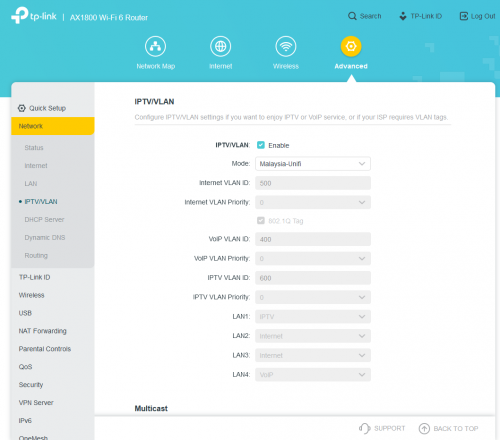
Did you configure the IPTV settings?

user posted image

Unifi won't connect without it.

This post has been edited by doomed151: Feb 27 2021, 03:56 PM
heLL_bOy
post Feb 27 2021, 04:07 PM

Regular
******
Senior Member
1,346 posts

Joined: Nov 2004
From: HEAVEN & HELL


QUOTE(go626201 @ Feb 27 2021, 03:26 PM)
I think i still need to stick with TM unifi,as my family needs the free fixed call...
Actually i think if mco totally end then bandwidth should be lower and more smooth at that time.

VPN is a must for using any malaysian ISP internet.
There is no best network provider in the world, so whatever ISP u are using there will be some small issue will be face.
So I really suggest everyone should get a VPN service if you are really want to have a very stable network all of the time.

You get what you pay for.
But of course last few days TM is really screw up on their network.
Hopefully TM technician will solve this problem as soon as possible...
*
i not saying that TM should be the best provider in the world. but at least standard thing should they provide to user as we pay for the service not saying by paying high amt or small amt is definitely a service that should given in first place.

imagine you doing your work at peak hours out of sudden such thing happen all thing have to stop till off peak hours only you can do.

plus i also using own VPN for some other stuff. but some of others thing i can't bypass vpn due restricted by the thing itself nothing can do so need to use normal connection.

i agree what you pay what you get for.. but totally unacceptable with this kind of nonsense doh.gif

This post has been edited by heLL_bOy: Feb 27 2021, 04:12 PM

go626201
post Feb 27 2021, 04:19 PM

Regular
******
Senior Member
1,882 posts

Joined: Sep 2017
QUOTE(heLL_bOy @ Feb 27 2021, 04:07 PM)
i not saying that TM should be the best provider in the world. but at least standard thing should they provide to user as we pay for the service not saying by paying high amt or small amt is definitely a service that should given in first place.

plus i also using own VPN for some other stuff. but some of others thing i can't bypass vpn due restricted by the thing itself nothing can do so need to use normal connection.

i agree what you pay what you get for.. but totally unacceptable with this kind of nonsense  doh.gif
*
Ya, I can accept unstable network happens sometimes to server that hosted outside southeast asia. (Since this part always is best effort)
But the worst part is routed to local network is crap than server hosted on Singapore. (How come this can happens for days and not getting fully fix) bangwall.gif

angelofro
post Feb 27 2021, 04:47 PM

Casual
***
Junior Member
385 posts

Joined: Nov 2007


change to 500mbps with rm199 with mesh m9 and std20.

looks like tm not giving new router for renew contract like last time.
kopitiam
post Feb 27 2021, 04:59 PM

cookie monster
*******
Senior Member
4,480 posts

Joined: Jan 2003
From: The capital of Soviet Sarawak - Pusak City


my new unifi installation 800mbps only can reach 3xx mbps on tplink ac1200 using gigabit lan. shall i downgrade to 500mbps since can't reach 800mbps? hmm.gif
enduser
post Feb 27 2021, 05:08 PM

Regular
******
Senior Member
1,280 posts

Joined: Jan 2003
QUOTE(kopitiam @ Feb 27 2021, 04:59 PM)
my new unifi installation 800mbps only can reach 3xx mbps on tplink ac1200 using gigabit lan. shall i downgrade to 500mbps since can't reach 800mbps?  hmm.gif
*
Could be ur pc/laptop limitation? Network cable?

This post has been edited by enduser: Feb 27 2021, 05:09 PM
aniq8676
post Feb 27 2021, 06:01 PM

Regular
******
Senior Member
1,524 posts

Joined: Dec 2020
From: Perak


QUOTE(kopitiam @ Feb 27 2021, 04:59 PM)
my new unifi installation 800mbps only can reach 3xx mbps on tplink ac1200 using gigabit lan. shall i downgrade to 500mbps since can't reach 800mbps?  hmm.gif
*
There may be an issue with your fiber reading, you need to call TM Expert to come to your house
Azusa_San
post Feb 27 2021, 06:10 PM

Casual
***
Junior Member
309 posts

Joined: Mar 2015
QUOTE(scflyk @ Feb 25 2021, 08:49 AM)
no smooth upgrade for me. Did all the possible actions, just can't get the speed.

Called TM, and they send technician to check and verify.  sad.gif
*
Hey bro, did the technician come and solve your issue?

As I also experiences the same thing just now, the new plan has show in unifi portal. But, for some reason the speed is still cap or not upgrade accordingly. sweat.gif

QUOTE(aniq8676 @ Feb 24 2021, 03:32 PM)
The upgrade process only takes less than 24 hoursrclxm9.gif  rclxm9.gif  rclxm9.gif
*
Can I know it took how long for you to receive the mesh device? As TM informed me it may need up to 7 days to process and deliver it.


This post has been edited by Azusa_San: Feb 27 2021, 06:15 PM
21th century apes
post Feb 27 2021, 06:22 PM

Getting Started
**
Junior Member
106 posts

Joined: Aug 2008
From: Texas,Kemaman


Hi all. Recently I just sign up for Unifi 30mbps + unifi TV. Do I need to upgrade anything or its sufficient considering we only 2 person in the house? My workstation is inside room and I live in the apartment which my apartment have port for telephone + fibre. Do we need to upgrade anything such as Wifi Router? compare to using stock Router.
Azusa_San
post Feb 27 2021, 06:27 PM

Casual
***
Junior Member
309 posts

Joined: Mar 2015
QUOTE(21th century apes @ Feb 27 2021, 06:22 PM)
Hi all. Recently I just sign up for Unifi 30mbps + unifi TV. Do I need to upgrade anything or its sufficient considering we only 2 person in the house? My workstation is inside room and I live in the apartment which my apartment have port for telephone + fibre. Do we need to upgrade anything such as Wifi Router? compare to using stock Router.
*
If you currently do not experience any issue like low WiFi signal and etc, there is no need to upgrade or change anything.
aniq8676
post Feb 27 2021, 06:31 PM

Regular
******
Senior Member
1,524 posts

Joined: Dec 2020
From: Perak


QUOTE(Azusa_San @ Feb 27 2021, 06:10 PM)
Can I know it took how long for you to receive the mesh device? As TM informed me it may need up to 7 days to process and deliver it.
*
still in the process of delivery
Azusa_San
post Feb 27 2021, 06:40 PM

Casual
***
Junior Member
309 posts

Joined: Mar 2015
QUOTE(aniq8676 @ Feb 27 2021, 06:31 PM)
still in the process of delivery
*
I see. Did you get any tracking no from tm? hmm.gif

This post has been edited by Azusa_San: Feb 27 2021, 06:40 PM

413 Pages « < 55 56 57 58 59 > » Top
Topic ClosedOptions
 

Change to:
| Lo-Fi Version
0.0179sec    0.60    6 queries    GZIP Disabled
Time is now: 1st December 2025 - 06:04 PM