

QUOTE(vez @ Jan 26 2020, 01:52 PM)
better watch out on your next bills 

Dont frightening meUnifi Official TM UniFi High Speed Broadband Thread V38, READ 1ST PAGE FOR TURBO SPEED INFO!
|
|
 Jan 26 2020, 06:26 PM Jan 26 2020, 06:26 PM
|
 
Senior Member
1,910 posts Joined: Jan 2005 
|
QUOTE(vez @ Jan 26 2020, 01:52 PM) better watch out on your next bills Dont frightening me |
|
|
|
|
|
Jan 26 2020, 09:35 PM
|
|
Junior Member
57 posts Joined: May 2015
|
QUOTE(Hummingbird @ Jan 26 2020, 06:07 PM) Do you mean the dedicated Ethernet port at the gateway for the hypptv tv box? I read a member from this thread able to do it when tm technician come to his home and convert to unifi tv Lan cable to modem(tm silver box) port 4 for unifi tv play work by just phone call to tm support team to done it remotely |
|
|
Jan 27 2020, 02:56 AM
|

Senior Member
1,363 posts Joined: Jan 2010 
|
Guys hope you don't mind me asking this here?
Wta is the internet quality of maxis and unifi the same? |
|
|
Jan 27 2020, 04:44 PM
|

Senior Member
1,028 posts Joined: Jan 2003 From: KL
|
Guys, I just subscribed to unifi 300mbps package on my new home, and due to the low wifi speed of the provided Netis router, i have since upgraded to TPLink Archer A9, all is good but I have some issue trying to connect to the new UnifiPlus tvbox via ethernet cable.
Here's my issues, The Unifi Plus ATV box will not detect the Ethernet connection if I plug it to LAN1(which is for IPTV) It will detect the connection and works fine if I plug it into any LAN ports other than LAN1. Now I don't mind using it via WIFI cause I got pretty good speed with the new router, The real problem is I can't use the LAN1 port for any other devices either. My Router is now crippled from 4 ports to 3 ports. I can't make any changes in the router setting (like changing LAN1 from IPTV to Internet) because the options are grayed. If I change the "Mode" from "Malaysia-Unifi" to any other settings I will get no internet. If I disable IPTV/VLAN by unchecking the box, I will also get no internet. 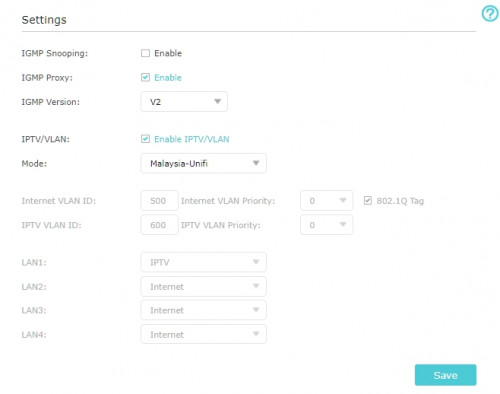 Here's what I believe is the issue, the IPTV protocol in the TPLink router is setup for the old Unifi TV Box and is incompatible for the new ATV box. All I wanted is to make LAN1 working for other devices again, any help would be greatly appreciated. EDIT: Using a custom setting and changed IPTV to Internet on LAN1 makes the port working again, but I'm wondering, doesn't UNIFI have the dedicated bandwith for UnifiTV? is this still the case if I connect via wifi or LAN setup for "Internet"? QUOTE(JustcallmeLarry @ Jan 27 2020, 02:56 AM) Guys hope you don't mind me asking this here? Base on my experience after porting from Unifi to Maxis: Maxis is much less stable, while this is quite unnoticeable with regular use, if you play MMORPG/Online games, you are bound to be disconnected very often. When I had Unifi, I can online/AFK on my MMORPGs for weeks, but on Maxis, I keep getting disconnected, this is also the reason I went back to Unifi for my new home.Wta is the internet quality of maxis and unifi the same? This post has been edited by Kellicros: Jan 27 2020, 05:04 PM |
|
|
Jan 27 2020, 05:59 PM
|

Senior Member
1,341 posts Joined: Dec 2016
|
QUOTE(JustcallmeLarry @ Jan 27 2020, 02:56 AM) Guys hope you don't mind me asking this here? Best way, doing your own personal research through their respective social media platform and give importance towards negative comments and do your own informal survey (verbally maybe some yumcha) by asking your taman people of the ISP, they're using currently and how is the performance, especially during at the peak hours and the package (e.g 100Mbps or 300Mbps) type and the max download speed they can achieve. Wta is the internet quality of maxis and unifi the same? You also must give importance towards the type of equipment these ISP gave you, how to maintain the networking gears (third-party gear compatibility without much effort, plug-and-play) and many more. You can refer her for further info if you need. You can only use other's experience as your good guideline towards a better experience on having contract with the ISP's for the next 24-months. |
|
|
Jan 27 2020, 06:50 PM
|

Senior Member
5,714 posts Joined: Mar 2007 
|
QUOTE(Kellicros @ Jan 27 2020, 04:44 PM) Guys, I just subscribed to unifi 300mbps package on my new home, and due to the low wifi speed of the provided Netis router, i have since upgraded to TPLink Archer A9, all is good but I have some issue trying to connect to the new UnifiPlus tvbox via ethernet cable. They do have dedicated bandwidth for UnifiTV, as it is on a separate VLAN, even if it is on a custom setting. That only applies if you use it on LAN. But, not if you use it on WiFi.Here's my issues, The Unifi Plus ATV box will not detect the Ethernet connection if I plug it to LAN1(which is for IPTV) It will detect the connection and works fine if I plug it into any LAN ports other than LAN1. Now I don't mind using it via WIFI cause I got pretty good speed with the new router, The real problem is I can't use the LAN1 port for any other devices either. My Router is now crippled from 4 ports to 3 ports. I can't make any changes in the router setting (like changing LAN1 from IPTV to Internet) because the options are grayed. If I change the "Mode" from "Malaysia-Unifi" to any other settings I will get no internet. If I disable IPTV/VLAN by unchecking the box, I will also get no internet. Here's what I believe is the issue, the IPTV protocol in the TPLink router is setup for the old Unifi TV Box and is incompatible for the new ATV box. All I wanted is to make LAN1 working for other devices again, any help would be greatly appreciated. EDIT: Using a custom setting and changed IPTV to Internet on LAN1 makes the port working again, but I'm wondering, doesn't UNIFI have the dedicated bandwith for UnifiTV? is this still the case if I connect via wifi or LAN setup for "Internet”? This post has been edited by SilentVampire: Jan 27 2020, 06:51 PM |
|
|
|
|
|
Jan 27 2020, 07:40 PM
Show posts by this member only | IPv6 | Post
#1527
|
|
Junior Member
362 posts Joined: Jan 2011
|
QUOTE(Kellicros @ Jan 27 2020, 04:44 PM) Guys, I just subscribed to unifi 300mbps package on my new home, and due to the low wifi speed of the provided Netis router, i have since upgraded to TPLink Archer A9, all is good but I have some issue trying to connect to the new UnifiPlus tvbox via ethernet cable. Try IGMP version select v3Here's my issues, The Unifi Plus ATV box will not detect the Ethernet connection if I plug it to LAN1(which is for IPTV) It will detect the connection and works fine if I plug it into any LAN ports other than LAN1. Now I don't mind using it via WIFI cause I got pretty good speed with the new router, The real problem is I can't use the LAN1 port for any other devices either. My Router is now crippled from 4 ports to 3 ports. I can't make any changes in the router setting (like changing LAN1 from IPTV to Internet) because the options are grayed. If I change the "Mode" from "Malaysia-Unifi" to any other settings I will get no internet. If I disable IPTV/VLAN by unchecking the box, I will also get no internet. Here's what I believe is the issue, the IPTV protocol in the TPLink router is setup for the old Unifi TV Box and is incompatible for the new ATV box. All I wanted is to make LAN1 working for other devices again, any help would be greatly appreciated. EDIT: Using a custom setting and changed IPTV to Internet on LAN1 makes the port working again, but I'm wondering, doesn't UNIFI have the dedicated bandwith for UnifiTV? is this still the case if I connect via wifi or LAN setup for "Internet"? Base on my experience after porting from Unifi to Maxis: Maxis is much less stable, while this is quite unnoticeable with regular use, if you play MMORPG/Online games, you are bound to be disconnected very often. When I had Unifi, I can online/AFK on my MMORPGs for weeks, but on Maxis, I keep getting disconnected, this is also the reason I went back to Unifi for my new home. |
|
|
Jan 27 2020, 09:50 PM
|
|
Senior Member
1,028 posts Joined: Jan 2003 From: KL
|
QUOTE(SilentVampire @ Jan 27 2020, 06:50 PM) They do have dedicated bandwidth for UnifiTV, as it is on a separate VLAN, even if it is on a custom setting. That only applies if you use it on LAN. But, not if you use it on WiFi. Just found this report by LYN, it seems the new UnifiPlus box no longer uses the dedicated IPTV VLAN ID:https://www.lowyat.net/2020/203992/unifi-tv...netflix-though/ Which mean no more dedicated bandwidth, then again we can now install apps from Playstore, I am guessing they disabled it because the low reserved bandwidth will not be enough for these new features. QUOTE(michaelkkl @ Jan 27 2020, 07:40 PM) Try IGMP version select v3 Nope, it will not work as long as you have the LAN setup for IPTV. |
|
|
Jan 27 2020, 10:49 PM
|
|
Senior Member
1,386 posts Joined: Nov 2012
|
QUOTE(JustcallmeLarry @ Jan 27 2020, 02:56 AM) Guys hope you don't mind me asking this here? not same qualityWta is the internet quality of maxis and unifi the same? UNIFI is best then Maxis Please don't not take Maxis Fibre its very bad and connection poor and sometime speed unstable you may check facebook a lot complaint and here complaint link https://forum.lowyat.net/topic/4890532 he using maxis but no internet have wait till 30 JAN 2020 look slow settle and delay delay i will not take Maxis Fibre so i will stay UNIFI almost stable and smooth i getting full speed for LAN Cable PC Desktop you want take maxis you own risk if problem and slow settle and delay delay almost lousy services maxis batter take unifi i also using unifi never had problem i will stay unifi i will not take maxis maxis is poor connection |
|
|
Jan 27 2020, 10:57 PM
|
|
Senior Member
1,386 posts Joined: Nov 2012
|
QUOTE(Kellicros @ Jan 27 2020, 04:44 PM) Guys, I just subscribed to unifi 300mbps package on my new home, and due to the low wifi speed of the provided Netis router, i have since upgraded to TPLink Archer A9, all is good but I have some issue trying to connect to the new UnifiPlus tvbox via ethernet cable. haha maxis is poor connection lousy services maxisHere's my issues, The Unifi Plus ATV box will not detect the Ethernet connection if I plug it to LAN1(which is for IPTV) It will detect the connection and works fine if I plug it into any LAN ports other than LAN1. Now I don't mind using it via WIFI cause I got pretty good speed with the new router, The real problem is I can't use the LAN1 port for any other devices either. My Router is now crippled from 4 ports to 3 ports. I can't make any changes in the router setting (like changing LAN1 from IPTV to Internet) because the options are grayed. If I change the "Mode" from "Malaysia-Unifi" to any other settings I will get no internet. If I disable IPTV/VLAN by unchecking the box, I will also get no internet. Here's what I believe is the issue, the IPTV protocol in the TPLink router is setup for the old Unifi TV Box and is incompatible for the new ATV box. All I wanted is to make LAN1 working for other devices again, any help would be greatly appreciated. EDIT: Using a custom setting and changed IPTV to Internet on LAN1 makes the port working again, but I'm wondering, doesn't UNIFI have the dedicated bandwith for UnifiTV? is this still the case if I connect via wifi or LAN setup for "Internet"? Base on my experience after porting from Unifi to Maxis: Maxis is much less stable, while this is quite unnoticeable with regular use, if you play MMORPG/Online games, you are bound to be disconnected very often. When I had Unifi, I can online/AFK on my MMORPGs for weeks, but on Maxis, I keep getting disconnected, this is also the reason I went back to Unifi for my new home. i still using unifi seen prefect a lot stable |
|
|
Jan 28 2020, 10:28 AM
|

Junior Member
509 posts Joined: Jun 2006
|
is unifi experimenting with QoS for applications/service type?
these past few weeks i sometimes cant even load webpages or instagram sometimes, but my netflix works flawlessly. getting annoyed with the service im getting. sometimes want to do online transaction also have to think twice coz of the unstable connection |
|
|
Jan 28 2020, 11:00 AM
|

Junior Member
124 posts Joined: Mar 2012
|
QUOTE(chickenshit36 @ Jan 28 2020, 10:28 AM) is unifi experimenting with QoS for applications/service type? What is your public ip range?these past few weeks i sometimes cant even load webpages or instagram sometimes, but my netflix works flawlessly. getting annoyed with the service im getting. sometimes want to do online transaction also have to think twice coz of the unstable connection Mine same issue (mostly reddit) with ip range 147.158 / 115.135 / 110.159.XXX.XXX I restarted router until ip 60.53.XXX.XXX so far no issue. |
|
|
Jan 28 2020, 11:31 AM
|
|
Senior Member
1,882 posts Joined: Sep 2017
|
QUOTE(chickenshit36 @ Jan 28 2020, 10:28 AM) is unifi experimenting with QoS for applications/service type? Should be routing for worldwide network screwed up...these past few weeks i sometimes cant even load webpages or instagram sometimes, but my netflix works flawlessly. getting annoyed with the service im getting. sometimes want to do online transaction also have to think twice coz of the unstable connection Netflix smooth smooth is because Netflix got setup their cache box in most ISP in the world including TM and others malaysia ISP, so the connection is stable and fast. |
|
|
|
|
|
Jan 28 2020, 12:39 PM
Show posts by this member only | IPv6 | Post
#1534
|
|
Junior Member
509 posts Joined: Jun 2006
|
QUOTE(izhamsatria @ Jan 28 2020, 11:00 AM) What is your public ip range? I see. I will try this.Mine same issue (mostly reddit) with ip range 147.158 / 115.135 / 110.159.XXX.XXX I restarted router until ip 60.53.XXX.XXX so far no issue. |
|
|
Jan 28 2020, 12:42 PM
|
|
Senior Member
1,386 posts Joined: Nov 2012
|
QUOTE(chickenshit36 @ Jan 28 2020, 10:28 AM) is unifi experimenting with QoS for applications/service type? i don't have problem i also use online transaction maybank seen stable noting problemthese past few weeks i sometimes cant even load webpages or instagram sometimes, but my netflix works flawlessly. getting annoyed with the service im getting. sometimes want to do online transaction also have to think twice coz of the unstable connection i using unifi 100mbps |
|
|
Jan 28 2020, 03:38 PM
|
|
Senior Member
2,329 posts Joined: Jun 2015
|
woohoo ~~!
my bill still remains at rm129 post #payfornothing promo... congrats to all those who were skeptical and didn't sign up for it ! |
|
|
Jan 28 2020, 04:15 PM
Show posts by this member only | IPv6 | Post
#1537
|

All Stars
11,456 posts Joined: Oct 2007 From: KL
|
QUOTE(lyc1982 @ Jan 28 2020, 03:38 PM) woohoo ~~! Same here. PDF bill not out yet but my balance went down by 168.55 from -219.9 to -51.35.my bill still remains at rm129 post #payfornothing promo... congrats to all those who were skeptical and didn't sign up for it ! My expected bill is RM159*1.06 = RM168.54 |
|
|
Jan 28 2020, 04:38 PM
|
 
Staff
72,806 posts Joined: Sep 2005 From: KUL 
|
I wonder what's the fuss with taking up YEP or not taking up YEP? It is everyone's choice. Problem?
Not to sound arrogant but really that 3 months of free bills' total amount is less than one day of my salary. I noticed this behaviour in some of you since this thing was launched. Peace out. Really, there is no need to be sarcastic with each other.  This post has been edited by fruitie: Jan 28 2020, 04:40 PM |
|
|
Jan 28 2020, 05:04 PM
|

Junior Member
405 posts Joined: Jul 2005
|
QUOTE(pakji @ Jan 27 2020, 10:49 PM) not same quality UNIFI is best then Maxis Please don't not take Maxis Fibre its very bad and connection poor and sometime speed unstable you may check facebook a lot complaint and here complaint link https://forum.lowyat.net/topic/4890532 he using maxis but no internet have wait till 30 JAN 2020 look slow settle and delay delay i will not take Maxis Fibre so i will stay UNIFI almost stable and smooth i getting full speed for LAN Cable PC Desktop you want take maxis you own risk if problem and slow settle and delay delay almost lousy services maxis batter take unifi i also using unifi never had problem i will stay unifi i will not take maxis maxis is poor connection  |
|
|
Jan 28 2020, 06:39 PM
|

Junior Member
346 posts Joined: Apr 2017
|
can we just potong the hypptv subscription?
|
|
Topic ClosedOptions
|
| Change to: |  0.0295sec 0.0295sec
 0.23 0.23
 6 queries 6 queries
 GZIP Disabled GZIP Disabled
Time is now: 6th December 2025 - 07:47 AM |
 Quote
Quote