Welcome Guest ( Log In | Register )

Bump Topic Topic Closed RSS Feed

Outline · [ Standard ] · Linear+

Unifi Official TM UniFi High Speed Broadband Thread V38, READ 1ST PAGE FOR TURBO SPEED INFO!

views
     
Kellicros
post Jan 27 2020, 04:44 PM

Regular
******
Senior Member
1,028 posts

Joined: Jan 2003
From: KL
Guys, I just subscribed to unifi 300mbps package on my new home, and due to the low wifi speed of the provided Netis router, i have since upgraded to TPLink Archer A9, all is good but I have some issue trying to connect to the new UnifiPlus tvbox via ethernet cable.

Here's my issues,

The Unifi Plus ATV box will not detect the Ethernet connection if I plug it to LAN1(which is for IPTV)

It will detect the connection and works fine if I plug it into any LAN ports other than LAN1.

Now I don't mind using it via WIFI cause I got pretty good speed with the new router,

The real problem is I can't use the LAN1 port for any other devices either. My Router is now crippled from 4 ports to 3 ports.


I can't make any changes in the router setting (like changing LAN1 from IPTV to Internet) because the options are grayed.

If I change the "Mode" from "Malaysia-Unifi" to any other settings I will get no internet.

If I disable IPTV/VLAN by unchecking the box, I will also get no internet.
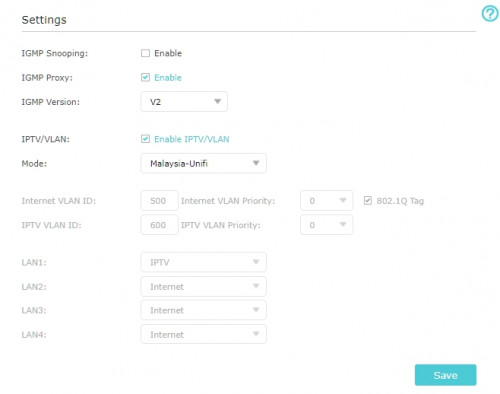
user posted image


Here's what I believe is the issue, the IPTV protocol in the TPLink router is setup for the old Unifi TV Box and is incompatible for the new ATV box.

All I wanted is to make LAN1 working for other devices again, any help would be greatly appreciated.

EDIT: Using a custom setting and changed IPTV to Internet on LAN1 makes the port working again, but I'm wondering, doesn't UNIFI have the dedicated bandwith for UnifiTV? is this still the case if I connect via wifi or LAN setup for "Internet"?


QUOTE(JustcallmeLarry @ Jan 27 2020, 02:56 AM)
Guys hope you don't mind me asking this here?
Wta is the internet quality of maxis and unifi the same?
*
Base on my experience after porting from Unifi to Maxis: Maxis is much less stable, while this is quite unnoticeable with regular use, if you play MMORPG/Online games, you are bound to be disconnected very often. When I had Unifi, I can online/AFK on my MMORPGs for weeks, but on Maxis, I keep getting disconnected, this is also the reason I went back to Unifi for my new home.

This post has been edited by Kellicros: Jan 27 2020, 05:04 PM
Kellicros
post Jan 27 2020, 09:50 PM

Regular
******
Senior Member
1,028 posts

Joined: Jan 2003
From: KL
QUOTE(SilentVampire @ Jan 27 2020, 06:50 PM)
They do have dedicated bandwidth for UnifiTV, as it is on a separate VLAN, even if it is on a custom setting. That only applies if you use it on LAN. But, not if you use it on WiFi.
*
Just found this report by LYN, it seems the new UnifiPlus box no longer uses the dedicated IPTV VLAN ID:

https://www.lowyat.net/2020/203992/unifi-tv...netflix-though/

Which mean no more dedicated bandwidth, then again we can now install apps from Playstore, I am guessing they disabled it because the low reserved bandwidth will not be enough for these new features.

QUOTE(michaelkkl @ Jan 27 2020, 07:40 PM)
Try IGMP version select v3
*
Nope, it will not work as long as you have the LAN setup for IPTV.
Kellicros
post Feb 2 2020, 01:43 AM

Regular
******
Senior Member
1,028 posts

Joined: Jan 2003
From: KL
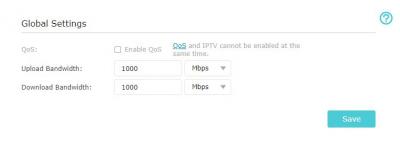
Is there a way to enable Tplink(Archer A9)'s QOS settings for Unifi?

Attached Image

I tried disabling the IPTV/VLAN but I can't get internet over LAN if I do so.

Since the new UnifiPlus box does not use VLAN anymore there is no reason to enable it anyway, or is there?
Kellicros
post Feb 2 2020, 01:49 PM

Regular
******
Senior Member
1,028 posts

Joined: Jan 2003
From: KL
QUOTE(soonwai @ Feb 2 2020, 02:09 AM)
You still need VLAN because Unifi's internet is still going over VLAN 500.
*
Damn it, there is no way to disable IPTV with VLAN enabled, I am starting to regret of buying this router sad.gif

Attached Image
Kellicros
post Feb 2 2020, 06:50 PM

Regular
******
Senior Member
1,028 posts

Joined: Jan 2003
From: KL
QUOTE(judehow @ Feb 2 2020, 06:09 PM)
I am think to buy at tm point so that why can fix for me, cause i scare  if buy outside  tm will not fix for me and i am not IT Expert.
*
how old is the router tho?

anyway, setting up new router is pretty basic and just a few simple steps, but you will need to get your unifi password from customer service.

Topic ClosedOptions
 

Change to:
| Lo-Fi Version
0.2902sec    0.54    7 queries    GZIP Disabled
Time is now: 9th December 2025 - 04:11 PM