QUOTE(hexcundie @ Jan 9 2020, 09:50 PM)
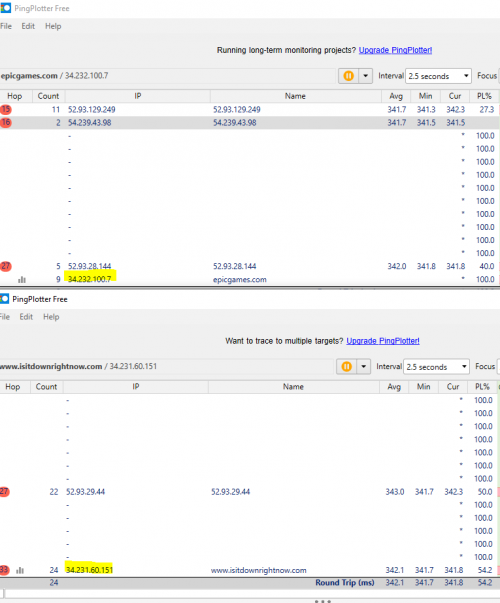
wikipedia load instantly using IPv6probably congestion over IPv4 to wikipedia
» Click to show Spoiler - click again to hide... «
This post has been edited by michaelkkl: Jan 9 2020, 10:44 PM
Unifi Official TM UniFi High Speed Broadband Thread V38, READ 1ST PAGE FOR TURBO SPEED INFO!
|
|
Jan 9 2020, 10:38 PM
Return to original view | IPv6 | Post
#1
|
![]() ![]() ![]()
Junior Member
362 posts Joined: Jan 2011 |
|
|
|
|
|
|
Jan 27 2020, 07:40 PM
Return to original view | IPv6 | Post
#2
|
![]() ![]() ![]()
Junior Member
362 posts Joined: Jan 2011 |
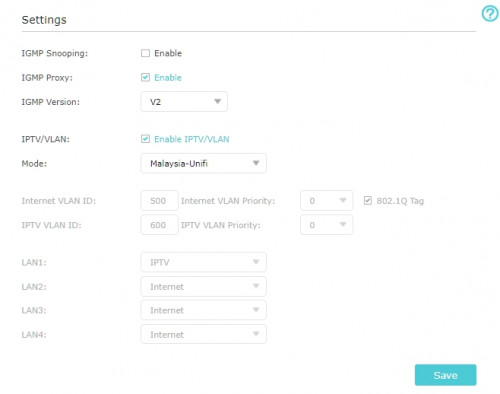
QUOTE(Kellicros @ Jan 27 2020, 04:44 PM) Guys, I just subscribed to unifi 300mbps package on my new home, and due to the low wifi speed of the provided Netis router, i have since upgraded to TPLink Archer A9, all is good but I have some issue trying to connect to the new UnifiPlus tvbox via ethernet cable. Try IGMP version select v3Here's my issues, The Unifi Plus ATV box will not detect the Ethernet connection if I plug it to LAN1(which is for IPTV) It will detect the connection and works fine if I plug it into any LAN ports other than LAN1. Now I don't mind using it via WIFI cause I got pretty good speed with the new router, The real problem is I can't use the LAN1 port for any other devices either. My Router is now crippled from 4 ports to 3 ports. I can't make any changes in the router setting (like changing LAN1 from IPTV to Internet) because the options are grayed. If I change the "Mode" from "Malaysia-Unifi" to any other settings I will get no internet. If I disable IPTV/VLAN by unchecking the box, I will also get no internet. ![]() Here's what I believe is the issue, the IPTV protocol in the TPLink router is setup for the old Unifi TV Box and is incompatible for the new ATV box. All I wanted is to make LAN1 working for other devices again, any help would be greatly appreciated. EDIT: Using a custom setting and changed IPTV to Internet on LAN1 makes the port working again, but I'm wondering, doesn't UNIFI have the dedicated bandwith for UnifiTV? is this still the case if I connect via wifi or LAN setup for "Internet"? Base on my experience after porting from Unifi to Maxis: Maxis is much less stable, while this is quite unnoticeable with regular use, if you play MMORPG/Online games, you are bound to be disconnected very often. When I had Unifi, I can online/AFK on my MMORPGs for weeks, but on Maxis, I keep getting disconnected, this is also the reason I went back to Unifi for my new home. |

|
|
Feb 7 2020, 09:27 PM
Return to original view | IPv6 | Post
#3
|
![]() ![]() ![]()
Junior Member
362 posts Joined: Jan 2011 |
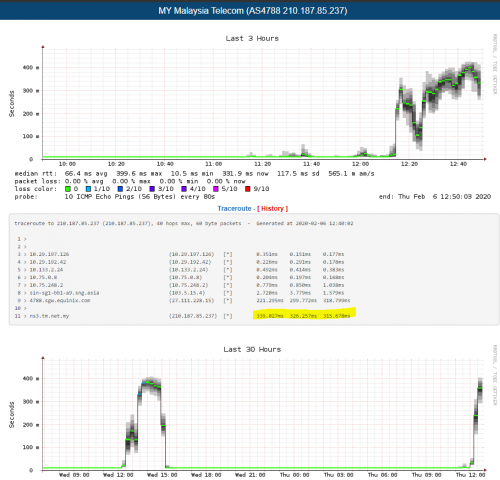
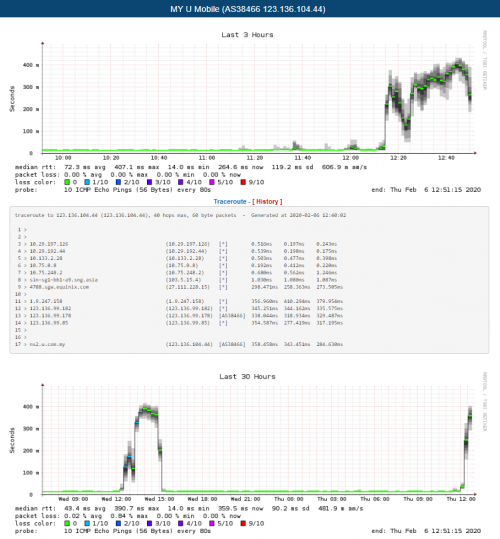
QUOTE(go626201 @ Feb 6 2020, 08:49 PM) See this... As for OVH, I have emailed them about this issue.Not a single case.... ![]() Actually complaint also not works...Unless we all complain at the same time,otherwise no improvements will be made... Even Hosting company(OVH) contact them for the overload network,they also dont care... And also the Telia.net routing already few years crap,also dont care... Every night like this how to use...evey night when 8pm the network will overload... Same routing die die no fix... ![]() ![]() They changed their route to U Mobile and it looks more better now. No longer facing high ping to OVH Singapore. |
|
|
Feb 14 2020, 11:52 AM
Return to original view | Post
#4
|
![]() ![]() ![]()
Junior Member
362 posts Joined: Jan 2011 |
QUOTE(go626201 @ Feb 14 2020, 11:25 AM) Guys,who having trouble with Fastly Site like Reddit,Speedtest.net or others, try tonight got better or not. The traffic is now route through Equinix Singapore which give a lower ping.I report to them about one week ago,now they replied. ![]() ![]() Ping on just now morning 11.22am. Who always use reddit or any fastly cdn powered sites if still got problem,tell me tonight,i can continue complain to them. Previously the traffic is route through Hong Kong. |
|
|
Mar 21 2020, 10:10 PM
Return to original view | Post
#5
|
![]() ![]() ![]()
Junior Member
362 posts Joined: Jan 2011 |
|
|
|
Mar 21 2020, 10:23 PM
Return to original view | Post
#6
|
![]() ![]() ![]()
Junior Member
362 posts Joined: Jan 2011 |
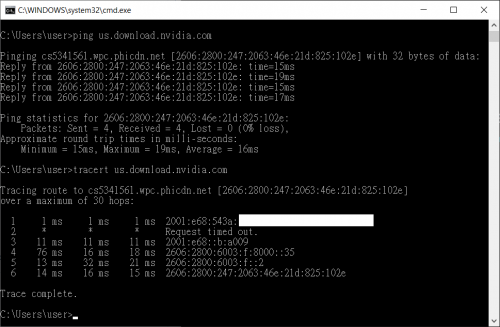
QUOTE(go626201 @ Mar 21 2020, 10:16 PM) akamai cdn not friendly to unifi,so far i always have routing problem with them,and also incapsula cdn also not stable. I tested downloading Nvidia drivers just now, disable IPv6 and using IPv4 I get 200KB/s~300KB/s download.For now cloudflare is still the best cdn for unifi to access. And also actually not all singapore server to unifi having serious routing issue, still got some server that using different routing work well. (I am using CF Warp VPN,still within 10ms to their warp service at SG DC) IPv6 i dont know,but i confirm every peak hour came, us nvidia server to unifi 95% will slow down to within 10mbps. Enabled IPv6 and I get around 3MB/s download. |
|
|
|
|
|
Mar 24 2020, 09:30 PM
Return to original view | Post
#7
|
![]() ![]() ![]()
Junior Member
362 posts Joined: Jan 2011 |
|
|
|
Mar 28 2020, 12:49 PM
Return to original view | IPv6 | Post
#8
|
![]() ![]() ![]()
Junior Member
362 posts Joined: Jan 2011 |
QUOTE(rjb123 @ Mar 28 2020, 11:59 AM) Yeah one of the systems I use daily is on AWS in UK, frequently slow. They have edge node in Kuala Lumpur.Recently changed to using AWS Global Accelerator which means that it transits through AWS and served through nearest point to user. Since then ... no more slowdown, I think they use AWS in SG for Malaysia QUOTE Q: Where is AWS Global Accelerator deployed today? A: AWS Global Accelerator uses a global network of 77 Points of Presence in 68 cities across 37 countries. AWS Global Accelerator Edge locations are located in: Asia: Bangalore, India; Chennai, India; Hong Kong, China; Hyderabad, India; Kuala Lumpur, Malaysia; Mumbai, India; New Delhi, India; Seoul, South Korea (2); Singapore (2); Taipei, Taiwan (2); Tokyo, Japan (2) FAQ |
|
|
Mar 30 2020, 03:40 PM
Return to original view | IPv6 | Post
#9
|
![]() ![]() ![]()
Junior Member
362 posts Joined: Jan 2011 |
|
|
|
Apr 1 2020, 09:02 PM
Return to original view | Post
#10
|
![]() ![]() ![]()
Junior Member
362 posts Joined: Jan 2011 |
|
|
|
Apr 2 2020, 12:58 PM
Return to original view | IPv6 | Post
#11
|
![]() ![]() ![]()
Junior Member
362 posts Joined: Jan 2011 |
|
|
|
Apr 8 2020, 09:37 PM
Return to original view | IPv6 | Post
#12
|
![]() ![]() ![]()
Junior Member
362 posts Joined: Jan 2011 |
Guys, enable your IPv6.
Some of the website load better with IPv6, especially cloudflare sites |
|
|
Apr 8 2020, 10:05 PM
Return to original view | IPv6 | Post
#13
|
![]() ![]() ![]()
Junior Member
362 posts Joined: Jan 2011 |
|
|
|
|
|
|
Apr 8 2020, 11:08 PM
Return to original view | IPv6 | Post
#14
|
![]() ![]() ![]()
Junior Member
362 posts Joined: Jan 2011 |
|
|
|
Apr 9 2020, 12:03 AM
Return to original view | IPv6 | Post
#15
|
![]() ![]() ![]()
Junior Member
362 posts Joined: Jan 2011 |
|
|
|
Apr 9 2020, 11:20 AM
Return to original view | IPv6 | Post
#16
|
![]() ![]() ![]()
Junior Member
362 posts Joined: Jan 2011 |
QUOTE(loonsave @ Apr 9 2020, 11:17 AM) I am tracing some sites that using Cloudflare, apparently UniFi have huge packet loss to some of the CF IP. Both IP 104.24.x.x and 104.31.x.x belongs to Cloudflare. Please refer to post before.https://www.cloudflare.com/ips/ Massive packet loss to 104.24.x.x [attachmentid=10466453] No Packet loss to 104.31.x.x [attachmentid=10466454] From the graph above, the packet loss started at 11:40am yesterday, and back to normal around 4:30am today. But it started loss again at 8am. Suspect the International routing for some IP ranges affected in TM. Cloudflare sites load better over IPv6. Enable your IPv6. |
|
|
Apr 9 2020, 11:33 AM
Return to original view | IPv6 | Post
#17
|
![]() ![]() ![]()
Junior Member
362 posts Joined: Jan 2011 |
|
|
|
Jun 26 2020, 08:38 AM
Return to original view | IPv6 | Post
#18
|
![]() ![]() ![]()
Junior Member
362 posts Joined: Jan 2011 |
|
|
|
Dec 17 2020, 06:49 PM
Return to original view | IPv6 | Post
#19
|
![]() ![]() ![]()
Junior Member
362 posts Joined: Jan 2011 |
QUOTE(powerwoot @ Dec 17 2020, 06:14 PM) Just got my 100mbps installation this evening. The installer fixed the fiberhome ONU and Dlink Covr1100 as a router. While the wifi is good, I am getting the speed but ethernet LAN is something else, the max it can read only 10mbps. I am using mobo that supports gigabit lan and cat5 cable. Connect to my laptop also 10mbps, be it windows or linux box. But when I try to put into the older VDSL router, it can go 100mbps or to the ONU itself, it read 1000mbps but not from the Covr that TM gave me. Try change to another cable. |
|
Topic ClosedOptions
|
| Change to: | 0.2900sec
0.46
7 queries
GZIP Disabled
Time is now: 7th December 2025 - 08:49 AM |