Welcome Guest ( Log In | Register )

Bump Topic Topic Closed RSS Feed
316 Pages « < 52 53 54 55 56 > » Bottom

Outline · [ Standard ] · Linear+

Unifi Official TM UniFi High Speed Broadband Thread V37, READ 1ST PAGE FOR TURBO SPEED INFO!

views
     
DecaPix
post Mar 14 2019, 08:01 AM

5 star monkey
*******
Senior Member
3,000 posts

Joined: Aug 2008
From: PeeJay
QUOTE(biloxee @ Mar 13 2019, 04:19 PM)
Try turning off your Wi-Fi Assist...
[attachmentid=10203060]

I have never seen my 6S, 8, XS exceed 400Mbps when testing with a 2x2 antenna WiFi Router/AP.
*
My place has almost zero or 1 bar LTE.
So i really doubt it's using cellular.
i tried speed testing my cellular, think my speed was around 20 mbps.
So that really is wireless AC and iphone 7

Oh yeah, forgot to mention it was charging at that time.
So that might affect the power mode of the phone.
TSSilentVampire
post Mar 14 2019, 08:52 AM

Networking Enthusiast
*******
Senior Member
5,714 posts

Joined: Mar 2007


QUOTE(pheranchis @ Mar 13 2019, 10:25 PM)
anyone know if this lukemanz dude is legit? pmed me saying he can help with my port issue, asking for address and gps coordinates (why is this needed?)
*
Proceed with caution. Not sure why he is doing that, and we are not endorsing anyone, so you have to make your own decision.
myteam94
post Mar 14 2019, 09:00 AM

Casual
***
Junior Member
438 posts

Joined: Oct 2009
QUOTE(soonwai @ Mar 14 2019, 12:45 AM)
Possible but expensive. You can use an optical-ethernet media converter to bridge the optical fibre cable and your Cat5e cable. Another option is to get a router that accepts optical, usually via an SFP module. or if desktop PC, a PCIe card that accepts optical.
*
optical-ethernet media converter to bridge the optical fibre cable and your Cat5e cable.

yea i've been searching and found one of this method
but I dont know where to look for it

is there store in KL selling it (eg: All it/thundermatch and etc) or it can only be purchase online?


taqu
post Mar 14 2019, 09:32 AM

Enthusiast
*****
Junior Member
864 posts

Joined: May 2005
QUOTE(chocobo7779 @ Mar 14 2019, 01:33 AM)
Actually the Galaxy S10e/S10/S10+ does that icon_idea.gif

I believe some laptops announced at CES 2019 also support WiFi 6 (ax)  icon_idea.gif
*
Nice thumbup.gif
PadeGP
post Mar 14 2019, 09:49 AM

Getting Started
**
Junior Member
77 posts

Joined: Jun 2010
does anyone here experience cannot open website like lazada, mudah & others streaming web. me experience from last nite. connection no problem can open youtube fb email & etc..
Max
post Mar 14 2019, 09:53 AM

Regular
******
Senior Member
1,705 posts

Joined: Jan 2003
From: Sepang - Putrajaya - Cyberjaya


QUOTE(myteam94 @ Mar 13 2019, 11:17 PM)
Hi guys,

not sure here the right place to ask

okay, previously when i was still in college i applied for UNIFI and been using till i move out back to my home. I've terminate my UNIFI and able to keep the modem, router and all

at my house, we already have a unifi and it using fibre optic cable...so i was wondering is it possible to convert the optic cable to gigabit ethernet cable since the i still have the my previous DLink DIR850L router

thank you.
*
just wondering y u wanna use the DIR850L? unsure.gif
can it just plug in to existing modem ?

myteam94
post Mar 14 2019, 10:34 AM

Casual
***
Junior Member
438 posts

Joined: Oct 2009
QUOTE(Max @ Mar 14 2019, 09:53 AM)
just wondering y u wanna use the DIR850L?  unsure.gif
can it just plug in to existing modem ?
*
because previously i was asking about router that can cater for the new UNIFI speed (still havent got the upgrade from UNIFI but in contact with them)

so some of them recommended some model but upon inspection, they all used CAT5 ethernet cable while my current router only support optic cable

sorry my enquiry using wrong model unit/terminology

maybe i can use a picture reference

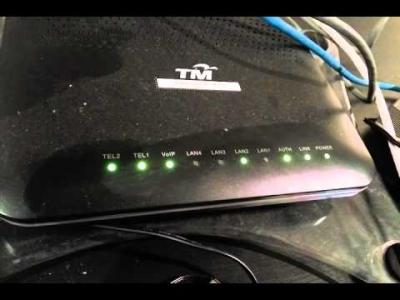
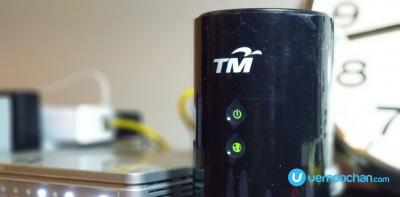
Attached Image Attached Image
My current house unit


Attached Image Attached Image
MY Previous Unit
previously i stayed at high rising area during my college whereby the technician just used the build-in Ethernet port

while for my family home (which is landed) they pull the fibre optic cable.


elmond
post Mar 14 2019, 11:22 AM

Look at all my stars!!
*******
Senior Member
2,262 posts

Joined: Jul 2013
QUOTE(myteam94 @ Mar 14 2019, 10:34 AM)


not sure what you want to do with the vdsl modem, there are no way you can communicate with optic fibre even with converter

just forget about the vdsl modem, it's useless with optic.

ONT is the only equipment will do that optical electrical.

This post has been edited by elmond: Mar 14 2019, 11:29 AM
dickybird
post Mar 14 2019, 11:26 AM

Look at all my stars!!
*******
Senior Member
2,093 posts

Joined: Apr 2005
Why make your life so complicated? When you sign up with Unifi they will give you a new router.
myteam94
post Mar 14 2019, 11:34 AM

Casual
***
Junior Member
438 posts

Joined: Oct 2009
QUOTE(elmond @ Mar 14 2019, 11:22 AM)
not sure what you want to do with the vdsl modem, there are no way you can communicate with optic fibre even with converter
*
that's why, i didnt know landed and housing are using different type of unit

i thought it possible to convert/bridge the optic cable to CAT5e cable


DecaPix
post Mar 14 2019, 11:35 AM

5 star monkey
*******
Senior Member
3,000 posts

Joined: Aug 2008
From: PeeJay
QUOTE(myteam94 @ Mar 13 2019, 11:17 PM)
Hi guys,

not sure here the right place to ask

okay, previously when i was still in college i applied for UNIFI and been using till i move out back to my home. I've terminate my UNIFI and able to keep the modem, router and all

at my house, we already have a unifi and it using fibre optic cable...so i was wondering is it possible to convert the optic cable to gigabit ethernet cable since the i still have the my previous DLink DIR850L router

thank you.
*
Can you tell what are you trying to achieve?
because the 850L is a gigabit router using LAN.
Not sure where you want to connect the optical cable.
myteam94
post Mar 14 2019, 11:53 AM

Casual
***
Junior Member
438 posts

Joined: Oct 2009
QUOTE(DecaPix @ Mar 14 2019, 11:35 AM)
Can you tell what are you trying to achieve?
because the 850L is a gigabit router using LAN.
Not sure where you want to connect the optical cable.
*
Truth to be told,

When i first talk to UNIFI regarding the new speed
they told either you can contract 2yrs or buy your own unit

of course that time, my UNIFI still was not part of the first pilot speed upgrade

so then, i talk again with UNIFI about the upgrade still no news, now i've tried to pressure them about the upgrade

since my current unit can't cater for the new speed, i thought wanna buy a new unit
thats where I wanna try to re-use my previous UNIFI (it was 30mbps plan) unit from my college time.

sorry i'm not be familiar with terms sweat.gif

the first method mention previously, bridge between Optic cable with Cat5e cable? is it workable? or i need to ask UNIFI technician to actually check about it?
go626201
post Mar 14 2019, 12:25 PM

Regular
******
Senior Member
1,882 posts

Joined: Sep 2017
QUOTE(myteam94 @ Mar 14 2019, 11:53 AM)
Truth to be told,

When i first talk to UNIFI regarding the new speed
they told either you can contract 2yrs or buy your own unit

of course that time, my UNIFI still was not part of the first pilot speed upgrade

so then, i talk again with UNIFI about the upgrade still no news, now i've tried to pressure them about the upgrade

since my current unit can't cater for the new speed, i thought wanna buy a new unit
thats where I wanna try to re-use my previous UNIFI (it was 30mbps plan) unit from my college time.

sorry i'm not be familiar with terms  sweat.gif

the first method mention previously, bridge between Optic cable with Cat5e cable? is it workable? or i need to ask UNIFI technician to actually check about it?
*
So you want to use the router as access point or change your current router to that old router?
Actually i dont really know what you want to do with your old device from college?
VDSL is not same to Fibre Optic.

if you want to buy a new router for supporting the turbo speed, dont care about your old device, just buy new router.
If you want to pull a cable from your current device to another room or what,then u can use your old dlink device as a access point.
or you are saying subscribe for 2rd unifi line?
That vdsl(silver one) didn't work for your current setup,so do not consider it for any usage.
nag
post Mar 14 2019, 12:26 PM

Casual
***
Junior Member
336 posts

Joined: Jul 2010
From: Changlun, Kedah
[QUOTE=myteam94,Mar 14 2019, 11:53 AM]
, bridge between Optic cable with Cat5e cable? is it workable?
*

[/]

Cat5e is linking between ONT and router,no matter you are using VDSL or FTTH, you still need it unless you are using ONR

This post has been edited by nag: Mar 14 2019, 12:33 PM
soonwai
post Mar 14 2019, 12:59 PM


********
All Stars
11,458 posts

Joined: Oct 2007
From: KL


QUOTE(myteam94 @ Mar 14 2019, 09:00 AM)
optical-ethernet media converter to bridge the optical fibre cable and your Cat5e cable.

yea i've been searching and found one of this method
but I dont know where to look for it

is there store in KL selling it (eg: All it/thundermatch and etc) or it can only be purchase online?
*
TPLink sells one. Retail shops probably don't have but I'm sure they can order. Or look online.
myteam94
post Mar 14 2019, 01:52 PM

Casual
***
Junior Member
438 posts

Joined: Oct 2009
QUOTE(go626201 @ Mar 14 2019, 12:25 PM)
So you want to use the router as access point or change your current router to that old router?
Actually i dont really know what you want to do with your old device from college?
VDSL is not same to Fibre Optic.

if you want to buy a new router for supporting the turbo speed, dont care about your old device, just buy new router.
If you want to pull a cable from your current device to another room or what,then u can use your old dlink device as a access point.
or you are saying subscribe for 2rd unifi line?
That vdsl(silver one) didn't work for your current setup,so do not consider it for any usage.
*
could explain to bit details

wait i think i got few things mix-up

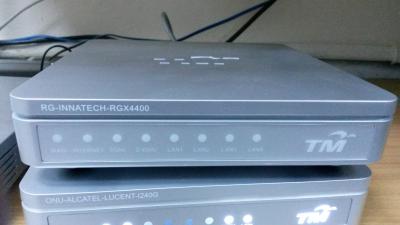
the black box whereby my optic cable is attach does not need to change right?

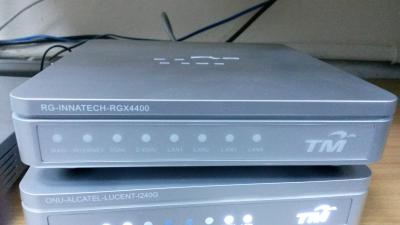
only the silver box router (as picture below) in order to cater for the new speed, correct?


Attached Image

swapped with

Attached Image

elmond
post Mar 14 2019, 02:24 PM

Look at all my stars!!
*******
Senior Member
2,262 posts

Joined: Jul 2013
QUOTE(myteam94 @ Mar 14 2019, 01:52 PM)
could explain to bit details

wait i think i got few things mix-up

the black box whereby my optic cable is attach does not need to change right?

only the silver box router (as picture below) in order to cater for the new speed, correct?
Attached Image

swapped with

Attached Image
*
yes, you just need to change the router rgx4400 with dlink 850l if wifi is the limitation

what is your current package?
what is your speed tested?

RGX4400 actually suppose able to handle quite good speed for wifi except it can input WAN 100M only

https://forum.lowyat.net/index.php?act=Atta...post&id=7029387

10.0. Technical Specifications

Standards IEEE 802.11b/g/n 2.4GHz
IEEE 802.11a/n/ac 5GHz

Antenna 4 x 3 dBi Built-in antenna
Protocol RFC768 UDP, RFC791 IP, RFC792 ICMP, FC793 TCP, RFC826
ARP, RFC2516 PPPoE, RFC2131 DHCP, ALG
Interface  1 x 10/100M Auto MDI/MDIX WAN port
 4 x 10/100M Auto MDI/MDIX LAN ports
 1 x 2.0 USB ports
 1 x 3.0 USB ports

This post has been edited by elmond: Mar 14 2019, 02:28 PM
myteam94
post Mar 14 2019, 02:29 PM

Casual
***
Junior Member
438 posts

Joined: Oct 2009
QUOTE(elmond @ Mar 14 2019, 02:24 PM)
what is your current package?
what is your speed tested?

RGX4400 actually suppose able to handle quite good speed for wifi except it can input WAN 100M only

https://forum.lowyat.net/index.php?act=Atta...post&id=7029387

10.0. Technical Specifications

Standards IEEE 802.11b/g/n 2.4GHz
IEEE 802.11a/n/ac 5GHz

Antenna 4 x 3 dBi Built-in antenna
Protocol RFC768 UDP, RFC791 IP, RFC792 ICMP, FC793 TCP, RFC826
ARP, RFC2516 PPPoE, RFC2131 DHCP, ALG
Interface  1 x 10/100M Auto MDI/MDIX WAN port
 4 x 10/100M Auto MDI/MDIX LAN ports
 1 x 2.0 USB ports
 1 x 3.0 USB ports
*
current package is 30Mbps (paid upgrade from 10mbps)
speed tested avg (Iphone and macbook are connected to 5.0ghz while PC connect to 2.4Ghz): 24-29mbps

I've already sent an email to UNIFI why my package havent upgraded to 300Mbps smile.gif

hope its help.
DecaPix
post Mar 14 2019, 02:46 PM

5 star monkey
*******
Senior Member
3,000 posts

Joined: Aug 2008
From: PeeJay
QUOTE(myteam94 @ Mar 14 2019, 02:29 PM)
current package is 30Mbps (paid upgrade from 10mbps)
speed tested avg (Iphone and macbook are connected to 5.0ghz while PC connect to 2.4Ghz): 24-29mbps

I've already sent an email to UNIFI why my package havent upgraded to 300Mbps  smile.gif

hope its help.
*
Why dont you chase TM to get it upgraded to 300 mbps before you worry about can support new speed or not.

Basically once you get upgraded to 300, the limitation is your router
The RGX-4400.

So you can use your DIR-850L as replacement. (no need worry of optical to ethernet etc etc)
But it wont be much help as probably wifi you can get around 100 odd.
That device is quite old. Hardware not that capable.
TM will offer to you to buy from them DIR-842
Or if they are generous...give you for free.

Side note:
You mentioned the black box that the optical comes into.
But you give picture of silver box Alcatel Lucent I240G?


myteam94
post Mar 14 2019, 03:06 PM

Casual
***
Junior Member
438 posts

Joined: Oct 2009
QUOTE(DecaPix @ Mar 14 2019, 02:46 PM)
Why dont you chase TM to get it upgraded to 300 mbps before you worry about can support new speed or not.

Basically once you get upgraded to 300, the limitation is your router
The RGX-4400.

So you can use your DIR-850L as replacement. (no need worry of optical to ethernet etc etc)
But it wont be much help as probably wifi you can get around 100 odd.
That device is quite old. Hardware not that capable.
TM will offer to you to buy from them DIR-842
Or if they are generous...give you for free.

Side note:
You mentioned the black box that the optical comes into.
But you give picture of silver box Alcatel Lucent I240G?
*
Ah... i see

sorry for my first post wrongly ask question
I'm not familiar with the unit/terminology

Free if I take up the 2yrs contract laugh.gif
I probably choose to buy owned router. I will continue my survey for router.
quite sad that my house had to pay higher for 30mbps (because it was paid upgrade), i ask to contract for the 30mbps package but they can't do it since my housing area already full. So paid upgrade is the only choice
10mbps RM149 top up RM50 for 30mbps

now paying RM210 (incl tax) sad.gif

yup. Currently wait for their feedback after my email regarding the upgrade status.

Thanks for clearing that up.

side note: about the picture (google image picture,my bad)
for my current house unit is the RGX4400 router and the Huawei GPON Terminal
for my previous unit is the ZTE VDSL2 and DIR850L router



316 Pages « < 52 53 54 55 56 > » Top
Topic ClosedOptions
 

Change to:
| Lo-Fi Version
0.0353sec    0.39    6 queries    GZIP Disabled
Time is now: 6th December 2025 - 06:58 PM