

QUOTE(blacktubi @ Mar 19 2023, 11:06 AM)
Option 1 might have some minimal downtime
Option 2 will ensure zero downtime

Do you know how fast TIME handle relocation case?Option 2 will ensure zero downtime
TIME [OFFICIAL] TIME Fibre Broadband™ v4, Experience the ONE TRUE 2Gbps
|
|
 Mar 19 2023, 12:52 PM Mar 19 2023, 12:52 PM
|
 
Newbie
9 posts Joined: Aug 2017  
|
QUOTE(blacktubi @ Mar 19 2023, 11:06 AM) Option 1 might have some minimal downtime Do you know how fast TIME handle relocation case?Option 2 will ensure zero downtime |
|
|
|
|
|
Mar 19 2023, 06:59 PM
Show posts by this member only | IPv6 | Post
#9822
|

Senior Member
2,193 posts Joined: Feb 2012
|
Hi, how do I swap out this HG8145X6 at another house that is also using Time broadband but with an older router that I want to replace with this one ?
|
|
|
Mar 20 2023, 08:41 AM
|

Senior Member
1,805 posts Joined: Oct 2010
|
QUOTE(gooroojee @ Mar 19 2023, 06:59 PM) Hi, how do I swap out this HG8145X6 at another house that is also using Time broadband but with an older router that I want to replace with this one ? Parking for this as well. My old router is better. |
|
|
Mar 20 2023, 09:01 PM
|
|
Senior Member
2,615 posts Joined: Nov 2020
|
confused by the wording
but if you are saying you dont want to use the provided huawei router, you can contact time cs and ask to change it into bridge mode and you can connect up your own router |
|
|
Mar 20 2023, 09:11 PM
Show posts by this member only | IPv6 | Post
#9825
|
|
Senior Member
2,193 posts Joined: Feb 2012
|
QUOTE(PRSXFENG @ Mar 20 2023, 09:01 PM) confused by the wording In my case I want to replace an older modem with this model.. for a different Time broadband subscription elsewhere.but if you are saying you dont want to use the provided huawei router, you can contact time cs and ask to change it into bridge mode and you can connect up your own router |
|
|
Mar 21 2023, 04:23 AM
|

Newbie
13 posts Joined: Jun 2013
|
Does anyone here having issue with International connection with Time especially to US and EU?
|
|
|
|
|
|
Mar 21 2023, 08:04 AM
|
|
Probation
6 posts Joined: Oct 2021
|
QUOTE(Himekaido @ Mar 21 2023, 04:23 AM) Does anyone here having issue with International connection with Time especially to US and EU? FTP connection to Europe quite slow this morning. |
|
|
Mar 21 2023, 01:53 PM
|
|
Newbie
13 posts Joined: Jun 2013
|
So it wasn't just me, had to VPN just to fetch some files from those region.
It's been very slow since last week. |
|
|
Mar 21 2023, 06:05 PM
|
|
Junior Member
445 posts Joined: Feb 2014
|
QUOTE(Himekaido @ Mar 21 2023, 04:23 AM) Does anyone here having issue with International connection with Time especially to US and EU? Same here. Experiencing slow connections to UpCloud and OVH servers since late January. Seems to get a lot worse lately.Already did my investigation and confirmed the issue is with Singtel. Had to reroute affected traffic via my parent's TM UniFi connection for the past month. Already reported this to TIME. No update yet. MTR from UpCloud Chicago, US to TIME VS TM for comparison: 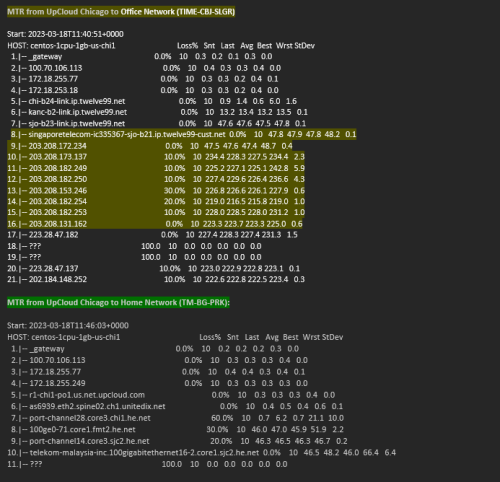 This post has been edited by faizyunus: Mar 21 2023, 06:10 PM Himekaido liked this post
|
|
|
Mar 22 2023, 07:01 PM
|

Senior Member
3,612 posts Joined: Feb 2006
|
QUOTE(lokgotz @ Mar 19 2023, 01:14 AM) Any idea how to do it? Because in my office, all I had to do is press one button on the node and the ONT. Hi, you need to turn teh X6 into AP mode by pressing the WPS button for 15s until you see all the lights are lit up.For this, it didn't say anything in the manual and I couldn't find any info online. Installer not answering my call but that's maybe because it's the weekend. Following is to place the X6 close to the ONT (within 2m), press the WPS button on the ONT until the WPS light starts blinking, when the WPS lights on the ONT is off, it means it's successfully paired. Btw, how come the Installer did not set it up for you ? Thanks. |
|
|
Mar 22 2023, 07:05 PM
|
|
Senior Member
3,612 posts Joined: Feb 2006
|
QUOTE(gooroojee @ Mar 19 2023, 06:59 PM) Hi, how do I swap out this HG8145X6 at another house that is also using Time broadband but with an older router that I want to replace with this one ? You can configure it as an AP but not as an ONT.Afterall, it's still the best to get some other models outside that for sure outperforms this one. |
|
|
Mar 22 2023, 09:14 PM
Show posts by this member only | IPv6 | Post
#9832
|
|
Senior Member
2,193 posts Joined: Feb 2012
|
QUOTE(jjj2 @ Mar 22 2023, 07:05 PM) You can configure it as an AP but not as an ONT. Yep looks like every Time subscriber MUST always use their given Huawei device as the modem , and we can only add routers and meshes to it. Afterall, it's still the best to get some other models outside that for sure outperforms this one. No option to combine a modem router that is a higher spec model (and also save electricity), and, No option to give the Huawei modem to someone else who may still be on an older device and could benefit from this small 'upgrade'. This post has been edited by gooroojee: Mar 22 2023, 09:15 PM |
|
|
Mar 22 2023, 09:22 PM
|
 
Elite
8,421 posts Joined: Jul 2008 
|
QUOTE(gooroojee @ Mar 22 2023, 09:14 PM) Yep looks like every Time subscriber MUST always use their given Huawei device as the modem , and we can only add routers and meshes to it. Sadly this is not the days of ADSL modem router.No option to combine a modem router that is a higher spec model (and also save electricity), and, No option to give the Huawei modem to someone else who may still be on an older device and could benefit from this small 'upgrade'. That's because FTTH (fiber-to-the-home) is not standardized so vendors wouldn't make third party fiber router that only works for TIME. The market is just too small. FTTH implementation differs from telco to telco as well. |
|
|
|
|
|
Mar 22 2023, 09:41 PM
|
|
Senior Member
3,612 posts Joined: Feb 2006
|
QUOTE(gooroojee @ Mar 22 2023, 09:14 PM) Yep looks like every Time subscriber MUST always use their given Huawei device as the modem , and we can only add routers and meshes to it. Not affirmative...but it will not be discussion here & we are not allowed to discuss it.No option to combine a modem router that is a higher spec model (and also save electricity), and, No option to give the Huawei modem to someone else who may still be on an older device and could benefit from this small 'upgrade'. Thanks. |
|
|
Mar 23 2023, 04:01 PM
Show posts by this member only | IPv6 | Post
#9835
|

Senior Member
2,657 posts Joined: Jan 2003 From: In front of my computer
|
QUOTE(jjj2 @ Mar 22 2023, 07:01 PM) Hi, you need to turn teh X6 into AP mode by pressing the WPS button for 15s until you see all the lights are lit up. Thank you. I'll try it when I get back.Following is to place the X6 close to the ONT (within 2m), press the WPS button on the ONT until the WPS light starts blinking, when the WPS lights on the ONT is off, it means it's successfully paired. Btw, how come the Installer did not set it up for you ? Thanks. I wasn't at home when the installer came and with just the ONT, it was sufficient. So he just left the X6 and left. But after using it, the reception at one of the rooms is a bit weak so I wanted to set up a node but found that there is only an extra X6.  jjj2 liked this post
|
|
|
Mar 24 2023, 06:23 PM
|
|
Senior Member
3,612 posts Joined: Feb 2006
|
QUOTE(biskutnutella @ Mar 19 2023, 12:52 PM) Do you know how fast TIME handle relocation case? For relocation, it takes 7--14 days normally. |
|
|
Mar 25 2023, 04:36 PM
Show posts by this member only | IPv6 | Post
#9837
|

Junior Member
80 posts Joined: Jul 2018
|
Hey guys & sifus, would like to get some advice on which Time package to go with (100 Mbps Wifi 5 vs 500 Mbps Wifi 6).
Currently, I am in a household of 4 users on the 100 Mbps plan and never had any issues in terms of speed. I will soon be moving into an 850 Sqft condo, just me & my wife (2 users). The router can be placed pretty centrally, so I doubt speed & range will ever be an issue for us (pretty standard usage: for work, watch YouTube/Netflix, casual gaming, & some IoTs connected). My question is, will Wifi 5 or Wifi 6 matter/make any difference for our usage? Or would it be worthwhile to future-proof with the 500 Mbps Wifi 6 plan? I personally think that speed is unnecessarily much for us (given that 100 Mbps worked fine when it was 4 users), but just unsure about the Wifi 5 vs Wifi 6 relevancy. Any help would be appreciated! |
|
|
Mar 25 2023, 06:14 PM
|
|
Elite
8,421 posts Joined: Jul 2008
|
QUOTE(JLJQ @ Mar 25 2023, 04:36 PM) Hey guys & sifus, would like to get some advice on which Time package to go with (100 Mbps Wifi 5 vs 500 Mbps Wifi 6). 100Mbps is more than enough for casual browsing and streamingCurrently, I am in a household of 4 users on the 100 Mbps plan and never had any issues in terms of speed. I will soon be moving into an 850 Sqft condo, just me & my wife (2 users). The router can be placed pretty centrally, so I doubt speed & range will ever be an issue for us (pretty standard usage: for work, watch YouTube/Netflix, casual gaming, & some IoTs connected). My question is, will Wifi 5 or Wifi 6 matter/make any difference for our usage? Or would it be worthwhile to future-proof with the 500 Mbps Wifi 6 plan? I personally think that speed is unnecessarily much for us (given that 100 Mbps worked fine when it was 4 users), but just unsure about the Wifi 5 vs Wifi 6 relevancy. Any help would be appreciated! Use the savings to buy a good router, the free Wi-Fi 6 router isn't any good either |
|
|
Mar 26 2023, 11:38 AM
Show posts by this member only | IPv6 | Post
#9839
|
|
Junior Member
80 posts Joined: Jul 2018
|
QUOTE(blacktubi @ Mar 25 2023, 06:14 PM) 100Mbps is more than enough for casual browsing and streaming Thanks for the suggestion, router seems to always be the bottleneck with these packages...Use the savings to buy a good router, the free Wi-Fi 6 router isn't any good either |
|
|
Mar 26 2023, 02:04 PM
Show posts by this member only | IPv6 | Post
#9840
|

Junior Member
242 posts Joined: Jan 2003
|
QUOTE(blacktubi @ Mar 25 2023, 06:14 PM) 100Mbps is more than enough for casual browsing and streaming From my actual usage experience, the Huawei HG8145V5 ONT is good enough for 100Mbps service as my phone can achieved slightly more than 100Mbps DL and UL at 3 meters. So, what is the problem? Use the savings to buy a good router, the free Wi-Fi 6 router isn't any good either  |
| Change to: |  0.0313sec 0.0313sec
 0.17 0.17
 6 queries 6 queries
 GZIP Disabled GZIP Disabled
Time is now: 22nd December 2025 - 08:02 AM |
 Quote
Quote