

Is the router Huawei HG8145X6 provided by Time MU-MIMO? It has only two antennas on it
TIME [OFFICIAL] TIME Fibre Broadband™ v4, Experience the ONE TRUE 2Gbps
TIME [OFFICIAL] TIME Fibre Broadband™ v4, Experience the ONE TRUE 2Gbps
|
|
 Mar 22 2022, 12:25 PM Mar 22 2022, 12:25 PM
Show posts by this member only | IPv6 | Post
#8741
|
 
Junior Member
61 posts Joined: Oct 2017 
|
Is the router Huawei HG8145X6 provided by Time MU-MIMO? It has only two antennas on it
|
|
|
|
|
|
Mar 24 2022, 07:50 AM
Show posts by this member only | IPv6 | Post
#8742
|

Senior Member
3,117 posts Joined: Jul 2005 From: Penang 
|
QUOTE(1zx @ Mar 21 2022, 09:25 PM) 1000BaseT requires all 4 pairs. Just wanna say thanks for the tip. I checked and indeed the keystone was not properly terminated, I think 2 or 3 cores were disconnected from the pins. Re-attached and got my gigabit yay!Sounds like not all 4 pairs are properly terminated.  |
|
|
Mar 24 2022, 03:40 PM
|

Senior Member
3,608 posts Joined: Feb 2006
|
QUOTE(Domeeneequec @ Mar 22 2022, 12:25 PM) Is the router Huawei HG8145X6 provided by Time MU-MIMO? It has only two antennas on it 2x2 MIMO |
|
|
Mar 28 2022, 01:57 PM
Show posts by this member only | IPv6 | Post
#8744
|
|
Newbie
20 posts Joined: Feb 2019
|
QUOTE(lee82gx @ Mar 24 2022, 07:50 AM) Just wanna say thanks for the tip. I checked and indeed the keystone was not properly terminated, I think 2 or 3 cores were disconnected from the pins. Re-attached and got my gigabit yay!  |
|
|
Mar 28 2022, 01:57 PM
|

Junior Member
301 posts Joined: Oct 2014
|
Hi guys, I need some reccomendations for my TIME package.
I first subscribed in 2016, and contract ended in 2018, and been paying till today for 500mbps package. So the modem is the original Huawei from 2016. Router I have upgraded in 2020 but not the wifi 6 version. My PC is using PCIE Asus A3000x wifi 6. Seems like a no brainer for me to renew the 24-month contract. I'll get RM10off monthly and free wifi 6 modem + 1 wifi 5 mesh. Any thoughts? 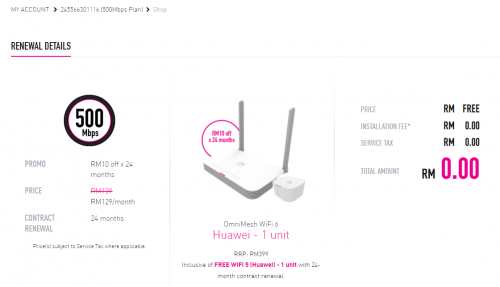 |
|
|
Mar 28 2022, 02:54 PM
|
|
Senior Member
3,608 posts Joined: Feb 2006
|
QUOTE(ms749 @ Mar 28 2022, 01:57 PM) Hi guys, I need some reccomendations for my TIME package. It really depends on your expectation on the performance & whether willing to be tied with another 2 more years contract.I first subscribed in 2016, and contract ended in 2018, and been paying till today for 500mbps package. So the modem is the original Huawei from 2016. Router I have upgraded in 2020 but not the wifi 6 version. My PC is using PCIE Asus A3000x wifi 6. Seems like a no brainer for me to renew the 24-month contract. I'll get RM10off monthly and free wifi 6 modem + 1 wifi 5 mesh. Any thoughts? If you wish to go for full WiFi-6 & performance wise, get your self a set of good wifi-6 mesh system. Thanks. |
|
|
|
|
|
Mar 28 2022, 04:49 PM
|
|
Junior Member
301 posts Joined: Oct 2014
|
QUOTE(jjj2 @ Mar 28 2022, 02:54 PM) It really depends on your expectation on the performance & whether willing to be tied with another 2 more years contract. Thanks you. Update ; I have just opted for this renewal.If you wish to go for full WiFi-6 & performance wise, get your self a set of good wifi-6 mesh system. Thanks. Because I didn't even realised that I was out of contract since 2018. And I expect to live in the same house for another 5 years. And it doesn't cost me anything, while getting RM10 monthly off. |
|
|
Mar 28 2022, 07:25 PM
Show posts by this member only | IPv6 | Post
#8748
|

Junior Member
105 posts Joined: May 2016
|
Just installed Time today and the device given is Huawei HG8145V5. Wanted to use my Huawei AX3 as router so i called to CS and told them i would like to enable bridge mode in my device. The CS told me this is latest device and she is not familiar with the setting and ask me checked with the installer. Is it because i told them wrongly?
Normally they will do the bridge mode setting remotely or enable it from their side? |
|
|
Mar 28 2022, 08:47 PM
|
|
Senior Member
2,611 posts Joined: Nov 2020
|
QUOTE(AliBaBa_King @ Mar 28 2022, 07:25 PM) Just installed Time today and the device given is Huawei HG8145V5. Wanted to use my Huawei AX3 as router so i called to CS and told them i would like to enable bridge mode in my device. The CS told me this is latest device and she is not familiar with the setting and ask me checked with the installer. Is it because i told them wrongly? Did you mention the HG8145 or the AX3? if you mentioned the AX3 they might have been confusedNormally they will do the bridge mode setting remotely or enable it from their side? Ircc they set remotely |
|
|
Mar 28 2022, 10:38 PM
|

Senior Member
1,030 posts Joined: Jan 2022
|
QUOTE(AliBaBa_King @ Mar 28 2022, 07:25 PM) Just installed Time today and the device given is Huawei HG8145V5. Wanted to use my Huawei AX3 as router so i called to CS and told them i would like to enable bridge mode in my device. The CS told me this is latest device and she is not familiar with the setting and ask me checked with the installer. Is it because i told them wrongly? Should have paid the RM99 more and get the Huawei HG8145X6 instead then pair it with your AX3Normally they will do the bridge mode setting remotely or enable it from their side? |
|
|
Mar 29 2022, 09:48 AM
|
|
Junior Member
105 posts Joined: May 2016
|
QUOTE(PRSXFENG @ Mar 28 2022, 08:47 PM) Did you mention the HG8145 or the AX3? if you mentioned the AX3 they might have been confused I told the CS "i need to enable bridge mode in the router/modem device provided by Time because i wanted to use my own router", didnt mentioned about my AX3 at all. But the CS told me she not familiar with the device setting. Do i need to mentioned the device name to them? because i thought they should know what device they provided to customer.Ircc they set remotely |
|
|
Mar 29 2022, 10:15 AM
Show posts by this member only | IPv6 | Post
#8752
|
|
Senior Member
2,611 posts Joined: Nov 2020
|
QUOTE(AliBaBa_King @ Mar 29 2022, 09:48 AM) I told the CS "i need to enable bridge mode in the router/modem device provided by Time because i wanted to use my own router", didnt mentioned about my AX3 at all. But the CS told me she not familiar with the device setting. Do i need to mentioned the device name to them? because i thought they should know what device they provided to customer. Huh interesting, they should know |
|
|
Mar 29 2022, 10:22 AM
|
|
Junior Member
105 posts Joined: May 2016
|
QUOTE(PRSXFENG @ Mar 29 2022, 10:15 AM) Huh interesting, they should know Yup, pretty frustrating when talk with the CS yesterday, no matter how i explain she will never understand. Will call again until they solve it. |
|
|
|
|
|
Mar 29 2022, 11:15 PM
|
|
Senior Member
3,608 posts Joined: Feb 2006
|
QUOTE(AliBaBa_King @ Mar 28 2022, 07:25 PM) Just installed Time today and the device given is Huawei HG8145V5. Wanted to use my Huawei AX3 as router so i called to CS and told them i would like to enable bridge mode in my device. The CS told me this is latest device and she is not familiar with the setting and ask me checked with the installer. Is it because i told them wrongly? Hi, please try again, inform CS that you wish to turn HG8145V5 ONT into Bridge Mode.Normally they will do the bridge mode setting remotely or enable it from their side? They will remotely provision for you. Thanks. |
|
|
Apr 2 2022, 01:36 AM
|

Senior Member
899 posts Joined: Feb 2005 From: Sumwhere
|
Hi there,
Just got my TIME broadband installed today and was provided with the Huawei HG8145V5 unit.. Previously I was a Unifi subscriber and I was able to plug my Asus router directly to my BTU. However I notice now that the Huawei is 2-in-1 (BTU cum router). I would like to continue using back my Asus as the main router, any idea what's the best way to do it? I can think of either setting my Asus in Access point mode, or disabling the router function in the Huawei unit (but im unsure how to do it). Appreciate advise here... Thanks! |
|
|
Apr 2 2022, 07:35 AM
|

Senior Member
5,714 posts Joined: Mar 2007 
|
QUOTE(hsiengloong @ Apr 2 2022, 01:36 AM) Hi there, Call TIME customer service and request for your Huawei BTU cum router to be placed in bridge mode. You can then use your ASUS router.Just got my TIME broadband installed today and was provided with the Huawei HG8145V5 unit.. Previously I was a Unifi subscriber and I was able to plug my Asus router directly to my BTU. However I notice now that the Huawei is 2-in-1 (BTU cum router). I would like to continue using back my Asus as the main router, any idea what's the best way to do it? I can think of either setting my Asus in Access point mode, or disabling the router function in the Huawei unit (but im unsure how to do it). Appreciate advise here... Thanks! |
|
|
Apr 2 2022, 09:26 AM
Show posts by this member only | IPv6 | Post
#8757
|
|
Senior Member
3,608 posts Joined: Feb 2006
|
QUOTE(hsiengloong @ Apr 2 2022, 01:36 AM) Hi there, Hi, please call our CS at 1800 18 1818 to request their assistance to set the HG8145V5 ONT to bridge mode. Alternatively, you may set your Asus to AP mode.Just got my TIME broadband installed today and was provided with the Huawei HG8145V5 unit.. Previously I was a Unifi subscriber and I was able to plug my Asus router directly to my BTU. However I notice now that the Huawei is 2-in-1 (BTU cum router). I would like to continue using back my Asus as the main router, any idea what's the best way to do it? I can think of either setting my Asus in Access point mode, or disabling the router function in the Huawei unit (but im unsure how to do it). Appreciate advise here... Thanks! Thanks. |
|
|
Apr 2 2022, 04:11 PM
Show posts by this member only | IPv6 | Post
#8758
|
|
Junior Member
154 posts Joined: Jan 2014
|
Hi. I need some technical figures here.
For Huawei HG8145X6 (Wifi 6), how much better is the wifi coverage compared to Huawei HG8145V5 (Wifi 5)? E.g. 1 metre further? |
|
|
Apr 2 2022, 06:16 PM
Show posts by this member only | IPv6 | Post
#8759
|

Junior Member
22 posts Joined: Sep 2015
|
Hi, my TIME still has about a year left for contract. If terminate, I have to pay Rm500 as termination fee, any other fees?
Reason is because moving to landed house. Renting but verbal agreement with owner. Any suggestions are welcome. Thank you |
|
|
Apr 3 2022, 11:42 PM
|

Junior Member
233 posts Joined: Aug 2009 From: Cyberjaya
|
Quick question to the TIME guys,
Currently, my network setup is by using the Huawei HG8240H5 + TPLINK AX73 router. i've just renew my contract and received the new ONU HG8145X6, but it's working on a router mode instead of ONU mode. I've changed the router to modem mode, but the ONU unable to be registered with the ACS/OLT. if possible i want the "perfect" setup to use the new ONU HG8145X6 + TPLINK AX73 as a router. Previously when the installer come installing the new ONU in my house, i did request for the new ONU to be set as a modem. but the provisioning team on the support center mention she can't do that,,,,, not sure why the new ONU can't be registered with their ACS/OLT |
| Change to: |  0.0256sec 0.0256sec
 1.14 1.14
 6 queries 6 queries
 GZIP Disabled GZIP Disabled
Time is now: 17th December 2025 - 01:06 AM |
 Quote
Quote