Outline ·
[ Standard ] ·
Linear+
TIME [OFFICIAL] TIME Fibre Broadband™ v4, Experience the ONE TRUE 2Gbps
|
jjj2
|
 Apr 8 2022, 08:58 AM Apr 8 2022, 08:58 AM
|

|
QUOTE(Bombgen @ Apr 6 2022, 03:42 PM) Hi guys im currently using Unifi, want to upgrade to TIME 500mbps, now using m9 plus, planning to keep my router, do i have to reset the router ? Do i need to do anything else? Hi, yes you need to reset it & reconfigure. Thanks. |
|
|
|
|
|
jjj2
|
Apr 8 2022, 09:09 AM
|
|
|
QUOTE(treblecase @ Apr 6 2022, 12:28 PM) Yeah, I’ve been offered this.. 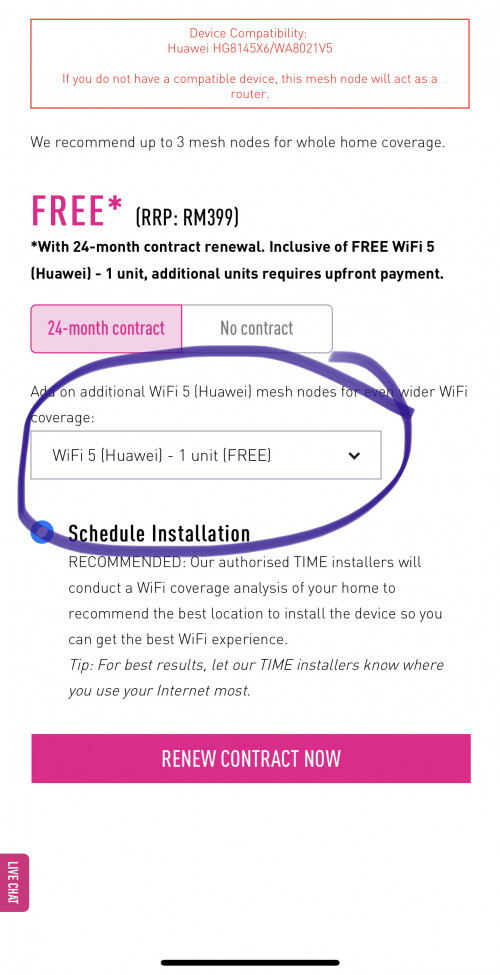 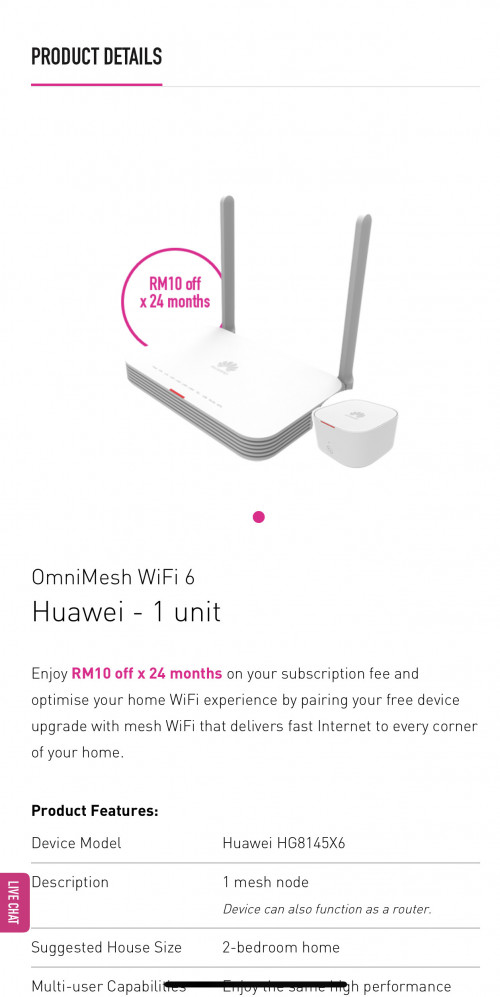 Why does it say it’s Wi-Fi 5? WiFi5 refers to the Mesh Node WA8021V5, the WiFi Router given is HG8145X6. |
|
|
|
|
|
jjj2
|
Apr 8 2022, 09:12 AM
|
|
|
QUOTE(blu.sockz @ Apr 6 2022, 07:59 PM) hi all, would like to get advice. Is there any past experience on using Archer C1200 vs Mesh6 in term of wifi coverage/penetration in condo unit? I'm currently using Archer C1200 and sometimes get a bit of delay/out of coverage in bedroom. Thinking whether worth the upgrade with using Mes6 ONT alone without additional node. Thanks. Hi, don't expect significant improvement in terms of signal penetration. Thanks. |
|
|
|
|
|
jjj2
|
Apr 8 2022, 09:16 AM
|
|
|
QUOTE(hsiengloong @ Apr 5 2022, 04:01 PM) Hi guys, thanks for the feedback and advise. May I check, which setup would be better? Bridge mode or AP mode? Hi, depending on your Asus Router model, if it's in the most recent 1-2 years models, then your own router most likely will have better routing performance, hence go for Bridge mode on the HG8145V5 ONT.Thanks! Hsieng Loong |
|
|
|
|
|
jjj2
|
Apr 8 2022, 10:26 AM
|
|
|
QUOTE(garybenjamin @ Apr 6 2022, 02:38 PM) Bro want to ask for HG8145X6 is it 8+8 Mac filtering already max ? Coz i'm setting my white list and it said i got maxed for my 5ghz SSID. Can I add additional 5ghz SSID to get extra mac filtering ? I guess you mean by WiFi Mac Filtering, yes you can always add additional SSID, but unless you have additional NICs, else you still max out the 8 limitation when connected to a single SSID at one time.Beside to update i got dead spot on my MB corner as in Yellow, if I bridge to two TP-Archer AX73/ Xiaomi Mesh AX3000 mesh would it be better (2 mesh node the 1 next to HGX6 as primary (in orange circle)) ? Go for Xiaomi AX3000 Mesh.and AX73 / AX3000 which is better? 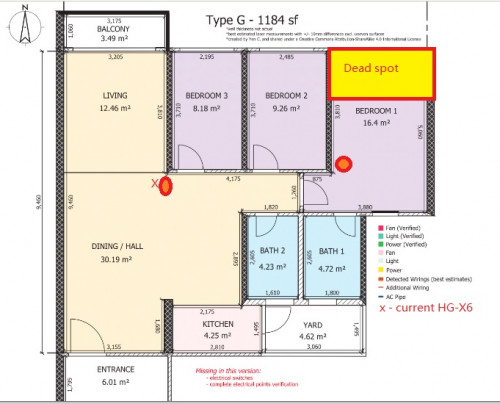 |
|
|
|
|
|
treblecase
|
Apr 8 2022, 11:04 AM
|
|
|
QUOTE(jjj2 @ Apr 8 2022, 09:09 AM) Hmm? It’s a Wi-Fi 6? |
|
|
|
|
|
cairokl
|
Apr 8 2022, 08:53 PM
|
New Member

|
QUOTE(jjj2 @ Apr 8 2022, 10:26 AM) May I know the recommended Xiaomi AX3000 Mesh is global version or china version? How about Redmi ax3000 china version? is the coverage sufficient for the use of condo's layout as attached below? 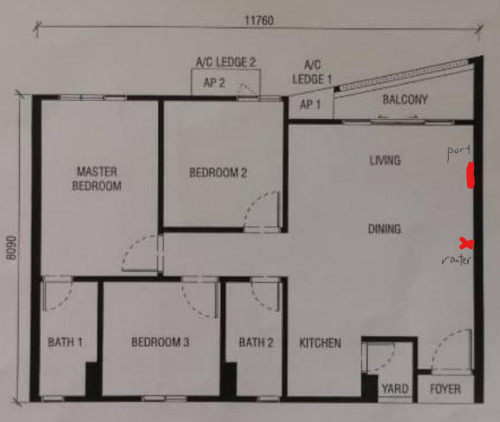 |
|
|
|
|
|
muncheno
|
Apr 9 2022, 07:40 AM
|
|
|
QUOTE(cairokl @ Apr 8 2022, 08:53 PM) May I know the recommended Xiaomi AX3000 Mesh is global version or china version? How about Redmi ax3000 china version? is the coverage sufficient for the use of condo's layout as attached below? Of course no., unless you have line in sight. WIFI signal drop drastically when need to pass through wall, worst when they are 2 to 3 walls to pass thru. Considering get 1 router and 2 mesh node for better speed if most of your devices doesn't support WiFi 6. If fully support WiFi 6, then you may consider 1 router plus a mesh. |
|
|
|
|
|
asphiroth
|
Apr 10 2022, 02:01 PM
|
Getting Started
|
hi guys
i just moved in to a new condo with time fibre ready, so i subscribed and got huawei HG8145X6
previously im using maxis fibre and used TP-Link AX-50, so once i moved, this router is not in use anymore
should i replace Time's HG8145X6 with my TP-Link AX-50 router? since both have same tech feature, not sure which one much powerful
|
|
|
|
|
|
eugenelam85
|
Apr 11 2022, 05:19 PM
|
Getting Started
|
why ax3 pro cannot have own ssid under repeater mode? so for the repeater mode, ax3 pro acts as a mesh node like that?
cannot understand, cause i have tp link wifi repeater, i can set another ssid for devices to connect it.
but for ax3 pro, how we know whether our devices connected direct to modem or connected to ax3 pro? cause the ssid same name only...
|
|
|
|
|
|
afif92
|
Apr 11 2022, 08:13 PM
|
|
|
EDITED : It has been solved. Thanks.
This post has been edited by afif92: Apr 11 2022, 11:20 PM
|
|
|
|
|
|
jjj2
|
Apr 12 2022, 09:11 AM
|
|
|
QUOTE(eugenelam85 @ Apr 11 2022, 05:19 PM) why ax3 pro cannot have own ssid under repeater mode? so for the repeater mode, ax3 pro acts as a mesh node like that? cannot understand, cause i have tp link wifi repeater, i can set another ssid for devices to connect it. but for ax3 pro, how we know whether our devices connected direct to modem or connected to ax3 pro? cause the ssid same name only... Hi, it is designed in such a way, if you want to have dif SSID, then configure as AP. Thanks. |
|
|
|
|
|
jjj2
|
Apr 12 2022, 09:13 AM
|
|
|
QUOTE(asphiroth @ Apr 10 2022, 02:01 PM) hi guys i just moved in to a new condo with time fibre ready, so i subscribed and got huawei HG8145X6 previously im using maxis fibre and used TP-Link AX-50, so once i moved, this router is not in use anymore should i replace Time's HG8145X6 with my TP-Link AX-50 router? since both have same tech feature, not sure which one much powerful Hi, more or less the same. Stick to X6 since you dont need to make additional changes. Thanks. |
|
|
|
|
|
cairokl
|
Apr 12 2022, 03:04 PM
|
New Member
|
QUOTE(muncheno @ Apr 9 2022, 07:40 AM) Of course no., unless you have line in sight. WIFI signal drop drastically when need to pass through wall, worst when they are 2 to 3 walls to pass thru. Considering get 1 router and 2 mesh node for better speed if most of your devices doesn't support WiFi 6. If fully support WiFi 6, then you may consider 1 router plus a mesh. i subscribed 500mpbs for my TIME broadband, currently dont have WIFI 6 device but Im going to have a lot of smart home devices. If i solely use the router of xiaomi ax3600, will it sufficient? or i still need router xiaomi ax3600 and xiaomi ax3000 as mesh node? 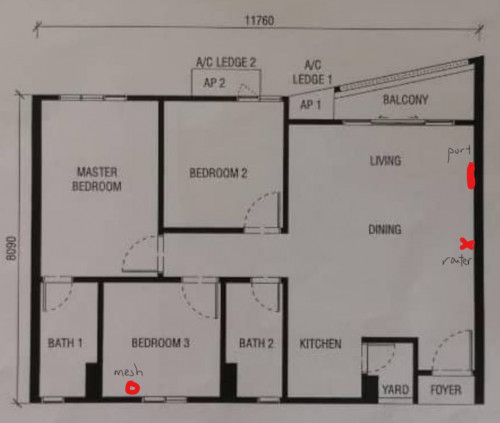 |
|
|
|
|
|
deejay5
|
Apr 12 2022, 03:24 PM
|
New Member
|
hey guys, so my TM contract ends in about 2-3 months. Just called TIME and said there's a port available.
forgot to ask them these two things. TIME, do they give you public IP and can you port forward port 80? before you start bashing me about port 80 security i have my reasons.
|
|
|
|
|
|
muncheno
|
Apr 12 2022, 03:51 PM
|
|
|
QUOTE(cairokl @ Apr 12 2022, 03:04 PM) i subscribed 500mpbs for my TIME broadband, currently dont have WIFI 6 device but Im going to have a lot of smart home devices. If i solely use the router of xiaomi ax3600, will it sufficient? or i still need router xiaomi ax3600 and xiaomi ax3000 as mesh node? If you don't mind getting 30~60mbps instead of 500 mbps in your master room on your old Wifi 2.4/5ghz devices, then you are find using ax3600 alone. Try it first, you can still add a mesh node later. |
|
|
|
|
|
1zx
|
Apr 13 2022, 01:45 PM
|
New Member
|
QUOTE(deejay5 @ Apr 12 2022, 03:24 PM) TIME, do they give you public IP and can you port forward port 80? before you start bashing me about port 80 security i have my reasons. Public IPv4 and IPv6. I haven't tried forwarding port 80 but all the other ports work so it should work.  |
|
|
|
|
|
dark_axl21
|
Apr 13 2022, 07:18 PM
|
|
|
Say guys, if the condo I'm about to move in still doesn't have TIME fibre or another ISPs, how should one proceed as the management office claims that no "offers" were made by TIME to deploy their services there.
Although surrounding condos are all provided by TIME Fibre.
Is there anyone here that expedite the process?
|
|
|
|
|
|
jjj2
|
Apr 13 2022, 10:52 PM
|
|
|
QUOTE(dark_axl21 @ Apr 13 2022, 07:18 PM) Say guys, if the condo I'm about to move in still doesn't have TIME fibre or another ISPs, how should one proceed as the management office claims that no "offers" were made by TIME to deploy their services there. Although surrounding condos are all provided by TIME Fibre. Is there anyone here that expedite the process? Hi, please PM me your building details. Thanks. |
|
|
|
|
|
jjj2
|
Apr 13 2022, 10:53 PM
|
|
|
QUOTE(deejay5 @ Apr 12 2022, 03:24 PM) hey guys, so my TM contract ends in about 2-3 months. Just called TIME and said there's a port available. forgot to ask them these two things. TIME, do they give you public IP and can you port forward port 80? before you start bashing me about port 80 security i have my reasons. Yes, public IP will be provided, and yes you can port forward 80 at this moment. |
|
|
|
|



 Quote
Quote





 0.0295sec
 1.23
1.23
 6 queries
 GZIP Disabled