Outline ·
[ Standard ] ·
Linear+
TIME [OFFICIAL] TIME Fibre Broadband™ v4, Experience the ONE TRUE 2Gbps
|
lee82gx
|
 Jul 4 2021, 05:29 PM Jul 4 2021, 05:29 PM
|

|
Hi guys, I’m moving in to a place with time fibre for the first time for me. I check the website and for my likely package (100mbps), I will be getting a HG8145V5 Huawei modem router.
If I’m not mistaken this is an optical network terminal + WiFi + router all in right?
Assuming it’s crappy, can I use this as the modem / ONT only and use my own asus router? In my new place 1450 sqft with 3+1 rooms I’m worried about coverage so I want to setup a mesh system. The main router will likely be in the living room. And there won’t be any Ethernet back haul I’m afraid.
So i want to buy a new Asus router (AC59U v2), and maybe another one if a wireless mesh is needed to reach some dead Zones.
Is this a good plan? I have an older non mesh asus router working for unifi that is getting old, I may convert that to an access point first if some Ethernet connection is doable.
I am trying to keep wiring cost down and if possible avoid putting a LAN port in every room.
|
|
|
|
|
|
lee82gx
|
Mar 19 2022, 09:30 PM
|
|
|
I'm getting Time in my new apartment soon. I have some Cat6 / Cat5e cables already laid in the walls, so there is some flexibility. I'd like some opinions where I should place 1 extra Asus AImesh node. Currently I have marked at the end of a hall way. I would like to gain good wifi all over of course. Then the wired points will serve my HTPC / work PC / NAS. At LAN Points obviously if i place the mesh node it will be best with a Ethernet backhaul but at the same time I dont think I have that many places in central positions. (I only have 1 extra MESH Node). Also Point C is currently only achieving 100Mbps despite being a belden CAT6 cable (trouble shooting needed). Other than that I have some potential points marked out, A,B,C for wireless backhaul. 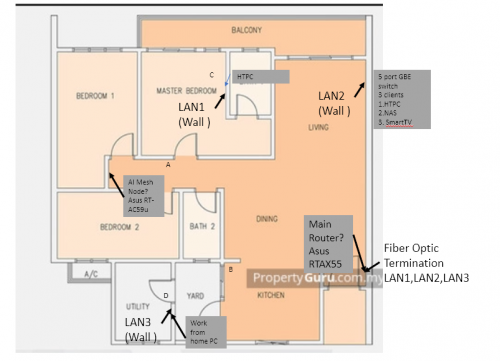 Appreciate input. This post has been edited by lee82gx: Mar 19 2022, 09:33 PM |
|
|
|
|
|
lee82gx
|
Mar 20 2022, 12:59 PM
|
|
|
QUOTE(jjj2 @ Mar 20 2022, 12:51 PM) 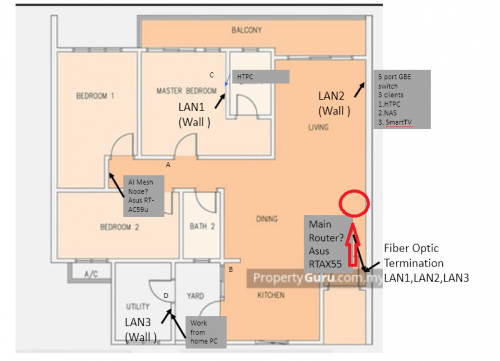 Try move your main router a bit up... Thanks for the tip. Too bad I can’t do it easily…lan cable will be exposed and my wife will say not beautiful…ya I know clear line of sight will be superb for the 5GHz backhaul. |
|
|
|
|
|
lee82gx
|
Mar 24 2022, 07:50 AM
|
|
|
QUOTE(1zx @ Mar 21 2022, 09:25 PM) 1000BaseT requires all 4 pairs. Sounds like not all 4 pairs are properly terminated. Just wanna say thanks for the tip. I checked and indeed the keystone was not properly terminated, I think 2 or 3 cores were disconnected from the pins. Re-attached and got my gigabit yay! |
|
|
|
|
|
lee82gx
|
Jun 16 2022, 12:22 PM
|
|
|
i am wondering if an old Time branded TP-link Archer C1200 can be used as a regular router with unifi or other ISP?
|
|
|
|
|
|
lee82gx
|
Nov 14 2024, 09:11 AM
|
|
|
I couldn't believe they changed for me to public IP on my 200Mbps line.
Now my jellyfin server is back!
|
|
|
|
|
|
lee82gx
|
Nov 15 2024, 11:22 AM
|
|
|
QUOTE(coolguy99 @ Nov 15 2024, 09:44 AM) Why they migrate us to private ip though? world is running out of public IPv4 addresses. IPv6 is ok, but many legacy devices have compatibility issues. CGNAT allows the ISP to internally redistribute their own addresses and I am going to speculate a bit cheaper for ISP side. But don't listen to me I am a noob in networking. |
|
|
|
|
|
lee82gx
|
Nov 15 2024, 10:15 PM
|
|
|
QUOTE(eauyong @ Nov 15 2024, 08:05 PM) I am on 200Mbps and private IP 169.254.xxx.xx and as you have explained, able to access my Synology NAS located in Singapore. You access synology via network or via the web apps hosted by synology? |
|
|
|
|
|
lee82gx
|
Nov 16 2024, 08:47 AM
|
|
|
QUOTE(eauyong @ Nov 16 2024, 01:08 AM) Via the internet with Browser Sometimes with mobile phone listen to music. 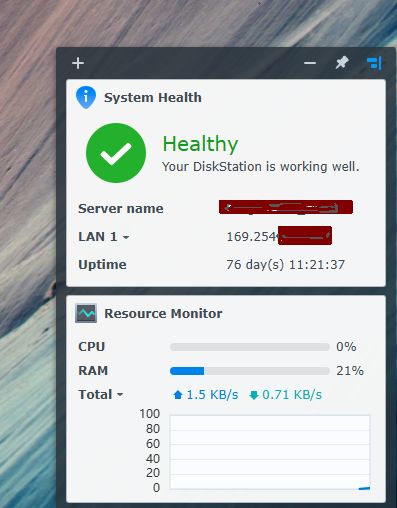 This one because synology app host one….sure no problem. If you built your own application that require actual IP you will have a difficult time getting high speed. Example is Jellyfin server or a non ds fileserver or remote control a PC purely by IP address. |
|
|
|
|
|
lee82gx
|
Nov 16 2024, 11:54 AM
|
|
|
QUOTE(eauyong @ Nov 16 2024, 10:00 AM) Good service & FREE, good apps, highest security Two-Factor Authentication (2FA), highest uptime. SYNOLOGY always!!! All these years no hackers can access, very happy with this server. Even if you find my login name and PW, you cannot get in due to 2FA similiar to a Bank's security. :thumbsup: Ya but their mobile apps like ds video is soo old and not well maintained in apple appstore. I’m a user of synology too and I do like their products just that they don’t work well with older hardware. And their new hardware is bloody expensive…😝 |
|
|
|
|
|
lee82gx
|
Nov 16 2024, 04:04 PM
|
|
|
QUOTE(eauyong @ Nov 16 2024, 03:41 PM) My phone is an old 2019 android phone I use DS file to access and right click the file use VLC for Android to open/play all types of media. Performance is OK. i mean your synology is probably not old, like mine. I have a 213j. It crawls. But, out of curiosity can you manage to stream media like 4k hdr on a client such as smart TV? It is not the same as direct play with a VLC (this one does the rendering on your native client). |
|
|
|
|



 Quote
Quote

 0.0648sec
 0.55
0.55
 7 queries
 GZIP Disabled