

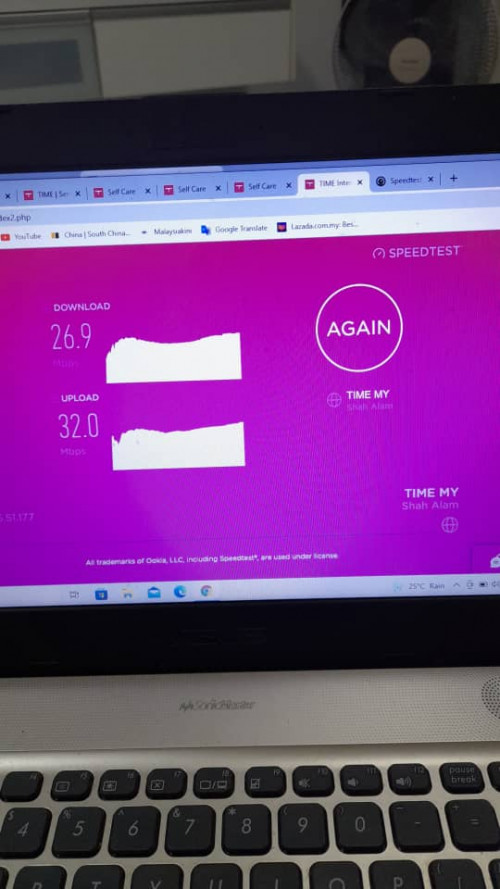
TIME [OFFICIAL] TIME Fibre Broadband™ v4, Experience the ONE TRUE 2Gbps
TIME [OFFICIAL] TIME Fibre Broadband™ v4, Experience the ONE TRUE 2Gbps
|
|
 Mar 17 2022, 08:03 AM Mar 17 2022, 08:03 AM
Show posts by this member only | IPv6 | Post
#8721
|
 
Junior Member
78 posts Joined: Aug 2008 
|
HG8240H5 huawei Modem from Time seems giving weak signal. Any idea if it happened to you guys.
|
|
|
|
|
|
Mar 18 2022, 03:45 PM
|

Junior Member
166 posts Joined: Jan 2008
|
So I don't sub to TIME but my expat boss does. He already terminated his contract after 6 years and wondering how to get back the equipment deposit of RM500? I don't really see much details on how to do this. Much thanks for any info.
|
|
|
Mar 18 2022, 05:16 PM
Show posts by this member only | IPv6 | Post
#8723
|

Senior Member
3,608 posts Joined: Feb 2006
|
QUOTE(Ryan19 @ Mar 17 2022, 08:03 AM) HG8240H5 huawei Modem from Time seems giving weak signal. Any idea if it happened to you guys. Do you mean WiFi signal ? If so, HG8240H5 does not broadcast wifi signal. Please kindly confirm the model of the Huawei ONT. Thanks. |
|
|
Mar 18 2022, 05:19 PM
Show posts by this member only | IPv6 | Post
#8724
|
|
Senior Member
3,608 posts Joined: Feb 2006
|
QUOTE(XIII @ Mar 18 2022, 03:45 PM) So I don't sub to TIME but my expat boss does. He already terminated his contract after 6 years and wondering how to get back the equipment deposit of RM500? I don't really see much details on how to do this. Much thanks for any info. Hi, is your boss a foreigner ? Please kindly contact our CS at 1800 18 1818. You can also fill this up for the refund process. https://refund.time.com.my/ This post has been edited by jjj2: Mar 18 2022, 05:19 PM |
|
|
Mar 18 2022, 05:43 PM
Show posts by this member only | IPv6 | Post
#8725
|
|
Senior Member
3,608 posts Joined: Feb 2006
|
QUOTE(AlexeyGubin @ Mar 16 2022, 12:04 PM) Hi everyone! I'm currently using Time 500mbs with a router hg8145v5. speed is ok, but the coverage is very bad. what would you recommend to improve coverage (my appartment is 1600 sq.ft.). to buy a huawei edge ont from time (is it or proper mesh or is it working as repeater and cutting the speed?) or to buy for example one tower of Xiaomi ax3000? Hi, For Full Mesh, go for Xiaomi Tower AX3000 (Twin Pack)....turn your ONT into Bridge Mode....Thanks. |
|
|
Mar 18 2022, 07:30 PM
Show posts by this member only | IPv6 | Post
#8726
|
|
Junior Member
78 posts Joined: Aug 2008
|
QUOTE(jjj2 @ Mar 18 2022, 05:16 PM) Do you mean WiFi signal ? If so, HG8240H5 does not broadcast wifi signal. EchoLife WA8021V5 Mesh router.Please kindly confirm the model of the Huawei ONT. Thanks. |
|
|
|
|
|
Mar 19 2022, 02:37 PM
Show posts by this member only | IPv6 | Post
#8727
|
|
Senior Member
3,608 posts Joined: Feb 2006
|
QUOTE(Ryan19 @ Mar 18 2022, 07:30 PM) EchoLife WA8021V5 Mesh router. Hi, either get the 2nd one to mesh with the 1st unit or totally purchase a new mesh system on your own, depending on your house unit size.Thanks. |
|
|
Mar 19 2022, 03:25 PM
Show posts by this member only | IPv6 | Post
#8728
|
|
Junior Member
78 posts Joined: Aug 2008
|
QUOTE(jjj2 @ Mar 19 2022, 02:37 PM) Hi, either get the 2nd one to mesh with the 1st unit or totally purchase a new mesh system on your own, depending on your house unit size. Actually my unit got 3 dead zone (bedroom). So need get a set of 2 3rd party mesh router. Or I just replace the mesh with 3rd party WiFi-6 router?Thanks. |
|
|
Mar 19 2022, 06:17 PM
Show posts by this member only | IPv6 | Post
#8729
|
|
Senior Member
3,608 posts Joined: Feb 2006
|
QUOTE(Ryan19 @ Mar 19 2022, 03:25 PM) Actually my unit got 3 dead zone (bedroom). So need get a set of 2 3rd party mesh router. Or I just replace the mesh with 3rd party WiFi-6 router? Hi, go for WiFi6 Mesh System. |
|
|
Mar 19 2022, 09:02 PM
Show posts by this member only | IPv6 | Post
#8730
|
|
Junior Member
78 posts Joined: Aug 2008
|
QUOTE(jjj2 @ Mar 19 2022, 06:17 PM) Hi, go for WiFi6 Mesh System. Can recommend any good brand that’s compatible with the Huawei modem? |
|
|
Mar 19 2022, 09:30 PM
|

Senior Member
3,117 posts Joined: Jul 2005 From: Penang 
|
I'm getting Time in my new apartment soon.
I have some Cat6 / Cat5e cables already laid in the walls, so there is some flexibility. I'd like some opinions where I should place 1 extra Asus AImesh node. Currently I have marked at the end of a hall way. I would like to gain good wifi all over of course. Then the wired points will serve my HTPC / work PC / NAS. At LAN Points obviously if i place the mesh node it will be best with a Ethernet backhaul but at the same time I dont think I have that many places in central positions. (I only have 1 extra MESH Node). Also Point C is currently only achieving 100Mbps despite being a belden CAT6 cable (trouble shooting needed). Other than that I have some potential points marked out, A,B,C for wireless backhaul. 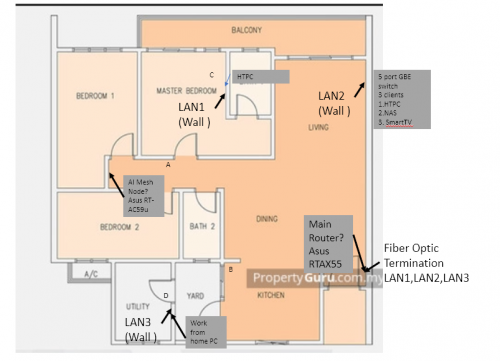 Appreciate input. This post has been edited by lee82gx: Mar 19 2022, 09:33 PM |
|
|
Mar 20 2022, 04:27 AM
|

Junior Member
84 posts Joined: Jan 2019
|
QUOTE(jjj2 @ Mar 19 2022, 06:17 PM) Hi, go for WiFi6 Mesh System. hi bro,1. i see time now is giving wifi6 mesh router, is this router anything close to ax3 pro (quad core)? or still ax3 pro is much much better? 2. during weekend the cs able to change the 2in1 modem to bridge mode or not? 3. i have the huawei v5 2in1 modem, last time you told me can buy ax3 pro (quad core) to upgrade, so can i check with you the steps stated below are correct or not? a. connect the ax3 wan with huawei v5 port1 b. then call cs to change v5 to bridge mode c. only take like 15 minutes to change right? d. i see the ax3 booklet said go 192.168.3.1 for setting? e. then key in the pppoe details which can be found in time selfcare? xxx@timebb & password? f. then done right? any extra steps that i missed out? please help to see see, thank you much!  |
|
|
Mar 20 2022, 11:33 AM
Show posts by this member only | IPv6 | Post
#8733
|
|
Junior Member
78 posts Joined: Aug 2008
|
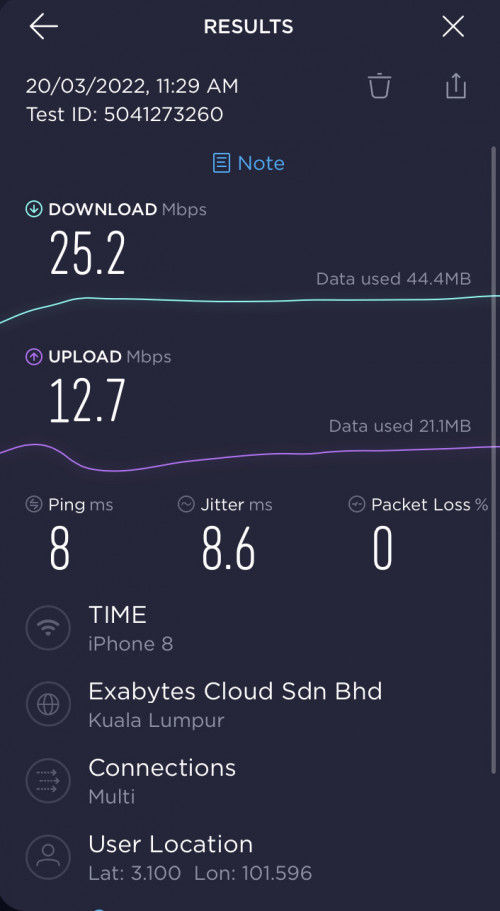 My bedroom 2.4G speed seems decent under 100mb package. |
|
|
|
|
|
Mar 20 2022, 12:39 PM
Show posts by this member only | IPv6 | Post
#8734
|
|
Senior Member
3,608 posts Joined: Feb 2006
|
QUOTE(Ryan19 @ Mar 19 2022, 09:02 PM) Can recommend any good brand that’s compatible with the Huawei modem? Hi, go for budgetary brands like Huawei/Xiaomi/TP-Link , or higher-end, Asus.Do note that by turning your Huawei ONT into bridge mode, you are free to use most of the mesh brands in the market. Thanks. |
|
|
Mar 20 2022, 12:45 PM
Show posts by this member only | IPv6 | Post
#8735
|
|
Senior Member
3,608 posts Joined: Feb 2006
|
QUOTE(eugenelam85 @ Mar 20 2022, 04:27 AM) hi bro, This post has been edited by jjj2: Mar 21 2022, 11:05 AM1. i see time now is giving wifi6 mesh router, is this router anything close to ax3 pro (quad core)? or still ax3 pro is much much better? AX3 Pro (Quad Core). 2. during weekend the cs able to change the 2in1 modem to bridge mode or not? Better not, as sometimes it involves provisioning team assistance. 3. i have the huawei v5 2in1 modem, last time you told me can buy ax3 pro (quad core) to upgrade, so can i check with you the steps stated below are correct or not? a. connect the ax3 wan with huawei v5 port1 b. then call cs to change v5 to bridge mode Yes, Step a & b sequence not important. c. only take like 15 minutes to change right? Not really, sometimes they need some time to do that. d. i see the ax3 booklet said go 192.168.3.1 for setting? Yes, that is for you to login into the admin panel to configure the router. e. then key in the pppoe details which can be found in time selfcare? xxx@timebb & password? f. then done right? Yes, and your WiFi settings as well. any extra steps that i missed out? please help to see see, thank you much! eugenelam85 liked this post
|
|
|
Mar 20 2022, 12:51 PM
Show posts by this member only | IPv6 | Post
#8736
|
|
Senior Member
3,608 posts Joined: Feb 2006
|
QUOTE(lee82gx @ Mar 19 2022, 09:30 PM) I'm getting Time in my new apartment soon. I have some Cat6 / Cat5e cables already laid in the walls, so there is some flexibility. I'd like some opinions where I should place 1 extra Asus AImesh node. Currently I have marked at the end of a hall way. I would like to gain good wifi all over of course. Then the wired points will serve my HTPC / work PC / NAS. At LAN Points obviously if i place the mesh node it will be best with a Ethernet backhaul but at the same time I dont think I have that many places in central positions. (I only have 1 extra MESH Node). Also Point C is currently only achieving 100Mbps despite being a belden CAT6 cable (trouble shooting needed). Other than that I have some potential points marked out, A,B,C for wireless backhaul. Appreciate input. 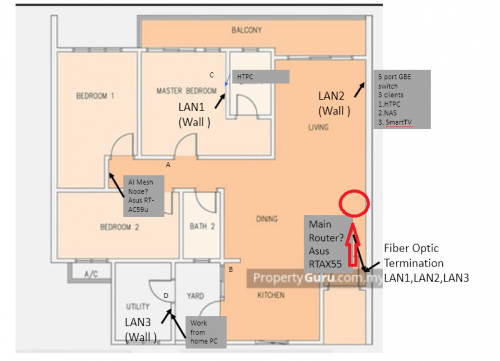 Try move your main router a bit up... |
|
|
Mar 20 2022, 12:59 PM
Show posts by this member only | IPv6 | Post
#8737
|
|
Senior Member
3,117 posts Joined: Jul 2005 From: Penang
|
QUOTE(jjj2 @ Mar 20 2022, 12:51 PM) Try move your main router a bit up... |
|
|
Mar 20 2022, 08:20 PM
|
|
Junior Member
84 posts Joined: Jan 2019
|
QUOTE(jjj2 @ Mar 20 2022, 12:45 PM)  |
|
|
Mar 20 2022, 10:03 PM
Show posts by this member only | IPv6 | Post
#8739
|
|
Junior Member
78 posts Joined: Aug 2008
|
QUOTE(jjj2 @ Mar 20 2022, 12:39 PM) Hi, go for budgetary brands like Huawei/Xiaomi/TP-Link , or higher-end, Asus. Ok. Will get back to u after research on the Mesh WiFi-6.Do note that by turning your Huawei ONT into bridge mode, you are free to use most of the mesh brands in the market. Thanks. |
|
|
Mar 21 2022, 09:25 PM
Show posts by this member only | IPv6 | Post
#8740
|
|
Newbie
20 posts Joined: Feb 2019
|
QUOTE(lee82gx @ Mar 19 2022, 09:30 PM) Also Point C is currently only achieving 100Mbps despite being a belden CAT6 cable (trouble shooting needed). 1000BaseT requires all 4 pairs.Appreciate input. Sounds like not all 4 pairs are properly terminated. lee82gx liked this post
|
| Change to: |  0.0324sec 0.0324sec
 0.88 0.88
 6 queries 6 queries
 GZIP Disabled GZIP Disabled
Time is now: 18th December 2025 - 05:20 PM |
 Quote
Quote