Welcome Guest ( Log In | Register )

670 Pages « < 430 431 432 433 434 > » Bottom

Outline · [ Standard ] · Linear+

TIME [OFFICIAL] TIME Fibre Broadband™ v4, Experience the ONE TRUE 2Gbps

views
     
PRSXFENG
post Feb 27 2022, 09:25 AM

Look at all my stars!!
*******
Senior Member
2,611 posts

Joined: Nov 2020


QUOTE(slack3r @ Feb 27 2022, 01:32 AM)
Hi. last year got new time connection and I was provided the new HG8145V5 but some settings specially the dns cannot change. Since I work from home and sometimes got vpn/intranet issues, our IT ask me to test different dns settings they provide to troubleshoot the issue. I want the settings to be on the modem/router since I use 2 machines (1 desktop and 1 laptop) for work so I rather not change dns settings manually in windows and have them removed again when I work from another location or from the office.

I have a friend who has HG8240H that he is not using anymore (also previously used with TIME)

Questions
1. Can I borrow his onu and use it with my connection?
2. Do I need to call time to setup anything?
3. Can I set it up myself without calling time?
4. Should I just call time and setup my HG8145V5 to bridge mode and I control my network using my own router?
5. If option #4 do I need special router or normal one with option for pppoe settings will work?

Basically I want to use his modem/onu/ont and have my own separate router to handle things on my own I just need the connection to time's server. Basically my time connection I don't use the phone.. I just basically use it for internet

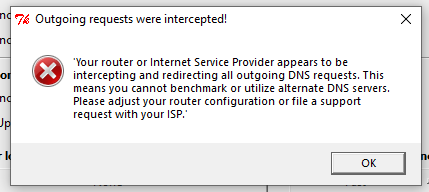
Another reason for changing modem and want my own router to setup my network is because they are hijacking the dns
user posted image

Any information will be appreciated.
*
I think 4. is the best option to go with, since it's the stock ont/router combo that hijacks dns.
bridge mode it and use own router, anything pppoe should work

engonaplane
post Feb 27 2022, 03:04 PM

New Member
*
Junior Member
43 posts

Joined: Mar 2020
QUOTE(jjj2 @ Feb 26 2022, 12:27 AM)
Hi, can let me know what is the issue in more details ?
Thanks.
*
replied your mesg
jjj2
post Feb 27 2022, 05:06 PM

Look at all my stars!!
*******
Senior Member
3,608 posts

Joined: Feb 2006
QUOTE(slack3r @ Feb 27 2022, 01:32 AM)
Hi. last year got new time connection and I was provided the new HG8145V5 but some settings specially the dns cannot change. Since I work from home and sometimes got vpn/intranet issues, our IT ask me to test different dns settings they provide to troubleshoot the issue. I want the settings to be on the modem/router since I use 2 machines (1 desktop and 1 laptop) for work so I rather not change dns settings manually in windows and have them removed again when I work from another location or from the office.

I have a friend who has HG8240H that he is not using anymore (also previously used with TIME)

Questions
1. Can I borrow his onu and use it with my connection?
Sorry you cant.
2. Do I need to call time to setup anything?
3. Can I set it up myself without calling time?
4. Should I just call time and setup my HG8145V5 to bridge mode and I control my network using my own router?
Yes, if you want to have more control & better routing performance.
5. If option #4 do I need special router or normal one with option for pppoe settings will work?
Normal router that able to perform PPPOE dialing will work just fine.

Basically I want to use his modem/onu/ont and have my own separate router to handle things on my own I just need the connection to time's server. Basically my time connection I don't use the phone.. I just basically use it for internet

Another reason for changing modem and want my own router to setup my network is because they are hijacking the dns

user posted image

Any information will be appreciated.
*
fragma757
post Feb 27 2022, 11:20 PM

New Member
*
Junior Member
18 posts

Joined: Apr 2008
From: Tortimer's Island
QUOTE(jjj2 @ Feb 26 2022, 12:18 AM)
Hi, are you chatting with bots ? Please ring CS @ 1800 18 1818.
Yes can be done remotely by pushing over the settings to your ONT.

Thanks.
*
@jjj2, I took your advice and called the CS at 1800 18 1818, everything settled in 15 mins quick and painless. Thank you so much!

Now I'm using my own TP-Link Archer C3150 with HG8145V5 in bridge mode. Archer C3150 wifi coverage outperformed HG8145V5 itself.

This post has been edited by fragma757: Feb 27 2022, 11:21 PM
sasuketaichou
post Feb 28 2022, 12:12 AM

Getting Started
**
Junior Member
192 posts

Joined: Jun 2013
i try searching for this but no luck

im moving out to a new condo next month and this place doesnt have time yet, in the website it seems like theres an option to request for it

how long does the process take place? if anyone can answer me as in the meantime i am waiting for time response

thank you
jjj2
post Feb 28 2022, 12:30 AM

Look at all my stars!!
*******
Senior Member
3,608 posts

Joined: Feb 2006
QUOTE(fragma757 @ Feb 27 2022, 11:20 PM)
@jjj2, I took your advice and called the CS at 1800 18 1818, everything settled in 15 mins quick and painless. Thank you so much!

Now I'm using my own TP-Link Archer C3150 with HG8145V5 in bridge mode. Archer C3150 wifi coverage outperformed HG8145V5 itself.
*
Hi, glad it's done smile.gif

Cheers smile.gif
jjj2
post Feb 28 2022, 12:32 AM

Look at all my stars!!
*******
Senior Member
3,608 posts

Joined: Feb 2006
QUOTE(sasuketaichou @ Feb 28 2022, 12:12 AM)
i try searching for this but no luck

im moving out to a new condo next month and this place doesnt have time yet, in the website it seems like theres an option to request for it

how long does the process take place? if anyone can answer me as in the meantime i am waiting for time response

thank you
*
Hi, this really depends, generally it takes 3--9 months. Some cases take even much longer.

Thanks.
throwawayacclmao
post Feb 28 2022, 01:11 AM

New Member
*
Junior Member
39 posts

Joined: Dec 2021
Hi i am recently moving to a new place and requested relocation service.
The installer came and mentioned there is a high reading error at the optical fibre and say he cant install and asked me to talk to management.
Management says its usual case in this condo and usually need the TIME installer to replace the fibre head connector.

May I know how long this process usually take? Not sure if TIME going to charge me full price during when this service is down pending relocation installation.
paogeh
post Feb 28 2022, 01:36 AM

Regular
******
Senior Member
1,679 posts

Joined: Sep 2006
From: Penang


Your fibre reading is high.
Please raise a ticket below for further support to resolve your connectivity issue.


*mAY I know what is this ? Thank you
paogeh
post Feb 28 2022, 01:56 AM

Regular
******
Senior Member
1,679 posts

Joined: Sep 2006
From: Penang


another questions .
For past years TIME receipt/statement ,

if IncomeTax audit,
can we ask TIME to provide the backdated years for the receipt claim under internet/broadband ? Thank you


slack3r
post Feb 28 2022, 04:57 AM

Getting Started
**
Junior Member
177 posts

Joined: May 2012


QUOTE(PRSXFENG @ Feb 27 2022, 09:25 AM)
I think 4. is the best option to go with, since it's the stock ont/router combo that hijacks dns.
bridge mode it and use own router, anything pppoe should work
*
QUOTE(jjj2 @ Feb 27 2022, 05:06 PM)

*
Thanks.. Will still be able to turn the wireless on/off in the ont when it's on bridge mode?
engonaplane
post Feb 28 2022, 06:14 AM

New Member
*
Junior Member
43 posts

Joined: Mar 2020
QUOTE(slack3r @ Feb 28 2022, 04:57 AM)
Thanks.. Will still be able to turn the wireless on/off in the ont when it's on bridge mode?
*
yes. the IP address is still valid and can use wifi (or LAN port) with the credentials under the ONT to log in and disable
slack3r
post Feb 28 2022, 01:14 PM

Getting Started
**
Junior Member
177 posts

Joined: May 2012


Thanks to jjj2 & PRSXFENG my ont is now in bridge mode took less than 15mins

QUOTE(engonaplane @ Feb 28 2022, 06:14 AM)
yes. the IP address is still valid and can use wifi (or LAN port) with the credentials under the ONT to log in and disable
*
Hi I can't seem to access the ONT now but I can still see the wireless networks from the ONT but there are exclamation points indicating there is no internet connection

stevenhsl
post Feb 28 2022, 02:50 PM

New Member
*
Newbie
2 posts

Joined: Dec 2012


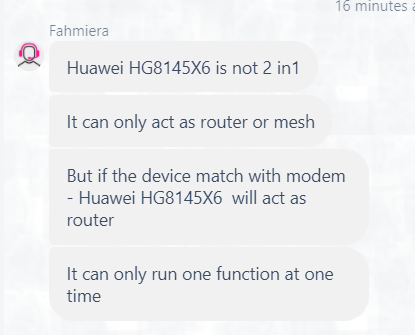
Question: Is the Wifi 6 router HG8145X6 a 2-in-1 ONT or standalone router?

My condo's optical terminal is placed near the fuse box and enclose inside a metal case, currently the config is a standalone ONU + router place near TV console through the build-in LAN socket, hence 2-in-1 is not ideal for my unit. My current setup is HG8240H ONU + WA8021V5.

From the comments in thread, and also Huawei support site, (https://support.huawei.com/enterprise/en/doc/EDOC1100140843), it looks like HG8145X6 and 8145V5 are the same 2-in-1 ONT unit.

However, TIME CS told me otherwise, she said HG8145X6 is a standalone router, and will pair with HG8240H ONU.

I'm quite confused though, some said it is 2-in-1, but CS said it is standalone router...

user posted image
engonaplane
post Feb 28 2022, 04:00 PM

New Member
*
Junior Member
43 posts

Joined: Mar 2020
QUOTE(slack3r @ Feb 28 2022, 01:14 PM)
Thanks to jjj2 & PRSXFENG my ont is now in bridge mode took less than 15mins
Hi I can't seem to access the ONT now but I can still see the wireless networks from the ONT but there are exclamation points indicating there is no internet connection
*
yup cause it is in bridge mode. Once you connect to that wifi, use 192.168.100.1 to get to the login page. just make sure you disable the wifi you are on last (2g or 5g)
eugenelam85
post Feb 28 2022, 06:26 PM

Getting Started
**
Junior Member
84 posts

Joined: Jan 2019
hi guys, currently my unit is using the huawei 2in1 stock router, the signal is terrible in another corner of the unit, planning to buy huawei ax3 quad core to improve the situation.

but currently tenant is staying inside the unit, once i call the cs to change the stock router to bridge mode, would it be changed immediately or within few hours? cause i see previous post stated it may take 2 to 3 days..

once it is on bridge mode means no internet connection right? i am thinking of how to do it so it brings the least inconveniency to my tenants..

any suggestion please? thank you!
engonaplane
post Feb 28 2022, 07:31 PM

New Member
*
Junior Member
43 posts

Joined: Mar 2020
QUOTE(eugenelam85 @ Feb 28 2022, 06:26 PM)

but currently tenant is staying inside the unit, once i call the cs to change the stock router to bridge mode, would it be changed immediately or within few hours? cause i see previous post stated it may take 2 to 3 days..

any suggestion please? thank you!
*
my experience was within 15mins end to end.. most time spend waiting for CS to come online.
They will ask u whether u already configured your router with credentials and plugged in before they "flip the switch"
eugenelam85
post Feb 28 2022, 08:54 PM

Getting Started
**
Junior Member
84 posts

Joined: Jan 2019
QUOTE(engonaplane @ Feb 28 2022, 07:31 PM)
my experience was within 15mins end to end.. most time spend waiting for CS to come online.
They will ask u whether u already configured your router with credentials and plugged in before they "flip the switch"
*
i see, so it is actually quite fast, thank you for the info! thumbup.gif
slack3r
post Mar 1 2022, 02:23 AM

Getting Started
**
Junior Member
177 posts

Joined: May 2012


QUOTE(engonaplane @ Feb 28 2022, 04:00 PM)
yup cause it is in bridge mode. Once you connect to that wifi, use 192.168.100.1 to get to the login page. just make sure you disable the wifi you are on last (2g or 5g)
*
yeah fixed it forgot to update here. thanks
garybenjamin
post Mar 1 2022, 04:39 PM

New Member
*
Junior Member
26 posts

Joined: Nov 2009


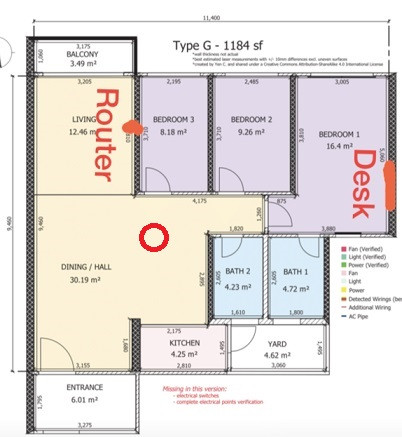
QUOTE(jjj2 @ Feb 17 2022, 09:41 AM)
Hi, if you want full speed, you will need to run a Network Cable to your master bedroom from the TIME HG8145X6 ONT.

AX3 Pro wont be able to get full 500Mbps if you repeat it... anyway you can get far more improvement if you can move the ONT to this location circled in red.

user posted image

Thanks.
*
Thank you JJ. i moved my ONT to close to where you place vola .... i able to get 28xmbps rather than 8x~9x mbps .... thanks bro.

670 Pages « < 430 431 432 433 434 > » Top
 

Change to:
| Lo-Fi Version
0.0255sec    0.48    6 queries    GZIP Disabled
Time is now: 15th December 2025 - 06:09 PM