

TIME [OFFICIAL] TIME Fibre Broadband™ v4, Experience the ONE TRUE 2Gbps
TIME [OFFICIAL] TIME Fibre Broadband™ v4, Experience the ONE TRUE 2Gbps
|
|
 Feb 14 2022, 04:05 PM Feb 14 2022, 04:05 PM
Return to original view | Post
#1
|
 
Junior Member
26 posts Joined: Nov 2009  
|
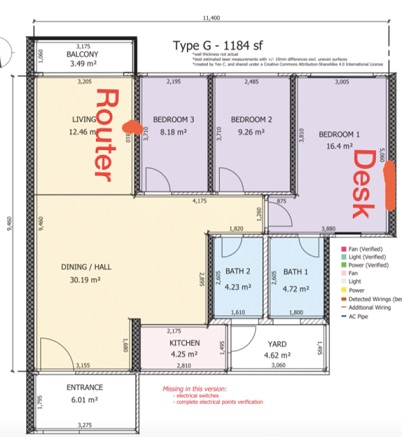
Hi friend i subscribed Time 500mbps and upgraded to HG8145X6. But my router is at living room but my computer and laptop at master room i.e. 2 room away, around 15m away with 3 concrete wall in between. So if I buy AX3 Pro is it sufficient to repeat it to master room to reap for full speed so i can use lan cable at master bedroom / got 5ghz wifi. Or i will need stronger mesh modem to repeat it?
|
|
|
|
|
|
Feb 15 2022, 08:22 AM
Return to original view | Post
#2
|
|
Junior Member
26 posts Joined: Nov 2009
|
QUOTE(ryansxs @ Feb 15 2022, 03:17 AM) If you want full speed, pull a cable from your router to you master bed room. Where should I put my node / router (Huawei AX3 Pro) if I gonna build a mesh ?Or Build a mesh Temporarily, if you want to get better speed, move your router closer to your dining hall, open your masterbedroom door and test the speed.  |
|
|
Mar 1 2022, 04:39 PM
Return to original view | Post
#3
|
|
Junior Member
26 posts Joined: Nov 2009
|
QUOTE(jjj2 @ Feb 17 2022, 09:41 AM) Hi, if you want full speed, you will need to run a Network Cable to your master bedroom from the TIME HG8145X6 ONT. Thank you JJ. i moved my ONT to close to where you place vola .... i able to get 28xmbps rather than 8x~9x mbps .... thanks bro.AX3 Pro wont be able to get full 500Mbps if you repeat it... anyway you can get far more improvement if you can move the ONT to this location circled in red. 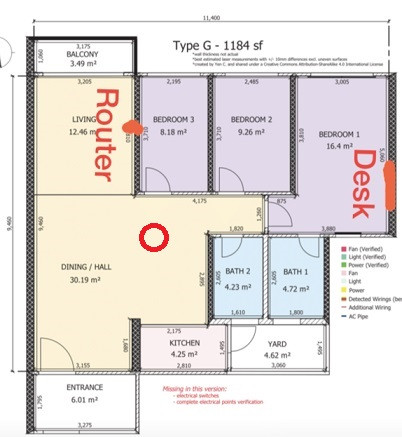 Thanks. |
|
|
Apr 6 2022, 02:12 PM
Return to original view | Post
#4
|
|
Junior Member
26 posts Joined: Nov 2009
|
QUOTE(treblecase @ Apr 6 2022, 12:28 PM) Yeah, I’ve been offered this.. Because it is Huawei HG8145V5, not X6. X6 onlygot wifi-6 only certain customer renew they will give X6.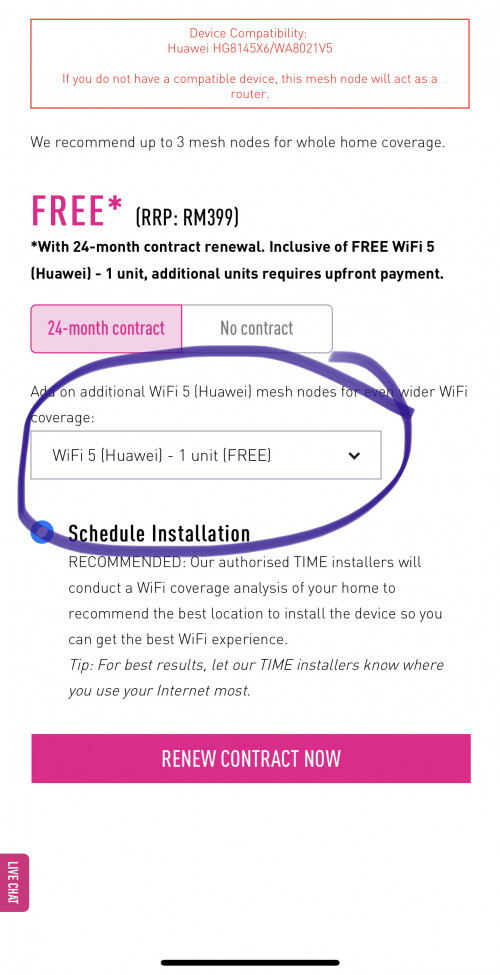 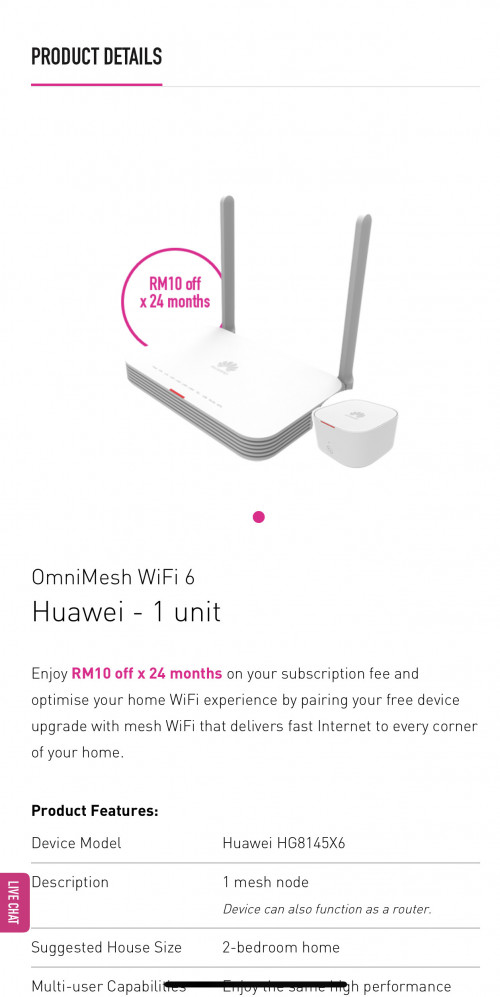 Why does it say it’s Wi-Fi 5? This post has been edited by garybenjamin: Apr 6 2022, 02:13 PM |
|
|
Apr 6 2022, 02:38 PM
Return to original view | Post
#5
|
|
Junior Member
26 posts Joined: Nov 2009
|
Bro want to ask for HG8145X6 is it 8+8 Mac filtering already max ? Coz i'm setting my white list and it said i got maxed for my 5ghz SSID. Can I add additional 5ghz SSID to get extra mac filtering ?
Beside to update i got dead spot on my MB corner as in Yellow, if I bridge to two TP-Archer AX73/ Xiaomi Mesh AX3000 mesh would it be better (2 mesh node the 1 next to HGX6 as primary (in orange circle)) ? and AX73 / AX3000 which is better? 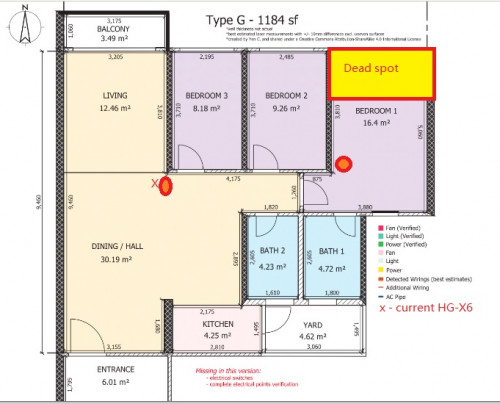 |
|
|
Apr 6 2022, 02:53 PM
Return to original view | Post
#6
|
|
Junior Member
26 posts Joined: Nov 2009
|
QUOTE(treblecase @ Apr 6 2022, 02:23 PM) 500 I think better call CS to ask.... the Wifi5 is they give a. 1x HG8145X6 (wifi6 router with mesh enable)+ 1X WA8021v5 (wifi 5 mesh node) or b. 1x HG8145v5 (wifi5 router with mesh enable ) + 1x WA8021v5 (wifi5 mesh node) or c. 1x WA8021v5 (wifi 5 mesh node only) |
|
|
|
|
|
Apr 15 2022, 12:31 PM
Return to original view | Post
#7
|
|
Junior Member
26 posts Joined: Nov 2009
|
QUOTE(jjj2 @ Apr 8 2022, 10:26 AM) Do I need to do additional setting? |
|
|
Apr 15 2022, 02:32 PM
Return to original view | Post
#8
|
|
Junior Member
26 posts Joined: Nov 2009
|
QUOTE(jjj2 @ Apr 15 2022, 01:23 PM) Yes Bro u need to do some settings, either you pair using WPS (this is not mesh ya). I see, but i still blur abit bro. Pair using WPS mean it is extender mode already it is not my intention to do it. So to setup mesh environment i think there will be 2 way i can do it right ?Or you hook up with a network cable & set it to become AP. 1. Hook up LAN to AX3000 and set AX3000 to AP mode then Mesh to another AX3000 that in masterbed room. But this 1 i will be using HG8145X6 for internet control e.g. white list Mac filtering all here. 2. HG8145X6 as bridge mode push over to AX3000 as gateway, then using MiWIfi interface for all network control. I want to know setup AX3000 as AP or HG8145X6 as Bridge Mode, which coverage and network will be better/more stable? This post has been edited by garybenjamin: Apr 15 2022, 02:35 PM |
|
|
Apr 22 2022, 02:39 PM
Return to original view | Post
#9
|
|
Junior Member
26 posts Joined: Nov 2009
|
QUOTE(jun_ng_1208 @ Apr 22 2022, 12:40 PM) Hi JJJ Here u go or go to original post #8643change DNS I just installed the Huawei HG8145X6 and don't see any option in the router page to change the DNS tho, cos last time in the TP Link C1200 there's this field for me to input the DNS.. QUOTE(Anime4000 @ Mar 2 2022, 03:07 AM) To who using stock TIME AIO ONU, want to change DNS, try this, This post has been edited by garybenjamin: Apr 22 2022, 02:48 PMEnable SSH or TELNET: [attachmentid=11103806] Open SSH: CODE ssh root@192.168.100.1 Root password is: CODE adminHW Later you will be greet WAP> Enter SU WAP: CODE su You will see SU_WAP> when success See your LAN DHCP CODE display dhcp server pool all look like this: CODE ---------------------------------------------------------------------- Index DHCP Server Netmask State ---------------------------------------------------------------------- 1 192.168.100.1 255.255.255.0 up 2 -- -- down ---------------------------------------------------------------------- Total: 2 success! Then, Update it: CODE dhcp server pool config index 1 gateway 192.168.100.1 netmask 255.255.255.0 start 192.168.100.2 end 192.168.100.254 dns 1.1.1.1 Check on WebGUI if success: [attachmentid=11103807] Done  Some extra finding... CODE SU_WAP>display pppoe client all ---------------------------------------------------------------------- Index Interface HW Addr State IP/Netmask ---------------------------------------------------------------------- 1 TIMEBB 34:58:40:1A:C1:59 Up 202.184.170.93/32 ---------------------------------------------------------------------- Total: 1 success! SU_WAP>display ppp interface interface TIMEBB --------------------------------------------------------------------- Mru :1492 Status :Enable IPCPStatus :Enable IPv6CPStatus :Enable --------------------------------------------------------------------- success! SU_WAP>ppp interface config ? ppp interface config interface interface { status status | ipcpstatus ipcpstatus | ipv6cpstatus ipv6cpstatus | mru mru } * |
|
|
Apr 22 2022, 02:52 PM
Return to original view | Post
#10
|
|
Junior Member
26 posts Joined: Nov 2009
|
QUOTE(chrischiang @ Apr 22 2022, 02:43 PM) hello, Here u go i would like to ask how to set up WA8021V5 (edge ONT) as ethernet backhaul instead of using wifi?? |
|
|
Apr 22 2022, 04:54 PM
Return to original view | Post
#11
|
|
Junior Member
26 posts Joined: Nov 2009
|
QUOTE(jun_ng_1208 @ Apr 22 2022, 03:54 PM) ooff macam a bit tedious Windows 10 have SSH beta apps pre-installed u just need to activate it. Go to "Apps & Features"> Manage Optional Feature > "Add a new feature"> scroll down until u find "OpenSSH CLIENT(beta)" then click install. lemme go study a bit when I get back pardon the noob me but how do I open SSH tho? using CMD? After install right click windows button select "Windows Power Shell" then there u go start follow the code |
|
|
Apr 25 2022, 12:56 PM
Return to original view | Post
#12
|
|
Junior Member
26 posts Joined: Nov 2009
|
QUOTE(jun_ng_1208 @ Apr 25 2022, 12:29 PM) Unfortunately I can't find this settings in my router page, but I did however managed to confirmed that it works using CMD > ipconfig/all Did u plug in Lan from router to Mesh ? If yes it shouldn't be. If no do remember speed reduce 50% on each hop level for mesh which is on wifi communicate.BTW I've noticed that the mesh node slows down the wifi speed tremendously for me, I tried testing the wifi at the same spot with direct connect to router (300+ mbps) VS connecting thru the mesh (70+mbps) Is that normal or is there any settings that can be done? |
|
|
Apr 25 2022, 03:40 PM
Return to original view | Post
#13
|
|
Junior Member
26 posts Joined: Nov 2009
|
QUOTE(jun_ng_1208 @ Apr 25 2022, 01:38 PM) The mesh node and the router is in 2 different rooms so it's both wirelessly connected, so if both were connected wirelessly then the mesh node is no different than normal extender is that right? can say so but Mesh system still slightly gain more bandwidth and more stable than normal extender. |
|
|
May 11 2022, 08:09 AM
Return to original view | Post
#14
|
|
Junior Member
26 posts Joined: Nov 2009
|
QUOTE(naqib0307 @ May 11 2022, 02:00 AM) Hi, Better gather all ur apartment owner who want time to register interest. When there is more people it will be fast. My condo without time internet end 2018, early 2019 gathered owner who want to use time then JMB to direct engage Time then official come in July 2019.For new apartment, normally how long will it takes for time to be available? Newly vp and currently only unifi is available. |
| Change to: |  0.0382sec 0.0382sec
 0.99 0.99
 7 queries 7 queries
 GZIP Disabled GZIP Disabled
Time is now: 18th December 2025 - 07:13 PM |
 Quote
Quote