Outline ·
[ Standard ] ·
Linear+
TIME [OFFICIAL] TIME Fibre Broadband™ v4, Experience the ONE TRUE 2Gbps
|
jjj2
|
 Mar 6 2022, 06:51 PM Mar 6 2022, 06:51 PM
|

|
QUOTE(blackwindow @ Mar 5 2022, 11:14 AM) Hi guys, I've gotten the free mesh from TIME. But when I switch on the mesh. For awhile the connection is fine but after awhile it will mess up. Either it goes really slow or no connection at all. How to fix this? Hi, if you are referring to the mesh node that connects wirelessly to the main node, make sure it's not placed too far. Best performance can be achieved with ethernet backbone. Thanks. |
|
|
|
|
|
linearz
|
Mar 7 2022, 01:12 AM
|
New Member

|
When I was using Huawei HG8145V5 in AIO mode, I got static IPv6 address and static /64 prefix(2001:f40:909:xxx/64). IPv4 always dynamic.
After changing it to bridge mode, my 3rd party router no longer able to get static IPv6. Why is that? Is there a way to get static IPv6?
|
|
|
|
|
|
emin
|
Mar 7 2022, 12:23 PM
|
New Member
|
Hi Sifus, May need your advice. My condo unit is 1650sq ft and planning to install the modem at the ‘M’ area. Do you think this is sufficient to let bedroom 1 & 2 to connect the wifi? The computer will be placed at the ‘C’ area. I am applying for time 100mbps, upgrade it to wifi 6 modem. Or shall i order for the mesh unit as well? If yes, where should the mesh unit need to be install? Thank you. 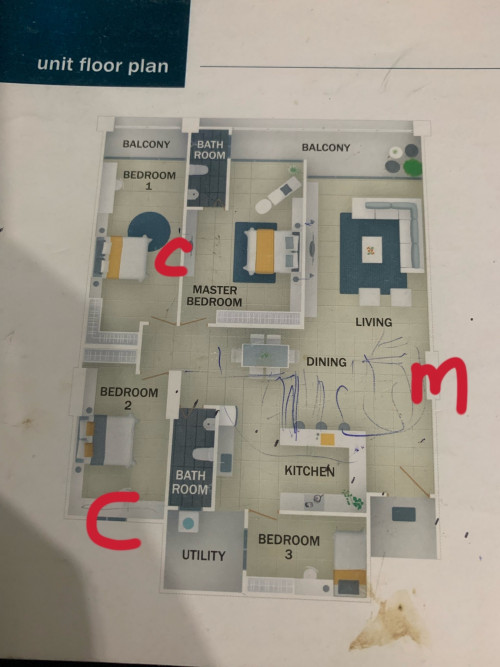 This post has been edited by emin: Mar 7 2022, 12:26 PM This post has been edited by emin: Mar 7 2022, 12:26 PM |
|
|
|
|
|
pyan14
|
Mar 7 2022, 12:26 PM
|
New Member
|
QUOTE(emin @ Mar 7 2022, 12:23 PM) Hi Sifus, May need your advice. My condo unit is 1650sq ft and planning to install the modem at the ‘M’ area. Do you think this is sufficient to let bedroom 1 & 2 to connect the wifi? I am applying for time 100mbps, upgrade it to wifi 6 modem. Or shall i order for the mesh unit as well? If yes, where should the mesh unit need to be install? Thank you. 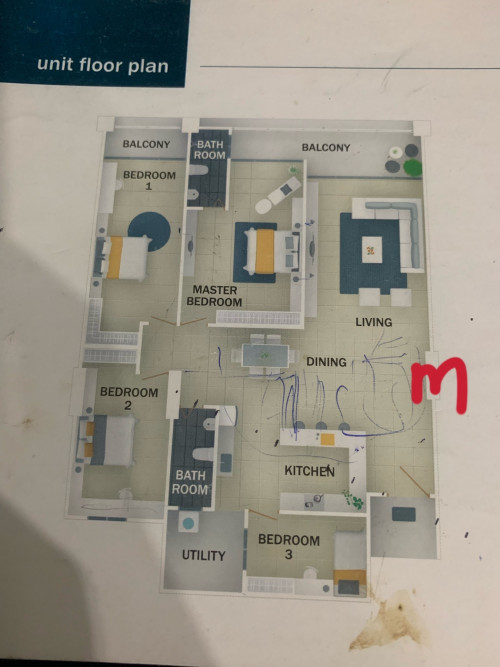 go for mesh... bedroom 1 and bedroom 2 or 3 This post has been edited by pyan14: Mar 7 2022, 12:27 PM |
|
|
|
|
|
kaixian1990
|
Mar 7 2022, 04:31 PM
|
New Member
|
Hi Sifus, Time has given the HG8145X6, if I buy the huawei AX3 pro myself. Can it be compatible into a mesh? Still need another apmode, one more ssid?
Thanks ya
|
|
|
|
|
|
jjj2
|
Mar 7 2022, 11:06 PM
|
|
|
QUOTE(linearz @ Mar 7 2022, 01:12 AM) When I was using Huawei HG8145V5 in AIO mode, I got static IPv6 address and static /64 prefix(2001:f40:909:xxx/64). IPv4 always dynamic. After changing it to bridge mode, my 3rd party router no longer able to get static IPv6. Why is that? Is there a way to get static IPv6? Yes, please show us your IPv6 settings. |
|
|
|
|
|
jjj2
|
Mar 7 2022, 11:34 PM
|
|
|
QUOTE(emin @ Mar 7 2022, 12:23 PM) Hi Sifus, May need your advice. My condo unit is 1650sq ft and planning to install the modem at the ‘M’ area. Do you think this is sufficient to let bedroom 1 & 2 to connect the wifi? The computer will be placed at the ‘C’ area. I am applying for time 100mbps, upgrade it to wifi 6 modem. Or shall i order for the mesh unit as well? If yes, where should the mesh unit need to be install? Thank you. 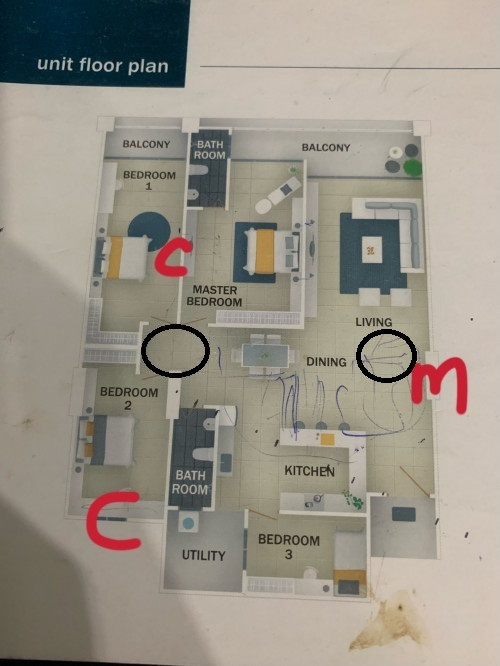 HG8145X6 as Mesh Node 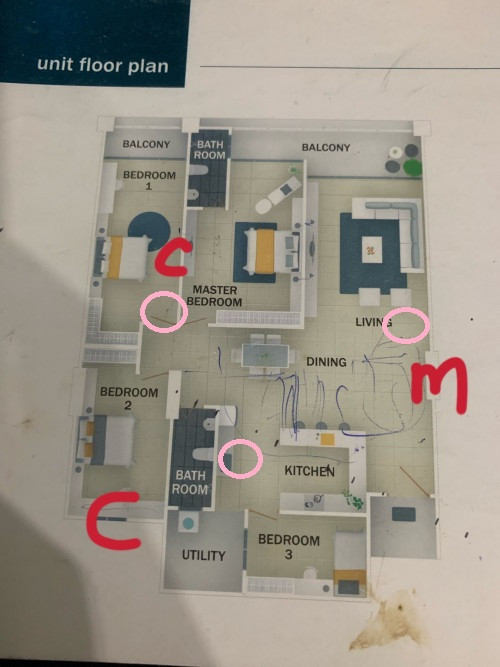 Your Own Mesh Unit |
|
|
|
|
|
jjj2
|
Mar 7 2022, 11:52 PM
|
|
|
QUOTE(kaixian1990 @ Mar 7 2022, 04:31 PM) Hi Sifus, Time has given the HG8145X6, if I buy the huawei AX3 pro myself. Can it be compatible into a mesh? Still need another apmode, one more ssid? It can work in Wireless Bridging with 1 SSID.Thanks ya |
|
|
|
|
|
emin
|
Mar 7 2022, 11:53 PM
|
New Member
|
QUOTE(pyan14 @ Mar 7 2022, 12:26 PM) go for mesh... bedroom 1 and bedroom 2 or 3 Let me explore that, thanks alot! |
|
|
|
|
|
emin
|
Mar 7 2022, 11:54 PM
|
New Member
|
QUOTE(jjj2 @ Mar 7 2022, 11:34 PM) HG8145X6 as Mesh Node Your Own Mesh Unit I did not ordering any mesh unit from Time, would you recommend me to grab from Time or shopee/lazada? |
|
|
|
|
|
Bullorbear
|
Mar 8 2022, 02:05 AM
|
Getting Started
|
Hi sifu,
I have recently subsribed to Time 500 mbps, and they gave me a wifi 5 router (2 in 1). My house is 1500sqft, but I am experiencing poor connection in my room with this router.
Any idea what should I do? Buy a new router? Adding mesh? I have spoken to Ookas if i should buy new router, But they say Time is not supported at the moment.
|
|
|
|
|
|
kaixian1990
|
Mar 9 2022, 10:34 AM
|
New Member
|
QUOTE(jjj2 @ Mar 7 2022, 11:52 PM) Thanks Sifu, If ax3 pro and hg8415x6, which one do you recommend? The main thing is that i don't need always cahnge the wifi. cause my parents is not familiar with it. while in the room. they don't change wifi. "M" is my time moden, i got 1 extra Cat6 cable at "X" 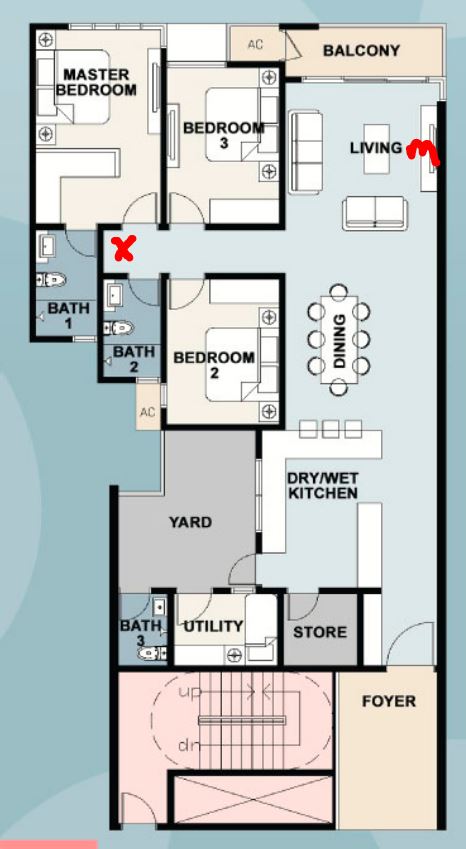 |
|
|
|
|
|
akecema
|
Mar 9 2022, 01:06 PM
|
|
|
my network suddenly drop to 500mbps~600mbps
what should i do
already call CS, they make firmware update n bla bla bla
still same speed.
btw i subscribe 1gbps
|
|
|
|
|
|
jjj2
|
Mar 9 2022, 01:27 PM
|
|
|
QUOTE(kaixian1990 @ Mar 9 2022, 10:34 AM) Thanks Sifu, If ax3 pro and hg8415x6, which one do you recommend? The main thing is that i don't need always cahnge the wifi. cause my parents is not familiar with it. while in the room. they don't change wifi. "M" is my time moden, i got 1 extra Cat6 cable at "X" Hi, go for AX3 Pro (Quad Core) with Ethernet as backhaul. Thanks. |
|
|
|
|
|
jjj2
|
Mar 9 2022, 01:33 PM
|
|
|
QUOTE(akecema @ Mar 9 2022, 01:06 PM) my network suddenly drop to 500mbps~600mbps what should i do already call CS, they make firmware update n bla bla bla still same speed. btw i subscribe 1gbps Hi, the speed test results performed especially for high speed like 1Gbps is a bit tricky. Make sure your computer have ample resources & no heavy backend services running when you perform the test, also try it on few different computers & SpeedTest servers as well. You can use SpeedTest Desktop Apps to test... Another thing to check is your fibre reading before ONU/ONT & what is detected by the ONU/ONT. Thanks. |
|
|
|
|
|
akecema
|
Mar 9 2022, 01:42 PM
|
|
|
QUOTE(jjj2 @ Mar 9 2022, 01:33 PM) Hi, the speed test results performed especially for high speed like 1Gbps is a bit tricky. Make sure your computer have ample resources & no heavy backend services running when you perform the test, also try it on few different computers & SpeedTest servers as well. You can use SpeedTest Desktop Apps to test... Another thing to check is your fibre reading before ONU/ONT & what is detected by the ONU/ONT. Thanks. I test using phone and desktop Also no other connection except my laptop and phone ONU/ONT check inside router? |
|
|
|
|
|
stasio
|
Mar 9 2022, 08:29 PM
|
|
|
Hi guys,
any info that maybe TIME slow down IPTV links, last 3-4 days ?
|
|
|
|
|
|
jjj2
|
Mar 9 2022, 11:49 PM
|
|
|
QUOTE(akecema @ Mar 9 2022, 01:42 PM) I test using phone and desktop Also no other connection except my laptop and phone ONU/ONT check inside router? Please lodge a report & TIME tech will be attending to your case. |
|
|
|
|
|
akecema
|
Mar 10 2022, 09:59 AM
|
|
|
i check using my other router (xiaomi)
router can detect internet speed (maybe open for router) is 1Gbps
|
|
|
|
|
|
Iylia
|
Mar 11 2022, 01:28 AM
|
Getting Started
|
Would anyone be able to advise why my HG8145X6 settings keeps reverting after a few days? I want to turn off band steering and set my WiFi channels manually. But the router settings doesn't seem to stick and it keeps returning to defaults. This causes 2 x SSID in the 5GHz Band 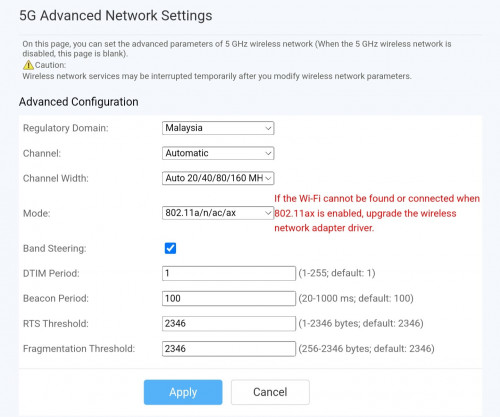 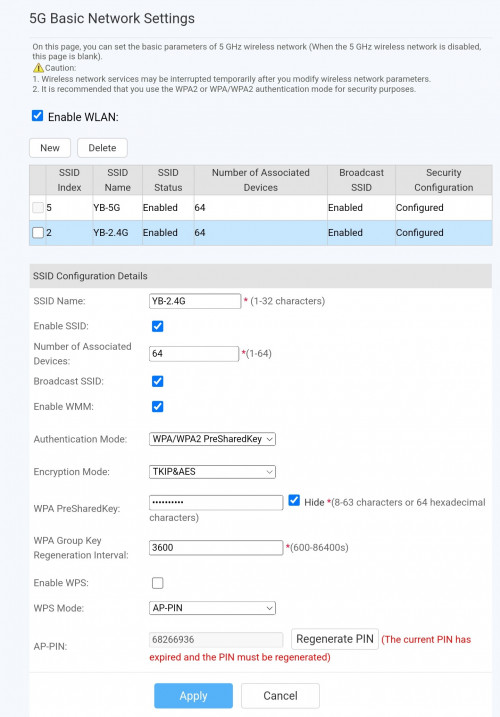 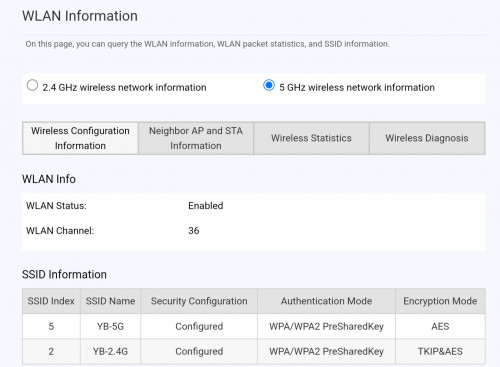 |
|
|
|
|



 Quote
Quote





 0.0308sec
 0.53
0.53
 6 queries
 GZIP Disabled