Welcome Guest ( Log In | Register )

670 Pages « < 429 430 431 432 433 > » Bottom

Outline · [ Standard ] · Linear+

TIME [OFFICIAL] TIME Fibre Broadband™ v4, Experience the ONE TRUE 2Gbps

views
     
jjj2
post Feb 23 2022, 03:02 PM

Look at all my stars!!
*******
Senior Member
3,608 posts

Joined: Feb 2006
QUOTE(guess0410 @ Feb 23 2022, 12:05 PM)
Hi guys..i got a call. to upgrade my current tplink archer c1200 to huawei wa8021v5 router.

i try to serarch the wifi speed of huawei router but cant get any info.
Is it worth to change it?

Mostly using wifi only (100Mbps plan).

The promoter told me that current warranty for TP link router is ended.

With the renewal of 2 year contract, will get a huawei wa8021v5 router.

thank for the input.
*
Hi, if you read through past messages, you will see some users & we did highlighted for some houses, Archer C1200 actually outperforms WA8021V5 in terms of wifi signal penetration & speed.

Thanks.
jjj2
post Feb 23 2022, 03:04 PM

Look at all my stars!!
*******
Senior Member
3,608 posts

Joined: Feb 2006
QUOTE(noobfm @ Feb 23 2022, 01:38 PM)
first CS told 1 hr, but not really helping
2nd and 3rd CS told that they are getting 2nd level subject matter expert to help, although already called me to confirm they had changed to bridging mode from their end but nothing is working at the moment  doh.gif
*
If it has been switched to bridge mode, then you need to configure your own router with the given PPPOE credentials & connect the Router WAN/Internet port to the LAN1 port of the Huawei ONT.

Thanks.
tzh2001
post Feb 23 2022, 03:24 PM

Heart warming
***
Junior Member
385 posts

Joined: Jan 2008
QUOTE(dannyw @ Feb 23 2022, 10:36 AM)
Any user switching from Unifi 30Mbps to TIME 100Mbps. Just want to know in actual fact is that much different?
*
i'm switching from unifi VDSL 30mbps to TIME 100mbps fiber
the improvement is driving saga to camry tongue.gif
ronnie
post Feb 23 2022, 03:51 PM

Not enough stars
*********
All Stars
21,315 posts

Joined: Jan 2003
From: Kuala Lumpur


QUOTE(tzh2001 @ Feb 23 2022, 03:24 PM)
i'm switching from unifi VDSL 30mbps to TIME 100mbps fiber
the improvement is driving saga to camry  tongue.gif
*
suppose to 3.33x faster.... no surprises also. Driving a kancil 660cc upgrade to 2000cc car...
trix
post Feb 23 2022, 04:11 PM

Enthusiast
*****
Senior Member
848 posts

Joined: Feb 2005
From: everywhere, yet nowhere.


QUOTE(noobfm @ Feb 22 2022, 04:36 PM)
Hi guys, i've called Time CS for 5 times to request their help in switching to bridging mode but that doesn't seems to be effective at all..

how should i proceed in this case? other than keep on calling them lol
*
don't call, use chat faster
protip: you can skip the automated stuff and straight go to actual person by typing "live chat"

done in ~15m from several of my past experiences.
dannyw
post Feb 23 2022, 04:47 PM

Regular
******
Senior Member
1,286 posts

Joined: Jan 2007
QUOTE(jjj2 @ Feb 23 2022, 02:59 PM)
Hi, usually you put the Router approx. 1.5m above the floor is good enough, anyway if you go for ceiling/wall mounted AP, then you need to mount it higher.
Thanks.
*
Ok, Thanks. Considering putting on top of bookshelf or TV cabinet.

QUOTE(tzh2001 @ Feb 23 2022, 03:24 PM)
i'm switching from unifi VDSL 30mbps to TIME 100mbps fiber
the improvement is driving saga to camry  tongue.gif
*
QUOTE(ronnie @ Feb 23 2022, 03:51 PM)
suppose to 3.33x faster.... no surprises also. Driving a kancil 660cc upgrade to 2000cc car...
*
Thanks for the feedback. So much different? Unifi still can survive? I keep receive the flyer for this both provider at condo.
SUSKaya Butter Toast
post Feb 23 2022, 06:54 PM

Casual
***
Junior Member
325 posts

Joined: Feb 2022

-

This post has been edited by Kaya Butter Toast: Mar 23 2022, 01:08 PM
SUSKaya Butter Toast
post Feb 23 2022, 06:55 PM

Casual
***
Junior Member
325 posts

Joined: Feb 2022

QUOTE(Kaya Butter Toast @ Feb 23 2022, 06:54 PM)
Hi,
I'm planning to get time 500mbps in a couple of weeks.
Any suggestions for maximum wifi performance to reach my office area? whole place is around 900sqf.
I noticed that they stopped offering the free mesh wifi, so any suggestions on the suitable router and position would be great
<a href='https://pictr.com/images/2022/02/23/BAp8xr.md.png' target='_blank'>https://pictr.com/images/2022/02/23/BAp8xr.md.png </a>
*


Attached thumbnail(s)
Attached Image
blacktubi
post Feb 23 2022, 10:00 PM

-
Group Icon
Elite
8,418 posts

Joined: Jul 2008

QUOTE(Kaya Butter Toast @ Feb 23 2022, 06:54 PM)
Hi,
I'm planning to get time 500mbps in a couple of weeks.
Any suggestions for maximum wifi performance to reach my office area? whole place is around 900sqf.
I noticed that they stopped offering the free mesh wifi, so any suggestions on the suitable router and position would be great
<a href='https://pictr.com/images/2022/02/23/BAp8xr.md.png' target='_blank'>https://pictr.com/images/2022/02/23/BAp8xr.md.png </a>
*
That position is the best already. Maybe speed in master bedroom will be weaker but office should be fine.

Forecast around 100Mbps on 5Ghz with the stock router.
SUSKaya Butter Toast
post Feb 24 2022, 10:05 AM

Casual
***
Junior Member
325 posts

Joined: Feb 2022

QUOTE(blacktubi @ Feb 23 2022, 10:00 PM)
That position is the best already. Maybe speed in master bedroom will be weaker but office should be fine.

Forecast around 100Mbps on 5Ghz with the stock router.
*
Should I pre order ASUS RT-AX55 WiFi 6 on shopee? Its only RM309 tonight at 12am.

Or there are better routers out there to enjoy faster speeds?

For master bedroom, probably I can add another ASUS RT-AX55 WiFi 6 in the office and mesh it if the speeds are too slow.
Iylia
post Feb 24 2022, 09:04 PM

Getting Started
**
Junior Member
263 posts

Joined: Oct 2004
From: Kuala Lumpur


Hi all,

Was hoping to get some advice / thoughts on my proposed mesh configuration in my house (3800 sqft)
I am currently using TIME 500mbps plan where my contact is eligible for re-contracting with free devices.
Once I, recontract they will provide me with one Wifi 6 node (Huawei HG8145X6) and one Wifi 5 node (Huawei WA8021V5).

My plan:
1. Main router (Wifi 6 Node) located at Family area
2. I already have Cat 5e cable run from main router location to Bedroom 2 and Guestroom
3. Will purchase additional 2 x Wifi 6 Node (RM 719) to be used at bedroom 2 and guestroom via ethernet backhaul
4. Wifi 5 node to be used at entrance terrace via wireless backhaul

user posted image

Would this be an ideal plan or instead of purchasing two additional wifi 6 nodes from TIME, to go for another brand / solution?
The TP-Link Deco X60 3-pack is RM 1.5k, but I was thinking by spending half of that would I achieve the same result?

Thanks for your thoughts
Sam Leong
post Feb 24 2022, 10:47 PM

On my way
****
Junior Member
679 posts

Joined: Mar 2016


Anyone experiencing ping spike on TIME network since 9.30PM?
My area under Damansara Damai and i noticed a ping spike to all network since 9.30PM
Is TIME having problem now?


Attached thumbnail(s)
Attached Image
jjj2
post Feb 25 2022, 12:15 AM

Look at all my stars!!
*******
Senior Member
3,608 posts

Joined: Feb 2006
QUOTE(Kaya Butter Toast @ Feb 23 2022, 06:54 PM)
Hi,
I'm planning to get time 500mbps in a couple of weeks.
Any suggestions for maximum wifi performance to reach my office area? whole place is around 900sqf.
I noticed that they stopped offering the free mesh wifi, so any suggestions on the suitable router and position would be great
<a href='https://pictr.com/images/2022/02/23/BAp8xr.md.png' target='_blank'>https://pictr.com/images/2022/02/23/BAp8xr.md.png </a>
*
Hi, budgetary options like Huawei AX3 Pro, TP-Link AX73 or even the stock router HG8145X6 may do the trick.
Thanks.
engonaplane
post Feb 25 2022, 10:27 AM

New Member
*
Junior Member
43 posts

Joined: Mar 2020
jjj2 pm me if you have staff or a contact that services Mont Kiara - might need an audit and rectification. The installer I used managed to turn a CAT6 into CAT5 speeds and is now shirking responsibility
fragma757
post Feb 25 2022, 05:46 PM

New Member
*
Junior Member
18 posts

Joined: Apr 2008
From: Tortimer's Island
QUOTE(jjj2 @ Feb 23 2022, 03:04 PM)
If it has been switched to bridge mode, then you need to configure your own router with the given PPPOE credentials & connect the Router WAN/Internet port to the LAN1 port of the Huawei ONT.

Thanks.
*
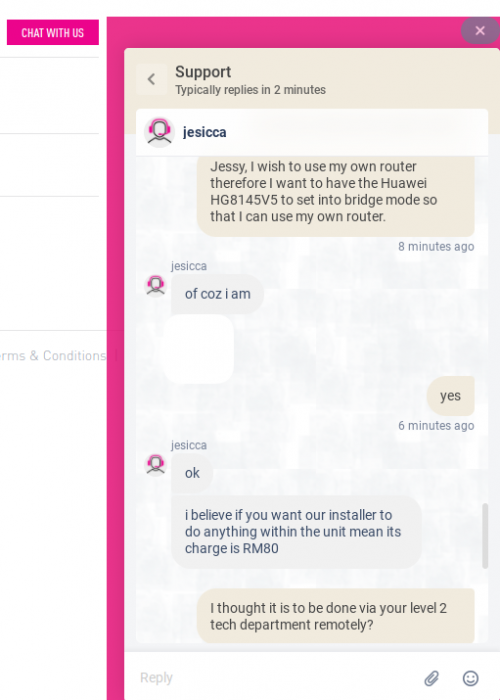
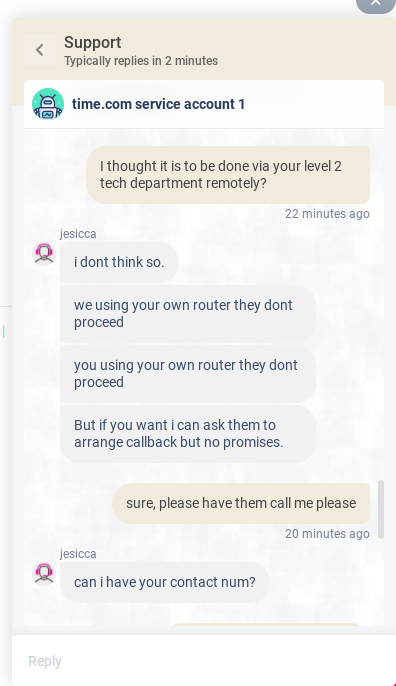
@jjj2 just wanna check, changing to bridge mode is done by level 2 tech remotely isn't it? And it should be no charges right? I wonder why the time broadband chat agent said there is an RM80 charge and cannot be done remotely and installer need to come physically?

user posted image
user posted image

This post has been edited by fragma757: Feb 25 2022, 05:53 PM
alpha team
post Feb 25 2022, 06:03 PM

Regular
******
Senior Member
1,058 posts

Joined: Oct 2013
QUOTE(jjj2 @ Feb 23 2022, 03:02 PM)
Hi, if you read through past messages, you will see some users & we did highlighted for some houses, Archer C1200 actually outperforms WA8021V5 in terms of wifi signal penetration & speed.

Thanks.
*
Hi jjj2, can u explain what kid of house showed AC1350/1200 better than WA8015v5 ? thanks. bcz i received the same call from customer services asked me to renew the contract for anothre 2yrs and in re turn the give me the Huawei WA8021V5 FOC.

jjj2
post Feb 26 2022, 12:18 AM

Look at all my stars!!
*******
Senior Member
3,608 posts

Joined: Feb 2006
QUOTE(fragma757 @ Feb 25 2022, 05:46 PM)
@jjj2 just wanna check, changing to bridge mode is done by level 2 tech remotely isn't it? And it should be no charges right? I wonder why the time broadband chat agent said there is an RM80 charge and cannot be done remotely and installer need to come physically?

user posted image
user posted image
*
Hi, are you chatting with bots ? Please ring CS @ 1800 18 1818.
Yes can be done remotely by pushing over the settings to your ONT.

Thanks.

jjj2
post Feb 26 2022, 12:22 AM

Look at all my stars!!
*******
Senior Member
3,608 posts

Joined: Feb 2006
QUOTE(alpha team @ Feb 25 2022, 06:03 PM)
Hi jjj2, can u explain what kid of house showed AC1350/1200 better than WA8015v5 ? thanks. bcz i received the same call from customer services asked me to renew the contract for anothre 2yrs and in re turn the give me the Huawei WA8021V5 FOC.
*
We tested it in condos approx. 900--1200 sq ft. with 3 bedrooms about 8-10m away, Archer C1200 outperforms the WA8021V5 significantly. You won't see much difference if your unit is open studio type...it gets more obvious where you have corners even though it's not far away from the router.
jjj2
post Feb 26 2022, 12:27 AM

Look at all my stars!!
*******
Senior Member
3,608 posts

Joined: Feb 2006
QUOTE(engonaplane @ Feb 25 2022, 10:27 AM)
jjj2 pm me if you have staff or a contact that services Mont Kiara - might need an audit and rectification. The installer I used managed to turn a CAT6 into CAT5 speeds and is now shirking responsibility
*
Hi, can let me know what is the issue in more details ?
Thanks.
slack3r
post Feb 27 2022, 01:32 AM

Getting Started
**
Junior Member
177 posts

Joined: May 2012


Hi. last year got new time connection and I was provided the new HG8145V5 but some settings specially the dns cannot change. Since I work from home and sometimes got vpn/intranet issues, our IT ask me to test different dns settings they provide to troubleshoot the issue. I want the settings to be on the modem/router since I use 2 machines (1 desktop and 1 laptop) for work so I rather not change dns settings manually in windows and have them removed again when I work from another location or from the office.

I have a friend who has HG8240H that he is not using anymore (also previously used with TIME)

Questions
1. Can I borrow his onu and use it with my connection?
2. Do I need to call time to setup anything?
3. Can I set it up myself without calling time?
4. Should I just call time and setup my HG8145V5 to bridge mode and I control my network using my own router?
5. If option #4 do I need special router or normal one with option for pppoe settings will work?

Basically I want to use his modem/onu/ont and have my own separate router to handle things on my own I just need the connection to time's server. Basically my time connection I don't use the phone.. I just basically use it for internet

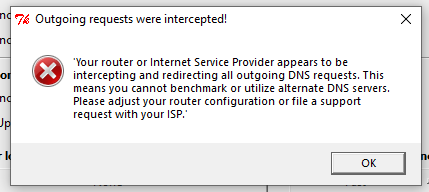
Another reason for changing modem and want my own router to setup my network is because they are hijacking the dns

user posted image

Any information will be appreciated.


This post has been edited by slack3r: Feb 27 2022, 04:03 AM

670 Pages « < 429 430 431 432 433 > » Top
 

Change to:
| Lo-Fi Version
0.0266sec    0.66    6 queries    GZIP Disabled
Time is now: 15th December 2025 - 08:16 PM