

if i go with Time - does the standard installation cover the fiber wall socket or do i need to top up / find an external contractor to fix it prior to installation?
TIME [OFFICIAL] TIME Fibre Broadband™ v4, Experience the ONE TRUE 2Gbps
|
|
 Jan 2 2022, 09:33 PM Jan 2 2022, 09:33 PM
Return to original view | Post
#1
|
 
Junior Member
43 posts Joined: Mar 2020 
|
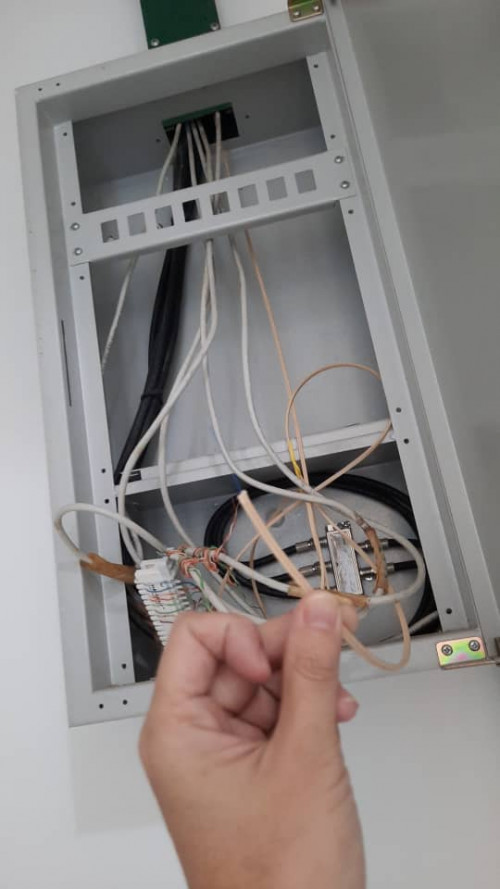
hi all. Just got a subsale condo and plan to install Time. However I suspect the previous owner cut the fiber - cannot find the fiber wall socket anywhere in the house and found a fibre dangling from the ceiling next to the MDB.
if i go with Time - does the standard installation cover the fiber wall socket or do i need to top up / find an external contractor to fix it prior to installation? |
|
|
|
|
|
Jan 2 2022, 10:16 PM
Return to original view | Post
#2
|
|
Junior Member
43 posts Joined: Mar 2020
|
QUOTE(ryansxs @ Jan 2 2022, 09:36 PM) how do you know that fiber is coming from your home? inside the house. next to the main distribution box for power - where the MCB and fuses are.(is this box outside?)  This post has been edited by engonaplane: Jan 2 2022, 10:17 PM |
|
|
Jan 3 2022, 01:01 AM
Return to original view | Post
#3
|
|
Junior Member
43 posts Joined: Mar 2020
|
QUOTE(ryansxs @ Jan 2 2022, 11:26 PM) this fiber maybe is the pre-laid fiber for your house. noted - will TIME cover the cost or do i need to top up for installation?they will use this fiber if you apply for TIME for example. |
|
|
Jan 3 2022, 06:35 PM
Return to original view | Post
#4
|
|
Junior Member
43 posts Joined: Mar 2020
|
QUOTE(jjj2 @ Jan 3 2022, 05:41 PM) Hi, Here? - no. This is in the kitchenI assume your condo is prelaid with fibre with the soho box like you shown. Not necessarily need a FWS, just get the SI to terminate the fibre with a fibre connector & plug into the ONU/ONT will do. *P/S : I dont see a power supply there, is there one ? |
|
|
Jan 4 2022, 02:06 PM
Return to original view | Post
#5
|
|
Junior Member
43 posts Joined: Mar 2020
|
QUOTE(jjj2 @ Jan 3 2022, 06:41 PM) This should be the proper place to place your ONU/ONT + a Router, as all the network cables are centralized here, where you can utilize them to add AP at various locations in your unit. Noted. thanks for the pointers. This is a subsale at Tiffani at Mont KiaraAnyway, you will need to tap a power source & prepare several power sockets for the devices. *P/S : Btw, which condo are you in ? |
|
|
Jan 21 2022, 11:54 AM
Return to original view | Post
#6
|
|
Junior Member
43 posts Joined: Mar 2020
|
planning my network layout..
Can the Huawei mesh given as part of a new 500Mbps be used as an AP for my own router? (thinking to change the Huawei ONT to bridge mode). Edit: Also do I wait till the installation date or should I preempt Time about setting the Huawei ONT to bridge mode before installation? This post has been edited by engonaplane: Jan 21 2022, 12:54 PM |
|
|
|
|
|
Feb 13 2022, 10:48 PM
Return to original view | Post
#7
|
|
Junior Member
43 posts Joined: Mar 2020
|
QUOTE(FusionXY @ Feb 5 2022, 07:30 PM) If you want to upgrade to WiFi 6 Router then additional RM99 to WiFi 6 router. Mileage may vary. The installer assigned to me refused to support converting to bridge mode and let me use own router (which I already configured and only pending PPPoE credentials). In the end contacted Time Support after he left - "Fine - I will do it myself".Or you can use own router, tell the technician on the spot to convert. Anyone want to buy the Huawei Wifi5 mesh node from me? Brand new unused except for the installer to "demonstrate OK and sign". This post has been edited by engonaplane: Feb 13 2022, 10:53 PM |
|
|
Feb 25 2022, 10:27 AM
Return to original view | Post
#8
|
|
Junior Member
43 posts Joined: Mar 2020
|
jjj2 pm me if you have staff or a contact that services Mont Kiara - might need an audit and rectification. The installer I used managed to turn a CAT6 into CAT5 speeds and is now shirking responsibility
|
|
|
Feb 27 2022, 03:04 PM
Return to original view | Post
#9
|
|
Junior Member
43 posts Joined: Mar 2020
|
QUOTE(jjj2 @ Feb 26 2022, 12:27 AM) Hi, can let me know what is the issue in more details ? replied your mesgThanks. |
|
|
Feb 28 2022, 06:14 AM
Return to original view | Post
#10
|
|
Junior Member
43 posts Joined: Mar 2020
|
QUOTE(slack3r @ Feb 28 2022, 04:57 AM) Thanks.. Will still be able to turn the wireless on/off in the ont when it's on bridge mode? yes. the IP address is still valid and can use wifi (or LAN port) with the credentials under the ONT to log in and disable |
|
|
Feb 28 2022, 04:00 PM
Return to original view | Post
#11
|
|
Junior Member
43 posts Joined: Mar 2020
|
QUOTE(slack3r @ Feb 28 2022, 01:14 PM) Thanks to jjj2 & PRSXFENG my ont is now in bridge mode took less than 15mins yup cause it is in bridge mode. Once you connect to that wifi, use 192.168.100.1 to get to the login page. just make sure you disable the wifi you are on last (2g or 5g)Hi I can't seem to access the ONT now but I can still see the wireless networks from the ONT but there are exclamation points indicating there is no internet connection |
|
|
Feb 28 2022, 07:31 PM
Return to original view | IPv6 | Post
#12
|
|
Junior Member
43 posts Joined: Mar 2020
|
QUOTE(eugenelam85 @ Feb 28 2022, 06:26 PM) but currently tenant is staying inside the unit, once i call the cs to change the stock router to bridge mode, would it be changed immediately or within few hours? cause i see previous post stated it may take 2 to 3 days.. any suggestion please? thank you! They will ask u whether u already configured your router with credentials and plugged in before they "flip the switch" eugenelam85 liked this post
|
|
|
Mar 2 2022, 01:01 AM
Return to original view | Post
#13
|
|
Junior Member
43 posts Joined: Mar 2020
|
QUOTE(jasonchan323 @ Mar 1 2022, 11:51 PM) HI Sifus, yea - if u login to the ONT, you will find a checkbox ticked to have the same SSID for 2.4G and 5G. Just untick to set different SSID for each band. that said a 2.4g device will not see the 5G anyway, so there is no harm in using a combined SSIDI am currently using the Huawei mesh offered by TIME. The router combines both 2.4 and 5 Ghz into 1 wifi. Is there any ways that if i could specifically conenct 2.4Ghs? Coz some of the device required 2.4 connection |
| Change to: |  0.0608sec 0.0608sec
 1.11 1.11
 7 queries 7 queries
 GZIP Disabled GZIP Disabled
Time is now: 19th December 2025 - 06:15 AM |
 Quote
Quote